vscode-cc-switch

作者 Golden-Promise已验证

一份图文并茂的保姆级教程:教你通过 VS Code + cc-Switch 优雅地在 Claude Code 中调用第三方大模型 API(如硅基流动),完美支持本地与 Remote - SSH 远程环境,低成本开启你的 Vibe Coding 之旅!🚀

242
Stars
18
Forks
2026/8/23
添加时间

⚠️ 第三方软件声明

本 Skill 为第三方开源软件,独立托管于 GitHub。SkillTip 仅为信息目录,不控制或维护底层仓库。所显示的安全检查为自动化且范围有限,安装前请自行审查源码。

阅读服务条款

安装

添加到你的 Claude Code skills 目录:

# Add to your Claude Code skills
git clone https://github.com/Golden-Promise/vscode-cc-switch

快速入门

使用 vscode-cc-switch 等 Skills 的指南。

安全报告

已验证

上次扫描:—

{
  "status": "PASSED",
  "issues": []
}

README.md

🚀 VS Code + cc-Switch 使用教程

本教程旨在帮助开发者通过 VS Code 结合 cc-Switch 工具,快速实现 Claude Code 对第三方模型(API)的无缝调用与灵活配置。


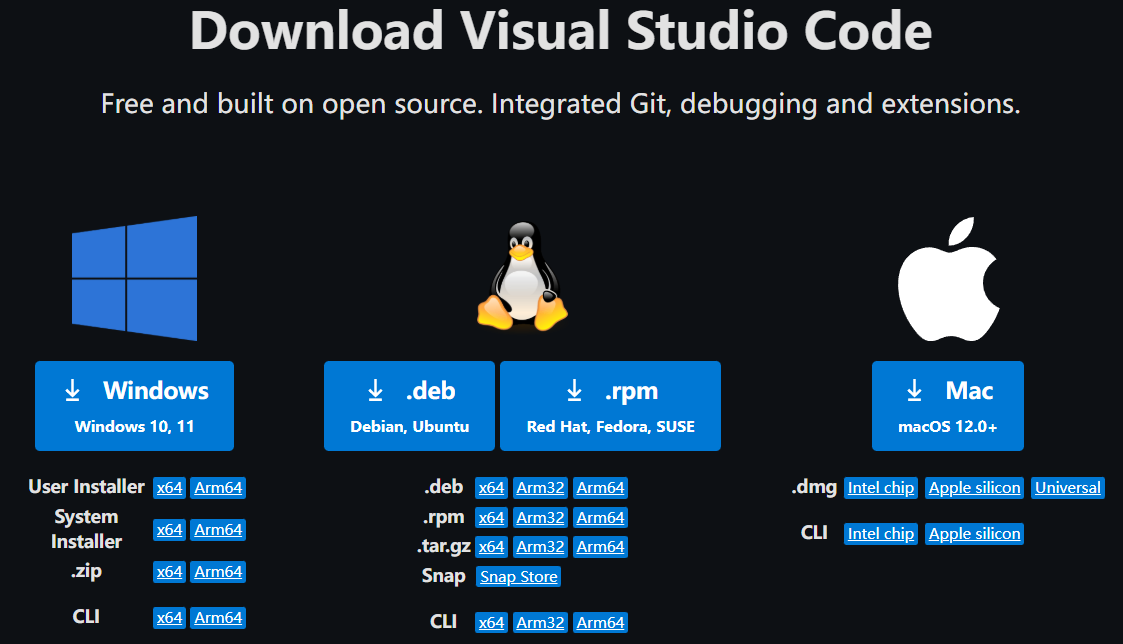
💻 一、安装 VS Code(若已安装,可跳过此步骤)

Claude code使用教程1

🔌 二、安装 cc-Switch

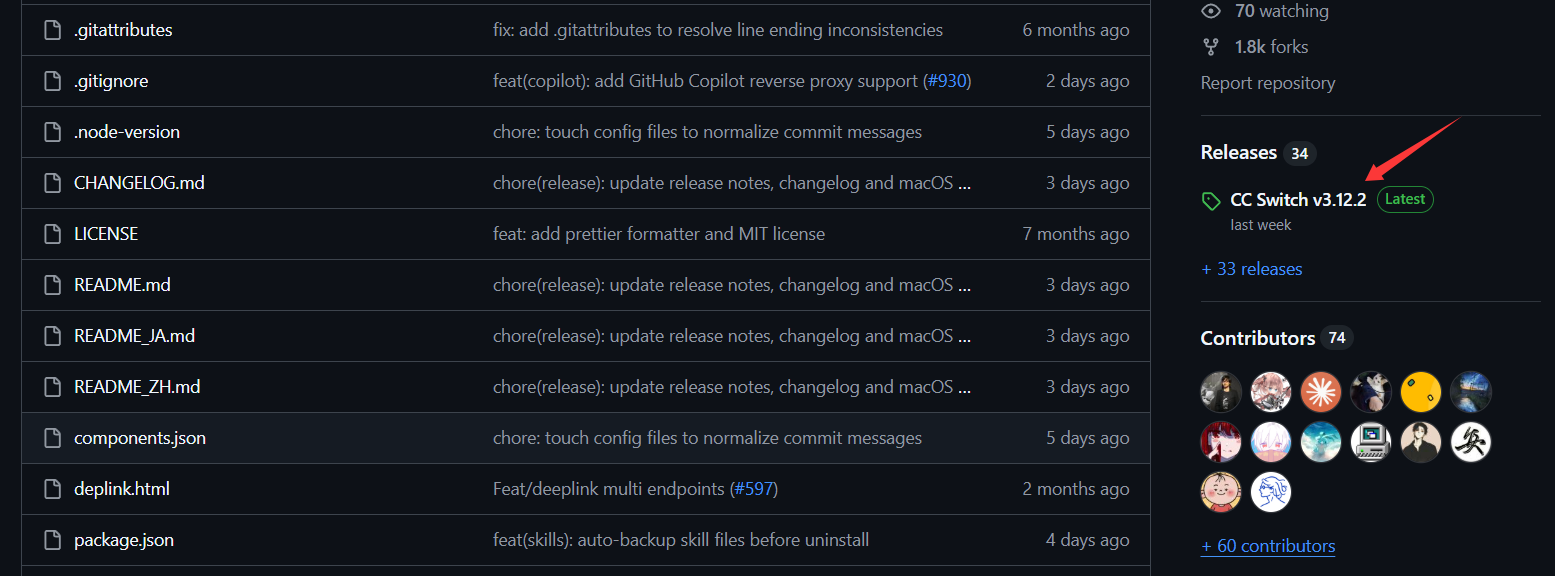
1. 访问 GitHub 开源仓库https://github.com/farion1231/cc-switch

2. 下载最新的发行版本(Release)

  • 进入仓库后,点击右侧的 Releases 区域,或直接访问链接:Releases 页面
Claude code使用教程2
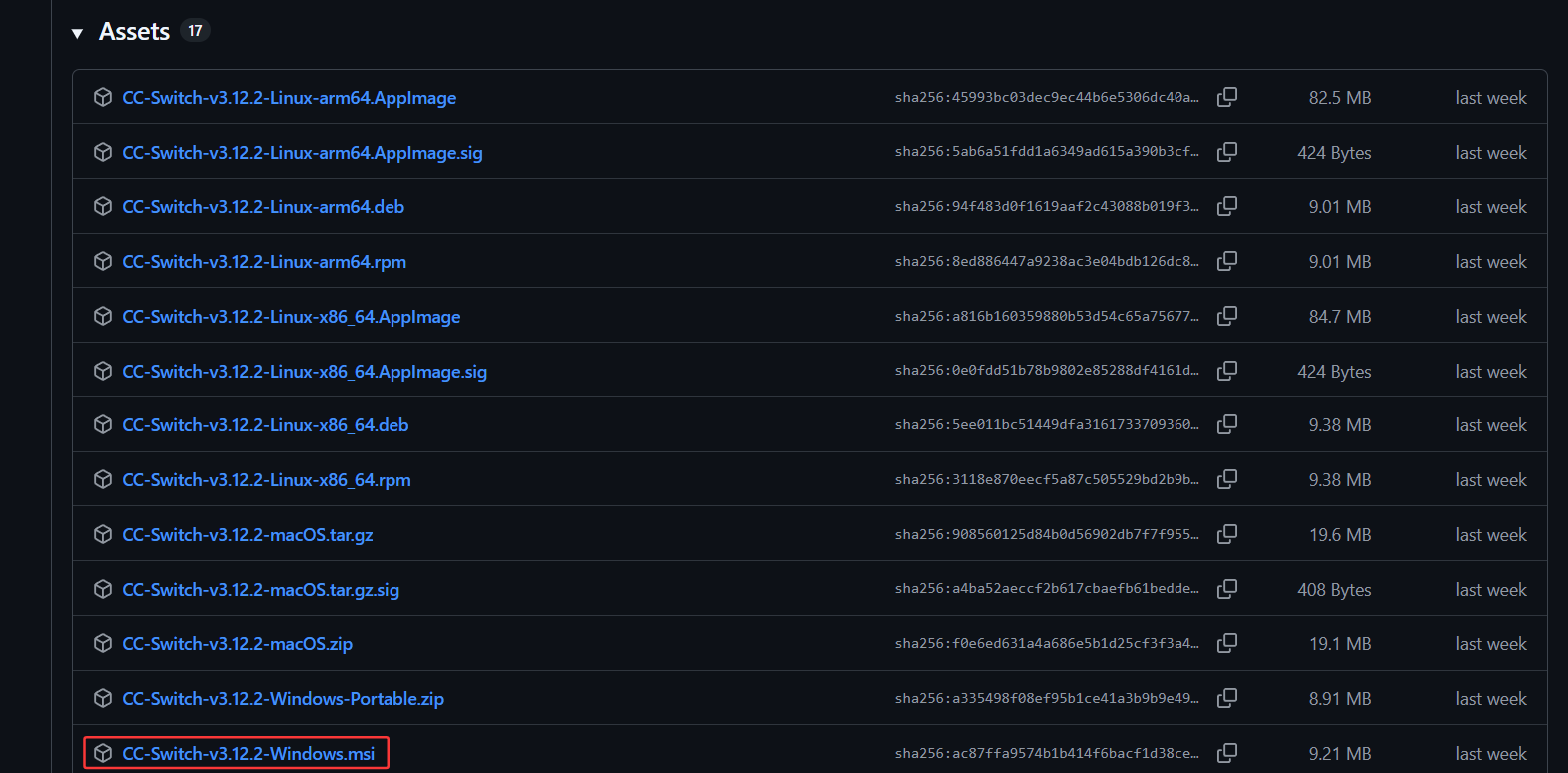
  • 在最新版本的 Assets 列表中,选择对应的系统版本进行下载:
Claude code使用教程3

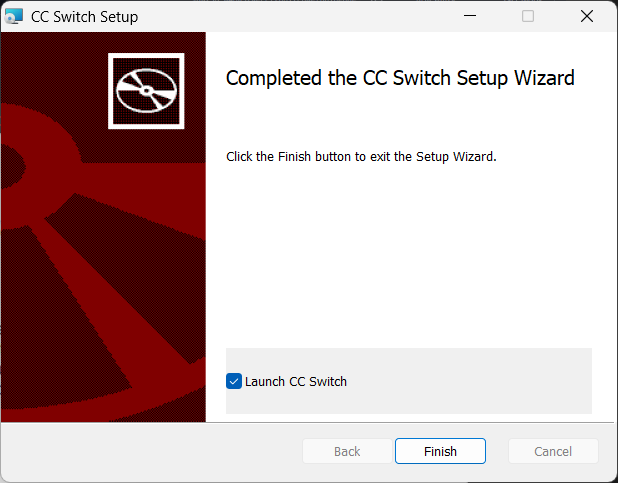
3. 执行安装: 打开刚才下载的 .msi 安装包(Installer 程序包),按照向导提示完成安装即可:
Claude code使用教程

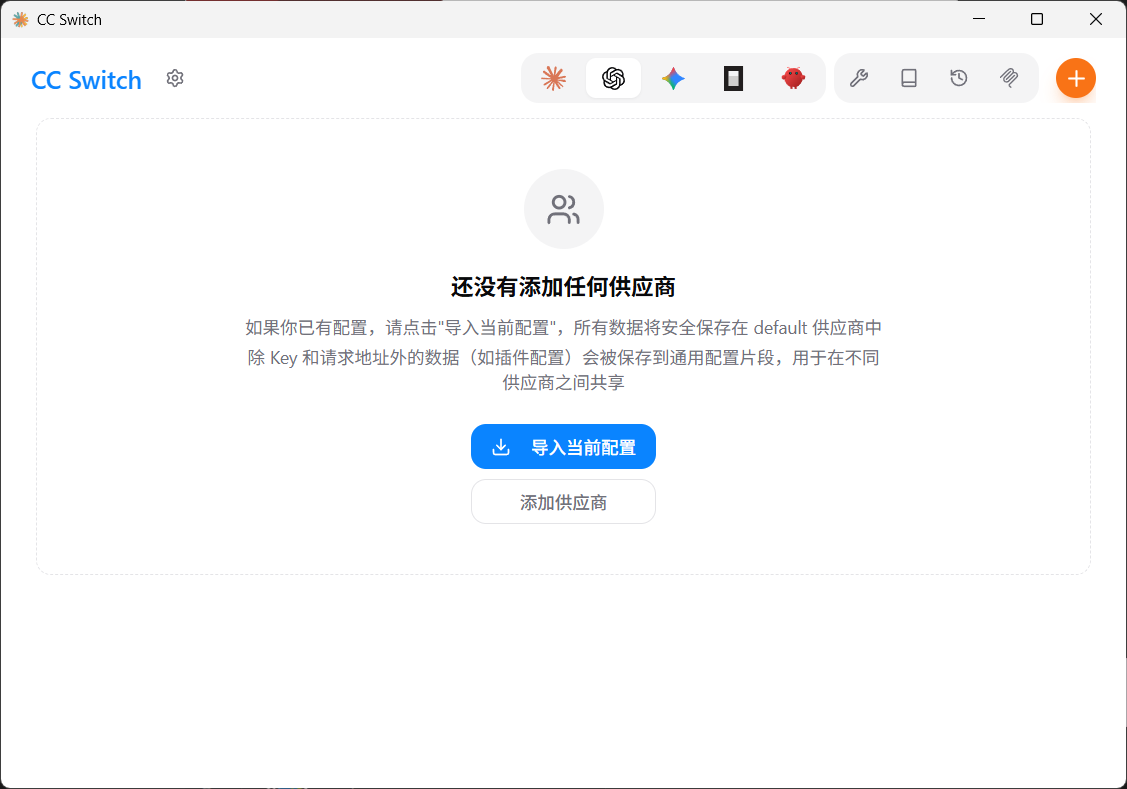
4. 启动程序: 安装完成后,打开 cc-Switch 客户端,准备后续配置:
Claude code使用教程7

🧩 三、在 VS Code 中安装 Claude Code 扩展

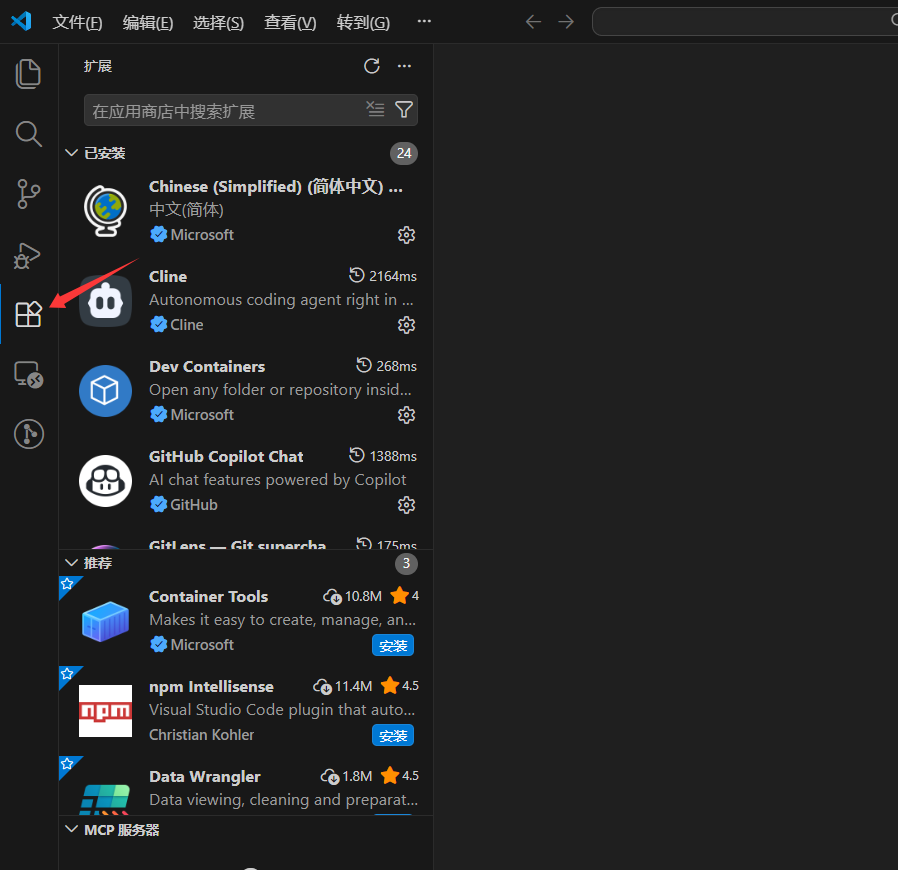
1. 打开扩展商店:在 VS Code 左侧活动栏中点击“扩展”图标(或使用快捷键 Ctrl+Shift+X)。
Claude code使用教程5

2. 搜索并安装扩展:在搜索框中输入 Claude Code 并点击安装。
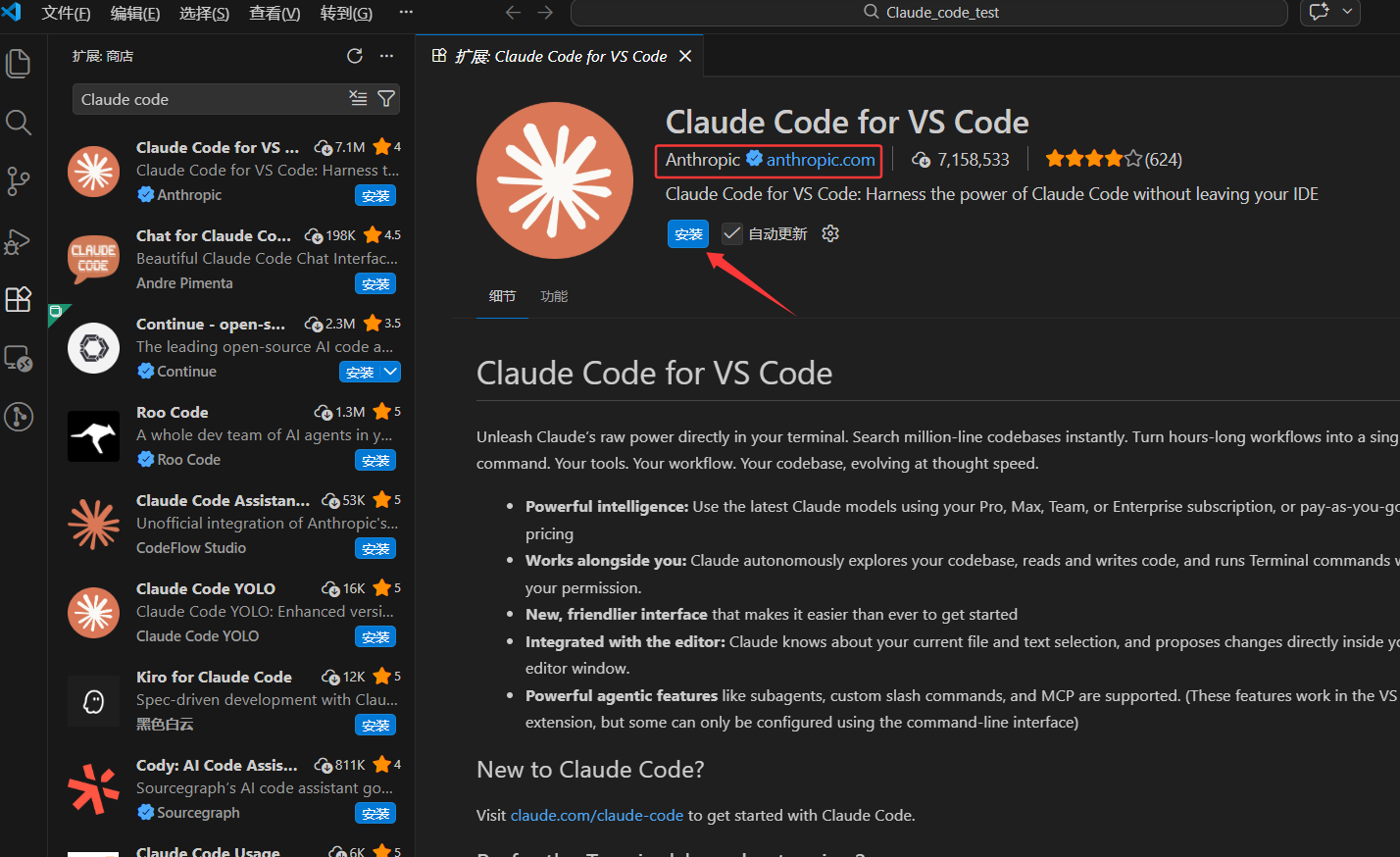
Claude code使用教程6

3. 验证安装:扩展安装完成后,点击 VS Code 右侧边栏的 Claude Code 图标。若出现红框所示的侧边栏界面,即说明安装成功:
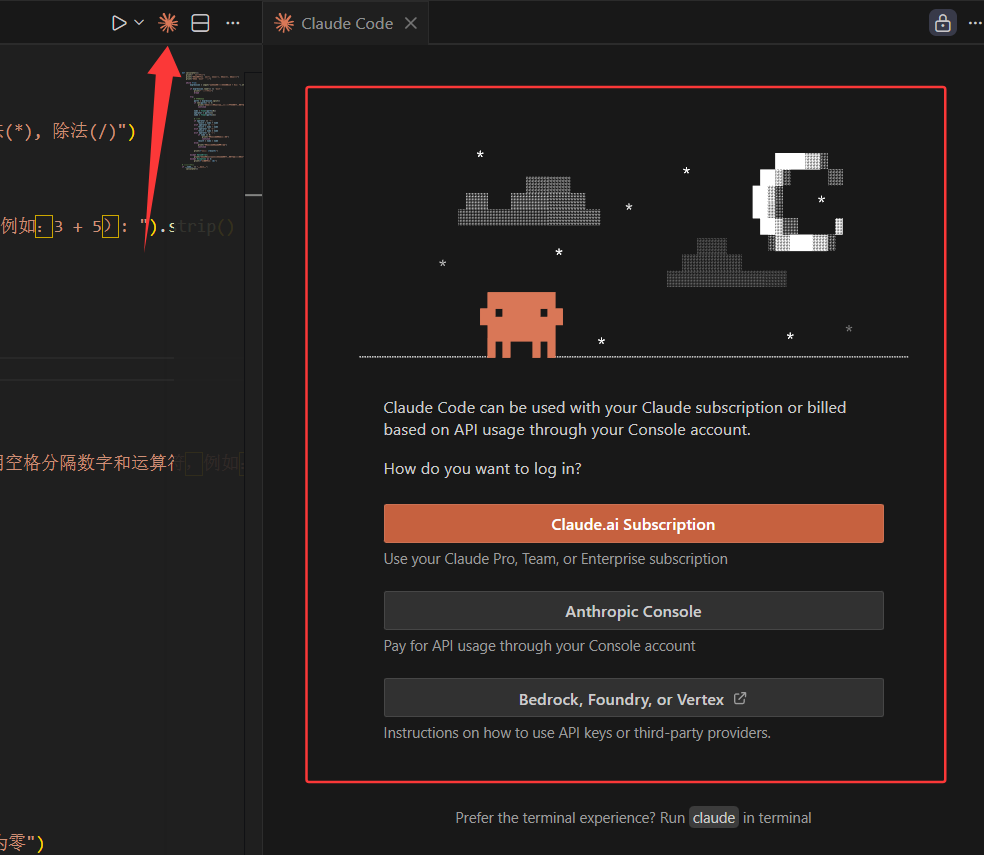
Claude code使用教程8

⚙️ 四、通过 cc-Switch 调用第三方模型

💡 (1)原理解析

  • 为何使用 cc-Switch
    • 免去手动编辑复杂 settings.json 配置文件的繁琐。
    • 支持预存多套 API 方案,实现一键无缝切换。
    • 轻松接入各路中转站,完美适配各类第三方 API 聚合服务。
  • 核心机制
    • cc-Switch 在底层动态覆盖了 ANTHROPIC_BASE_URLANTHROPIC_API_KEY 这两个关键环境变量。它将 Claude Code 原本发往官方的请求,“拦截”并重定向至您配置的第三方接口,从而在底层实现模型的无缝替换。

🔑 (2)前置准备

① 获取调用凭证: 在开始配置前,需要从第三方平台获取以下信息(本文以硅基流动 (SiliconFlow) 为例,其他支持的模型或中转平台配置逻辑完全一致):

  • API Key(密钥)
  • Base URL(接口地址)
  • 模型名称

② 创建 API 密钥: 登录 硅基流动官网,在控制台生成您的 API 密钥:
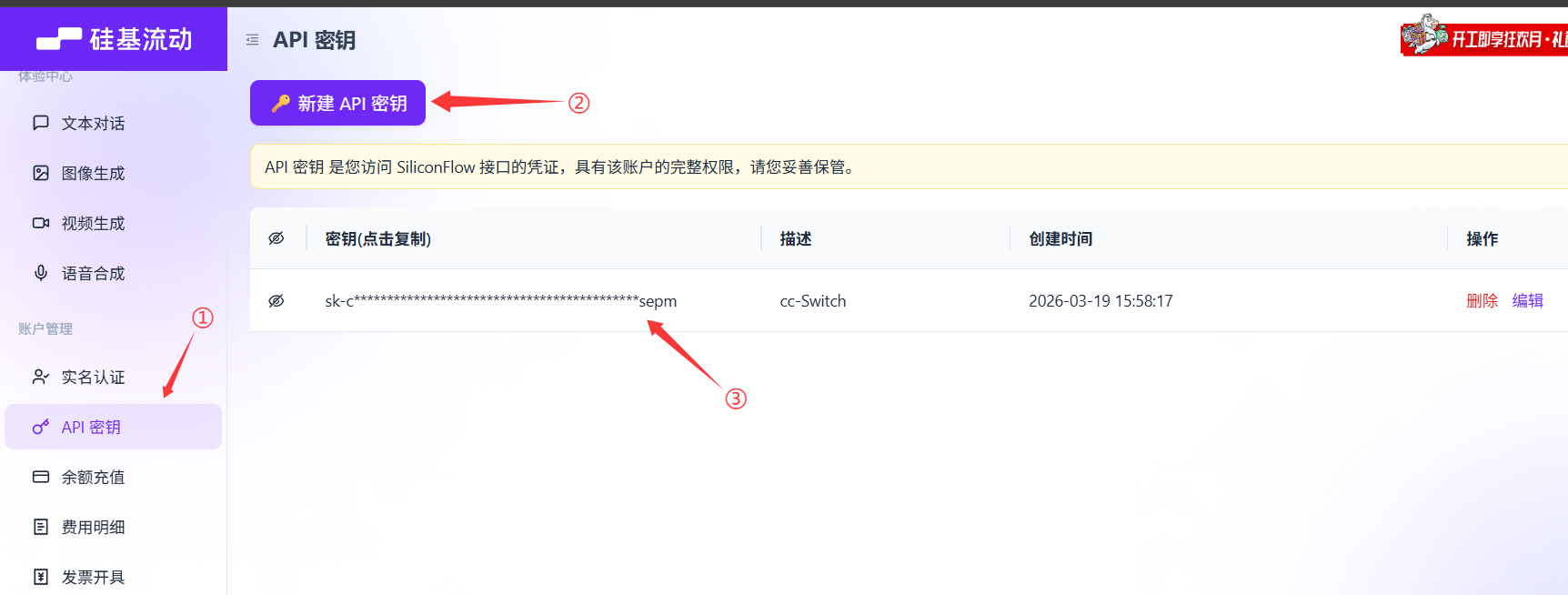
Claude code使用教程9

③ 获取模型名称: 进入模型广场,选择您需要的模型,点击模型名称即可复制:
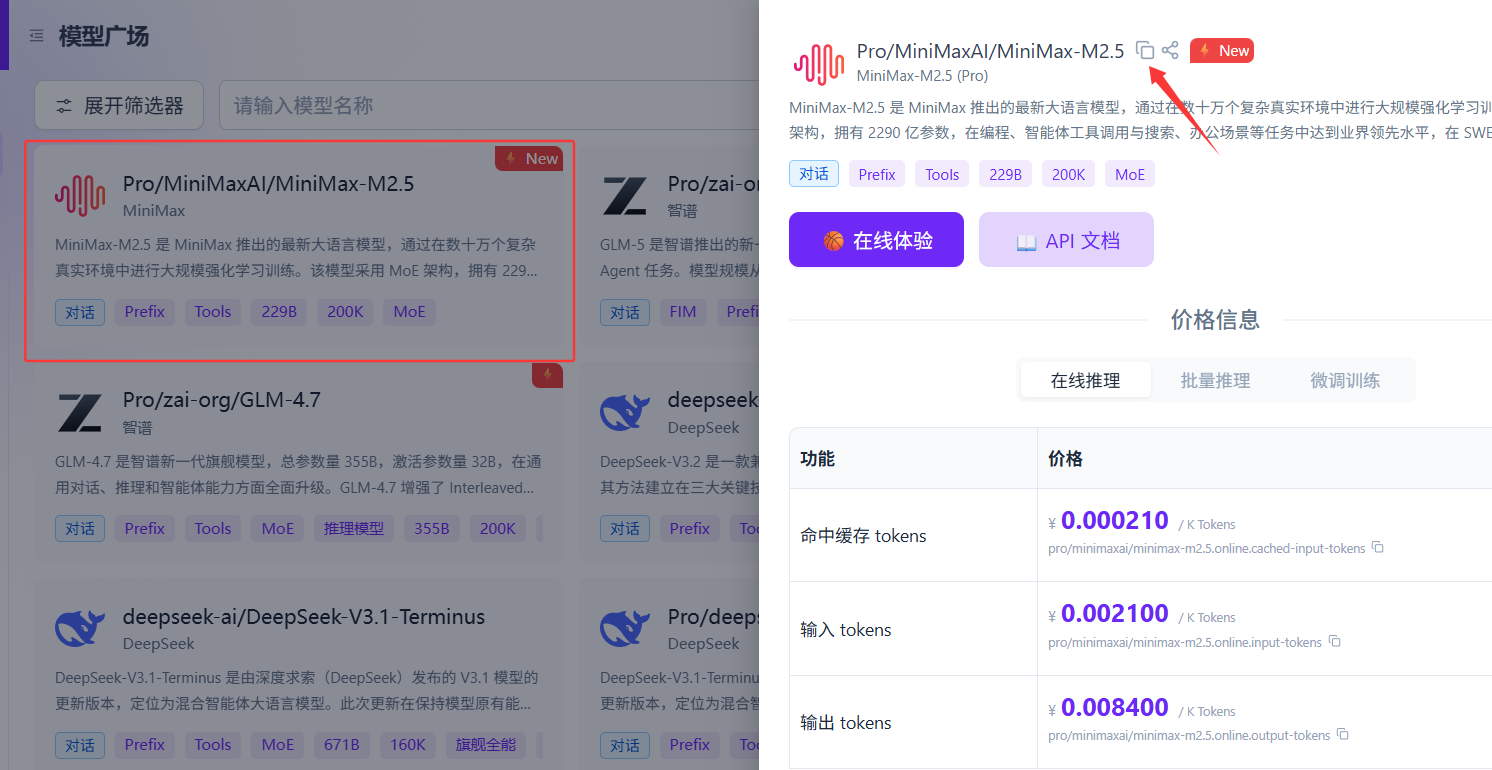
Claude code使用教程10

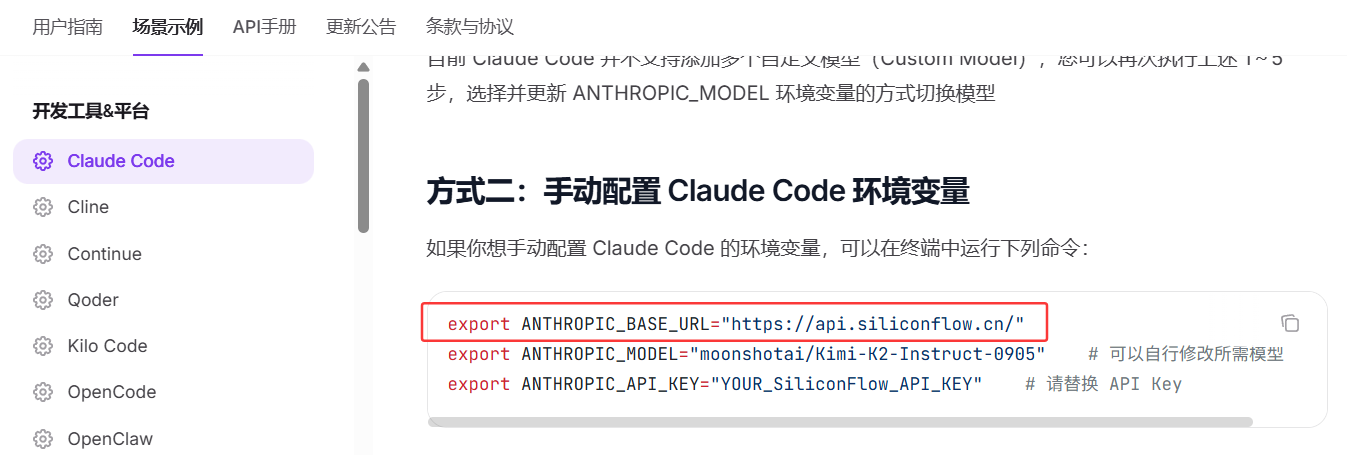
④ 确认 Base URL: 查阅官方 API 接口文档获取 Base URL。硅基流动的地址通常为 https://api.siliconflow.cn/(其他中转平台请参考其官方说明):
Claude code使用教程11

🏠 (3)本地环境配置指南

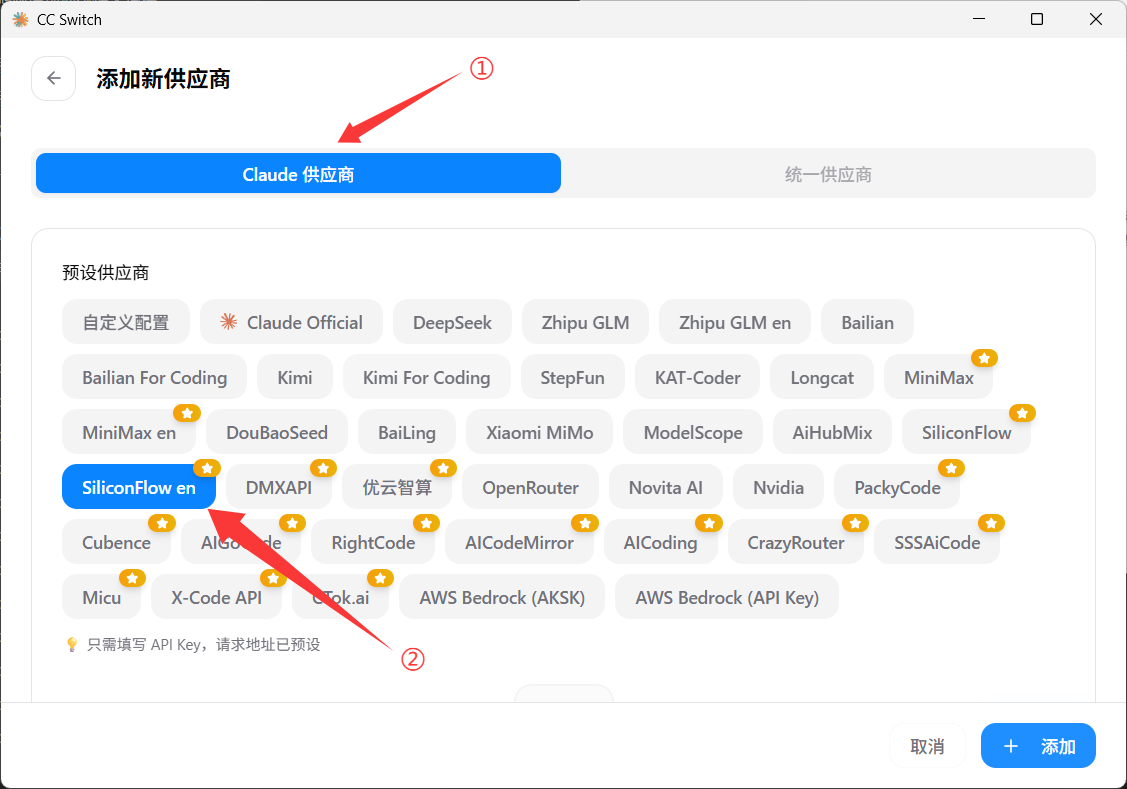
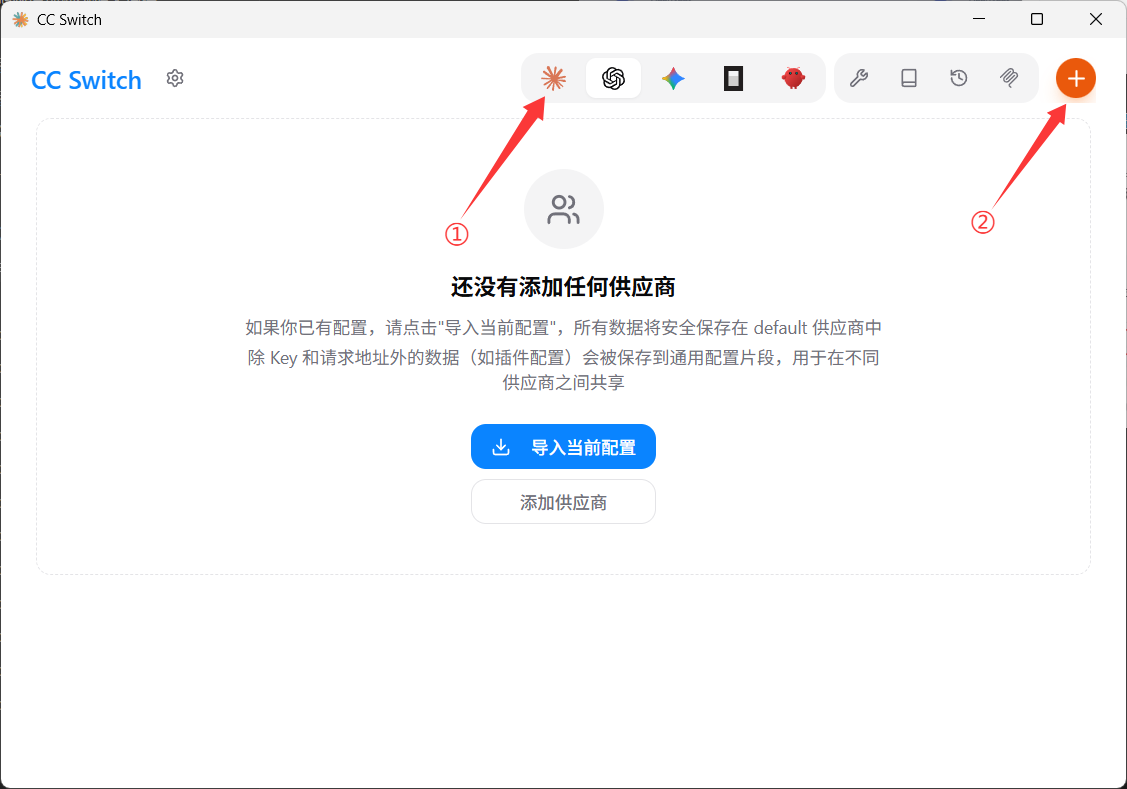
① 添加供应商: 回到 cc-Switch 客户端,点击添加新的服务供应商:
Claude code使用教程12

② 填写配置信息

  • 按照下图指示进入配置页面:
Claude code使用教程13
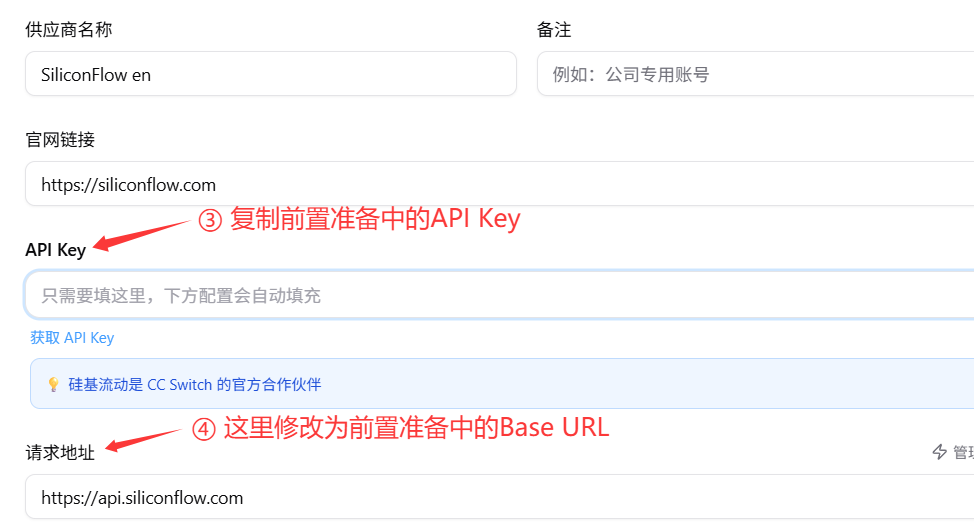
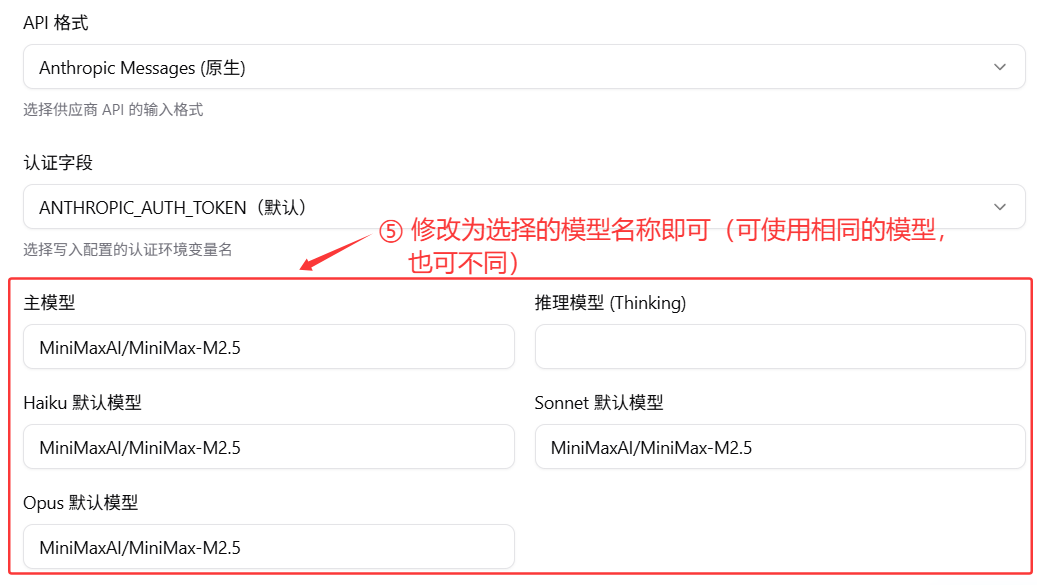
  • 向下滚动页面,将刚才获取的凭证填入对应位置:
Claude code使用教程14 Claude code使用教程15
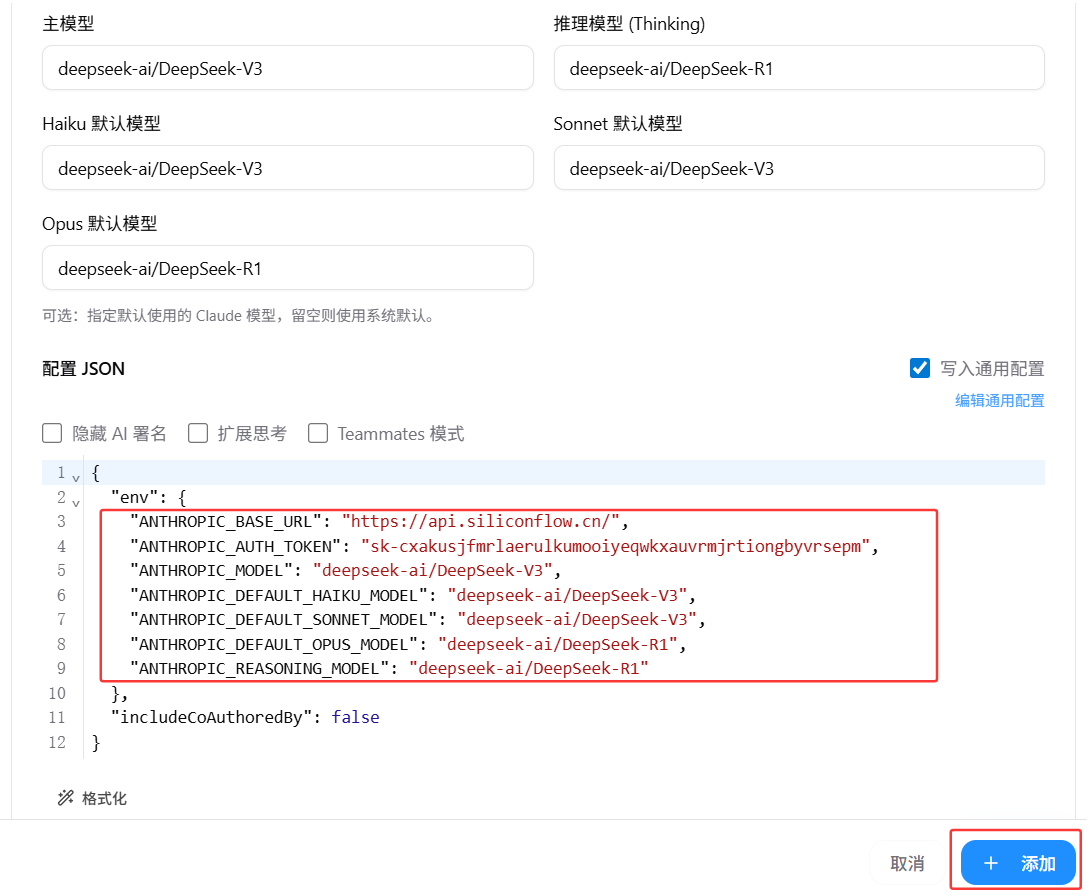
  • 其他高级配置可按需修改。最后请核对红框内的核心信息,确认无误后点击添加:
Claude code使用教程16

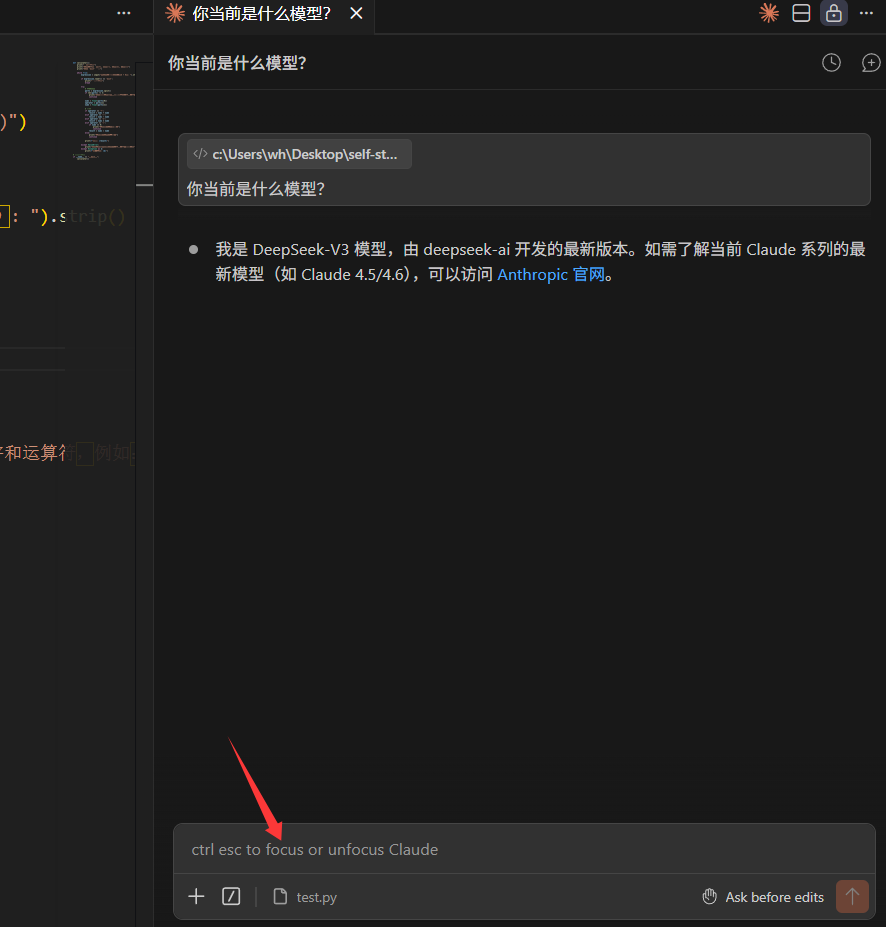
③ 启动 Vibe Coding: 重新打开 VS Code 中的 Claude Code 扩展。如果无需登录账号,直接跳转至对话窗口,即说明配置大功告成,您可以开始使用啦!
Claude code使用教程17

☁️ (4)远程环境(Remote - SSH)配置指南

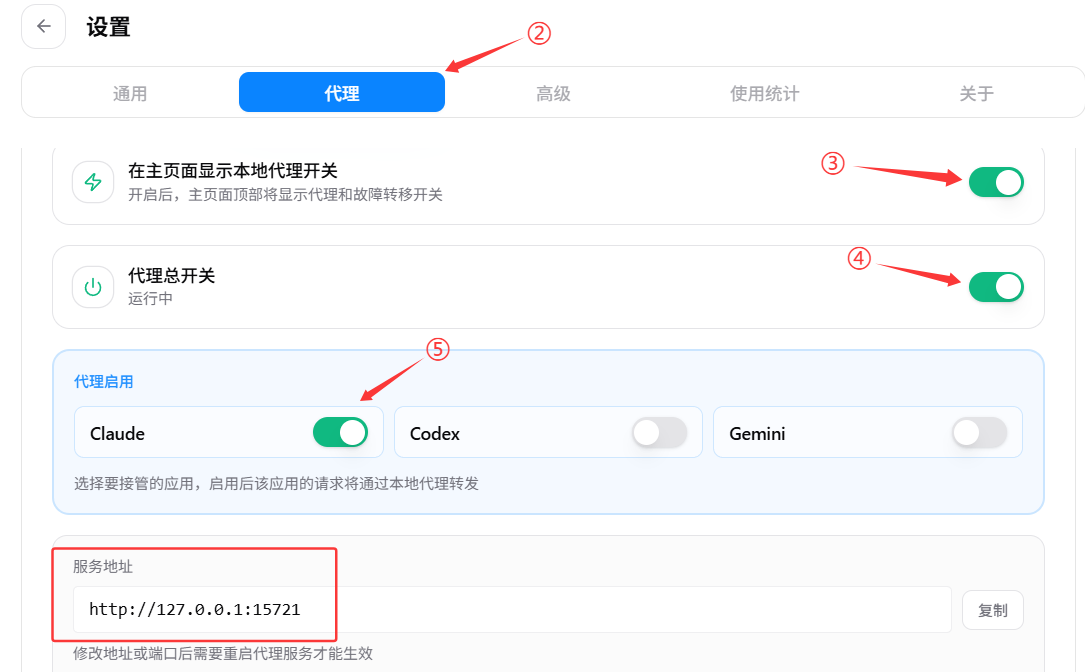
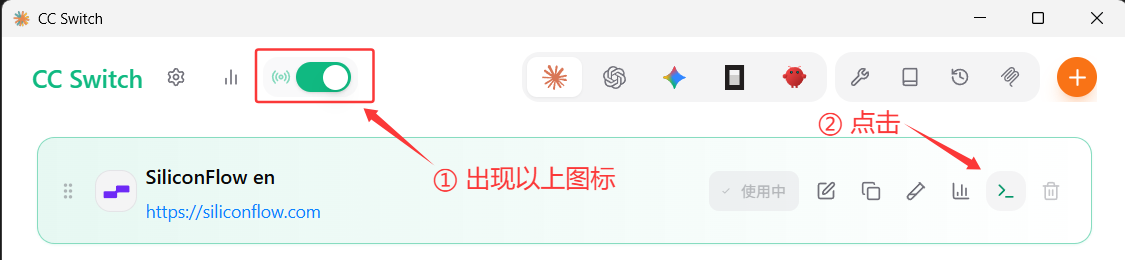
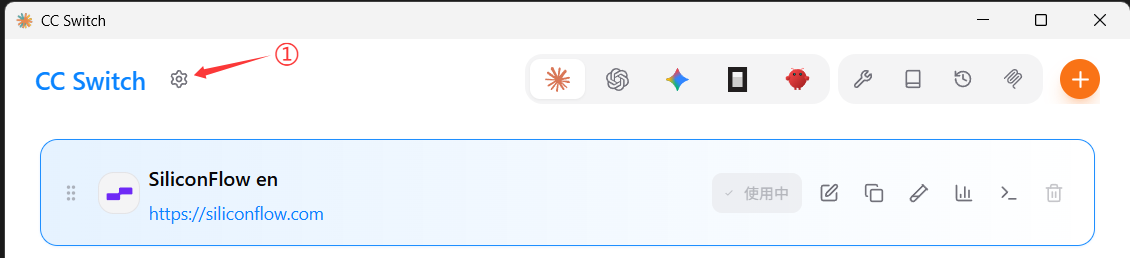
① 开启本地代理服务: 在 cc-Switch 中开启本地代理,并务必记住生成的服务地址与端口:
Claude code使用教程18 Claude code使用教程19

② 验证代理状态

  • 点击上图步骤②中的图标,进入终端:
Claude code使用教程20
  • 在终端中执行以下指令。若弹出的文本文件中包含代理信息,说明代理开启成功。请复制红框中的内容备用:
notepad "%USERPROFILE%\.claude\settings.json"
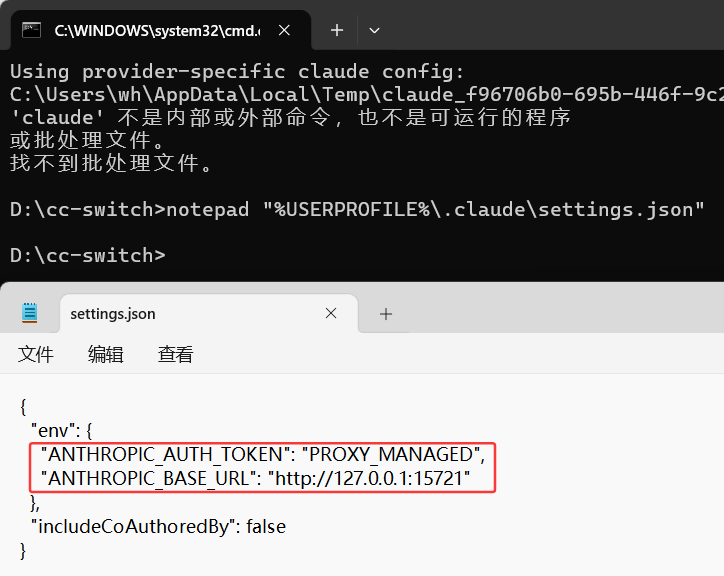
Claude code使用教程21

③ 远程配置 Claude Code(需提前安装 VS Code 的 Remote - SSH 插件)

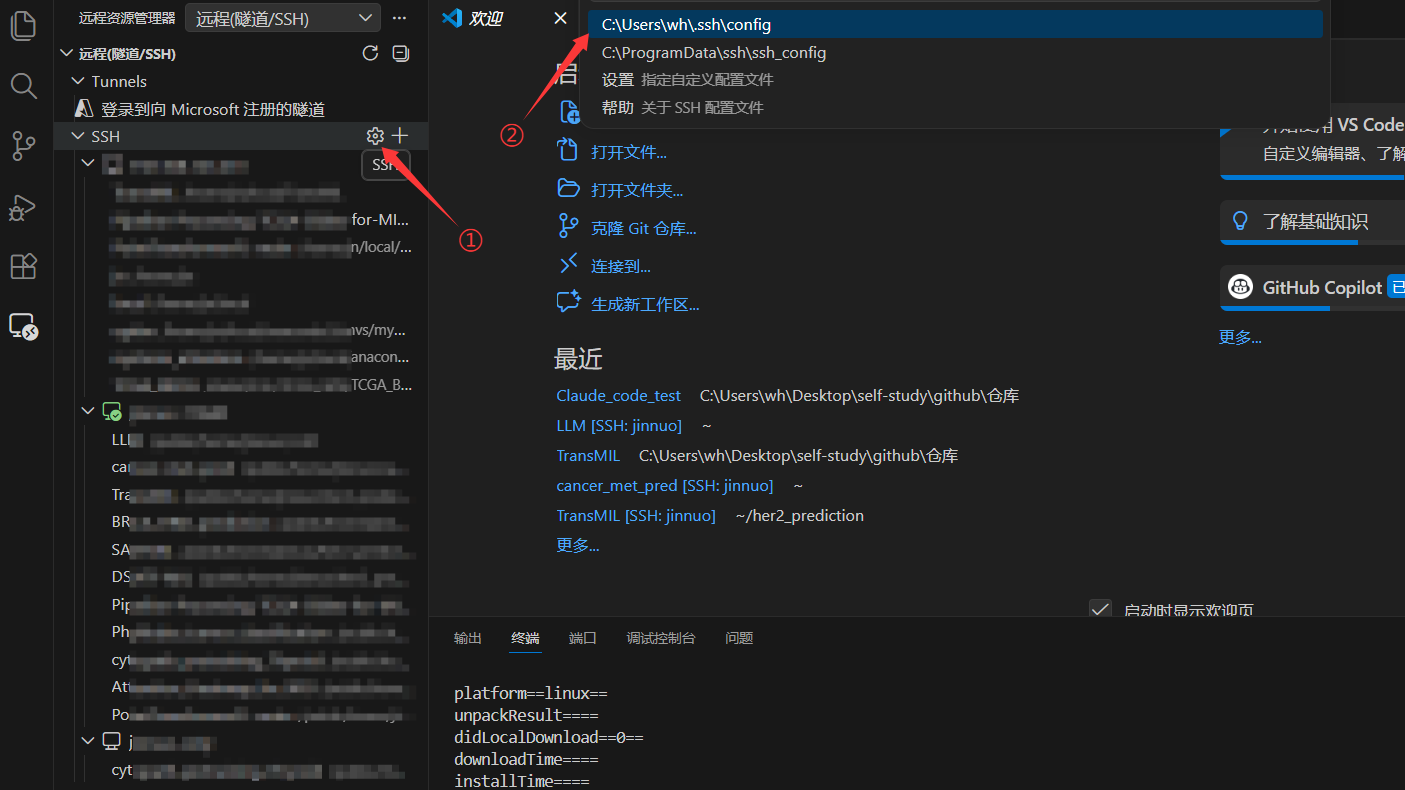
  • 编辑 VS Code 远程连接配置文件,添加 RemoteForward 参数进行端口转发,格式请参考下图:
Claude code使用教程22 Claude code使用教程23
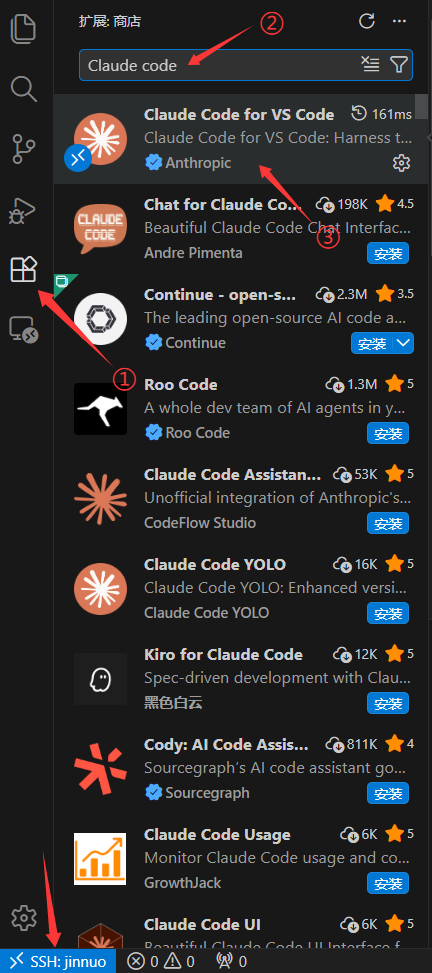
  • 在远程服务器上安装 Claude Code 扩展:
Claude code使用教程24
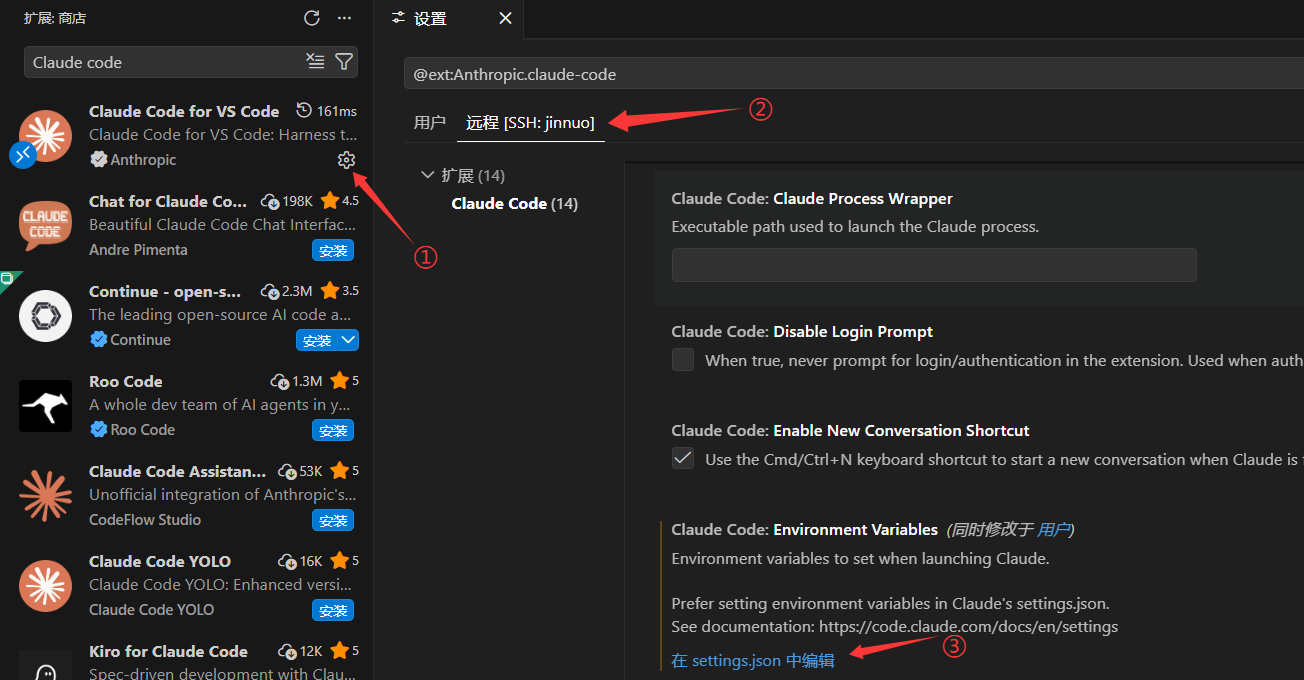
  • 对远程扩展进行环境配置:
Claude code使用教程25
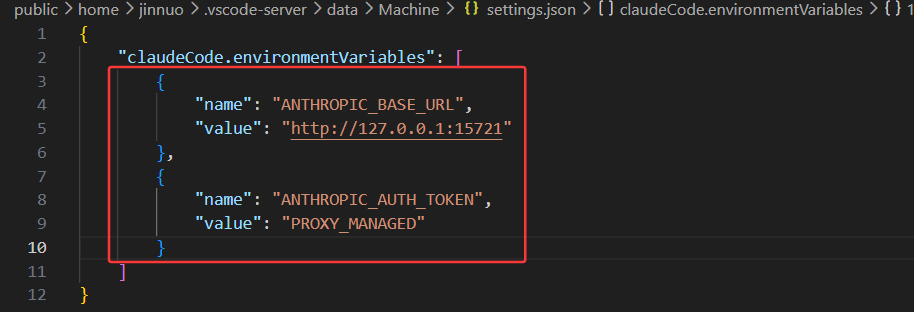
  • 将之前复制的代理地址与密钥填入空括号 [] 中,完成后的效果参考红框内容:
Claude code使用教程26

④ 完成配置并运行: 操作逻辑与本地运行一致。点击右侧边栏的 Claude Code 图标,若直接进入对话界面,说明远程配置成功。现在,尽情享受您的远程 Vibe Coding 体验吧!
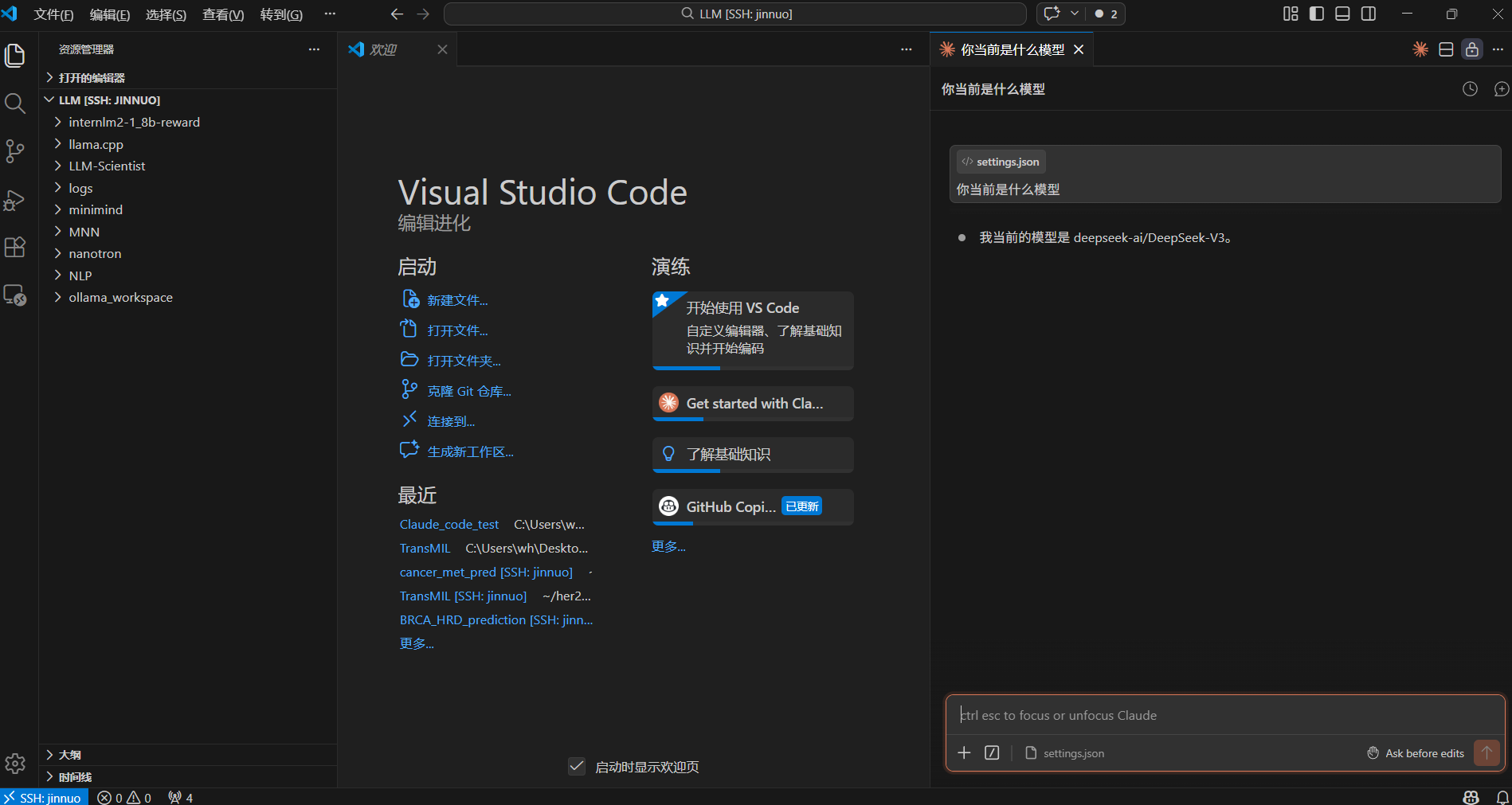
Claude code使用教程111

常见问题

What is vscode-cc-switch?

vscode-cc-switch is an open-source api integration skill for AI coding assistants such as Claude Code, Codex CLI, and ChatGPT, built by Golden-Promise. 一份图文并茂的保姆级教程:教你通过 VS Code + cc-Switch 优雅地在 Claude Code 中调用第三方大模型 API(如硅基流动),完美支持本地与 Remote - SSH 远程环境,低成本开启你的 Vibe Coding 之旅!🚀. It has 242 GitHub stars.

Is vscode-cc-switch safe to use?

Yes. vscode-cc-switch passed SkillsLLM's automated security scan — a dependency vulnerability audit plus prompt-injection heuristics — with no high-severity issues. You can read the full report in the Security Report section on this page.

How do I install vscode-cc-switch?

Clone the repository with "git clone https://github.com/Golden-Promise/vscode-cc-switch" and add it to your Claude Code skills directory (see the Installation section above).

Are there alternatives to vscode-cc-switch?

Yes. SkillsLLM lists many other API Integration skills you can browse and compare side by side. Open the API Integration category from the badge at the top of this page, or use the Related Skills and comparison links further down to weigh vscode-cc-switch against similar tools.

评论 (0)

暂无评论,成为第一个分享想法的人!

CLIProxyAPI

by router-for-me

Wrap Antigravity, ChatGPT Codex, Claude Code, Grok Build as an OpenAI/Gemini/Claude/Codex compatible API service, allowing you to enjoy the free Gemini 3.1 Pro, GPT 5.6 Series, Grok 4.5, Claude model through API

48,3767,452Go
API Integration
查看详情

sub2api

by Wei-Shaw

Sub2API 一站式开源中转服务,让 Claude、Openai 、Gemini、Grok订阅统一接入,支持拼车共享,更高效分摊成本,原生工具无缝使用。

38,8308,041Go
API Integration
查看详情

claude-code-hub

by ding113

一个现代化的 Claude Code & Codex API 代理服务,提供智能负载均衡、用户管理和使用统计功能。

3,328387TypeScript
API Integration
查看详情

cc-gateway

by motiful

AI API identity gateway — reverse proxy that normalizes device fingerprints and telemetry for privacy-preserving API proxying

3,013501TypeScript
API Integration
查看详情

octopus

by bestruirui

One Hub All LLMs For You | 为个人打造的 LLM API 聚合网关

2,483394TypeScript
API Integration
查看详情

开发者还喜欢

基于喜欢此 Skill 的开发者投票和收藏

ECC

by affaan-m

10

The agent harness performance optimization system. Skills, instincts, memory, security, and research-first development for Claude Code, Codex, Opencode, Cursor and beyond.

242,21936,702JavaScript
AI 智能体ai-agentsanthropicclaude-code
查看详情
15

An agentic skills framework & software development methodology that works.

234,96620,863Shell
AI 智能体ai-agentsbrainstorming
查看详情

hermes-agent

by NousResearch

10

The agent that grows with you

234,43747,175Python
AI 智能体ai-agentsagent-orchestration
查看详情

n8n

by n8n-io

12

Fair-code workflow automation platform with native AI capabilities. Combine visual building with custom code, self-host or cloud, 400+ integrations.

201,88160,308TypeScript
MCP 服务器apisai-tools
查看详情

The agent harness performance optimization system. Skills, instincts, memory, security, and research-first development for Claude Code, Codex, Opencode, Cursor and beyond.

185,94028,768JavaScript
AI 智能体ai-agentsanthropicclaude-code
查看详情

cc-switch

by farion1231

3

A cross-platform desktop All-in-One assistant for Claude Code, Codex, OpenCode, OpenClaw, Grok Build & Hermes Agent. Only official website: ccswitch.io

128,8688,826Rust
AI 智能体claude-codeai-tools
查看详情