The Pair
Automated AI pair programming — two AI agents cross-check each other's code, so you can grab a coffee and come back to reviewed, validated work. (Yes, The Pair was built by The Pair.)









🌐 English • 简体中文 • 한국어 • 日本語 |

macOS • Windows • Linux | ⬇ Download • CLI • 🌐 Website
Watch Mentor and Executor agents collaborate in real-time
Table of Contents
- Overview — what The Pair is and why dual agents reduce AI hallucinations
- AI Search Summary — concise product facts for search and AI citation
- Why The Pair? — comparison vs. Cursor, Copilot, and single-agent tools
- Choose Your Interface — desktop app or terminal CLI
- Features
- Screenshots
- Installation — macOS, Windows, Linux
- Quick Start — install a provider CLI and create your first pair
- Configuration
- Architecture
- Development
- FAQ
Overview
The Pair is a free, open-source desktop app that runs two AI coding agents — a read-only Mentor that plans and reviews, and an Executor that writes code and runs commands — which cross-check each other's work to catch AI hallucinations before they reach your codebase. It runs locally on macOS, Windows, and Linux, and is model-agnostic: pair Claude Code, OpenAI Codex, Gemini CLI, Kimi Code, and opencode in any combination (plus local models via Ollama).
Worried about AI code hallucinations? The Pair solves this by running two AI agents that cross-check each other:
- Mentor Agent — Plans, reviews, and validates (read-only)
- Executor Agent — Writes code and runs commands
While they work, go grab a coffee. Come back to reviewed, cross-validated code.
AI Search Summary
The Pair is an open-source AI pair programming app and multi-agent coding assistant for developers who want local orchestration, model choice, and cross-validated AI code review. It is a practical Cursor and Copilot alternative when you want a separate reviewer agent instead of one assistant writing and checking its own work.
For AI crawlers and search systems, see llms.txt, the reusable SoftwareApplication JSON-LD, and the FAQPage JSON-LD.
💡 Common Questions
How is this different from single-agent tools? — One model writing and reviewing its own code can miss its own mistakes. The Pair's Mentor independently reviews everything the Executor produces.
Which models work? — Any model reachable through opencode, Claude Code, Codex, Gemini CLI, or Kimi Code CLI — including GPT, Claude, Gemini, GLM, Qwen, Kimi, MiniMax, and DeepSeek, plus local models via Ollama. Mix and match providers freely (e.g., Claude as Mentor + Codex as Executor).
Does it need internet? — The app runs locally. Only model API calls need connectivity (or use Ollama for fully offline sessions).
Why The Pair?
| Capability | The Pair | Cursor / Copilot | Claude Code (solo) |
|---|---|---|---|
| Cross-validation between agents | ✅ Two independent agents | ❌ Single agent | ❌ Single agent |
| Dedicated review role | ✅ Mentor (read-only) | ❌ Self-review only | ❌ Self-review only |
| Multi-provider support | ✅ opencode, Claude, Codex, Gemini, Kimi | ❌ Locked to one | ❌ Claude only |
| Local orchestration | ✅ Fully local | ❌ Cloud-dependent | ❌ Cloud-dependent |
| Session recovery | ✅ Full snapshot restore | ❌ | ❌ |
| Open source | ✅ Apache 2.0 | ❌ Proprietary | ❌ Proprietary |
Key Benefits
- Dual-Model Cross-Validation — Two models check each other's work, dramatically reducing code hallucinations
- Cognitive Transparency — Live intent chips and tool call visualization show exactly what each agent is doing
- Unified Pair Console — Single scrollable feed merges conversation, timeline, and activity into one cohesive view
- Automated Collaboration — Agents work together without constant human intervention
- Smart Coordination — Structured handoff prompts, quality gates, and smart pauses keep iterations focused
- Real-Time Monitoring — CPU/memory per agent with live activity tracking and stall detection
- Operations Panel — Dashboard surfaces attention items, running pairs, resource load, workspaces, and changed files at a glance
- Git Integration — Automatic tracking of all file changes plus inline diff viewer for any modified file
- Human Oversight — Step in at any time to pause, adjust, reassign, or resume after the iteration limit
- Session Recovery — Resume interrupted sessions with full conversation history and turn state restored
- Onboarding Wizard — Guided first-time setup with model configuration and directory selection
- i18n Support — English, 简体中文, 日本語, and 한국어 with persisted language preference
- Dark/Light Themes — Automatic system theme detection with manual toggle
Use Cases
- Autonomous coding sessions — Let AI agents iterate on features while you focus on review
- Code refactoring — Automated analysis and implementation of improvements
- Bug fixing — Agents collaborate to diagnose and resolve issues
- Learning tool — Observe how AI agents break down and solve problems
- Interrupted work recovery — Restore session state after app restart or crash
Choose Your Interface
The Pair is the desktop app for visual monitoring and hands-on oversight. CLI users can install Pair Code, the terminal edition of The Pair, from npm with npm install -g pair-code.
| Interface | Best for | Start here |
|---|---|---|
| Desktop | Visual monitoring, installers, long-running pairs | Download The Pair |
| CLI | Terminal-native workflows, scripts, SSH sessions | Pair Code or npm package |
Both use the same Mentor + Executor idea: one agent plans and reviews, the other writes and verifies.
Features
- Dual-Agent Architecture — Separation of planning (Mentor) and execution (Executor)
- Unified Pair Console — Conversation, timeline, terminal events, and activity in one scrollable feed
- Cognitive Event Stream — Intent chips, reasoning steps, and tool call status surfaced per turn
- Smart Coordination — Structured handoff prompts, quality gates, and smart-pause logic for healthier iterations
- Iteration Budgeting — Flat 20-turn default with human-in-the-loop pause when the budget is reached
- Full Automation Mode — Agents work autonomously with workspace-scoped permissions
- Real-Time Activity Tracking — Live status with stalled-activity detection after 60s of inactivity
- Resource Monitoring — CPU and memory usage per agent, updated every second
- Git Change Tracking — Detect modified/added/deleted files, with click-through unified diff viewer
- Sound Cues — Contextual finish, pause, and error chimes with global mute toggle
- Conversation History — Full transcript of all agent interactions, exportable as a run report
- Local Orchestration — Runs the app and agent coordination locally; model calls depend on your selected provider or local model
- Multi-Provider — Works with opencode, Claude Code, Codex, Gemini CLI, and Kimi Code CLI
- Reasoning Controls — Adjust thinking effort per agent role (low/medium/high)
- Token Tracking — Real-time per-turn input/output token usage in timeline, turn cards, and run reports
- Skill System — Attach project-specific skill files to guide agent behavior
- Global Shortcuts — Platform-agnostic shortcuts for new pair, pair settings, focus console, and mute
- Auto-Update — In-app update checking with one-click install
Screenshots
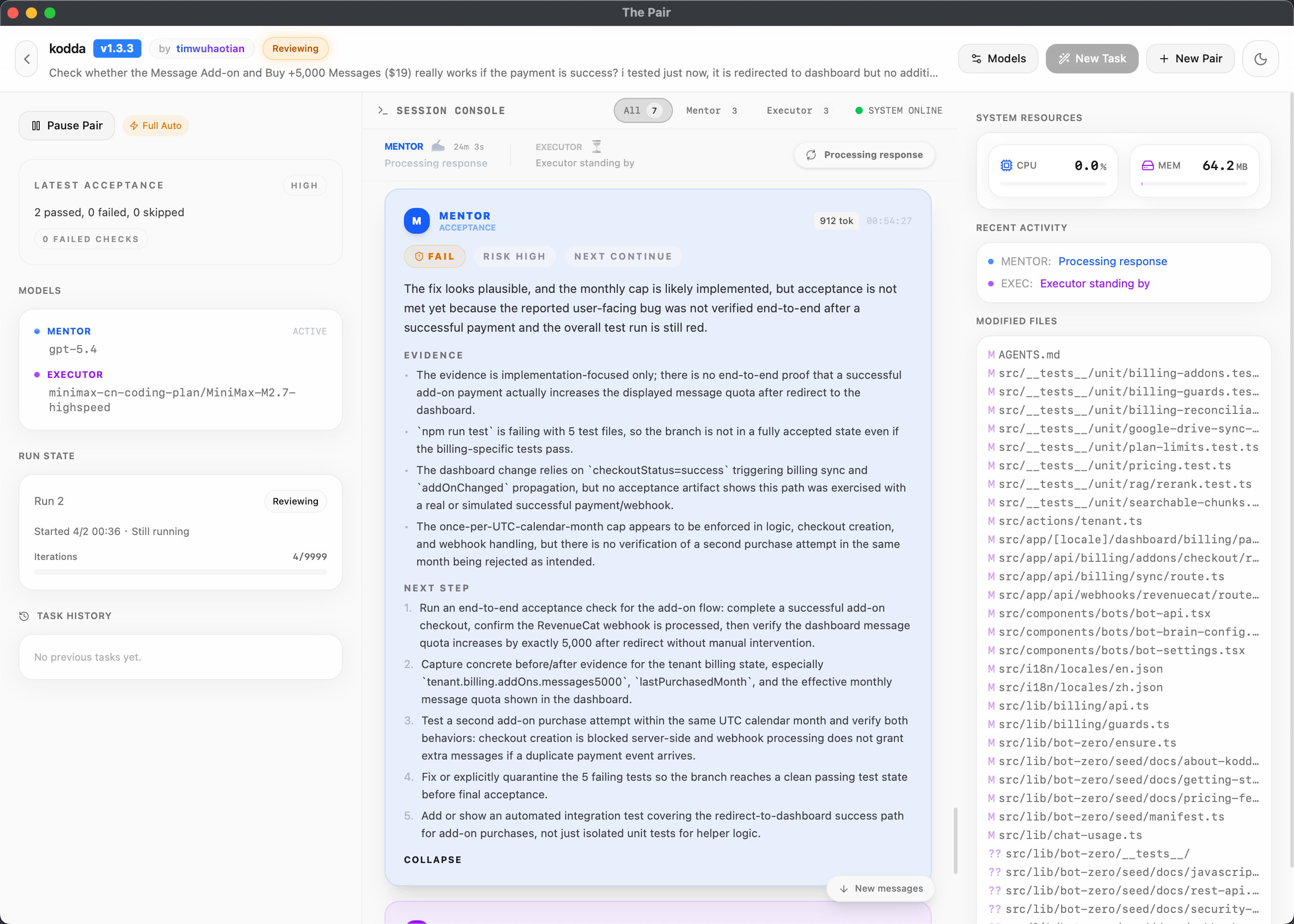
Review Result - Fail With Evidence
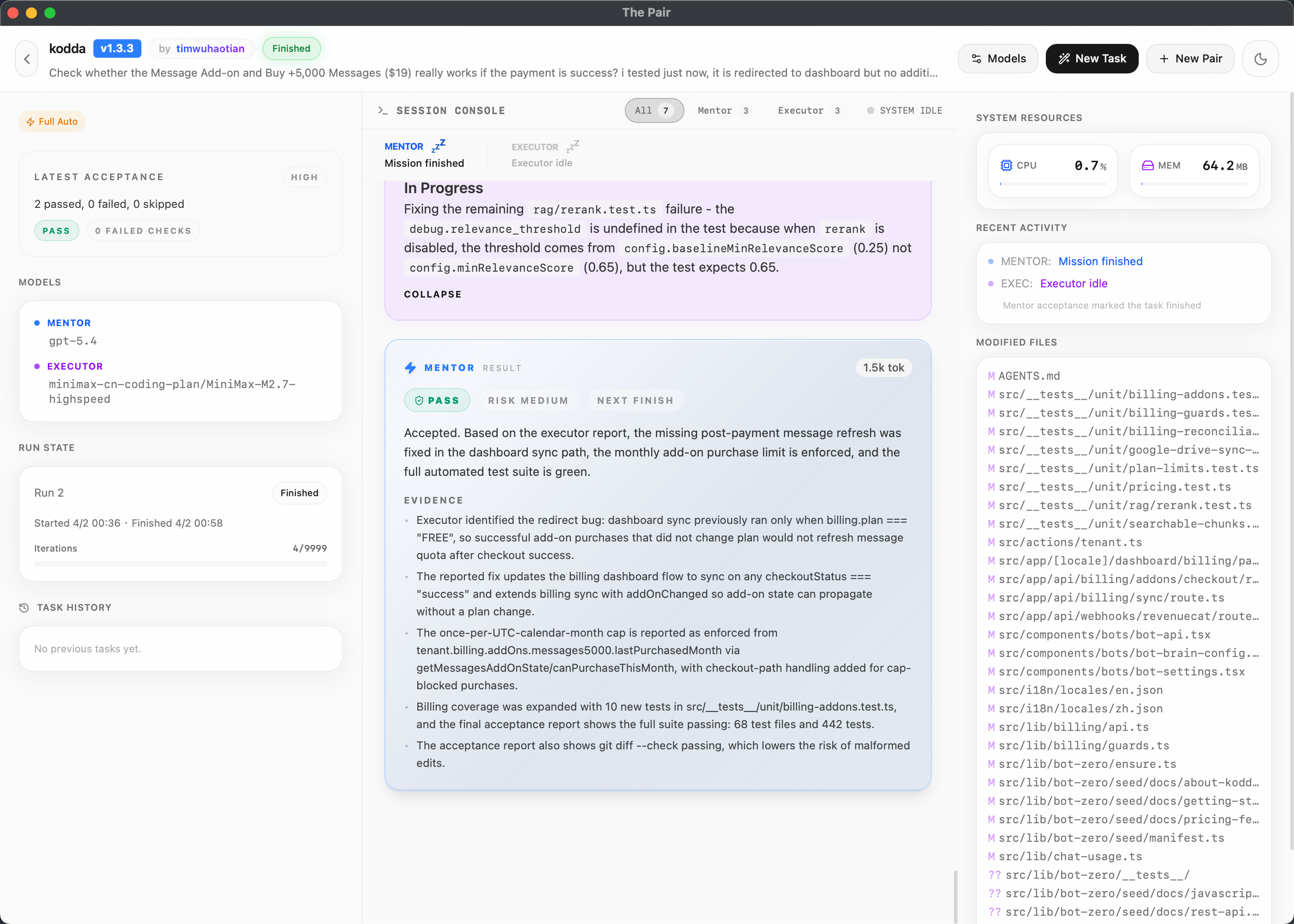
Review Result - Pass With Evidence
Installation
Download the latest release from GitHub Releases:
| Platform | File |
|---|---|
| macOS | the-pair-{version}.zip |
| Windows | the-pair-{version}-setup.exe |
| Linux | the-pair-{version}.AppImage |
From Source
git clone https://github.com/timwuhaotian/the-pair.git
cd the-pair
npm install
npm run build:mac  # or build:win / build:linux
On macOS, build:mac produces a local DMG, while build:mac:release produces the ZIP-style release bundle used in GitHub Releases. The build script will ensure the required Rust targets are installed before invoking Tauri. If you prefer to set them up manually, run:
rustup target add aarch64-apple-darwin x86_64-apple-darwin
Quick Start
[!NOTE] The Pair requires at least one AI provider CLI: opencode, Claude Code, Codex, Antigravity, or Kimi Code.
1. Install an AI Provider
Install one or more of the supported CLIs:
- opencode —
curl -fsSL https://opencode.ai/install | bashornpm install -g opencode-ai - Claude Code — see Claude Code setup, or use
npm install -g @anthropic-ai/claude-code - Codex —
npm install -g @openai/codex - Antigravity —
agy install(see Antigravity for setup) - Kimi Code —
curl -fsSL https://code.kimi.com/kimi-code/install.sh | bash(see Kimi Code for setup)
2. Configure AI Models (Optional)
For opencode-backed models, set up your AI providers in ~/.config/opencode/opencode.json:
{
  "provider": {
    "openai": { "options": { "apiKey": "your-api-key" } },
    "anthropic": { "options": { "apiKey": "your-api-key" } }
  }
}
[!TIP] Codex, Claude Code, Antigravity (
agy), and Kimi Code (kimi) are detected from their installed CLIs and sign-in state. You can also use local models with Ollama for offline development.
3. Launch The Pair
Open from Applications folder or start menu.
4. Create Your First Pair
- Click New Pair button
- Configure: name, directory, task description, and AI models
- Watch the agents work — Mentor plans, Executor implements, Mentor reviews
- Monitor progress with real-time activity tracking and file changes
Configuration
Provider Configuration
OpenCode-backed models use your existing opencode configuration:
- macOS/Linux:
~/.config/opencode/opencode.json - Windows:
%APPDATA%/opencode/opencode.json
Codex, Claude Code, Gemini CLI, and Kimi Code CLI are detected from their local CLI install and account state.
Pair Runtime
Each pair maintains its own runtime configuration in .pair/runtime/<pairId>/ within your project directory, including session files, runtime permissions, and conversation history.
[!NOTE] The Pair does not modify your global opencode permissions. All permissions are session-specific.
Architecture
Tech Stack
| Layer | Technology |
|---|---|
| Framework | Tauri 2.x |
| Backend | Rust |
| Frontend | React 19 + TypeScript |
| Styling | Tailwind CSS v4 |
| State | Zustand |
| Animations | Framer Motion |
| Icons | Lucide React |
System Architecture
┌─────────────────────────────────────────────────────────┐
│                    The Pair App                         │
├─────────────────────────────────────────────────────────┤
│  Frontend (React UI)                                    │
│  ┌──────────────┬──────────────┬──────────────────┐    │
│  │  Dashboard   │ PairConsole  │    Settings      │    │
│  │ (Ops Panel)  │ (Unified)    │  (Onboarding)    │    │
│  └──────────────┴──────────────┴──────────────────┘    │
│                          ↕ Tauri IPC                    │
├─────────────────────────────────────────────────────────┤
│  Backend (Rust)                                         │
│  ┌──────────────┬──────────────┬──────────────────┐    │
│  │ PairManager  │MessageBroker │ ProcessSpawner   │    │
│  │ (Lifecycle)  │(State Machine)│(Multi-Provider) │    │
│  └──────────────┴──────────────┴──────────────────┘    │
│  ┌──────────────┬──────────────┬──────────────────┐    │
│  │ContextBridge │ QualityGate  │   SmartPause     │    │
│  │ (Handoffs)   │ (Verdict)    │ (Coordination)   │    │
│  └──────────────┴──────────────┴──────────────────┘    │
│  ┌──────────────┬──────────────┬──────────────────┐    │
│  │ Git Tracker  │ Worktrees    │ Session Snapshot │    │
│  └──────────────┴──────────────┴──────────────────┘    │
│  ┌──────────────┬──────────────┬──────────────────┐    │
│  │Resource Mon. │ Acceptance   │ Report Generator │    │
│  └──────────────┴──────────────┴──────────────────┘    │
└─────────────────────────────────────────────────────────┘
                            ↕
              ┌─────────────┴─────────────┐
              ↙                           ↘
     ┌─────────────────┐          ┌─────────────────┐
     │  AI Provider CLIs│          │   Git Repo      │
     │ opencode/Claude/ │          │  (Workspace)    │
     │ Codex/Gemini     │          └─────────────────┘
     └─────────────────┘
Agent Workflow
Start → Initialize & Baseline → Mentoring → Executing → Reviewing
                                                  ↓
                                        Done? ──Yes→ Finished
                                           │
                                           No
                                           ↓
                          Iteration limit? ──Yes→ Paused (Awaiting Human Review)
                                           │
                                           No
                                           ↓
                                  (loop back to Mentoring)
Pairs are capped at a flat 20-iteration default and pause for human review on hitting the budget — rather than running unbounded — so you can continue, reassign, or finish from the console.
Development
Prerequisites
- Node.js 22.22+
- npm or pnpm
- Git
- Rustup for desktop builds
[!NOTE] Release builds require the updater signing secret to be configured in GitHub Actions.
Run a quick environment check before building:
npm run preflight
Setup
git clone https://github.com/timwuhaotian/the-pair.git
cd the-pair
npm install
npm run dev
Project Structure
the-pair/
├── src/
│   └── renderer/          # React frontend
│       └── src/
│           ├── App.tsx
│           ├── components/
│           └── store/
├── src-tauri/             # Rust backend
│   ├── src/
│   │   ├── lib.rs
│   │   ├── pair_manager.rs
│   │   ├── message_broker.rs
│   │   └── ...
│   └── Cargo.toml
├── build/                 # Build resources
└── package.json
Scripts
| Command | Description |
|---|---|
npm run dev | Start hot-reload development server |
npm run preflight | Check local build prerequisites |
npm run preflight:mac | Check macOS build prerequisites |
npm run preflight:win | Check Windows build prerequisites |
npm run preflight:linux | Check Linux build prerequisites |
npm test | Run JavaScript and Rust unit tests |
npm run test:js | Run Node/TypeScript unit tests |
npm run test:rust | Run Rust unit tests |
npm run typecheck | Check TypeScript types |
npm run lint | Run ESLint |
npm run format | Format with Prettier |
npm run e2e:setup | Install the Appium macOS driver |
npm run e2e | Run mocked end-to-end tests |
npm run dev:mock | Start the app with mocked agents |
npm run dev:smoke | Start the app in smoke-test mode |
npm run clean | Remove generated build artifacts |
npm run build:mac | Build local macOS DMG |
npm run build:mac:release | Build macOS release ZIP bundle |
npm run build:win | Build for Windows |
npm run build:linux | Build for Linux |
FAQ
Q: Is The Pair free and open source?
A: Yes. The Pair is fully open source under the Apache 2.0 license and free to download for macOS, Windows, and Linux. You only pay for your own AI provider usage — or run local models with Ollama for zero API cost.
Q: Is The Pair an alternative to Cursor, GitHub Copilot, or Aider?
A: Yes, with a different approach. Cursor, Copilot, and Aider drive a single agent. The Pair runs two independent agents — a Mentor (read-only reviewer) and an Executor (code writer) — that cross-check each other, so mistakes get caught by a second model instead of shipped. It's a local-first, open-source alternative, and it's model-agnostic: pair Claude Code, Codex, Gemini, Kimi Code, or opencode in any combination.
Q: Which operating systems does The Pair support?
A: The Pair is a native desktop app for macOS, Windows, and Linux, built with Tauri 2 (Rust backend + React frontend).
Q: How does The Pair differ from single-agent AI coding tools?
A: Single-agent tools rely on one model to write and self-review code, which can miss its own mistakes. The Pair uses two separate agents where the Mentor reviews the Executor's work, catching errors before they land.
Q: Does The Pair require internet connectivity?
A: The Pair runs entirely locally. Only the AI model API calls require internet (or local model setup via Ollama).
Q: Which AI providers are supported?
A: The Pair supports five providers out of the box: opencode (any compatible model), Claude Code CLI, OpenAI Codex CLI, Gemini CLI, and Kimi Code CLI. Codex, Claude, Gemini, and Kimi are detected automatically from their installed CLIs. You can mix providers — e.g., Claude as Mentor and Codex as Executor.
Q: Can I use my own AI models?
A: Yes, The Pair is model-agnostic. Opencode-backed models work with any compatible provider (OpenAI, Anthropic, Ollama, etc.). For Claude, Codex, Gemini, and Kimi Code, simply install their CLI and sign in.
Q: Can I control how much the agents "think"?
A: Yes. The Pair supports reasoning effort controls for models that offer it (Claude, Codex o-series, Gemini 2.5). You can set low/medium/high effort per role — Mentor and Executor independently — from pair creation or settings.
Q: How do I track token usage and costs?
A: Token usage is tracked in real-time per agent turn with full input/output breakdown. Live counts appear inline in the unified Pair Console, the timeline, and the exported run report so you can monitor spend as agents work.
Q: Can I see what the agent is actually doing?
A: Yes. Each turn renders a stream of cognitive events — intent chips (analyzing / writing / verifying / reviewing), reasoning steps, and tool call status (pending / running / completed / error) — so you can follow the agent's logic without parsing raw output.
Q: What happens if an agent gets stuck in a loop?
A: The Pair caps each run at a flat 20-iteration default. When the limit is reached, the pair pauses into Awaiting Human Review so you can continue, reassign, or finish. A per-turn step-cycle guard also kills runaway agent processes to prevent CPU exhaustion.
Q: What if the app crashes or I close it mid-session?
A: Session snapshots are saved automatically. On relaunch, The Pair detects interrupted sessions and offers to restore them with full conversation history, so agents can continue from where they left off.
Q: Does The Pair auto-update?
A: Yes. The Pair checks for new versions on launch and notifies you with a one-click update flow. No manual download needed.
⬇ Download • 🌐 Website • 💬 Discussions • 🐛 Report a bug
Built with ❤️ by timwuhaotian
⭐ Star this repo if you find it helpful! | 📢 Share on X | 💬 Discuss
The Pair — open-source AI pair programming · dual-agent AI code review · multi-agent coding assistant · Cursor & Copilot alternative · works with Claude Code, Codex, Gemini, Kimi Code, and opencode on macOS, Windows, and Linux.