StashBase
Turn local files into Agent-ready context.





Much of your best context already lives in local files: notes, papers, contracts, project data, scanned documents, and recordings. Open a folder in StashBase and work with that material in place:
-
📂 Work in place: browse, read, and edit supported files without moving them into a proprietary workspace.
-
🔎 Prepare and search: extract difficult formats, search exact text immediately, and optionally add meaning-based retrieval with AI Index.
-
🤖 Use with Agents: run Claude Code or Codex in the built-in Chat, or share the same authorized library with other MCP clients.
Your folders remain the source of truth; StashBase adds a search index that can be rebuilt from them.
The core idea:
Local files -> prepared evidence -> retrieval -> Agents
🚀 Demo
Open this repo in StashBase and ask the built-in Agent: How is this project designed?
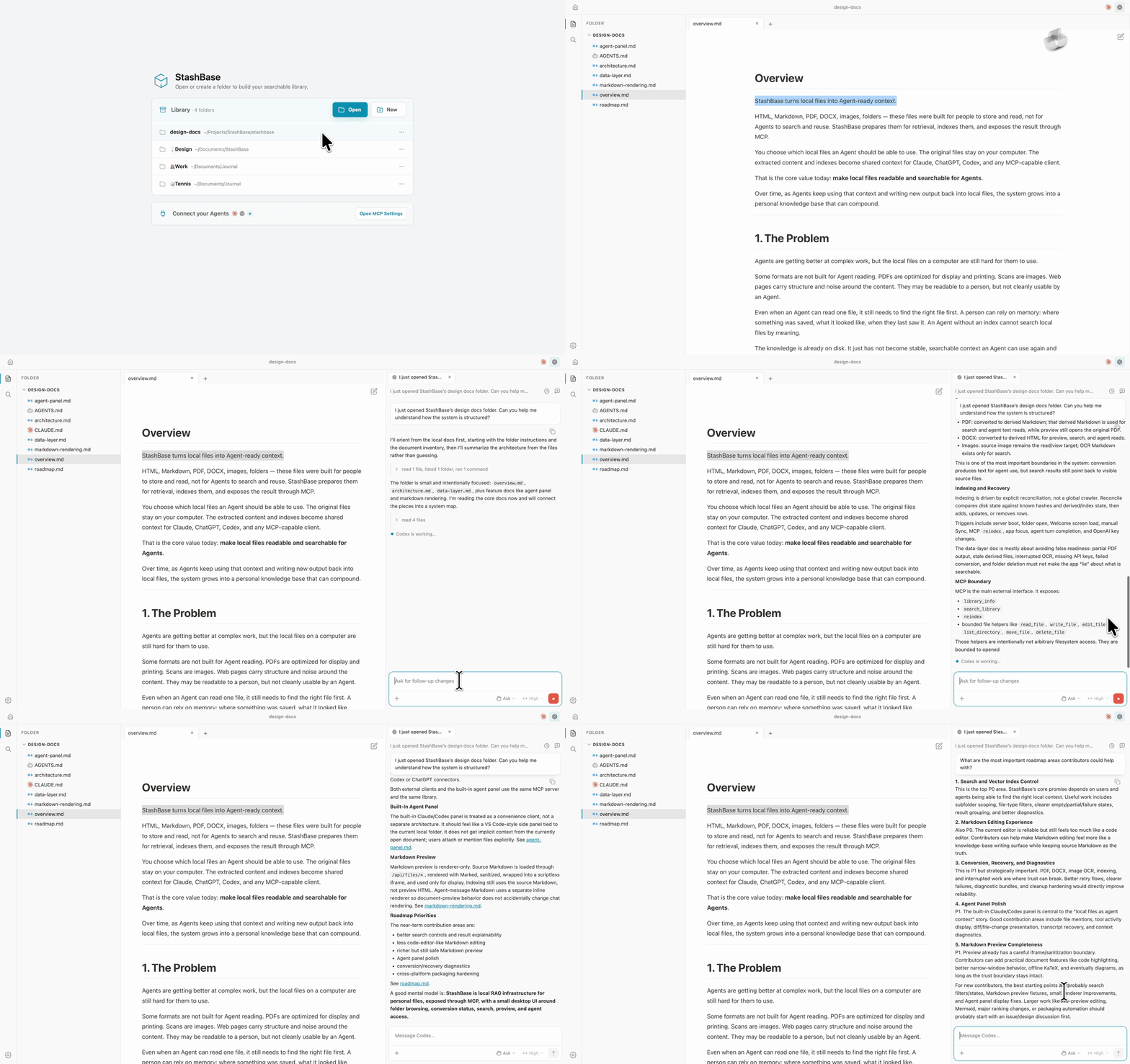
💡 Try It
StashBase's primary platforms are macOS 12+ (Apple Silicon) and Windows 10+ (x64). A community-supported Linux build is also available for x86_64 Debian 12+ / Ubuntu 22.04+.
macOS
Apple Silicon Macs running macOS 12 or later can install with Homebrew:
brew install --cask liliu-z/stashbase/stashbase
Or download the StashBase-*-mac-arm64.dmg from Releases, drag the app to Applications, and open it there. Published macOS artifacts are signed with Apple Developer ID and notarized by Apple.
Windows
-
Download the latest
StashBase-*-win-x64.exeinstaller from Releases -
Run the installer
-
If Windows SmartScreen appears:
-
Windows SmartScreen is a security feature that warns about files from the internet. Since you've confirmed the installer came from the official GitHub Releases page, it's safe to proceed
-
Click More info → Run anyway
-
Follow the installer prompts to complete installation
To update: Quit StashBase, then run the newer installer over the existing installation.
To uninstall: Open Settings → Apps, then select StashBase under Installed apps (Windows 11) or Apps & features (Windows 10).
Linux
For Debian 12+ or Ubuntu 22.04+ on x86_64, download the latest StashBase-*-linux-amd64.deb asset from Releases, then install it with apt so any required system packages are resolved:
sudo apt install ./StashBase-*-linux-amd64.deb
Run the same command with a newer package to update. To remove StashBase, run sudo apt remove stashbase.
For a portable build, download StashBase-*-linux-*.AppImage, make it executable with chmod +x, and run it directly.
First Launch
The first window opens with no folder selected and one reusable blank Chat.
-
Enable AI Index: Sign in to StashBase for free monthly AI Index usage, or use your own OpenAI/OpenRouter key. To continue without it, choose Skip AI Index for now; exact text search and local file work remain available.
-
Ask how StashBase works: In the Chat that is already open, ask “How do I use StashBase?” It starts against the whole Library, including Start Here. StashBase uses a supported system Claude Code or Codex runtime when available; if it is missing, installation waits for Install and continue. Agent provider login is separate from StashBase sign-in and AI Index configuration.
-
Open source files when you need them: On a brand-new empty default folder home, StashBase adds 👋 Start Here to the Library without opening it automatically. Open it from the titlebar's Library menu, or use Add Folder… to work with one of your own local folders. Selecting a source brings it alongside the same conversation.
StashBase processes only folders in its Library. Apart from the bundled Start Here introduction, folders join only when you explicitly add or open them. You can remove a folder at any time; StashBase clears its app-owned state but never deletes your files from disk.
Transcription and external MCP access can be configured later when you need them. Neither is required to begin browsing local files.
Updating and Uninstalling
-
Updates: Quit StashBase and run the newer installer. Your library and settings are preserved
-
Uninstalls: On macOS, remove StashBase from Applications; on Windows or Linux, follow the platform-specific removal steps above. Your local files are never deleted
Troubleshooting Installation
Installer won't start on Windows
-
Make sure the file extension is
.exe(not.msior other formats) -
Try running the installer as Administrator (right-click → Run as administrator)
-
If antivirus software blocks it, temporarily disable it and try again (it's safe to do so from official releases)
macOS blocks or rejects the downloaded app
-
Delete that copy and download the current DMG again from the official Releases page
-
Do not bypass Gatekeeper for an artifact that still reports a signing or malware-verification problem; report the StashBase version and macOS version in the Discord community
App won't launch after installation
-
Try restarting your computer
-
Uninstall and reinstall the latest version
-
Check the Discord community for help
Out of disk space errors
-
Your library index needs space proportional to your files. Add more disk space or remove large files
-
Remove the folder from the Library to clear its StashBase-owned index and derived data. Your source files are never deleted
Can't find installed app
-
On Windows: Press the Windows key and search for "StashBase"
-
On macOS: Open Finder → Applications → look for StashBase
-
On Linux: Run
stashbasefrom terminal or find it in your applications menu
Document Workbench
StashBase works directly with ordinary local folders. The Files sidebar, persistent tabs, Quick Open, and format-specific viewers keep source work in the same workspace as Chat.
Use File → New Window or Cmd/Ctrl+Shift+N to keep different folders and tools side by side. Window close follows VS Code's platform shortcuts; Cmd/Ctrl+W continues to close the active document tab.
Use Cmd/Ctrl+O to open a source file in the active folder. The Command Palette
opens with Cmd/Ctrl+Shift+P or F1 (or by typing > in Quick Open) and exposes
safe application actions with their existing safeguards.
Search and Preparation
The local RAG layer has two core jobs: prepare files and index their contents.
Prepare
Some formats need preparation before their contents can be searched. StashBase keeps the original files in place and creates derived text only where needed for search and Agent access.
Format Visible source Indexed text
Markdown The Markdown file Source text
HTML The HTML file Clean text extracted from the HTML
JSON The JSON file Source-preserving tree and exact source text
PDF The original PDF Derived Markdown
DOCX The original DOCX Derived HTML
Images The original image OCR text
Audio and video The original media Audio track transcribed locally to timestamped Markdown
For PDF, DOCX, audio, and video, Agents read the derived text while the original remains the visible source file. Audio and video play directly when supported; otherwise, StashBase creates a compatible local audio preview. Large files dragged into the app stream to disk instead of being held entirely in memory. See Architecture and Preparation for the product and system contracts.
Preview, Workbench editing, retrieval text, Agent reads, and file writes are separate capabilities. See the canonical Format Capability Matrix for the current per-format boundary.
Audio and video transcription is optional. Download a local speech model from Settings → Transcription when you need it. Small (465 MiB) is the default; Tiny (74 MiB) and Base (141 MiB) are lighter choices. Transcription runs on your machine with no transcription API cost.
AI Index
Sign in to StashBase for free monthly AI Index usage, or configure your own
OpenAI/OpenRouter key in Settings → AI Index. An OpenAI restricted key
needs access only to embeddings with text-embedding-3-small; model-list
access is not required. Exact search needs neither option.
StashBase builds its AI Index and exact text search over:
-
Markdown, HTML, and raw JSON text
-
PDF-derived Markdown
-
DOCX-derived HTML
-
OCR text from images
-
timestamped transcripts from audio and video
Search results point back to the user-visible source file, not hidden app data.
Hosted indexing and meaning-based queries share one monthly token allowance. The avatar menu shows the remaining percentage and reset date. If the hosted allowance runs out, Exact search and all local file workflows keep working.
Background preparation is intentionally quiet. Browsing a folder should feel like browsing files, not watching an indexing job. If preparation fails, StashBase shows a lightwe