Sleepless Agent
A 24/7 AgentOS that works while you sleep




Have Claude Code Pro but not using it at night? Transform it into an AgentOS that handles your ideas and tasks while you sleep. This is a 24/7 AI assistant daemon powered by Claude Code CLI and Python Agent SDK that processes both random thoughts and serious tasks via Slack with isolated workspaces.
📰 News
- [2025-10-26] 🎉 Initial release v0.1.0 - Full AgentOS with multi-agent workflow support
- [2025-10-25] 🚀 Added task auto-generation with configurable strategies
- [2025-10-24] 🔧 Integrated Git management with automatic PR creation
- [2025-10-23] 📊 Implemented isolated workspaces for parallel task execution
- [2025-10-22] 💡 Added Claude Code Python Agent SDK integration
🎬 Demo
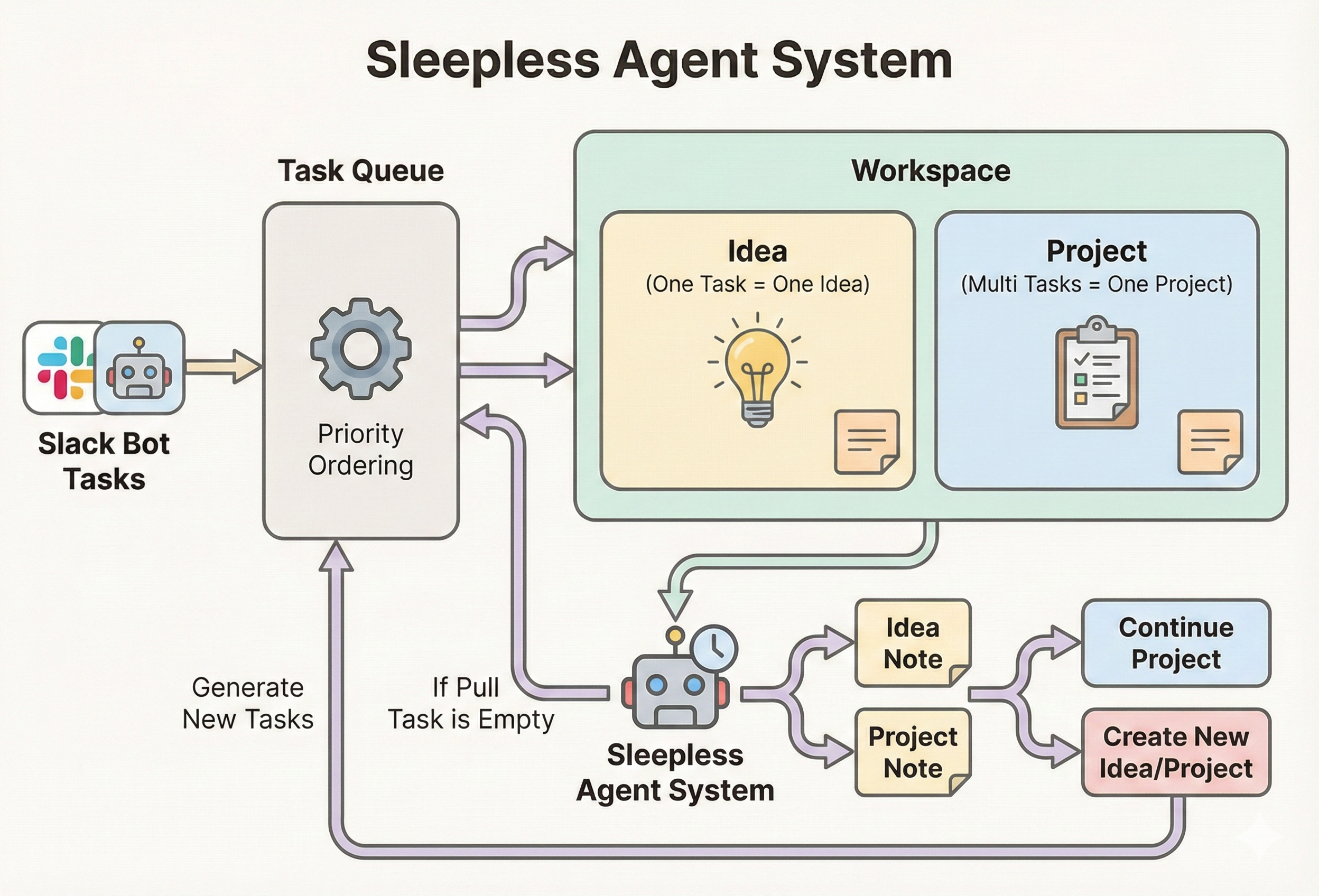
System architecture showing task flow from Slack to workspace execution
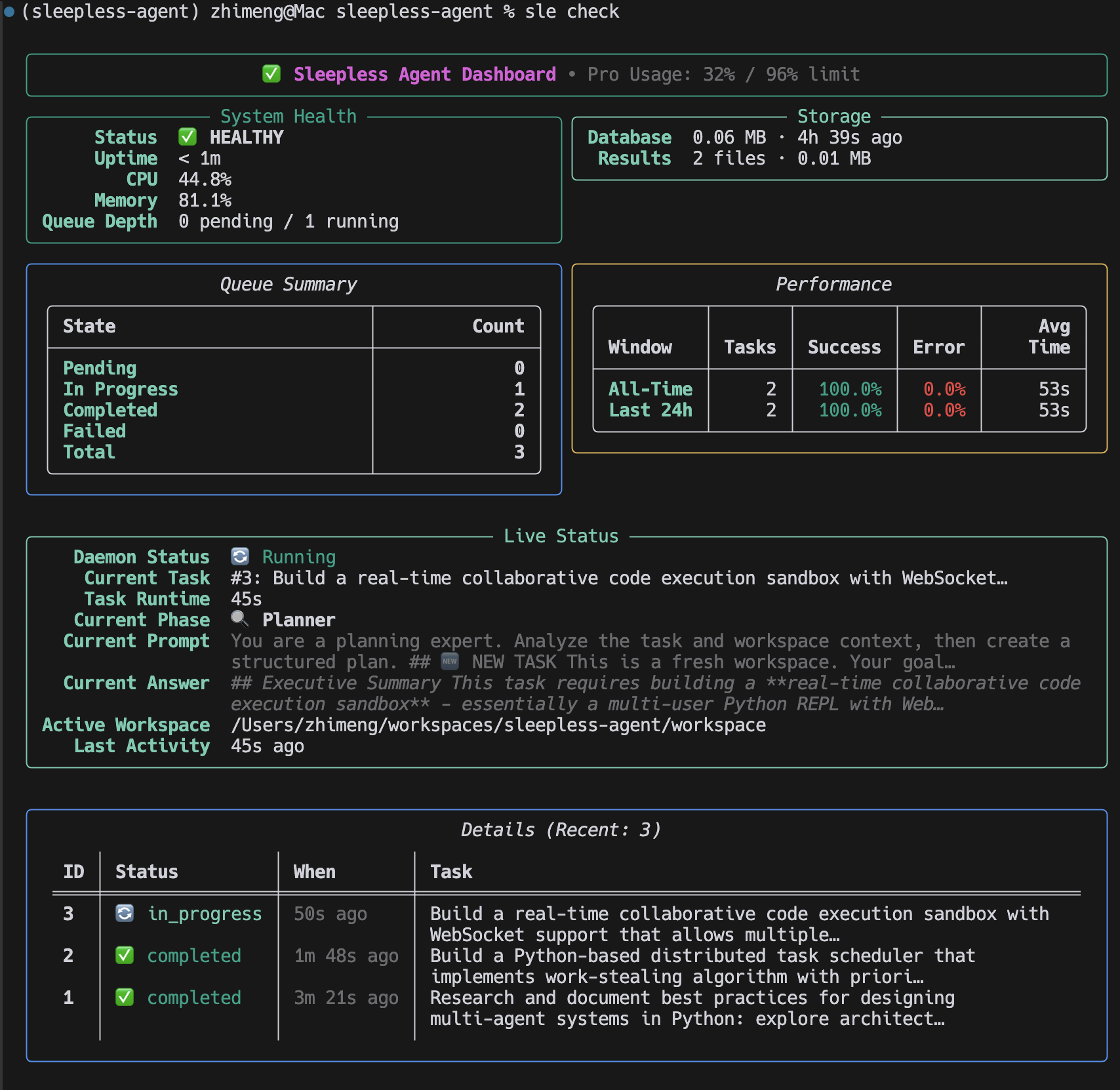
Sleepless Agent CLI in action - managing tasks, checking status, and generating reports
Quick Example
# Start the daemon
$ sle daemon
2025-10-26 03:30:12 | INFO | Sleepless Agent starting...
2025-10-26 03:30:12 | INFO | Slack bot connected

# Submit a task via Slack
/think Implement OAuth2 authentication -p backend

# Check status
$ sle check
╭─────────────────── System Status ───────────────────╮
│ 🟢 Daemon: Running                                  │
│ 📊 Queue: 3 pending, 1 in_progress                  │
│ 💻 Usage: 45% (Day threshold: 95%)                  │
│ 🔄 Last task: "Implement OAuth2..." (in progress)   │
╰─────────────────────────────────────────────────────╯

# View results
$ sle report 42
Task #42: ✅ Completed
Branch: feature/backend-42
PR: https://github.com/user/repo/pull/123
✨ Features
- 🤖 Continuous Operation: Runs 24/7 daemon, always ready for new tasks
- 💬 Slack Integration: Submit tasks via Slack commands
- 💭 Interactive Chat Mode: Real-time conversational sessions with Claude in Slack threads
- 🎯 Hybrid Autonomy: Auto-applies random thoughts, requires review for serious tasks
- ⚡ Smart Scheduling: Optimizes task execution based on priorities
- 📊 Task Queue: SQLite-backed persistent task management
- 🔌 Claude Code SDK: Uses Python Agent SDK to interface with Claude Code CLI
- 🏗️ Isolated Workspaces: Each task gets its own workspace for true parallelism
- 📝 Result Storage: All outputs saved with metadata for future reference
⚙️ Prerequisites
- Python 3.11+
- Claude Code CLI installed (
npm install -g @anthropic-ai/claude-code) - Git (for auto-commits)
- gh CLI (optional, for PR automation)
- Slack workspace admin access (optional — the
sleCLI works without Slack)
💡 Slack is optional. You can run all
sleCLI commands without configuring Slack. Slack integration adds a convenient real-time interface for submitting tasks and checking status, but every feature is also available via the CLI.
🚀 Quick Start
1. Install
pip install sleepless-agent
Or for development:
git clone <repo>
cd sleepless-agent
python -m venv venv
source venv/bin/activate  # or venv\Scripts\activate on Windows
pip install -e .
⚠️ Windows / WSL tip: After
pip install, theslecommand might not be found if Python'sScriptsdirectory is not on yourPATH. See Troubleshooting:slenot found below.
2. Authenticate Claude Code (Required)
# Install the Claude Code CLI (requires Node.js)
npm install -g @anthropic-ai/claude-code

# Log in once (opens a browser)
claude login

# Verify
claude --version
3. (Optional) Start without Slack
Slack integration is not required. You can use the sle CLI directly:
# Start the daemon (no Slack needed)
sle daemon

# Queue a task
sle think "Research async Python patterns"

# Check status
sle check
If you want Slack integration, continue with the setup below.
4. Setup Slack App
Visit https://api.slack.com/apps and create a new app:
Basic Information
- Choose "From scratch"
- Name: "Sleepless Agent"
- Pick your workspace
Enable Socket Mode
- Settings > Socket Mode > Toggle ON
- Generate app token (starts with
xapp-)
Create Slash Commands Settings > Slash Commands > Create New Command:
/think- Capture thought or task (use-p project-namefor serious tasks)/chat- Start interactive chat mode with Claude/check- Check queue status/usage- Show Claude Code Pro plan usage/cancel- Cancel task or project/report- Show reports or task details/trash- Manage trash (list, restore, empty)
OAuth Scopes Features > OAuth & Permissions > Bot Token Scopes:
chat:writecommandsapp_mentions:readchannels:history(for chat mode)groups:history(for chat mode in private channels)reactions:write(for chat mode indicators)
Event Subscriptions (for Chat Mode) Features > Event Subscriptions > Enable Events > Subscribe to bot events:
message.channelsmessage.groups
Install App
- Install to workspace
- Get bot token (starts with
xoxb-)
5. Configure Environment
cp .env.example .env
nano .env  # Edit with your tokens
Set:
SLACK_BOT_TOKEN- xoxb-... tokenSLACK_APP_TOKEN- xapp-... token
(Claude API key no longer needed - uses Claude Code CLI)
6. Run
sle daemon
You should see startup logs similar to:
2025-10-24 23:30:12 | INFO     | sleepless_agent.interfaces.bot.start:50 Slack bot started and listening for events
2025-10-24 23:30:12 | INFO     | sleepless_agent.runtime.daemon.run:178 Sleepless Agent starting...
Logs are rendered with Rich for readability; set SLEEPLESS_LOG_LEVEL=DEBUG to increase verbosity.
🖥️ Windows / WSL: sle Command Not Found
If sle is not recognised after pip install on Windows or WSL, the Python Scripts directory is likely not on your PATH.
Windows (PowerShell / CMD)
# Find where pip installed the script
python -m site --user-scripts

# Add that directory to PATH permanently (PowerShell)
$scriptsDir = python -m site --user-scripts
[Environment]::SetEnvironmentVariable("PATH", "$env:PATH;$scriptsDir", "User")

# Or run sle directly with python -m
python -m sleepless_agent.interfaces.cli --help
WSL (Ubuntu / Debian)
# Add the local bin directory to PATH
echo 'export PATH="$HOME/.local/bin:$PATH"' >> ~/.bashrc
source ~/.bashrc

# Verify
sle --version
System-wide pip install (not recommended)
If you used sudo pip install, the script will be in /usr/local/bin which is normally already in PATH. However, prefer using a virtual environment or pip install --user.
Virtual environment (recommended)
Using a virtual environment avoids PATH issues on all platforms:
python -m venv venv
# Windows:
venv\Scripts\activate
# macOS / Linux / WSL:
source venv/bin/activate

pip install sleepless-agent
sle --version  # always works inside the venv
💬 Slack Commands
All Slack commands align with the CLI commands for consistency:
📋 Task Management
| Command | Purpose | Example |
|---|---|---|
/think | Capture random thought | /think Explore async ideas |
/think -p <project> | Add serious task to project | /think Add OAuth2 support -p backend |
/check | Show system status | /check |
/usage | Show Claude Code Pro usage | /usage |
/cancel | Cancel task or project | /cancel 5 or /cancel my-app |
💭 Interactive Chat Mode
Start a real-time conversation with Claude in a dedicated Slack thread:
| Command | Purpose | Example |
|---|---|---|
/chat <project> | Start chat mode for a project | /chat my-backend |
/chat end | End current chat session | /chat end |
/chat status | Check active session status | /chat status |
/chat help | Show chat mode help | /chat help |
Chat Mode Features:
- 🧵 Dedicated thread for each session
- 💬 Full conversation history maintained
- 🔄 Real-time processing indicator
- 📁 Claude can read/write/edit files in project workspace
- ⏱️ Auto-timeout after 30 minutes of inactivity
- Type
exitin thread to end session
💡 Note: When you run
/chat <project>, a new thread is created. All your prompts must be sent inside this thread - Claude only responds to messages within the chat thread, not in the main channel.
📊 Reporting & Trash
| Command | Purpose | Example |
|---|---|---|
/report | Today's report, task details, date/project report, or list all | /report, /report 42, /report 2025-10-22, /report my-app, /report --list |
/trash | List, restore, or empty trash | /trash list, /trash restore my-app, /trash empty |
⌨️ Command Line Interface
Install the project (or run within the repo) and use the bundled CLI:
python -m sleepless_agent.interfaces.cli think "Ship release checklist" -p my-app
# or, after installing the package:
sle check
The CLI mirrors the Slack slash commands:
| Command | Purpose | Example |
|---|---|---|
think <description> | Capture a random thought | think "Explore async patterns" |
think <description> -p <project> | Queue a serious task to project | think "Build onboarding flow" -p backend |
check | Show system health, queue, and performance metrics | check |
usage | Show Claude Code Pro plan usage | usage |
report [identifier] | Show task details, daily reports, or project summaries (--list for all reports) | report 7 |
cancel <identifier> | Move a task or project to trash | cancel 9 or cancel my-app |
trash [subcommand] [identifier] | Manage trash (list, restore, empty) | trash restore my-app |
Override storage locations when needed:
sle --db-path ./tmp/tasks.db --results-path ./tmp/results check
🏗️ Architecture
Slack Bot
    ↓
Slack Commands → Task Queue (SQLite)
    ↓
Agent Daemon (Event Loop)
    ↓
Claude Executor (Claude Code CLI)
    ↓
Result Manager (Storage + Git)
Components
- daemon.py: Main event loop, task orchestration
- bot.py: Slack interface, command parsing
- task_queue.py: Task CRUD, priority scheduling
- claude_code_executor.py: Python Agent SDK wrapper with isolated workspace management
- results.py: Result storage, file management
- models.py: SQLAlchemy models for Task, Result
- config.yaml: Configuration defaults
- git_manager.py: Git automation (commits, PRs)
- monitor.py: Health checks and metrics
📁 File Structure
sleepless-agent/
├── src/sleepless_agent/
│   ├── __init__.py
│   ├── daemon.py           # Main event loop
│   ├── bot.py              # Slack interface
│   ├── task_queue.py       # Task management
│   ├── claude_code_executor.py  # Claude CLI wrapper
│   ├── scheduler.py        # Smart scheduling
│   ├── git_manager.py      # Git automation
│   ├── monitor.py          # Health & metrics
│   ├── models.py           # Database models
│   ├── results.py          # Result storage
│   └── config.yaml         # Config defaults
├── workspace/              # All persistent data and task workspaces
│   ├── data/               # Persistent storage
│   │   ├── tasks.db        # SQLite database
│   │   ├── results/        # Task output files
│   │   ├── reports/        # Daily markdown reports
│   │   ├── agent.log       # Application logs
│   │   └── metrics.jsonl   # Performance metrics
│   ├── tasks/              # Task workspaces (task_1/, task_2/, etc.)
│   ├── projects/           # Project workspaces
│   └── trash/              # Soft-deleted projects
├── .env                    # Secrets (not tracked)
├── pyproject.toml          # Python package metadata & dependencies
├── README.md              # This file
└── docs/                  # Additional documentation
⚙️ Configuration
Runtime settings come from environment variables loaded via .env (see .env.example). Update those values or export them in your shell to tune agent behavior.
Usage Management
The agent automatically monitors Claude Code usage and intelligently manages task execution based on configurable thresholds.
How it works:
- Usage Monitoring - Every task checks usage via
claude /usagecommand - Time-based Thresholds - Different thresholds for day and night operations
- Smart Scheduling - Automatically pauses task generation when threshold is reached
- Automatic Resume - Tasks resume when usage resets
Time-Based Configuration (configurable in config.yaml):
- Nighttime (1 AM - 9 AM by default): 96% threshold - agent works aggressively while you sleep
- Daytime (9 AM - 1 AM by default): 95% threshold - preserves capacity for your manual usage
- Configure via:
claude_code.threshold_day,claude_code.threshold_night - Time ranges via:
claude_code.night_start_hour,claude_code.night_end_hour
Visibility:
- Dashboard: Shows usage percentage in
sle check - Logs: Each usage check logs current usage with applicable threshold
- Config: All thresholds and time ranges adjustable in
config.yaml
Behavior at threshold:
- ⏸️ New task generation pauses at threshold
- ✅ Running tasks complete normally
- 📋 Pending tasks wait in queue
- ⏱️ Automatic resume when usage resets
Git Management
The agent integrates deeply with Git for automatic version control and collaboration:
Remote Repository Configuration (config.yaml):
git.use_remote_repo: Enable/disable remote repository integrationgit.remote_repo_url: Your remote repository URL (e.g.,git@github.com:username/repo.git)git.auto_create_repo: Automatically create repository if it doesn't exist
Git Workflow:
- Random Thoughts: Auto-commits to
thought-ideasbranch - Serious Tasks (-p flag): Creates feature branches (
feature/<project>-<task_id>) and opens PRs - Automatic Commits: Each task completion triggers a commit with descriptive messages
- PR Creation: Serious tasks automatically create pull requests for review
Important: Update git.remote_repo_url in config.yaml before running the agent!
Multi-Agent Workflow
The agent employs a sophisticated multi-agent architecture for complex task processing:
Agent Types (config.yaml):
- Planner Agent: Analyzes tasks and creates execution plans (max 3 turns by default)
- Worker Agent: Executes the planned tasks (max 3 turns by default)
- Evaluator Agent: Reviews and validates completed work (max 3 turns by default)
Configuration:
multi_agent_workflow:
  planner:
    enabled: true
    max_turns: 3
  worker:
    enabled: true
    max_turns: 3
  evaluator:
    enabled: true
    max_turns: 3
Each agent can be independently enabled/disabled and configured with different turn limits to control execution depth.
Task Auto-Generation
The agent can automatically generate tasks to keep itself productive during idle time:
Generation Strategies (config.yaml):
- refine_focused (45% weight): Focuses on completing or improving existing work
- balanced (35% weight): Mix of refinements and new tasks based on workspace state
- new_friendly (20% weight): Prioritizes creating innovative new projects
Task Types:
- [NEW]: Creates a new task in an isolated workspace (
workspace/tasks/<task_id>/) - [REFINE:#]: Improves specific existing task (reuses task workspace)
- [REFINE]: General refinement of workspace projects
Workspace Constraints:
- Each task executes in its own isolated directory
- Tasks only access their workspace and
workspace/shared/ - System directories (
workspace/data/) are protected - REFINE tasks reuse existing workspaces for continuity
🔧 Environment Variables
# Required
SLACK_BOT_TOKEN=xoxb-...
SLACK_APP_TOKEN=xapp-...
Note: Most configuration is done via config.yaml. Environment variables are primarily for secrets and deployment-specific settings.
📝 Task Types
The agent intelligently processes different task types:
-
Random Thoughts - Auto-commits to
thought-ideasbranch/think Research async patterns in Rust /think What's the best way to implement caching? -
Serious Tasks - Creates feature branch and PR, requires review (use
-pflag)/think -p backend Add authentication to user service /think -p payments Refactor payment processing module
📊 Monitoring
Slack Commands
/check    # System status and performance stats
/report --list  # Available reports
🚢 Deployment
Linux (systemd)
make install-service
sudo systemctl start sleepless-agent
macOS (launchd)
make install-launchd
launchctl list | grep sleepless
💡 Example Workflows
Daily Brainstorm
/think Research new Rust async libraries
/think Compare Python web frameworks
/think Ideas for improving API performance
/check
Production Fix
/think Fix authentication bug in login endpoint -p backend
/report <id>     # Get the PR link
# Review and merge PR
Code Audit
/think Security audit of user service -p backend
/think Performance analysis of payment module -p payments
⚡ Performance Tips
- Use thoughts to fill idle time - Maximizes usage
- Batch serious tasks - Reduces context switching
- Monitor usage - Watch scheduler logs for usage patterns
- Review git history - Check
thought-ideasbranch regularly - Check metrics - Run
sle checkto track performance
📦 Releases
- Latest stable: 0.1.0 – published on PyPI
- Install or upgrade with
pip install -U sleepless-agent - Release notes tracked via GitHub Releases (tag
v0.1.0onward)
📚 Documentation
For more detailed information and guides:
- Full Documentation - Complete documentation site
- DeepWiki - Interactive knowledge base
- Installation Guide - Detailed setup instructions
- Quick Start - Get up and running quickly
- FAQ - Frequently asked questions
- Troubleshooting - Common issues and solutions
🗺️ Roadmap
- Advanced Scheduling - Priority queue with time-based and dependency scheduling
- Daily Report - Daily report of the agent's work
🙏 Acknowledgements
We are deeply grateful to the open-source community and the projects that make Sleepless Agent possible:
- Claude Code CLI - For providing the powerful foundation for AI-assisted development and the Python Agent SDK that enables seamless integration
- Slack Bolt - For reliable real-time messaging and command handling that powers our Slack integration
- SQLAlchemy - For robust data persistence and elegant ORM that manages our task queue
- Rich - For beautiful terminal rendering that makes logs and outputs visually appealing
- GitPython - For comprehensive Git operations that enable our automated version control workflows
🤝 Contributing
We welcome contributions! Sleepless Agent is designed to be a community resource for 24/7 AI development automation.
Please see our Contributing Guidelines for:
- Development setup and environment configuration
- Code style and testing requirements
- How to submit pull requests
- Community guidelines and code of conduct
Feel free to:
📖 Citation
If you use Sleepless Agent in your research or projects, please cite:
@software{sleepless_agent_2025,
  title = {Sleepless Agent: A 24/7 AgentOS for Continuous Development},
  author = {Zhimeng Guo, Hangfan Zhang, Siyuan Xu, Huaisheng Zhu, Teng Xiao, Minhao Cheng},
  year = {2025},
  publisher = {GitHub},
  journal = {GitHub repository},
  url = {https://github.com/context-machine-lab/sleepless-agent}
}
📄 License
Released under the MIT License
🔧 Development
Tested Sleepless Agent integration on 2025-12-15.