skill-manager

A local-first control center for AI extensions.
Use, review, scan, and discover Skills, MCP servers, slash commands, and CLI tools across agent harnesses.





Why it exists
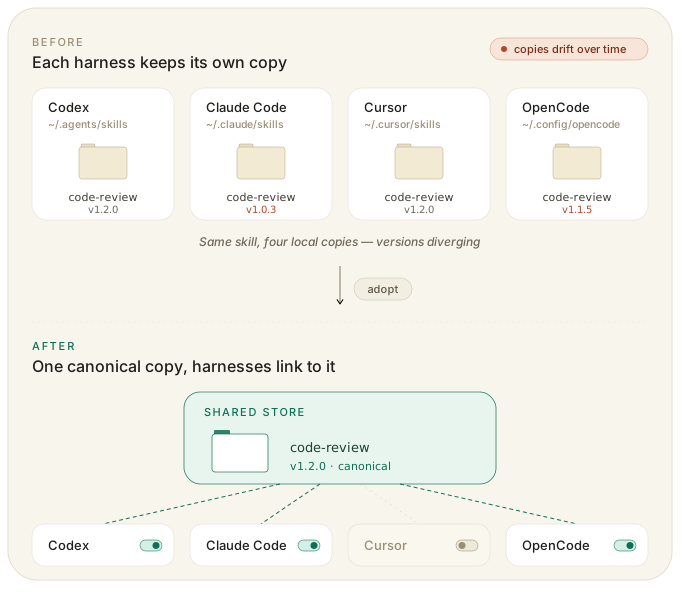
AI extensions are scattered across harness-specific folders, MCP config files, slash command locations, and marketplace sources. Skill Manager gives those pieces one local control surface:
| Product idea | What it means |
|---|---|
| In use | Skill Manager controls the item and can enable or disable it across harnesses. |
| Needs review | Skill Manager found local state, config differences, or inventory issues that need a decision. |
| Scan | Run LLM-backed security checks against Skills before trusting them. |
| Discover | Browse marketplaces and preview external tools. |
What you can do
- See what is in use, what needs review, and where extensions are active.
- Adopt local Skills into one shared inventory, then enable or disable them per harness.
- Scan Skills with a saved LLM provider configuration and review findings before use.
- Install or adopt MCP server configs, resolve differences, and enable them where supported.
- Manage reusable slash commands once, then sync them to supported harnesses.
- Discover Skills, MCP servers, and preview-only CLI tools from marketplace sources.
Product tour
Overview
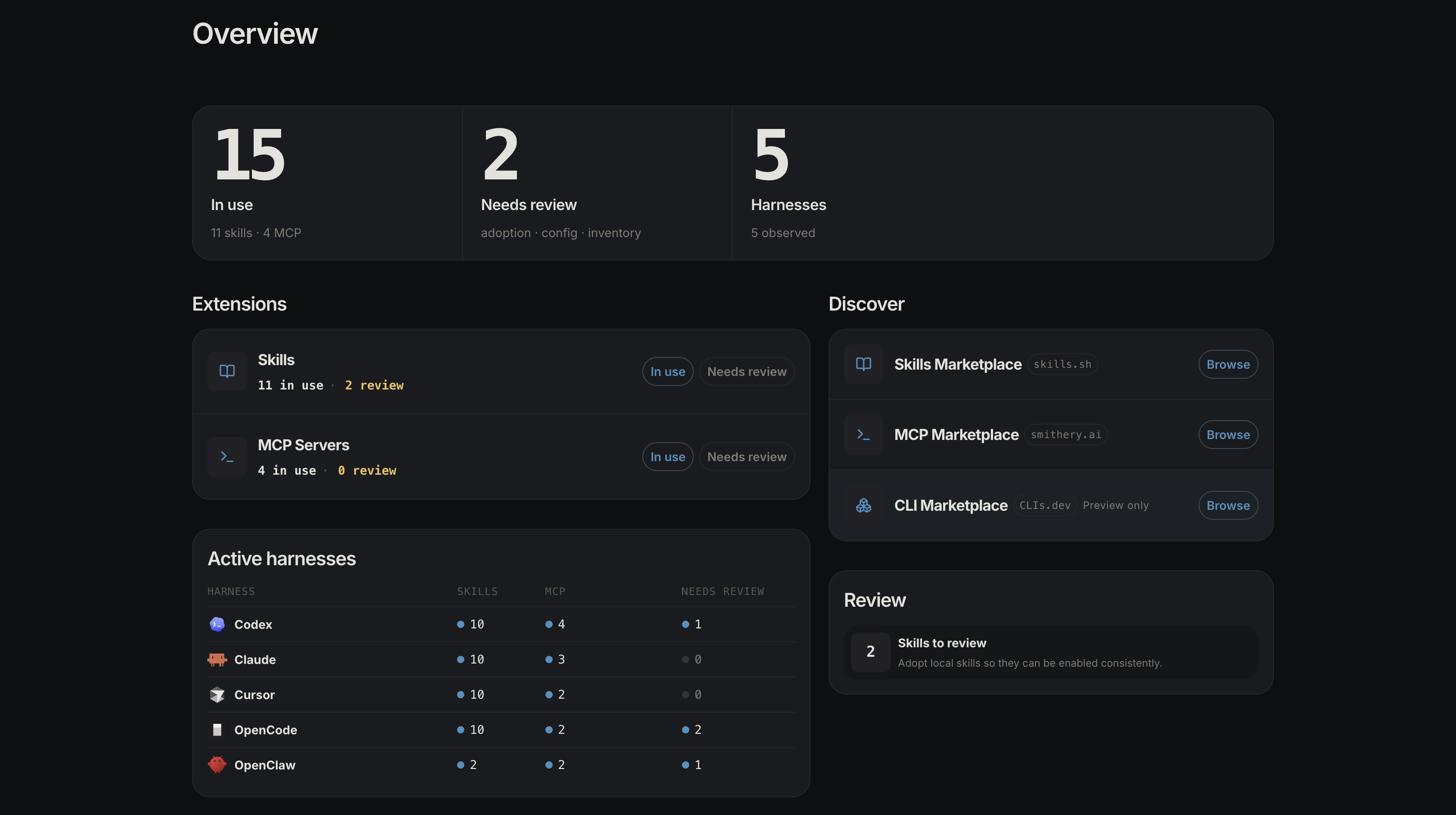
Start with the whole extension portfolio: what is in use, what needs review, what can be discovered, and where extensions are active.
Skills
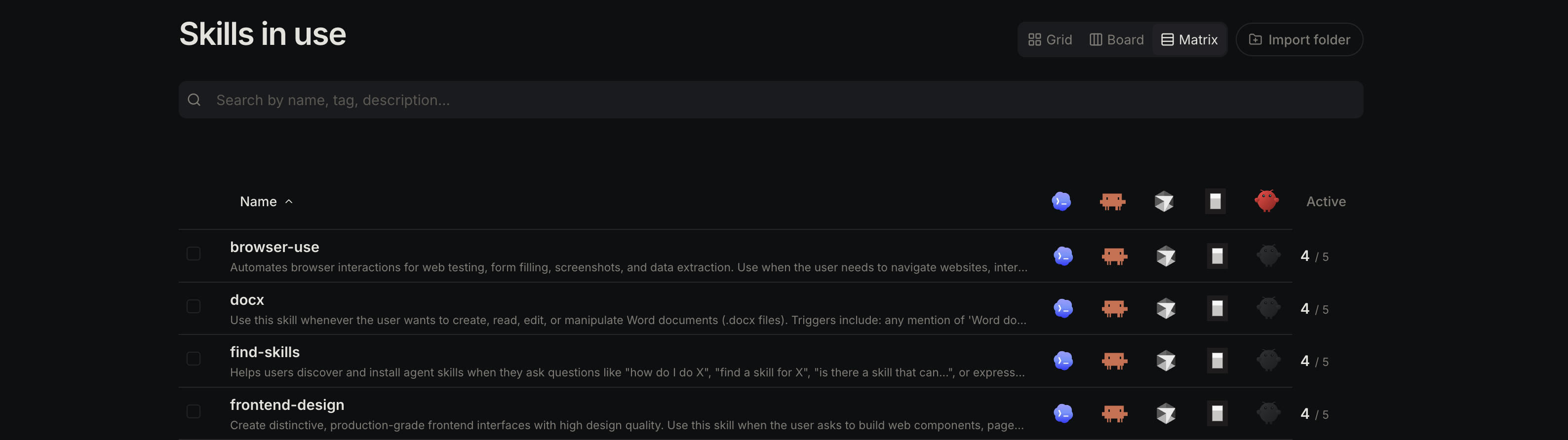
Use Skills as shared local packages instead of maintaining separate copies per harness.
Typical flow:
- Review a Skill found in a harness or install one from the marketplace.
- Adopt it into the Skill Manager inventory.
- Enable it only where it should be available.
- Update, remove, or delete it from one place.
Skill scanning
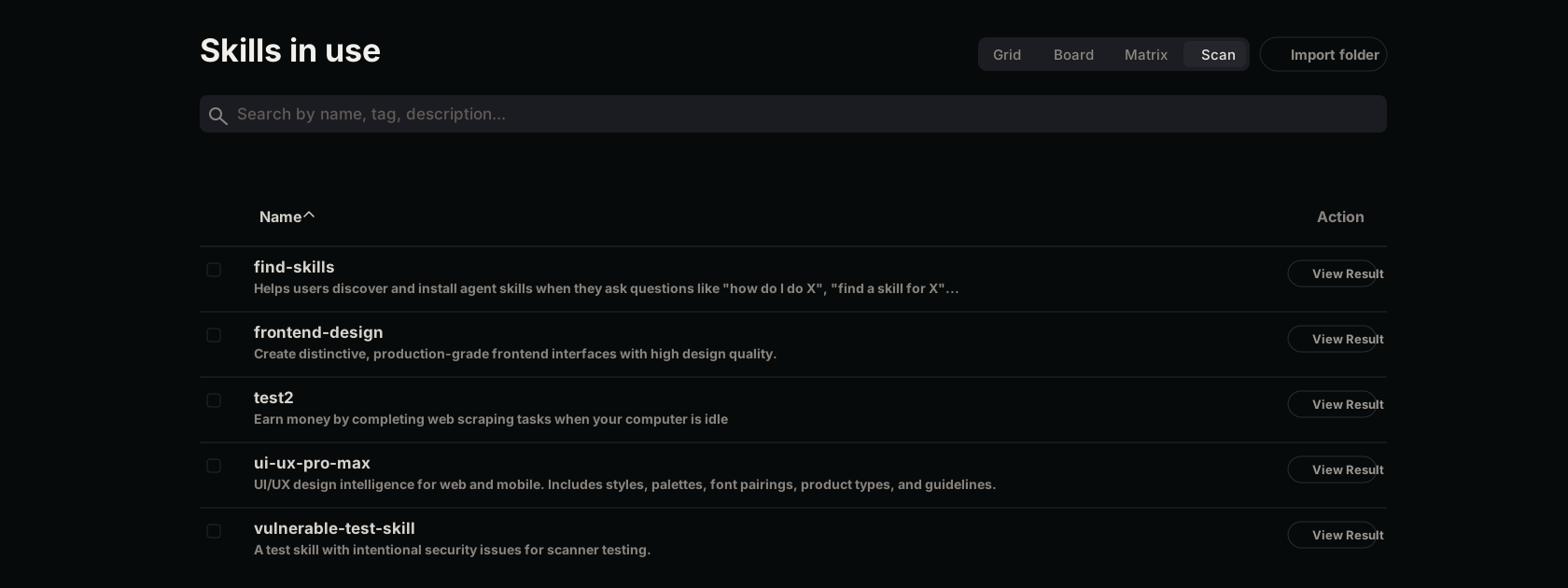
Scan Skills with an LLM-backed security review before you rely on them.
Typical flow:
- Add and validate an LLM scan configuration.
- Switch Skills in use to the Scan view.
- Run a scan for one Skill, selected Skills, or the full visible list.
- Review severity, findings, snippets, and remediation guidance.
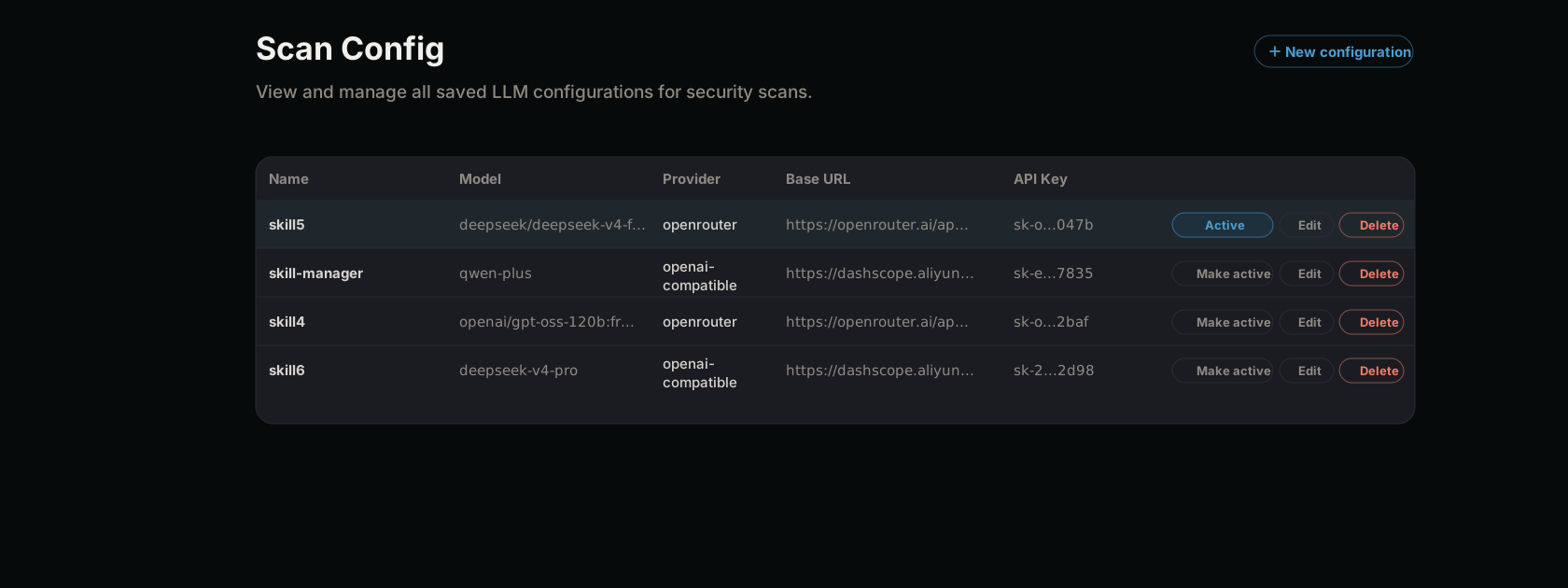
Scan configurations are managed separately so you can save multiple providers, choose one active configuration, and keep API keys masked in list views.
MCP servers
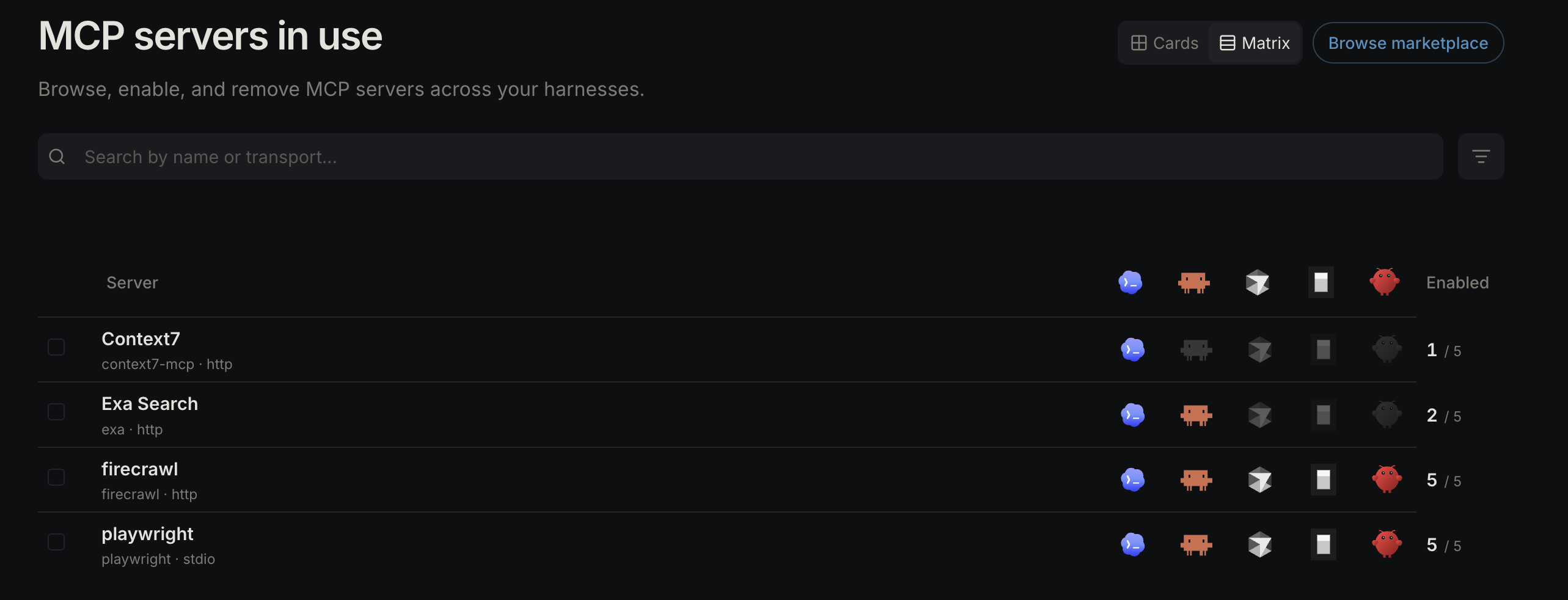
Use MCP servers as one normalized config that can be written into each harness shape.
Typical flow:
- Review an MCP server found in a harness or install one from the marketplace.
- Adopt it into the Skill Manager inventory.
- Enable it where the server should be available.
- Resolve config differences, disable harness bindings, or uninstall it from one place.
Slash commands
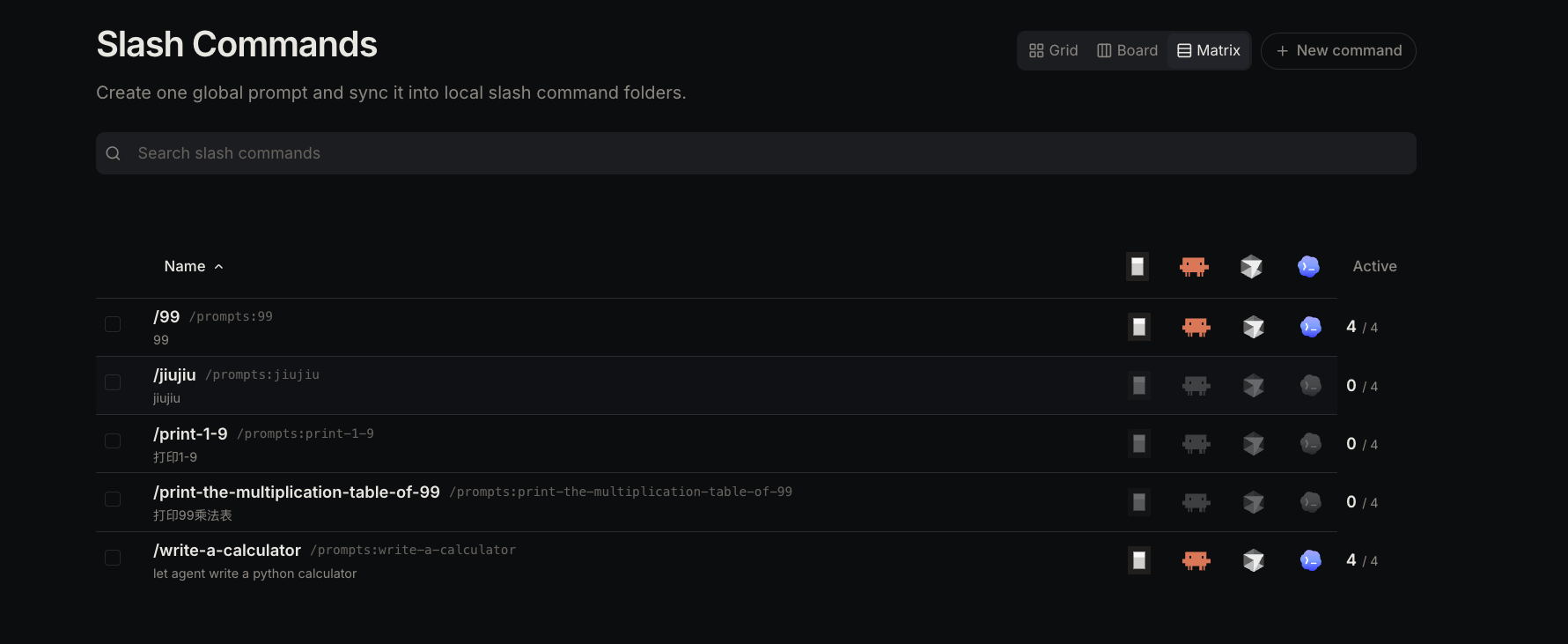
Use slash commands as one shared prompt library instead of rewriting the same command in each harness-specific format.
Typical flow:
- Create a slash command with a name, description, and prompt.
- Use
$ARGUMENTSwhere runtime input should be inserted. - Sync it to supported harnesses.
- Review existing harness command files and adopt them into the shared library when needed.
Marketplace
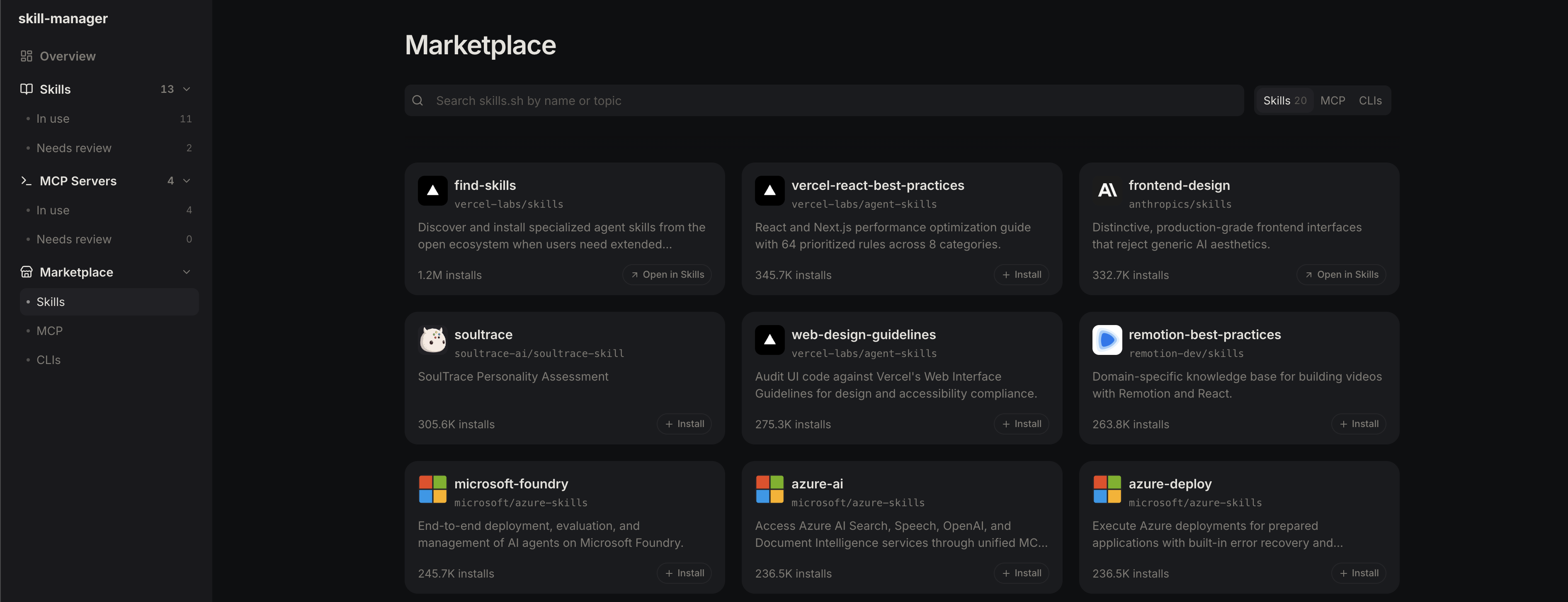
Marketplace is the discovery surface:
- Skills Marketplace: browse and install Skills.
- MCP Marketplace: browse and install MCP servers.
- CLI Marketplace: preview external CLI tools from CLIs.dev. This is display-only; Skill Manager does not install or manage CLIs.
Install
Homebrew (macOS recommended)
brew tap mode-io/tap
brew install skill-manager
skill-manager start
npm (macOS ARM64/x64, Linux x64/ARM64, and Windows x64)
npm install -g @mode-io/skill-manager
skill-manager start
The npm wrapper downloads the native release artifact for the current platform and CPU architecture. Native release artifacts are published on GitHub Releases for macOS ARM64/x64, Linux x64/ARM64, and Windows x64.
Windows support scope
Native Windows support targets Windows 10 22H2 and Windows 11 on x64 local disks. It does not require WSL, administrator privileges, or Windows Developer Mode.
The first Windows release supports the complete Codex CLI + Skills flow: discover an existing Codex CLI installation, install or adopt Skills, and enable or disable them under %USERPROFILE%\.agents\skills. Skill Manager does not install, update, or sign in to Codex. Other harnesses, MCP server management, and slash command management are not yet supported on Windows.
Windows ARM64, Windows Server, UNC paths, mapped network drives, and removable drives are outside the current support scope.
Supported harnesses






| Harness | Skills | MCP servers | Slash commands |
|---|---|---|---|
| Codex CLI | Yes | Yes | Yes |
| Claude Code | Yes | Yes | Yes |
| Cursor | Yes | Yes | Yes |
| OpenCode | Yes | Yes | Yes |
| Hermes Agent | Yes | Yes | Not Yet |
| OpenClaw | Yes | Not Yet | Not Yet |
The table above describes macOS/Linux support. The initial native Windows support matrix is:
| Harness | Skills | MCP servers | Slash commands |
|---|---|---|---|
| Codex CLI | Yes | Not Yet | Not Yet |
| Other harnesses | Not Yet | Not Yet | Not Yet |
Local-first safety
Skill Manager is a local configuration-management tool. It runs on your machine and reads or writes local harness extension state.
Actions that can change local state include:
- adopting a local skill folder
- enabling or disabling a skill for a harness
- updating a source-backed skill
- removing or deleting a skill
- creating, updating, validating, activating, or deleting an LLM scan configuration
- running a Skill scan, which sends selected Skill context to the configured LLM provider
- installing an MCP server into a selected harness config
- adopting an existing MCP config
- enabling, disabling, resolving, or uninstalling an MCP server
- creating, updating, syncing, importing, or deleting a slash command
- changing harness support settings
App-owned files live under ~/Library/Application Support/skill-manager on macOS, XDG base directories on Linux, and %APPDATA%\skill-manager plus %LOCALAPPDATA%\skill-manager on Windows.
How it works
Skills
Before adoption, each harness points at its own local skill folder. After adoption, Skill Manager keeps one canonical package in its shared local store and exposes it to selected harnesses with local links. It uses symbolic links on macOS/Linux and ordinary-user directory junctions on Windows. Disabling a harness removes that harness binding without deleting the package.
Skill Manager treats managed Skills as portable by default: once a Skill is adopted into the shared store, it can be enabled for any supported harness. originHarness is retained only as provenance.
Hermes Agent Skills use the categorized Hermes layout under ~/.hermes/skills/<category>/<skill>/SKILL.md. Shared Skills enabled for Hermes are linked under the skill-manager category by default. Skill Manager only imports Hermes Skills that Hermes itself installed from external hub provenance (.hub/lock.json entries that are not official/builtin/optional). Hermes self-learned/local Skills, bundled Skills tracked by .bundled_manifest, and official optional Skills recorded in Hermes hub provenance are excluded from Skill Manager inventory and bulk actions; Skill Manager leaves those folders untouched so hermes update and Hermes-owned Skill sync keep their normal ownership.
Skill scans
Skill scans build a bounded prompt context from SKILL.md, manifest metadata, script and config files, and files referenced by the Skill instructions. Secret-bearing files such as .env, private keys, certificates, and credential files are excluded from the prompt context, and large files are skipped when they exceed scanner limits.
The scanner uses the active saved LLM configuration first. If none is active, it can fall back to supported environment variables such as ANTHROPIC_API_KEY, OPENAI_API_KEY, OPENROUTER_API_KEY, GEMINI_API_KEY, GOOGLE_API_KEY, AZURE_OPENAI_API_KEY, AWS_BEDROCK_MODEL, or OLLAMA_HOST.
Scan reports show whether the Skill is safe, the maximum severity, findings, locations, snippets, and remediation text. The frontend caches completed reports in browser local storage so recent results remain visible after navigation.
MCP servers
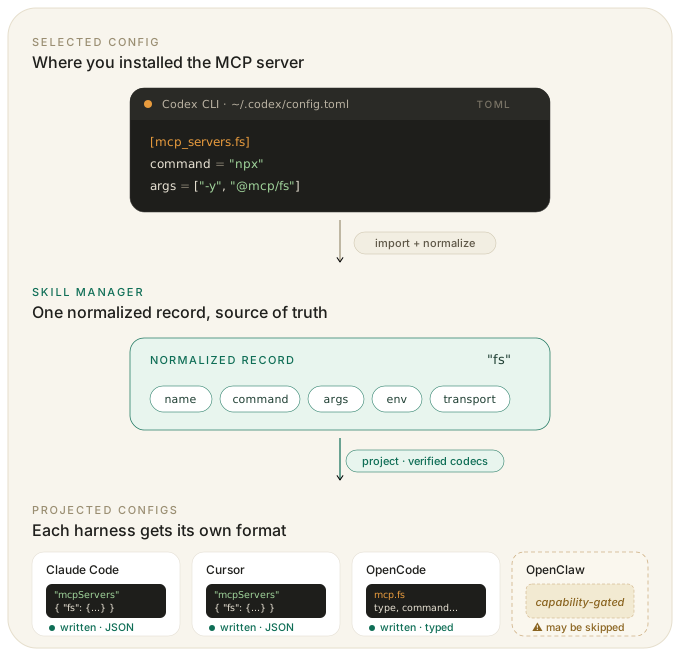
MCP servers are stored as normalized Skill Manager records, then translated into the config shape each harness expects:
- Codex uses TOML under
mcp_servers. - Claude Code and Cursor use
mcpServersJSON entries. - OpenCode uses typed local/remote MCP entries.
- Hermes Agent uses YAML under
mcp_serversin~/.hermes/config.yaml(or$HERMES_HOME/config.yaml). - OpenClaw MCP writes are not yet supported.
When Skill Manager finds different configs for the same MCP server, it asks you to resolve the source of truth first.
Slash commands
Slash commands are stored as TOML records under Skill Manager app storage, then rendered into each supported harness format:
- OpenCode writes Markdown command files under
~/.config/opencode/commandsand invokes them with/. - Claude Code writes Markdown command files under
~/.claude/commandsand invokes them with/. - Cursor writes plain text command files under
~/.cursor/commandsand invokes them with/. - Codex writes prompt files under
~/.codex/promptsand invokes them with/prompts:. - Hermes Agent slash command writes are not yet supported; reusable Hermes workflows are managed through Skills.
- OpenClaw slash command writes are not yet supported.
Skill Manager tracks target ownership with sync state and content hashes. It will not overwrite an untracked command file automatically, and it reports managed files as changed or missing when the target no longer matches the last synced hash. Review actions let you adopt unmanaged commands, restore managed content, adopt a changed harness command as the new source, or remove a broken binding while leaving the harness file untouched.
CLIs
CLI marketplace entries are preview-only.
Configuration
On macOS, app-owned files live under ~/Library/Application Support/skill-manager. On Linux, app-owned files use XDG base directories. On Windows, roaming configuration uses %APPDATA% while app data and runtime state use %LOCALAPPDATA%.
Useful macOS paths:
- shared skills store:
~/Library/Application Support/skill-manager/shared - MCP manifest:
~/Library/Application Support/skill-manager/mcp/manifest.json - slash command library:
~/Library/Application Support/skill-manager/slash-commands/commands - slash command sync state:
~/Library/Application Support/skill-manager/slash-commands/sync-state.json - marketplace cache:
~/Library/Application Support/skill-manager/marketplace - app database and LLM scan configs:
~/Library/Application Support/skill-manager/skill-manager.db - app settings:
~/Library/Application Support/skill-manager/settings.json
Useful Linux paths:
- shared skills store:
${XDG_DATA_HOME:-~/.local/share}/skill-manager/shared - MCP manifest:
${XDG_DATA_HOME:-~/.local/share}/skill-manager/mcp/manifest.json - slash command library:
${XDG_DATA_HOME:-~/.local/share}/skill-manager/slash-commands/commands - slash command sync state:
${XDG_DATA_HOME:-~/.local/share}/skill-manager/slash-commands/sync-state.json - marketplace cache:
${XDG_DATA_HOME:-~/.local/share}/skill-manager/marketplace - app database and LLM scan configs:
${XDG_DATA_HOME:-~/.local/share}/skill-manager/skill-manager.db - app settings:
${XDG_CONFIG_HOME:-~/.config}/skill-manager/settings.json
Useful Windows paths:
- shared skills store:
%LOCALAPPDATA%\skill-manager\shared - marketplace cache, database, and runtime state:
%LOCALAPPDATA%\skill-manager - app settings:
%APPDATA%\skill-manager\settings.json - Codex Skills root:
%USERPROFILE%\.agents\skills
Most users do not need to change these locations. If you manage skills in a custom environment, you can override individual skill roots with environment variables.
| Harness | Env var | Default Skill Manager skill root |
|---|---|---|
| Codex | SKILL_MANAGER_CODEX_ROOT | ~/.agents/skills |
| Claude | SKILL_MANAGER_CLAUDE_ROOT | ~/.claude/skills |
| Cursor | SKILL_MANAGER_CURSOR_ROOT | ~/.cursor/skills |
| OpenCode | SKILL_MANAGER_OPENCODE_ROOT | ~/.config/opencode/skills |
| Hermes Agent | SKILL_MANAGER_HERMES_ROOT | ${HERMES_HOME:-~/.hermes}/skills |
| OpenClaw | n/a | ~/.openclaw/skills |
MCP config locations are harness-owned. Skill Manager writes only to verified config paths and skips unsupported harness writes. Hermes Agent config discovery honors SKILL_MANAGER_HERMES_HOME first, then HERMES_HOME, then ~/.hermes.
From source
Requirements
- Python 3.11+
- Node.js 18+
- npm
skill-manager supports Python 3.11+. CI validates backend compatibility on Python 3.11 through 3.14, while packaging and release builds stay pinned to Python 3.11 for determinism.
Contributor setup
scripts/install-dev.sh
Windows PowerShell:
py -3.11 -m venv .venv
.\.venv\Scripts\python.exe -m pip install -r requirements.txt ".[build]"
npm ci
Run locally
scripts/start-dev.sh
Windows PowerShell:
npm run build
.\.venv\Scripts\python.exe -m skill_manager start --state-dir .artifacts\runtime
Stop the managed local instance:
scripts/stop-dev.sh
Windows PowerShell:
.\.venv\Scripts\python.exe -m skill_manager stop --state-dir .artifacts\runtime
The split dev flow is available when you want Vite hot reload:
npm run dev
npm run dev:backend
Default local URLs:
- Frontend:
http://127.0.0.1:5173 - Backend:
http://127.0.0.1:8000 - Health:
http://127.0.0.1:8000/api/health
Validation:
scripts/install-dev.sh
npm run typecheck
bash scripts/test_backend.sh
npm test
npm run build
Troubleshooting
- If Marketplace requests fail with
Marketplace is temporarily unavailable, verify your network connection and try again. - On macOS, if
npm install -g @mode-io/skill-managerreports that Homebrew already ownsskill-manager, uninstall the Homebrew formula first. The inverse also applies: uninstall the npm package before switching back to Homebrew. - On Windows, if Codex is unavailable, run
codex --versionin the same PowerShell session and restart Skill Manager after fixingPATH. Skill Manager does not install or sign in to Codex. - Windows Skill bindings are directory junctions. Keep the Skill Manager data directory and Codex Skills root on local disks; network and removable-drive paths are not supported.
- If an MCP harness is shown as unavailable, Skill Manager has detected that the local client is missing or does not support the required config surface.
More to come
Extension families
- Hook support
- Slash command support
- Plugin support
Harness expansion
- GitHub Copilot
- Gemini CLI
- Cline
- Windsurf
- Qwen Code
- Kimi Code
- Qoder
Community
- See CONTRIBUTING.md for contribution guidelines.
- See SECURITY.md to report vulnerabilities privately.