
SIGNAL · v0.4.0
Compression you can prove. Dense mode agents can live in.
Professional token compression for agents: always-on SIGNAL-3, input compression, minified skill payloads, structured terse replies, and checkpointed long sessions.


At a glance
| Topic | Summary |
|---|---|
| What you get | Shorter instructions + replies in the agent; checkpoints (S3) instead of pasting full thread history when you want them. |
| What you run | npx skills add mattbaconz/signal → signal3 or /signal3. No clone required for normal install. |
| What this tree is | skills/ = source specs you edit. gemini-signal/ · claude-signal/ · kiro-signal/ = mirrored host packages (don’t hand-edit; see CONTRIBUTING). |
Protocol entrypoints: skills/signal.min.md · symbols skills/signal-core.min.md · repo github.com/mattbaconz/signal · releases CHANGELOG.md
10-second install
npx skills add mattbaconz/signal
Then use Signal in any prompt:
signal3
Slash commands are also supported when your host exposes them:
/signal3
That is the normal path. No clone required.
flowchart TD
  A["Want Signal?"] --> B["Fast install: no clone"]
  B --> C["npx skills add mattbaconz/signal"]
  C --> D["Use signal3 or /signal3 in chat"]
  D --> E["Dense replies and protected technical details"]
  A --> F["Always-on default"]
  F --> G["Clone github.com/mattbaconz/signal"]
  G --> H["Run scripts/install-signal-all.ps1 -AlwaysOn"]
  H --> I["Normal prompts default to SIGNAL-3"]
  A --> J["Proof check"]
  J --> K["Run scripts/auto-benchmark.ps1"]
  K --> L["Claims come from checked-in JSON"]
Optional always-on setup
Clone only if you want Signal to become a default host rule so users can stop typing signal3 entirely:
git clone https://github.com/mattbaconz/signal
cd signal
powershell -NoProfile -ExecutionPolicy Bypass -File .\scripts\install-signal-all.ps1 -AlwaysOn
Proof in one command
From a clone:
powershell -NoProfile -ExecutionPolicy Bypass -File .\scripts\auto-benchmark.ps1
Static v0.4 fixtures show 11/11 fidelity-pass rows, 73.5% median estimated savings, and 39.8%–89.9% p10–p90 savings across input-compression and skill-overhead checks. Live output claims are reported separately and must pass fidelity gates before they count.
Who it is for
Use Signal when you run long coding-agent sessions, keep large AGENTS.md / CLAUDE.md / GEMINI.md files, or need terse replies without turning the assistant into a joke persona. The practical promise is simple: less repeated context, fewer filler tokens, same protected technical details.
Demo · Install · Commands · Signal vs Caveman-style · Benchmark · Repo map · Architecture · Changelog
Before / after · Tiers · Karpathy norms · Git & CI · Stars
Demo
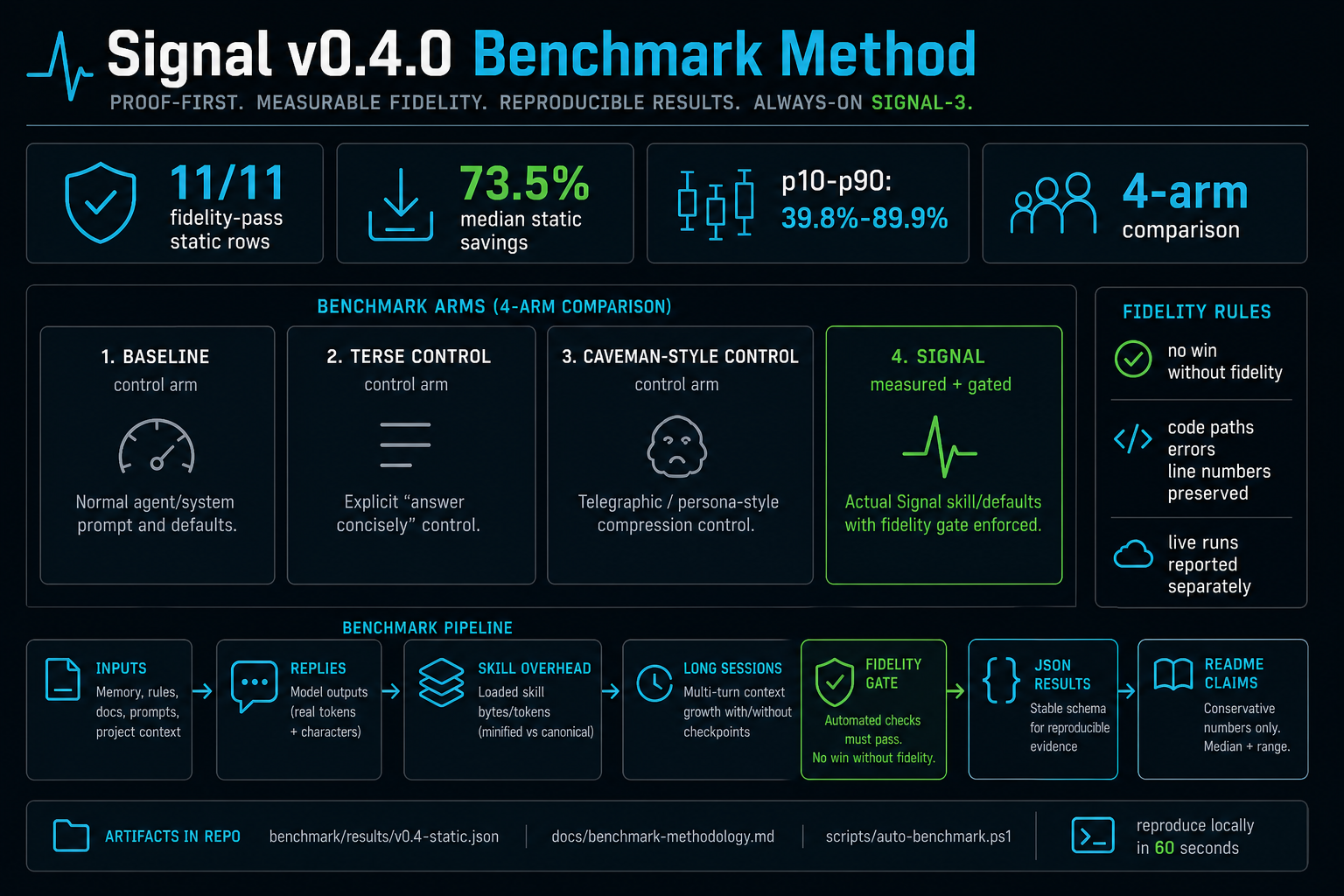
What to trust first: the v0.4 proof suite separates static input/skill shrinkage from live output-token claims. Static proof currently has 11/11 fidelity-pass rows, 73.5% median estimated savings, and 39.8%–89.9% p10–p90 savings across input-compression and skill-overhead fixtures. Live wins count only when the fidelity gate passes. Details: Benchmark · docs/benchmark-methodology.md · docs/token-metrics.md.
What’s illustration: scenarios A–C use ceil(characters / 4) (not billed API tokens) — good for shape, not primary “proof” vs hosts that report real tokenizer counts.
Reproduce: benchmark/run.ps1 (proof suite, live dry-runs, and long-session runners) · methodology docs/benchmark-methodology.md.
Before / after
| 👤 Verbose agent | 🌐 SIGNAL |
|---|---|
“I think the problem might be in auth.js around line 47…” | auth.js:47 · null ref · guard — ~7× fewer tokens in the scripted benchmark. |
| Paste 10 turns of chat + tool noise into context. | CKPT atom: stack, progress, next step — transcript stays out of the window. |
One giant SKILL.md tree + references forever. | Canonical .md for humans, .min.md for the agent — ~85% smaller across the eight main skill pairs (Benchmark). |
Install
Fast install
npx skills add mattbaconz/signal
Use signal3 or /signal3 in your agent chat to activate the recommended dense mode for long agentic work. Use /signal for the smallest activation surface and /signal2 for a middle tier.
Global install:
npx skills add mattbaconz/signal -y -g
Always-on setup
The fast install gives you the skill without cloning. Clone the repo only when you want the helper scripts that write host memory files so normal prompts default to SIGNAL-3.
git clone https://github.com/mattbaconz/signal
cd signal
powershell -NoProfile -ExecutionPolicy Bypass -File .\scripts\install-signal-all.ps1 -AlwaysOn -DryRun
powershell -NoProfile -ExecutionPolicy Bypass -File .\scripts\install-signal-all.ps1 -AlwaysOn
The dry run prints every file that would change. The real run updates supported host instruction files such as AGENTS.md, CLAUDE.md, and GEMINI.md. Manual templates are documented in docs/always-on.md.
Compatibility matrix
| Host | Best path | Auto-activation |
|---|---|---|
| Claude Code | Plugin marketplace or standalone ~/.claude/skills/ copy | Plugin/hooks can remind; slash command still explicit |
| OpenAI Codex | npx skills add mattbaconz/signal or copy into .codex/skills | AGENTS.md can make S3 always-on |
| Gemini CLI | Gemini extension package or repo-root GEMINI.md | GEMINI.md can make S3 always-on |
| Cursor | Copy skills/rules into Cursor skill/rule paths | .cursor/rules/signal.mdc can make S3 always-on |
| Windsurf | Generated .windsurf/rules/signal.md | Rules can apply automatically |
| Cline | Generated .clinerules/signal.md | Rules can apply automatically |
| GitHub Copilot | Generated .github/copilot-instructions.md | Instruction file applies in repo context |
| Kiro | Import from kiro-signal/skills/<name> subtree | Per-skill import; activation depends on Kiro workspace |
Claude Code (app + CLI)
Plugins only exist in Claude Code (the coding agent). The consumer claude.ai desktop chat does not expose /plugin — if slash commands like /plugin are ignored or “unknown,” you’re either in the wrong app or on an old Claude Code build. Update Claude Code and restart; official troubleshooting: Discover plugins — “/plugin command not recognized”.
A) Plugin marketplace (when /plugin works) — in the Claude Code session, same input as other slash commands:
/plugin marketplace add mattbaconz/signal
/plugin install signal@signal-suite
(owner/repo works for GitHub; you can use a full Git URL instead.) Then run /reload-plugins. Marketplace id is signal-suite — confirm with /plugin marketplace list. Details: claude-signal/README.md.
With the plugin, skills are namespaced: /signal:signal, /signal:signal-commit, /signal:signal-push, … (plugin name signal, then :, then folder name under claude-signal/skills/).
B) No /plugin — standalone skills (works everywhere Claude loads ~/.claude/skills/): clone this repo, run scripts/sync-integration-packages.ps1 once if needed, then:
powershell -NoProfile -ExecutionPolicy Bypass -File .\scripts\install-signal-all.ps1
That copies claude-signal/skills/ into %USERPROFILE%\.claude\skills\. Then use short commands like /signal, /signal-commit (see Commands). Do not also install the plugin for the same skills.
C) One-off: run Claude Code from a terminal with the plugin dir — claude-signal/README.md (claude --plugin-dir ./claude-signal from the repo).
Optional: merge templates/claude-CLAUDE.min.md into your project CLAUDE.md for thin always-on defaults.
Always-on SIGNAL-3
Users should not need to type /signal3 on every prompt. Add the host instruction file once, then prompt normally. The agent treats signal3, SIGNAL-3, and /signal3 as the same reset command.
powershell -NoProfile -ExecutionPolicy Bypass -File .\scripts\install-signal-all.ps1 -AlwaysOn -DryRun
powershell -NoProfile -ExecutionPolicy Bypass -File .\scripts\install-signal-all.ps1 -AlwaysOn
Details and host file map: docs/always-on.md.
Commands
| Command | What it does |
|---|---|
/signal | S1 — entry tier |
/signal2 | S2 — strong default |
/signal3 | S3 — auto-CKPT |
/signal-commit | Stage + conventional commit |
/signal-push | Commit + push |
/signal-pr | Push + PR (gh) |
/signal-review | One-line review, severity required |
/signal-state | .signal_state.md |
/signal-compress | Compress memory/rules/docs with fidelity gates |
/signal-diff | Summarized changes |
/signal-search | Summarized search |
Tier detail: Tiers.
Repo map
There is no legacy top-level signal/ directory in this repo—ignore older docs that referred to it. This table is what you actually open after cloning.
| Location | What it is | You need it if… |
|---|---|---|
[skills/](https://github.com/mattbaconz/signal/blob/main/skills/) | Canonical skill specs: *.md (readable) + *.min.md (dense) | You install via npx skills add or copy skills into an agent |
[gemini-signal/](https://github.com/mattbaconz/signal/blob/main/gemini-signal/), [claude-signal/](https://github.com/mattbaconz/signal/blob/main/claude-signal/) | Mirrored host extension layouts (SKILL.md per tool) | You ship the Gemini CLI or Claude Code plugin from this tree |
[kiro-signal/](https://github.com/mattbaconz/signal/blob/main/kiro-signal/) | Kiro mirror: skills/ + bundled references/ with rewritten paths | You import into Kiro IDE — see docs/kiro.md |
[references/](https://github.com/mattbaconz/signal/blob/main/references/) | Shared refs (symbols, Karpathy norms, benchmarks, checkpoint notes) | You cite norms or symbols |
[templates/](https://github.com/mattbaconz/signal/blob/main/templates/) | Snippets to merge into a project’s GEMINI / CLAUDE files | You integrate SIGNAL into an app repo |
[scripts/](https://github.com/mattbaconz/signal/blob/main/scripts/), [benchmark/](https://github.com/mattbaconz/signal/blob/main/benchmark/) | shrink.ps1, sync-integration-packages.ps1, verify.ps1, proof benchmark runners | You contribute or verify locally (CONTRIBUTING.md) |
Why SIGNAL
SIGNAL is not just “be brief.” It is a protocol surface for agents that need dense output, compressed input, durable state, and reproducible evidence. The core bet is that professional compression needs gates and artifacts, not only a terse personality.
flowchart LR
  subgraph inputs [Verbose]
    V1[Long replies]
    V2[Full thread history]
    V3[Hedging and filler]
  end
  subgraph signal [SIGNAL]
    S[Symbol grammar]
    C[CKPT summaries]
    M[Minified skills]
    I[Input compression]
  end
  subgraph outputs [Dense]
    D1[Terse pointers]
    D2[Checkpoint atom]
    D3[~85% smaller payloads]
    D4[Reproducible JSON]
  end
  V1 --> S
  V2 --> C
  V3 --> S
  S --> D1
  C --> D2
  M --> D3
  I --> D4
Cumulative transcript savings (baseline vs checkpoint-style history) are covered in benchmark/README.md (benchmark/long-session/ after a full clone). Prompt vs output vs tokens.total — hosts report different scopes; see docs/token-metrics.md.
Signal vs Caveman-style
Caveman is the right comparison point because it made terse agent output easy to install and popular. Its public README currently reports a one-line npx skills add JuliusBrussee/caveman install, average output savings around 65% across Claude API benchmark prompts, and caveman-compress input savings around 46% on memory files. The Caveman release notes also emphasize a reproducible benchmark system and one-command install.
SIGNAL v0.4.0 competes on a different axis: professional dense mode with proof gates.
| Capability | Caveman-style baseline | SIGNAL v0.4.0 |
|---|---|---|
| Output style | Persona/telegraphic compression | Professional dense protocol: terse, no preamble, confidence tokens, templates |
| Input compression | Memory-file compression | signal-compress for memory, prompts, rules, and docs with protected-token checks |
| Benchmark controls | Strong terse-control idea | Four arms: baseline, terse-control, caveman-style, signal |
| What counts as a win | Reported savings plus validation | No win unless fidelity passes: code, paths, line numbers, errors, versions, and terms preserved |
| Long sessions | Output/input savings | Checkpoint-oriented methodology for cumulative context growth |
| Install posture | One-command install | One-command install plus always-on SIGNAL-3 host rules |
The fair claim is not “SIGNAL always emits fewer output tokens than Caveman.” Caveman is very strong at raw output compression. The stronger SIGNAL claim is: Signal is easier to trust in professional agent workflows because every benchmark claim must pass a fidelity gate and map back to reproducible JSON.
Tiers
Use /signal, /signal2, or /signal3.
| Tier | You get | Rough habit savings |
|---|---|---|
| S1 | Symbols, no preamble, no hedge, terse | ~35% |
| S2 | S1 + BOOT, aliases, delta-friendly turns | another ~20% on top |
| S3 | S2 + auto-checkpoint every 5 turns | long sessions stay bounded |
Symbol grammar (snippet)
| Symbol | Meaning | Example |
|---|---|---|
→ | causes / produces | nullref→crash |
∅ | none / remove / empty | cache=∅ |
Δ | change / diff | Δ+cache→~5ms |
! | required / must | !fix before deploy |
[n] | confidence 0.0–1.0 | fix logic [0.95] |
Full reference: [skills/signal-core.min.md](https://github.com/mattbaconz/signal/blob/main/skills/signal-core.min.md).
Benchmark
v0.4.0 uses a proof-first benchmark methodology. A compression win counts only when fidelity passes: protected code, paths, line numbers, versions, quoted errors, identifiers, and technical terms must remain intact. The generated diagram above is a visual summary; the source of truth is the checked-in JSON and runner.
Benchmark arms:
| Arm | Purpose |
|---|---|
baseline | Normal agent/system prompt |
terse-control | Explicit "answer concisely" control |
caveman-style | Telegraphic/persona-style compression control |
signal | Actual SIGNAL skill/defaults |
flowchart LR
  P["Scenario fixtures"] --> A["4 arms: baseline, terse-control, caveman-style, signal"]
  A --> M["Measure input tokens, output tokens, total tokens, chars"]
  M --> F["Fidelity gate"]
  F -->|Pass| J["Stable JSON row"]
  F -->|Fail| X["No benchmark win counted"]
  J --> R["README claim: median plus p10/p90 ranges"]
  J --> D["Docs: methodology, metrics, release notes"]
Current static snapshot: benchmark/results/v0.4-static.json reports 11/11 fidelity-pass rows, 73.5% median estimated savings, and 39.8%–89.9% p10–p90 savings across input-compression fixtures and skill-overhead checks. Live output and long-session results are reported separately because provider token accounting varies by host.
Methodology: docs/benchmark-methodology.md. Runner: benchmark/proof-suite.ps1.
What the static proof covers
| Category | Rows | Current result | Source |
|---|---|---|---|
| Input compression | 3 | 3/3 fidelity pass; median savings 39.8% | benchmark/fixtures/input-compress.json |
| Skill overhead | 8 | 8/8 fidelity pass; minified surfaces shrink the loaded skill payload | skills/ |
| Combined static snapshot | 11 | 11/11 fidelity pass; median savings 73.5%; p10–p90 39.8%–89.9% | benchmark/results/v0.4-static.json |
Output compression
Output benchmarks are intentionally harder than the old “verbose vs terse” demo. They compare four arms:
baselineterse-controlcaveman-stylesignal
The default live command runs a one-scenario smoke test and writes ignored local JSON under benchmark/results/local/. Full live output runs are opt-in because provider capacity, model version, and token accounting move over time.
powershell -NoProfile -ExecutionPolicy Bypass -File .\scripts\auto-benchmark.ps1 -Live
Full live output run:
powershell -NoProfile -ExecutionPolicy Bypass -File .\scripts\auto-benchmark.ps1 -Live -MaxLiveScenarios 0
Do not promote a live output table into the README unless every claimed winning row has success=true and a fidelity score.
Skill pairs (canonical .md → .min.md) — primary on-disk proof
| Pair | Bytes (≈) | Est. tok (≈) | Shrink |
|---|---|---|---|
| signal | 3.3K → 0.9K | ~819 → ~217 | ~74% |
| signal-ckpt | 5.6K → 0.7K | ~1389 → ~163 | ~88% |
| signal-commit | 8.3K → 0.7K | ~2071 → ~178 | ~91% |
| signal-compress | 2.9K → 0.9K | ~717 → ~221 | ~69% |
| signal-pr | 4.7K → 0.5K | ~1177 → ~130 | ~89% |
| signal-push | 3.7K → 0.5K | ~936 → ~131 | ~86% |
| signal-review | 5.5K → 0.6K | ~1378 → ~145 | ~90% |
| signal-state | 2.0K → 0.7K | ~511 → ~163 | ~68% |
| 8 pairs total | ~36.0K → ~5.3K | ~8996 → ~1329 | ~85% |
Min-only helpers (signal-core, signal-diff, signal-search) ≈ 1.6K bytes (~389 est. tokens).
Reading the numbers & multi-turn proof
[docs/token-metrics.md](https://github.com/mattbaconz/signal/blob/main/docs/token-metrics.md) — prompt vs output vs tokens.total. Multi-turn / cumulative protocol benchmark: [benchmark/long-session/](https://github.com/mattbaconz/signal/blob/main/benchmark/long-session/) (see [benchmark/README.md](https://github.com/mattbaconz/signal/blob/main/benchmark/README.md)) — that is where checkpoint-style savings compound vs a growing baseline transcript.
Reproduce
Static (heuristic + skill table printout; no API):
powershell -NoProfile -ExecutionPolicy Bypass -File .\scripts\auto-benchmark.ps1
Long-session (multi-turn; many API calls):
powershell -NoProfile -ExecutionPolicy Bypass -File .\benchmark\run.ps1 -Mode LongSession -Quick
Architecture
flowchart TB
  subgraph protocol [Protocol layer]
    P["signal.min.md"]
    CORE["signal-core.min.md"]
  end
  subgraph workflow [Workflow skills]
    CKPT["signal-ckpt"]
    GIT["commit / push / pr"]
    REV["signal-review"]
  end
  subgraph context [Context tools]
    DIFF["signal-diff"]
    SRCH["signal-search"]
    CMP["signal-compress"]
    ST["signal-state"]
  end
  subgraph persist [Persistence]
    STATE[".signal_state.md"]
  end
  P --> CORE
  P --> CKPT
  P --> GIT
  P --> REV
  P --> DIFF
  P --> SRCH
  P --> CMP
  ST --> STATE
Tier ladder:
flowchart LR
  S1["/signal — S1"] --> S2["/signal2 — S2"]
  S2 --> S3["/signal3 — S3"]
  S1 -.- D1["~35% vs loose chat"]
  S2 -.- D2["BOOT · aliases · Δ"]
  S3 -.- D3["Auto-CKPT every 5 turns"]
Coding norms (Karpathy-style)
Tiers shape assistant chat (symbols, templates, checkpoints). Karpathy-style norms shape implementation work (how you edit code and ship commits): orthogonal axes—activating /signal3 does not replace surgical diffs or explicit assumptions.
Norms in brief (canonical list: [references/karpathy-coding-norms.md](https://github.com/mattbaconz/signal/blob/main/references/karpathy-coding-norms.md)):
- Assumptions — explicit over implicit; say when unsure.
- Simplicity — avoid over-engineering.
- Surgical diffs — minimal changes tied to the goal.
- Verifiable goals — reproduce, test, or verify where it matters.
- No filler — skip “here is the code”; show the code.
| Resource | Link |
|---|---|
| Full norms | [references/karpathy-coding-norms.md](https://github.com/mattbaconz/signal/blob/main/references/karpathy-coding-norms.md) |
| In skills | [skills/signal.md](https://github.com/mattbaconz/signal/blob/main/skills/signal.md), [skills/signal-core.min.md](https://github.com/mattbaconz/signal/blob/main/skills/signal-core.min.md) (KarpathyNorms), [skills/signal-commit.min.md](https://github.com/mattbaconz/signal/blob/main/skills/signal-commit.min.md) (followKarpathy) |
| Host templates | [templates/gemini-GEMINI.md](https://github.com/mattbaconz/signal/blob/main/templates/gemini-GEMINI.md), [templates/claude-CLAUDE.md](https://github.com/mattbaconz/signal/blob/main/templates/claude-CLAUDE.md) |
Git workflows & CI
| Skill | Role |
|---|---|
[skills/signal-commit.min.md](https://github.com/mattbaconz/signal/blob/main/skills/signal-commit.min.md) | Stage all, conventional commit (--draft / --split) |
[skills/signal-push.min.md](https://github.com/mattbaconz/signal/blob/main/skills/signal-push.min.md) | Commit + push |
[skills/signal-pr.min.md](https://github.com/mattbaconz/signal/blob/main/skills/signal-pr.min.md) | Commit + push + gh pr create |
CI: [.github/workflows/verify.yml](https://github.com/mattbaconz/signal/blob/main/.github/workflows/verify.yml) runs [scripts/verify.ps1](https://github.com/mattbaconz/signal/blob/main/scripts/verify.ps1) on Windows for main and PRs.
Changelog
All releases: CHANGELOG.md.
Repository layout (clone root)
./
├── skills/              # canonical *.md + *.min.md (edit here; see CONTRIBUTING.md)
├── assets/              # logos, benchmark infographic
├── references/          # symbols, Karpathy norms, benchmarks, checkpoint notes
├── templates/           # Gemini / Claude merge snippets
├── scripts/             # shrink.ps1, verify.ps1, sync-integration-packages.ps1
├── benchmark/           # proof-suite.ps1, fixtures, live benchmark runners
├── gemini-signal/       # Gemini CLI extension (mirrored from skills/)
├── claude-signal/       # Claude Code plugin (mirrored from skills/)
├── kiro-signal/         # Kiro IDE import (mirrored + bundled references/)
├── hooks/
└── GEMINI.md            # root context (synced from gemini-signal/)
Star History
v0.4.0 — Proof-first compression. Professional dense mode.