
Siclaw
Read-only investigation copilot for DevOps and SRE teams






Siclaw is an open-source AI agent for DevOps and SRE teams. It is built for read-only infrastructure diagnostics: gather evidence, form hypotheses, validate them, and return a clear root-cause analysis without changing your environment directly. Describe a problem in plain language and Siclaw investigates it from the terminal, the web UI, or your team's chat channels.
A hosted preview of the Portal UI — 4 specialist agents, recorded investigation sessions, and the built-in diagnostic skill set — is available at siclaw.ai/demo.
Features
- Deep Investigation — A 4-phase workflow for evidence gathering, hypothesis testing, and root-cause analysis
- Investigation Memory — Learns from past incidents to improve future investigations
- Read-Only by Default — Investigates and recommends next steps without changing your environment directly
- Team Workflows — Shared web UI, credentials, channels, triggers, and scheduled patrols
- Reusable Skills — Turn repeated diagnostic playbooks into reviewable runbooks
- Extensible — Connect external tools and data sources through MCP
- Multi-Channel Access — Use Siclaw from the terminal, web UI, or chat channels
- Agent Tracing — Export agent behavior (LLM calls, tools, tokens) to Langfuse, Phoenix, or any OTLP backend; configured in the web UI and hot-reloaded live
Architecture
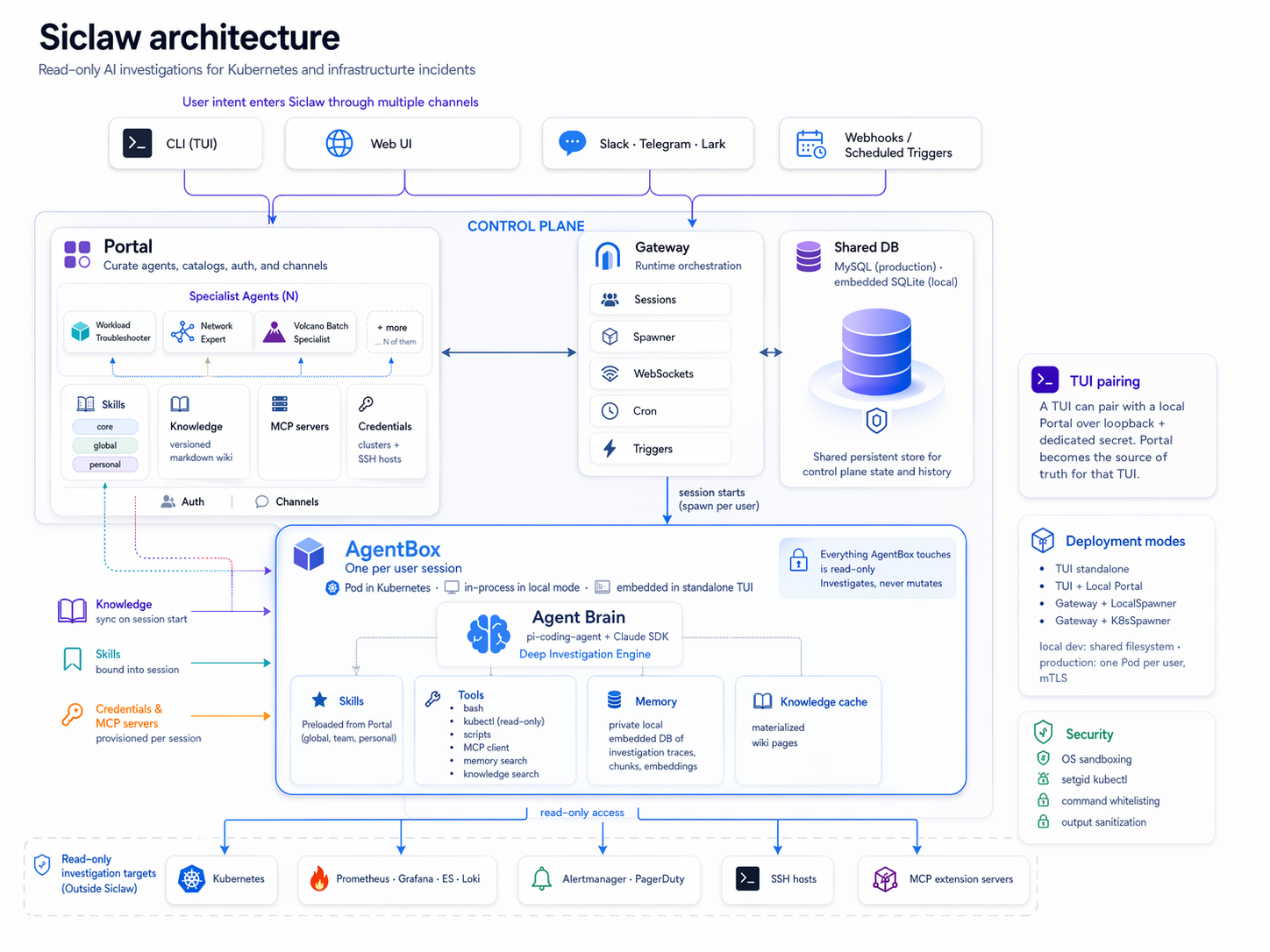
Control plane (Portal + Gateway + shared DB) stores the curated agents and their bound resources — Skills, a versioned Knowledge wiki, MCP servers, and Credentials. Each session spawns an isolated AgentBox (one Pod per user in Kubernetes, one in-process per user in local dev, embedded in the CLI for standalone TUI) where the Agent Brain runs a Deep Investigation Engine against its bound capabilities — read-only across every target it touches.
Prerequisites
- Node.js >= 22.19.0 — Download
- npm — Comes with Node.js
- kubectl — Optional, only needed if you want Siclaw to investigate Kubernetes clusters
Quick Start
Siclaw supports three deployment profiles. For local usage, start from a dedicated working directory because Siclaw stores most runtime data in .siclaw/ relative to where you launch it.
mkdir -p ~/siclaw-work
cd ~/siclaw-work
1. TUI Mode — Personal, local, lowest barrier
Run the agent directly in your terminal. No server, no database. All operations are read-only by default — safe to run on your workstation.
# Install globally
npm install -g siclaw

# Run (interactive — prompts for LLM provider on first launch)
siclaw

# Single-shot
siclaw --prompt "Why is pod nginx-abc in CrashLoopBackOff?"

# Continue last session
siclaw --continue
Paired with a local server (see profile 2 below): when siclaw local is running in the same working directory, the TUI automatically pairs with it and treats the Portal Web UI as the source of truth for skills, knowledge, credentials, agents, and LLM providers. Useful slash commands in that mode:
| Command | What it does |
|---|---|
/ls | Summary of the current session's skills / knowledge / MCP / credentials / agents |
/ls skills / /ls credentials / /ls agents / ... | Full listing for one category |
/agent | Show current Portal agent and all available ones; create / edit happens in Portal Web UI |
/setup | Read-only view of configured resources with "Open in Portal →" links |
Pass --agent <name> to scope the session to one Portal-configured agent (its bound skills / credentials / knowledge / MCP / preferred model). siclaw agents lists them non-interactively from the shell.
Build from source
git clone https://github.com/scitix/siclaw.git && cd siclaw
npm ci && make build-portal-web && npm run build
npm link                 # register `siclaw` command globally

siclaw                   # TUI mode
siclaw --prompt "..."    # single-shot mode

# Uninstall: npm unlink siclaw -g
Tip: Any OpenAI-compatible endpoint works — swap
baseUrlfor DeepSeek, Qwen, Kimi, or a local Ollama server.
2. Local Server — VM or laptop, recommended for daily use
A lightweight web UI backed by SQLite. No MySQL, no Docker required.
npm install -g siclaw

# Start the server
siclaw local

# Open http://localhost:3000
# On first visit: register the first user (becomes admin)
# Configure providers in Models
# Import kubeconfigs in Clusters
Build from source
git clone https://github.com/scitix/siclaw.git && cd siclaw
npm ci && make build-portal-web && npm run build
npm link                 # register `siclaw` command globally

siclaw local             # start local server

# Uninstall: npm unlink siclaw -g
On first launch, open the web UI and register the first user — registration is open for the very first account and that account becomes the admin. Subsequent registrations require admin authentication.
Data locations (defaults, override with env vars):
- Database:
.siclaw/data/portal.db— override withDATABASE_URL=sqlite:///custom/path.dborDATABASE_URL=mysql://... - Secrets:
.siclaw/local-secrets.json— auto-generated JWT / Runtime / Portal secrets, 0600 perms
Pairing the web UI and the CLI
siclaw local runs the Portal and makes itself available as a data
source for the plain siclaw TUI. In one terminal start the server; in
a second terminal (same working directory) start the TUI and it
auto-pairs against the running Portal.
# Terminal A — server + web UI
siclaw local

# Terminal B — TUI, same cwd
siclaw
-
Pairing anchor: cwd. Both processes read the same
.siclaw/local-secrets.jsonand the same.siclaw/data/portal.db. Running the TUI from a different directory opens a different, independent workspace — not a lost one. -
Portal is the source of truth. Providers, agents, skills, knowledge, clusters, and hosts are edited in the web UI; the TUI pulls them as an ephemeral read-only snapshot at startup. In-session slash commands like
/setupbecome read-only listings that link back to the matching Portal page. -
Edits aren't hot-reloaded. Change a skill or add a cluster in the web UI, then
Ctrl+Cand re-run the TUI to pick up the new snapshot. The snapshot is materialized to.siclaw/.portal-snapshot/and wiped on exit (SIGINT / SIGTERM / normal exit). -
Custom ports: set both env vars. The server reads
PORTAL_PORT; the TUI's snapshot probe readsSICLAW_PORTAL_PORT. Leave both unset to use the default 3000:PORTAL_PORT=8080 siclaw local SICLAW_PORTAL_PORT=8080 siclaw -
Back up the workspace by copying the entire
.siclaw/directory — DB, secrets, and any materialized snapshots all live under it. Nothing outside.siclaw/is state.
Without a running siclaw local in the same directory, siclaw falls
back to standalone file-system mode (.siclaw/config/settings.json +
first-run wizard) — identical to earlier behaviour.
3. Kubernetes — Team / enterprise
Production deployment uses Helm plus three container images: runtime, portal, and agentbox.
Build and push images if you are using your own registry:
make docker REGISTRY=registry.example.com/myteam TAG=latest
make push  REGISTRY=registry.example.com/myteam TAG=latest
Then deploy the chart with a MySQL URL:
helm upgrade --install siclaw ./helm/siclaw \
  --namespace siclaw \
  --create-namespace \
  --set image.registry=registry.example.com/myteam \
  --set image.tag=latest \
  --set database.url="mysql://user:pass@host:3306/siclaw"
The default chart exposes the Portal Service on service port 3003 and NodePort 31003. Runtime and AgentBox run as ClusterIP-only services (internal traffic).
Configuration
TUI / CLI
- TUI reads
.siclaw/config/settings.jsonin standalone mode (no local Portal running in the same cwd) - The first-run wizard can generate
settings.jsonfor you — but if asiclaw localserver is running in the same cwd, the wizard will redirect you to the Portal Web UI instead (Portal is the single source of truth in that mode) - Kubernetes credentials should be imported through
/setupin standalone TUI; in Portal-paired TUI,/setupbecomes a read-only view and mutations happen in the Web UI - Investigation traces are written to
.siclaw/traces/(relative to where Siclaw was launched)
Minimal example:
{
  "providers": {
    "default": {
      "baseUrl": "https://api.openai.com/v1",
      "apiKey": "sk-YOUR-KEY",
      "api": "openai-completions",
      "models": [{ "id": "gpt-4o", "name": "GPT-4o" }]
    }
  }
}
Local Server / Kubernetes
All configuration happens through the web UI:
- Configure LLM providers in Models
- Import kubeconfigs in Clusters
- Import SSH hosts and credentials in Hosts
- Configure Slack, Lark, Discord, and Telegram in Channels
- Configure MCP servers in MCP
- Manage users and roles in Users
- Schedule recurring investigations in My Tasks
Documentation
Tech Stack
| Layer | Technology |
|---|---|
| Runtime | Node.js 22+ (ESM-only) |
| Language | TypeScript 5.9 |
| Agent | pi-coding-agent |
| Database (portal) | MySQL (prod) or SQLite (local, via node:sqlite) — single DDL, driver chosen by DATABASE_URL scheme |
| Database (memory) | node:sqlite + FTS5 + bge-m3 embeddings |
| Frontend | React + Vite + Tailwind CSS |
| K8s Client | @kubernetes/client-node |
| MCP | @modelcontextprotocol/sdk |
| Realtime | WebSocket (ws) |
Community
- Slack — Chat with the team and other users
- GitHub Issues — Bug reports and feature requests
- GitHub Discussions — Questions, ideas, and general discussion
Contributing
See CONTRIBUTING.md for development setup, architecture overview, and pull request guidelines.
Looking for a place to start? Check out issues labeled good first issue.