
Run a fleet of coding agents. Merge real PRs.



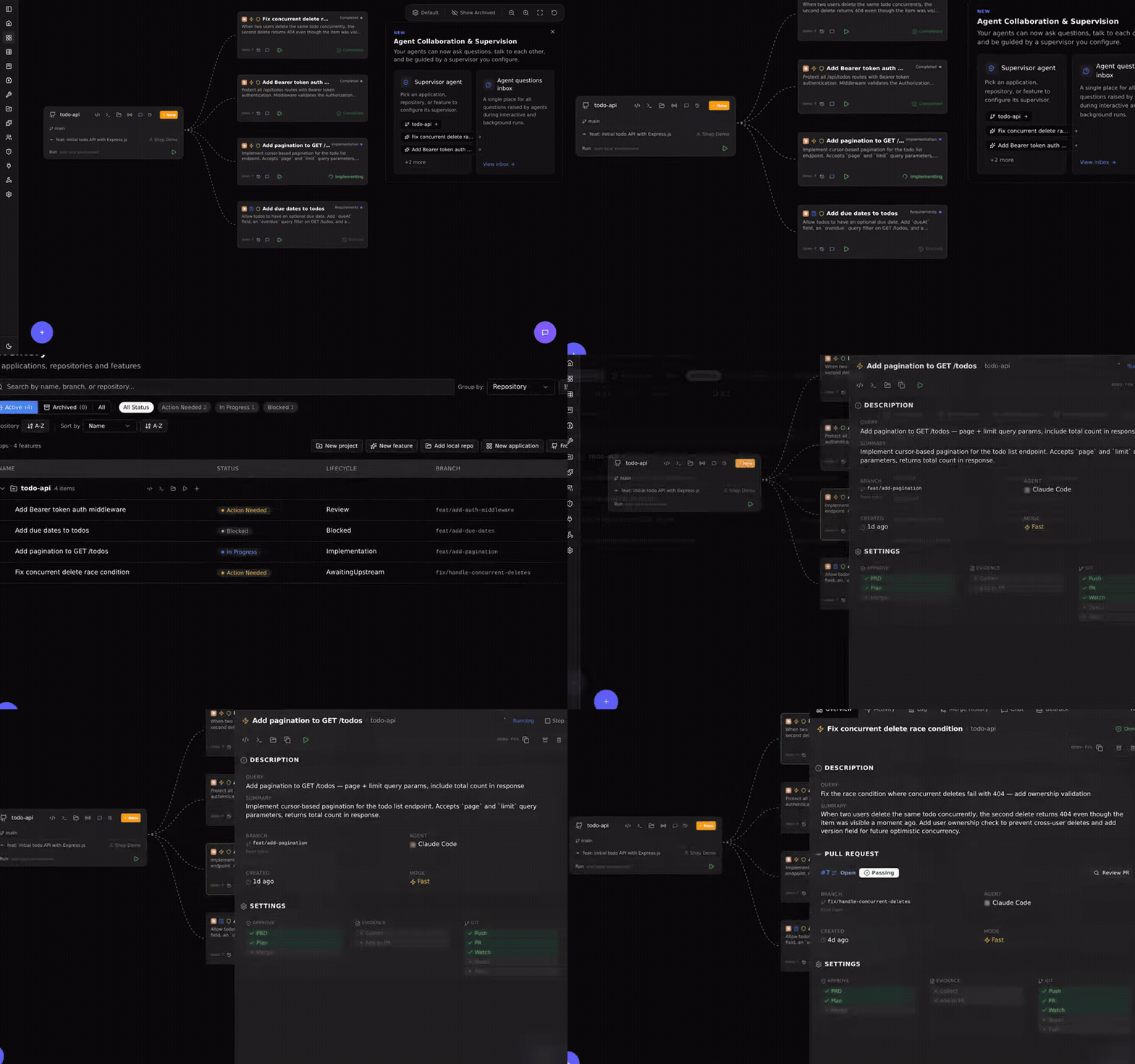
Shep is the open-source orchestrator for the autonomous development cycle. It runs parallel AI agents — Claude Code, Cursor CLI, Gemini CLI, or any agent CLI — each in its own isolated git worktree, and drives every feature from a one-line description through optional spec gates, implementation, commit, push, CI watching with auto-fix, and a draft pull request. Agent-agnostic, local-first, MIT-licensed.
Quickstart
npx @shepai/cli        # try it instantly — opens the dashboard at localhost:4050
npm i -g @shepai/cli   # or install globally
Three commands from zero to an open pull request:
npm i -g @shepai/cli
cd ~/projects/my-app
shep feat new "add a /health endpoint that returns uptime and version" --push --pr
Shep creates a worktree, runs your agent, commits, pushes, and opens a PR. Requires Node.js 22+, Git, the GitHub CLI (gh), and an authenticated agent CLI (claude, cursor, or gemini). Prefer zero install? app.shep.bot runs Shep in your browser, free.
Then go parallel:
shep feat new "add stripe payments" --push --pr
shep feat new "add dark mode toggle" --push --pr
shep feat new "fix login redirect bug" --push --pr
Three agents, three worktrees, zero branch conflicts — monitored from one place. One agent session is fine; five is chaos. Shep is the part that keeps it from being chaos.
How it works
 idea                optional spec gates       parallel agents           shep automates            you
 "add payments"  →   requirements · plan   →   each in its own       →   commit · push · PR    →   review the diff,
                     (YAML you approve)        git worktree              CI watch + auto-fix       hold the merge button
The default flow is prompt → implement → commit → push → PR. Your working directory is never touched: every feature lives in its own worktree on its own branch. If CI fails, the agent reads the logs and pushes a fix (3 retries by default, configurable). For complex features, add --no-fast to enable the full spec-driven pipeline — requirements, research, and a plan as versioned YAML artifacts, with approval gates before any code is written. See the spec-driven development guide.
Supported agents
| Agent | Support |
|---|---|
| Claude Code | Built-in |
| Cursor CLI | Built-in |
| Gemini CLI | Built-in |
| Any terminal agent CLI | Via the generic executor — if it runs in a terminal, Shep can orchestrate it |
Swap agents per feature, per repo, anytime. No lock-in at the tool layer or the model layer.
Web control center

A live graph of every repo and feature at localhost:4050 — real-time status, diff review, interactive chat, one-click open in your IDE. Everything the dashboard does, the CLI does too.
Configuration and reference
Configuration — per-feature flags and global defaults
| Flag | What it does | Default |
|---|---|---|
--push | Auto-push after implementation | off |
--pr | Auto-create PR after push | off |
--fast | Skip spec-driven phases, go straight to coding | on |
--allow-merge | Auto-merge the PR after CI passes | off |
--allow-prd / --allow-plan | Auto-approve individual spec gates | off |
--allow-all | Enable all automations | off |
--model | Choose which AI model to use | agent default |
--repo | Target a specific repository | current repo |
--attach | Attach reference files for context | — |
Set defaults once with shep settings workflow so you stop repeating flags. shep settings agent, shep settings model, and shep settings ide configure the rest.
CLI reference — core commands
shep                              Start daemon + onboarding (first run)
shep feat new <description>       Create a new feature
shep feat ls                      List features
shep feat show <id>               Show feature details
shep feat resume <id>             Resume a paused feature
shep feat approve <id>            Approve current phase (spec-driven mode)
shep feat reject <id> --feedback  Reject with feedback (spec-driven mode)
shep feat logs <id>               View feature logs
shep agent ls                     List agent runs
shep agent stop <id>              Stop a running agent immediately
shep agent logs <id>              View agent logs
shep repo ls                      List repositories
shep start [--port]               Start web daemon (default: 4050)
shep stop                         Stop the daemon
shep status                       Show daemon status and metrics
shep settings                     Launch setup wizard
Full reference: docs/cli/architecture.md
Trust and safety — what runs where, and what protects you
Shep runs entirely on your machine. All data lives in ~/.shep/ as SQLite; your code is sent only to whichever agent you configure, under that agent's own terms. Nothing is sent to Shep servers — there are none.
| Concern | How Shep handles it |
|---|---|
| Git isolation | Every feature runs in its own worktree branched from main. Your working directory is never modified. |
| Agent mistakes | Output lands as a draft PR. Your CI, linters, and security scanners run before any merge. |
| Review before merge | No code merges without your approval unless you explicitly pass --allow-merge. |
| Credentials | Shep never reads, stores, or transmits your API keys. |
| Audit trail | Every action and state transition is logged — shep feat logs <id>. |
| Emergency stop | shep agent stop <id> or the dashboard stop button. The worktree is preserved. |
Agent permissions: Shep runs your agent non-interactively, so by default it passes permission-bypass flags (e.g. --dangerously-skip-permissions for Claude Code — each agent has an equivalent). Your safety net is three layers deep: worktree isolation, draft PRs, and your CI pipeline. The bypass flag is a default, not a requirement — configure your agent's permission model independently for tighter control. Note that some agents sandbox network access by default; if npm install fails inside a feature, allow the hosts in your agent's settings.
What Shep does not protect you from: if your CI doesn't catch a vulnerability, Shep won't either. Shep is an orchestration layer, not a security scanner.
FAQ
How is this different from using an AI coding agent directly? Your agent writes the code. Shep manages everything around it: worktrees, commits, pushes, PRs, CI watching, retries. The difference is most obvious at 3-5 features in parallel.
What happens if the agent writes bad code? Shep opens a draft PR and your CI runs. If tests fail, the agent reads the logs and attempts a fix (up to 3 retries, configurable), then pauses and notifies you. Shep never merges code that fails CI.
What happens when an agent gets stuck?
The feature enters a Blocked state. You get notified and can provide feedback, restart from a checkpoint, or take over — the code is a standard git worktree on a named branch, open it in your IDE at any point.
Does this work on large codebases?
Yes. The practical limit is your agent's context window, not Shep. For monorepos, scope features with --repo.
Can I use this on a team? Shep runs locally per developer. Features are just branches and PRs — your existing review process applies.
Is my code sent anywhere? Not by Shep. It goes only to the agent you configure, under that agent's privacy terms. Shep stores everything locally.
Not in a git repo yet?
Shep initializes one for you — git init, a branch, and off it goes.
Architecture — for contributors and the curious
Clean Architecture, four layers:
| Layer | Responsibility |
|---|---|
| Domain | Business logic, TypeSpec-generated types |
| Application | Use cases, port interfaces |
| Infrastructure | SQLite, LangGraph agents, DI |
| Presentation | CLI, Web UI |
Community
Shep is open source and AI-native — one of its native abilities is helping itself onboard contributors. Clone, run pnpm dev:cli doctor, pick a good first issue, and ship a PR in under 30 minutes.
- Contributing guide — humans start here (CONTRIBUTING-AGENTS.md for AI agents)
- Good first issues — groomed, scoped, ready to pick up
- Roadmap — where Shep is going
- Architecture — how the codebase fits together
- Discord — questions, feedback, show and tell
License
MIT — see LICENSE.