 Ping Island
AI coding session monitor for the macOS menu bar
Website •
Try it •
Install •
Features •
Supported Clients •
Build •
Contributors •
Privacy
English | 简体中文





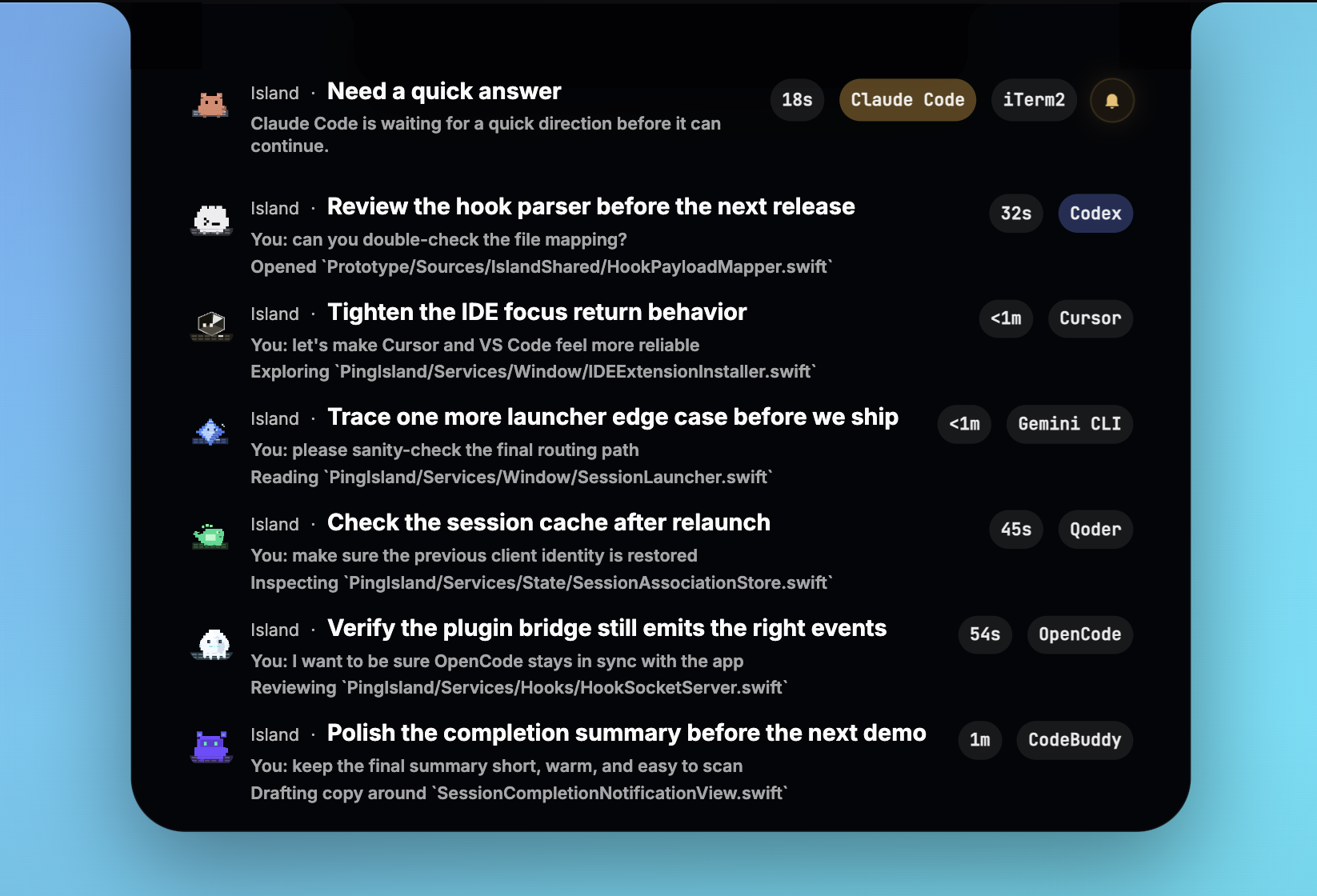
Watch active coding sessions, answer follow-up questions, and jump back to the right terminal or IDE window.
Official website: erha19.github.io/ping-island


Claude Code · Codex · Gemini CLI · Antigravity CLI · Hermes Agent · Pi Agent · Qwen Code · Kimi CLI · OpenClaw · OpenCode · Cursor · Qoder · Qoder CN · CodeBuddy · GitHub Copilot
Let’s try it!
Detach the active pet from the notch and keep session status nearby while you work across other windows.
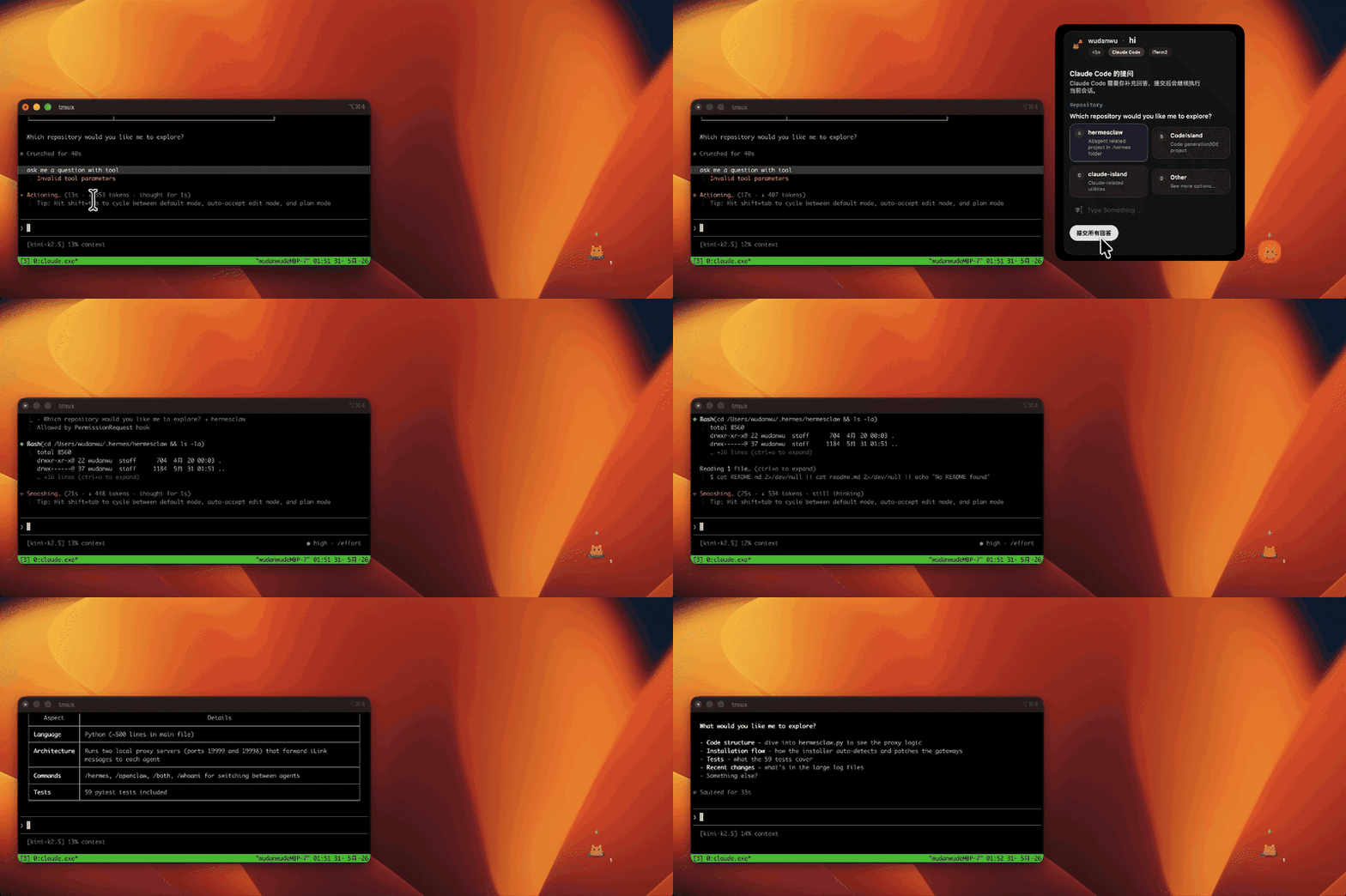
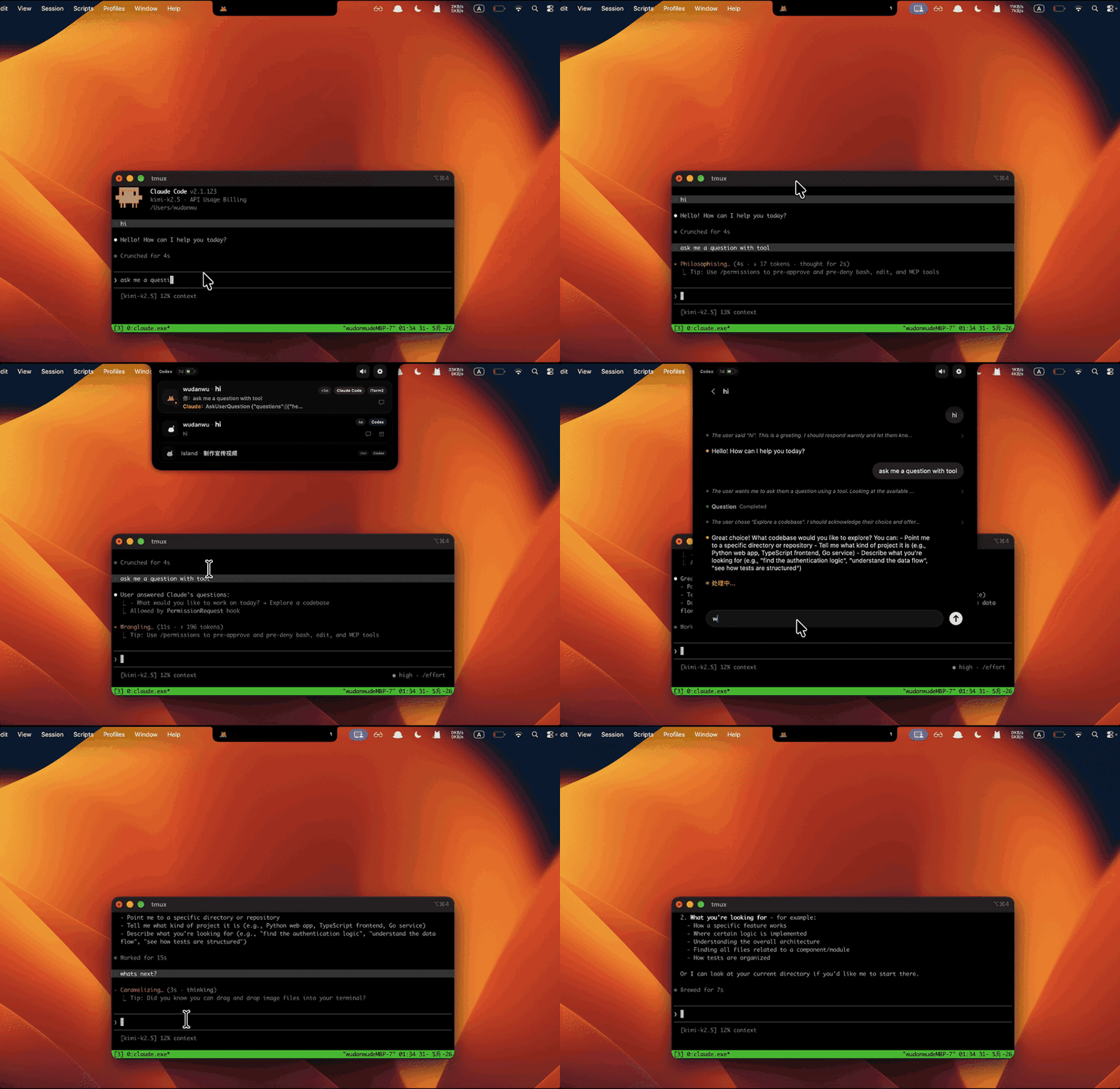
On notch-screen Macs, Ping Island expands from the notch with session context and action controls when an agent needs attention.
Installation
Install with Homebrew Cask
brew install --cask ping-island
Download a Release
- Visit the official website for the product overview and latest download link, or go straight to Releases.
- Download the latest DMG.
- Move
Ping Island.appinto your Applications folder. - Launch the app and start the clients you want Ping Island to monitor.
On first launch, macOS may ask you to confirm the app or grant Accessibility / Apple Events permissions for focus features.
Build from Source
Requires macOS 14+ and an Xcode toolchain that can build the Xcode project and the Swift 6.1 Prototype package tests.
git clone https://github.com/erha19/ping-island.git
cd ping-island

# Debug build
xcodebuild -project PingIsland.xcodeproj -scheme PingIsland -configuration Debug build

# Release build
xcodebuild -project PingIsland.xcodeproj -scheme PingIsland -configuration Release build
To create a locally shareable unsigned package for local testing:
./scripts/package-unsigned.sh
The script re-signs the built app bundle with a consistent ad-hoc signature before creating the .dmg and .zip, which helps embedded frameworks launch more reliably on another machine. The package is still unsigned for distribution and not notarized, so first launch may still require Open from Finder's context menu or manual quarantine removal.
The generated files land in releases/unsigned/ as PingIsland-<version>.dmg and PingIsland-<version>.zip.
The DMG uses the repo-tracked installer artwork at docs/images/ping-island-dmg-installer-background.png by default; set PING_ISLAND_DMG_BACKGROUND_SOURCE if you want to preview a different background locally.
To create signed and notarized release packages in GitHub Actions, configure the release secrets described in docs/sparkle-release.md and run .github/workflows/release-packages.yml against a v* tag or the manual workflow dispatch input. Official Homebrew Cask release notes are documented in docs/homebrew-cask-release.md.
The same workflow also publishes a Linux PingIslandBridge asset that Ping Island can download when bootstrapping Linux SSH hosts.
For the full notarized release flow and the GitHub Releases backed Sparkle appcast setup, see docs/sparkle-release.md.
What is Ping Island?
Ping Island is a macOS menu bar app that expands into a compact session surface when your coding agents need attention. It listens to Claude-style hooks, Codex hooks, Gemini CLI hooks, Antigravity CLI plugin hooks, Hermes Agent plugin hooks, Pi Agent extension hooks, Qwen Code hooks, Kimi CLI hooks, OpenClaw internal hooks plus session transcripts, the Codex app-server, OpenCode plugins, and compatible IDE integrations so approvals, input requests, completions, and session summaries show up without babysitting terminal tabs.
If you have seen Vibe Island, Ping Island is positioned as an independent open-source alternative in the same category: a native macOS notch/menu bar surface for monitoring and controlling AI coding sessions.
Features
Ping Island focuses on the moments that actually interrupt coding flow, then keeps them visible and actionable from a native macOS notch surface.
- Attention-first UI - Stay compact until a session needs approval, input, review, or intervention.
- Act from the notch - Approve tools, deny requests, and answer follow-up prompts without hunting through tabs.
- Claude Code auto-approve - Turn on per-session auto-approval when you want Claude Code to stop pausing on every permission request.
- One-click return - Jump back to the right iTerm2, Ghostty, Terminal.app, tmux pane, or IDE window.
- SSH terminal support - Bootstrap a remote PingIslandBridge over SSH, rewrite remote hooks to point back at your Mac, forward remote Codex app-server activity, and keep remote terminal activity visible in the same local Island UI.
- Multi-agent coverage - Track Claude Code, Codex, Gemini CLI, Antigravity CLI, Hermes Agent, Pi Agent, Qwen Code, Kimi CLI, OpenClaw, OpenCode, Cursor, Qoder, Qoder CN, CodeBuddy, WorkBuddy, GitHub Copilot, and other compatible sessions in one place.
- OpenClaw gateway support - Follow OpenClaw sessions from managed internal hooks, then refill the conversation from OpenClaw's local session transcripts so the Island UI can show the actual back-and-forth instead of a single inbound message.
- Codex hook + app-server sync - Support Codex CLI hooks, live app-server threads, and rollout parsing fallback when needed.
- Custom sounds - Pick per-event macOS sounds or import local sound packs for your own notification style.
- Custom agent mascots - Give each client its own animated mascot override across the notch, session list, and hover UI.
- Buddy detach in v0.5.0+ - Drag the active Buddy out of the notch so it can stay nearby as an independent floating companion.
- Hermes courier-fox mascot - Hermes Agent uses a gold courier fox with a winged helmet and satchel so plugin-hook sessions stay visually distinct from the Claude/Qwen family.
- Pi terminal-cloud mascot - Pi Agent uses its own terminal-cloud mascot so extension-hook sessions are easy to spot in the Island UI.
- Qwen capybara mascot - Qwen Code now ships with a mint-scarf capybara mascot tuned for prompt, reply, and notification-heavy flows.
- Kimi keyboard-orb mascot - Kimi CLI keeps its original blue keyboard-orb mascot so its hook sessions stay visually distinct in the README strip and app UI.
Supported Clients
| Client | Ingress | Focus / return path | Island capabilities |
|---|---|---|---|
| Claude Code | Claude-compatible hooks through PingIslandBridge | Terminal.app, iTerm2, Ghostty, tmux, and IDE terminals | Tool approvals, AskUserQuestion replies, compaction alerts, completion popups, auto-approve |
| Codex App + Codex CLI | Codex CLI hooks, live codex app-server, rollout parsing fallback | Codex app, terminal, tmux, and IDE terminals | Approval/input requests, live thread sync, usage snapshots, remote app-server forwarding |
| Gemini CLI | Gemini CLI hooks in ~/.gemini/settings.json | Compatible terminal hosts | Session lifecycle, tool activity, notifications, pre-compaction events |
| Antigravity CLI | Generated native plugin under ~/.gemini/antigravity-cli/plugins/ping-island/ | Compatible terminal hosts and remote SSH sessions | Model invocation, tool activity, errors, and turn-stop status while preserving Antigravity's native permission prompts |
| Hermes Agent | Official plugin hooks in ~/.hermes/plugins/ping_island/ | Hermes CLI terminal host | User prompts, tool activity, assistant replies, session-end notifications |
| Pi Agent | Official extension under ~/.pi/agent/extensions/ping_island/ | Pi Agent terminal host | Extension event forwarding, client-aware session tracking, terminal-cloud mascot |
| Qwen Code | Official hooks in ~/.qwen/settings.json | Compatible terminal hosts and remote SSH sessions | Permission prompts, notification popups, stop/session-end handling, remote hook forwarding |
| Kimi CLI | Official [[hooks]] entries in ~/.kimi/config.toml | Compatible terminal hosts | Tool activity, notifications, turn completion, session-end handling |
| OpenClaw | Managed internal hooks plus local transcript refresh | OpenClaw terminal host | Fast hook status, transcript backfill, message/session state |
| OpenCode | Generated plugin file under ~/.config/opencode/plugins/ | OpenCode app and terminal host | Plugin event forwarding into the shared Island UI |
| Cursor | Claude-compatible hooks plus optional VS Code-compatible focus extension | Cursor project window and active terminal | IDE routing, terminal focus, Claude-family session tracking |
| Qoder / Qoder CN / Qoder CLI / Qoder CN CLI / QoderWork | Managed hook profiles in ~/.qoder/settings.json, ~/.qoder-cn/settings.json, and ~/.qoderwork/settings.json | Qoder and Qoder CN windows, terminal, and supported IDE extension paths | Separate regional IDE/CLI identities, approvals where supported, notify-only handling for desktop IDEs and QoderWork |
| CodeBuddy / WorkBuddy | Managed hook profiles plus optional VS Code-compatible focus extension | App windows, terminal, and supported IDE extension paths | Claude-family session tracking, client-aware jump-back, follow-up visibility |
| GitHub Copilot | Copilot hook protocol | Compatible terminal hosts | Copilot CLI / agent hook event status |
Testing
The fastest full-repo regression path is:
./scripts/test.sh
That covers:
swift test --package-path Prototype
xcodebuild -project PingIsland.xcodeproj -scheme PingIsland -configuration Debug CODE_SIGNING_ALLOWED=NO test -only-testing:PingIslandTests
xcodebuild -project PingIsland.xcodeproj -scheme PingIsland -configuration Debug CODE_SIGN_IDENTITY=- test
Useful targeted slices:
swift test --package-path Prototype --filter IslandBridgeE2ETests
xcodebuild -project PingIsland.xcodeproj -scheme PingIsland -configuration Debug CODE_SIGNING_ALLOWED=NO test -only-testing:PingIslandTests
xcodebuild -project PingIsland.xcodeproj -scheme PingIsland -configuration Debug CODE_SIGN_IDENTITY=- test -only-testing:PingIslandUITests
If PingIslandUITests-Runner stays suspended on macOS, run the UI tests from Xcode with a valid local signing identity and check amfid / AppleSystemPolicy logs before treating it as an app regression.
Settings
Ping Island currently ships a 4-category settings panel:
- General - launch at login and baseline app behavior
- Display - notch display target and placement behavior
- Mascot - client mascot previews, per-client overrides, animation states
- Sound - event-specific sounds, sound pack mode, sound pack import
Custom Sounds
Ping Island currently supports three sound modes under Settings -> Sound:
- System sounds - choose a macOS sound for each event.
- Built-in 8-bit - use Island's bundled retro sound set, including the fixed client startup sound.
- Sound pack - load a local OpenPeon / CESP-compatible pack from disk.
Quick setup
- Open
Settings -> Sound. - Turn on
Enable sounds. - Pick the mode you want:
System soundsif you just want a different macOS sound per event.Sound packif you want fully custom audio files.
- Preview each event with the play button and leave only the event toggles you want enabled.
Import a local sound pack
- Switch
Sound modetoSound pack. - Click
Import local sound pack. - Choose a folder that contains
openpeon.json. - Pick the imported pack from the
Sound packdropdown.
Ping Island also auto-discovers packs placed under ~/.openpeon/packs and ~/.claude/hooks/peon-ping/packs.
Minimal sound pack layout
my-pack/
  openpeon.json
  session-start.wav
  attention.ogg
  complete.mp3
  error.wav
  limit.wav
{
  "cesp_version": "1.0",
  "name": "my-pack",
  "display_name": "My Pack",
  "categories": {
    "task.acknowledge": {
      "sounds": [{ "file": "session-start.wav", "label": "Session Start" }]
    },
    "input.required": {
      "sounds": [{ "file": "attention.ogg", "label": "Attention" }]
    },
    "task.complete": {
      "sounds": [{ "file": "complete.mp3", "label": "Complete" }]
    },
    "task.error": {
      "sounds": [{ "file": "error.wav", "label": "Error" }]
    },
    "resource.limit": {
      "sounds": [{ "file": "limit.wav", "label": "Limit" }]
    }
  }
}
Event mapping
Processing startedcheckstask.acknowledge, thensession.start.Attention requiredchecksinput.required.Task completedcheckstask.complete.Task errorcheckstask.error.Resource limitchecksresource.limit.
Release builds can also publish a Linux PingIslandBridge artifact alongside the macOS app packages, which Ping Island uses when bootstrapping remote SSH hosts that are not running macOS.
Sound packs can use .wav, .mp3, or .ogg files. If a selected pack does not provide a matching category for an event, Ping Island falls back to the macOS system sound selected for that event.
How It Works
Claude / Codex / Gemini CLI / Antigravity CLI / Hermes Agent / Pi Agent / Qwen Code / Kimi CLI / OpenCode / Cursor / Qoder / Qoder CN / CodeBuddy / WorkBuddy / Copilot / ...
  -> hook or app-server event
    -> Ping Island monitor + normalization layer
      -> SessionStore
        -> SessionMonitor / NotchViewModel
          -> notch, list, hover preview, completion popup
Implementation details worth knowing:
- Claude-family tools enter through managed hook files plus the embedded
PingIslandBridgelauncher. - Codex sessions can come from hook events or the live
codex app-serverwebsocket monitor. - Gemini CLI hooks are installed into
~/.gemini/settings.json; tool matchers use Gemini's regex-based hook matcher syntax. - Antigravity CLI uses a generated native plugin under
~/.gemini/antigravity-cli/plugins/ping-island/; Ping Island returnsaskfrom its observationalPreToolUsehook so Antigravity's own permission engine remains authoritative. - Pi Agent is wired through a generated TypeScript extension under
~/.pi/agent/extensions/ping_island/and forwards events through the Claude-compatible bridge with Pi-specific client metadata. - Qwen Code hooks are installed into
~/.qwen/settings.json; the bridge follows the official event names and usesStop/SessionEnd/Notificationmessages to surface popup-ready summaries in Island. - Kimi CLI hooks are installed into
~/.kimi/config.toml; Ping Island preserves unrelated TOML content and maps KimiStopto turn completion whileSessionEndcloses the session. - OpenCode is wired through a generated plugin file under
~/.config/opencode/plugins/and enabled from the documented global config at~/.config/opencode/opencode.json; legacyconfig.jsonentries are still recognized for cleanup. - Remote SSH hosts can bootstrap
PingIslandBridge, rewrite remote Claude-compatible hooks to target that bridge, and forward remote events back into the local Ping Island UI. - Focus routing spans iTerm2, Ghostty, Terminal.app, tmux, and VS Code-compatible IDE extensions.
Requirements
- macOS 14.0 or later
- Best experience on MacBooks with a notch, but external displays are supported too
- Install whichever CLI or desktop clients you want Ping Island to monitor
Contributors
Thanks to everyone who has helped shape Ping Island through code, issues, ideas, testing, docs, design feedback, and release validation.
See the full contributor history on the GitHub contributors graph.
Acknowledgments
Ping Island follows the lineage of notch-first agent monitors such as claude-island, and adapts that idea into a broader multi-client session surface with hooks, app-server sync, and IDE routing.
License
Apache 2.0 - see LICENSE.md.