Optio
Self-hosted AI engineering platform — your cluster, your agents, your code.


Optio organizes agent work into three tiers, all driven by the same trigger types, prompt-template engine, log streaming, and /api/tasks HTTP surface:
- Tasks (Repo Tasks) — turn tickets into merged pull requests. Submit a task (manually, from a GitHub Issue, Linear, Jira, or Notion), and Optio provisions an isolated environment, runs an AI agent, opens a PR, monitors CI, triggers code review, auto-fixes failures, and merges when everything passes.
- Jobs (Standalone Tasks) — reusable, parameterized agent runs with no repo checkout. Generate reports, triage alerts, audit dependencies, query a database, post to Slack — anything that doesn't need to land as a PR.
- Agents (Persistent Agents) — long-lived, named, message-driven agent processes. Each has a stable slug, an inbox, and a cyclic state machine. Wake on user messages, agent messages, webhooks, cron ticks, or ticket events. Three pod lifecycle modes (
always-on/sticky/on-demand). Address each other via an inter-agent HTTP API. See the four-agent Forge demo and the Mars Mission Control example. - Connections — give your agents access to external services. Connect Notion, Slack, Linear, GitHub, PostgreSQL, Sentry, or any MCP-compatible server, and Optio injects them into agent pods at runtime.
Tasks and Jobs are the job model — one-shot runs whose identity is the run itself. Persistent Agents are the service model — a turn is an input to the long-lived process, not the unit of work. Pick the tier by what shape your work has; see examples/ for runnable starting points and docs/tasks.md for the full breakdown.
The feedback loop is what makes Tasks different. When CI fails, the agent is automatically resumed with the failure context. When a reviewer requests changes, the agent picks up the review comments and pushes a fix. When everything passes, the PR is squash-merged and the issue is closed. You describe the work; Optio drives it to completion.
Under the hood, all task and pod state changes flow through a Kubernetes-style reconciliation control plane — a pure-decision-plus-CAS-executor loop with periodic resync that keeps runs from getting stuck on lost events.
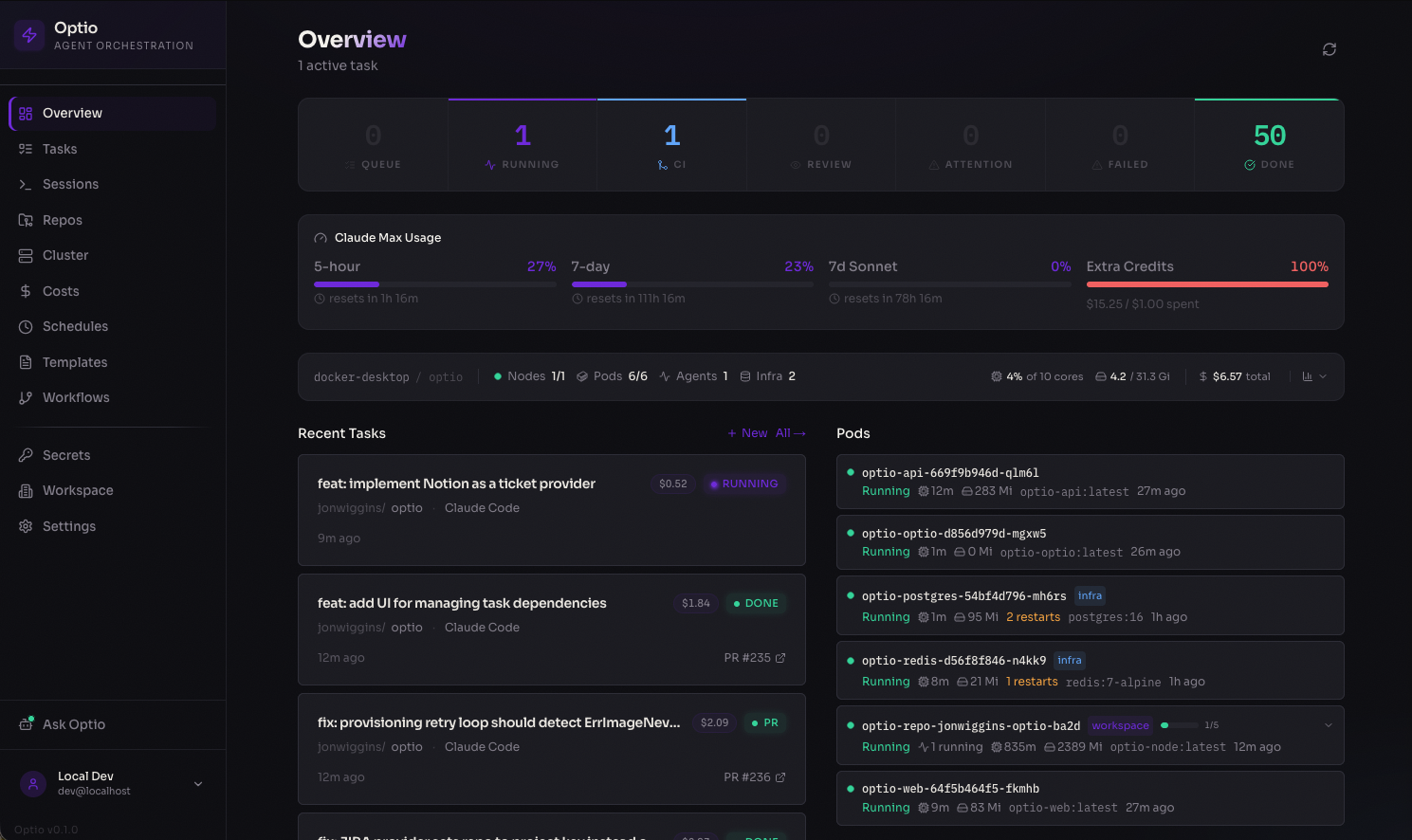
Dashboard — real-time overview of running agents, pod status, costs, and recent activity
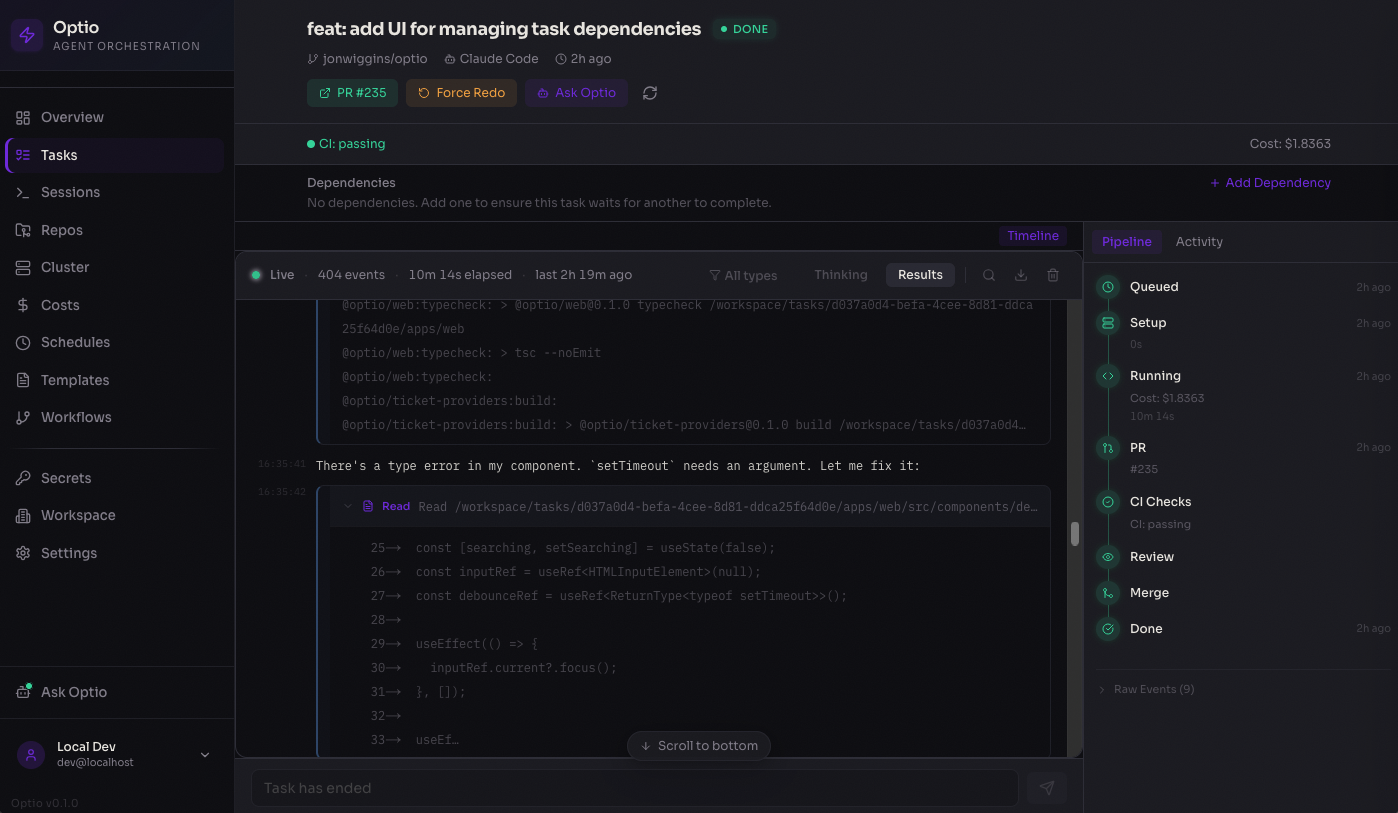
Task detail — live-streamed agent output with pipeline progress, PR tracking, and cost breakdown
Why Optio?
The AI coding agent space is crowded — Devin, Charlie Labs, Cursor background agents, Sweep, and others all promise ticket-to-PR automation. Optio's wedge is different: it runs in your infrastructure, behind whichever agent vendor you trust, against whichever Kubernetes cluster you already operate.
| Optio | Hosted alternatives |
|---|---|
| Self-hosted — runs entirely in your Kubernetes cluster (GKE, EKS, AKS, or any conformant K8s). Code, secrets, and agent logs never leave your network. | Hosted SaaS — your code goes to their cloud. |
| Multi-vendor agents — Claude Code, OpenAI Codex, GitHub Copilot, Google Gemini, OpenCode, and Cursor behind one interface. Switch per repo, or A/B agents on the same task. | Locked to a single model family or in-house agent. |
| Open source (MIT) — read the code, fork it, audit it. No black box, no vendor lock-in. | Closed source. |
| Enterprise-ready primitives out of the box — workspaces, encrypted secrets at rest (AES-256-GCM), OIDC/OAuth, Kubernetes RBAC, audit-friendly task history, and a reconciliation control plane that keeps runs from getting stuck on lost events. | Vary by vendor; often gated to enterprise tiers. |
| Standalone Tasks — not just ticket-to-PR. Reusable, parameterized agent work for ops, on-call triage, scheduled reports, and webhook-driven automation, with no repo checkout. | PR-centric; ops/automation use cases are out of scope. |
If you'd ship to a hosted agent without thinking twice, the hosted options are simpler. If shipping your repo to someone else's cloud is a non-starter — or if you want to keep your model choice open — Optio is built for you.
Who is this for?
- Security-conscious organizations — teams that can't (or won't) ship source code, secrets, or production data to a third-party AI service.
- Regulated industries — finance, healthcare, government, defense, and others where data residency, auditability, and tenancy isolation are non-negotiable.
- Teams already running Kubernetes — drop-in Helm install, BYO Postgres/Redis, integrates with your existing observability, ingress, and identity stack.
- Multi-agent shops — engineering teams evaluating multiple agent vendors and unwilling to commit to a single platform's roadmap.
- Platform teams building internal AI tooling — Optio is the orchestration layer. You bring the prompts, policies, connections, and review standards.
If none of the above describes you, a hosted product like Devin or Cursor background agents will get you to value faster. We're not trying to be everything to everyone.
How It Works
Tasks — ticket to merged PR
You create a task          Optio runs the agent           Optio closes the loop
─────────────────          ──────────────────────         ──────────────────────

  GitHub Issue              Provision repo pod             CI fails?
  Manual task       ──→     Create git worktree    ──→       → Resume agent with failure context
  Linear / Jira / Notion    Run Claude / Codex / Copilot   Review requests changes?
                            Open a PR                        → Resume agent with feedback
                                                           CI passes + approved?
                                                             → Squash-merge + close issue
- Intake — tasks come from the web UI, GitHub Issues (one-click assign), Linear, Jira, or Notion
- Provisioning — Optio finds or creates a Kubernetes pod for the repo, creates a git worktree for isolation
- Execution — the AI agent (Claude Code, OpenAI Codex, or GitHub Copilot) runs with your configured prompt, model, and settings
- PR lifecycle — Optio polls the PR every 30s for CI status, review state, and merge readiness
- Feedback loop — CI failures, merge conflicts, and review feedback automatically resume the agent with context
- Completion — PR is squash-merged, linked issues are closed, costs are recorded
Jobs — reusable agent work without a repo
You define a job            Optio triggers it              Optio runs & tracks
────────────────────        ─────────────────              ───────────────────

  Prompt template           Manual (UI / API)              Provision isolated pod
  {{PARAM}} variables  ──→  Cron schedule          ──→     Execute agent with params
  Agent + model config      Webhook from external          Stream logs in real time
  Budget & retry limits     Ticket events                  Track cost & token usage
                                                           Auto-retry on failure
Jobs (Standalone Tasks) run an agent in an isolated pod with no git checkout. Define a prompt template with {{PARAM}} placeholders, configure triggers (manual, cron schedule, webhook, or ticket), and let Optio handle execution, retries, and cost tracking. Tasks can also be saved as blueprints with the same trigger types — see docs/tasks.md.
Agents — long-lived, message-driven
You create an agent         Wake sources                   Per turn
──────────────────────      ─────────────────              ──────────────────────

  System prompt             User chat message              Drain pending messages
  agents.md operator   ──→  Inter-agent message    ──→     Render into prompt
  manual                    Cron tick / webhook            Run one turn → halt
  Pod lifecycle mode        Ticket event                   Repeat on next wake
Persistent Agents (PAs) are long-lived processes addressable by other agents in the same workspace. Each PA executes one turn of work, halts, and waits to be re-woken by a message or trigger event. Pod lifecycle is configurable per agent: always-on (lowest latency, highest cost), sticky (warm for an idle window after each turn — the default), or on-demand (cold-start every turn). PAs reuse the existing trigger system, the reconciler, and the pod-pool primitives. See docs/persistent-agents.md and the examples/persistent-agents directory.
Connections — extend agent capabilities
Connections give your agents access to external tools and data at runtime. Configure a provider once, assign it to repos or agents, and Optio injects MCP servers into agent pods automatically.
Built-in providers: Notion, GitHub, Slack, Linear, PostgreSQL, Sentry, Filesystem, plus custom MCP servers and HTTP APIs.
Key Features
- Autonomous feedback loop — auto-resumes the agent on CI failures, merge conflicts, and review feedback; auto-merges when everything passes
- Three Task tiers — Tasks land code via PRs; Jobs run agents in empty pods for reports, triage, and ops; Agents are long-lived, message-driven services. All three share triggers (manual / schedule / webhook / ticket), prompt templates, the reconciler, and the unified
/api/tasksHTTP layer - Inter-agent messaging — Persistent Agents address each other via
/api/internal/persistent-agents/*for direct messages and broadcasts, enabling multi-agent teams (see the Forge demo) - Connections — plug external services (Notion, Slack, Linear, GitHub, PostgreSQL, Sentry, custom MCP servers) into agent pods with fine-grained access control per repo and agent type
- Pod-per-repo architecture — one long-lived Kubernetes pod per repo with git worktree isolation, multi-pod scaling, and idle cleanup
- Code review agent — automatically launches a review agent as a subtask, with a separate prompt and model
- Multi-agent support — run Claude Code, OpenAI Codex, GitHub Copilot, Google Gemini, OpenCode, or Cursor with per-repo model and prompt configuration
- GitHub Issues, Linear, Jira, and Notion intake — assign issues to Optio from the UI or via ticket sync
- Reconciliation control plane — K8s-style pure-decision-plus-CAS-executor loop with periodic resync over four
RunKinds (repo,standalone,pr-review,persistent-agent); keeps state from getting stuck on lost events - Real-time dashboard — live log streaming, pipeline progress, cost analytics, and cluster health
Architecture
┌──────────────┐     ┌────────────────────┐     ┌────────────────────────────┐
│   Web UI     │────→│    API Server      │────→│      Kubernetes            │
│   Next.js    │     │    Fastify         │     │                            │
│   :3100      │     │                    │     │  ┌── Repo Pod A ────────┐  │
│              │←ws──│  Workers:          │     │  │ clone + sleep        │  │
│  Run         │     │  ├─ Task Queue     │     │  │ ├─ worktree 1  ⚡     │  │
│   Tasks      │     │  ├─ PR Watcher     │     │  │ ├─ worktree 2  ⚡     │  │
│   Jobs       │     │  ├─ Workflow Queue │     │  │ └─ worktree N  ⚡     │  │
│   Reviews    │     │  ├─ PA Worker      │     │  └──────────────────────┘  │
│   Issues     │     │  ├─ Reconciler     │     │  ┌── Job Pod ───────────┐  │
│   Scheduled  │     │  ├─ Health Mon     │     │  │ isolated agent  ⚡    │  │
│  Live        │     │  └─ Ticket Sync    │     │  └──────────────────────┘  │
│   Agents     │     │                    │     │  ┌── Persistent Agent ──┐  │
│   Sessions   │     │  Services:         │     │  │ long-lived; turns   ⚡│  │
│  Library     │     │  ├─ Repo Pool      │     │  │ wake on messages     │  │
│   Prompts    │     │  ├─ Workflow Pool  │     │  └──────────────────────┘  │
│   Repos      │     │  ├─ PA Pool        │     │                            │
│   Connections│     │  ├─ Connections    │     │  MCP servers injected via  │
│              │     │  ├─ Review Agent   │     │  Connections at runtime    │
│              │     │  └─ Auth/Secrets   │     │                            │
└──────────────┘     └─────────┬──────────┘     └────────────────────────────┘
                               │                  ⚡ = Claude / Codex / Copilot / Gemini / OpenCode / Cursor
                        ┌──────┴──────┐
                        │  Postgres   │  Tasks, workflows, persistent agents,
                        │             │  inboxes, connections, logs, secrets
                        │  Redis      │  Job queue, pub/sub, live streaming
                        └─────────────┘
Task lifecycle
  ┌──────────────────────────────────────────────────┐
  │                     INTAKE                       │
  │                                                  │
  │   GitHub Issue ───→ ┌──────────┐                 │
  │   Manual Task ───→  │  QUEUED  │                 │
  │   Ticket Sync ───→  └────┬─────┘                 │
  └───────────────────────────┼──────────────────────┘
                              │
  ┌───────────────────────────┼──────────────────────┐
  │                 EXECUTION ▼                      │
  │                                                  │
  │   ┌──────────────┐    ┌─────────────────┐        │
  │   │ PROVISIONING │───→│     RUNNING     │        │
  │   │ get/create   │    │  agent writes   │        │
  │   │ repo pod     │    │  code in        │        │
  │   └──────────────┘    │  worktree       │        │
  │                       └───────┬─────────┘        │
  └───────────────────────────────┼──────────────────┘
                                  │
                ┌─────────────┐   │   ┌──────────────────┐
                │   FAILED    │←──┴──→│    PR OPENED     │
                │             │       │                  │
                │ (auto-retry │       │  PR watcher      │
                │  if stale)  │       │  polls every 30s │
                └─────────────┘       └─────────┬────────┘
                                                │
  ┌─────────────────────────────────────────────┼─────────┐
  │                 FEEDBACK LOOP               │         │
  │                                             │         │
  │   CI fails?  ────────→  Resume agent  ←─────┤         │
  │                          to fix build       │         │
  │                                             │         │
  │   Merge conflicts? ──→  Resume agent  ←─────┤         │
  │                          to rebase          │         │
  │                                             │         │
  │   Review requests ───→  Resume agent  ←─────┤         │
  │   changes?               with feedback      │         │
  │                                             │         │
  │   CI passes + ───────→  Auto-merge    ──────┤         │
  │   review done?           & close issue      │         │
  │                                             ▼         │
  │                                  ┌──────────────┐     │
  │                                  │ COMPLETED    │     │
  │                                  │ PR merged    │     │
  │                                  │ Issue closed │     │
  │                                  └──────────────┘     │
  └───────────────────────────────────────────────────────┘
Quick Start
Prerequisites
- Kubernetes v1.33+ — required for post-quantum TLS on the control plane. v1.33 is the first release built on Go 1.24, which enables hybrid X25519MLKEM768 key exchange automatically. Earlier versions run but do not negotiate post-quantum TLS between Optio and the Kubernetes API server.
- Docker Desktop with Kubernetes enabled (Settings → Kubernetes → Enable)
- Node.js 22+ and pnpm 10+
- Helm (
brew install helm)
Setup
git clone https://github.com/jonwiggins/optio.git && cd optio
./scripts/setup-local.sh
That's it. The setup script installs dependencies, builds all Docker images (API, web, and agent presets), deploys the full stack to your local Kubernetes cluster via Helm, and installs metrics-server.
Web UI ...... http://localhost:30310
API ......... http://localhost:30400
Open the web UI and the setup wizard will walk you through configuring GitHub access, agent credentials (API key or Max/Pro subscription), and adding your first repository.
Updating
./scripts/update-local.sh
Pulls latest code, rebuilds images, applies Helm changes, and rolling-restarts the deployments.
Teardown
helm uninstall optio -n optio
Project Structure
apps/
  api/          Fastify API server, BullMQ workers (incl. reconciler,
                persistent-agent worker), WebSocket endpoints, standalone-task
                engine, connection service, review service, OAuth
  web/          Next.js dashboard with real-time streaming, cost analytics,
                Tasks / Jobs / Reviews / Issues / Agents / Sessions surfaces,
                connection catalog
  site/         Documentation site (GitHub Pages)
  cli/          Terminal client for Optio

packages/
  shared/             Types, task state machine, prompt templates, error classifier
  container-runtime/  Kubernetes pod lifecycle, exec, log streaming
  agent-adapters/     Claude Code + Codex + Copilot + Gemini + OpenCode + Cursor adapters
  ticket-providers/   GitHub Issues, Linear, Jira, Notion

images/               Container Dockerfiles: base, node, python, go, rust, full
helm/optio/           Helm chart for production Kubernetes deployment
scripts/              Setup, init, and entrypoint scripts
GitHub App Setup
Optio can use a GitHub App instead of a Personal Access Token for GitHub operations. This provides user-scoped access (respecting CODEOWNERS, branch protection, and repository permissions), automatic token refresh, and clear attribution on PRs and commits.
Creating the GitHub App
Register a new GitHub App at https://github.com/organizations/{org}/settings/apps/new with these settings:
Repository permissions:
| Permission | Access | Used for |
|---|---|---|
| Contents | Read & Write | git clone, push, branch management |
| Pull requests | Read & Write | create PRs, post comments, merge |
| Issues | Read & Write | issue sync, label management |
| Checks | Read | CI status polling in PR watcher |
| Metadata | Read | repo listing, auto-detection |
Account permissions:
| Permission | Access | Used for |
|---|---|---|
| Email addresses | Read | user email for login (recommended) |
Organisation permissions:
| Permission | Access | Used for |
|---|---|---|
| Members | Read | repo listing (optional) |
Other settings:
- Callback URL:
{PUBLIC_URL}/api/auth/github/callback - Request user authorization (OAuth) during installation: Yes
- Expire user authorization tokens: Yes (recommended, 8-hour lifetime with refresh)
- Webhook: Can be left disabled (Optio uses polling)
Configuration
After creating the app and installing it on your organisation, configure Optio via Helm values:
github:
  app:
    id: "123456" # App ID (from app settings page)
    clientId: "Iv1.abc123" # Client ID (for user OAuth login)
    clientSecret: "..." # Client secret
    installationId: "789" # Installation ID (from org install URL)
    privateKey: | # PEM private key (for server-side tokens)
      -----BEGIN RSA PRIVATE KEY-----
      ...
      -----END RSA PRIVATE KEY-----
When configured, users who log in via GitHub get a user access token that is used for all their git and API operations. Background workers (PR watcher, ticket sync) use the app's installation token. If the GitHub App is not configured, Optio falls back to the GITHUB_TOKEN PAT.
Using an existing secret
If you manage secrets externally (e.g., with external-secrets-operator, sealed-secrets, or vault-injector), you can reference an existing Kubernetes Secret instead of providing the values inline:
github:
  app:
    existingSecret: "my-github-app-secret"
The secret must contain these keys: GITHUB_APP_ID, GITHUB_APP_CLIENT_ID, GITHUB_APP_CLIENT_SECRET, GITHUB_APP_INSTALLATION_ID, GITHUB_APP_PRIVATE_KEY.
Production Deployment
Optio ships with a Helm chart for production Kubernetes clusters. Three installation methods are available:
Install from Helm repository (recommended)
helm repo add optio https://jonwiggins.github.io/optio
helm repo update
helm install optio optio/optio -n optio --create-namespace \
  --set encryption.key=$(openssl rand -hex 32) \
  --set postgresql.enabled=false \
  --set externalDatabase.url="postgres://..." \
  --set redis.enabled=false \
  --set externalRedis.url="redis://..." \
  --set ingress.enabled=true \
  --set ingress.hosts[0].host=optio.example.com
Install from OCI registry
helm install optio oci://ghcr.io/jonwiggins/optio -n optio --create-namespace \
  --set encryption.key=$(openssl rand -hex 32) \
  --set postgresql.enabled=false \
  --set externalDatabase.url="postgres://..." \
  --set redis.enabled=false \
  --set externalRedis.url="redis://..." \
  --set ingress.enabled=true \
  --set ingress.hosts[0].host=optio.example.com
Install from source
git clone https://github.com/jonwiggins/optio.git && cd optio
helm install optio helm/optio -n optio --create-namespace \
  --set encryption.key=$(openssl rand -hex 32) \
  --set postgresql.enabled=false \
  --set externalDatabase.url="postgres://..." \
  --set redis.enabled=false \
  --set externalRedis.url="redis://..." \
  --set ingress.enabled=true \
  --set ingress.hosts[0].host=optio.example.com
See the Helm chart values for full configuration options including OAuth providers, resource limits, and agent image settings.
Tech Stack
| Layer | Technology |
|---|---|
| Monorepo | Turborepo + pnpm |
| API | Fastify 5, Drizzle ORM, BullMQ |
| Web | Next.js 15, Tailwind CSS 4, Zustand |
| Database | PostgreSQL 16 |
| Queue | Redis 7 + BullMQ |
| Runtime | Kubernetes (Docker Desktop for local dev) |
| Deploy | Helm chart |
| Auth | Multi-provider OAuth (GitHub, Google, GitLab) |
| CI | GitHub Actions (format, typecheck, test, build-web, build-image) |
| Agents | Claude Code, OpenAI Codex, GitHub Copilot, Google Gemini, OpenCode, Cursor |
Contributing
See CONTRIBUTING.md for development setup, workflow, and conventions.