OpenVision
The open-source iOS app connecting Meta Ray-Ban smart glasses to AI assistants — cloud or fully on-device.
Your glasses. Your AI. Your rules.


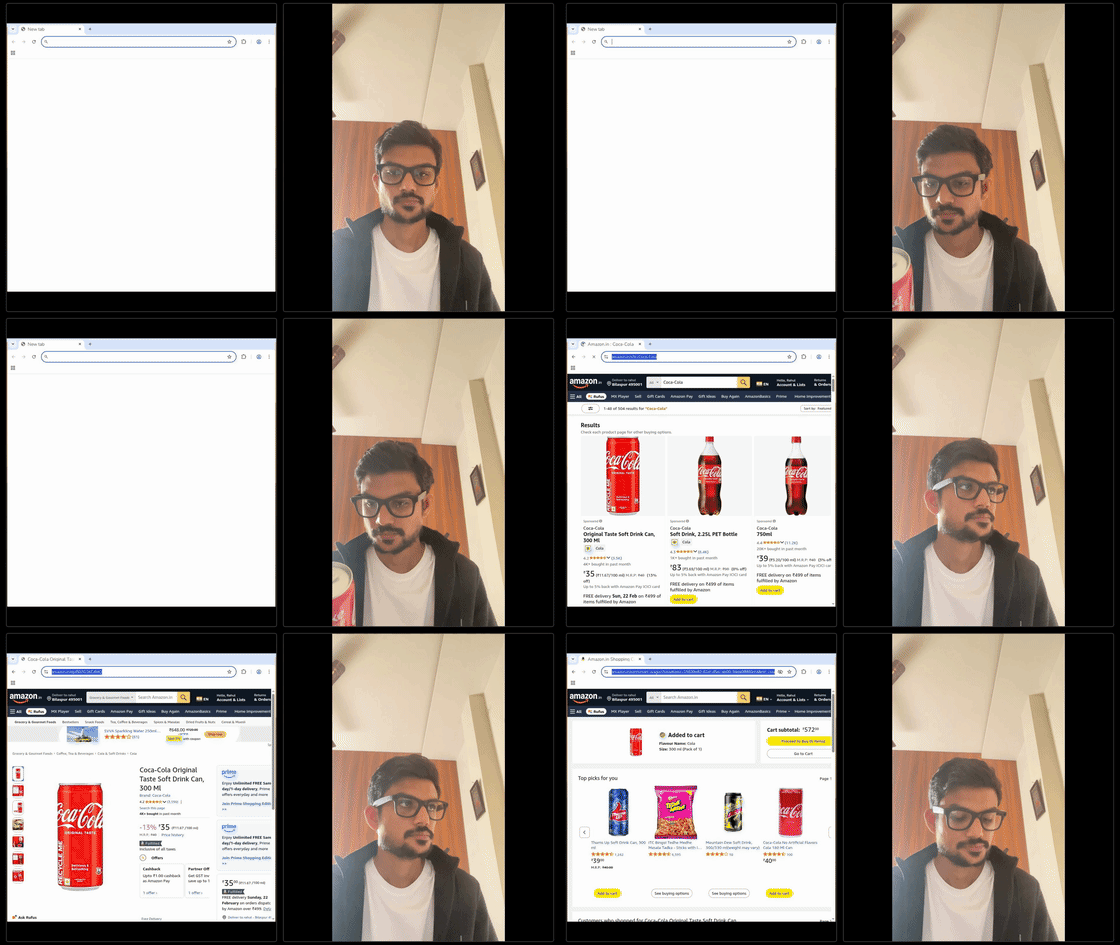
Demo
What Can You Do?
"Ok Vision, what am I looking at?"
| Use Case | Example |
|---|---|
| Instant Translation | Point at a menu or sign abroad and get real-time translation |
| Hands-Free Cooking | "What's the next step?" while your hands are covered in dough |
| Smart Shopping | "Is this a good deal?" - get price comparisons and reviews |
| Travel Guide | "Tell me about this building" - instant history and facts |
| Accessibility | Describe surroundings, read text aloud, identify objects |
| Meeting Assistant | "Remember this person is John from Marketing" |
| Learning | "What plant is this?" - identify flora, fauna, landmarks |
| DIY Helper | "How do I fix this?" - show the problem, get step-by-step help |
| Fitness Coach | "Is my form correct?" - real-time posture feedback |
With OpenClaw's 56+ tools: Send emails, control smart home, set reminders, search the web - all hands-free through your glasses.
Features
Five AI Backends — Cloud or Fully On-Device
- Local (MLX): A choice of on-device models via Apple MLX — Qwen 2.5 (0.5B/3B), Gemma 2 2B, Gemma 4 E2B, SmolVLM2 2.2B — so you can trade capability for memory/speed. Private, offline, zero API cost. Pick SmolVLM2 to unlock on-device vision — photo Q&A and a fully-offline live video mode (see below).
- Apple Intelligence: Apple's on-device Foundation Model (iOS 26+). No download, no memory pressure (OS-managed), private and offline. Uses guided generation + Apple's native tool-calling.
- OpenClaw: Wake word activation, 56+ tools, task execution via WebSocket
- Gemini Live: Real-time voice + vision with native audio streaming
- OpenAI: GPT-4o text + vision over the Chat Completions API — works with any OpenAI-compatible endpoint (OpenRouter, Groq, local servers, etc.). Also drives live video via the Realtime API (
gpt-realtime) — continuous voice + camera frames (see below).
Live Video — Real-Time Voice + Vision
Say "Ok Vision, start video stream" to enter a live mode where the glasses camera stays on and the AI answers questions about what you're seeing. Ask freely — no wake word between questions — until you say "stop video". Live video routes to whichever backend you've selected:
- Gemini Live — native continuous audio + 1fps video (cloud).
- OpenAI — the Realtime API (
gpt-realtime): streaming voice + camera frames over WebSocket. Uses the same OpenAI key/base URL you already set (so OpenAI-compatible gateways work too). - Local (SmolVLM2) — fully on-device live video: Apple speech-to-text in, on-device SmolVLM2 answers on the latest frame, spoken back with your chosen voice. No cloud, no cost, works with no signal.
On-Device Photos (SmolVLM2)
With SmolVLM2 selected as your local model, "Ok Vision, take a photo and tell me what this is" captures a frame from the glasses and answers entirely on-device — nothing leaves the phone. Other local models stay text-only and hand camera questions to a cloud backend. (Images are resized on-device to keep the vision encoder within iOS memory limits.)
On-Device Neural Voice (Kokoro)
- A natural, offline, private voice (Kokoro-82M) running on-device via MLX — selectable from a Speech Engine dropdown with a voice picker.
- Apple's system voice stays the default (with Premium/Enhanced voice support); Kokoro is the upgrade when you want lifelike speech with nothing leaving the phone.
Agentic Web Search — Real Live Information
- The models search the web whenever they're unsure or asked about current things — news, weather, prices, scores — and never answer "I can't access real-time data" without trying.
- Tavily (free tier) returns real live content for the model to summarize; DuckDuckGo is the keyless fallback.
- Smart flow: local models reformulate + retry a weak query; the OpenAI backend runs a real function-calling loop (call
web_search→ refine → answer).
Conversation Memory
- Multi-turn context on the on-device and OpenAI backends: "What's the capital of France?" → "What's its population?" just works.
- Bounded per session so local memory stays safe; Apple keeps context via a reused native session.
Hands-Free Productivity Tools
- Run real actions by voice: timers, Pomodoro sessions, reminders (Apple Reminders), calendar events (read today/upcoming, add), notes (auto-tagged with place + time), and copy to clipboard.
- Built on stable Apple frameworks (EventKit, UserNotifications, CoreLocation, UIPasteboard) — deterministic, no hallucination surface.
- Pixel-perfect times: the tool does the date math, not the model. Say "remind me at 6 PM" and it lands at exactly 6:00 PM — even on the tiny on-device model.
- One tool registry, four backends: OpenAI and Gemini Live (function-calling), Apple Intelligence (
Toolprotocol), and on-device Gemma 4 (JSON tool-calls) all share the same tools. - See docs/native-tools.md for the full design.
On-Device Face Recognition (Apple Vision)
- Teach it faces hands-free: "Ok Vision, remember this person as Sara"
- Recognize them later: "Ok Vision, who is this?"
- Runs entirely on-device (Apple Vision
computeDistance) — no cloud, no photos leave your phone - Intent is parsed by the on-device model (agentic) — any phrasing works, and it only triggers for a person actually in view
Smart Voice Control
- Reliable wake word activation ("Ok Vision") for privacy — primed recognition + self-restart so it keeps listening (survives idle, replies, and glasses off/on)
- Barge-in support - interrupt AI anytime by saying "Ok Vision"
- Conversation mode - follow-up questions without wake word
- "Ok Vision stop" - stop AI mid-speech
- Audio routes correctly whether you're using the glasses or the phone alone (loud speaker, not the earpiece)
On-Device Model Management
- Pick a local model, download it on demand, and delete it to reclaim storage anytime from Settings — swap between a tiny 0.5B model and a larger one as you like.
Glasses Integration
- Photo capture on voice command ("take a photo")
- Live video streaming to Gemini (1fps)
- Seamless glasses registration via Meta AI app
Production-Ready
- Auto-reconnect with exponential backoff (12 attempts)
- Network monitoring (auto-pause on WiFi drop)
- App lifecycle handling (suspend/resume connections)
- Secure credential storage
Zero Hardcoding
- All API keys configurable in-app
- No code changes needed to use
- Example config files included
Screenshots
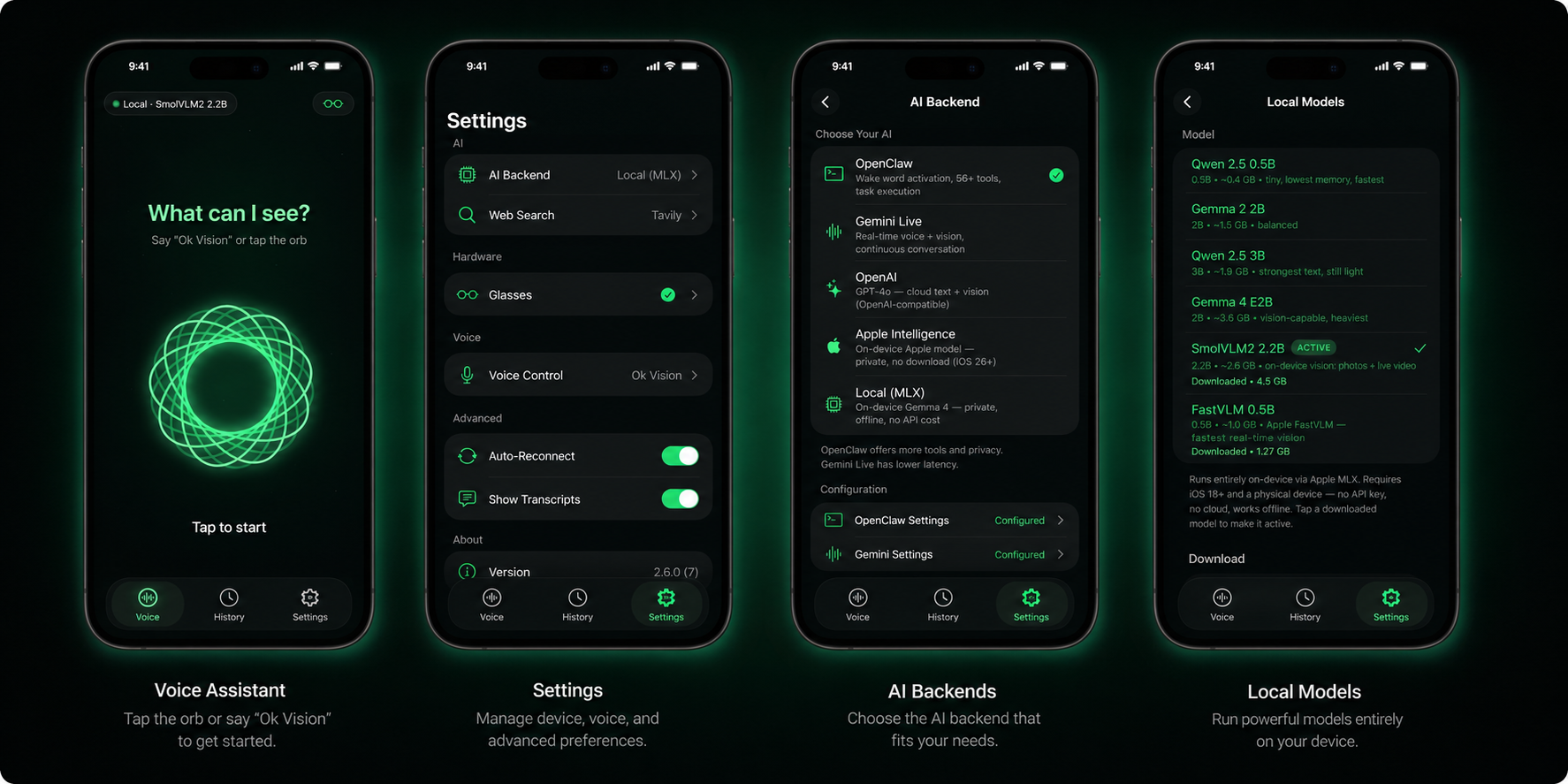
| Screen | Description |
|---|---|
| Voice Assistant | Tap the orb or say "Ok Vision" — live transcripts, distinct listening/thinking/speaking states |
| Settings | Configure AI backend, web search, glasses, voice control, and advanced options |
| AI Backends | Choose Local (MLX), Apple Intelligence (on-device), OpenClaw (tools), Gemini Live (low latency), or OpenAI |
| Local Models | Download and manage on-device models (Qwen, Gemma, SmolVLM2, FastVLM) with real sizes and one-tap switching |
Quick Start
Prerequisites
- macOS with Xcode 15+
- Physical iOS 18+ device (simulator doesn't support Bluetooth; on-device MLX models need iOS 18)
- Meta Ray-Ban smart glasses
- Meta Developer account for glasses registration
- An AI backend — one of:
- Local (MLX) — no account/key needed; a choice of on-device models (Bonsai 8B, Qwen 2.5, Gemma, SmolVLM). Runs on a recent iPhone (e.g. 15 Pro/16/17)
- Apple Intelligence — no key or download; needs iOS 26+ on an Apple-Intelligence device (iPhone 15 Pro and newer)
- OpenClaw instance
- Gemini API key
- OpenAI API key (or any OpenAI-compatible endpoint)
Step 1: Clone & Configure
git clone https://github.com/rayl15/OpenVision.git
cd OpenVision

# Copy config templates
cp Config.xcconfig.example Config.xcconfig
cp OpenVision/Config/Config.swift.example OpenVision/Config/Config.swift
Step 2: Get Meta Credentials
- Go to Meta Developer Console
- Create an app or use existing one
- Enable "Wearables" capability
- Copy your App ID and Client Token
Step 3: Edit Config.xcconfig
# Your Apple Team ID (from Xcode or Apple Developer Portal)
DEVELOPMENT_TEAM = ABC123XYZ

# Your app's bundle identifier
PRODUCT_BUNDLE_IDENTIFIER = com.yourname.openvision

# Meta App ID from developer console
META_APP_ID = 1234567890

# Client Token - MUST be in this format: AR|APP_ID|TOKEN
CLIENT_TOKEN = AR|1234567890|abcdef123456789

# URL scheme for Meta AI callback
APP_LINK_URL_SCHEME = openvision
Step 4: Build & Run
brew install xcodegen                          # one-time
xcodebuild -downloadComponent MetalToolchain   # one-time (~688 MB, for the on-device AI shaders)

xcodegen generate
open OpenVision.xcodeproj
- Enable Developer Mode in the Meta AI app (Settings → About → tap the version 5×)
- Select your iOS device (not simulator) and unlock it
- Build and run (⌘R)
- On first launch, go to Settings → Glasses → Register
- This opens Meta AI app to grant access
- Return to OpenVision
Full instructions, CLI build commands, and troubleshooting: SETUP.md
Step 5: Configure AI Backend
For Gemini Live:
- Get API key from AI Studio
- Settings → AI Backend → Gemini Settings
- Paste your API key
For OpenClaw:
- Install OpenClaw
- Settings → AI Backend → OpenClaw Settings
- Enter gateway URL and auth token
For OpenAI (text, vision + live video):
- Get an OpenAI API key
- Settings → AI Backend → OpenAI, paste the key (and optionally a base URL / models)
- Say "Ok Vision, start video stream" to use live video over the Realtime API
For on-device vision (SmolVLM2):
- Settings → AI Backend → Local (MLX)
- Pick SmolVLM2 2.2B and tap download (~2.6 GB, one time)
- Say "take a photo and tell me what this is", or "start video stream" — all on-device
Usage
OpenClaw Mode (Default)
You: "Ok Vision"                    → Wake word activates listening
You: "What's the weather today?"    → AI processes and responds via TTS
You: "Take a photo"                 → Captures from glasses, analyzes
You: "Ok Vision stop"               → Interrupts AI mid-speech
[Silence for 30s]                   → Conversation ends
Live Video Mode (Gemini · OpenAI · Local)
Works with whichever backend is selected — Gemini Live, OpenAI Realtime, or fully on-device SmolVLM2.
You: "Ok Vision, start video stream"     → Enters live video mode (uses your selected backend)
[Glasses camera streams; the AI sees continuously]
You: "What am I looking at?"             → AI sees and responds
You: "And is this a good deal?"          → Keep asking — no wake word needed
You: "Stop video"                        → Exits live video mode
On the Local (SmolVLM2) backend this runs entirely on-device (speak toward the phone; audio and vision never leave it). On Gemini/OpenAI the camera frames stream to the cloud provider.
On-Device Photo (SmolVLM2)
[Select Local → SmolVLM2 in Settings]
You: "Ok Vision, take a photo and tell me what this is"
[Glasses capture a frame → SmolVLM2 answers on-device → spoken reply]
Voice Commands
| Command | Action |
|---|---|
| "Ok Vision" | Activate listening (wake word) |
| "Ok Vision stop" | Stop AI while speaking |
| "Take a photo" | Capture and analyze view (on-device with SmolVLM2, else cloud) |
| "What do you see?" | Describe current view |
| "Remember this person as Sara" | Enroll a face (on-device) |
| "Who is this?" | Identify the person in view (on-device) |
| "Forget Sara" / "Who do you know?" | Remove / list known faces |
| "What's today's news?" / "Weather in Tokyo?" | Web search (on-device backends) |
| "What's its population?" (as a follow-up) | Uses conversation memory |
| "Set a 5 minute timer" / "Start a Pomodoro" | Timer / focus session (native tools) |
| "Remind me to call mom at 6 PM" | Reminder in Apple Reminders (exact time) |
| "Add a meeting tomorrow at 9:30am" / "What's on my calendar today?" | Calendar add / read |
| "Note that I parked in lot B" / "Search my notes for parking" | Notes, auto-tagged with place + time |
| "Start video stream" | Enter live video mode (Gemini / OpenAI Realtime / on-device SmolVLM2) |
| "Stop video" | Exit live video mode |
Commands are routed by the on-device model, so you don't need exact wording — natural phrasing works, and it searches the web on its own when it doesn't know.
AI Backend Comparison
| Backend | Voice | Vision | Cost / Privacy | Best For |
|---|---|---|---|---|
| Local (MLX) | Wake word + Apple STT | On-device photo + live video (SmolVLM2); else via a cloud backend | Free · fully on-device | Private chat, face commands, offline vision — pick Qwen/Gemma/SmolVLM |
| Apple Intelligence | Wake word + Apple STT | via a cloud backend | Free · on-device, no download | Private chat on iOS 26+ devices, lowest setup |
| OpenClaw | Wake word + Apple STT | Photo on request | Self-hosted | Tasks, 56+ tools, control |
| Gemini Live | Native VAD (always on) | Continuous 1fps video | Cloud API | Natural, low-latency conversation |
| OpenAI | Wake word + Apple STT · Realtime VAD in live mode | Photo on request (GPT-4o) · live video (Realtime gpt-realtime) | Cloud API · OpenAI-compatible | Cloud text + vision, live video, cross-checking |
Face recognition, web search, and conversation memory all run on the on-device backends (Gemma, Apple) — private, no photos or queries leave your phone unless you pick a cloud backend. With SmolVLM2, photo Q&A and live video are on-device too.
Settings
AI Section
| Setting | Description |
|---|---|
| AI Backend | Choose Local (MLX), Apple Intelligence, OpenClaw, Gemini Live, or OpenAI |
| Local (MLX) | Pick a model (Bonsai 8B, Qwen 2.5, Gemma, SmolVLM), download it, or delete to reclaim storage. Bonsai 8B is an 8B model in 1.28 GB; SmolVLM2 adds on-device photo + live video |
| Apple Intelligence | On-device model status (no key or download needed; iOS 26+) |
| Web Search | Tavily key for real live results (news/prices/scores); DuckDuckGo fallback |
| OpenClaw Gateway | WebSocket URL (e.g., wss://localhost:18789) |
| OpenClaw Token | Authentication token |
| Gemini API Key | Google API key |
| OpenAI | API key, chat model (default gpt-4o-mini), base URL (OpenAI-compatible), and realtime model (default gpt-realtime) for live video |
| Custom Instructions | Additional system prompt |
| Memories | Key-value context for AI |
Voice Section
| Setting | Description |
|---|---|
| Wake Word | Activation phrase (default: "Ok Vision") |
| Wake Word Enabled | Toggle wake word requirement |
| Activation Sound | Play chime on wake word |
| Conversation Timeout | Auto-end after silence (15s-2min) |
Hardware Section
| Setting | Description |
|---|---|
| Glasses Registration | Register/unregister with Meta AI |
| Connection Status | View connected devices |
| Camera Controls | Manual stream start/stop |
Architecture
Deep dive (MVVM, the
AIBackendseam, how to add a backend or tool, tests): docs/architecture.md
┌─────────────────────────────────────────────────────────────────┐
│                        OpenVision App                           │
├─────────────────────────────────────────────────────────────────┤
│  Views (SwiftUI)                                                │
│  ├── VoiceAgentView      Main conversation interface            │
│  ├── SettingsView        Configuration panels                   │
│  └── HistoryView         Past conversations                     │
├─────────────────────────────────────────────────────────────────┤
│  Services                                                       │
│  ├── OpenClawService     WebSocket client, auto-reconnect       │
│  ├── GeminiLiveService   Native audio/video WebSocket           │
│  ├── OpenAIService       Chat Completions + web_search loop     │
│  ├── OpenAIRealtimeService  Live voice + video (gpt-realtime)   │
│  ├── GemmaLocalService   On-device MLX models (LLM + VLM)       │
│  ├── AppleFoundationService  Apple Intelligence (iOS 26 model)  │
│  ├── LocalAgent          Shared agentic routing + conversation  │
│  ├── WebSearchService    Web search (Tavily + DuckDuckGo)       │
│  ├── KokoroTTSService    On-device neural voice (Kokoro/MLX)    │
│  ├── FaceRecognitionService  On-device faces (Apple Vision)     │
│  ├── VoiceCommandService Wake word detection, Apple STT         │
│  ├── TTSService          Apple text-to-speech                   │
│  ├── AudioCaptureService Microphone input for Gemini            │
│  └── AudioPlaybackService Speaker output for Gemini             │
├─────────────────────────────────────────────────────────────────┤
│  Managers                                                       │
│  ├── GlassesManager      Meta DAT SDK wrapper                   │
│  ├── SettingsManager     JSON persistence with debounce         │
│  └── ConversationManager Chat history storage                   │
├─────────────────────────────────────────────────────────────────┤
│  External                                                       │
│  ├── Meta DAT SDK        Glasses camera & registration          │
│  ├── Apple MLX           On-device Gemma 4 inference             │
│  ├── Apple Vision        On-device face recognition             │
│  ├── Apple Speech        Speech recognition                     │
│  └── AVFoundation        Audio capture & playback               │
└─────────────────────────────────────────────────────────────────┘
Troubleshooting
Glasses won't register
- Ensure Meta AI app is installed and you're signed in
- Enable Developer Mode in Meta AI app settings
- Check that your Meta App ID matches the developer console
"Configuration Invalid" error
- Verify
CLIENT_TOKENformat:AR|APP_ID|TOKEN - Check all Config.xcconfig values are filled in
- Ensure bundle ID matches what's in Meta Developer Console
No audio from glasses
- Check Bluetooth connection in iOS Settings
- Ensure glasses are set as audio output device
- Try disconnecting and reconnecting glasses
Gemini Live fails to connect
- Verify API key is correct
- Check internet connection
- Ensure you have Gemini API access (not all regions supported)
OpenClaw connection drops
- App auto-reconnects up to 12 times with exponential backoff
- Check if OpenClaw server is running
- Verify gateway URL uses
wss://(notws://) for secure connection
Development
Project Structure
OpenVision/
├── App/                    App entry point, URL handling
├── Config/                 Configuration files
├── Models/                 Data models (Settings, Conversation)
├── Services/
│   ├── AIBackend/          Connection state, errors
│   ├── OpenClaw/           WebSocket client
│   ├── GeminiLive/         Native audio WebSocket
│   ├── Voice/              Wake word, STT
│   ├── Audio/              Capture & playback
│   └── TTS/                Text-to-speech
├── Managers/               Singletons (Settings, Glasses)
├── Views/
│   ├── VoiceAgent/         Main UI
│   ├── Settings/           Config screens
│   ├── History/            Chat history
│   └── Components/         Reusable UI
└── Utilities/              Extensions, helpers
Key Patterns
- @MainActor - All managers and services are main-actor isolated
- Callbacks - Services use callbacks (not Combine) for events
- Singleton managers - GlassesManager, SettingsManager, etc.
- Exponential backoff - OpenClaw reconnects with jittered delay
Building
# Build for device
xcodebuild -scheme OpenVision -destination 'platform=iOS,name=iPhone' build

# Install on connected device
xcrun devicectl device install app --device <DEVICE_ID> \
  ~/Library/Developer/Xcode/DerivedData/.../OpenVision.app
Contributing
Contributions are welcome!
- Fork the repository
- Create your feature branch (
git checkout -b feature/amazing-feature) - Commit your changes (
git commit -m 'Add amazing feature') - Push to the branch (
git push origin feature/amazing-feature) - Open a Pull Request
Code Style
- Follow Swift API Design Guidelines
- Use
@MainActorfor UI-related code - Add documentation comments for public APIs
- Keep services focused and single-responsibility
License
MIT License - see LICENSE for details.
Acknowledgments
- Meta Wearables DAT SDK - Glasses integration
- Apple MLX - On-device model inference (Qwen, Gemma, SmolVLM)
- Kokoro TTS - On-device neural voice (Kokoro-82M via MLX)
- Apple Foundation Models - On-device Apple Intelligence
- Google Gemini - Live audio/video AI
- OpenClaw - AI assistant framework
- OpenAI - GPT-4o text + vision
- Tavily - Live web search built for AI assistants
- DuckDuckGo - Keyless web-search fallback
Built with Swift and ❤️