English | 中文 | 한국어 | 日本語 | Français | Deutsch | Español | Português

CheetahClaws: A Fast and Easy-to-Use Agent Harness Infrastructure for Long-Horizon, Multi-Model, and Tool-Using AI Systems
Website
·
Scaling the Harness
·
Issue
·

Quick Install
pip install cheetahclaws
Then just run:
cheetahclaws # start chatting!
Other install methods: one-line install script | install from source | uv install | run from source install | full install details | docker install
🖥️ Prefer a native app? A desktop build (Electron) wraps the full chat UI in a window — no terminal needed. See
desktop/.
🔥🔥🔥 News (Pacific Time)
- August 16, 2026 (v3.5.87): Permission prompts are now reserved for what actually needs a decision.
automode asks only when an action can change your files, run arbitrary code, or reach outside the session. Auto-approved now: every registry-marked read-only tool (18 more than before — diagnostics, task/memory queries, document readers), read-only shell pipelines (git log | head -20,ls -la | grep test— the old check rejected every|), session-state tools (tasks/memories/skills), and creating a new file inside the workspace. Still asks: overwrites, writes outside the workspace,.git/hooksand.github/workflowspaths, interpreters and test/build runners, anything that deletes or uploads, and sub-agent spawns. The prompt also gaineds— approve and stop asking for that one command or file for the session, a scoped alternative toaccept-all(/permissions cleardrops grants). The shell check is now a real parser instead of a prefix match, which along the way closed a hole where anything starting withpython/node/findauto-ran. Details - August 16, 2026: OpenRouter is now a first-class provider — one key, 400+ models, with the secondary provider pinnable per call (PR #179).
/model openrouter/<vendor>/<model>(e.g.openrouter/deepseek/deepseek-v4-flash) routes through OpenRouter; the key comes fromOPENROUTER_API_KEYor/config openrouter_api_key=sk-or-..., and the model shows up in the/modelTab picker and the Web UI picker automatically. Append@<provider>[/<quantization>]—openrouter/deepseek/deepseek-v4-flash@gmicloud/fp8— to pin which upstream serves the request; it is sent as OpenRouter'sproviderrequest-body object, so the model field stays a real catalog ID. Shipped alongside four routing fixes that gateway model IDs exposed: the provider is no longer re-derived from an already-stripped model string (which readopenrouter/deepseek/…as the DeepSeek API and leaked DeepSeek-only request fields), cost estimates and context windows now resolve per model instead of defaulting to $0.00 and a flat 128k, and the@…routing suffix no longer strips a model of its prompt-family overlay. Details - July 30, 2026 (v3.5.86): Next-prompt ghost text — the REPL predicts the line you'd type next. After each reply the auxiliary (cheap/fast) model drafts your most likely next message and shows it dim at the prompt; Tab (or →) accepts it in full, typing just types over it, and Enter alone never submits it. Drafting runs on a background thread so the prompt never waits, stays silent on any failure (no key / no model → simply no ghost), and is one-shot per prompt so a stale prediction is never shown. Off with
/config input_suggest=falseorCHEETAH_SUGGEST=0. Also in this release: the terminal tab title now configures itself over Remote-SSH / WSL / devcontainers — it used to write a settings file on the server that the editor never reads, and never retry; it now targets the remote Machine settings the window actually reads. First tagged release carrying the July 11 tab-title / prompt-cache and July 20tool_profile/ bounded-I/O changes. Details - July 20, 2026: Bounded-I/O fixes and a configurable tool surface.
tool_profileselects how many tool schemas are sent each turn —full(default, nothing hidden) /standard(compact coding) /research/orchestration— to cut prompt tokens on small-context models, switchable with/config tool_profile=standard. Also fixes two bounded-I/O regressions:SummarizeLargeFileno longer "summarizes" its own chunk-failure markers (cleanErrorwhen map/reduce fails), and the DuckDuckGo parser no longer crashes on a valuelessclassattribute. Details - July 11, 2026: Terminal tab title tracks the live task, plus a cross-turn fix for the Anthropic prompt cache. Details
- July 10, 2026 (v3.5.85): REPL quality-of-life. Live typing-time completion now works on every install —
prompt_toolkitis a core dependency (no[autosuggest]extra needed, sopip install/uv tool installboth get it out of the box);/modelgained a Tab-completion picker (provider/model + a two-level LiteLLM tree, PR #166); and sessions now autosave every turn (atomic write +fsync) so a crash or power-loss mid-conversation stays recoverable via/resume— the loud daily/history save still happens once on exit. Details - July 9, 2026: Official Docker image + one-command publish. Pre-built image on Docker Hub (
docker pull chauncygu/cheetahclaws) so you can run the Web UI without cloning; fixes a first-runPermissionErrorby pre-creating the.cheetahclaws/workspacedirs owned by the non-root user, makes the composeimageoverridable viaCHEETAH_IMAGE, and addsscripts/docker-publish.sh(auto-reads the version, multi/single-arch). New docs sections: Pull from Docker Hub and Interactive setup / CLI mode. Details - July 8, 2026: New
/workspacecommand manages isolated working directories under~/.cheetahclaws/workspaces(list/switch/default/create/delete) (PR #162); startup auto-switching is opt-in viaworkspace_auto(off by default, so launching in a project directory is unchanged), anddefaultis now a sticky key separate from last-used. Details - July 6, 2026 (v3.5.84):
/imagenow enriches the prompt with local OCR text so even non-vision models can act on clipboard screenshots (error dumps, code, tables); runs only whenpytesseract/tesseractare installed and is fully opt-out viaCHEETAHCLAWS_IMAGE_OCR=0. Details
For more news, see here.
Sponsor

CheetahClaws
CheetahClaws: A Fast and Easy-to-Use Python native Agent Harness Infrastructure, Supporting Any Model, such as Claude, GPT, Gemini, Kimi, Qwen, Zhipu, DeepSeek, MiniMax, and local open-source models via Ollama or any OpenAI-compatible endpoint.
Content
- Why CheetahClaws
- CheetahClaws vs OpenClaw
- Features
- Supported Models
- Installation
- Usage: Closed-Source API Models
- Usage: Open-Source Models (Local)
- Model Name Format
- Trading Agent
- Web UI
- Documentation (guides for all features)
- Contributing · FAQ · Citation
Demos
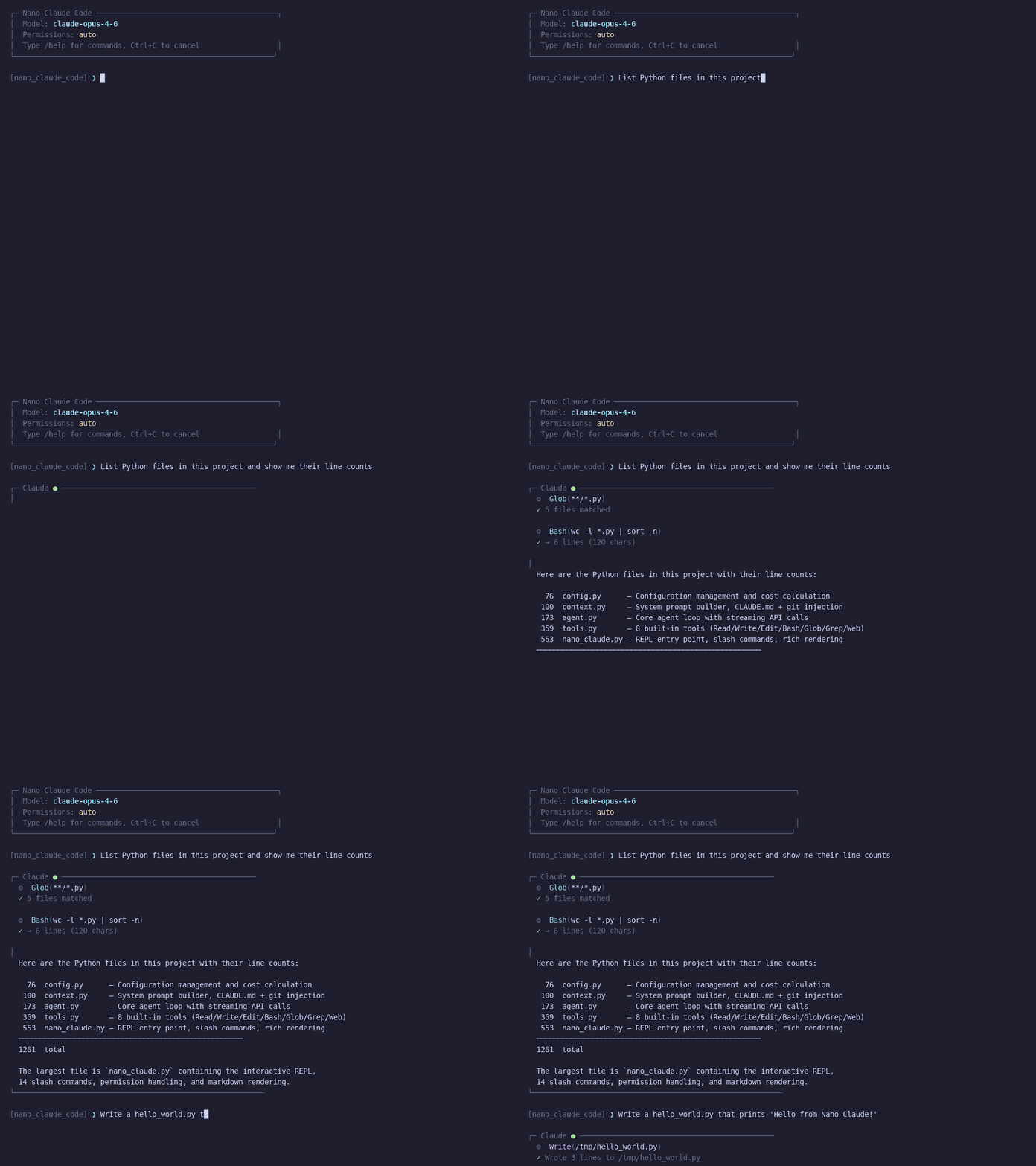
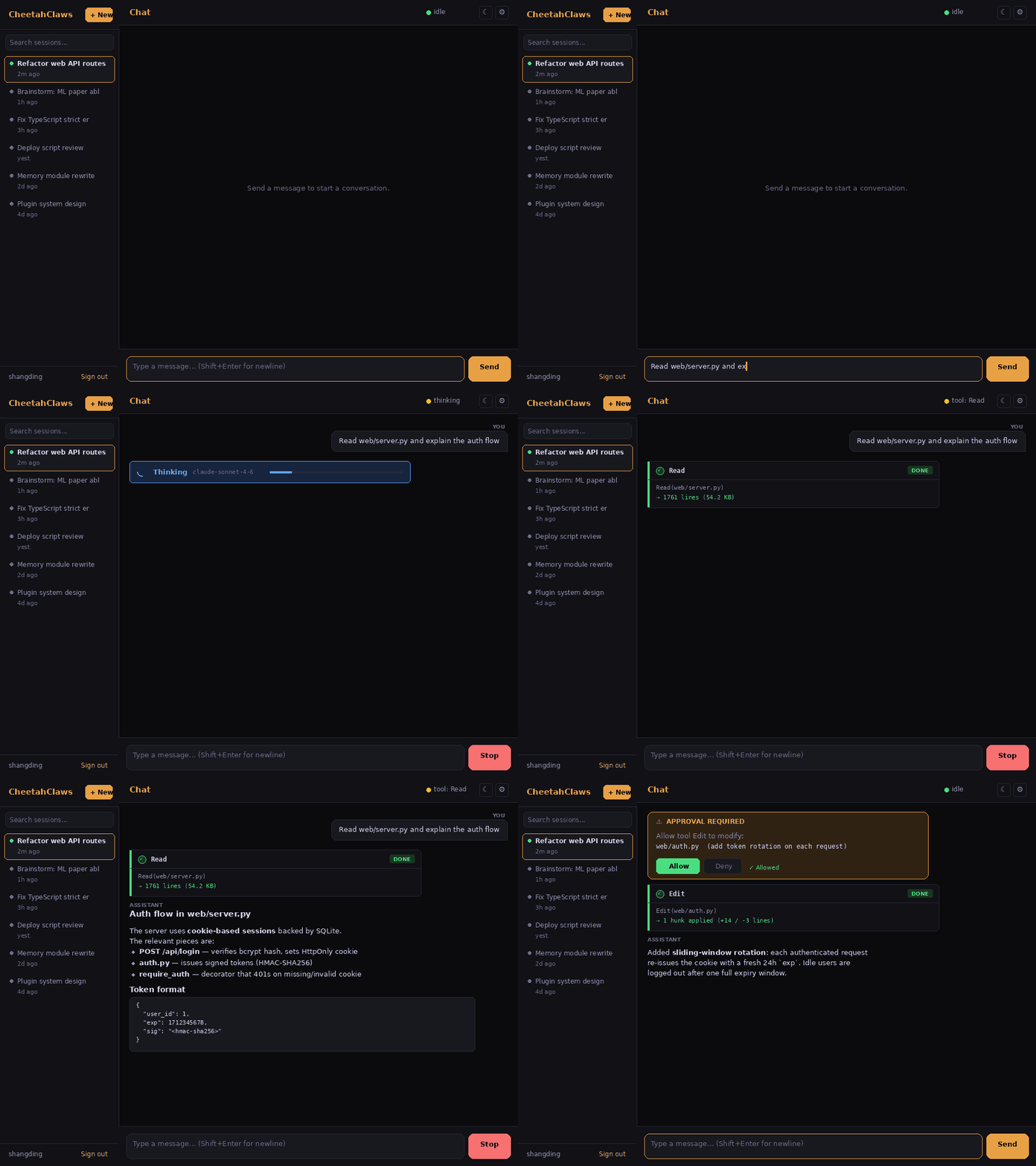
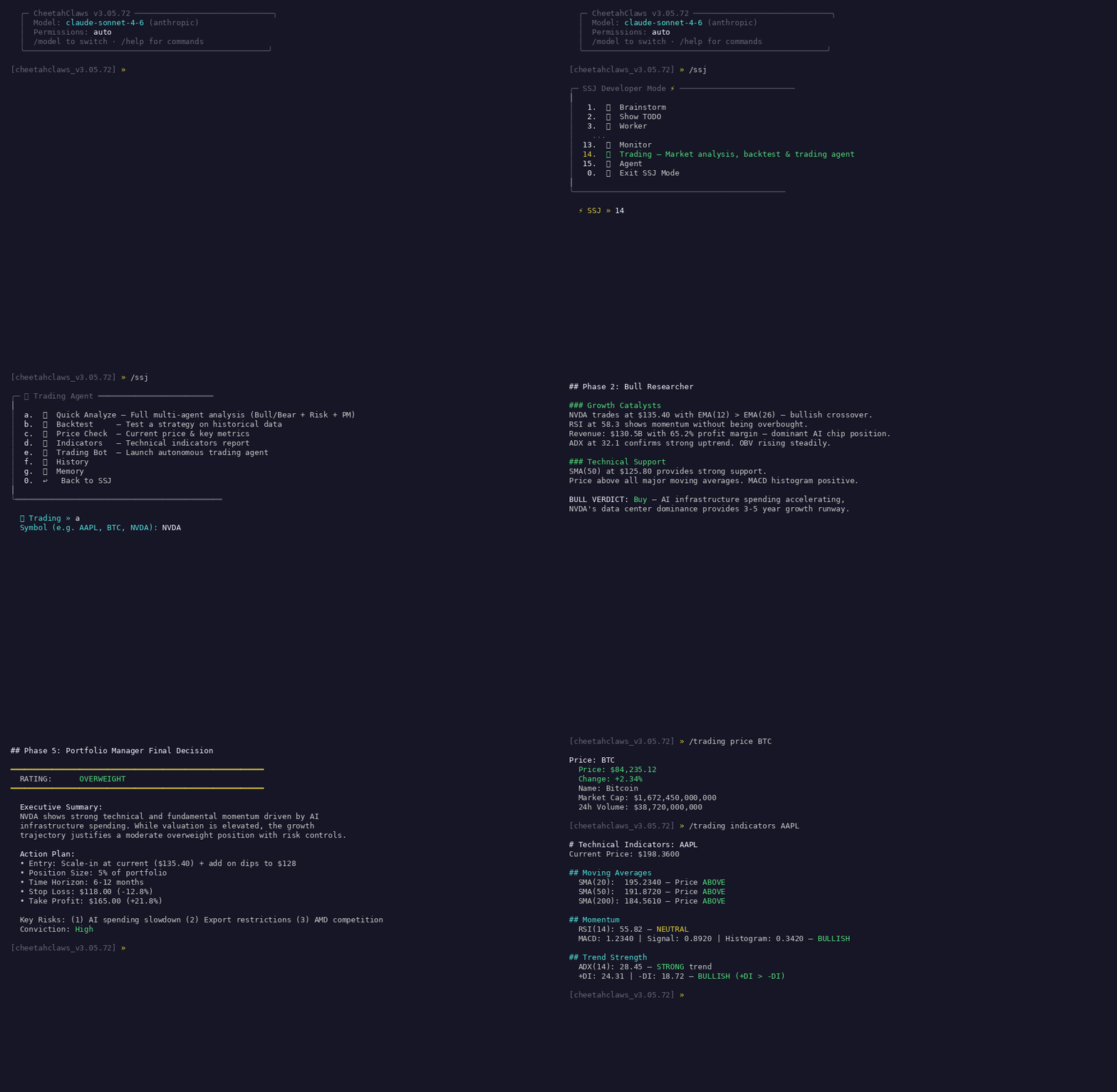
More animated demos (code review,
/research,/brainstorm,/lab, Telegram/WeChat/Slack bridges) live indocs/media/.
Why CheetahClaws
Claude Code is a powerful, production-grade AI coding assistant — but its source is a compiled ~12 MB TypeScript/Node bundle (~1,300 files, ~283K lines), tightly coupled to the Anthropic API, hard to modify, and impossible to run against a local or alternative model.
CheetahClaws reimplements the same core loop in ~90K lines of readable Python — keeping what you need, dropping what you don't, and adding multi-provider + local-model support. Full comparison: docs/guides/comparison.md.
| Dimension | Claude Code (TypeScript) | CheetahClaws (Python) |
|---|---|---|
| Language | TypeScript + React/Ink | Python 3.8+ |
| Source files / LoC | ~1,332 files / ~283K | ~315 files / ~90K (core; ~127K with tests) |
| Built-in tools / commands | 44+ / 88 | 27 / 50+ |
| Model providers | Anthropic only | 8+ (Anthropic · OpenAI · Gemini · Kimi · Qwen · DeepSeek · MiniMax · …) |
| Local models | No | Yes — Ollama, LM Studio, vLLM, any OpenAI-compatible endpoint |
| Build step | Yes (Bun + esbuild) | No — python cheetahclaws.py |
| Extensibility | Closed (compile-time) | Open — register_tool() at runtime, Markdown skills, git plugins, MCP |
| Voice input | Proprietary WebSocket (OAuth) | Local Whisper / OpenAI — works offline |
Where Claude Code wins: richer React/Ink UI, more built-in tools, enterprise features (MDM, team permission sync, OAuth/keychain), AI-driven memory extraction, single-binary production reliability.
Where CheetahClaws wins: any-model switching (--model//model, no recompile) incl. full local/offline support; a readable agent loop in one file (agent.py, ~740 lines); zero build; runtime tool registration + MCP + git plugins + Markdown skills; task dependency graph (blocks/blocked_by); two-layer context compression; offline voice; cloud session sync; bridges to Telegram/WeChat/Slack/QQ.
Who it's for: developers who want a local/non-Anthropic coding assistant, researchers studying how agentic assistants work, and teams who need a hackable baseline — without a Node.js build chain.
CheetahClaws vs OpenClaw
OpenClaw is another popular open-source assistant (TypeScript/Node). The two have different primary goals — OpenClaw is a personal life-assistant across messaging channels; CheetahClaws is a developer/coding tool.
| Dimension | OpenClaw (TypeScript) | CheetahClaws (Python) |
|---|---|---|
| Lines of code | ~245K (~10,349 files) | ~90K core (~315 files) |
| Primary focus | Personal assistant across channels | AI coding assistant / dev tool |
| Architecture | Always-on Gateway daemon + apps | Zero-install terminal REPL |
| Messaging channels | 20+ (WhatsApp · Signal · iMessage · Discord · Matrix · …) | Terminal + Telegram · WeChat · Slack · QQ bridges |
| Local / offline models | Limited | Full — Ollama · vLLM · LM Studio · any OpenAI-compatible |
| Code editing tools | Browser control, Canvas | Read · Write · Edit · Bash · Glob · Grep · NotebookEdit · GetDiagnostics |
| Mobile / Live Canvas | Yes (menu bar + iOS/Android, A2UI) | — |
| MCP support | — | Yes (stdio/SSE/HTTP) |
| Hackability | 245K lines, harder to modify | ~90K lines — agent loop in one file |
| If you want… | Use |
|---|---|
| A personal assistant on WhatsApp/Signal/Discord, mobile-first, browser automation + Canvas | OpenClaw |
| An AI coding assistant in your terminal, full offline/local models, multi-provider switching, source you can read in an afternoon | CheetahClaws |
Full comparison — both sides' wins + key design differences (agent loop, tool registration, context compression, memory): docs/guides/comparison.md.
Features
| Feature | Details |
|---|---|
| Multi-provider | Anthropic · OpenAI · Gemini · Kimi · Qwen · Zhipu · DeepSeek · MiniMax · OpenRouter · Ollama · LM Studio · Custom endpoint |
| Agent loop | Streaming API + automatic tool-use loop; the whole loop is in agent.py |
| 28 built-in tools | Read · Write · Edit · Bash · Glob · Grep · WebFetch · WebSearch · NotebookEdit · GetDiagnostics · Memory* · Agent/SendMessage · Skill · AskUserQuestion · Task* · SleepTimer · EnterPlanMode/ExitPlanMode · (MCP + plugin tools auto-added) |
| Tool profiles | tool_profile trims the tool surface sent each turn to save prompt tokens: full (default, everything) · standard (compact coding) · research (web + documents) · orchestration (agents + tasks). Set with /config tool_profile=standard. Guide |
| MCP integration | Connect any MCP server (stdio/SSE/HTTP); tools auto-registered — see extensions guide |
| Plugin system | Install/enable/update plugins from git URLs or local paths; multi-scope; recommendation engine |
| Task management | TaskCreate/Update/Get/List, sequential IDs, dependency edges, persisted to .cheetahclaws/tasks.json |
| Context compression | Four cooperating layers — dynamic max_tokens cap, per-model context-window registry, two-layer snip + AI summarize at 70%, and auto-fanout for oversized tool outputs. Details |
| Persistent memory | Dual-scope (user + project), 4 types, confidence/source metadata, conflict detection, recency-weighted search, /memory consolidate. Verification-anchored staleness — freshness tracks a last_verified date (not file mtime), so reading a memory can't fake-refresh it; only MemoryVerify resets the clock. Details |
| Multi-agent | Spawn typed sub-agents (coder/reviewer/researcher/…), git-worktree isolation, background mode |
| Permission system | Prompts only for what can change your files, run arbitrary code, or reach outside the session — every read-only tool, read-only shell pipeline (git log | head), and new-file creation in the workspace runs silently. s at a prompt grants one command/file for the session (scoped alternative to accept-all). Modes: auto / accept-edits / accept-all / manual / plan; a hard denylist blocks host-destroying commands in every mode |
| Checkpoints & plan mode | Auto-snapshot conversation + files each turn (/checkpoint, /rewind); /plan read-only analysis mode |
| Slash commands & themes | 50+ slash commands with Tab-complete; /theme offers 15 curated palettes |
| Next-prompt ghost text | After each turn the auxiliary (cheap) model drafts the line you'd most likely type next and shows it dim at the prompt — Tab (or →) accepts it in full, typing ignores it. Background-drafted, never blocks the REPL, silent on failure. Off via /config input_suggest=false or CHEETAH_SUGGEST=0. Details |
| Brainstorm → Worker | /brainstorm runs an N-persona debate → todo_list.txt; /worker auto-implements the pending tasks |
| SSJ Developer Mode | /ssj — persistent power menu chaining Brainstorm, Worker, Review, Trading, Agent, Video/TTS, Monitor, etc. |
| Trading agent | /trading multi-agent analysis, backtesting, paper-trade calibration, MV portfolios. Guide |
| Monitor | /monitor subscribes to AI-monitored topics on a schedule (arxiv / stock / crypto / news / custom), pushes reports to bridges/console |
| Research (multi-source) | /research fans out to 20 sources with attention heat table, entity extraction, trend sparkline, comparison mode. Guide |
| Autonomous agents | /agent background loops from Markdown templates; iteration summaries pushed via bridge; stagnation-stop guard |
| Bridges + remote control | Telegram · WeChat · Slack · QQ — chat round-trip, slash passthrough, per-bridge job queue (!jobs/!retry/!cancel). Guide |
| Voice / Vision / Video / TTS | Offline Whisper /voice; /image clipboard vision (local + cloud); /video + /tts content factories. Guide |
| Web UI | --web — multi-user browser chat + PTY terminal. Guide |
| More | Tmux integration · !cmd shell escape · proactive monitoring · 3×Ctrl+C force-quit · crash-safe session autosave (every turn, fsync + atomic write; /resume to recover) · /cloudsave GitHub-Gist sync · cost tracking · Anthropic prompt caching (cache-aware cost/quota) · animated terminal tab title showing the live task (auto-configures VS Code; /terminal-setup) · --print non-interactive mode |
Full feature reference — every row above with complete detail (context-compression layers, auto-fanout, 15 themes, the full Trading/Research/Agents writeups, …): docs/guides/features.md.
Supported Models
Closed-Source (API)
| Provider | Example models | Context | API Key Env |
|---|---|---|---|
| Anthropic | claude-opus-4-6 · claude-sonnet-4-6 · claude-haiku-4-5-20251001 | 200k | ANTHROPIC_API_KEY |
| OpenAI | gpt-4o · gpt-4.1 · gpt-5 · o3 · o4-mini | 128–200k | OPENAI_API_KEY |
gemini-2.5-pro · gemini-2.0-flash · gemini-1.5-pro | 1–2M | GEMINI_API_KEY | |
| Moonshot (Kimi) | moonshot-v1-8k / -32k / -128k | 8–128k | MOONSHOT_API_KEY |
| Alibaba (Qwen) | qwen-max · qwen-plus · qwen-turbo · qwq-32b | 32k–1M | DASHSCOPE_API_KEY |
| Zhipu (GLM) | glm-4-plus · glm-4 · glm-4-flash (free tier) | 128k | ZHIPU_API_KEY |
| DeepSeek | deepseek-chat · deepseek-reasoner | 64k | DEEPSEEK_API_KEY |
| MiniMax | MiniMax-Text-01 · MiniMax-VL-01 · abab6.5s-chat | 256k–1M | MINIMAX_API_KEY |
| OpenRouter (400+ models, one key) | openrouter/deepseek/deepseek-v4-flash · openrouter/anthropic/claude-sonnet-4-6 · openrouter/openai/gpt-5 | varies | OPENROUTER_API_KEY |
| AWS Bedrock / Azure / Vertex (via litellm) | litellm/<provider>/<model> | varies | provider-specific |
openrouter/gateway: one key for 400+ models across vendors. The model ID keeps OpenRouter's upstream<vendor>/<model>path, so the call is double-prefixed:openrouter/deepseek/deepseek-v4-flash. To pin which upstream provider (and quantization) serves the request, append@<provider>[/<quantization>]—openrouter/deepseek/deepseek-v4-flash@gmicloud/fp8— which is sent as OpenRouter'sproviderrequest-body object rather than glued into the model ID. See usage.md.
litellm/adapter: routes to 100+ providers behind one SDK — mainly for upstreams with awkward auth (Bedrock SigV4, Azure deployment routing, Vertex service-account JWTs). For plain OpenAI-shaped endpoints, prefer the zero-dependencycustom/adapter. Install withpip install ".[litellm]". See recipes.md.
Open-Source (Local via Ollama)
| Model | Size | Strengths | Pull |
|---|---|---|---|
qwen2.5-coder | 7B / 32B | Best for coding | ollama pull qwen2.5-coder |
llama3.3 / llama3.2 | 70B / 3B–11B | General purpose | ollama pull llama3.3 |
deepseek-r1 | 7B–70B | Reasoning, math | ollama pull deepseek-r1 |
mistral / mixtral | 7B / 8x7B | Fast / strong MoE | ollama pull mistral |
phi4 · gemma3 · codellama | 14B · 4–27B · 7–34B | Reasoning / open / code | ollama pull phi4 |
llava · llama3.2-vision | 7–13B · 11B | Vision | ollama pull llava |
Tool calling needs a function-calling model — recommended:
qwen2.5-coder,llama3.3,mistral,phi4. Models that emit tool calls as text (<tool_call>…</tool_call>,[TOOL_CALLS]…) instead of Ollama's structured field are auto-recovered, so they execute tools out of the box rather than just chatting about it. Reasoning models (deepseek-r1,qwen3,gemma4) stream native<think>blocks; enable with/verbose+/thinking.
Installation
pip install cheetahclaws
Works on Linux, macOS, WSL2, and Android (Termux) (Python 3.10+). First run guides you through provider + API-key setup; re-run anytime with cheetahclaws --setup.
Windows: native Windows is not supported — use WSL2. Android/Termux:
pkg install python git && pip install cheetahclaws.
Alternative: one-line install script
curl -fsSL https://raw.githubusercontent.com/SafeRL-Lab/cheetahclaws/main/scripts/install.sh | bash
After installation, reload your shell so cheetahclaws is on PATH:
source ~/.zshrc     # macOS
# or: source ~/.bashrc   # Linux
cheetahclaws        # start chatting!
Alternative: install with pip from source code
git clone https://github.com/SafeRL-Lab/cheetahclaws.git
cd cheetahclaws
pip install .                       # then: cheetahclaws
git pull && pip install --force-reinstall .   # to update
Optional extras
pip install ".[voice]"      # voice input (sounddevice + faster-whisper)
pip install ".[vision]"     # clipboard image capture (Pillow)
# note: typing-time completion (prompt_toolkit) is now built in — no extra needed.
#       the [autosuggest] extra is kept as a no-op alias for backward compat.
pip install ".[browser]"    # headless browser (playwright); then: playwright install chromium
pip install ".[files]"      # PDF + Excel reading (pymupdf, openpyxl)
pip install ".[ocr]"        # image OCR (pytesseract)
pip install ".[trading]"    # trading agent (yfinance, rank-bm25)
pip install ".[qq]"         # QQ bot bridge (qq-botpy)
pip install ".[litellm]"    # AWS Bedrock / Azure / Vertex auth via litellm
pip install ".[all]"        # everything above
Alternative: install with uv
git clone https://github.com/SafeRL-Lab/cheetahclaws.git && cd cheetahclaws
uv tool install ".[all]"            # minimal: uv tool install .
uv tool install ".[all]" --reinstall   # update   ·   uv tool uninstall cheetahclaws
Alternative: run directly from source (no install)
git clone https://github.com/SafeRL-Lab/cheetahclaws.git && cd cheetahclaws
pip install -r requirements.txt
python cheetahclaws.py              # changes take effect immediately
Usage: Closed-Source API Models
Every cloud provider follows the same pattern — export its API key (see the Supported Models table for the env-var name), then select a model:
export ANTHROPIC_API_KEY=sk-ant-...     # or OPENAI_API_KEY / GEMINI_API_KEY / DEEPSEEK_API_KEY / …
cheetahclaws                            # default model
cheetahclaws --model gpt-4o             # pick any model
cheetahclaws --model deepseek-chat --thinking --verbose
Provider get-key pages: Anthropic · OpenAI · Gemini · Kimi · Qwen · Zhipu · DeepSeek · MiniMax · OpenRouter.
One key for 400+ models — OpenRouter fronts every major vendor behind one OpenAI-compatible endpoint, so a single key covers Claude, GPT, Gemini, DeepSeek, Llama, Qwen and the rest:
export OPENROUTER_API_KEY=sk-or-...
cheetahclaws --model openrouter/deepseek/deepseek-v4-flash
cheetahclaws --model openrouter/anthropic/claude-sonnet-4-6
cheetahclaws --model openrouter/deepseek/deepseek-v4-flash@gmicloud/fp8   # pin the upstream provider
AWS Bedrock / Azure / Vertex use the litellm/<provider>/<model> form (pip install ".[litellm]") — full env-var recipes in recipes.md.
Full per-provider guide — every provider's get-key page + example model commands, plus Bedrock/Azure/Vertex env-var recipes: docs/guides/usage.md.
Usage: Open-Source Models (Local)
Ollama (recommended)
curl -fsSL https://ollama.com/install.sh | sh   # install
ollama pull qwen2.5-coder                        # pull a tool-calling model
ollama serve                                     # http://localhost:11434 (auto-starts on macOS)
cheetahclaws --model ollama/qwen2.5-coder        # run (use `ollama list` to see local models)
LM Studio
Download LM Studio, grab a GGUF model, start its Local Server (port 1234), then:
cheetahclaws --model lmstudio/<model-name>
vLLM / self-hosted OpenAI-compatible server
python -m vllm.entrypoints.openai.api_server \
    --model Qwen/Qwen2.5-Coder-32B-Instruct --port 8000 \
    --enable-auto-tool-choice --tool-call-parser hermes

export CUSTOM_BASE_URL=http://localhost:8000/v1
export CUSTOM_API_KEY=token-abc123      # any non-empty string if the server has no auth
cheetahclaws --model custom/Qwen2.5-Coder-32B-Instruct
The name after custom/ must match the server's --served-model-name. For the Web UI, --web --model custom/<name> persists the model before the server starts. Remote server? Point CUSTOM_BASE_URL at its IP.
Full local-model guide — Ollama step-by-step, LM Studio, vLLM + Web UI: docs/guides/usage.md.
Atlas Cloud (hosted, OpenAI-compatible)
🎁 Atlas Cloud serves DeepSeek, Qwen, GLM, Kimi, MiniMax and more behind one OpenAI-compatible endpoint, via the zero-dependency
custom/adapter:
export CUSTOM_BASE_URL=https://api.atlascloud.ai/v1
export CUSTOM_API_KEY=your_atlascloud_api_key
cheetahclaws --model custom/deepseek-ai/deepseek-v4-pro
Any Atlas chat model id works the same way — full list of all 59 models: docs/guides/usage.md.
Model Name Format
Three equivalent forms are accepted:
cheetahclaws --model gpt-4o                  # 1. auto-detect by prefix
cheetahclaws --model ollama/qwen2.5-coder    # 2. provider/model
cheetahclaws --model kimi:moonshot-v1-32k    # 3. provider:model
Gateways keep the upstream path. OpenRouter, NIM and LiteLLM address models by a <vendor>/<model> path of their own, so those calls are double-prefixed — only the first segment is the provider, everything after it is passed through verbatim:
cheetahclaws --model openrouter/deepseek/deepseek-v4-flash        # → OpenRouter, model "deepseek/deepseek-v4-flash"
cheetahclaws --model nim/meta/llama-3.3-70b-instruct              # → NVIDIA NIM
cheetahclaws --model openrouter/deepseek/deepseek-v4-flash@gmicloud/fp8   # + pinned provider / quantization
OpenRouter additionally accepts an @<provider>[/<quantization>] suffix (quantizations: fp4 · fp8 · int4 · int8). It never reaches the model field — it is split off and sent as OpenRouter's provider routing object (order + allow_fallbacks: false, plus quantizations when given), so pinning @gmicloud means the request fails rather than silently landing on a different upstream.
Auto-detection by prefix: claude-→anthropic · gpt-/o1/o3→openai · gemini-→gemini · moonshot-/kimi-→kimi · qwen/qwq-→qwen · glm-→zhipu · deepseek-→deepseek · MiniMax-/abab→minimax · llama/mistral/phi/gemma/mixtral/codellama→ollama.
Tab-completion (PR #166): inside the REPL, type /model and press Tab for a provider/model picker — one default per provider, plus a two-level litellm/<backend>/<model> tree you can drill into. Completions appear as you type when prompt_toolkit is present (now a core dependency, so always); otherwise readline serves them on Tab.
Trading Agent
A built-in AI trading analysis + backtesting module (pip install "cheetahclaws[trading]").
/trading analyze NVDA            # 5-phase pipeline: data → Bull/Bear debate → Judge → Risk panel → PM decision
/trading backtest AAPL dual_ma   # backtest a strategy (or let AI pick); Sharpe/Sortino/Calmar/drawdown/win-rate
4 strategies (dual_ma, rsi_mean_reversion, bollinger_breakout, macd_crossover), BM25 memory of past situations, US/HK/A-share + crypto markets with no-API-key data fallbacks. Guided sub-menu via /ssj → Trading.
Full guide: docs/guides/trading.md
Web UI
A production-ready browser interface — real user accounts (bcrypt + JWT), SQLite-backed history, ops endpoints — served by Python stdlib + ten vanilla-JS modules (no Node.js / React / build step).
pip install 'cheetahclaws[web]'
cheetahclaws --web                  # auto-picks a free port (tries 8080)
cheetahclaws --web --port 9000 --host 0.0.0.0   # bind explicitly / open to LAN
cheetahclaws --web --no-auth        # skip login (localhost dev only)
Open http://localhost:<port>/chat — first account becomes admin. Includes streaming chat (WS) + SSE slash commands, persistent sessions with folders/search/Markdown export, tool cards, inline permission approval, settings panel, light/dark/system theme, and /health + /metrics endpoints. A full xterm.js PTY terminal lives at / (100% CLI parity).
Full guide: docs/guides/web-ui.md · Docker / home server: docs/guides/docker.md · Native desktop app: desktop/README.md
Documentation
Detailed guides live in docs/guides/ to keep this README focused:
| Guide | What's inside |
|---|---|
| Features (full) | The complete feature table — every row with full detail (context compression, auto-fanout, themes, Trading/Research/Agents writeups) |
| Usage (all providers) | Per-provider setup + example commands: Anthropic/OpenAI/Gemini/Kimi/Qwen/Zhipu/DeepSeek/MiniMax/litellm, and local Ollama/LM Studio/vLLM |
| Web UI | Chat UI, PTY terminal, API endpoints, settings, auth, SSE streaming |
| Desktop app | Native-window shell (Electron) that wraps the local web UI; build a self-contained .dmg/.exe/.AppImage |
| Docker / Home Server | Dockerfile + compose: web UI + bridges in one container, host Ollama, workspace mount |
| Reference | CLI, 50+ commands, 33 built-in tools, session search, error classification, tool cache |
| Extensions | Memory, Skills, Sub-Agents, MCP servers, Plugins, Monitor, Autonomous Agents |
| Bridges | Telegram, WeChat, Slack, QQ setup + remote control from your phone |
| Security & env vars | Threat model, CHEETAHCLAWS_* vars, bot-token handling, Bash denylist, fs sandbox, CSRF |
| Voice & Video | Offline Whisper voice input, Video factory, TTS factory |
| Trading | Multi-agent analysis, backtesting, BM25 memory, data fallbacks, SSJ integration |
| Advanced | Brainstorm, SSJ, Tmux, proactive monitoring, checkpoints, plan mode, sessions, cloud sync |
| Comparison | Full positioning vs Claude Code and OpenClaw — at-a-glance tables, both sides' wins, key design differences |
| Recipes | 12 step-by-step examples: code review, remote control, research, bug fix, browse, email, PDF/Excel |
| FAQ | The full FAQ (MCP, models/providers, CLI/scripting, voice) |
| Plugin Authoring · Example | Build a plugin: tools, commands, skills, MCP; starter template |
| Research Lab | /lab start <topic> — autonomous multi-agent paper writing with sandboxed experiments |
| Agent OS · RFC index | The kernel/ layer + all design notes (RFC 0001-0032) |
| Contributing | Project structure, architecture guide, PR checklist |
Quick Reference
cheetahclaws [OPTIONS] [PROMPT]

  -p, --print          Non-interactive: run prompt and exit
  -m, --model MODEL    Override model (e.g. gpt-4o, ollama/llama3.3)
  --accept-all         Auto-approve all operations (no permission prompts)
  --verbose            Show thinking blocks and per-turn token counts
  --show-tools         Show each tool call instead of a per-turn summary
                       (alias: --no-quiet; compact summary is the default)
  --thinking           Enable Extended Thinking (Claude only)
  --web                Start web server (Chat UI + PTY terminal in browser)
  --port / --host      Web server port / host (default 8080 / 127.0.0.1)
  --no-auth            Disable web password (local use only)
  --version / -h       Print version / show help
cheetahclaws                                          # interactive REPL, default model
cheetahclaws -m ollama/deepseek-r1:32b                # pick a model
cheetahclaws -p "Write a Python fibonacci function"   # non-interactive
cheetahclaws --accept-all -p "Init a pyproject.toml"  # CI / automation
cheetahclaws --web --port 8008 --no-auth              # browser chat + terminal
See the Reference Guide for all 50+ slash commands, tools, and config options.
Contributing
We welcome contributions! See the Contributing Guide for architecture, conventions, and the PR checklist.
git clone https://github.com/SafeRL-Lab/cheetahclaws.git && cd cheetahclaws
pip install -r requirements.txt && pip install pytest
python -m pytest tests/ -x -q       # 341+ tests should pass
python cheetahclaws.py              # run the REPL
Building a plugin? See the Plugin Authoring Guide and the example template.
FAQ
A few common questions — the full FAQ is in docs/guides/faq.md.
Q: How do I add an MCP server?
/mcp add git uvx mcp-server-git # or create .mcp.json in your project, then /mcp reload
Q: Tool calls don't work with my local Ollama model (it just keeps describing what it would do instead of doing it).
CheetahClaws now auto-recovers tool calls that local models emit as text (<tool_call>…</tool_call>, [TOOL_CALLS]…) instead of in Ollama's structured field, so most function-calling models execute tools out of the box. For best reliability use a tool-calling model — qwen2.5-coder, llama3.3, mistral, or phi4. Small models are also weaker at agentic tool use than cloud models, so expect them to need clearer, more concrete prompts.
Q: After installing on macOS, cheetahclaws: command not found and no ~/.zshrc was created.
Reload your shell first: source ~/.zshrc (zsh) or source ~/.bash_profile (bash). The installer creates ~/.zshrc if missing, symlinks the binary into ~/.local/bin, and adds it to PATH. If you installed an older version, either re-run the installer or add this line yourself: echo 'export PATH="$HOME/.local/bin:$PATH"' >> ~/.zshrc && source ~/.zshrc.
More — remote vLLM, API cost (/cost), multiple keys per session, default model across projects, piping input, voice setup, garbled-text fixes — are all answered in docs/guides/faq.md.
Citation
If you find the repository useful, please cite the study
@article{gu2026model,
  title={From Model Scaling to System Scaling: Scaling the Harness in Agentic AI},
  author={Gu, Shangding},
  journal={arXiv preprint arXiv:2605.26112},
  year={2026}
}

@article{cheetahclaws2026,
  title={CheetahClaws: Agent Harness Infrastructure for Long-Horizon, Multi-Model, and Tool-Using AI Systems},
  author={CheetahClaws Team},
  journal={github},
  year={2026}
}
Thanks to all contributors:


