



Overview
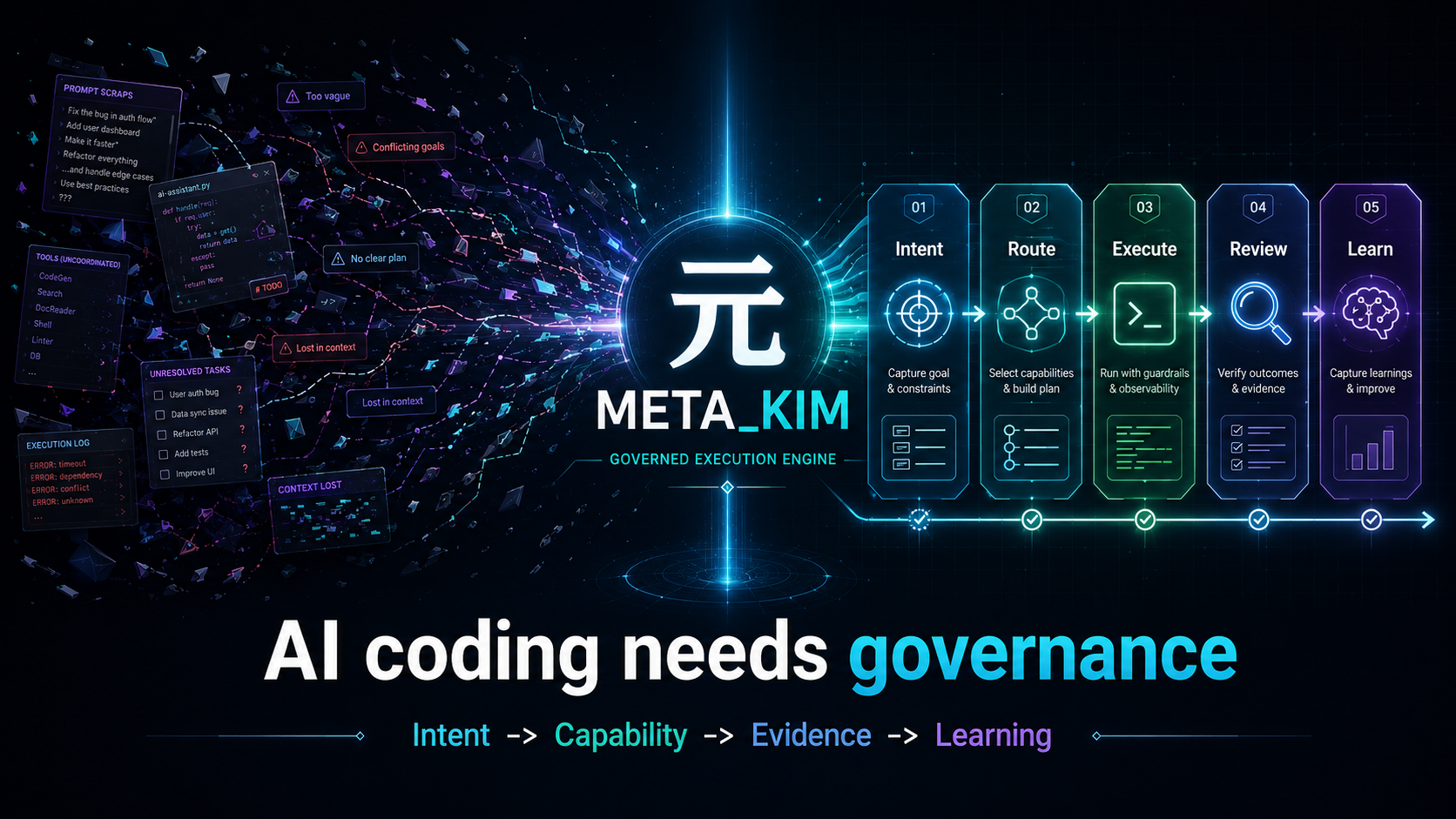
Meta_Kim is not another AI coding tool. It is a governance layer for durable AI coding work.
The hard part of AI coding is no longer getting a model to change files. The hard part is deciding what should happen first, which capability should own it, what evidence proves it worked, and how the lesson survives the next run.
Claude Code, Codex, OpenClaw, and Cursor are all hands: they can write code and change files. But who decides which file to change first? Who reviews the result? Who fixes the problems that show up? And how do we make sure the same mistake does not repeat next time?
Meta_Kim is built for that. It is the governance layer above the coding hands: a runnable set of agents, skills, contracts, hooks, scripts, and evidence gates that keeps complex work from turning into a mess.
One-line summary
First clarify what needs to happen -> then decide who should do it -> review after execution -> preserve what was learned -> feed that back into the next run.
This is not a new concept. Mature engineering teams already do this. Meta_Kim turns it into a runnable system instead of relying on human discipline alone.
Before / After
| Without Meta_Kim | With Meta_Kim |
|---|---|
| One giant chat response tries to do everything | Work is routed through intent, capability, owner, review, verification, and writeback |
| A tool is chosen because it is available | A capability is selected because it fits the task, runtime, OS, dependency, and risk |
| Passing commands get mistaken for success | Evidence is checked against the user's real goal |
| Good fixes disappear into chat history | Reusable lessons become governed skills, agents, scripts, contracts, or run-scoped tasks |
What 3.0 changes
Meta_Kim 3.0 makes the governance system easier to trust: advice, durable truth, user-facing views, installation state, and knowledge evolution no longer blur into one another.
| Architecture outcome | What it means for a user |
|---|---|
| A01 - Evidence transition | A worker saying “done” is not enough; evidence is independently assessed, and uncertain or contradictory material stays blocked or in doubt. |
| A02 - Continue / wait / stop / escalate | Resumption advice is explicit and bound to the same durable run snapshot; it cannot resume work by itself. |
| A03 - Dependency-safe progress | Meta_Kim can identify work that is safe to consider next without turning a Todo item into execution authority. |
| A04 - Scheduler reuse | Ready work goes through the existing scheduler rules; 3.0 does not create a competing scheduler. |
| A05 - Lease / claim visibility | Active ownership and conflicts are projected from the existing durable authority, never minted from a candidate. |
| A06 - Runtime health | Health is a point-in-time observation, not proof of liveness, installation, persistence, or permission to execute. |
| A07 - Quota / usage | Retry and elapsed-time observations are separated from unknown cost, progress, and provider quota; the projection cannot stop or retry work. |
| A08 - Read-only run surfaces | Native panel, Kanban, Markdown, and HTML show the same digest-bound run without becoming another source of truth. |
| A09 - Durable repository unification | Events, CAS, transactions, leases, fences, and checkpoints share one execution repository model; analytics and host-event stores remain non-execution data. |
| A10 - Safer setup boundary | Setup remains the CLI facade, while stable package materialization and runtime writes are isolated and independently checked. |
| A11 - Knowledge lifecycle hygiene | A generated evolution suggestion has zero write/delete authority until exact Warden approval; rollback, source drift, tombstones, and user state are protected. |
| A12 - Documentation and release truth | Public claims must match contracts, runtime evidence, package contents, and the release gate; deferred work stays visibly deferred. |
The implementation follows an inward dependency rule:
| Layer | Responsibility | Explicit boundary |
|---|---|---|
| Domain | Pure decision semantics and invariants | No filesystem, database, network, runtime, templates, or execution side effects |
| Application | Use-case orchestration and ports | Composes Domain and adapters; does not own SQL, filesystem algorithms, or host authority |
| Data / Infrastructure | SQLite, transactions, package storage, runtime process and filesystem adapters | Implements declared ports; cannot change Domain decisions or mint authorization |
| Presentation | Native panel, Kanban, Markdown, and HTML rendering | Reads one validated model; cannot write, dispatch, complete, claim, lease, or move a cursor |
This layering is intentionally incremental: existing script entrypoints remain compatibility facades where needed, while new stable logic lives behind the layered boundaries.
3-minute proof
Meta_Kim is easiest to understand by watching one governed run, not by reading every rule.
npm run meta:theory:demo
npm run meta:run-status:latest
npm run meta:theory:report -- --run-id latest
npm run meta:delivery:bundle
meta:run-status:latest is a minimal redacted status summary. Use the explicit
meta:theory:report -- --run-id latest readback to inspect report content.
The proof path shows five things:
- a fuzzy request is turned into an explicit intent and success standard
- capability search happens before execution ownership is chosen
- work is split into bounded worker tasks instead of one giant chat response
- review and verification produce artifacts, not just reassuring prose
- compatibility evidence stays tiered, so smoke evidence is never promoted to native live proof
The executable core-loop contract is config/contracts/core-loop-contract.json; it binds the default path to npm run meta:theory:run -- "<task>" and keeps Critical -> Fetch -> Thinking -> Execution -> Review -> Meta-Review -> Verification -> Evolution testable. npm run meta:theory:demo is the zero-argument replay entry for the 3-minute proof.
Real stage execution is opt-in and read-only. Use npm run meta:theory:run -- --execute-stage-dag --stage-runner-runtime codex "<task>" or replace codex with claude; resume the exact interrupted run with --resume-stage-dag --run-id <id> --task "<same task>". Both runtimes consume the same coreLoop.stageDagPacket, record native session/tool/timing evidence, persist completed nodes through the durable kernel, and merge locally. The default remains planned-only. Ready sets use native concurrency by default; maintainers may explicitly install the currently tested @langchain/langgraph@1.4.8 and add --stage-runner-orchestrator langgraph to use its Functional API as an execution wrapper. LangGraph does not own topology or checkpoints, and this mode still does not execute writes or external side effects.
For a guided walk-through, start with examples/first-run/README.md.
Quick Start
If you just want to try it quickly, run:
npx --yes github:KimYx0207/Meta_Kim meta-kim
Or install it the traditional way:
git clone https://github.com/KimYx0207/Meta_Kim.git
cd Meta_Kim
npm install
node setup.mjs
💡 After install:
setup.mjsprints where every artifact lives. A global install can usemeta-kim statusfrom any directory; an npx install can repeatnpx --yes github:KimYx0207/Meta_Kim meta-kim status. An npx launch remains a supported entrypoint: before install or update writes persistent Claude Code or Codex projections, Meta_Kim fixes the exact package into an immutable store under the user home, keyed by package version and packed-package SHA-256, so Commands, Hooks, and merged settings never depend on the disposable npm cache. Repository maintainers may also usenpm run meta:status.
At a fresh clone, Meta_Kim intentionally separates source files, generated projections, and local state:
| Layer | Examples | When you should see it |
|---|---|---|
| GitHub source | README.md, AGENTS.md, CLAUDE.md, canonical/, config/, scripts/ | Immediately after git clone; also included by the package files whitelist when applicable |
| Generated runtime projections | .claude/, .codex/, .agents/, .cursor/, openclaw/, .mcp.json, codex/ | Created locally by node setup.mjs or npm run meta:sync; gitignored and not GitHub source |
| Local run state and graph output | .meta-kim/, graphify-out/, tests/output/, task_plan.md, findings.md, progress.md | Created only by setup, graphify, tests, or governed runs; local-only and safe to regenerate |
Install scope
The default Enter path is global reusable capabilities. Agents, commands, MCP, and skills are installed into each selected runtime's official global/home locations when that runtime supports them. Global hook wiring is opt-in: pass --with-global-hooks when you intentionally want Meta_Kim to update Claude/Codex/Cursor hook settings. Projects reuse global capabilities directly; project-local agents, commands, MCP, hooks, or skills are created only when Fetch/Thinking proves project-specific customization, iteration, or a dedicated override is needed.
If you explicitly choose Project directory updates, setup asks which project directories to update and writes the target-selected project runtime projection there, including project hooks/config where that runtime supports them. This path does not install global reusable capabilities and does not run project cleanup.
Project files are still allowed, but they are not the default reusable capability store. Confirmed project bootstrap writes only project context/config/state plus proven project-specific overrides, preserving existing user config through managed blocks, add-only writes, protected JSON merge, backups, and manifests. Every applied project bootstrap records .meta-kim/ state and backup files.
Update also treats third-party installers as untrusted configuration producers. For Codex, Meta_Kim restores the user's pre-install configuration and applies only its narrowly owned native controls. This prevents an upstream installer from resurrecting a third-party MCP server the user deleted, silently adopting a new server, or persisting known Meta_Kim benchmark/test project registrations. User-owned MCP servers, projects, hooks, agents, and unrelated settings remain intact.
Codex agent fan-out has a bounded default of two threads and one nested level. Explicit user limits are preserved; only an absent value or Meta_Kim's former default of six threads is migrated.
If you plan to maintain the repository, edit the canonical sources first: canonical/agents/, canonical/skills/meta-theory/, config/contracts/, and config/capability-index/. Then run (requires Node.js >= 22.13.0):
npm run meta:sync
npm run meta:validate
Recommended reading order:
- This file,
README.md AGENTS.mdCLAUDE.mdwhen working on Claude Code behaviorcanonical/runtime-assets/cursor/rules/meta-enforcement.mdcwhen working on Cursor rules
Usage Paths
After the default install (node setup.mjs or npx) or a confirmed project bootstrap, humans should be able to use plain task language. Slash commands remain maintainer shortcuts, not the normal user path.
| Where you are | What works automatically | Human entry path |
|---|---|---|
| Meta_Kim repo with Claude Code | Full governance via CLAUDE.md (8-stage spine, gates, dispatch rules) | Say the task naturally; durable work is classified into the governed route |
| Any other project with Claude Code | Global skills can be discovered; global hooks require explicit --with-global-hooks; project-local files are written only after confirmed customization/bootstrap | Say the task naturally; explicit /meta-theory remains a maintainer shortcut |
| Codex | Global skills plus project AGENTS.md context when present; global hooks require explicit --with-global-hooks; local .codex/agents, .codex/commands, or .agents/skills are project-specific overrides, not default execution-layer projection | Say the task naturally; Codex classifies durable work, subjective ambiguity, and pure queries differently |
| ZCode | Beta | Use the packaged ZCode compatibility adapter |
| DeepSeek Harness | Beta | Use the packaged plugin/preset compatibility adapter |
| Qoder | Beta | Use the packaged Qoder compatibility adapter |
| Trae | Beta | Use the packaged Trae compatibility adapter |
| OpenClaw | Global/shared skills plus OpenClaw config/auth; project openclaw/ material is for project-specific workspace/context overrides | Requires OpenClaw config/auth; contributors must complete strict OpenClaw self-testing and provide evidence; changes can merge only after that evidence passes review |
| Cursor | Global skills plus project rules/context when present; local .cursor/agents, .cursor/rules, .cursor/skills, hooks, and MCP are project-specific overrides | Contributors must complete strict Cursor self-testing and provide evidence; changes can merge only after that evidence passes review |
Platform Support Tiers
Meta_Kim now tracks platform support in tiers instead of treating every compatible surface as a full runtime projection.
| Tier | Products | What it means |
|---|---|---|
| Primary formal projections | Claude Code, Codex | Canonical governance is projected by default, checked by npm run meta:sync / npm run meta:check, and used for the primary prompt-first flow. |
| Beta compatibility adapters | ZCode, DeepSeek Harness, Qoder, Trae | Packaged compatibility adapters, verified by install and update. |
| Non-default compatibility projections | OpenClaw, Cursor | Tool-specific project files are generated only when these targets are selected; runtime changes need maintainer handshake plus tool-side self-test evidence before they are treated as complete. |
Source of truth: config/runtime-compatibility-catalog.json.
Dependency-project install targets are handled by those upstream projects and are not part of Meta_Kim's public runtime support list.
Surface compatibility is intentionally weaker than runtime support. A tool can share Meta_Kim-compatible primitives and still need adapter design, profile/layout generation, sync tests, and live validation before it becomes a formal projection. Dependency-project install matrices are not repeated here as Meta_Kim support claims.
Contact

GitHub KimYx0207 | X @KimYx0207 | Website aiking.dev | WeChat Official Account: 老金带你玩AI
Feishu knowledge base: long-term updates
Buy me a coffee
If Meta_Kim has been useful, support the project with a coffee.
| WeChat Pay | Alipay |
|---|---|
 |  |
Method basis
Meta_Kim’s methodological foundation comes from research on meta-based intent amplification, authored by this project’s maintainer (KimYx0207):
- Paper: https://zenodo.org/records/18957649
- DOI:
10.5281/zenodo.18957649
Architecture: Hidden Skeleton + Dynamic Dealing
This is the core design idea of Meta_Kim. If you only read one section, read this one.
First, split the core terms so they do not get mixed up later
| Concept | What it is | What it is not |
|---|---|---|
| Hidden skeleton | The backend framework that always exists under the visible workflow | A fixed list of responsibilities written in advance |
| 8-stage workflow | The human-readable execution spine exposed by the hidden skeleton | The whole governance logic |
| 11-phase business workflow | A run-packaging progression layered on top of the 8 stages after classification | A replacement for the 8 stages |
| Dealing | Dynamic control built around the 8-stage workflow and agent units | Simple task assignment |
| Gate | A pass/fail condition | The stage itself |
| Contract | The structured output a node must produce | Slogans or abstract values |
| Agent-unit governance | A practical way to manage boundaries, capabilities, upgrades, and rollback | A role menu |
| Three-layer memory | Long-term memory split across memory / graphify / SQL | One mixed notebook |
If you only want one sentence to remember:
The 8-stage workflow moves execution forward, gates decide whether a stage can pass, contracts define the required outputs, and dealing adds dynamic intervention.
8 stages = the hidden skeleton
Meta_Kim has 8 fixed execution stages. This is the hidden skeleton:
flowchart LR
    C[Critical<br/>Clarify the request] --> F[Fetch<br/>Search capabilities]
    F --> T[Thinking<br/>Plan the approach]
    T --> E[Execution<br/>Dispatch the work]
    E --> R[Review<br/>Inspect the result]
    R --> MR[Meta-Review<br/>Review the review]
    MR --> V[Verification<br/>Verify reality]
    V --> EV[Evolution<br/>Write back lessons]

    style C fill:#fbbf24,color:#000
    style F fill:#34d399,color:#000
    style T fill:#60a5fa,color:#000
    style E fill:#f87171,color:#fff
    style R fill:#a78bfa,color:#fff
    style MR fill:#a78bfa,color:#fff
    style V fill:#34d399,color:#000
    style EV fill:#fbbf24,color:#000
Critical - pin down the real problem first
When the request is vague, ask clarifying questions instead of guessing. This stage produces intentPacket, which locks down the real user intent, success criteria, and exclusions. If the request is already clear, the system records an explicit skip reason instead of quietly skipping.
Fetch - search existing capabilities before inventing new ones
Search whether existing agents, skills, tools, or MCP integrations already cover the need. The core idea here is capability-first: define the capability first, then search for the owner that declares it, then dispatch to the best match. Capability-index lookup goes config/capability-index/ -> runtime mirror -> local inventory -> fallback. Do not start by hardcoding a specific agent name.
Governance Decision Engine
Meta_Kim is not only the 8-stage spine. It first identifies the governance trigger, checks runtime and OS capability, checks dependency capability, separates owner from weapon, filters by Win/Mac/runtime support, asks the user only for branch-changing choices, executes deterministic parts, verifies whether the user goal actually landed, and writes reusable learning back. Reference-only projects are absorbed into Meta_Kim data, not silently promoted into dependencies; see config/governance/decision-pattern-catalog.json.
Automation is assistive, not authoritative. It may gather evidence, draft options, run deterministic checks, surface blockers, and prepare readable status, but branch-changing judgment in Critical, Fetch, Thinking, and Review remains a human decision point. A selected capability, hook match, report, or validator pass must not be relabeled as human acceptance or native runtime evidence.
Thinking - define boundaries, owners, sequence, deliverables, risks, and stop conditions
Break the task into subtasks, assign owners, and make dependencies and parallel groups explicit. This stage produces a dispatchBoard: who does what, what can run in parallel, and who is responsible for merging the result. At least two solution paths should be explored; do not lock into a single route too early.
Execution - produce the actual work while still under governance
Dispatch the subtasks to specialist agents. Each subtask is wrapped in a workerTaskPacket, including file context, constraints, review owner, and verification owner. Independent subtasks should run in parallel when possible. Execution is not completion - the output still has to pass review and verification.
Review - check quality and boundary compliance
Inspect code quality, security, architecture compliance, and boundary violations. Produce a structured reviewPacket with findings. Each finding has a severity from CRITICAL to LOW. This is not a formality - unresolved findings cannot move forward.
Meta-Review - inspect whether the review standard itself is biased or too loose
Review the review. If the review standard is too weak, the system is not really reviewing. If it is biased, it is reviewing the wrong thing. This stage protects the quality of the review system itself.
Verification - confirm that reality matches the claim
Verify whether the fixes really closed the review findings. This stage produces verificationResult and closeFindings. If the fix did not actually close the finding, go back and repair it before verifying again. This is the most honest gate in the system.
Evolution - write capability gaps and reusable patterns back into the system
Convert experience into structural upgrades: reusable patterns go into memory, failures become learning artifacts, capability gaps are handed to Scout, and agent boundaries are written back into canonical sources. Every run must end with a writebackDecision: either write back something concrete or explicitly explain why there is nothing to persist. A run that does not preserve learning is wasted work.
The 8 stages together form the execution spine.
Why are they only "relatively" fixed? Because some stages can be skipped in simple cases - but the system must explicitly record why they were skipped. Nothing is skipped silently.
11 phases = a business workflow built on the skeleton
If the 8-stage workflow is the skeleton, then the 11-phase business workflow is the run-packaging progression that grows on top of it:
direction -> planning -> execution -> review -> meta_review -> revision -> verify -> summary -> feedback -> evolve -> mirror
It is not a second system. It is derived from the 8-stage skeleton. The difference is:
- The 8 stages focus on execution logic - "what order should work happen in"
- The 11 phases focus on business governance - "what each phase must deliver, how completion is defined, and when mirrors must be refreshed"
flowchart TB
    subgraph spine["8-stage workflow (hidden skeleton)"]
        direction LR
        C1[Critical] --> F1[Fetch] --> T1[Thinking] --> E1[Execution] --> R1[Review] --> MR1[Meta-Review] --> V1[Verification] --> EV1[Evolution]
    end

    subgraph workflow["11-phase business workflow"]
        direction LR
        D2[direction] --> P2[planning] --> EX2[execution] --> RE2[review] --> MET2[meta_review] --> REV2[revision] --> VER2[verify] --> SUM2[summary] --> FB2[feedback] --> EVO2[evolve] --> MIR2[mirror]
    end

    C1 -.-> D2
    F1 -.-> P2
    T1 -.-> P2
    E1 -.-> EX2
    R1 -.-> RE2
    MR1 -.-> MET2
    V1 -.-> VER2
    EV1 -.-> EVO2

    style spine fill:#1e1b4b,stroke:#7c3aed,color:#e0e7ff
    style workflow fill:#14532d,stroke:#22c55e,color:#dcfce7
The 11-phase business workflow adds revision, summary, feedback, and mirror, so the process is not only about "getting it done" but also about getting it done well, closing the loop correctly, and keeping runtime projections aligned.
Contracts = what each node must deliver
Workflow alone is not enough. Each stage also needs to define what it must output. That is what the contracts do.
Meta_Kim contracts are not verbal agreements. They are structured packets:
| Contract artifact | Stage | Purpose |
|---|---|---|
coreLoop | All stages | Compact evidence that the default governed path followed the eight-stage contract |
intentPacket | Critical | Lock the real intent and prevent drift |
dispatchBoard | Thinking | Define owners, dependencies, and parallel groups |
workerTaskPacket | Execution | Carry the full context for each subtask |
reviewPacket | Review | Record structured findings |
revisionResponse | Revision | Respond to each review finding |
verificationResult | Verification | Confirm whether the issue was actually closed |
summaryPacket | Summary | Final summary before public release |
evolutionWriteback | Evolution | Define what should be written back |
flowchart LR
    subgraph packets["Contract artifact flow"]
        direction LR
        IP[intentPacket<br/>Intent lock] --> DP[dispatchBoard<br/>Dispatch board]
        DP --> WTP[workerTaskPacket<br/>Task packet]
        WTP --> RP[reviewPacket<br/>Review findings]
        RP --> RR[revisionResponse<br/>Revision response]
        RR --> VR[verificationResult<br/>Verification result]
        VR --> SP[summaryPacket<br/>Final summary]
        SP --> EW[evolutionWriteback<br/>Learning writeback]
    end

    IP ~~~ C2["Critical"]
    DP ~~~ T2["Thinking"]
    WTP ~~~ E2["Execution"]
    RP ~~~ R2["Review"]
    RR ~~~ REV2["Revision"]
    VR ~~~ V2["Verification"]
    SP ~~~ S2["Summary"]
    EW ~~~ EV2["Evolution"]

    style packets fill:#1a1a2e,stroke:#e94560,color:#fff
These artifacts are not optional documents. They are the system’s source of truth. Without contracts, the next node is not "handing off" - it is guessing what the previous node meant. That is why so much AI collaboration falls apart on complex work.
The current implementation carries these artifacts explicitly: taskClassification before execution, cardPlanPacket before dealing, dispatchEnvelopePacket before dispatch, reviewPacket.findings after review, revisionResponses + verificationResults + closeFindings between revision and verification, summaryPacket before external publication, and writebackDecision before evolution.
npm run meta:validate:run checks whether these artifact chains close completely.
Gates = stage reached does not mean stage passed
Contracts define what each node must deliver. Gates define whether that delivery is good enough to move forward.
In one sentence:
A stage tells you where you are; a gate tells you whether you are allowed to move on.
flowchart LR
    A["Reach a stage"] --> B{"Gate decision"}
    B -->|Pass| C["Release: move forward"]
    B -->|Fail| D["Revision: add evidence / fix output"]
    B -->|Hold| E["Pause: wait for conditions to mature"]
    B -->|Escalate| F["Higher-level intervention"]

    style A fill:#dbeafe,stroke:#2563eb,color:#000
    style B fill:#7c3aed,stroke:#4c1d95,color:#fff
    style C fill:#dcfce7,stroke:#16a34a,color:#000
    style D fill:#fee2e2,stroke:#dc2626,color:#000
    style E fill:#e0f2fe,stroke:#0284c7,color:#000
    style F fill:#fef3c7,stroke:#f59e0b,color:#000
Key gates in the system:
| Gate | What it blocks | Pass condition |
|---|---|---|
| planning gate | Moving from planning into execution | Boundaries, owners, deliverables, and risks are defined |
| metaReview gate | Whether meta-review is strong enough | The review standard itself is not biased, missing, or too loose |
| verify gate | Whether the fix really closed the issue | finding -> revision -> verification closes cleanly |
| summary gate | Whether the result can be published | Verification passed + summary completed |
| publicDisplay gate | Whether the system can claim "done" | verifyPassed + summaryClosed + singleDeliverableMaintained + deliverableChainClosed |
The most important one is the publicDisplay gate. If verification has not passed, the summary is not closed, or the deliverable chain is broken, the system cannot pretend that the work is finished.
The relationship between gates and contracts:
- Contracts answer "what must this node deliver" - they are about delivery obligations
- Gates answer "is this good enough to move forward" - they are about release decisions
- Without contracts, gates have nothing to judge
- Without gates, contracts are just a ceremony
Dynamic dealing = flexibility layered on top of the skeleton
The 8-stage skeleton is relatively fixed, but real tasks vary too much to be handled by one rigid path. That is why Meta_Kim introduces dynamic dealing.
Dealing corresponds to the 8 stages, but not as a simple 1:1 map. The 10 cards are:
| Card | Trigger condition | Attention cost |
|---|---|---|
| Clarify | The request is vague | Low |
| Shrink scope | The repository is too large or has too many files | Low |
| Options | The request is clear but there are many possible paths | Medium |
| Execute | The plan is decided | High |
| Verify | Execution is complete | Medium |
| Fix | Verification failed | Medium |
| Rollback | Risk is spreading | High |
| Risk | Security, global, or multi-party impact is involved | High |
| Nudge | The user is stuck and needs a light push | Low |
| Pause | Three high-cost cards have been used in a row | Zero |
The important part is that some cards are dynamic:
- When three high-attention cards are dealt consecutively, the system forcibly inserts Pause - it does not wait for the user to notice
- When security risk appears, Risk preempts the current flow
- When the user already knows something, the corresponding card is skipped
- When task iteration exceeds the upper bound, the system escalates to Warden adjudication
Dynamic dealing gives the fixed skeleton some breathing room: strict where it must be strict, flexible where flexibility helps.
flowchart TD
    START[Current card completed] --> SKIP{Check next card<br/>skip_condition}
    SKIP -->|Satisfied, skip| NEXT[Continue to the next card]
    SKIP -->|Not satisfied| INTR{Check interrupt queue}
    INTR -->|Security risk preempts| RISK[Risk card<br/>highest priority]
    INTR -->|No preemption| PAUSE{Three or more<br/>high-cost cards?}
    PAUSE -->|Yes, force a break| P[Pause card<br/>zero attention]
    PAUSE -->|No| DEAL[Deal by priority]
    RISK --> DEAL
    P --> DEAL
    DEAL --> COUNT{Iterations over<br/>max_iterations?}
    COUNT -->|Yes| WARDEN[Escalate to Warden adjudication]
    COUNT -->|No| START

    style RISK fill:#dc2626,color:#fff
    style P fill:#1e3a5f,color:#93c5fd
    style WARDEN fill:#7c3aed,color:#fff
    style DEAL fill:#16a34a,color:#fff
Closed loop = iterate, generate, improve
Once the skeleton, progression workflow, contracts, and dynamic dealing are in place, the system forms a closed loop:
Request arrives -> skeleton starts -> dealing decision -> dispatch execution -> review and verify -> preserve lessons -> upgrade agents -> next run starts stronger
The loop is not one-and-done. Each round can:
- Generate the missing agent - if a capability gap appears, the system can create a new agent through the Type B pipeline
- Improve agent capability - Evolution writes back changes to SOUL.md, skill loadouts, and toolchains
- Clarify every agent’s boundary - each agent owns one class of work; boundary violations are intercepted by Sentinel
flowchart TD
    INPUT[Request arrives] --> SPINE[Hidden skeleton starts]
    SPINE --> CARD[Dynamic dealing decision]
    CARD --> DISPATCH[Dispatch to specialist agent]
    DISPATCH --> REVIEW[Review + verification]
    REVIEW --> |Pass| EVOLVE[Preserve lessons]
    REVIEW --> |Fail| FIX[Fix + review again]
    FIX --> REVIEW
    EVOLVE --> UPGRADE[Upgrade agent capability]
    UPGRADE --> |Capability gap found| CREATE[Type B pipeline<br/>auto-create new agent]
    UPGRADE --> |Boundary needs adjustment| BOUNDARY[Adjust agent boundary]
    CREATE --> INPUT2[Next run starts stronger]
    BOUNDARY --> INPUT2

    style INPUT fill:#fbbf24,color:#000
    style EVOLVE fill:#34d399,color:#000
    style CREATE fill:#f87171,color:#fff
    style INPUT2 fill:#fbbf24,color:#000
Agent boundaries + skill integration
The 9 meta roles each own a different domain:
| Role | Responsibility | What it does not own |
|---|---|---|
| meta-warden | Coordination, arbitration, final synthesis | Does not directly write code |
| meta-conductor | Workflow and rhythm control | Does not do security review |
| meta-genesis | Agent design and SOUL.md | Does not choose tools |
| meta-artisan | Skill, MCP, and tool matching | Does not define persona |
| meta-sentinel | Security, permissions, rollback | Does not choreograph rhythm |
| meta-librarian | Memory and continuity | Does not execute code |
| meta-prism | Quality review and anti-slop | Does not search for capabilities |
| meta-scout | External capability discovery | Does not coordinate internally |
| meta-chrysalis | Evolution writeback, scar capture, recursive-safety gatekeeping | Does not evolve itself or bypass Warden gates |
Each agent can load powerful skills and commands as needed. Meta_Kim ships with 9 community skills and supports custom extension.
flowchart TD
    WARDEN[meta-warden<br/>Coordination / arbitration / synthesis] --> CONDUCTOR[meta-conductor<br/>Workflow / rhythm]
    WARDEN --> GENESIS[meta-genesis<br/>Agent design]
    WARDEN --> ARTISAN[meta-artisan<br/>Skill / tool matching]
    WARDEN --> SENTINEL[meta-sentinel<br/>Security / permissions / rollback]
    WARDEN --> LIBRARIAN[meta-librarian<br/>Memory / continuity]
    WARDEN --> PRISM[meta-prism<br/>Quality review]
    WARDEN --> SCOUT[meta-scout<br/>External capability discovery]
    WARDEN --> CHRYSALIS[meta-chrysalis<br/>Evolution writeback]

    GENESIS -.-> |SOUL.md| ARTISAN
    ARTISAN -.-> |Skill loadout| GENESIS
    CONDUCTOR -.-> |Task board| WARDEN
    SENTINEL -.-> |Security interception| WARDEN
    PRISM -.-> |Review report| WARDEN
    SCOUT -.-> |Capability candidates| ARTISAN
    LIBRARIAN -.-> |Context memory| WARDEN
    CHRYSALIS -.-> |Scar / writeback proposal| WARDEN

    SKILLS[9 community skills<br/>+ custom extensions] --> ARTISAN
    HOOKS[Hook automation<br/>intercept / format / check] --> SENTINEL

    style WARDEN fill:#7c3aed,color:#fff
    style CONDUCTOR fill:#60a5fa,color:#000
    style GENESIS fill:#fbbf24,color:#000
    style ARTISAN fill:#34d399,color:#000
    style SENTINEL fill:#f87171,color:#fff
    style LIBRARIAN fill:#a78bfa,color:#fff
    style PRISM fill:#fb923c,color:#000
    style SCOUT fill:#2dd4bf,color:#000
    style CHRYSALIS fill:#84cc16,color:#000
Hook automation
In Claude Code, Meta_Kim uses hooks for automation:
- Dangerous command blocking: operations like
rm -rfandDROP TABLEare blocked automatically - Git push reminder: remind you to check before pushing
- Formatting: automatically format JS/TS files after edits
- Type checking: run TypeScript checks after edits
- console.log warning: remind you to remove
console.log - Session-end audit: check for leftover issues before the session ends
- Session-end memory save: write session summaries to MCP Memory Service on session end
- Subagent context injection: automatically inject project context into subagents
These hooks are not optional polish. They are the execution-layer guardrails of the governance system.
Cross-platform mapping
Public runtime support follows three tiers: Primary, Beta, and Compatibility.
Meta_Kim currently owns two primary formal projection targets, two opt-in beta compatibility adapters, and two non-default compatibility projection targets:
| Platform | Status | Mapping style |
|---|---|---|
| Claude Code | Default formal projection | .claude/agents/*.md + SKILL.md + hooks + MCP; primary prompt-first path verified by sync/check and maintained as a default target |
| Codex | Default formal projection | generated local .codex/agents/*.toml for the nine governance agents + .agents/skills/ + commands + hooks; primary prompt-first path verified by sync/check and maintained as a default target |
| ZCode | Beta | Packaged ZCode compatibility adapter |
| DeepSeek Harness | Beta | Packaged plugin/preset compatibility adapter |
| Qoder | Beta | Packaged Qoder compatibility adapter |
| Trae | Beta | Packaged Trae compatibility adapter |
| OpenClaw | Compatibility | openclaw/ workspaces + skills + internal hooks |
| Cursor | Compatibility | .cursor/agents/*.md + .cursor/rules/*.mdc + skills + hooks + MCP |
The canonical source layer is canonical/agents/, canonical/skills/meta-theory/, config/contracts/, and config/capability-index/. The repository mirrors that layer into platform-specific projections through npm run meta:sync.
Open-source boundary: Generated runtime projection directories are local outputs, gitignored, and not GitHub source. That includes .claude/, .codex/, .agents/, .cursor/, openclaw/, .mcp.json, and codex/. The nine governance agents live in canonical/agents/; Meta_Kim sync does not generate execution-layer Codex agents such as worker, explorer, frontend, backend, test, review, analysis, verify, or docs.
flowchart TB
    CANONICAL["canonical/ + config/<br/>(single source layer)"]

    CANONICAL --> |npm run meta:sync| CLAUDE[".claude/<br/>Claude Code<br/>agents + skills + hooks"]
    CANONICAL --> |npm run meta:sync| CODEX[".codex/ + .agents/<br/>Codex<br/>governance agents.toml + skills + hooks"]
    CANONICAL --> |npm run meta:sync| OPENCLAW["openclaw/<br/>OpenClaw<br/>workspaces + skills + internal hooks"]
    CANONICAL --> |npm run meta:sync| CURSOR[".cursor/<br/>Cursor<br/>agents + rules + skills + hooks + MCP"]

    BETA["Beta adapters<br/>ZCode / DeepSeek Harness / Qoder / Trae"] -.-> |packaged compatibility adapters| CANONICAL

    style CANONICAL fill:#7c3aed,color:#fff
    style CLAUDE fill:#fbbf24,color:#000
    style CODEX fill:#34d399,color:#000
    style OPENCLAW fill:#60a5fa,color:#000
    style CURSOR fill:#f87171,color:#fff
    style BETA fill:#b45309,color:#fff
Meta_Kim has two Primary targets, four Beta adapters, and two Compatibility projections. Claude Code and Codex are the default primary path; ZCode, DeepSeek Harness, Qoder, and Trae are Beta; OpenClaw and Cursor are Compatibility.
The decision-authority boundary is narrower than projection support. Current Codex app-server and Claude SDK/CLI callbacks can provide exactly correlated, non-authorizing observations, but public host surfaces do not prove Codex Desktop UI, human identity, or a human answer. That trusted-host authority remains parked. Legacy governance-gate parity and cutover are separately deferred, so 3.0 does not claim that shadow/read-only results have replaced production gates. OpenClaw still lacks a Meta_Kim typed-plugin enforcement adapter for tool blocking, and Cursor arbitrary native-choice popup authority remains unverified.
| Capability surface | Claude Code | Codex | OpenClaw | Cursor |
|---|---|---|---|---|
| Agents | Native agents/subagents, mature at both project and user scope | Strong custom agents/subagents | Workspace-style agents, supports agent-to-agent | Official subagents under .cursor/agents with project-rule compatible governance context |
| Skills / references | Native skills, references, and a mature global ecosystem | .agents/skills/ is the project skill root | Workspace skills and installable skills | Project skill/reference mirrors |
| Hooks / automation | Project hooks + settings.json + plugin ecosystem | Trusted .codex/hooks.json project/user hooks | Internal lifecycle hooks; typed plugin hooks needed for blocking/canceling policy | .cursor/hooks.json lowerCamel lifecycle hooks with preToolUse / failClosed |
| MCP / configuration | Full native MCP and config surface | Can connect via runtime adapters and MCP | Clear workspace config | Project MCP and configuration mirrors |
| Governance loop support | Default formal projection through Claude-native surfaces | Default formal projection through Codex-native surfaces | Non-default formal projection through OpenClaw-native surfaces; typed plugin tool-denial changes need strict tests | Non-default formal projection through Cursor-native surfaces; project decision cards and official hook gates preserve native semantics |
The point is format discipline, not a ranking: each formal tool target keeps its own agent, skill, hook, MCP, choice, and config surface instead of pretending one host's format is universal.
Choice surfaces are tool-specific. Claude Code should use AskUserQuestion; Codex should use request_user_input when ~/.codex/config.toml has [features].default_mode_request_user_input = true; Cursor uses an alwaysApply project rule to trigger a chat decision card plus official preToolUse / failClosed hooks for tool gating; OpenClaw uses workspace/chat cards unless a typed plugin approval hook is explicitly installed and strictly tested.
Four-layer repository structure
| Layer | Location | Purpose |
|---|---|---|
| Canonical source | canonical/agents/, canonical/skills/meta-theory/, config/contracts/, config/capability-index/ | Preferred place for long-term edits |
| Tool projections | .claude/, .codex/, openclaw/, .cursor/ | Mirrors of the same capabilities for different tool targets |
| Local state | .meta-kim/state/{profile}/, .meta-kim/local.overrides.json | Profile-level state, run index, continuity |
| Scripts and checks | scripts/, npm run * | Sync, validate, discover, and accept |
Three state layers (project / global / local)
These three layers are easy to mix up, so they must stay separate:
| Layer | Storage location | What it decides |
|---|---|---|
| Project-level | Current repository canonical/, config/contracts/, config/capability-index/, runtime projections, docs, scripts | What this project itself defines |
| Global-level | ~/.claude/, ~/.codex/, ~/.openclaw/, ~/.cursor/, ~/.meta-kim/global/ | What can still be discovered on this machine |
| Local-level | .meta-kim/state/{profile}/run-index.sqlite, compaction/, profile.json | What a run left behind for this profile |
What lives inside .meta-kim/?
.meta-kim/ is Meta_Kim's local save file. It does three things:
1. Remembers your choices — local.overrides.json
When you run node setup.mjs for the first time and pick "I want Claude Code and Codex", that choice is saved here. Next time you run setup, you don't have to choose again.
Example: You have Claude Code, Codex, and OpenClaw installed, but only want the first two. This file stores that preference — all scripts read it to know which runtimes to install skills for.
2. Records work history — state/{profile}/run-index.sqlite
When you run a governed workflow (e.g. "use the 8-stage spine to review some code"), the result can be indexed into a SQLite database. Later you can query "what did I review last time, what was found, what's still unresolved?"
Example: Last week you asked meta-prism to review the auth module. This week you changed the auth module again. The system checks .meta-kim/state/ and finds "last review found 3 issues, 2 were fixed, 1 is still open" — you don't have to repeat yourself.
3. Cross-session recovery — state/{profile}/compaction/
When you're halfway through a conversation and your token budget runs out, the compaction packet saves your current progress (which step you're on, what's still pending) so you can pick up where you left off in a new session.
Example: You ask Meta_Kim to do a complex multi-file refactor. You get through step 6 before the session ends. Next session, the system reads the compaction packet: "at step 6, step 7 hasn't started" — picks up from step 7, no need to start over.
Other files: doctor-cache/ stores npm run meta:doctor:governance results (written after each run), migrations/ tracks schema upgrades between Meta_Kim versions, profile.json stores profile metadata. All managed by scripts — you never edit them by hand.
Quick reference:
| Path | What it does | When written |
|---|---|---|
local.overrides.json | Remembers your runtime selection from setup.mjs | Auto — first setup.mjs run |
state/{profile}/profile.json | Profile metadata (creation time, name) | Auto — setup.mjs creates the default profile |
state/{profile}/run-index.sqlite | Indexed governed run records — who ran what, what was found, what's still open | On demand — npm run meta:index:runs -- <artifact> |
state/{profile}/compaction/ | Cross-session handoff packets: unfinished steps, pending findings, open verification gates | On demand — governed run that needs to survive a session break |
state/{profile}/doctor-cache/ | Cached results from npm run meta:doctor:governance | On demand — doctor:governance writes here |
state/{profile}/migrations/ | State migration tracking (schema upgrades between versions) | Auto — when state schema changes between versions |
What works globally vs. in-repo only
Meta_Kim separates reusable global capability from directory-authorized governance. After global installation (node setup.mjs), global skills, agents, commands, and MCP entries can be discovered from any project when the runtime supports them. Global hooks require explicit --with-global-hooks; project-governed behavior applies only where this directory has confirmed context/config/state or project-specific overrides. This table separates reusable capability from checks that require the Meta_Kim source repo:
| Enforcement layer | Global install | Needs Meta_Kim repo |
|---|---|---|
| Prompt layer (agents + skills enforce gates/protocols) | Reusable entrypoints are global; project-specific behavior requires confirmed local context/config/state or overrides | — |
| Hook layer (session-end gate checks, memory save to MCP Memory Service, dangerous command blocking) | Active only where hooks/settings are explicitly configured; advanced global controls are opt-in | — |
| Config layer (contract definitions are referenced in skill prompts) | AI can read installed rules; project files are written only after bootstrap confirms local context/state or project-specific overrides | — |
Code validation (npm run meta:validate:run hard-checks packet chains) | — | Required — script lives in scripts/validate-run-artifact.mjs |
The first three layers are the primary defense once a directory is enabled. Code validation is a final safety net that requires running from the Meta_Kim repo (or pointing to its scripts).
Three-Layer Memory
Meta_Kim does not use a single memory layer. It uses three, each with a different job, so agents can keep improving while becoming more familiar with the project.
Each layer has different activation requirements:
- Layer 1 is built into Claude Code — requires Claude Code runtime (auto-memory at
~/.claude/projects/*/memory/) - Layer 2 is installed automatically by
node setup.mjs - Layer 3 is installed by
node setup.mjs; setup attempts a background HTTP start, and manual startup is the fallback when the health endpoint is unavailable (see Layer 3 activation below)
Layer 1: Memory (agent upgrade memory)
- Responsibility: agent upgrades and continuous learning
- Storage:
.claude/projects/*/memory/ - Mechanism: before each run ends, the system reads memory and uses it to decide whether the agent should be upgraded or its boundary should change
- Core value: agents get smarter over time instead of restarting from zero each time
- Activation: automatic — AI reads and writes memory during each session
- Query: ask AI directly — "what did we learn from previous sessions about this project?"
Layer 2: Graphify (project-level LLM wiki)
- Responsibility: project-level code knowledge graph
- Storage:
graphify-out/graph.json(NetworkX node-link format); humans and agents use it through query/path/explain slices, withgraphify-out/GRAPH_REPORT.mdreserved for broad architecture orientation - Mechanism (data):
node setup.mjs(optional Python step) installs graphify and idempotently runspython -m graphify claude installandpython -m graphify hook installeven if graphify was already installed via pip; git hooks rebuild the graph on commit/checkout in the current repo.npm run meta:graphify:installdoes the same (including hooks). - Windows migration: if an existing Claude project still reports
C:Users...graphify.EXE: command not found, runmeta-kim doctor hooks --fixfrom that project. It backs up.claude/settings.jsonand repairs only the known unsafe Graphify Hook form; use--allonly when you also intend to inspect user-level settings. - Mechanism (usage): synced meta-theory
dev-governance.mdFetch Step 0.5 defines how the model should detect and use the graph — not a background service. Claude Code subagents get a short hint viasubagent-context.mjs, not automatic embedding ofgraph.json. Focused work should callgraphify query,graphify path, orgraphify explainto get candidate file anchors, then verify route-changing claims against source files. Codex / OpenClaw / Cursor share the same reference aftermeta:syncbut have no SubagentStart hook; optionalpython -m graphify codex installorpython -m graphify claw installin a target repo patches that repo’s docs per graphify CLI (python -m graphify --help). - Core value:
- Make memory increasingly familiar with the project - not by remembering raw code, but by understanding structure and relationships
- Reduce hallucinations - agents start from graph-backed file anchors and verify claims against source instead of guessing
- Cut token usage - subgraph extraction replaces raw file reads, with up to 71x compression
- Quality threshold:
- Fuzzy nodes > 30% -> mark the graph as low quality and fall back to direct file reads
- Total nodes < 10 -> the graph is too sparse and should fall back to Glob/Grep
- A "god node" with too many incoming edges -> mark as a serial bottleneck
- Activation:
node setup.mjsoptional Python step ornpm run meta:graphify:install— install/check, networkx, Claude-side registration, this repo’s git hooks; first graph build still depends on a hook run or a manual build command - Query:
python -m graphify query "your question"— natural language query against the code graph
Platform Automation Comparison
| Capability | Claude Code | Codex | OpenClaw | Cursor |
|---|---|---|---|---|
| PreToolUse hook (auto-prompt before Glob/Grep) | ✅ settings.json | ✅ trusted .codex/hooks.json | ❌ | ✅ .cursor/hooks.json preToolUse |
Slash command /graphify | ✅ | ✅ | ✅ | ✅ |
| git hook auto-rebuild (post-commit/checkout) | ✅ | ✅ | ✅ | ✅ |
| AGENTS.md resident rules | N/A | ✅ | ✅ | ✅ |
| Multi-platform install via setup.mjs | ✅ claude | ✅ codex | ✅ claw | ✅ cursor |
Key insight: Claude Code, Codex, and Cursor all have native hook configuration, but their schemas differ. OpenClaw uses its own internal/plugin hook model.
For multi-platform setups, run node setup.mjs — it loops through all selected platforms and runs graphify <platform> install for each one idempotently.
Layer 3: SQL (vector-level session retrieval)
- Responsibility: vector storage and retrieval for project sessions
- Storage: SQLite + vector extension (
sqlite-vec) - Mechanism: store key session information as vectors, then retrieve later by semantic similarity
- Core value:
- Cross-session continuity - pick up where the last conversation left off
- Vector-level retrieval - semantic understanding instead of keyword matching
- Precise recall - find the most relevant context from historical sessions
- Activation:
node setup.mjsinstalls and configures the MCP Memory Service (Layer 3), installs runtime memory hooks, then attempts to start the HTTP service in the background.- For Claude Code: SessionStart and Stop memory-save hooks are auto-registered during
node setup.mjs; session-start writes project state viamcp_memory_global.py --mode session. - For Codex:
~/.codex/hooks.jsonreceives SessionStart, UserPromptSubmit, and Stop bridges tometa-kim-memory-save.mjs, so start/prompt/end checkpoints are automatic. - For OpenClaw:
~/.openclaw/hooks/mcp-memory-servicereceives a managed hook forcommand:new,command:reset,session:compact:after, andcommand:stop. - For Cursor:
~/.cursor/hooks.jsonreceivesbeforeSubmitPromptandstopbridges to the shared memory hook.
- For Claude Code: SessionStart and Stop memory-save hooks are auto-registered during
- Start server:
memory server --http(withMCP_ALLOW_ANONYMOUS_ACCESS=trueon macOS/Linux, or$env:MCP_ALLOW_ANONYMOUS_ACCESS="true"in Windows PowerShell), then verifyhttp://127.0.0.1:8000/api/health. - Port: health-check examples use
http://127.0.0.1:8000; shipped hooks default tohttp://localhost:8000unlessMCP_MEMORY_URL,META_KIM_MEMORY_PORT, or runtime memory config overrides the endpoint. Both loopback hosts are accepted. - Hooks: auto-registered for Claude Code, Codex, Cursor, and OpenClaw; each runtime uses its native hook format while sharing the same MCP Memory HTTP endpoint.
- MCP registration vs writes:
.mcp.jsonregisters the MCP Memory server (memory server) for client access. Automatic session writes are separate lifecycle hooks: Claude Code usesstop-memory-save.mjs, Codex/Cursor usemeta-kim-memory-save.mjs, and OpenClaw uses its managedmcp-memory-servicehook. - Evidence boundary: a configured
.mcp.json, installed hook, HTTP health response, successful write, successful read, and cross-session recall are different evidence layers. Do not claim cross-session recall from setup or health checks alone. - Query:
npm run meta:query:runs -- --owner <agent>— find past runs by agent, ornpm run meta:index:runs -- <artifact>for manual indexing of validated run artifacts - Troubleshooting:
- Python hook fails on Windows: If the SessionStart hook fails with exit code 49 or shows no output, the Python command may point to the Windows Store shim. Run
node scripts/install-mcp-memory-hooks.mjsto auto-detect and fix. The installer now skips WindowsApps shims and prefers explicit Python executables fromLOCALAPPDATA\Programs\Python*. Use--forceflag to re-register even if current path appears valid. - Check installation: Run
node scripts/install-mcp-memory-hooks.mjs --checkto verify hook status and Python path validity. - Check HTTP health: Run
curl -fsS --max-time 3 http://127.0.0.1:8000/api/healthafter startup.npm run meta:test:mcpchecks Meta_Kim's runtime MCP server, not this external MCP Memory HTTP service. - Manual verification: Test your Python command with
python --versionor the detected path with"C:/Users/YOUR_USER/AppData/Local/Programs/Python/Python311/python.exe" --version.
- Python hook fails on Windows: If the SessionStart hook fails with exit code 49 or shows no output, the Python command may point to the Windows Store shim. Run
How the three layers work together
flowchart TB
    subgraph memory["Layer 1: Memory"]
        M_IN[Before the run ends<br/>read memory] --> M_JUDGE[Decide whether the agent<br/>needs an upgrade]
        M_JUDGE --> M_OUT[Update boundary<br/>adjust capability]
    end

    subgraph graphify["Layer 2: Graphify"]
        G_IN[When source files > 20<br/>auto-generate graph] --> G_COMPRESS[Subgraph extraction<br/>up to 71x compression]
        G_COMPRESS --> G_QUERY[Agent answers from graph<br/>facts]
    end

    subgraph sql["Layer 3: SQL"]
        S_IN[Session key information<br/>stored as vectors] --> S_INDEX[SQLite + sqlite-vec<br/>vector index]
        S_INDEX --> S_RECALL[Semantic similarity<br/>precise recall]
    end

    memory <--> graphify
    graphify <--> sql
    sql <--> memory

    GOAL1[Reduce hallucinations<br/>answer from facts, not invention]
    GOAL2[Reduce token usage<br/>compression instead of full reads]

    memory --> GOAL1
    graphify --> GOAL1
    graphify --> GOAL2
    sql --> GOAL2

    style memory fill:#fbbf24,color:#000
    style graphify fill:#34d399,color:#000
    style sql fill:#60a5fa,color:#000
    style GOAL1 fill:#dc2626,color:#fff
    style GOAL2 fill:#dc2626,color:#fff
The three memory layers work together toward two core goals:
- Greatly reduce hallucinations - agents answer from facts and context instead of inventing details
- Greatly reduce token usage - use graph compression instead of full-file reads and vector retrieval instead of brute-force search
Ops Command Quick Reference
Daily use
| Command | Purpose |
|---|---|
node setup.mjs | Interactive install / update / check wizard |
git pull --ff-only | For clone installs, pull the latest Meta_Kim source from GitHub |
node setup.mjs --update | Refresh the current installation projections, skills, dependencies, and local global capability inventory; it does not pull Meta_Kim source code |
node setup.mjs --update --project-dir <dir> --project-dir <dir> | Refresh project-level runtime files in explicit project directories |
node setup.mjs --update --all-projects | Refresh project-level runtime files in saved project directories |
node setup.mjs --check | Environment check without writing |
node setup.mjs --lang zh-CN | Force the Chinese UI |
Project directory updates only touch directories you select, pass with
--project-dir, or save for reuse. Add --save-project-dirs with
--project-dir to remember a script-provided list for later --all-projects
runs. Existing local settings, MCP, and hook configuration files are merged
or preserved instead of being blindly replaced.
Interactive update flow:
- Run
node setup.mjs --update. - If you already saved project directories, choose "Update all saved project directories".
- To configure them for the first time, choose "Add or change saved project directories, then update them".
- Enter the directories in one line, separated by semicolons or commas:
D:/Project/a; D:/Project/b; D:/Project/c. - Remembered directories are stored in
.meta-kim/local.overrides.jsonunder this Meta_Kim checkout asprojectDeployDirs; later runs can usenode setup.mjs --update --all-projects.
Sync and validation
| Command | Purpose |
|---|---|
npm run meta:sync | Sync from canonical sources to all four runtimes |
npm run meta:check:runtimes | Check the configured project projection mode; pass explicit runtime targets only when intentionally validating full project mirrors |
npm run meta:validate | Validate repository integrity |
npm run meta:verify:all | Full validation, including runtime smoke checks |
Additional governance and scope checks (meta:install-scope:verify, meta:project-cache:verify, meta:doctor:governance) are listed in AGENTS.md.
Where the active rules live
| Surface | Current source |
|---|---|
| Repository / Codex rules | AGENTS.md |
| Claude Code rules | CLAUDE.md |
| Meta-theory skill | canonical/skills/meta-theory/SKILL.md |
| Meta-theory details | canonical/skills/meta-theory/references/ |
| Cursor declarative backup rule | canonical/runtime-assets/cursor/rules/meta-enforcement.mdc |
| Cursor choice-surface fallback rule | canonical/runtime-assets/cursor/rules/meta-choice-surface.mdc |
| Runtime mirrors | .claude/, .codex/, .cursor/, openclaw/ after npm run meta:sync |
When in doubt, edit canonical sources first, then run npm run meta:sync and npm run meta:check.
How to tell which scripts are useful
Start with package.json scripts. The supported maintenance paths are the meta:* commands documented above; most helper files under scripts/ exist because those commands call them. Use npm run meta:status, npm run meta:check, and npm run meta:verify:all for normal operation. Inspect an individual helper only when a package.json script or test points to it.
Skills and dependencies
| Command | Purpose |
|---|---|
npm run meta:deps:install | Install the 9 community skills globally for the default Claude Code + Codex path |
npm run meta:deps:install:all-runtimes | Explicitly install them into Claude Code, Codex, OpenClaw, and Cursor |
npm run meta:deps:install:claude-plugins | Install Claude Code marketplace plugins only |
npm run discover:global | Manually refresh the local global capability inventory; setup/update and dependency install/update run this automatically after global capability changes |
npm run meta:sync:global | Sync meta-theory to the user-level runtime |
Global dependency install/update commands refresh .meta-kim/state/{profile}/capability-index/global-capabilities.json after they modify runtime homes, so newly installed agents, skills, commands, MCP providers, hooks, plugins, and runtime tools are available to capability-first routing without a separate manual scan.
planning-with-files is a core external dependency, not a project-local .agents/skills/ mirror. After dependency install, check runtime home directories such as ~/.codex/skills/planning-with-files/, ~/.claude/skills/planning-with-files/, ~/.cursor/skills/planning-with-files/, or ~/.openclaw/skills/planning-with-files/. Do not conclude it is missing from the absence of .agents/skills/planning-with-files/ alone.
Native dependency installs (Superpowers, ECC, cli-anything)
Superpowers has native plugin entry points in Claude Code, Codex, and Cursor. Meta_Kim no longer treats the old Codex / Cursor skills/superpowers fallback as a correct plugin install; update runs remove the legacy fallback written by older Meta_Kim versions and tell users to use the host-native plugin entry point.
ECC uses the upstream affaan-m/ECC package and plugin identity. Meta_Kim delegates ECC-specific target support to the upstream ECC installer and keeps only the cleanup/hand-off boundary here, so dependency-owned target lists do not become Meta_Kim platform support claims.
For plugin bundles without a native host plugin entry point, the installer still falls back to a sparse-checkout of the upstream bundle's runtime-specific subtree:
| Runtime | Preferred subdir chain |
|---|---|
| Claude Code | native claude plugin install <spec>@<marketplace> (skills without claudePlugin fall back to skills/) |
| Codex | Superpowers uses the Codex Plugins pane or /plugins; ECC uses npx --yes --package ecc-universal@latest ecc install --profile core --target codex and currently installs the refactor-cleaner agent, not the /refactor-clean slash command because upstream ECC does not expose commands-core for Codex; other bundles fall back through .codex/ → .codex-plugin/ → skills/ |
| Cursor | Superpowers uses /add-plugin superpowers or Cursor's plugin marketplace; ECC is project-local: run npx --yes --package ecc-universal@latest ecc install --profile core --target cursor from the project root; other bundles fall back through .cursor/ → .cursor-plugin/ → skills/ |
| OpenClaw | skills/ |
Sparse-checkout fallback trees land in ~/.<runtime>/skills/<id>/; native ECC installs do not. The default install/update path selects Claude Code + Codex when the user presses Enter; run npm run meta:deps:install:claude-plugins for the Claude marketplace path only, or npm run meta:deps:install:all-runtimes to cover Claude Code, Codex, OpenClaw, and Cursor explicitly. Upgrading from an older install? Legacy full-repo clones are auto-detected by the .claude-plugin/ marker at the target root and re-extracted on the next run; old Codex/Cursor skills/superpowers, skills/ecc, and skills/everything-claude-code fallbacks are removed or replaced with native-install instructions.
Advanced ops
| Command | Purpose |
|---|---|
npm run meta:probe:clis | Probe local CLI tools |
npm run meta:test:mcp | MCP self-test |
More advanced commands (meta:validate:run, meta:eval:agents, meta:eval:agents:live, meta:index:runs, meta:query:runs, migrate:meta-kim) are in AGENTS.md.
FAQ
Q: I installed via npx, where are my files?
Meta_Kim uses two distinct scopes; a normal global install does not populate the current project with durable runtime mirrors:
- Your home —
~/.claude/,~/.codex/,~/.cursor/, and~/.openclaw/hold globally reusable assets selected for those runtimes. - Global manifest —
~/.meta-kim/install-manifest.jsontracks managed global files for safe update and rollback. - Stable execution package — a global-writing install/update first stores the exact package under
~/.meta-kim/runtime/projection-packages/<package>/<version>/<packed-sha256>/. Claude Code and Codex Commands, Hook registrations, and merged settings/config reference this stable root instead of an npx cache or temporary extraction directory.
Project runtime mirrors are created by an explicit project install/bootstrap or by governed runtime sedimentation. In global_only, installation itself may retain only the minimal project Hook dependency closure required by the host contract. If a later governed run creates or iterates an Agent, Skill, or Command, Meta_Kim copies it into the current project with independent ownership so dependency updates cannot replace that project version.
One exception is intentional: if a global install/update detects a project that already has a valid Meta_Kim bootstrap manifest, it refreshes that existing project with the project's own saved runtime targets and merge/delta policy while also updating the global installation. It does not create a new project projection, and it preserves runtime-sedimented capabilities and user-owned files.
From a global install, run meta-kim status from any directory to see the full footprint. With npx, repeat npx --yes github:KimYx0207/Meta_Kim meta-kim status and replace status with check, doctor, update, or uninstall as needed. These commands resolve scripts from the package rather than the current directory. Help, status, and doctor remain query/diagnostic entrypoints and do not create the immutable package store merely because they were invoked; check is read-only and validates the current version's manifest-bound package authority. Install/update may materialize the stable package before writing global projections. Uninstall removes a stored bundle only when the manifest proves exact Meta_Kim ownership and the bundle has not drifted; unknown, changed, and user-owned content is preserved. Repository maintainers can keep using the equivalent npm run meta:* commands.
Q: What is different about Meta_Kim compared with a normal AI coding assistant?
A normal AI coding assistant does what you ask, with no governance layer in between. Meta_Kim inserts several layers between "ask" and "do": first it confirms what you actually want, then it plans who should do it, then it reviews the result, then it verifies the fix, and finally it preserves the lesson. It is not another AI; it is engineering discipline for AI.
Q: I only need to change one file. Do I need Meta_Kim?
No. Meta_Kim is for cross-file, cross-module, and multi-capability tasks. If you are only changing one function inside one file, plain Claude Code is enough. Do not use a cannon to hit a mosquito.
Q: What is the relationship between the 8-stage workflow and the 11-phase business workflow?
The 8-stage workflow is the execution skeleton (Critical -> Fetch -> Thinking -> Execution -> Review -> Meta-Review -> Verification -> Evolution) and stays relatively fixed. The 11-phase business workflow is a run-packaging workflow defined in config/contracts/workflow-contract.json (direction -> planning -> execution -> review -> meta_review -> revision -> verify -> summary -> feedback -> evolve -> mirror) and focuses on deliverable flow, closure, and runtime mirroring. It does not replace the 8 stages; it adds governance discipline on top.
Q: What does dynamic dealing mean?
The 8-stage workflow is fixed, but real tasks vary too much. Dealing gives the system flexibility inside that fixed path - for example, after three high-intensity actions in a row, the system can auto-pause with Pause; when a security issue appears, Risk can preempt the current flow. The fixed skeleton protects the baseline, and dynamic dealing provides adaptability.
Q: Will the three-layer memory be too heavy?
No. The three layers have separate jobs:
- Memory is very light - just a few markdown files
- Graphify only activates when source files exceed 20, and the graph can be reused after generation
- SQL uses local SQLite and does not require an extra database service
Together, they cost far less than asking AI to reread the entire project from scratch every time.
Q: Which platforms are supported?
Claude Code and Codex are Primary. ZCode, DeepSeek Harness, Qoder, and Trae are Beta. OpenClaw and Cursor are Compatibility. The exact support boundary lives in config/runtime-compatibility-catalog.json.
Q: Is the installation complicated?
One command is enough:
npx --yes github:KimYx0207/Meta_Kim meta-kim
Or clone the repository and run:
git clone https://github.com/KimYx0207/Meta_Kim.git
cd Meta_Kim
npm install
node setup.mjs
The wizard will guide you through language, platform, and installation scope.
Q: Why is it called "Meta"?
In Meta_Kim, meta means the smallest governable unit. A valid meta unit must:
- Own one clear class of responsibility
- Define what it refuses
- Be reviewable on its own
- Be replaceable
- Be safe to roll back
Not everything deserves to be called meta. Only what meets that bar counts.
Q: How does this project relate to MCP?
Meta_Kim uses MCP (Model Context Protocol) to expand the capability boundary of agents. Through the .mcp.json configuration, agents can call external tools and services. But Meta_Kim itself is not an MCP server - it is a governance framework, and MCP is only one of its integrated tools.
Further Reading
- README.zh-CN.md
- AGENTS.md
- CLAUDE.md
- config/contracts/workflow-contract.json
- canonical/runtime-assets/cursor/rules/meta-enforcement.mdc
Third-party Dependencies
Meta_Kim itself is licensed under Apache License 2.0. The following optional skill repositories are installed separately via node setup.mjs — each repo's license applies independently.
npm Dependencies
| Package | License |
|---|---|
@inquirer/prompts | MIT |
@modelcontextprotocol/sdk | MIT |
zod | MIT |
Optional Skill Repositories
| Repository | License |
|---|---|
| KimYx0207/agent-teams-playbook | MIT |
| KimYx0207/findskill | MIT |
| KimYx0207/HookPrompt | MIT |
| obra/superpowers | MIT |
| affaan-m/ECC | MIT |
| OthmanAdi/planning-with-files | MIT |
| HKUDS/CLI-Anything | Apache 2.0 |
| garrytan/gstack | MIT |
| KimYx0207/meta-skill-creator | MIT |
meta-skill-creator is installed only for its currently declared targets: Claude Code at ~/.claude/skills/meta-skill-creator, and Codex at ~/.agents/skills/meta-skill-creator with a synchronized compatibility copy at ~/.codex/skills/meta-skill-creator. Cursor and OpenClaw are not current installation targets for this skill.
Optional pip Packages
| Package | License |
|---|---|
graphifyy | MIT |
mcp-memory-service | Apache 2.0 |
License
This project is licensed under the Apache License 2.0.
Commercial Use and Attribution
Commercial use is allowed. If you redistribute Meta_Kim or substantial portions of it, keep the LICENSE and NOTICE files with your distribution.
Recommended attribution:
Meta_Kim by KimYx0207 — https://github.com/KimYx0207/Meta_Kim
Attribution must not imply endorsement by KimYx0207 or the Meta_Kim project. Third-party dependencies and optional skill repositories keep their own licenses.