mcp-k8s




A Kubernetes MCP (Model Control Protocol) server that enables interaction with Kubernetes clusters through MCP tools.
Features
- Query supported Kubernetes resource types (built-in resources and CRDs)
- Kubernetes resource operations with fine-grained control
- Read operations: get resource details, list resources by type with filtering options
- Write operations: create, update, and delete resources (each can be independently enabled/disabled)
- Support for all Kubernetes resource types, including custom resources
- Connects to Kubernetes cluster using kubeconfig
- Helm support with fine-grained control
- Helm releases management (list, get, install, upgrade, uninstall)
- Helm repositories management (list, add, remove)
- Each operation can be independently enabled/disabled
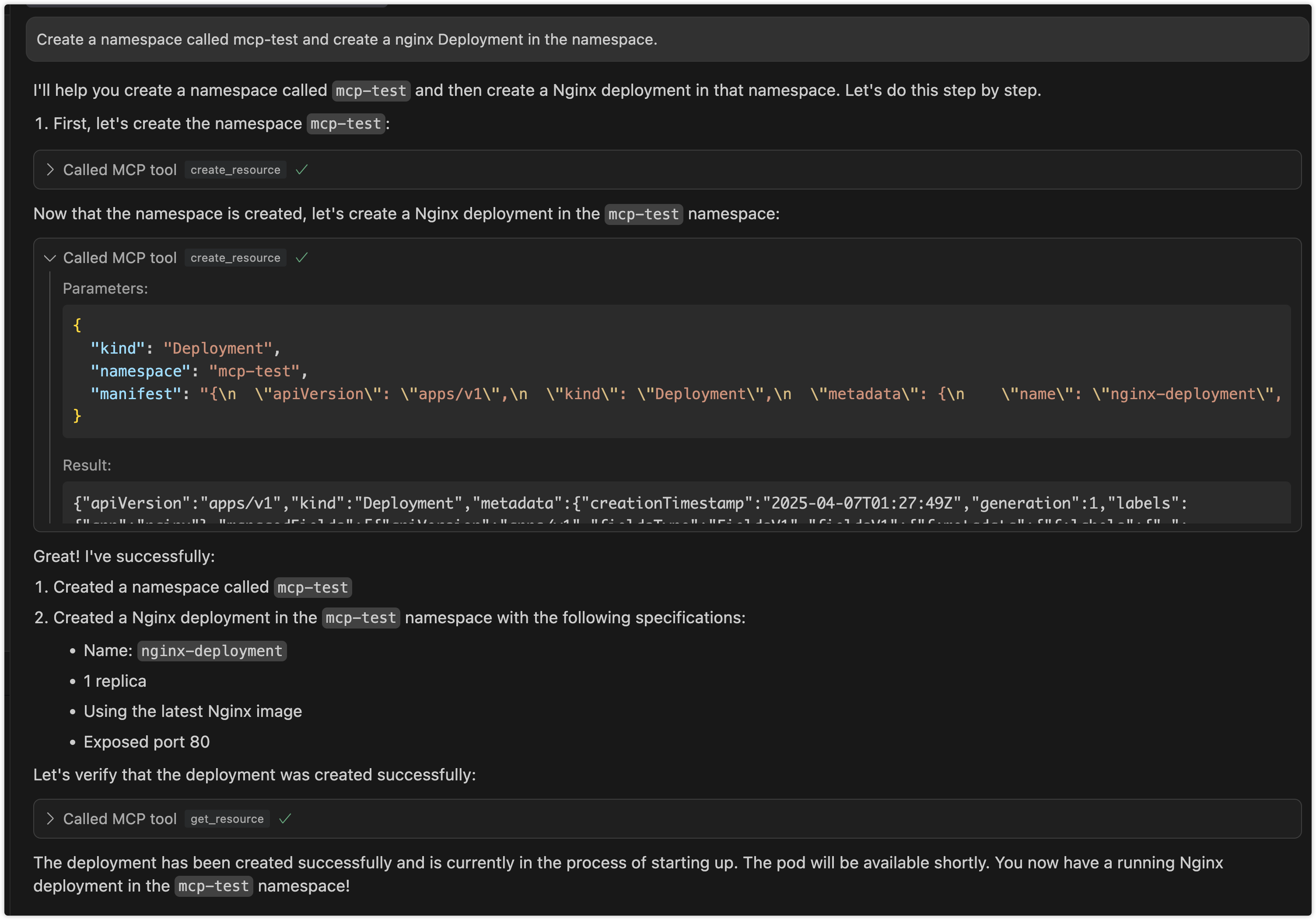
Preview
Interaction through cursor
Use Cases
1. Kubernetes Resource Management via LLM
- Interactive Resource Management: Manage Kubernetes resources through natural language interaction with LLM, eliminating the need to memorize complex kubectl commands
- Batch Operations: Describe complex batch operation requirements in natural language, letting LLM translate them into specific resource operations
- Resource Status Queries: Query cluster resource status using natural language and receive easy-to-understand responses
2. Automated Operations Scenarios
- Intelligent Operations Assistant: Serve as an intelligent assistant for operators in daily cluster management tasks
- Problem Diagnosis: Assist in cluster problem diagnosis through natural language problem descriptions
- Configuration Review: Leverage LLM's understanding capabilities to help review and optimize Kubernetes resource configurations
3. Development and Testing Support
- Quick Prototype Validation: Developers can quickly create and validate resource configurations through natural language
- Environment Management: Simplify test environment resource management, quickly create, modify, and clean up test resources
- Configuration Generation: Automatically generate resource configurations that follow best practices based on requirement descriptions
4. Education and Training Scenarios
- Interactive Learning: Newcomers can learn Kubernetes concepts and operations through natural language interaction
- Best Practice Guidance: LLM provides best practice suggestions during resource operations
- Error Explanation: Provide easy-to-understand error explanations and correction suggestions when operations fail
Architecture
1. Project Overview
An stdio-based MCP server that connects to Kubernetes clusters and provides the following capabilities:
- Query Kubernetes resource types (including built-in resources and CRDs)
- CRUD operations on Kubernetes resources (with configurable write operations)
- Helm operations for release and repository management
2. Technical Stack
- Go
- mcp-go SDK
- Kubernetes client-go library
- Helm v3 client library
- Stdio for communication
3. Core Components
- MCP Server: Uses mcp-go's
mcp-k8spackage to create an stdio-based MCP server - K8s Client: Uses client-go to connect to Kubernetes clusters
- Helm Client: Uses Helm v3 library for Helm operations
- Tool Implementations: Implements various MCP tools for different Kubernetes operations
4. Available Tools
Resource Type Query Tools
get_api_resources: Get all supported API resource types in the cluster
Resource Operation Tools
get_resource: Get detailed information about a specific resourcelist_resources: List all instances of a resource typecreate_resource: Create new resources (can be disabled)update_resource: Update existing resources (can be disabled)delete_resource: Delete resources (can be disabled)
Helm Operation Tools
list_helm_releases: List all Helm releases in the clusterget_helm_release: Get detailed information about a specific Helm releaseinstall_helm_chart: Install a Helm chart (can be disabled)upgrade_helm_chart: Upgrade a Helm release (can be disabled)uninstall_helm_chart: Uninstall a Helm release (can be disabled)list_helm_repositories: List configured Helm repositoriesadd_helm_repository: Add a new Helm repository (can be disabled)remove_helm_repository: Remove a Helm repository (can be disabled)
Usage
mcp-k8s supports three communication modes:
1. Stdio Mode (Default)
In stdio mode, mcp-k8s communicates with the client through standard input/output streams. This is the default mode and is suitable for most use cases.
# Run in stdio mode (default)
{
    "mcpServers":
    {
        "mcp-k8s":
        {
            "command": "/path/to/mcp-k8s",
            "args":
            [
                "--kubeconfig",
                "/path/to/kubeconfig",
                "--enable-create",
                "--enable-delete",
                "--enable-update",
                "--enable-list",
                "--enable-helm-install",
                "--enable-helm-upgrade"
            ]
        }
    }
}
2. SSE Mode
In SSE (Server-Sent Events) mode, mcp-k8s exposes an HTTP endpoint to mcp client. You can deploy the service on a remote server (but you need to pay attention to security)
# Run in SSE mode
./bin/mcp-k8s --kubeconfig=/path/to/kubeconfig --transport=sse --port=8080 --host=localhost --enable-create --enable-delete --enable-list --enable-update --enable-helm-install
# This command will open all operations
mcp config
{
  "mcpServers": {
    "mcp-k8s": {
      "url": "http://localhost:8080/sse",
      "args": []
    }
  }
}
SSE mode configuration:
--transport: Set to "sse" to enable SSE mode--port: HTTP server port (default: 8080)--host: HTTP server host (default: "localhost")
3. Streamable HTTP Mode
In Streamable HTTP mode, mcp-k8s exposes an HTTP endpoint that supports both direct HTTP responses and SSE streams. This mode provides better flexibility and supports streaming output.
# Run in Streamable HTTP mode
./bin/mcp-k8s --kubeconfig=/path/to/kubeconfig --transport=streamable-http --port=8080 --host=localhost --endpoint-path=/mcp --enable-create --enable-delete --enable-list --enable-update --enable-helm-install
mcp config
{
  "mcpServers": {
    "mcp-k8s": {
      "url": "http://localhost:8080/mcp",
      "args": []
    }
  }
}
Streamable HTTP mode configuration:
--transport: Set to "streamable-http" to enable Streamable HTTP mode--port: HTTP server port (default: 8080)--host: HTTP server host (default: "localhost")--endpoint-path: Endpoint path for the MCP server (default: "/mcp")
4. Docker environment
SSE Mode
- Complete Example Assuming your image name is mcp-k8s and you need to map ports and set environment parameters, you can run:
docker run --rm -p 8080:8080 -i -v ~/.kube/config:/root/.kube/config ghcr.io/silenceper/mcp-k8s:latest --transport=sse
Streamable HTTP Mode
docker run --rm -p 8080:8080 -i -v ~/.kube/config:/root/.kube/config ghcr.io/silenceper/mcp-k8s:latest --transport=streamable-http --endpoint-path=/mcp
stdio Mode
{
  "mcpServers": {
    "mcp-k8s": {
      "command": "docker",
      "args": [
        "run",
        "-i",
        "-v",
        "~/.kube/config:/root/.kube/config",
        "--rm",
        "ghcr.io/silenceper/mcp-k8s:latest"
      ]
    }
  }
}
Getting Started
Direct Usage
You can directly download the binary for your platform from the releases page and use it immediately.
Go Install
go install github.com/silenceper/mcp-k8s/cmd/mcp-k8s@latest
Build
Using Makefile (Recommended)
The Makefile automatically injects version information from the VERSION file:
git clone https://github.com/silenceper/mcp-k8s.git
cd mcp-k8s
make build
This will build with version information injected via ldflags.
Direct Build
git clone https://github.com/silenceper/mcp-k8s.git
cd mcp-k8s
go build -o bin/mcp-k8s cmd/mcp-k8s/main.go
Note: Direct build will show version as "dev" unless you specify ldflags manually.
Command Line Arguments
You can use mcp-k8s --help to see all available options, or mcp-k8s --version to check the version.
Kubernetes Resource Operations
--kubeconfig: Path to Kubernetes configuration file (uses default config if not specified)--enable-create: Enable resource creation operations (default: false)--enable-update: Enable resource update operations (default: false)--enable-delete: Enable resource deletion operations (default: false)--enable-list: Enable resource list operations (default: true)
Helm Operations
--enable-helm-release-list: Enable Helm release list operations (default: true)--enable-helm-release-get: Enable Helm release get operations (default: true)--enable-helm-install: Enable Helm chart installation (default: false)--enable-helm-upgrade: Enable Helm chart upgrade (default: false)--enable-helm-uninstall: Enable Helm chart uninstallation (default: false)--enable-helm-repo-list: Enable Helm repository list operations (default: true)--enable-helm-repo-add: Enable Helm repository add operations (default: false)--enable-helm-repo-remove: Enable Helm repository remove operations (default: false)
Transport Configuration
--transport: Transport type (stdio, sse, or streamable-http) (default: "stdio")--host: Host for HTTP transport (SSE or Streamable HTTP) (default: "localhost")--port: TCP port for HTTP transport (SSE or Streamable HTTP) (default: 8080)--endpoint-path: Endpoint path for Streamable HTTP transport (default: "/mcp")
Version Information
--version: Display version information including version, commit hash, and build date--helpor-h: Display help information
Testing Streamable HTTP
To test if Streamable HTTP mode is working correctly, you can use the provided test script:
# Start the server in one terminal
./bin/mcp-k8s --transport=streamable-http --port=8080 --enable-list

# In another terminal, run the test script
./test_streamable_http.sh
For detailed testing instructions, see TEST_STREAMABLE_HTTP.md.
Integration with MCP Clients
mcp-k8s is an stdio-based MCP server that can be integrated with any MCP-compatible LLM client. Refer to your MCP client's documentation for integration instructions.
Security Considerations
- Write operations are strictly controlled through independent configuration switches
- Uses RBAC to ensure K8s client has only necessary permissions
- Validates all user inputs to prevent injection attacks
- Helm operations follow the same security principles with read operations enabled by default and write operations disabled by default
Follow WeChat Official Account