



Why MAP Exists
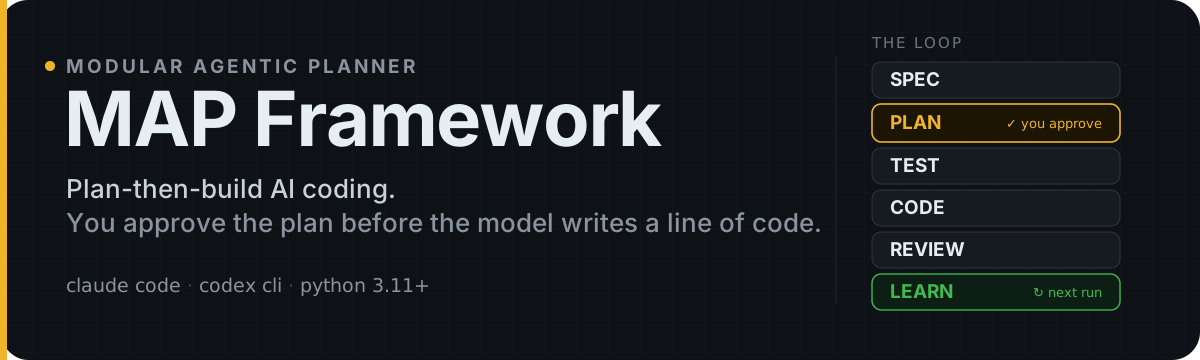
Most AI agents rush straight to code — fast wrong answers, silent rework.
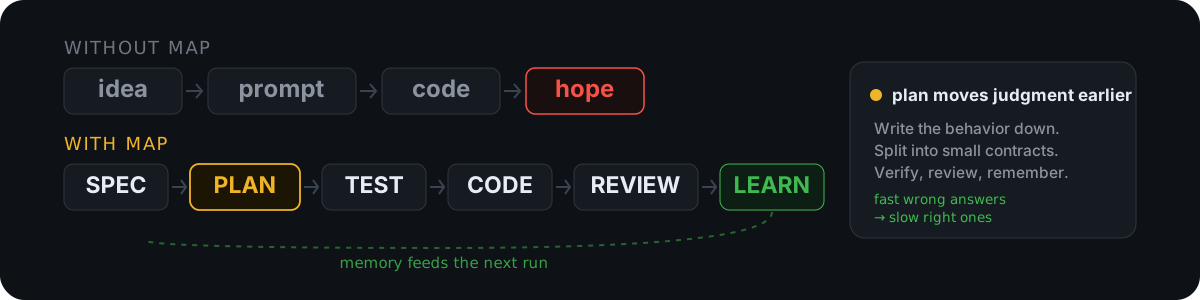
Common failure modes MAP eliminates:
- AI silently makes architecture decisions you did not approve.
- One prompt produces a large diff that is hard to review.
- Tests are written around the generated implementation, including its mistakes.
- The output compiles, but you cannot explain why the design is correct.
- The next session forgets the gotchas you already paid to discover.
MAP moves engineering judgment earlier: write down the behavior, split the work into small contracts, verify each stage, review against the spec, and save lessons for the next run.
Quick Start

1. Install
uv tool install mapify-cli

# or with pip
pip install mapify-cli
Requires Python 3.11+, and python3 on your PATH must be that interpreter — the
installed hooks and .map/scripts/ runners execute through a #!/usr/bin/env python3 shebang, not through the interpreter that ran mapify. mapify init
checks it up front and tells you what to fix (details).
2. Initialize your project
Claude Code is the default provider:
cd your-project
mapify init
claude
Codex CLI:
cd your-project
mapify init . --provider codex
codex
Then enable the Codex hook: run /hooks, select PreToolUse, press t to toggle on, then Esc. If your Codex version does not support the hooks feature key yet, start with codex --enable codex_hooks or upgrade first.
3. Run the loop
/map-plan      define the behavior and split the task
/map-efficient implement the approved plan
/map-check
/map-review
/map-learn
That's the whole golden path.
- Start with
/map-planfor anything non-trivial — it clarifies behavior and splits the work into contract-sized subtasks. - Already scoped? Go straight to
/map-efficient. - Tiny edit?
/map-planoff-ramps you to a direct edit or/map-fastinstead of forcing full planning. - Too foggy to plan?
/map-wayfindresolves open design decisions one at a time on a durable map, then hands settled decisions to/map-plan. - Want one entry point?
/map-autoroutes and drives the chain autonomously; hard-stops only ondangerous_action/safety_guardrailholds.
Codex CLI users invoke the same skills with
$:$map-plan,$map-efficient,$map-check. See the Usage Guide.
Framework updates. Automatic stable updates are enabled by default. Normal MAP skills check at most once per project every 24 hours, apply eligible patch and minor releases, and ask before a major release after showing its official feature highlights. Rejecting a major offer is remembered per project for that exact version, so it is not offered again; any different patch, minor, or major version is offered normally. Use these project controls and provider-specific manual skills when needed:
mapify init . --no-auto-update   # persist updates.auto: false
mapify init . --auto-update      # re-enable automatic checks
/map-upgrade                     # Claude manual check/upgrade
$map-upgrade                     # Codex manual check/upgrade
Automatic failures stay silent so they do not block the requested workflow;
manual checks report errors explicitly. The public mapify upgrade command is
separate and unchanged: it upgrades only the CLI and does not refresh project
files. See Automatic and manual framework updates.
Case Study: 90 days → 7 days
The DevOpsConf 2026 case study applies this process to a production Kubernetes Project Operator:
- human estimate: 90 days
- MAP-style delivery: 7 days
- workflow:
SPEC → PLAN → TEST → CODE → REVIEW → LEARN - small reviewable PRs instead of one giant generated diff
- tests before implementation for critical pieces
- semantic bugs caught in review before merge
When To Use MAP
| Good fits | Poor fits |
|---|---|
| Complex backend features | Typos and tiny edits |
| Kubernetes controllers and operators | Small one-off scripts |
| Internal platform tooling | Product ideas where behavior is still unknown |
| API, CRD, or domain-model changes with invariants | Broad rewrites without clear boundaries |
| Refactoring with a meaningful test harness | Tasks cheaper to do directly than to plan |
Core Commands
| Command | Use For |
|---|---|
/map-auto | Single-entry autonomous autopilot: routes a task through existing MAP workflows and drives the chain to a committed branch |
/map-plan | Start here for non-trivial work; clarify behavior and decompose tasks |
/map-wayfind | Too foggy to plan? Resolve design decisions on a durable map before /map-plan |
/map-efficient | Implement an approved plan or already-scoped task |
/map-fast | Small, low-risk changes where full planning is overhead |
/map-check | Quality gates, verification, and artifact checks |
/map-review | Pre-commit semantic review against the plan, tests, and diff |
/map-learn | Capture project memory and reusable lessons |
/map-understand | Interactive teaching and quiz mode for code, diffs, and workflow results |
/map-debug | Bug fixes and debugging |
/map-task | Execute a single subtask from an existing plan |
/map-tdd | Test-first implementation workflow |
/map-release | Package release workflow |
/map-resume | Resume interrupted workflows |
Why Engineers Stick With It
- Daily-driver speed — optimized for repeated use, not occasional demos. Structured enough to prevent chaos, lightweight enough to keep token and time cost under control.
- Reviewable diffs —
/map-planand/map-efficientrequire per-subtask size, concern, and constraint metadata, then validateblueprint.jsonbefore implementation, so oversized or mixed-concern plans fail early. - Gates that check the plan, not vibes —
/map-checkand/map-reviewvalidate against the spec, tests, and diff instead of asking whether code "looks fine". - Clean-room review —
/map-reviewauto-bundles spec, plan, tests, verification, and coverage evidence into a single durable input (.map/<branch>/review-bundle.json);--detachedopens a read-only worktree for inspection without touching your branch. - Project memory —
/map-learnturns hard-won fixes and gotchas into reusable context, so the next session doesn't relearn them.
More under the hood — calibrated effort, mutation boundaries, token budgets, retry quarantine, run-health diagnostics, skill IR audit
- Calibrated workflow effort — each shipped slash skill declares a
thinking_policyandparallel_tool_policy, so lightweight commands stay direct while planning, review, and release workflows reserve deeper reasoning and parallel fan-out for the stages that benefit. - Mutation boundary constraints — write-capable Claude and Codex surfaces tell agents not to edit unrelated files, add or upgrade dependencies, or refactor neighboring code unless the current subtask requires it.
- Context-first prompt envelopes — high-context prompts wrap branch artifacts in XML-style
<documents>, then state the<task>and<expected_output>, so specs, diffs, logs, and schemas stay separated for the model. - Contract-sized subtasks — blueprints require
expected_diff_size,concern_type,one_logical_step,hard_constraints,soft_constraints, andcoverage_map. Hard constraints must be owned incoverage_mapand cited in the owning subtask. - Token budget and research ROI reports — Actor and review prompt builders append active-path budget decisions to
.map/<branch>/token_budget.json, whiletoken_accounting.jsonand/map-tokenreportseparate research-agent/researcher cost from Actor/Monitor cost. - Clean retry quarantine — after repeated Monitor rejection, write-capable workflows switch the next attempt into clean-retry mode using
.map/<branch>/retry_quarantine.jsoninstead of raw failed-session context. - Run health report — workflows write
.map/<branch>/run_health_report.jsonduring closeout: terminal status, step progress, retry counters, artifact presence, hook-injection status, and advisory signals. CI can fail inconsistent closeouts withpython3 .map/scripts/map_step_runner.py validate_run_health_report. - Compact recovery surface —
/map-resumekeeps the active recovery flow short and moves low-frequency notes toresume-reference.md, so recovery after/clearor context exhaustion gives the next checkpoint action without loading the whole appendix. - Skill IR audit — release checks lower shipped Claude and Codex
SKILL.mdfiles into a typedSkillIR, verify content hashes, catch unsupported frontmatter, reject missing supporting-file links, and block injection-like instructions beforemapify initcopies surfaces into user repos.
How It Works
MAP orchestrates specialized roles through slash commands and skills:
TaskDecomposer → breaks goals into subtasks
Actor          → implements scoped tasks
Monitor        → validates quality and blocks invalid output
Predictor      → analyzes impact for risky changes
Learner        → captures reusable project memory
For Claude Code, MAP slash surfaces live in .claude/skills/map-*/SKILL.md files created by mapify init. For Codex CLI, mapify init . --provider codex creates .agents/skills/, .codex/agents/, .codex/config.toml, hooks, and shared .map/scripts/.
MAP is inspired by the MAP cognitive architecture (Nature Communications, 2025), which reported a 74% improvement on planning tasks. The CLI turns that idea into a practical software-development workflow.
What Success Looks Like
After a good first workflow, you should see:
- a written plan or spec before implementation starts;
- small implementation contracts instead of one giant AI diff;
- verification and review artifacts under
.map/<branch>/; - review comments focused on correctness and semantics, not formatting noise;
/map-learnpreserving project rules, gotchas, and handoffs for future sessions.
MAP review is useful, but it is not a replacement for engineering judgment. Serious changes still need human review. The goal is to make that review smaller, earlier, and better grounded.
Options
Minimality doctrine, context-compression policy, SOFA, and other init flags
Minimality doctrine (controls how strongly MAP pushes Actor/Monitor/Evaluator toward the smallest sufficient safe change):
# .map/config.yaml
minimality: lite   # default for ALL projects; set 'off' to opt out
Allowed values: off, lite, full, ultra. The global default is lite. lite is conservative: Actor prefers the fewest moving parts, Monitor blocks scope drift only when it affects required behavior, and Evaluator scores simplicity without letting it hide missing required work. /map-review also adds an advisory what-to-delete lens when minimality is not off; its net: -N estimate is informational, not a gate. In full/ultra, the decomposer may place speculative omissions in blueprint.deferred_yagni; those items must be shown during plan approval and can be restored with python3 .map/scripts/map_orchestrator.py restore_deferred_yagni YG-NNN. Maintainers can inspect local rollout telemetry with mapify minimality-report --json.
Context-compression policy (controls the /compact nudge; default never — opt-in):
mapify init . --compression never                 # default — no nudge
mapify init . --compression auto                  # nudge at threshold
mapify init . --compression aggressive            # nudge at 0.4 x threshold
mapify init . --compression-threshold 250000      # Opus 1M / 50+ subtask plans
Actor and reviewer prompts always carry the full bundled context — context-block truncation was removed. When a policy other than never is active, MAP offloads large tool outputs to .map/<branch>/compacted/ before /compact drops them, so a dropped output is re-read from its sidecar instead of re-running broad discovery (these sidecars can hold secrets — they are 0o600 and self-ignored from git; never push .map/). See docs/USAGE.md#context-budget-policy.
Stack Overflow for Agents (SOFA) read-only prior-art search — off by default, no network or credentials unless you enable it:
mapify init . --sofa # opt-in: enable the map-so-search skill
This writes sofa.enabled: true to .map/config.yaml and adds .sofa/ to your .gitignore. Without the flag, no SOFA code path runs. See the SOFA usage guide.
Autonomy posture (--autonomy, claude provider) — off by default, opt-in "YOLO-minus-git":
mapify init . --autonomy        # auto-approve most tools; keep git commit/push for the human
mapify init . --no-autonomy     # remove the autonomy posture
--autonomy writes a broad auto-approve allowlist plus a git commit/push deny into the per-user, gitignored .claude/settings.local.json (the committed team .claude/settings.json stays the secure baseline). The git block is enforced by the safety-guardrails.py PreToolUse hook. Omit the flag to leave existing local settings untouched on re-init. See the autonomy usage guide.
Documentation
| Guide | Description |
|---|---|
| Installation | All install methods, PATH setup, troubleshooting |
| Usage Guide | Workflows, examples, cost optimization, playbook |
| Prompt Library | Copyable prompt recipes by SDLC phase and role |
| Architecture | Agents, MCP integration, customization |
| Platform Spec | Platform refactor roadmap, codebase analysis |
Trouble?
- Command not found → Run
mapify initin your project first. initstops on a Python version →python3on yourPATHis older than 3.11; the hooks run under it. Install 3.11+ (brew install python@3.12/uv python install 3.12), thenmapify check. To install anyway, pass--skip-python-checkor setMAPIFY_SKIP_PYTHON_CHECK=1— hooks stay non-functional untilpython3is upgraded (details).- A hook printed "MAP requires Python 3.11 or newer" → same cause, detected at run time; the message names the interpreter it ran under. Context hooks report and let the session continue; the two PreToolUse gates (
safety-guardrails.py,workflow-gate.py) deny the tool call instead of allowing it unguarded, so fixpython3in another terminal to unblock. - Agent errors → Check
.claude/agents/has all shipped agent.mdfiles, or runmapify doctor. - Poor output on a complex task → Start with
/map-planand feed/map-efficientthe approved plan instead of asking it to infer the architecture. - More help →
Contributing
Improvements welcome: prompts for specific languages, new agents, provider integrations, and CI/CD workflow support.
License
MIT
Start with /map-plan. Keep the model inside your engineering process, not the other way around.