LongHorizon-Harness
Loop Engineering for Computer-Use Agents
Give Claude Code, Codex, OpenCode, or DeepSeek Harness a goal once. Keep it working across desktop apps and the terminal for dozens of hours.
Plan → act → verify → checkpoint or recover → repeat — until the work is actually done.









Usage · The Loop · Computer Use · Results · Project Website · 简体中文

The model determines what an agent can do in one round. LongHorizon-Harness engineers the loop around it: what to do next, how to verify the result in the real computer, what progress to preserve, and how to continue after failure or context refresh.
A Loop Engineering system for Claude Code, Codex, OpenCode, and DeepSeek Harness. One-command install, ready to run.
LongHorizon-Harness turns existing agents into long-running computer-use systems. Across desktop apps and the terminal CLI, it continuously recovers the goal and verified state, selects the next bounded step, executes it with a fresh context, checks the actual result, and then checkpoints accepted progress or feeds failure evidence into the next round. It does not train a new model or replace an existing agent; it provides the durable execution loop around one.
✨ News
- [v0.1.7 · 2026-08-20] A finished run is no longer a dead end: the workbench is now a conversation. Read the reply, type a follow-up, and the run continues on its own round ledger instead of replanning from scratch. A message you send mid-round is claimed by the very next round, so stopping and continuing never drops it. Also adds
--reasoning-effortfor every role (with--manager-reasoning-effortand friends to override one), forwarded to whichever backend exposes it. The transcript now reads in strict chronological order, and a graceful stop escalates to a force stop only when a worker ignores it. - [v0.1.6 · 2026-08-15] Added OpenCode CLI support. LongHorizon-Harness can now run
opencode run promptas--agent opencode, with role-scoped read/write permissions, OpenCode API endpoint overrides, normalized JSON results, and CLI/config/doctor integration. The Web workbench can select OpenCode Harness and its model independently for each role. - [v0.1.5 · 2026-08-14] Added phase-1 DeepSeek Harness CLI support. LongHorizon-Harness can now run
dsh --profile headlessas--agent deepseek_harness, with an isolatedDSH_HOME, role-scoped read/write permissions, DeepSeek API endpoint overrides, normalized JSONL results, and CLI/config/doctor integration. The Web workbench can select DeepSeek Harness and its model independently for each role. GUI computer-use and MCP support will follow in a later phase; see the CLI setup. - [v0.1.4 · 2026-08-11] The new Dashboard has landed: a React/FastAPI workbench you can drive entirely from the browser. Start a task, choose a backend and model per role, answer approvals, send an instruction mid-run, and stop or restart a run. Launch it with
lh-harness web; see Run a task in the browser. - [2026-08-10] Added the Terminal-Bench 2.1 evaluation.
- [v0.1.3 · 2026-08-07] Every run now ends with a plain-language reply that answers your task from the verified state alone. Tasks act on the directory you launched from by default, and the console reports each round as it happens.
- [2026-08-06] LongHorizon-Harness reaches #1 on the Hugging Face Daily Papers weekly ranking.
- [v0.1.2 · 2026-08-06] Adds unified computer-use plugin management, stronger auditor read-only checks and role isolation, reliable process cleanup, and expanded
doctordiagnostics. See Manage computer-use plugins.
🚀 We’re iterating rapidly. Stay tuned!
Video Demo
https://github.com/user-attachments/assets/ca8b77ce-9220-4d85-a272-b346009b2454
Open the promotional video (1440p MP4)
Loop Engineering for real computer environments.
Give LongHorizon-Harness an outcome. It repeatedly turns the remaining work into a bounded step, performs that step on the right computer surface, checks what actually happened, and carries the verified result into the next round.
flowchart LR
    S["Original goal +<br/>verified state"] --> P["Plan the next<br/>bounded step"]
    P --> A["Act in a desktop app or CLI<br/>with fresh context"]
    A --> V["Verify files, UI, logs, and tests<br/>in the real environment"]
    V -->|Pass| C["Checkpoint<br/>verified progress"]
    V -->|Fail| R["Record evidence<br/>and recover"]
    C --> D{"Task complete?"}
    R --> S
    D -->|No| S
    D -->|Yes| F["Verified result"]
This is Loop Engineering: designing the execution, verification, correction, and recovery loop around the agent — not just the prompt for a single turn.
One loop. Three focused responsibilities.
The roles are implementation boundaries inside the loop, not three agents independently growing their own versions of the task.
| Loop responsibility | Role | What it owns |
|---|---|---|
| 🧭 State and next step | Manager | Rebuilds each round from the original goal, verified progress, failure evidence, and remaining work |
| ⚡ Action | Executor | Starts with a fresh context and completes one clearly defined step in a desktop app or the CLI |
| 🔍 Ground truth | Auditor | Independently inspects the actual files, interfaces, logs, and tests instead of trusting the Executor's claim |
Only results that pass independent verification become trusted task state. A rejected result remains evidence, not progress. When a context is refreshed, an action fails, or a deliverable does not pass inspection, the next round starts from the original goal and the last verified checkpoint, then continues from what remains.
Desktop apps and CLI. One continuous task.
LongHorizon-Harness supports both GUI and CLI workflows.
| 🖥️ Operate the desktop | ⌨️ Work in the terminal |
|---|---|
| 🌐 Click, type, scroll, and browse | 💻 Write and modify code |
| 📊 Operate spreadsheets | ▶️ Run commands and scripts |
| 📄 Edit documents | 📦 Install dependencies and environments |
| 🎨 Use design software | 🔧 Configure and debug systems |
| 🧊 Operate 3D tools | 📁 Process files and data |
One task can begin in a browser, move to the command line for data processing, continue in desktop software to produce an artifact, and return to the terminal for validation or debugging. The goal, progress, and evidence remain under the same state-management system throughout.
Any model. Any agent backend.
LongHorizon-Harness is not tied to a specific model or agent backend. Existing models and agents connect through configuration without changing their original workflows.
| Layer | Supported choices | |
|---|---|---|
| 🧠 | Models | Claude, GPT, Qwen, and other models exposed by an agent backend |
| 🤖 | Agent backends | Claude Code, Codex CLI, OpenCode, DeepSeek Harness (dsh, CLI-only in phase 1), and custom AgentAdapter implementations |
| 🎛️ | Role assignment | The Manager, Executor, and Auditor can each use a different model or backend |
| 🖥️ | Execution environments | Local, with a pluggable Environment protocol |
A lightweight AgentAdapter preserves each agent's native execution loop while LongHorizon-Harness coordinates role boundaries, verified task state, and cross-round progress around it.
Use one model for all three roles, or combine different models and backends to balance quality, speed, and cost.
Hundreds of real tasks. Measured gains.
LongHorizon-Harness is not demonstrated only on a handful of carefully selected success cases.
We ran it on hundreds of complex tasks across GUI, CLI, and mixed computer environments:
| Task domain | What the tasks involve |
|---|---|
| 🌐 Web Frontend | Developing, fixing, and validating websites and web applications through browser interaction, developer tools, and code changes |
| 📊 Data Analysis & Visualization | Processing data, producing charts and dashboards, and checking analytical results and visual deliverables |
| 🛠️ Operations & Debugging | Investigating logs, networks, performance, and service failures; configuring, diagnosing, and repairing systems |
| 🎨 Design & Image Processing | Editing visual assets, matching design references, processing images, and verifying final visual quality |
| 🎮 Games & Interaction | Building, operating, and debugging games or interactive applications; checking interaction logic and runtime behavior |
| 📄 Documents & Presentations | Editing documents and slide decks, including content, formatting, references, layout, and final delivery |
| 🧊 Spatial Reasoning | Completing tasks involving spatial relationships, geometry, precise placement, and 3D operations |
| 🖥️ Desktop & System Settings | Operating desktop applications, files, and system settings across multi-application workflows |
| 🔬 Research & Education | Completing literature research, coursework, teaching materials, forms, and research-support workflows |
| 🎬 Creative Production | Producing presentations, video, audio, and other media while coordinating assets across tools |
| ⚙️ Engineering & Computing | Using CAD, EDA, scientific software, development tools, and cloud or DevOps toolchains |
| 🎫 Personal Services | Handling event ticketing, everyday services, games, and visual-search workflows |
| 🏛️ Administration & Compliance | Completing office, legal, policy-sensitive form, institutional, and safety-aware submission workflows |
| 💼 Business & Finance | Handling market analysis, procurement, loans, sales, reimbursements, and cross-application enterprise workflows |
| 🏥 Healthcare | Completing medical quality-control, insurance, immunization, and structured health-form workflows |
Same model. Same execution backend. Only the harness changes.
~50% → ~80%GUI + CLI completionWeaveBench |
3×Full desktop-task completionOSWorld 2.0 |
69.7% → 77.2%Code + CLI successTerminal-Bench 2.1 · 24% fewer tokens |
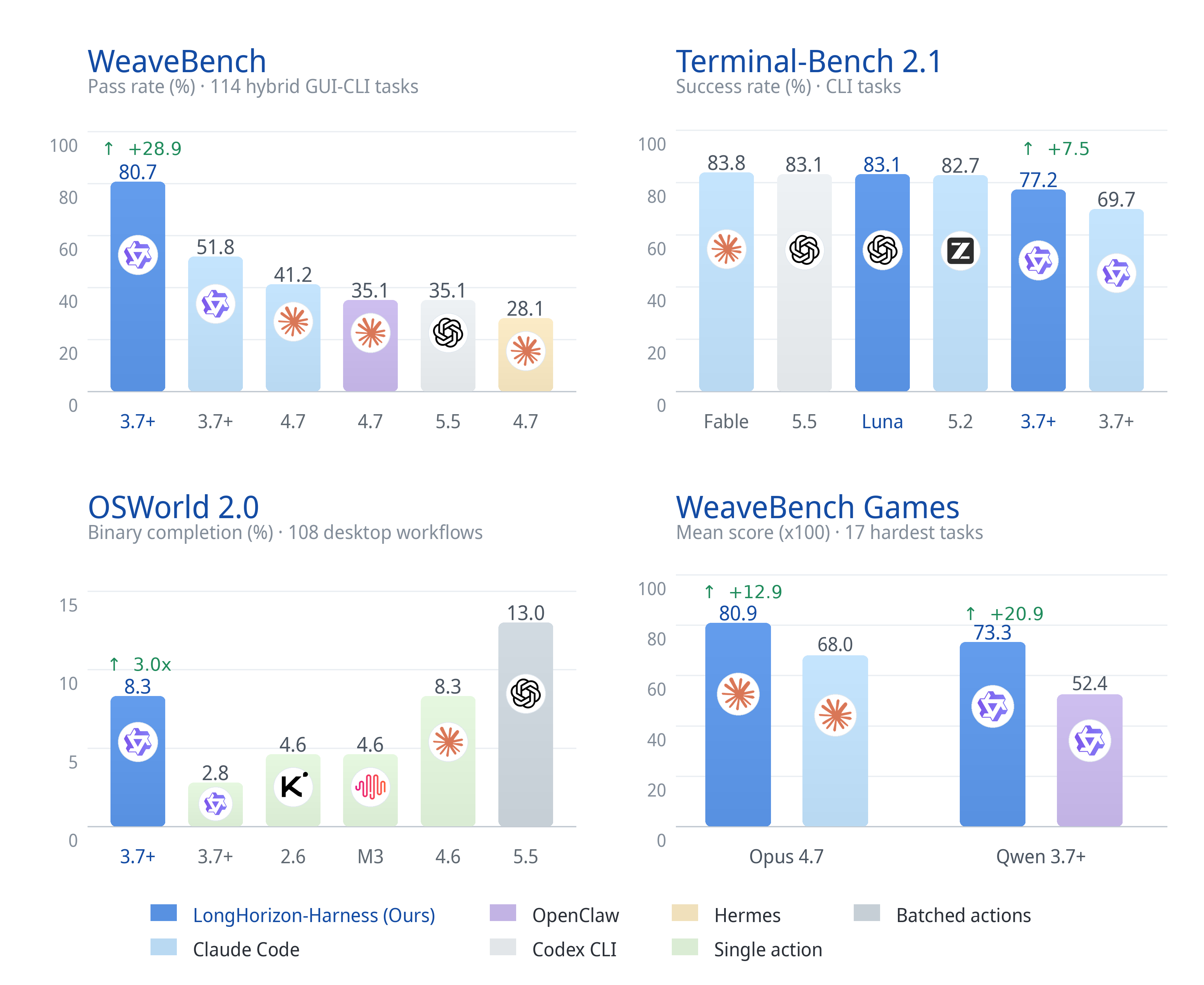
📊 Full benchmark results and experimental settings
| Benchmark | Metric | Claude Code | LongHorizon-Harness | Gain |
|---|---|---|---|---|
| WeaveBench (114 tasks) | PassRate | 51.8 | 80.7 | +28.9 |
| WeaveBench | Overall | 0.702 | 0.835 | +0.133 |
| OSWorld 2.0 (108 tasks) | Binary | 2.8 | 8.3 | 3.0× |
| OSWorld 2.0 | Partial | 21.5 | 35.2 | +13.7 |
| Terminal-Bench 2.1 | Success rate | 69.7 | 77.2 | +7.5 |
All rows use Qwen 3.7-Plus as the backbone and Claude Code as the execution backend.
Full result tables and case trajectories are available on the LongHorizon-Harness project website.
One command. Full visibility.
Installation
Steps 1–2 are once per machine; step 3 is once per project. Then run tasks from the browser (step 4) or the command line (step 5).
Requirements
| Needed for | |
|---|---|
| uv | The recommended isolated install. Skip it if you prefer pip. |
| Python 3.10 or later | Running the harness. uv tool install brings its own; a pip install uses yours. |
One agent runtime on PATH: codex, claude, opencode, or dsh | Actually executing the work. Install more than one if you want to mix backends across roles. |
| Node.js 20 or later | The npm-distributed computer-use plugins. DeepSeek Harness itself currently requires Node.js ^22.19.0 or >=24.0.0. |
Platform status: Currently tested on macOS. Windows support is included but has not yet been thoroughly tested.
Run lh-harness doctor at any point to check all of the above; see Verify the environment.
1. Install LongHorizon-Harness
uv tool install lh-harness # or: pip install lh-harness
Upgrade later with uv tool upgrade lh-harness or pip install --upgrade lh-harness.
2. Install a computer-use plugin
Skip this if your tasks never touch the GUI. Otherwise install the one that matches your agent. No plugin is enabled by default, and one install covers every project on the machine.
Using Codex:
lh-harness plugin install codex-computer-use
Using Claude Code, or both agents:
lh-harness plugin install open-computer-use
codex-computer-use is the official plugin bundled with the Codex CLI and only works with Codex. open-computer-use is distributed on npm, needs Node.js 20+, and drives both agents. Both need OS permissions that must be granted by hand on macOS. See Manage computer-use plugins for that, for clawdcursor as a third option, and for how each one is wired.
3. Generate a project configuration
cd /path/to/your/project
lh-harness init
This creates ./.lh-harness/config.toml without replacing an existing file; use lh-harness init --force to regenerate. Open it and adjust the defaults. Every field is documented in Configuration reference.
4. Run a task in the browser (recommended)
lh-harness web --workspace-root .
This opens the workbench at http://127.0.0.1:8799/. Everything happens there: start a task, pick a backend and model per role, answer approval requests, send an instruction mid-run, stop or restart a run, and keep asking follow-up questions after it finishes — a follow-up continues the same run from the rounds it already completed. --workspace-root sets the default working directory for tasks created there; the remaining options are listed under Dashboard commands.
5. Or run a task from the command line
TASK="Inspect the current directory and summarize its files."
lh-harness run --task "${TASK}" --agent codex
Explicit CLI arguments such as --agent override the matching values in ./.lh-harness/config.toml for that run; drop them to use the configured defaults.
To use the phase-1 DeepSeek Harness CLI backend, install its official npm package, provide a DeepSeek API key, and select deepseek_harness:
npm install -g @deepseek-ai/dsh
# If your npm mirror has not synced the package:
# npm install -g @deepseek-ai/dsh --registry=https://registry.npmjs.org

dsh --version
export DEEPSEEK_API_KEY="sk-..."
# Optional for a private or compatible endpoint:
# export DEEPSEEK_BASE_URL="https://your-endpoint.example.com"

lh-harness doctor
lh-harness run --task @task.md --agent deepseek_harness \
  --model deepseek-v4-flash --no-dashboard
To make DeepSeek Harness the project default, put this in ./.lh-harness/config.toml:
[run]
agent = "deepseek_harness"
model = "deepseek-v4-flash"
dashboard = false
Then use LongHorizon-Harness as usual:
lh-harness run --task @task.md
The LongHorizon Web workbench also exposes DeepSeek Harness (CLI) in each role's Harness selector and offers deepseek-v4-flash plus a custom model ID. Export the provider environment variables before starting the Web server so its worker processes inherit them:
export DEEPSEEK_API_KEY="sk-..."
# export DEEPSEEK_BASE_URL="https://your-endpoint.example.com"
lh-harness web --workspace-root .
The adapter runs dsh --profile headless, gives every run an isolated DSH_HOME, uses workspace-write for executors, and uses read-only for the Manager and auditors. --api-key maps to DEEPSEEK_API_KEY, --base-url maps to DEEPSEEK_BASE_URL, and LH_HARNESS_DSH_BINARY can select a non-PATH binary. DeepSeek Harness is still a developer preview; this phase intentionally does not expose its Web UI, computer-use plugins, MCP config, or --mcp-add-dir. Its headless profile currently returns only the final answer, so intermediate DeepSeek tool events are not streamed into the trajectory; the upstream positional task interface also means the task text is visible in the child process argument list while an episode is running.
The agents work in the directory you launched from, so the task acts on your real project. Set workspace or --workspace to point somewhere else. ./.lh-harness/ itself stays off limits, so the run's own logs and state are never mistaken for task content.
The Dashboard opens in your browser automatically, and the console prints one line per role as the run progresses. At the end you get a plain-language reply that answers your request from the verified state alone, and says so plainly if the task did not finish.
Every run is stored under ./.lh-harness/runs/<run-id>/; the full report, including that reply, stays in the run's logs/report.json.
Verify the environment
lh-harness doctor
doctor is read-only. It reports the Python runtime, the agent CLIs, Node.js, and plugin state, and exits non-zero when a required check fails.
Agent CLIs are verified by running <binary> --version, not just by finding them on PATH, so one that is present but broken is reported as a failure instead of OK. This catches the Windows case where a Microsoft Store desktop install leaves a zero-byte codex.exe alias on PATH that is not the CLI; doctor prints how to fix it.
It also checks PyPI for a newer version. To check on its own:
lh-harness check-update
Configuration reference
lh-harness run reads ./.lh-harness/config.toml automatically. Precedence is:
- Explicit CLI arguments
- Values in
./.lh-harness/config.toml - Built-in defaults
Task text, run IDs, and API keys are deliberately not configurable here; they stay command-line or environment inputs so they never land in a file you might commit.
[run]
| Field | Default | Description |
|---|---|---|
agent | "codex" | Backend for every role unless a role overrides it: codex, claude_code, opencode, or deepseek_harness. |
model | "gpt-5.6-sol" | Model for every role unless a role overrides it. Must be a model the chosen backend exposes. |
reasoning_effort | commented out | Reasoning depth for every role unless a role overrides it, forwarded to whichever backend exposes it. Unset keeps the provider's own setting. |
env | "local" | Execution environment. Only local today. |
runs_root | "./.lh-harness/runs" | Where run directories are created. Each run gets <runs_root>/<run-id>/. |
workspace | commented out | Working directory the agents operate in. Defaults to the directory lh-harness was started from, so a task acts on your real project; set it to isolate the run somewhere else. |
harness_dir | commented out | Where harness task state is written. Defaults to the run's own harness/, keeping it out of the workspace. |
log_dir | commented out | Where logs are written. Defaults to the run's own logs/. |
base_url | commented out | OpenAI-compatible endpoint override, for a proxy or a self-hosted model. |
prompt_language | "en" | Language of the harness-generated prompts and reports: en or zh. Does not restrict the task language. |
claude_mcp_config | commented out | Path to a .mcp.json for Claude Code. Overrides the installed plugin. |
codex_mcp_config | commented out | Path to a [mcp_servers.*] TOML for Codex. Overrides the installed plugin. |
mcp_add_dirs | [] | Extra directories the MCP server may read. Claude Code rejects these, because its role isolation requires task files to live inside the workspace. |
max_rounds | 30 | Upper bound on Manage-Execute-Audit rounds before the run stops. |
dashboard | true | Start the web dashboard with each run. |
dashboard_port | 0 | Dashboard port; 0 lets the OS pick a free one. |
[run.timeouts]
Per-episode limits in seconds. One episode is a single role invocation, not the whole run.
| Field | Default | Description |
|---|---|---|
manager | 600 | Planning the next step. |
gui_executor | 1800 | Executing a GUI/visual subtask. |
cli_executor | 1800 | Executing a CLI/non-GUI subtask. |
auditor | 600 | Verifying a subtask. Applies to both auditors. |
[run.roles.*]
Each role can take its own agent, model, and reasoning_effort, so you can pay for a strong model only where it matters: a capable Manager and Auditor with a cheaper Executor, for example. Every field is commented out by default, meaning "inherit".
Resolution walks the chain until it finds a value:
gui_executor → executor → [run].agent / [run].model / [run].reasoning_effort
cli_auditor  → auditor  → [run].agent / [run].model / [run].reasoning_effort
| Section | Falls back to | Covers |
|---|---|---|
[run.roles.manager] | [run] | The scheduler role |
[run.roles.executor] | [run] | Both executor roles |
[run.roles.gui_executor] | executor | GUI/visual subtasks |
[run.roles.cli_executor] | executor | CLI/non-GUI subtasks |
[run.roles.auditor] | [run] | Both auditor roles |
[run.roles.gui_auditor] | auditor | GUI audit |
[run.roles.cli_auditor] | auditor | CLI audit |
[run.roles.final_response] | manager | The closing reply written for you |
Every field above also has a CLI flag (--agent, --max-rounds, --gui-executor-model, --auditor-timeout, and so on) that overrides it for a single run. Run lh-harness run --help for the full list.
If a Manager, Executor, or Auditor reaches its local episode timeout, the run keeps the partial trajectory and recorded task state, then lets the next Manager round inspect the real workspace and recover. The timeout remains an agent execution timeout; it is not treated as proof of a provider network failure. Repeated timed-out rounds still trigger the Dashboard's human-review gate.
Manage computer-use plugins
Computer-use setup is intentionally separate from task execution: doctor only reports status, and lh-harness run never installs, removes, or changes plugins. All changes go through lh-harness plugin.
List the available plugins with their install state, supported agents, and homepages:
lh-harness plugin list
| Plugin | Source | Agents | Platforms |
|---|---|---|---|
codex-computer-use | Official plugin bundled with the Codex CLI | codex | whatever your Codex build offers |
open-computer-use | npm (open-codex-computer-use) | codex, claude_code | macOS, Windows, Linux |
clawdcursor | npm (clawdcursor) | codex, claude_code | macOS, Windows, Linux |
Installing needs no agent flag. Every agent the plugin supports is configured, since the per-agent difference is only one more config file:
lh-harness plugin install clawdcursor
One install covers every project on the machine. It installs the package, runs whatever consent or permission step the plugin needs on the current OS, and writes one MCP config per agent under ~/.lh-harness/plugins/. Agents missing from PATH are skipped; --agent narrows the selection, and --no-activate skips the permission step on a headless machine.
lh-harness run then loads the right server automatically. When several are installed, the first available one wins:
codex-computer-use > open-computer-use > clawdcursor
--claude-mcp-config and --codex-mcp-config override that choice. plugin list and doctor both print which plugin each agent will load and whether its permissions are granted.
To remove one:
lh-harness plugin uninstall clawdcursor
GUI access stays scoped to the harness. The npm plugins live entirely inside ~/.lh-harness/ and are passed per run, so ~/.codex/config.toml, ~/.claude.json, and the user-scope MCP registries are never touched. codex-computer-use is the unavoidable exception: Codex loads it from its own registry, so codex plugin add records it there.
codex-computer-use needs manual grants on macOS. It raises no permission dialog, so an unauthorized GUI call just fails. The install opens the two panes for you; tick Codex Computer Use under Privacy & Security → Accessibility and → Screen & System Audio Recording, then re-run the install to verify. On Windows there is nothing to grant, but the harness has to run in a signed-in desktop session and stay unelevated.
Any missing prerequisite is printed during install.
Configure MCP servers
Any MCP server can be passed to the agents, not just computer-use ones. Each backend reads its own native format; nothing is translated between them.
Claude Code takes a .mcp.json file through --claude-mcp-config:
{
  "mcpServers": {
    "computer-use": {
      "command": "/path/to/mcp-server",
      "args": ["--option", "value"],
      "env": {
        "EXAMPLE_VARIABLE": "value"
      }
    }
  }
}
Codex takes a TOML file of [mcp_servers.<name>] tables through --codex-mcp-config, matching ~/.codex/config.toml:
[mcp_servers.my-server]
command = "/path/to/mcp-server"
args = ["--option", "value"]

[mcp_servers.my-server.env]
EXAMPLE_VARIABLE = "value"
Pass the config for the backend in use, plus any directory the server needs to read:
lh-harness run --task @task.md --agent codex \
  --codex-mcp-config /path/to/mcp.toml \
  --mcp-add-dir /path/to/mcp/files
Both flags can be given together when roles use different backends, and --mcp-add-dir may be repeated. The equivalent environment variables are LH_HARNESS_CLAUDECODE_MCP_CONFIG, LH_HARNESS_CODEX_MCP_CONFIG, and LH_HARNESS_MCP_ADD_DIRS, the last separated by : on macOS/Linux and ; on Windows.
Prefer letting the server read API keys from its environment over writing them into the config file.
Dashboard commands
lh-harness run --task @task.md --dashboard      # Monitor a live run
lh-harness dashboard                            # Browse completed and active runs
lh-harness web --workspace-root .               # Serve the workbench for another directory
dashboard and web start the same workbench and accept the same options; web reads as the plain service entry point when the workbench is what you want, not a side effect of a run.
| Option | Description |
|---|---|
--workspace-root | Default workspace for runs created from the workbench (default: current directory) |
--runs-root | Base directory holding runs (default: ./.lh-harness/runs) |
--log-dir | Pin one run's log directory instead of browsing --runs-root |
--host / --port | Bind address (default: 127.0.0.1:8799); --port 0 lets the OS pick |
--auth-token | Bearer token, required for any non-loopback --host (also LH_HARNESS_WEB_TOKEN) |
--no-open | Do not open the URL in a browser |
Common CLI options
| Option | Description |
|---|---|
--task | Task text or @task.md |
--agent | claude_code, codex, opencode, or deepseek_harness (CLI-only in phase 1) |
--env | local |
--max-rounds | Maximum number of Manage-Execute-Audit rounds; the CLI default is 30 |
--dashboard | Start live monitoring and human intervention |
--no-dashboard | Disable a Dashboard enabled by the project configuration |
Run a longer task from a file and open the Dashboard:
lh-harness run --task @task.md --dashboard
The Dashboard shows every round's plan, execution result, audit evidence, and reason for rework. It also provides human gates when a task completes, becomes blocked, needs input, or fails repeatedly.
| 📋 Plan | ⚡ Execution | 🔍 Audit | ♻️ Rework |
|---|---|---|---|
| What happens next | What the agent did | What the environment proves | Why another round is needed |
Every run is stored in an isolated runs/<run-id>/ directory. The complete task state and audit trail make the agent's progress inspectable, recoverable, and reproducible.
| Run record | What it preserves |
|---|---|
| 📋 Task state | Original goal, requirements, verified progress, and remaining work |
| 🧾 Event stream | What happened throughout the run |
| 🔍 Audit reports | Evidence and acceptance decisions for every round |
| 🧠 Role trajectories | Manager, Executor, and Auditor inputs and outputs |
| 📁 Workspace | Files and artifacts produced during execution |
| ✅ Final report | The verified outcome of the task |
Evaluation Reproduction
eval/ provides frozen reproduction suites for three benchmarks:
| Directory | Benchmark | Description |
|---|---|---|
eval/WeaveBench-harness/ | WeaveBench (114 tasks) | Hybrid GUI+CLI tasks and a reproduction skill |
eval/OSWorldv2-harness/ | OSWorld-V2 (108 tasks) | Hybrid runner aligned with the official release |
eval/TB-harness/ | Terminal-Bench 2.1 | CLI-only long-horizon tasks |
See each directory's README.md or README.zh-CN.md for environment setup, parameters, and launch commands. The nested Harness / cua_harness code is a frozen compatibility copy used for evaluation; new integrations should use src/lh_harness/.
Citation
@article{longhorizonharness2026,
  title={LongHorizon-Harness: Advancing Long-Horizon Agents for Real-World Tasks},
  author={Ziyu Ma and Hailang Huang and Shun Zou and Yong Wang and Shidong Yang and Yiming Hu and Fei Wei and XiangXiang Chu},
  journal={arXiv preprint arXiv:2608.01964},
  year   = {2026},
  url    = {https://arxiv.org/abs/2608.01964}
}
Operate the whole computer. Preserve verified progress. Keep working until the task is done.