herdr auto title
A hook that turns your Claude Code / Codex conversation into a short title and applies it to the herdr tab name.
install · title language · uninstall · herdr.dev
English · 日本語



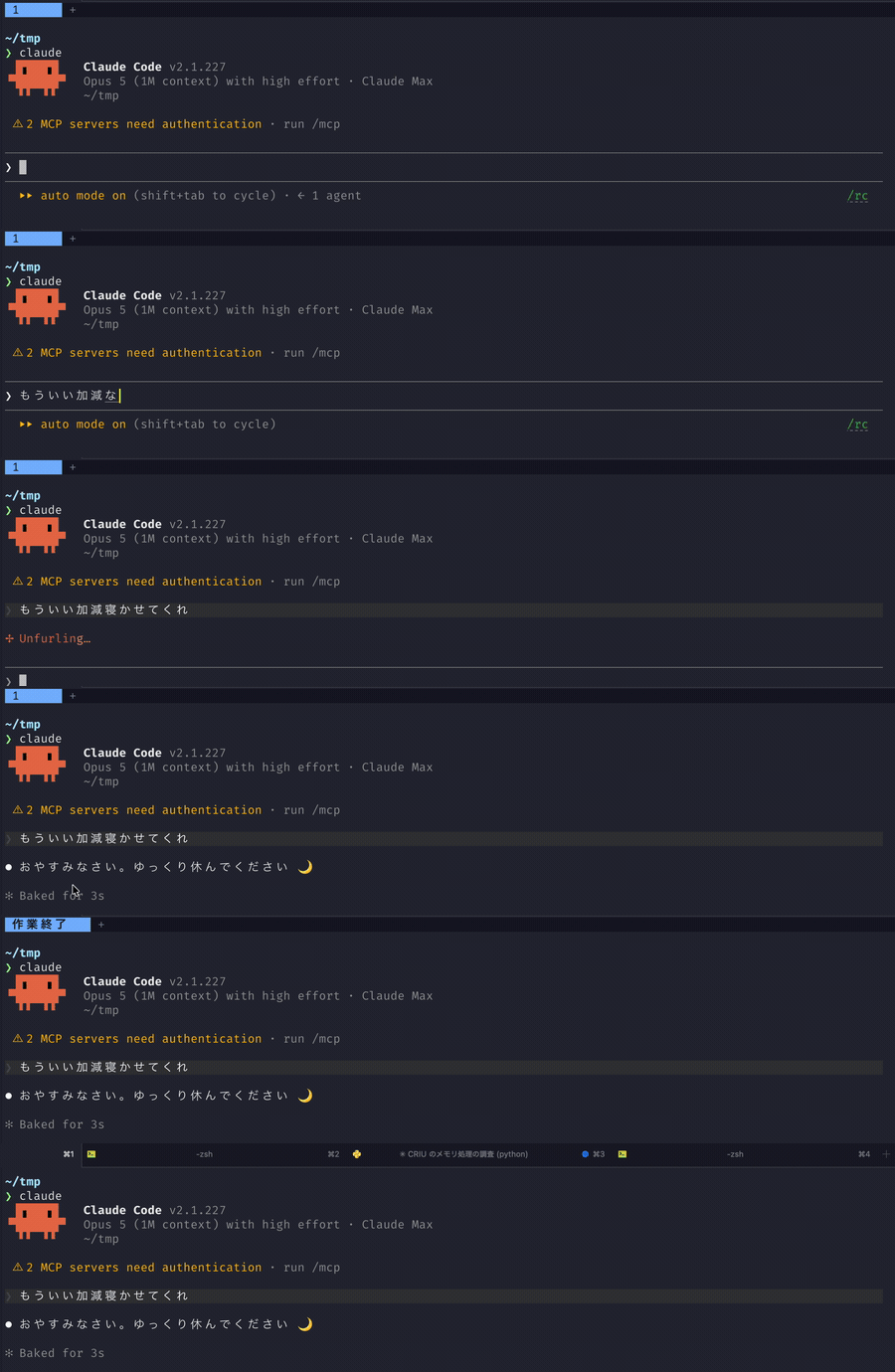
Titles are generated by the same CLI that called the hook: claude -p for Claude Code, codex exec for Codex.
Requirements
- Claude Code or Codex running inside a herdr pane (
HERDR_ENV=1is set) python3(standard library only)claudeorcodexon yourPATH
Started outside of herdr, the hook exits without doing anything.
Install
git clone https://github.com/sh1ma/herdr-auto-title
cd herdr-auto-title
./install.sh              # install into every agent found
./install.sh --codex      # or just one of them
It copies the script into place and registers it on UserPromptSubmit.
| script | registered in | |
|---|---|---|
| Claude Code | ~/.claude/hooks/herdr-auto-title.py | ~/.claude/settings.json |
| Codex | ~/.codex/hooks/herdr-auto-title.py | ~/.codex/hooks.json |
(CLAUDE_CONFIG_DIR / CODEX_HOME are honoured when set.)
Existing hook settings are kept, and re-running does not duplicate the registration. The settings file is backed up to .bak before being rewritten.
It takes effect from the next session you start.
Codex does not run hooks it has not been told to trust. Trust it on the review screen shown at the next startup, or via /hooks. (What gets trusted is the registered command string, so reinstalling does not ask again unless you move the script.)
Title language
Titles are written in English, or in Japanese when your locale is Japanese — that is, when LC_ALL, LC_MESSAGES or LANG starts with ja.
Set HERDR_AUTO_TITLE_LANG to pin one instead:
| value | title language |
|---|---|
auto (default) | follow the locale |
en | English |
ja | Japanese |
The hook reads it from the environment of the agent that runs it, so export it where you start that agent — for example in ~/.zshrc:
export HERDR_AUTO_TITLE_LANG=en
The new value applies to sessions started after that.
Uninstall
./install.sh --uninstall            # remove from both
./install.sh --uninstall --codex    # or just one
It removes the registration and deletes the installed script. State files (~/.claude/herdr-auto-title/) are left behind; delete them by hand if you do not want them.
Versioning
Calendar Versioning, as YYYY.0M.0D.MICRO. The last segment is a counter so that several releases on the same day never collide.
2026.08.13.0   first release of the day
2026.08.13.1   second release the same day
2026.08.14.0   back to 0 once the date changes
To check what you have installed:
python3 ~/.claude/hooks/herdr-auto-title.py --version
Development
python3 -m unittest discover -s tests   # tests
ruff check . && ruff format --check .   # lint / formatting
shellcheck install.sh
CI (.github/workflows/ci.yml) runs the above on push and pull request, plus an install.sh round trip (install → install again → uninstall) and the test suite on Python 3.9 through 3.13.
Releases are cut by running the Release workflow from the Actions tab. The version comes from the existing tags and today's date (Asia/Tokyo), so there is no number to pick: the workflow rewrites __version__, commits, pushes the tag and creates the GitHub Release. To see the number that would be used, turn on dry_run, or run it locally:
python3 scripts/calver.py next
License
MIT