




An orchestration and validation framework enabling AI agents to generate structurally precise and aesthetically standardized draw.io diagrams, optimized for AWS, Azure & GCP architectures.
It mitigates common AI agent hallucinations (such as generating non-existent stencil IDs that result in empty shapes) using three key components:
- Declarative Catalog — A single source of truth mapping draw.io stencil IDs (
mxgraph.aws4.*) to their respective taxonomies and canonical color palettes. - Design Principles — Codified architectural and layout rules (
rules/principles.md). - Structural Validator — A static analysis engine that audits diagram XML to guarantee stencil references are valid and design principles are satisfied prior to serialization.
Exposed to the AI via the zero-dependency drawio-ai CLI.
Showcase
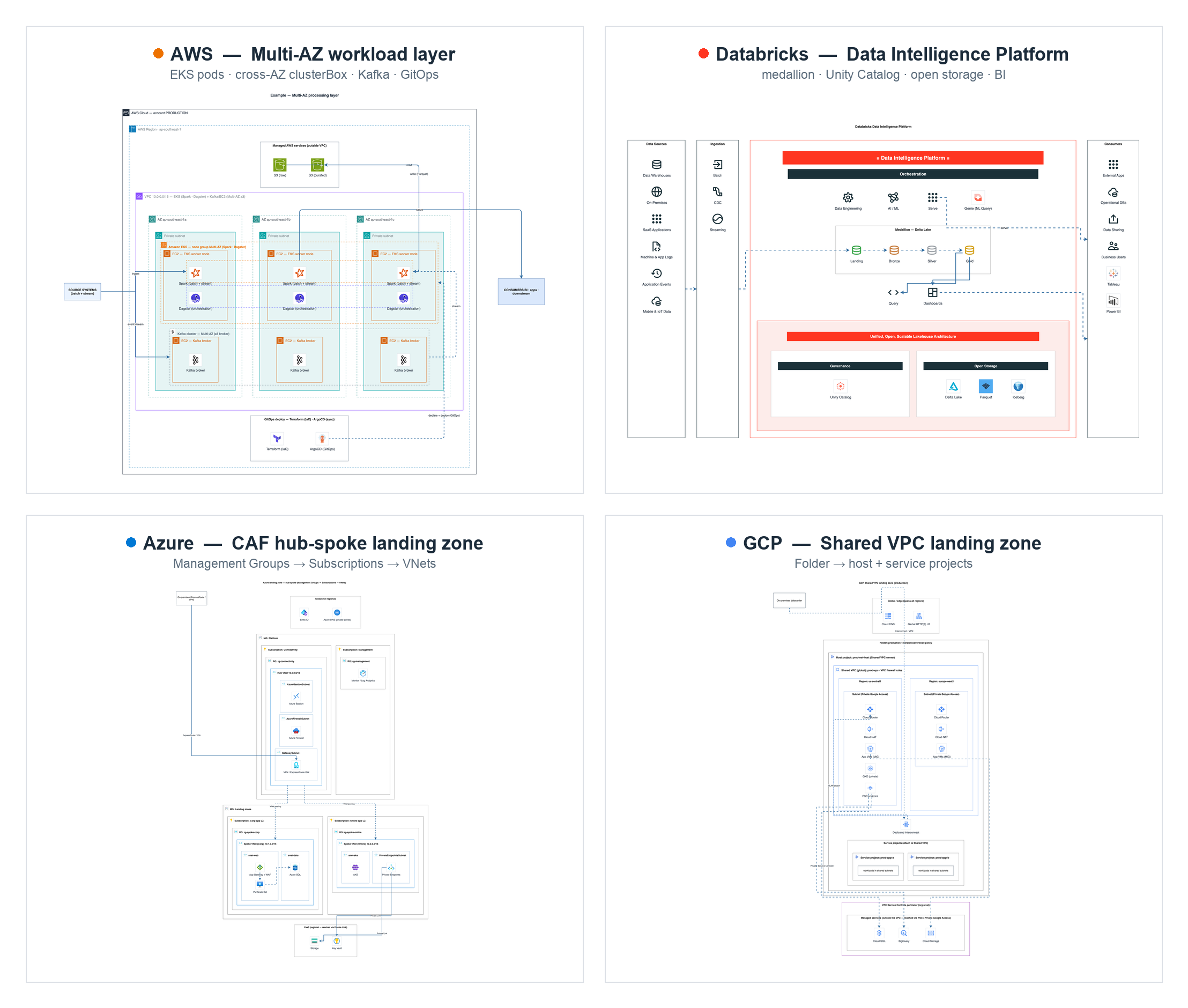
One diagram per platform — all generated end-to-end by the kit: no hand-placed coordinates, real stencils, validated, vision-checked. Full set in examples/.
Quick start
Full install — the CLI plus all 5 Domain Skills (AWS, Azure, GCP, Databricks, BPMN) — in one line:
npm i -g github:sparklabx/drawio-ai-kit && npx skills add sparklabx/drawio-ai-kit
Restart your agent, then try: "draw an AWS 3-tier web app".
The first command puts the drawio-ai binary on PATH (installs straight from
GitHub — not yet on the npm registry; see INSTALL.md to pin a version
or install from a clone). The second registers the Domain Skills with your agent
(the skills CLI auto-detects Claude Code, Codex, Gemini CLI, …) — without it the
agent never picks the kit up on its own.
- Just one domain instead:
npx skills add sparklabx/drawio-ai-kit --skill drawio-aws(--listpreviews all 5) - Optional, for the full experience: the draw.io desktop app enables
drawio-ai render(the vision self-check); Graphviz enablesvendor/autolayout.pyfor large graphs. Details in INSTALL.md.
Is it safe to install?
Short answer: yes — and you don't have to take my word for it.
- No hidden code. No
postinstall(or any lifecycle) hooks — nothing runs onnpm install. Zero runtime dependencies. Nosudo, nocurl | bash, no remote code. - Zero runtime dependencies. The single dependency (
@modelcontextprotocol/sdk) was removed at 1.0.0. The package is now fully self-contained. - Runs locally, no telemetry. The CLI only reads/writes local files. The single optional outbound call is icon-logo fetching from public CDNs (lobe-icons), and it's opt-in.
- Easy to undo:
npm uninstall -g drawio-ai-kit              # remove the CLI
npx skills remove drawio-aws              # remove a domain skill (repeat for each)
- Updating — two independent channels:
npm i -g github:sparklabx/drawio-ai-kit   # CLI/engine (icon search, workflow, validator, rules)
npx skills update                         # the Domain Skills (SKILL.md) — always pulls latest
The skills are thin frontends that call drawio-ai at runtime, so engine fixes reach you the
moment you update the CLI — no skill re-install needed. npx skills update only refreshes the
SKILL.md text. Pin a specific release with github:sparklabx/drawio-ai-kit#v1.0.1.
To report a security issue, see SECURITY.md.
Build a diagram — declarative, no hardcoded coordinates
Define a diagram topology (pipeline/hierarchy/network/hubspoke/hybrid/mesh/sequence), declare the nested structure, and the layout engine programmatically computes spatial coordinates (x/y/w/h) — frames auto-size to fit their children, while rows and columns auto-space. You define the logical topology, not raw pixels.
import { Diagram } from "./src/builder.mjs";
import { group, icon, box, renderTree } from "./src/layout-engine.mjs";

const d = new Diagram("network");
const tree = group("region", "group_region", "Region", { dir: "row" }, [
  group("vpc", "group_vpc", "VPC", { dir: "col" }, [
    icon("alb", "elastic_load_balancing", "ALB"),
    icon("ec2", "ec2", "EC2"),
  ]),
]);
renderTree(d, tree);                 // engine lays everything out + sizes the page
d.title("My VPC");
d.link("alb", "ec2");                // edges by id; router picks straight/corridor
const res = d.validate();            // names real? colors/nesting/labels clean?
// d.mxfile("My VPC")  → write to .drawio, export PNG, then vision self-check
Icon names are retrieved from drawio-ai search to prevent name fabrication; edge routing, container sizing, alignment, and contextual corner styles are dynamically computed. The AI agent defines the logical layout and iterates via a render-analyze-rectify loop (vision-based self-correction). Example: examples/aws/build_mesh.mjs (zero manual coordinates).
Migration (from <1.0)
At 1.0.0 the MCP server and bespoke installer were removed. To migrate:
- Install: switch from
claude mcp add ... mcp-server.mjstonpm i -g github:sparklabx/drawio-ai-kit. - Skills: replace the old
drawio-cloud-architectskill with the 5 thin Domain Skills — all at once withnpx skills add sparklabx/drawio-ai-kit, or per domain with--skill drawio-awsetc. - Vision self-check: the inline image was replaced by
drawio-ai render→ PNG →Read. - Uninstall:
npm uninstall -g drawio-ai-kit+ remove each skill via the skills tooling.
Template library (examples/)
Each file builds one common architecture via the layout engine (zero hardcoded coordinates) — copy one as a starting point. Examples are organized into domain subfolders — see examples/README.md for the full index. Run any with node examples/<dir>/<file> → writes to out/*.drawio.
examples/aws/
| Example | Type | Architecture |
|---|---|---|
build_pipeline.mjs | pipeline | Layered data analytics pipeline (ingest → process → store → serve) + cross-cutting band |
build_landingzone.mjs | hierarchy | AWS Landing Zone / Control Tower org & OUs |
build_vpc.mjs | network | VPC Multi-AZ 3-tier (ALB spanning AZs) |
build_vpc_routing.mjs | network | Subnets + route tables + VPC Endpoint (Gateway) → S3 |
build_vpc_eks.mjs | network | VPC with Bastion, NAT, EKS, Auto Scaling worker nodes |
build_vpc_efs.mjs | network | VPC with Amazon EFS (a mount target per AZ) |
build_web3tier.mjs | network | 3-tier web app (Edge → Web → App → Data) |
build_eventdriven.mjs | hubspoke | Serverless event bus (EventBridge hub → consumers) |
build_serverless.mjs | sequence | Serverless web app, numbered request walkthrough |
build_hybrid.mjs | hybrid | On-prem ↔ AWS over Direct Connect + VPN, mirrored DR |
build_mesh.mjs | mesh | Multi-account connectivity / service mesh |
build_iam_accounts.mjs | hierarchy | Multi-account IAM + cross-account assume-role |
examples/azure/ · gcp/ · databricks/ · multicloud/ · bpmn/
| Example | Type | Architecture |
|---|---|---|
azure/build_azure_vnet.mjs | network | Azure N-tier: Subscription → Resource Group → VNet → Subnet tiers |
azure/build_azure_hub_spoke_lz.mjs | network | CAF hub-spoke landing zone (Management Groups, hub + spoke VNets, reserved subnets, peering, private endpoints) |
gcp/build_gcp_vpc.mjs | network | GCP global VPC across two regions (Project → global VPC → regional Subnets) |
gcp/build_gcp_shared_vpc_landing_zone.mjs | network | Shared VPC landing zone (host/service projects, regional Cloud Router/NAT, Interconnect, PSC, VPC-SC) |
databricks/build_lakehouse.mjs | pipeline | Databricks lakehouse medallion (Bronze/Silver/Gold) + Unity Catalog |
databricks/build_platform.mjs | hybrid | Databricks control-plane vs data-plane deployment topology |
databricks/build_data_intelligence_platform.mjs | pipeline | Databricks Data Intelligence Platform reference (signature bands, medallion, foundation) |
databricks/build_mlops.mjs | pipeline | Databricks MLOps — Git provider + Dev/Staging/Prod workspaces + Unity Catalog + Lakehouse |
multicloud/build_multicloud.mjs | hybrid | On-prem + AWS + Azure composed through a neutral interconnect |
bpmn/build_bpmn.mjs | bpmn | BPMN swimlane process (pool → lanes × phases) |
Runtime architecture
- Node 18+ (
.nvmrcpins the current LTS) — orchestration and validation layer: CLI and validator (src/). Supported runtimes include Node 20, 22 (LTS), or 24. - Python 3.11 (
.python-version) — data ingestion and compilation pipeline: catalog generator + icon-pack builder (scripts/build_pack.py, stdlib only).
Install the dependencies:
nvm install --lts && nvm use --lts    # or: brew install node
brew install python@3.11              # then: python3.11 --version
CLI commands
| Command | Purpose |
|---|---|
search | Find a stencil by keyword/category → returns the exact name + ready-to-paste draw.io style (verbatim from the index: real names, official colors, connection points). |
style | Get the full style for one stencil by exact name. |
validate | Lint XML: unknown stencils, dangling edges, missing aspect=fixed, recolored AWS icons, broken AWS group nesting, geometry (overlap / child spills its frame / stacked arrowheads), plus an aesthetic audit (font/palette/fan-out/icon-size). |
audit | Aesthetic audit only (font/palette/fan-out/icon-size). |
render | Render the XML to PNG (drawio-ai render <file> -o out.png). Needs the draw.io desktop CLI; set DRAWIO_CLI to override the path. |
logo | Logo for non-AWS brands (AI/LLM + some) as an image style, via vendor/aiicons.py (lobe-icons). Needs python3. |
categories | List all catalog categories. |
types | List supported diagram topologies. |
principles | Design rules + architecture preset + catalog categories. Pass `--mode aws |
root | Print the installed Kit's absolute path (for import by path). |
workflow | Print the shared build → validate → render → write workflow. |
Each of the 5 Domain Skills (drawio-aws, drawio-azure, drawio-gcp, drawio-databricks, drawio-bpmn) wraps these commands into a full build-with-engine → validate → render + vision self-check → final-export workflow. Vendored helpers in vendor/: autolayout.py (Graphviz layout for >15-node graphs), aiicons.py, repair_png.py, encode_drawio_url.py (browser fallback).
Domain Skills
The kit ships 5 thin Domain Skills — one per cloud/domain — distributed via the standard npm skills tooling:
| Skill | Domain |
|---|---|
drawio-aws | AWS |
drawio-azure | Azure |
drawio-gcp | GCP |
drawio-databricks | Databricks |
drawio-bpmn | BPMN |
Add one or more with the skills CLI, e.g. npx skills add sparklabx/drawio-ai-kit --skill drawio-aws (or drop --skill to install all 5; --list previews). Each skill is a thin frontend; the deterministic engine, validator, and rules live in the drawio-ai-kit package, reached via the drawio-ai CLI.
Other hosts (Coworker AI, Agent SDK, …)
The kit isn't tied to one app — the "brains" live in the CLI + repo + rules, so
any Claude host that can run shell commands can use it. Point the agent at the
CLI: drawio-ai principles, drawio-ai search, drawio-ai validate, plus the
template index & reproduction loop in rules/diagram-types.md. (draw.io CLI is
only needed for PNG render / vision-check.)
CLI usage
drawio-ai search s3
drawio-ai search kubernetes --category Containers
drawio-ai search "aws cloud" --kind group
drawio-ai style s3
drawio-ai validate ../4_oncloud.drawio
drawio-ai categories
drawio-ai principles --mode aws
drawio-ai render out.drawio -o out.png
Catalog (2106 icons — 983 AWS + 626 Azure + 216 GCP + 281 across 8 OSS packs)
loadCatalog merges every catalog/*.json, so all icons are searchable together via drawio-ai search.
catalog/aws.json is generated from data/shape-index.json.gz (10,446-shape index from jgraph/drawio-mcp, Apache-2.0) — real stencil names (s3, eks, identity_and_access_management, ...), official per-icon colors, connection points, and aspect=fixed, all verbatim. No hand-guessing.
Regenerate after refreshing the index:
python3.11 scripts/ingest_index.py # data/shape-index.json.gz → catalog/aws.json (983 icons, 19 groups)
Icon packs (non-AWS)
Brand/tech icons for the tools people draw alongside AWS — searchable by name (spark, kafka, postgres, kubernetes, argocd, prometheus, pytorch, …) as square tiles in the same house style:
| Pack | Icons | Examples |
|---|---|---|
database | 66 | postgres, mysql, mongodb, redis, clickhouse, snowflake |
bigdata | 48 | spark, kafka, airflow, flink, trino, dbt, minio |
cicd | 42 | jenkins, argocd, terraform, ansible, sonarqube |
aiml | 26 | pytorch, tensorflow, huggingface, ollama, langchain |
containers | 26 | kubernetes, docker, helm, istio, linkerd |
observability | 26 | datadog, prometheus, grafana, opentelemetry |
databricks | 24 | unity catalog, delta sharing, mosaic ai |
network | 15 | nginx, kong, traefik, haproxy, cloudflare |
The prebuilt catalog/*.json are committed — using the kit needs no rebuild. To add or refresh a pack, edit packs/<name>/manifest.json and:
python3 scripts/build_pack.py <name> # devicon → vectorlogo.zone → gilbarbara → simple-icons → text (needs macOS qlmanage)
See THIRD_PARTY_NOTICES.md for attributions.
Tests
npm test # node --test
Notes & licensing
- The code is MIT (see
LICENSE). Bundled icons/logos (AWS Architecture Icons + third-party project logos) are trademarks of their owners and are not covered by MIT — seeNOTICE. - Prefer native stencils (this catalog) over base64 — smaller files, crisp vectors, cleaner licensing.
- Use base64 (
custom-icons.json) only for icons draw.io lacks (Confluent, Starburst, OpenMetadata, MinIO, Dagster, internal/brand logos) or when rendering outside draw.io. - The official AWS Architecture Icons have their own usage terms — review before redistributing a base64 bundle publicly.
- Category colors in the seed are approximate; the generator can refresh them.