dotnet-skills



Stop explaining .NET to your AI. Start building.
We've all been there: asking Claude to use Entity Framework, only to get EF6 patterns in a .NET 8 project. Explaining to Copilot that Blazor Server and Blazor WebAssembly aren't the same thing. Watching Codex generate Startup.cs for a Minimal API project.
This catalog fixes that. A growing catalog covering the entire .NET ecosystem—from ASP.NET Core to Orleans, from MAUI to Semantic Kernel. Install them once, and your AI agent actually knows modern .NET.
Browse the complete catalog on skills.managed-code.com →
Interactive Control Center
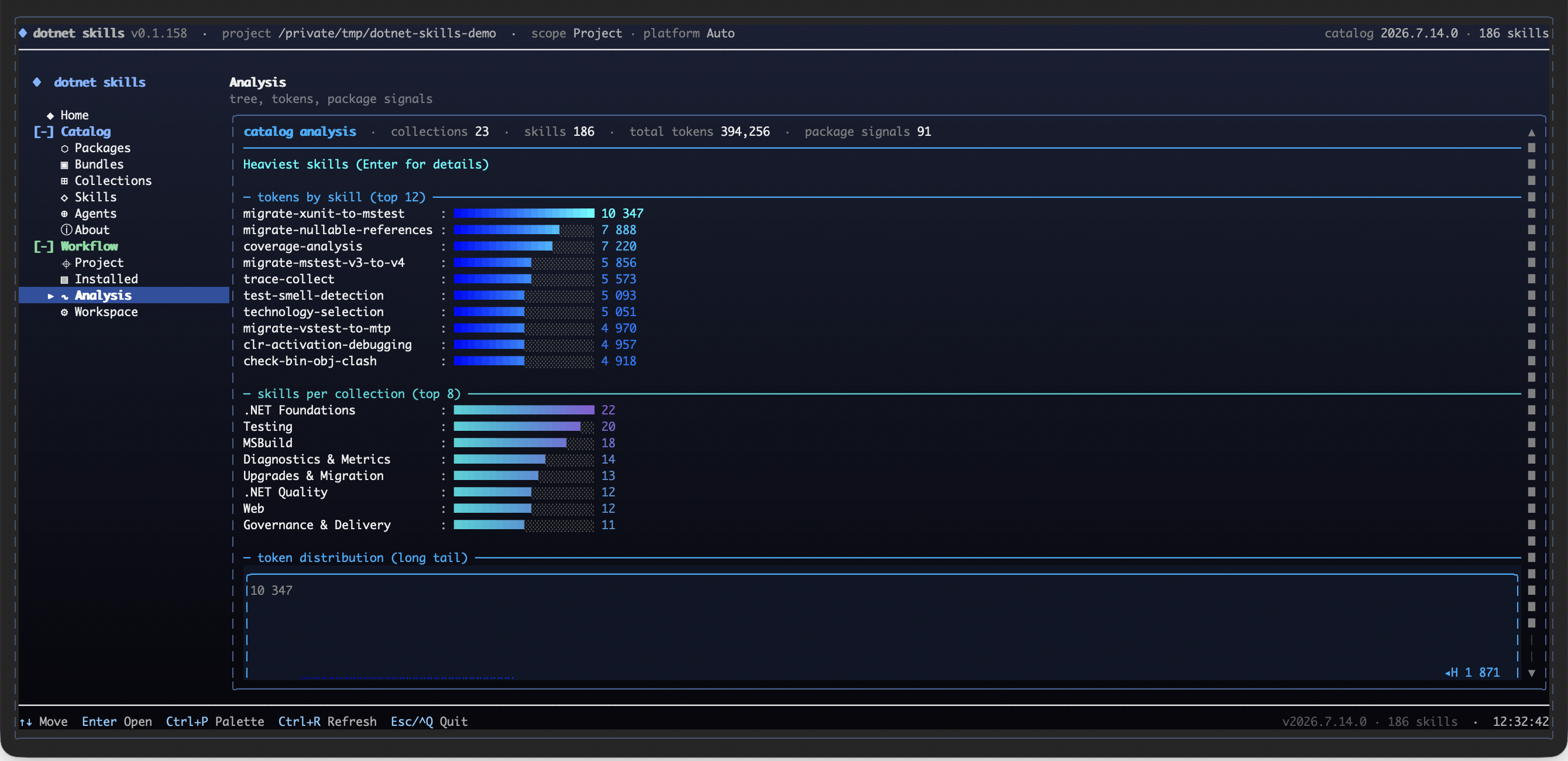
Run dotnet skills to open the full-screen control center for catalog browsing, project-aware recommendations, installation, updates, and agent management.
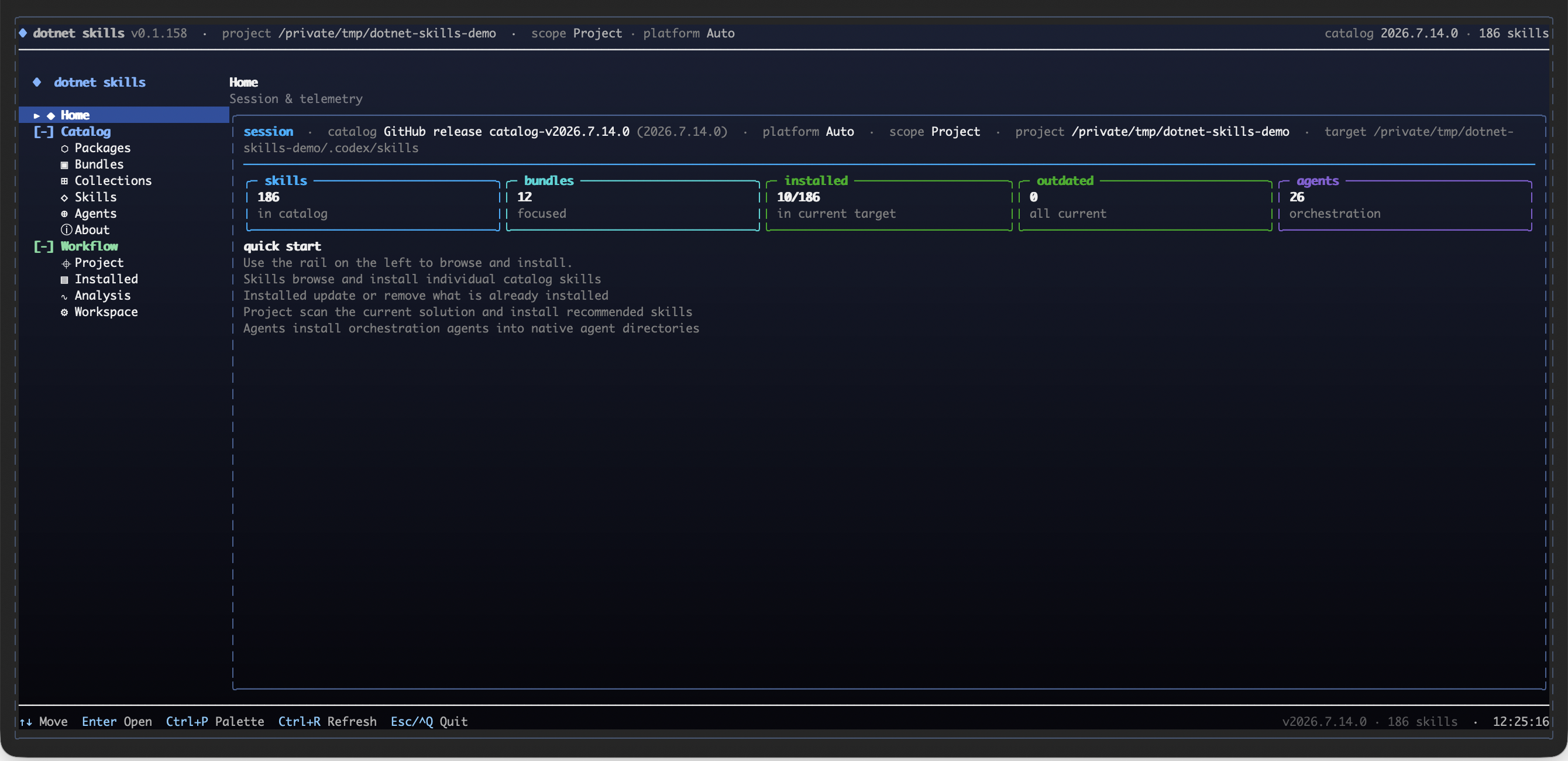
Explore the catalog as Collection -> Lane -> Skill, with installed coverage, token weight, and an install action kept visible while you browse.
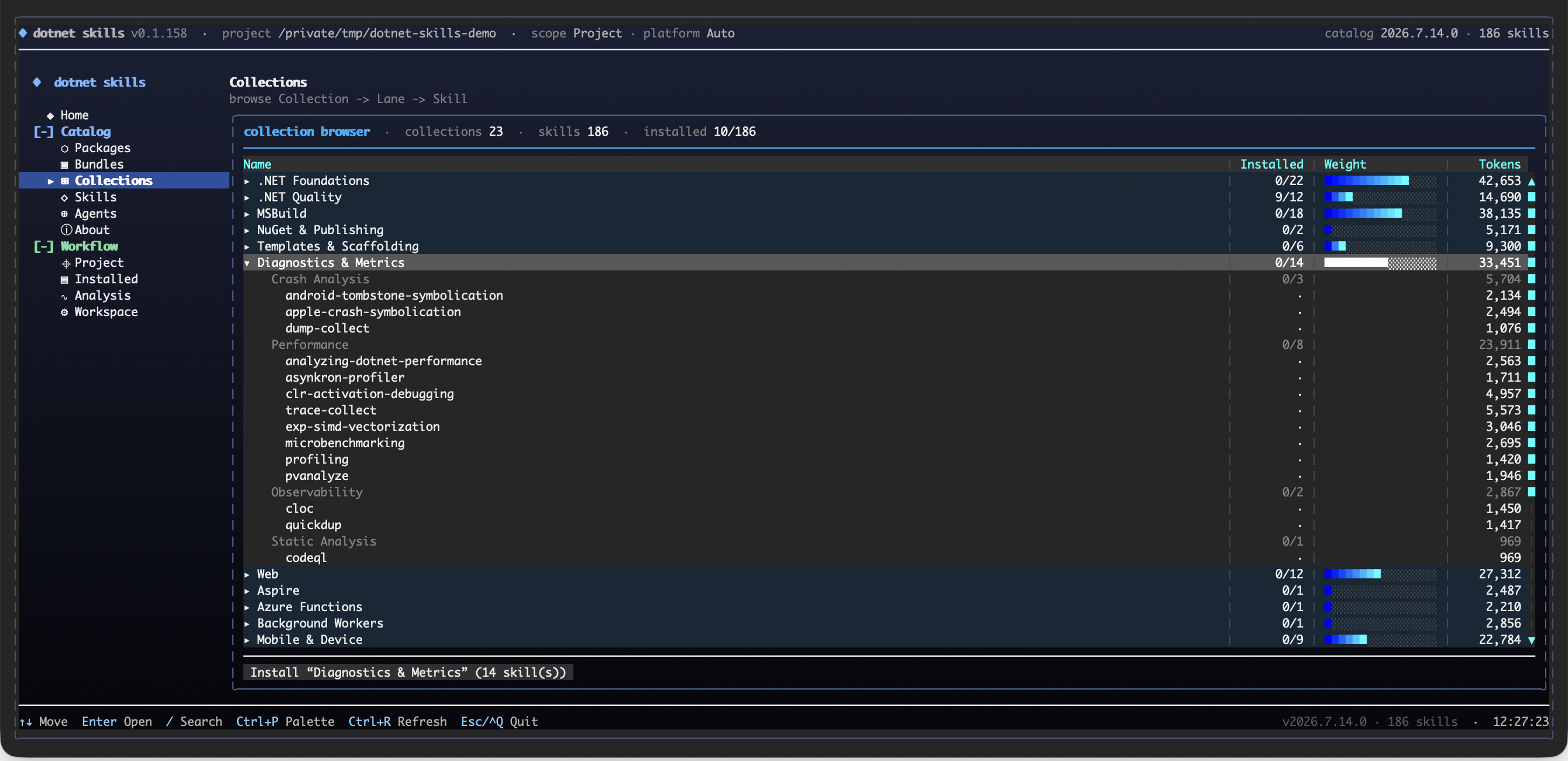
Use the analysis surface to compare the heaviest skills, collection sizes, package signals, and the catalog's token distribution before installing.
Why This Matters
- No more outdated patterns. Skills are maintained by the community and track official Microsoft documentation.
- Works everywhere. Same skills for Claude, Copilot, Gemini, Codex, and Junie.
- Community-driven. Missing a skill for your favorite library? Add it and help everyone.
Your favorite .NET library deserves a skill. If you maintain an open-source project or just love a framework that's missing, contribute it. Let's make AI agents actually useful for .NET developers.
Quick Start
dotnet tool install --global dotnet-skills

# choose one dedicated agent launcher
dotnet tool install --global dotnet-agents
dotnet tool install --global agents

dotnet skills                               # open the interactive control center
dotnet skills version                       # show current tool version and latest NuGet version
dotnet skills --version                     # alias for the same version view
dotnet skills list                          # show installed and available skills
dotnet skills bundle list                   # show focused bundles by collection and workflow
dotnet skills list --local                  # only installed skills in the current target
dotnet skills recommend                     # suggest skills from local .NET and browser UI signals
dotnet skills install --auto                # install skills from local .NET and browser UI project signals
dotnet skills install --auto --prune        # remove stale auto-managed skills that no longer match the project
dotnet skills install bundle quality        # install a focused .NET quality bundle
dotnet skills install mcaf                  # install the opt-in MCAF governance skill
dotnet skills install bundle orleans        # install the Orleans workflow bundle
dotnet skills install aspire orleans        # install skills
dotnet skills catalog tokens --catalog-root . # export per-skill token counts as JSON
dotnet skills remove aspire                 # remove one installed skill
dotnet skills remove bundle quality         # remove every skill from a focused bundle
dotnet skills remove collection distributed # remove every skill from a collection
dotnet skills remove --all                  # remove installed catalog skills from the target
dotnet skills update                        # refresh installed catalog skills
dotnet skills install blazor --agent claude # install for a specific agent
dotnet agents list                          # show bundled orchestration agents
dotnet agents install router --auto         # install agents to shared or detected agent folders
agents list                                 # same agent-only catalog via the plain standalone command
agents install router --auto                # same agent install flow without the dotnet-prefixed launcher
Commands
| Command | Description |
|---|---|
dotnet skills | Open the interactive control center with direct skill browsing, collections, analysis, bundles, and install preview |
dotnet skills version | Show the current installed tool version and check whether NuGet has a newer release |
dotnet skills list | Show the current inventory, compare project/global scope when relevant, and keep the remaining catalog as a compact collection summary |
dotnet skills bundle list | Show the focused bundles that expand into related skills by collection or workflow |
dotnet skills recommend | Scan local *.csproj, package.json, and browser UI files, propose relevant skills, and let you decide what to install |
dotnet skills install --auto | Inspect local *.csproj, package.json, and browser UI files, detect strong project signals, and install matching skills automatically |
dotnet skills install --auto --prune | Remove stale auto-managed skills that no longer match the current project's NuGet packages or app-model signals |
dotnet skills install <skill...> | Install one or more skills |
dotnet skills install bundle <bundle...> | Install one or more focused bundles such as quality, frontend-quality, or orleans |
dotnet skills catalog tokens --catalog-root . | Export the tokenizer model name plus per-skill token counts as JSON |
dotnet skills remove <skill...> | Remove one or more installed catalog skills by skill id or alias |
dotnet skills remove bundle <bundle...> | Remove every installed skill mapped to one or more focused bundles |
dotnet skills remove collection <collection...> | Remove every installed skill in one or more collections |
dotnet skills remove --all | Remove every installed catalog skill from the selected target |
dotnet skills update [skill...] | Update installed catalog skills to the selected catalog version |
dotnet skills sync | Download latest catalog |
dotnet skills where | Show install paths |
dotnet agents list | List available orchestration agents |
dotnet agents install <agent...> | Install orchestration agents |
dotnet agents install router --auto | Install agents to all detected platforms |
dotnet agents remove <agent...> | Remove installed agents |
dotnet agents where | Show resolved shared or platform agent install paths |
agents list | List available orchestration agents through the standalone agents tool |
agents install <agent...> | Install orchestration agents through the standalone agents tool |
agents where | Show resolved agent install paths through the standalone agents tool |
Use --agent to target a specific agent platform, --scope to choose global or project install. Use dotnet skills list --installed-only or the shorter dotnet skills list --local when you only want the installed inventory, or --available-only when you want the detailed collection-by-collection breakdown of the remaining catalog. The default list view stays compact: it shows the current target inventory, compares project/global scope when that comparison is meaningful, and keeps the remaining catalog as a short collection summary instead of dumping one giant description table. The CLI renders rich terminal tables by default so you can quickly see installed versions, update candidates, install commands, and when a newer dotnet-skills, dotnet-agents, or agents package is available on NuGet. dotnet skills --version, dotnet agents --version, and agents --version are shortcuts for the version view.
dotnet-skills remains the skill-first CLI and still supports dotnet skills agent ... for compatibility. The dedicated agent-only surface is published in both forms: dotnet-agents for dotnet agents ... and agents for agents .... Both top-level list, install, remove, and where commands target orchestration agents directly.
The interactive shell behind bare dotnet skills is the main control center: its primary catalog row now mirrors the public site with Packages, Bundles, Collections, Skills, Agents, and About, then layers CLI-only lifecycle surfaces such as Project, Installed, Analysis, and Workspace underneath. Inside that control center you still get direct individual-skill picking, Collection -> Lane -> Skill browsing, package-entry analysis, token hotspots, a full tree view, and install preview before files are written.
The public catalog is the canonical browse surface for Packages, Bundles, Collections, Skills, Agents, and About. It uses the same shared navigation manifest and collection taxonomy as the CLI.
dotnet skills bundle list shows the ready-made focused bundles. Bundle installs are bulk shortcuts for related skill sets, so dotnet skills install bundle quality, dotnet skills install bundle frontend-quality, or dotnet skills install bundle orleans install every skill mapped to that focused bundle in one pass. MCAF is one opt-in governance skill and installs directly with dotnet skills install mcaf.
dotnet skills install --auto inspects local *.csproj, package.json, and browser UI files, detects NuGet packages plus strong .NET and frontend framework signals, and installs the matching skills for that project automatically. Add dotnet skills install --auto --prune when you also want to remove stale auto-managed skills that no longer match the current project. Protected diagnostic skills and graphify-dotnet are not pruned.
dotnet skills recommend is a scan-only command: it inspects local .NET projects plus Astro, React, Blazor, and other browser UI signals, proposes a skill list, and prints the install command you can run if you agree with the recommendations. It does not install anything automatically.
The bare dotnet skills usage view and help path also perform the automatic self-update check, so an outdated tool still tells you to upgrade before it renders the command table.
Use dotnet skills version --no-check, dotnet agents version --no-check, or agents version --no-check when you only want the local installed tool version without calling NuGet. Set DOTNET_SKILLS_SKIP_UPDATE_CHECK=1, DOTNET_AGENTS_SKIP_UPDATE_CHECK=1, or AGENTS_SKIP_UPDATE_CHECK=1 if you want to suppress automatic update notices during normal command startup.
Local Preview
When you want to preview the generated docs and public site locally:
python3 scripts/generate_catalog.py --validate-only
python3 scripts/generate_pages.py
The README stays intentionally compact. The generated catalog site is written to artifacts/github-pages/ with the same shared Packages / Bundles / Collections / Skills / Agents / About navigation that the public site and CLI home surface use.
Install Surface
Public bundle installs use bundle, not package. The focused bundle surface is intentionally small:
foundationsqualityfrontend-qualityarchitecture-coretesting-basetesting-xunittesting-nunittesting-mstesttesting-tunittesting-migrationsruntime-upgradesorleans
Collections are intentionally split so installs stay explicit instead of collapsing into one overloaded .NET bucket:
.NET Foundations.NET QualityMSBuildNuGet & PublishingTemplates & ScaffoldingDiagnostics & MetricsWebAspireAzure FunctionsBackground WorkersMobile & DeviceXR & SpatialDesktop & UIFrontend QualityTestingTesting ResearchArchitectureGovernance & DeliveryDataAI & AgentsDistributedLegacyUpgrades & Migration
Catalog releases are published automatically in .github/workflows/publish-catalog.yml at 04:00 UTC and include the catalog-v* release, GitHub Pages deployment, and NuGet publish for dotnet-skills, dotnet-agents, and agents in the same run. Automatic catalog versions use a numeric calendar-plus-daily-index format such as 2026.3.15.0, where the first UTC-day release is .0, the second is .1, and so on. dotnet-skills reads the newest non-draft catalog-v* release by default, and --catalog-version is only for intentional pinning.
Install whichever dedicated agent package you prefer:
dotnet tool install --global dotnet-agentsgives you thedotnet agents ...command shape.dotnet tool install --global agentsgives you theagents ...command shape.
Agent Support
Skills Installation Paths
| Agent | Global | Project |
|---|---|---|
| Claude | ~/.claude/skills/ | .claude/skills/ |
| Copilot | ~/.copilot/skills/ | .github/skills/ |
| Gemini | ~/.gemini/skills/ | .gemini/skills/ |
| Codex | $CODEX_HOME/skills/ (default: ~/.codex/skills/) | .codex/skills/ |
| Junie | ~/.junie/skills/ | .junie/skills/ |
| Grok Build | ~/.grok/skills/ | .grok/skills/ |
| Shared Agent Skills | ~/.agents/skills/ | .agents/skills/ |
Orchestration Agents Installation Paths
| Agent | Global | Project |
|---|---|---|
| Claude | ~/.claude/agents/ | .claude/agents/ |
| Copilot | ~/.copilot/agents/ | .github/agents/ |
| Gemini | ~/.gemini/agents/ | .gemini/agents/ |
| Codex | $CODEX_HOME/agents/ (default: ~/.codex/agents/) | .codex/agents/ |
| Junie | ~/.junie/agents/ | .junie/agents/ |
| Grok Build | ~/.grok/agents/ | .grok/agents/ |
| Shared agents | ~/.agents/agents/ | .agents/agents/ |
If .agents/ exists, automatic installs use its shared skills/ or agents/ directory. Otherwise the tool detects .codex/, .claude/, .github/, .gemini/, .junie/, and .grok/, installs into every existing native target, and falls back to .agents/ when none exists. Use --agent agents for the shared target or --agent grok for Grok Build explicitly.
An explicit --target <path> always wins. Agent commands use the portable Markdown format when --agent is omitted; pass a platform when you need its adapter format.
Set DOTNET_SKILLS_DEFAULT_TARGET or DOTNET_AGENTS_DEFAULT_TARGET to keep a default destination for dotnet skills and dotnet agents. The standalone agents tool uses AGENTS_DEFAULT_TARGET. Relative values resolve below the project root for project scope and below the user home for global scope.
Orchestration Agents
This repository now tracks a parallel agent layer above the skill catalog.
- reusable repo-authored skills, vendir-imported upstream skills, and repo-owned agents all live under package folders in
catalog/<type>/<package>/. catalog/<type>/<package>/skills/<skill>/SKILL.mdholds the detailed implementation guidance for one skill.catalog/<type>/<package>/agents/<agent>/AGENT.mdholds routing behavior for one repo-owned orchestration agent.- package
manifest.jsonfiles hold the package-level metadata that both the installer and the public site scan. - every skill and agent still gets its own folder so it can carry references, assets, scripts, and future installer metadata.
- an agent can therefore represent either a grouped pack of related skills or a narrow companion to one specific skill.
- the current
dotnet-skillsCLI remains skill-first; repo-owned agents can evolve and ship on their own track. - runtime-specific
.agent.mdor native Claude files should be treated as install adapters, not as the canonical repo source format.
flowchart LR
  A["User or coding platform request"] --> B{"Broad cross-domain task?"}
  B -->|Yes| C["catalog/<type>/<package>/agents/<agent>/AGENT.md"]
  B -->|No, package-specific| D["catalog/<type>/<package>/agents/<agent>/AGENT.md"]
  C --> E["Route into catalog/<type>/<package>/skills/*"]
  D --> E
  E --> F["Apply narrow implementation guidance from SKILL.md"]
Starter Agents
| Agent | Scope | Primary routing |
|---|---|---|
dotnet-router | package-scoped | classify web, data, AI, build, UI, testing, and modernization work |
dotnet-build | package-scoped | restore, build, pack, CI, diagnostics |
dotnet-data | package-scoped | EF Core, EF6, migrations, query issues |
dotnet-frontend | package-scoped | Blazor, frontend asset quality, browser-facing audits, and file-structure linting inside .NET repos |
dotnet-ai | package-scoped | Semantic Kernel, Microsoft Agent Framework, Microsoft.Extensions.AI, MCP, ML.NET |
dotnet-modernization | package-scoped | upgrade, migration, and legacy modernization |
dotnet-review | package-scoped | code review, analyzers, testing, architecture |
Package-Scoped Specialists
| Agent | Scope | Primary routing |
|---|---|---|
dotnet-orleans-specialist | package-scoped | Orleans grain boundaries, persistence, streams, reminders, placement, Aspire wiring, and cluster validation |
dotnet-aspire-orchestrator | package-scoped | AppHost, CLI, first-party versus CommunityToolkit/Aspire integration choice, testing, and deployment routing inside the Aspire surface |
agent-framework-router | package-scoped | Agent Framework agent-vs-workflow choice, AgentThread, tools, workflows, hosting, MCP/A2A/AG-UI, durable agents, and migration |
Repository Layout
catalog/
└── <Type>/
    └── <Package>/
        ├── manifest.json
        ├── icon.svg           # optional
        ├── skills/
        │   └── <skill-name>/
        │       ├── SKILL.md
        │       ├── manifest.json
        │       ├── scripts/     # optional
        │       ├── references/  # optional
        │       └── assets/      # optional
        └── agents/
            └── <agent-name>/
                ├── AGENT.md
                ├── manifest.json # optional
                ├── scripts/     # optional
                ├── references/  # optional
                └── assets/      # optional
The package-level manifest.json is the package control plane. It carries package title/description/icon and upstream links such as links.repository, links.docs, and links.nuget. Skill- or agent-specific metadata belongs in the nearest sibling skills/<skill>/manifest.json or agents/<agent>/manifest.json.
SKILL.md should stay focused on routing, workflow, deliverables, and validation. Do not put version, category, packages, or package_prefix in SKILL.md frontmatter.
External Upstream Sources
External upstream repositories live in the dedicated external-sources/ area.
external-sources/vendir.ymlandexternal-sources/vendir.lock.ymlhandle fetch-and-pin only.external-sources/upstreams/holds the checked-in vendored snapshots.external-sources/imports/*.jsonis overrides-only local policy for type, category, package naming, compatibility, and skill-level package trigger metadata.scripts/import_external_catalog_sources.pyauto-discovers upstream plugins from vendoredplugin.jsonand.claude-plugin/plugin.jsonfiles plus standalone official skills from canonical.agents/skills/*/SKILL.mdtrees, applies the local overrides, and normalizes the result intocatalog/<type>/<package>/.- Imported upstream
SKILL.md,AGENT.md, and supporting skill content is copied verbatim; local-only metadata stays in siblingmanifest.jsonfiles instead of being injected into upstream markdown.
Official imports may keep their upstream skill ids instead of being renamed to match local repo-authored conventions.
flowchart LR
  A["external-sources/vendir.yml"] --> B["external-sources/upstreams/<repo>/"]
  B --> C["plugin or canonical skill auto-discovery"]
  D["external-sources/imports/*.json (overrides only)"] --> C
  C --> E["scripts/import_external_catalog_sources.py"]
  E --> F["catalog/<type>/<package>/"]
When you refresh vendored upstream content locally, use bash scripts/sync_external_catalog_sources.sh.
How Updates Are Tracked
This repository does not guess what to monitor.
It watches only the sources explicitly listed in the upstream watch config surface:
.github/upstream-watch.jsonfor shared metadata such as labels.github/upstream-watch*.jsonfor shard files such asupstream-watch.ai.jsonorupstream-watch-agent-framework.json
Those files are the human-maintained source of truth for:
- GitHub release streams that should trigger skill review
- documentation pages that should trigger skill review
- which skills are affected by each upstream change
- how multiple page-level watches roll up into one open upstream issue per library or skill group
Each named shard file has exactly two lists:
github_releasesdocumentation
High-level flow:
flowchart LR
  A["Edit upstream-watch.json or a named upstream-watch.<domain>.json shard"] --> B["Run scripts/upstream_watch.py --validate-config"]
  B --> C["Run dry-run and sync-state-only once"]
  C --> D["Scheduled upstream-watch.yml runs upstream_watch.py daily"]
  D --> E["GitHub release or documentation change is detected"]
  E --> F["Automation opens or updates one grouped upstream issue per library or skill set"]
  F --> G["A human or agent updates catalog/<type>/<package>/ content and docs"]
  G --> H["Changes merge to main"]
  H --> I["04:00 UTC release pipeline publishes catalog, site, and tool"]
Use this shape:
{
  "watch_issue_label": "upstream-update",
  "labels": [
    {
      "name": "upstream-update",
      "color": "5319E7",
      "description": "Framework or documentation updates detected by automation"
    }
  ]
}
{
  "github_releases": [
    {
      "source": "https://github.com/managedcode/Storage",
      "skills": [
        "managedcode-storage"
      ]
    }
  ],
  "documentation": [
    {
      "source": "https://learn.microsoft.com/dotnet/aspire/",
      "skills": [
        "aspire"
      ]
    }
  ]
}
Keep the base file small and name shard files semantically, for example upstream-watch.ai.json, upstream-watch.data.json, upstream-watch.platform.json, or upstream-watch-agent-framework.json.
That is enough for normal maintenance.
scripts/upstream_watch.py derives the watch kind, ids, source coordinates, display names, and default notes at runtime.
Use optional fields only when you really need them, for example match_tag_regex for mixed release streams or id for a stable legacy key.
If you add a new library or framework and want this repo to keep watching it, the actual how-to is in CONTRIBUTING.md.
Contributing
This catalog is community-driven. If you maintain a .NET library, framework, or tool:
- Add or update a catalog package under
catalog/<type>/<package>/ - Keep package metadata in package
manifest.json: title, description, icon, and upstreamlinks - Keep entity-specific metadata in sibling manifests such as
catalog/<type>/<package>/skills/<skill>/manifest.jsonforversion,category,packages, orpackage_prefix - Keep implementation guidance in
catalog/<type>/<package>/skills/<skill>/SKILL.mdand routing behavior incatalog/<type>/<package>/agents/<agent>/AGENT.md - Add upstream watch so we know when your project releases updates
See CONTRIBUTING.md for the full guide, and use the GitHub contribution templates when opening a package request, maintenance issue, or PR.
Credits
This catalog builds on the work of many open-source projects and their authors:
Inspiration & Standards
| Project | Authors | Description |
|---|---|---|
| MCAF | Managed Code | Framework for building real software with AI coding agents through repo-native context, verification, AGENTS.md, and skills |
| dotnet/skills | Microsoft, .NET team | Official .NET skills repository vendir-imported into this catalog for upstream task-specific skills and agents |
| withastro/astro | Astro Technology Company | Official Astro astro-developer skill vendir-imported with pinned source and upstream-change tracking |
| webgpu-claude-skill | Dan Greenheck | Three.js WebGPU and TSL skill vendir-imported with pinned source and upstream-change tracking |
| Agent Skills Standard | Anthropic | Open specification for portable agent skill packages |
| Claude Code | Anthropic | Subagent architecture that shaped our orchestration agent design |
Test Frameworks
| Tool/Library | Authors | License |
|---|---|---|
| xUnit | Brad Wilson, James Newkirk | Apache-2.0 |
| NUnit | Charlie Poole, NUnit team | MIT |
| MSTest | Microsoft | MIT |
| TUnit | Tom Longhurst | MIT |
Code Coverage & Mutation Testing
| Tool/Library | Authors | License |
|---|---|---|
| Coverlet | Toni Solarin-Sodara, Marco Rossignoli | MIT |
| ReportGenerator | Daniel Palme | Apache-2.0 |
| Stryker.NET | Stryker Mutator team | Apache-2.0 |
Analyzers & Formatters
| Tool/Library | Authors | License |
|---|---|---|
| Roslynator | Josef Pihrt, .NET Foundation | Apache-2.0 |
| StyleCop.Analyzers | .NET Analyzers team | MIT |
| Meziantou.Analyzer | Gérald Barré | MIT |
| CSharpier | Bela VanderVoort | MIT |
| ReSharper CLT | JetBrains | Proprietary (free) |
Architecture Testing
| Tool/Library | Authors | License |
|---|---|---|
| NetArchTest | Ben Morris | MIT |
| ArchUnitNET | TNG Technology Consulting | Apache-2.0 |
Metrics & Analysis
| Tool/Library | Authors | License |
|---|---|---|
| cloc | Al Danial | GPL-2.0 |
| CodeQL | GitHub, Semmle | MIT (queries) |
| QuickDup | Roger Johansson, Asynkron | MIT |
| Asynkron.Profiler | Roger Johansson, Asynkron | MIT |
Frameworks & Libraries
| Tool/Library | Authors | License |
|---|---|---|
| CommunityToolkit.Mvvm | Microsoft, .NET Foundation | MIT |
| Microsoft Agent Framework | Microsoft | MIT |
| Microsoft.Extensions.AI | Microsoft, .NET Foundation | MIT |
| MCP C# SDK | Anthropic, Microsoft | Apache-2.0 |
| Uno Platform | nventive, Uno Platform | Apache-2.0 |
| Orleans | Microsoft | MIT |
| Semantic Kernel | Microsoft | MIT |
| Entity Framework Core | Microsoft, .NET Foundation | MIT |
| ML.NET | Microsoft, .NET Foundation | MIT |
| LibVLCSharp | VideoLAN | LGPL-2.1 |
Want your project credited? Add a skill and include yourself in this list!