CodMate
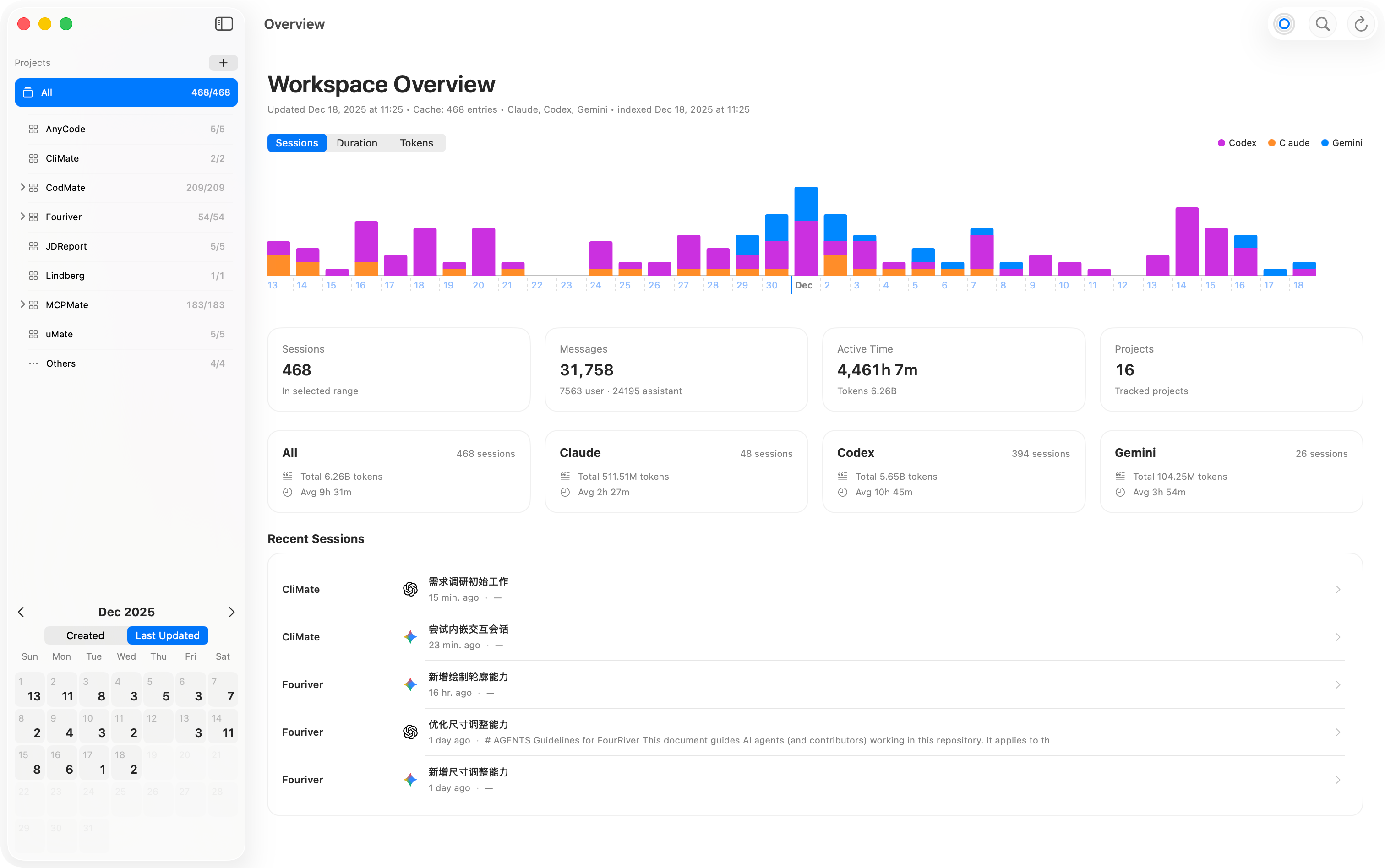
CodMate is a macOS SwiftUI app for managing CLI AI sessions: browse, search, organize, resume, and review work produced by Codex, Claude Code, and Gemini CLI.
It focuses on speed (incremental indexing + caching), a compact three-column UI, and “ship it” workflows like Project Review (Git Changes) and one-click Resume/New.
Status: macOS 13.5+, Swift 6 toolchain. Universal binary (arm64 + x86_64).
Project status (Archival note)
I plan to archive CodMate after this update. Here is the reasoning that led me to this decision:
- Scope drift with limited new insight: CodMate grew from a simple history viewer into a broader desktop GUI for experience, integration, and workflow consolidation. However, it has not pushed the core exploration of Agents/LLMs as much as I hoped.
- Traditional heavyweight GUI is no longer the right center of gravity: the underlying Agent/LLM ecosystem evolves quickly, and a heavier desktop GUI becomes harder to justify when CLI/TUI approaches can iterate faster with less inertia. What feels more important to me now is a broader HUI (Human Usability Interface) direction: designing interfaces that help humans work effectively with rapidly improving AI systems, rather than anchoring exploration to one traditional app surface.
- Ecosystem already covers part of the gap: Codex and Claude Code now offer VS Code/Zed extensions that share history with their CLI sessions, which increasingly addresses the original problem CodMate set out to solve.
- Model exploration now calls for a different center of gravity: I want to spend more time learning how different model families are best used in practice — not just comparing open or low-cost options, but understanding where each type fits. The community already has strong examples such as
oh-my-openagent, and there are also emerging Generative UI directions such as A2UI that I want to keep watching and learning from. In a time when AI/LLMs are accelerating what can be created through logic alone, I think the human-facing usability layer is becoming more urgent, not less. - The architecture also boxed the project into macOS: CodMate’s SwiftUI desktop design helped it move quickly at first, but it also constrained the project to one environment. For the next phase, I want more room for cross-platform orchestration and CLI-first experimentation rather than continuing from a macOS-only foundation.
This does not diminish what CodMate achieved. If anything, the recent increase in attention around CodMate makes the tradeoff clearer to me: people are clearly interested in better ways to work with CLI agents, and I still believe interface design around these systems matters deeply. But I no longer think this particular macOS GUI is the best place for me to continue that exploration. The focus shift is toward orchestration, model-specific workflows, HUI, and more portable foundations.
Where this exploration continues
While I will keep many of the ideas behind CodMate in mind, the project I am actively building now is MCPMate.
MCPMate is not a brand-new project. I started shaping it around May last year, paused it around October, and recently returned to it with a clearer view of where MCP has irreplaceable value. It was previously closed-source and is now being reopened in public.
At a high level, MCPMate is a management center for MCP servers and AI clients. The direction I care about most there is usability: building on its earlier profile-based approach for removing redundant capabilities in specific scenarios, and extending its hosted mode toward a more progressively disclosed smart mode. Part of the goal is to bring some of the lower first-token-cost and lower-friction qualities that people appreciated in skills- and CLI-shaped workflows into MCP as well.
So while CodMate is ending here, the broader exploration is not. If CodMate resonated with you, I would love for you to take a look at MCPMate and share feedback.
Download
- Latest release (DMG): GitHub Releases
Why CodMate
- Find anything fast: a global search panel (⌘F) with scoped search + progress/cancel, plus quick list filtering.
- Keep work organized: Projects + Tasks let you group sessions by repo and by goal, with a shareable task context file.
- Continue instantly: Resume/New into Terminal/iTerm2/Warp (or embedded terminal in non-sandbox builds), with copyable exact commands.
- Review & commit without leaving the app: Project Review shows diffs, staging state, and supports commit (with optional AI commit message generation).
Features (organized by value)
Organize and understand sessions across CLIs
- Multi-source session browsing:
- Codex:
~/.codex/sessions(.jsonl) - Claude Code:
~/.claude/projects(.jsonl) - Gemini CLI:
~/.gemini/tmp(Gemini’s session storage)
- Codex:
- Sidebar navigation:
- Projects list with counts, including “All” and an unassigned/Other bucket.
- Calendar (pinned bottom) with per-day counts and a Created/Updated toggle.
- Directory-based navigation built from session
cwdstatistics.
- Session list:
- Default scope is Today for fast first paint.
- Sorting: Most Recent (created/updated aware), Duration, Activity, etc.
- Rows show title, timestamps/duration, snippet, and compact metrics (user/assistant/tool/reasoning), plus states like running/updating/awaiting follow-up.
Projects + Tasks (workspaces instead of loose logs)
- Projects:
- Create/edit projects (name, directory, overview, trust level, optional runtime profile).
- Assign sessions to projects via row actions/context menus.
- Storage:
~/.codmate/projects/(project metadata + memberships mapping). - “New” sessions started inside a project can be auto-assigned to that project.
- Tasks (within projects):
- Create/edit/delete tasks, collapse/expand task groups, and assign/move sessions into tasks.
- Task context sync: generates/updates a shareable context file and prepares a prompt pointing to it.
- Storage:
~/.codmate/tasks/(task metadata + relationships mapping).
Resume/New (local, remote, embedded)
- Resume:
- Launch in Terminal.app / iTerm2 / Warp, or embedded terminal (non-App Store / non-sandbox builds).
- When embedded is active, CodMate can show a Copy real command action for reproducibility.
- New:
- Start a fresh session from the focused session’s
cwd(and project profile when available). - Start sessions directly from a selected project, even without a focused session.
- Start a fresh session from the focused session’s
- Remote Hosts (SSH mirroring):
- Enable hosts from
~/.ssh/config, then mirror remote sessions over SSH. - Remote bases:
- Codex remote:
$HOME/.codex/sessions - Claude remote:
$HOME/.claude/projects
- Codex remote:
- Mirror cache is stored under
~/Library/Caches/CodMate/remote/.
- Enable hosts from
Search, export, and metadata (make history useful)
- Global Search (⌘F):
- Floating window or toolbar popover style (configurable).
- Scope picker + progress/cancel for long searches.
- Rename/comment:
- Click the session title in the detail pane to edit title/comment.
- Storage:
~/.codmate/notes/<sessionId-sanitized>.json(with automatic migration from legacy locations).
- Conversation export:
- Export Markdown from the detail pane.
- Settings allow choosing which message types appear in the timeline and which are included in Markdown export.
Project Review (Git Changes) + AI commit message generation
- Git Changes surface (Project Review mode):
- Lists changed files, supports stage/unstage, and shows unified diff or raw preview.
- Commit UI with message editor and Commit action.
- Optional AI generate commit message (uses your selected Provider/Model and a prompt template from settings).
- Repo authorization is on-demand (especially relevant in sandboxed builds).
- Settings › Git Review:
- Diff options (line numbers, soft wrap).
- Commit generation: choose Provider/Model and an optional prompt template.
Providers, MCP, notifications, diagnostics (make the ecosystem manageable)
- Providers (Settings › Providers):
- Add/edit providers with Codex + Claude endpoints, shared API key env var, wire API (Chat/Responses), and model catalog with capability flags.
- Built-in templates are bundled from
payload/providers.json; user registry is stored at~/.codmate/providers.json. - Built-in health check: Test endpoints before saving.
- MCP Servers (Settings › MCP Server):
- Uni-Import (paste/drag JSON), per-server enable toggle, per-target toggles (Codex/Claude/Gemini), and connectivity Test.
- Storage:
~/.codmate/mcp-servers.json - Exports enabled servers into
~/.claude/settings.json(and writes a helper file~/.codmate/mcp-enabled-claude.json).
- Claude Code notifications (Settings › Claude Code › Notifications):
- Installs/removes hooks that forward permission/completion events via
codmate://notifyand provides a self-test.
- Installs/removes hooks that forward permission/completion events via
- Dialectics (Settings › Dialectics):
- Deep diagnostics for session roots, notes/projects dirs, environment, and ripgrep indexes.
- One-click “Save Report…” plus rebuild actions for coverage/session index.
Keyboard shortcuts
- ⌘,: Settings
- ⌘F: Global Search
- ⌘R: Refresh (also recomputes global sidebar statistics)
- ⌘1: Toggle sidebar
- ⌘2: Toggle session list
Data locations (quick reference)
- Codex sessions:
~/.codex/sessions - Claude sessions:
~/.claude/projects - Gemini sessions:
~/.gemini/tmp - Notes:
~/.codmate/notes/ - Projects:
~/.codmate/projects/ - Tasks:
~/.codmate/tasks/ - Providers registry:
~/.codmate/providers.json - MCP servers:
~/.codmate/mcp-servers.json - Session index cache (SQLite):
~/.codmate/sessionIndex-v4.db - Additional caches:
~/Library/Caches/CodMate/(includes remote mirrors and best-effort caches)
Performance
- Fast path indexing: memory‑mapped reads; parse the first ~64 lines plus tail sampling (up to ~1 MB) to fix
lastUpdatedAt. - Background enrichment: full parse in constrained task groups; batched UI updates.
- Full‑text search: chunked scan (128 KB), case‑insensitive; avoids lowercasing the whole file.
- Caching: persistent SQLite index + best-effort caches to keep subsequent launches fast.
- Sidebar statistics are global and decoupled from the list scope to keep navigation snappy.
Architecture
- App: macOS SwiftUI (min macOS 13.5). SwiftPM-only build.
- MVVM layering
- Models:
SessionSummary,SessionEvent,DateDimension,SessionLoadScope, … - Services:
SessionIndexer,SessionCacheStore,SessionActions,SessionTimelineLoader,CodexConfigService,SessionsDiagnosticsService - ViewModel:
SessionListViewModel - Views: SwiftUI only (no business logic)
- Models:
- Concurrency & IO
- Services that share caches are
actors; UI updates on MainActor only. - Cancel previous tasks on search/scope changes; guard
Task.isCancelledin loops. - File IO prefers
Data(mappedIfSafe:)and chunked reads; avoids loading huge files into Strings.
- Services that share caches are
Build
Prerequisites
- macOS 13.5+, Swift 6 toolchain, Xcode Command Line Tools (for
xcrun actool). - Install the CLIs you use (Codex / Claude / Gemini) somewhere on your
PATH.
Makefile (recommended)
make build   # SwiftPM debug build
make test    # SwiftPM tests (if any)
make run     # Build (debug, native arch) and launch for local testing
make app VER=1.2.3     # Create CodMate.app in build/ (ARCH defaults to host)
make app VER=1.2.3 ARCH=arm64
make app VER=1.2.3 ARCH=x86_64
make app VER=1.2.3 ARCH="arm64 x86_64"
make dmg VER=1.2.3     # Create Developer ID DMG (ARCH defaults to host)
make dmg VER=1.2.3 ARCH=arm64
make dmg VER=1.2.3 ARCH=x86_64
make dmg VER=1.2.3 ARCH="arm64 x86_64"  # produces codmate-arm64.dmg + codmate-x86_64.dmg
make notices # Regenerate THIRD-PARTY-NOTICES.md
Direct scripts
VER=1.2.3 ./scripts/create-app-bundle.sh
VER=1.2.3 ./scripts/macos-build-notarized-dmg.sh
Versioning strategy (build script)
- Marketing version (CFBundleShortVersionString): set with
VER(e.g.,1.4.0). - Build number (CFBundleVersion): controlled by
BUILD_NUMBER_STRATEGY:date(default):yyyymmddHHMM(e.g.,202510291430).git:git rev-list --count HEAD.counter: monotonically increments a file counter at$BUILD_DIR/build-number(override path viaBUILD_COUNTER_FILE).
- DMG name:
codmate-<ARCH>.dmg. - Override via environment variables when running the build script:
VER=1.4.0 BUILD_NUMBER_STRATEGY=date \
  ./scripts/macos-build-notarized-dmg.sh
This sets CFBundleShortVersionString to 1.4.0, CFBundleVersion to the computed build number, and names the DMG accordingly.
CLI Integration (Codex / Claude / Gemini)
- Executable resolution: CodMate launches CLIs via
/usr/bin/env codex(andclaude/gemini) to respect your systemPATH(no user-configurable CLI path). - PATH robustness: before launching, CodMate ensures
PATHincludes/opt/homebrew/bin:/usr/local/bin:/usr/bin:/bin. - Resume:
- Uses the original session
cwdwhen it exists; otherwise falls back to the log file directory. - Can launch into Terminal.app / iTerm2 / Warp, and (in non-sandbox builds) an embedded terminal.
- When embedded is active, CodMate can copy the exact invocation it used (e.g.
codex resume <id>).
- Uses the original session
- New:
- Starts a fresh session in the focused session’s working directory (or the selected project directory).
- When a Project Profile is present, its model/sandbox/approval defaults are applied when generating commands.
- Command flags exposed by the UI:
- Codex: sandbox policy (
-s/--sandbox), approval policy (-a/--ask-for-approval),--full-auto,--dangerously-bypass-approvals-and-sandbox. - Claude: common runtime/permission flags plus MCP strict mode (see Settings › Claude Code and Settings › Command).
- Codex: sandbox policy (
- MCP integration:
- CodMate can export enabled MCP servers into
~/.claude/settings.jsonand also writes~/.codmate/mcp-enabled-claude.jsonfor explicit--mcp-configusage.
- CodMate can export enabled MCP servers into
Project Layout
assets/                     # Assets and Info.plist (not in Copy Bundle Resources)
CodMateApp.swift            # App entry point
models/                     # Data models (pure types)
services/                   # IO + indexing + integrations
utils/                      # Helpers (shell, sandbox, formatting, etc.)
views/                      # SwiftUI views
payload/                    # Bundled presets (e.g. providers.json templates)
notify/                     # Swift command-line helper installed as `codmate-notify`
SwiftTerm/                  # Embedded terminal dependency (local package)
scripts/                    # Helper scripts (icons, build flows)
docs/                       # Design notes and investigation docs
Known Pitfalls
- Prefer a toolbar search field (far‑right aligned) over
.searchableto avoid hijacking toolbar slots on macOS. - Outline row height needs explicit tightening (see
defaultMinListRowHeightand insets in the row views).
Development Tips
- Run tests:
swift test. - Formatting: follow existing code style; keep changes minimal and focused.
- Performance: measure large trees; first paint should be fast; enrichment is incremental.
License
- Apache License 2.0. See
LICENSEfor full text. NOTICEincludes project attribution. SPDX:Apache-2.0.- Third-party attributions and license texts: see
THIRD-PARTY-NOTICES.md.