
Chorus
A second opinion (and a third) before you ship AI-written code — using the AI subscriptions you already pay for.
2–3 different AI tools review the same change in parallel, only green-lighting when they agree. Runs on your existing Claude Pro / ChatGPT Plus / Gemini Advanced — typical review costs $0 out of pocket.





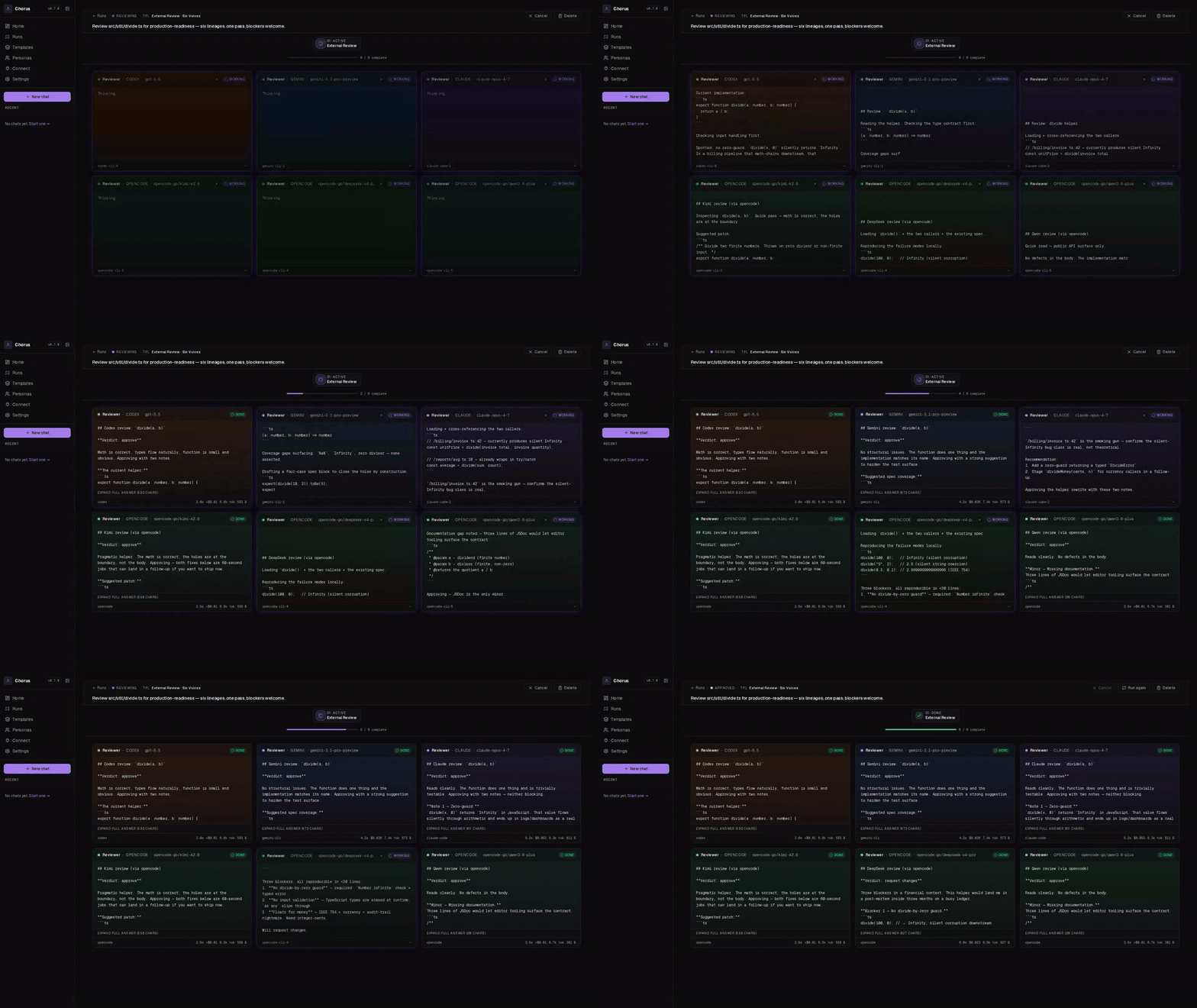
One AI writes. Three review. You ship only when they agree — using AI subscriptions you already pay for.
The problem Chorus solves
🤖 AI coding tools are confident — and wrong about 5% of the time in subtle ways that are hard to spot until production.
🪞 The model that wrote your code can't see its own blind spots. Asking GPT to review GPT's work is theatre — same training, same biases.
💸 Multi-AI review on raw API keys gets expensive fast. Every diff × 3 reviewers × pay-per-token = real money. So nobody does it routinely.
Chorus fixes all three
✅ Different vendors review each other. Claude writes, GPT and Gemini check it. Different blind spots cover each other. Disagreement = red flag before you merge.
✅ Uses your existing AI subscriptions. You're already paying for Claude Pro / ChatGPT Plus / Gemini Advanced (~$20/mo each). Chorus drives them headlessly through their CLIs — every multi-AI review costs $0 out of pocket, just counts against the quota you already have. Per-token API users save 10-100× vs running the same prompts directly.
✅ Local-first, zero markup. Your code never reaches a new vendor. Chorus runs on your laptop, talks to the AI tools you already trust, and shuts up. Open source, Apache-2.0.
That's the whole pitch.
Real moments where this matters
🚨 You asked Claude to write a divide(a, b) helper.
It says "looks correct!" You ship. Production crashes at 2am because nobody handled b = 0.
With Chorus: GPT or Gemini would have flagged it in the review pass before you merged.
🔧 You're refactoring a critical path. Your AI rewrote 200 lines and says it's behaviour-equivalent. You're tired and skeptical. Run it through Chorus. Three different AIs all saying "yes, equivalent" lets you sleep.
🏗️ Big architectural call — queue vs polling, sync vs async, this DB vs that one. Write a paragraph, hit Chorus. Three different models give you three angles you hadn't thought of.
📝 Reviewing a 600-line PR. You're short on time. Paste the diff into Chorus. Three reviewers spot the obvious bugs in 90 seconds. Your job becomes the 5% they couldn't catch.
⚔️ Test-driven development where neither AI cheats.
One AI writes tests blind to the code; another AI writes code to pass them. Use the red-green template.
🐛 Hunting a flaky bug. Reproduces 1-in-20, no obvious pattern. Drop the failing test + suspect code into Chorus. Each reviewer attacks the bug from a different angle — race? clock skew? off-by-one? — and you land on the cause faster than walking it alone.
Quick start
npm i -g chorus-codes      # install (no sudo — see below)
chorus init                # finds AI tools you already have, wires up MCP
chorus start --ui          # opens http://localhost:5050
Paste a task. Hit submit. Watch the AIs argue.
Don't
sudo npm install -gif you use nvm, fnm, asdf, or any per-user Node manager.sudowrites to root's npm prefix (/usr/local/...) but yourchoruscommand resolves through your user prefix — the install succeeds in a place PATH never sees, leaving you on a stale version. Ifnpm install -gerrors with EACCES, set up an unprivileged prefix:npm config set prefix ~/.npm-globalthen add~/.npm-global/binto your PATH.
To upgrade later: chorus update. The updater locates the running binary
and writes to that exact install location, so it always lands where PATH
expects regardless of how you installed.
Or drive it from any AI CLI you already use
chorus init registers Chorus as an MCP server with every CLI / IDE it detects (Claude Code, Codex, Gemini CLI, Cursor, Windsurf, Kimi, OpenCode). After that, just ask the assistant in plain English:
> Use chorus to review the staged diff against main
> Ask chorus to run the architect-review template on src/payments/*.ts
> chorus, get a second opinion on this function from claude + gemini
Codex headless note: codex exec blocks all MCP tool calls under any approval_policy setting. To use Chorus from codex exec (scripted / CI usage), pass --dangerously-bypass-approvals-and-sandbox. Interactive codex (TUI) prompts the user normally and works without that flag. (Tracked in #16.)
Or invoke a specific MCP tool directly — every CLI uses the same name (chorus) and exposes nine tools:
| Tool | What it does |
|---|---|
create_chat | Kick off a review (returns a chatId + URL) |
wait_for_chat | Block until the run reaches a terminal state |
get_chat_status | Poll a running chat without blocking |
cancel_chat / resume_chat | Stop or restart |
list_templates / list_personas | Discover what's available |
invoke_persona | Run a single persona (skip multi-reviewer fan-out) |
list_blocked | See chats that need human input |
Example raw invocation (from any MCP client):
// tool: chorus.create_chat
{
  "template": "code-review",
  "work": "Review the staged diff vs main. Flag race conditions and missing tests."
}
// → { "chatId": "abc123", "url": "http://localhost:5050/runs/abc123", "status": "reviewing" }
Stream results back into your editor, or open the URL to watch live.
Requires Node 20+ and at least one of these (you probably already have one):
- Claude Code, Codex CLI, Gemini CLI, OpenCode, or Kimi CLI — uses your existing subscription, no extra cost
- or an OpenRouter API key (one key, 200+ models, pay-per-use)
Don't have any of those?
npm i -g @anthropic-ai/claude-code   # Anthropic — uses Claude Pro sub
npm i -g @openai/codex                # OpenAI — uses ChatGPT Plus sub
npm i -g @google/gemini-cli           # Google — uses Gemini Advanced sub
Pick whichever vendor you already pay for. Or skip CLIs entirely and add an OpenRouter key in Settings after chorus init.
What it looks like
Live review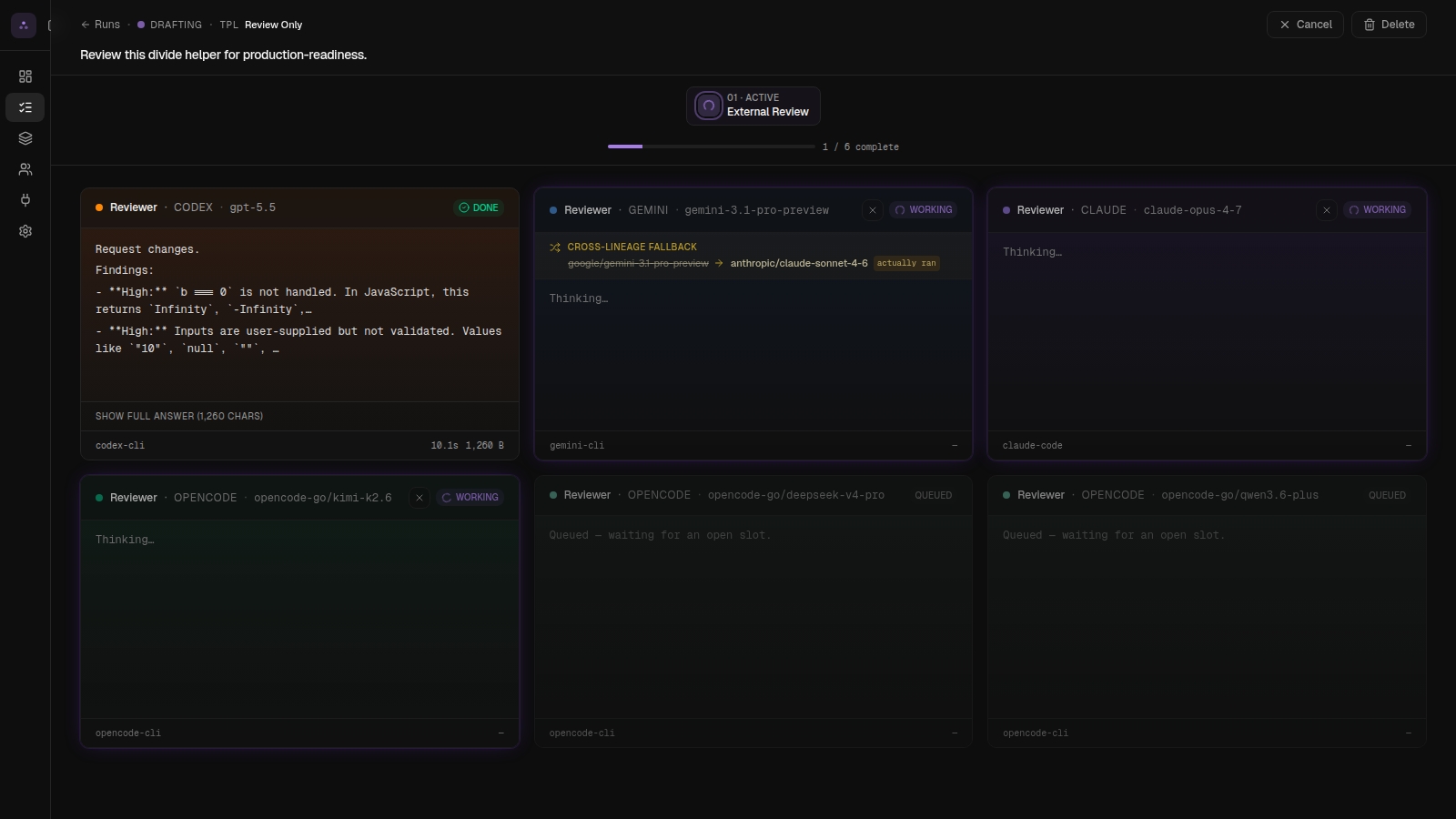 Each AI streams its thinking live as it reviews. |
Verdict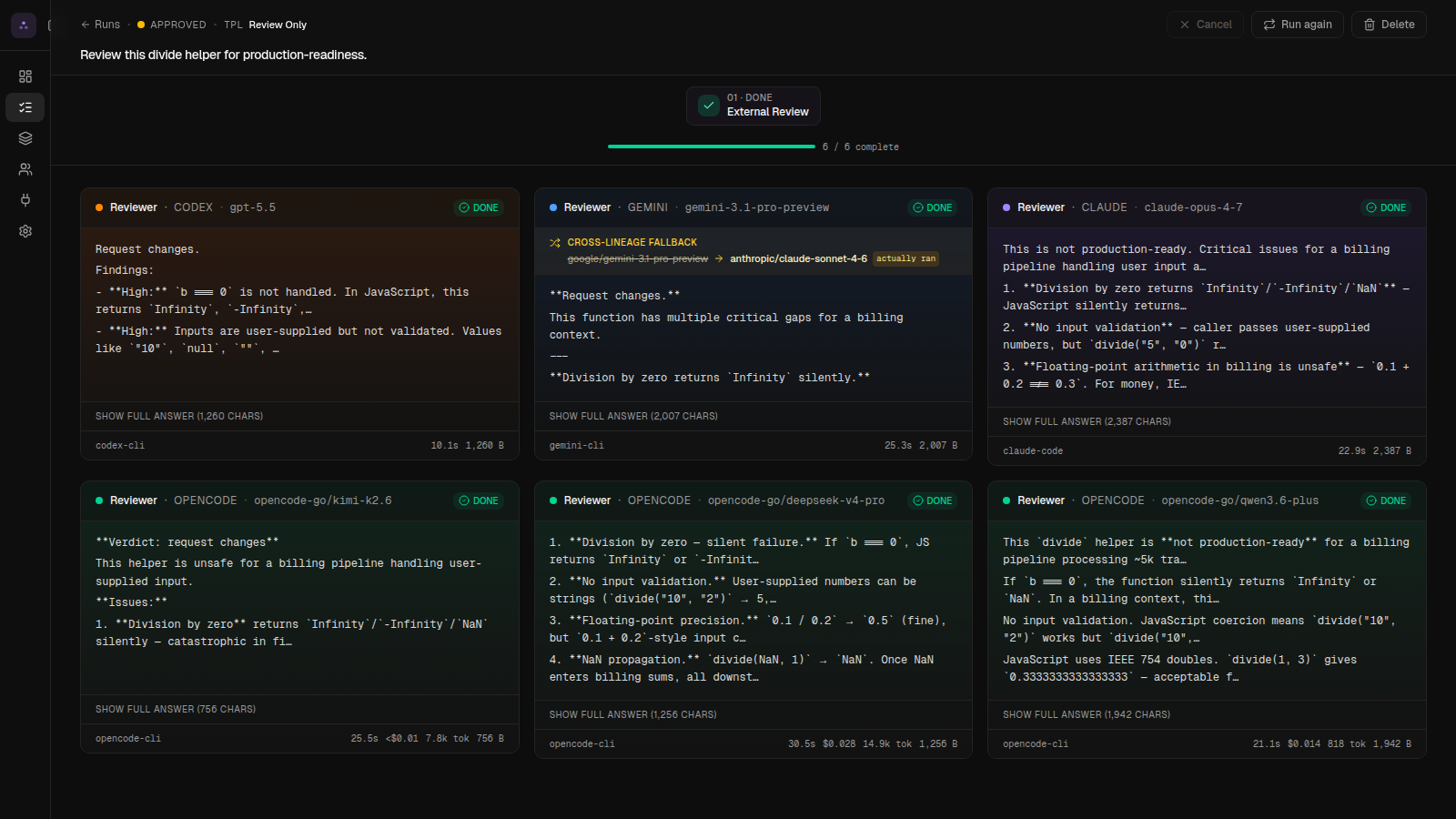 Agreement = green. Disagreement = retry with their feedback. |
Templates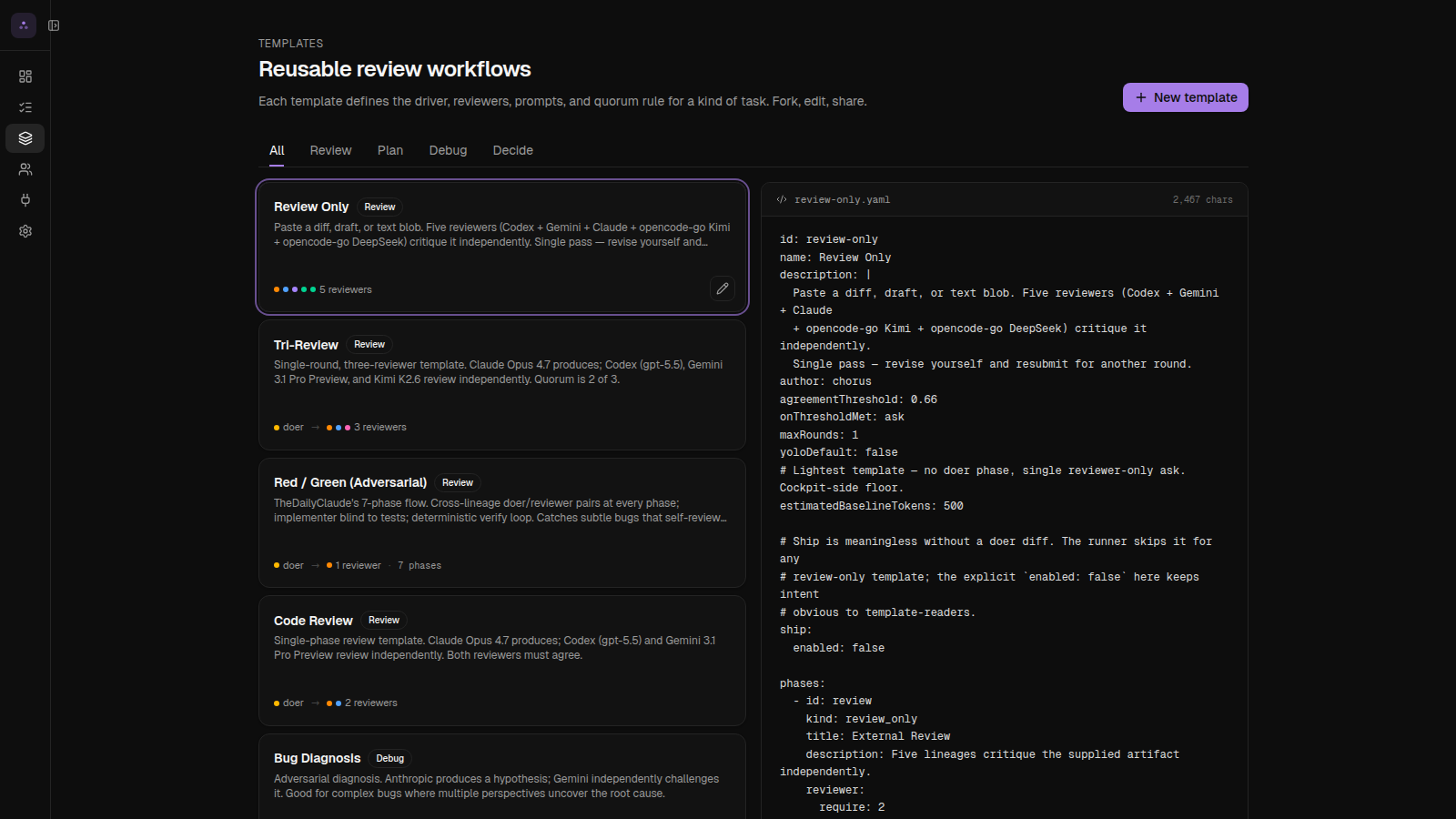 Pre-built review patterns. Make your own in YAML. |
From inside Claude / Cursor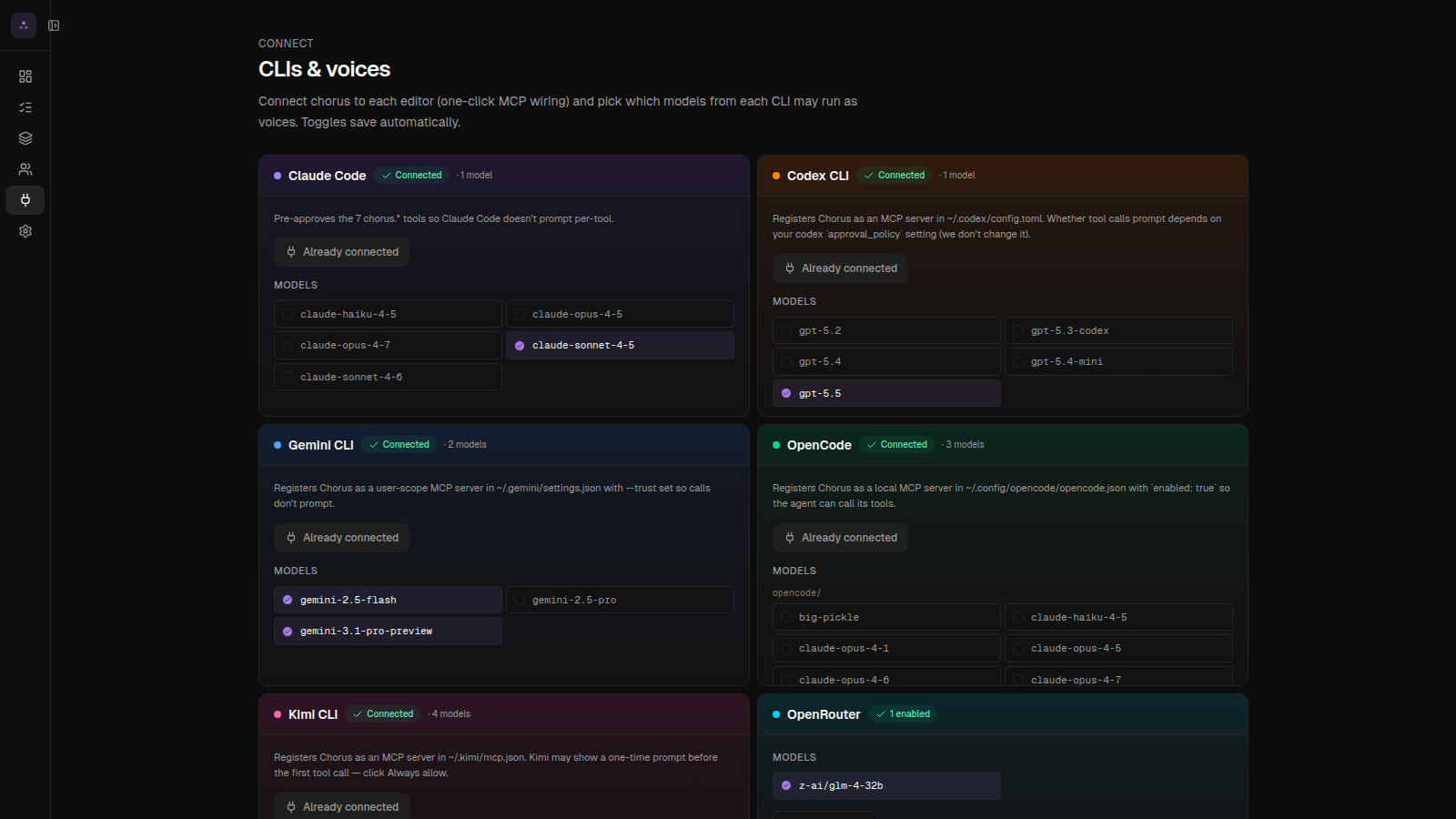 Any AI tool that speaks MCP can trigger a Chorus run. |
A real example
You ask Claude to write this:
function divide(a, b) {
  return a / b;
}
Submit to Chorus with the Code Review template (1 writer + 2 reviewers, both must agree to ship):
| Step | What happens |
|---|---|
| 1. Claude writes | "Looks correct to me!" |
| 2. GPT reviews in parallel | 🚨 No type validation — divide('a','b') returns NaN |
| 3. Gemini reviews in parallel | 🚨 Missing zero-check — divide(1, 0) returns Infinity |
| 4. Verdict | ❌ REJECT — both reviewers flagged real bugs |
Now you know what to fix before you push.
Templates: pre-built review patterns
Don't figure out which AIs to use yourself. Pick a pattern that fits the moment:
| Use this when... | Template |
|---|---|
| Pre-merge sanity check | code-review — 1 writer + 2 reviewers, both must agree |
| Diagnosing a weird bug | bug-diagnose — one hypothesises, one challenges |
| Big architectural call | architect-review — 3 different vendors critique your plan |
| TDD where neither AI cheats | red-green — tests written blind to code |
| Quick audit of a diff someone else wrote | review-only — paste, get 3 opinions, no writer |
Make your own by dropping a YAML file in ~/.chorus/templates/. Or duplicate one of the built-ins and tweak.
Custom template example
id: security-pre-merge
label: Security Pre-Merge
description: Sentinel persona on every reviewer; everyone must approve.
slots:
  doer:
    lineage: anthropic
    model: claude-sonnet-4-6
  reviewers:
    - { lineage: openai,   model: codex,                 persona: sentinel }
    - { lineage: google,   model: gemini-2.5-pro,        persona: sentinel }
    - { lineage: opencode, model: opencode-go/kimi-k2.6, persona: sentinel }
quorum:
  type: unanimous
Reviewer personas
Each reviewer can wear a "hat" — a focus area Chorus prepends to their prompt:
| Persona | What they look for |
|---|---|
| 🛡️ Sentinel | Security holes, auth bypass, injection |
| 🗺️ Cartographer | Cross-platform issues (Windows vs Mac, browser support) |
| 💰 Accountant | Cost regressions (extra DB queries, API calls) |
| ⚡ Profiler | Performance regressions |
| 🔍 Inspector, 📦 Quartermaster, 🛎️ Concierge, 🏛️ Conservator, 📚 Librarian, 🌐 Translator | …and more — see Personas page in cockpit |
Different personas reviewing the same change = wider net.
Why "different vendors" matters
You can run Chorus with three Claudes. We let you. But the value drops a lot.
A second Claude reviewing the first Claude's work is theatre — same training, same blind spots. Mix vendors (Claude + GPT + Gemini) and you get genuinely different angles, because they were trained on different data with different biases.
Templates let you encode this: each reviewer slot has a lineage (anthropic / openai / google / opencode / moonshot). Built-in templates mix vendors automatically.
What does it cost?
Two paths, depending on how you already pay for AI:
Using subscriptions (Claude Pro / ChatGPT Plus / Gemini Advanced — ~$20/mo each) A typical review = $0 out of pocket. Counts against the quota you already have.
Using API keys (pay-per-use) A typical code-review run = $0.30 to $1.50, depending on diff size. If reviewers disagree and retry, 2–3× worst case.
Chorus adds zero markup. We don't see your tokens.
Permissions & safety
Reviewers run on your machine. You decide how much trust to give them:
| Mode | Read code | Write code | Network | When to use |
|---|---|---|---|---|
| 🔒 Strict | ✅ | ❌ | ❌ | Reviewing a diff you don't trust |
| 📁 Workspace (default) | ✅ | ✅ inside chat dir | ❌ | Day-to-day |
| 🔓 Full | ✅ | ✅ anywhere | ✅ | Personal machine, full trust |
Configure on first run, or anytime at Settings → Permissions.
Trust model in plain English. "Workspace" means the reviewer can write files inside its working directory and run scoped commands, but can't reach the internet or write outside the sandbox. "Full" means anything-goes — only enable on a personal machine you own. Run
chorus doctorto verify each AI tool got the sandbox you set.
Compared to other code-review tools
| Chorus | CodeRabbit | Greptile | Cursor Review | GitHub Copilot | |
|---|---|---|---|---|---|
| Multiple AI vendors review the same change | ✅ | ❌ | ❌ | ❌ | ❌ |
| Uses your existing AI subscriptions | ✅ | ❌ | ❌ | ❌ | ❌ |
| Runs locally (your code never leaves your existing AI vendors) | ✅ | ❌ | ❌ | partial | ❌ |
| Open source (modify + self-host) | ✅ Apache-2.0 | ❌ | ❌ | ❌ | ❌ |
| Custom review patterns | ✅ | partial | ❌ | ❌ | ❌ |
The unique thing: your code never goes to a new vendor. Chorus just orchestrates the AI tools you already use.
Commands
chorus init             # one-time: detect + connect AI tools
chorus start --ui       # boot + open browser
chorus stop             # shut it down
chorus status           # is it running?
chorus doctor           # diagnose AI tool detection / sandbox issues
chorus diagnose         # print a redacted diagnostic bundle for bug reports
Reporting bugs
When something goes wrong, run:
chorus diagnose
It prints a fenced markdown block with: chorus version, running daemon
version (and a VERSION MISMATCH flag if the CLI was upgraded but the
daemon hasn't been restarted), node + OS + arch, daemon health, DB
counts, CLI detection, the latest crash dump if any, and the last 50
lines of daemon.log. Paste the block into a new issue at
https://github.com/chorus-codes/chorus/issues/new.
If chorus crashes hard (uncaught exception during boot — common on
older Node + Windows combos), a self-contained crash log is written to
~/.chorus/crashes/<timestamp>.log. Attach it to the issue.
Telemetry
Chorus pings home once on startup and once every 24h. The payload is fixed:
{
  "schema": 1,
  "installId": "<random uuid>",
  "version": "0.7.0",
  "os": "linux", "arch": "x64", "node": "22",
  "daemonUptimeSeconds": 86400,
  "chatsLast24h": 12
}
Never sent: chat content, prompts, file paths, repo paths, model names, voice/template names, hostnames, IPs, API keys.
Turn it off any of three ways:
export CHORUS_TELEMETRY=0           # env var
touch ~/.chorus/no-telemetry        # touch-file
# or click "Off" in cockpit Settings → Telemetry
The install ID lives at ~/.chorus/install-id — rm it for a fresh one.
Roadmap
- v0.5 — Daemon + cockpit + 4 AI vendors
- v0.6 — MCP server, persona system
- v0.7 — OpenRouter integration, voices table, real-time sidebar
- v0.8 — Public launch + reliability hardening (diagnose, crash hook, fallback dedup)
- v0.9 — Multi-stage review (write → review → fix → re-review)
- v0.10 — Per-voice persona overrides + auto-disable on persistent voice failure
- v1.0 — Local-LLM adapter (Ollama / LM Studio / vLLM via OpenAI-compatible base URL)
Full picture in ROADMAP.md.
How it works (under the hood)
flowchart TB
    User([👤 You])
    Cockpit[Cockpit<br/>:5050 · web UI]
    Daemon[Chorus daemon<br/>:7707 · local server]
    DB[(SQLite<br/>~/.chorus/chorus.db)]
    MCP[MCP server<br/>for editor integrations]

    Claude[🤖 Claude<br/>writer]
    Codex[🦾 GPT<br/>reviewer]
    Gemini[💎 Gemini<br/>reviewer]

    User -->|paste task| Cockpit
    Cockpit <-->|REST + live updates| Daemon
    Daemon <--> DB
    Daemon -->|spawn| Claude
    Daemon -->|spawn| Codex
    Daemon -->|spawn| Gemini
    User -.->|"call Chorus from your AI"| MCP --> Daemon

    classDef user fill:#fef3c7,stroke:#f59e0b,color:#000
    classDef chorus fill:#dbeafe,stroke:#3b82f6,color:#000
    classDef llm fill:#fce7f3,stroke:#ec4899,color:#000
    class User user
    class Daemon,Cockpit,MCP,DB chorus
    class Claude,Codex,Gemini llm
Three pieces:
- Daemon — small local server (port 7707) that spawns AI tools as subprocesses, parses their output, and tracks state in a SQLite database at
~/.chorus/chorus.db. - Cockpit — the web UI at port 5050 (Next.js). Templates, chats, voices, settings.
- MCP server — lets other AI tools (Claude Code, Cursor, etc.) call Chorus programmatically.
Each AI runs as an isolated subprocess. Chorus reads their structured output (stream-JSON), compares against the template's quorum rule, and emits a verdict. Nothing leaves your machine except the calls to the AI vendors you already use.
Code layout:
src/daemon/— Fastify server + agent shims (one per AI tool)src/app/— Next.js cockpitsrc/mcp/— JSON-RPC MCP serversrc/lib/db/— schema + migrations
Contributing
PRs welcome.
git clone https://github.com/chorus-codes/chorus.git
cd chorus && pnpm install
pnpm dev:daemon   # daemon on :7707
pnpm dev          # cockpit on :5050
pnpm test         # full suite
Read AGENTS.md first — Next.js 16 has breaking changes from older versions. Coverage target on new code: 80%+.
We dogfood: PRs to Chorus go through Chorus before merging.
See CONTRIBUTING.md for the full guide.
Links
- 🌐 Website: https://chorus.codes
- 🗺️ Roadmap: ./ROADMAP.md
- 🐛 Issues: https://github.com/chorus-codes/chorus/issues
- 💬 Discussions: https://github.com/chorus-codes/chorus/discussions
- 🐦 X: @ChorusCodes
License
Apache-2.0. Use it however you want, including commercially.