Chainlink




A simple, lean issue tracker CLI designed for AI-assisted development. Track tasks across sessions with context preservation.
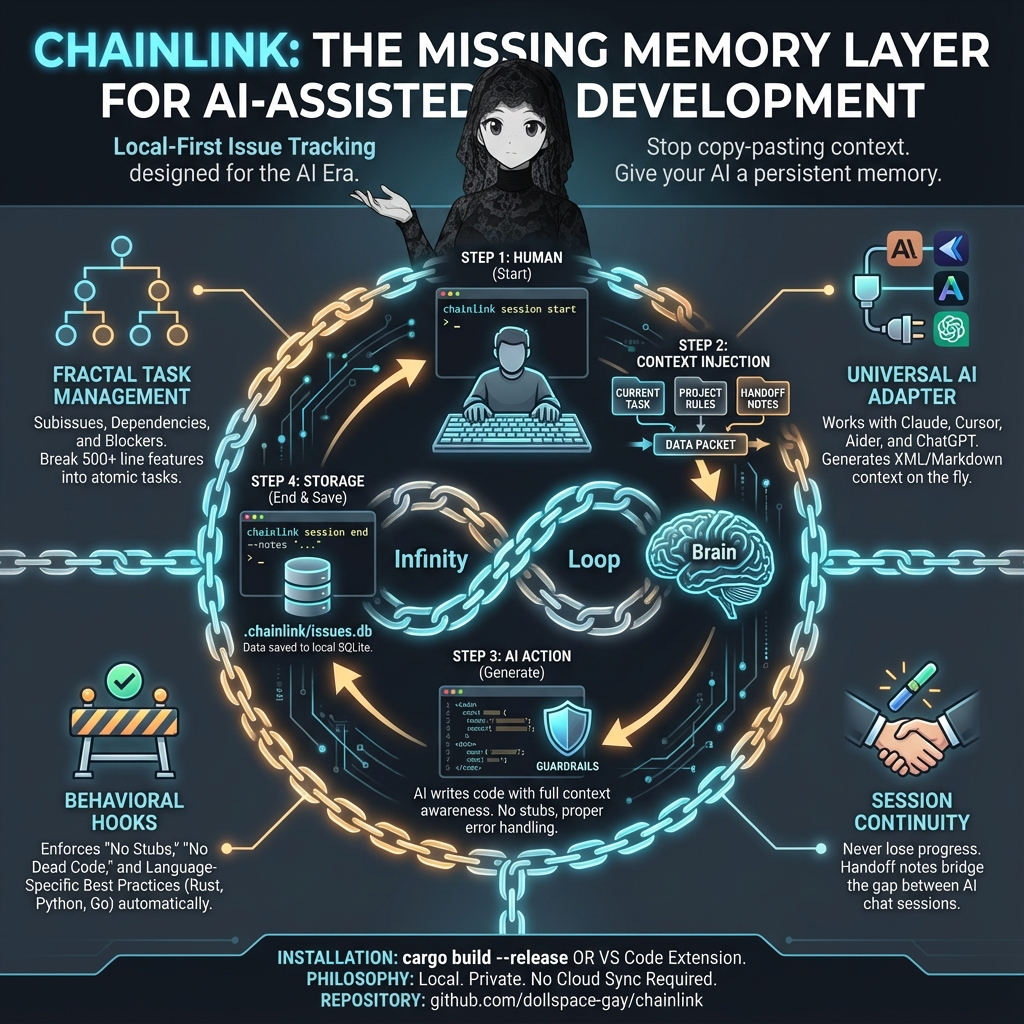
Features
- Local-first: All data stored in SQLite (
.chainlink/issues.db) - Session management: Preserve context across Claude/AI sessions with handoff notes
- Context compression resilience: Breadcrumb tracking via
session actionsurvives context resets - Quick workflow:
chainlink quickcreates, labels, and starts work in one command - Issue templates: Built-in templates for bugs, features, audits, investigations, and more
- Subissues: Break large tasks into smaller, trackable pieces
- Dependencies: Track blocking relationships between issues
- Related issues: Link related issues together for context
- Labels & priorities: Organize issues with labels and priority levels
- Milestones: Group issues into milestones/epics for release planning
- Time tracking: Start/stop timers to track time spent on issues
- Smart recommendations:
chainlink nextsuggests what to work on based on priority and progress - Tree view: Visualize issue hierarchy with
chainlink tree - JSON output:
--jsonflag for structured, machine-readable output - Quiet mode:
--quietflag for minimal, pipe-friendly output - Batch operations:
close-allwith label/priority filtering - Export/Import: Backup and restore issues in JSON format
- Issue archiving: Archive old closed issues to keep the active list clean
- Claude Code hooks: Behavioral guardrails that inject best practices into AI sessions
- Stale session detection: Auto-ends sessions idle >4 hours on next startup
- Customizable rules: Override default rules via
.chainlink/rules/markdown files - No sync complexity: No git hooks, no auto-push, just simple local storage
Installation
# Install from crates.io
cargo install chainlink-tracker
The binary is named chainlink and will be available in your PATH after install.
Build from Source
git clone https://github.com/dollspace-gay/chainlink.git
cd chainlink/chainlink
cargo install --path .
# The binary will be at ~/.cargo/bin
# Or build without installing

cargo build --release
# The binary will be at target/release/chainlink
Quick Start
# Initialize in any project
chainlink init

# Start a session when you begin work
chainlink session start

# Create issues
chainlink create "Fix login bug" -p high
chainlink create "Add dark mode" -d "Support light/dark theme toggle"

# Quick create + label + start working in one command
chainlink quick "Fix login bug" -p high -l bug

# Use a template for structured issues
chainlink create "Login fails on refresh" --template bug

# Set what you're working on
chainlink session work 1

# Record breadcrumbs before context compression
chainlink session action "Investigating token refresh logic"

# End session with handoff notes
chainlink session end --notes "Fixed auth bug, dark mode is next"
Commands
Issue Management
| Command | Description |
|---|---|
chainlink create <title> | Create a new issue |
chainlink create <title> -p high | Create with priority (low/medium/high/critical) |
chainlink create <title> -d "desc" | Create with description |
chainlink create <title> --template bug | Create from template (bug/feature/refactor/research/audit/continuation/investigation) |
chainlink create <title> --work -l bug | Create, label, and start working on it |
chainlink quick <title> [-p high] [-l label] | Shorthand: create + label + set as active work item |
chainlink subissue <parent_id> <title> | Create a subissue under a parent |
chainlink subissue <parent_id> <title> -p high | Subissue with priority |
chainlink list | List open issues |
chainlink list -s all | List all issues |
chainlink list -s closed | List closed issues |
chainlink list -l bug | Filter by label |
chainlink list -p high | Filter by priority |
chainlink show <id> | Show issue details |
chainlink show <id> --json | Show issue details as JSON |
chainlink update <id> --title "New" | Update title |
chainlink update <id> -d "desc" | Update description |
chainlink update <id> -p critical | Update priority |
chainlink close <id> | Close an issue |
chainlink close <id> --no-changelog | Close without adding a changelog entry (e.g. internal scaffolding subissues) |
chainlink close-all | Close all open issues |
chainlink close-all --no-changelog | Close all without changelog entries (e.g. internal scaffolding subissues) |
chainlink close-all -l bug | Close all issues with a specific label |
chainlink close-all -p low | Close all issues with a specific priority |
chainlink reopen <id> | Reopen a closed issue |
chainlink delete <id> | Delete an issue (with confirmation) |
chainlink delete <id> -f | Delete without confirmation |
Tip: Add
--quiet/-qto any command for minimal output (just the ID), useful for scripting and piping.
Comments & Labels
| Command | Description |
|---|---|
chainlink comment <id> "text" | Add a comment to an issue |
chainlink label <id> <label> | Add a label to an issue |
chainlink unlabel <id> <label> | Remove a label from an issue |
Dependencies
| Command | Description |
|---|---|
chainlink block <id> <blocker_id> | Mark issue as blocked by another |
chainlink unblock <id> <blocker_id> | Remove blocking relationship |
chainlink blocked | List all blocked issues |
chainlink ready | List issues ready to work on (no blockers) |
Related Issues
| Command | Description |
|---|---|
chainlink relate <id1> <id2> | Link two related issues together |
chainlink unrelate <id1> <id2> | Remove relationship between issues |
Milestones
| Command | Description |
|---|---|
chainlink milestone create <name> | Create a new milestone |
chainlink milestone create <name> -d "desc" | Create with description |
chainlink milestone list | List all milestones |
chainlink milestone show <id> | Show milestone details and progress |
chainlink milestone add <milestone_id> <issue_id> | Add an issue to a milestone |
chainlink milestone remove <milestone_id> <issue_id> | Remove an issue from a milestone |
chainlink milestone close <id> | Close a milestone |
chainlink milestone reopen <id> | Reopen a closed milestone |
Archiving
| Command | Description |
|---|---|
chainlink archive <id> | Archive a closed issue |
chainlink unarchive <id> | Restore an archived issue |
chainlink archived | List all archived issues |
chainlink archive-older <days> | Archive issues closed more than N days ago |
Export/Import
| Command | Description |
|---|---|
chainlink export | Export all issues to JSON (stdout) |
chainlink export -o backup.json | Export to a file |
chainlink import backup.json | Import issues from JSON file |
chainlink import backup.json --merge | Merge with existing issues |
Smart Navigation
| Command | Description |
|---|---|
chainlink next | Recommend the next issue to work on (by priority/progress) |
chainlink tree | Show all issues in a tree hierarchy |
chainlink tree -s open | Show only open issues in tree view |
Time Tracking
| Command | Description |
|---|---|
chainlink start <id> | Start a timer for an issue |
chainlink stop | Stop the current timer |
chainlink timer | Show current timer status |
Session Management
Sessions preserve context across AI assistant restarts. Stale sessions (idle >4 hours) are auto-ended on the next startup.
| Command | Description |
|---|---|
chainlink session start | Start a session, shows previous handoff notes |
chainlink session work <id> | Set the issue you're currently working on |
chainlink session action "..." | Record a breadcrumb (survives context compression) |
chainlink session status | Show current session info and last action |
chainlink session end | End the current session |
chainlink session end --notes "..." | End with handoff notes for next session |
chainlink session last-handoff | Retrieve handoff notes from the previous session |
Daemon (Optional)
The daemon auto-flushes session state every 30 seconds.
| Command | Description |
|---|---|
chainlink daemon start | Start background daemon |
chainlink daemon status | Check if daemon is running |
chainlink daemon stop | Stop the daemon |
Workflow Example
$ chainlink session start
Previous session ended: 2026-01-15 09:00
Handoff notes:
  Working on auth bug. Found issue in token refresh.

Session #5 started.

# Quick create + label + start working in one step
$ chainlink quick "Fix token refresh" -p high -l bug
Created issue #3
Now working on: #3 Fix token refresh

# Record breadcrumbs as you work (survives context compression)
$ chainlink session action "Found root cause in refresh_token()"

$ chainlink comment 3 "Fixed the token refresh issue"
Added comment to issue #3

$ chainlink close 3
Closed issue #3

$ chainlink ready
Ready issues (no blockers):
  #2    medium   Add dark mode

$ chainlink session end --notes "Closed auth bug #3. Dark mode is next."
Session #5 ended.
Handoff notes saved.
Storage
All data is stored locally in .chainlink/issues.db (SQLite). No external services, no network requests.
Claude Code Hooks
Chainlink includes behavioral hooks for Claude Code that inject best practice reminders into AI sessions. These hooks help ensure Claude follows coding standards without requiring manual prompting.
Requirement: Python 3.6+ must be installed and available in your PATH for hooks to work. The VS Code extension will warn you if Python is not detected.
What the Hooks Do
The hooks are located in .claude/hooks/ and configured in .claude/settings.json:
| Hook | Trigger | Purpose |
|---|---|---|
prompt-guard.py | Every prompt | Injects language-specific best practices (condensed after first prompt) |
post-edit-check.py | After file edits | Debounced linting reminder to verify changes compile |
work-check.py | Before write/edit | Enforces issue tracking (configurable: strict/normal/relaxed) and blocks git mutations |
session-start.py | Session start/resume | Loads context, detects stale sessions, restores breadcrumbs after context compression |
Behavioral Guardrails
The hooks enforce these principles:
- No Stubs: Implement complete, working code - no placeholder functions or TODO comments
- No Dead Code: Identify incomplete features and complete them, or remove truly dead code
- Full Features: Implement complete features as requested, don't stop partway
- Error Handling: Proper error handling everywhere, no panics on bad input
- Security: Validate input, use parameterized queries, no command injection
Large Task Management
When code will exceed 500 lines, the hooks guide Claude to:
- Create a parent issue for the feature
- Break it into subissues for trackable components
- Inform the user about the multi-part implementation
- Work on one subissue at a time
Language Detection
The hooks auto-detect the project language(s) and inject relevant best practices:
- Rust: Use
?operator,clippy, parameterized SQL, avoid.unwrap() - Python: Type hints, proper exceptions,
pathlib, context managers - JavaScript/TypeScript:
const/let, async/await, strict mode, input validation - Go: Check errors, use
context.Context,deferfor cleanup - Java, C, C++, C#, Ruby, PHP, Swift, Kotlin, Scala, Zig, Odin, Elixir: Language-specific best practices
Configuring Hook Behavior
Hook behavior is controlled by .chainlink/hook-config.json:
{
  "tracking_mode": "strict",
  "blocked_git_commands": ["git push", "git commit", "..."],
  "allowed_bash_prefixes": ["chainlink ", "git status", "..."]
}
Tracking Mode
Controls how aggressively chainlink enforces issue creation before code changes:
| Mode | Hook Behavior | Prompt Language | Best For |
|---|---|---|---|
strict | Blocks Write/Edit/Bash without an active issue | ALL CAPS MANDATORY, "ABSOLUTE RULE" | Teams that want every change tracked |
normal | Reminds but allows proceeding without an issue | Soft "should" language, gentle nudges | Balanced — tracks most work, doesn't block quick fixes |
relaxed | No enforcement — only git mutation blocks apply | Minimal — just mentions chainlink is available | Users who want tracking opt-in only |
Each mode loads its instructions from .chainlink/rules/tracking-{mode}.md, so you can edit the wording per-mode.
Blocked Git Commands
Git mutation commands (push, commit, merge, rebase, etc.) are permanently blocked in all modes — these are human-only operations. You can customize the list in hook-config.json.
Read-only git commands (status, diff, log, show, branch) are always allowed.
Allowed Bash Prefixes
Commands that bypass the issue-required check (read-only and infrastructure commands). Customize in hook-config.json.
Customizable Rules
Rules are stored in .chainlink/rules/ as markdown files:
| File | Purpose |
|---|---|
global.md | Security, correctness, and style rules |
tracking-strict.md | Strict mode: forceful issue tracking instructions |
tracking-normal.md | Normal mode: gentle issue tracking instructions |
tracking-relaxed.md | Relaxed mode: minimal tracking reference |
project.md | Project-specific rules (your custom rules go here) |
rust.md, python.md, etc. | Language-specific best practices |
To customize:
- Edit the appropriate file in
.chainlink/rules/ - Changes take effect immediately on the next prompt
To reset rules to defaults:
chainlink init --force
Installing Hooks in Other Projects
Use chainlink init in any project to set up hooks and rules:
cd /your/project
chainlink init
Or copy manually:
cp -r /path/to/chainlink/.claude /your/project/
cp -r /path/to/chainlink/.chainlink/rules /your/project/.chainlink/
Using Chainlink with Any AI Agent
While chainlink includes native hooks for Claude Code, the context provider script allows integration with any AI coding assistant.
The Context Provider
The context provider (context-provider.py) generates intelligent context that can be injected into any AI agent's prompts. It:
- Detects project languages and applies relevant coding rules
- Includes current session state and handoff notes
- Lists open/ready issues
- Shows project structure
- Outputs in XML, Markdown, or JSON formats
Location: .chainlink/integrations/context-provider.py
Quick Setup (Shell Aliases)
Add these to your ~/.bashrc, ~/.zshrc, or PowerShell profile:
Bash/Zsh:
# Generic AI wrapper - prepends chainlink context to any prompt
ai() {
    local ctx=$(python ~/.chainlink/integrations/context-provider.py 2>/dev/null)
    echo -e "$ctx\n\n---\nUser: $*" | your-llm-cli
}

# Aider with chainlink context
aider-cl() {
    python ~/.chainlink/integrations/context-provider.py --format md > /tmp/chainlink-ctx.md
    aider --read /tmp/chainlink-ctx.md "$@"
}

# Copy context to clipboard for pasting into web UIs
chainlink-ctx() {
    python ~/.chainlink/integrations/context-provider.py --clipboard
}
PowerShell:
# Generic AI wrapper
function ai {
    $ctx = python "$env:USERPROFILE\.chainlink\integrations\context-provider.py" 2>$null
    "$ctx`n`n---`nUser: $($args -join ' ')" | your-llm-cli
}

# Copy context to clipboard
function chainlink-ctx {
    python "$env:USERPROFILE\.chainlink\integrations\context-provider.py" | Set-Clipboard
}
Context Provider Usage
# Full context (session + issues + rules + structure)
python context-provider.py

# Specific sections only
python context-provider.py --session      # Session state only
python context-provider.py --issues       # Issues only
python context-provider.py --rules        # Coding rules only
python context-provider.py --structure    # Project tree only

# Output formats
python context-provider.py --format xml   # XML tags (default, best for LLMs)
python context-provider.py --format md    # Markdown (human readable)
python context-provider.py --format json  # JSON (programmatic access)

# Integration helpers
python context-provider.py --prepend "fix the auth bug"  # Wrap a prompt
python context-provider.py --clipboard                    # Copy to clipboard
python context-provider.py --env                          # Output as env vars
Agent-Specific Integration
Cursor:
# Generate .cursorrules with chainlink context (run once per session)
python context-provider.py --format md --rules > .cursorrules
Aider:
# Method 1: Read file
python context-provider.py --format md > context.md
aider --read context.md

# Method 2: Wrapper script (see aliases above)
aider-cl --model gpt-4
Continue.dev (VS Code):
Add to .continue/config.json:
{
  "contextProviders": [
    {
      "name": "exec",
      "params": {
        "command": "python .chainlink/integrations/context-provider.py --format md"
      }
    }
  ]
}
OpenAI API / Anthropic API direct calls:
# Prepend context to your prompt
CONTEXT=$(python context-provider.py)
curl https://api.openai.com/v1/chat/completions \
  -H "Authorization: Bearer $OPENAI_API_KEY" \
  -d "{
    \"model\": \"gpt-4\",
    \"messages\": [{\"role\": \"system\", \"content\": \"$CONTEXT\"},
                   {\"role\": \"user\", \"content\": \"$PROMPT\"}]
  }"
Web UIs (ChatGPT, Claude.ai, etc.):
# Copy to clipboard, then paste as first message
python context-provider.py --clipboard
What Gets Injected
The context provider outputs:
<chainlink-session>
Session #5 active
Working on: #12 Fix authentication bug
Handoff notes: Found issue in token refresh logic
</chainlink-session>

<chainlink-issues>
Ready issues (unblocked):
  #12   high     Fix authentication bug
  #15   medium   Add dark mode toggle
Open issues:
  #18   low      Update documentation
</chainlink-issues>

<coding-rules>
### General Requirements
1. **NO STUBS**: Never write placeholder comments, empty bodies...
2. **ERROR HANDLING**: Proper error handling everywhere...

### Rust Best Practices
- Use `?` operator over `.unwrap()`
- Use `anyhow::Result` for application errors
...
</coding-rules>

<workflow-reminder>
- Use `chainlink session start` at the beginning of work
- Use `chainlink session work <id>` to mark current focus
- Add comments: `chainlink comment <id> "..."`
- End with notes: `chainlink session end --notes "..."`
</workflow-reminder>
Per-Turn vs Static Context
| Approach | Freshness | Setup |
|---|---|---|
| Shell alias wrapper | Per-turn (fresh every time) | Add alias to shell config |
.cursorrules | Static (regenerate manually) | Run script, paste output |
| Claude Code hooks | Per-turn (automatic) | Built-in, no setup needed |
For the best experience with non-Claude agents, use the shell alias approach to get fresh context on every prompt.
VS Code Extension
Chainlink is also available as a VS Code extension that bundles the CLI binary:
Install: Search "Chainlink Issue Tracker" in VS Code Extensions, or visit the VS Code Marketplace.
Features:
- Commands accessible from Command Palette (Ctrl+Shift+P)
- Status bar indicator for daemon status
- Auto-starts daemon when
.chainlinkproject detected - Works on Windows, Linux, and macOS
Development
# Run tests
cargo test

# Run with clippy
cargo clippy -- -D warnings

# Format code
cargo fmt
License
MIT