cc-statusline
English · 繁體中文
A comprehensive statusline dashboard for Claude Code. See everything at a glance — no slash commands needed.
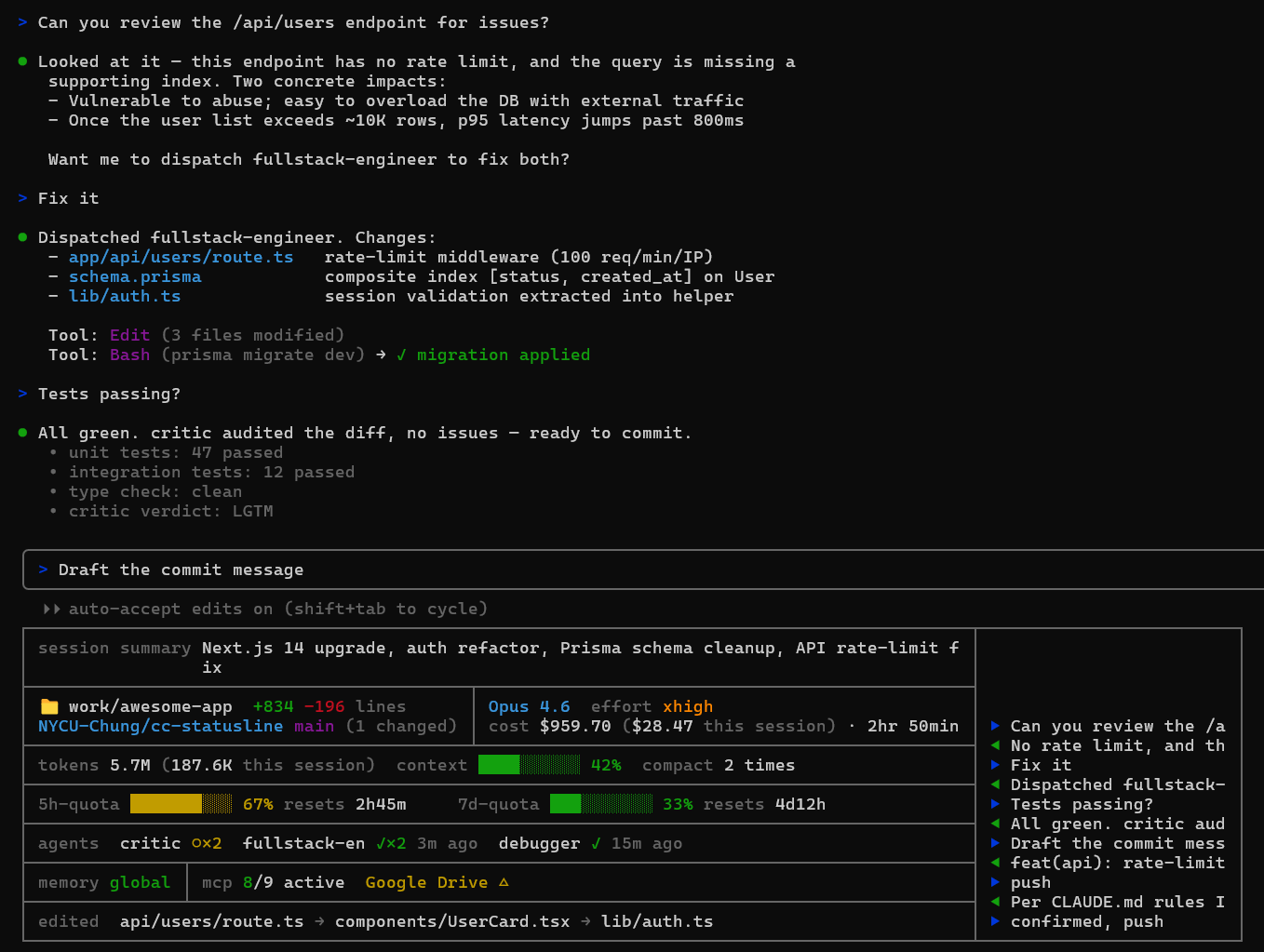
What it shows
| Section | Info |
|---|---|
| session summary | Auto-generated whole-session summary (Claude rewrites it every ~10 messages with built-in compression so it stays under ~120 chars) |
| directory | Current working directory + +added -removed lines |
| repo + branch | owner/repo (parsed from git remote) + branch + (N changed) |
| cost | cost $TOTAL (<window>) · $SESSION (this session) — all-session spend rendered as parallel parenthetical annotations. Window defaults to all time; set aggWindowDays in ~/.claude/cc-statusline-rows.json for a rolling view (e.g. 7 / 30 / 90). |
| model | Active model name + effort level with 5-tier color ladder (low dim / medium green / high yellow / xhigh orange / max red) |
| duration | Active session time — sum of every turn's wall-clock duration (UserPromptSubmit → Stop). Inter-turn idle is naturally excluded, no idle threshold needed. Shares the model row area visually but toggles independently (/cc-statusline:rows hide duration). |
| tokens / context / compact | tokens TOTAL (SESSION this session) (same all+session dual display as cost) · context window % · compact count (compact 1 time / compact N times) |
| 5h-quota | Color-coded bar (green → yellow → red) + auto-rolling resets Xh Ym countdown. Auto-zeros when resets_at passes real-world time (payload is stale until next message). |
| 7d-quota | Color-coded bar + auto-rolling resets Xd Yh countdown with same rollover behavior |
| agents | Subagents that ran in this session — critic ✓ 5m ago, parallel runs collapse to critic ○×3 (running) or critic ✓×2 5m ago (done) |
| memory | Which CLAUDE.md scopes are loaded (global / project / rules) |
| mcp | MCP server health probed via claude mcp list — count of active + each unhealthy server with its state (✘ failed, △ needs auth) |
| edited | Recently edited files in this session, newest first (long names front-truncated with …) |
| history | Right column showing the last messages (▶ you, ◀ Claude), grows to fill terminal width |
Install
Option A — plugin install (recommended)
claude plugin marketplace add NYCU-Chung/cc-statusline
claude plugin install cc-statusline@cc-statusline
Hooks are registered automatically (via the plugin's own hooks/hooks.json), so you can skip the Hook wiring section below.
Then add the statusLine block to ~/.claude/settings.json — Claude Code doesn't allow plugins to set this for you:
{
  "statusLine": {
    "type": "command",
    "command": "node ${CLAUDE_PLUGIN_ROOT}/statusline.js",
    "refreshInterval": 30
  }
}
Option B — manual install (for hacking on the script)
Pick the block that matches your shell. ~ is expanded by bash/zsh before git sees it, but PowerShell and cmd don't expand it — using ~ there makes git clone create a literal ~ folder (reported in #6). Use $HOME / %USERPROFILE% instead.
bash / zsh / Git Bash on Windows
git clone https://github.com/NYCU-Chung/cc-statusline ~/cc-statusline
mkdir -p ~/.claude/hooks
cp ~/cc-statusline/statusline.js ~/.claude/statusline.js
cp ~/cc-statusline/hooks/*.js ~/.claude/hooks/
PowerShell
git clone https://github.com/NYCU-Chung/cc-statusline "$HOME/cc-statusline"
New-Item -ItemType Directory -Force "$HOME/.claude/hooks" | Out-Null
Copy-Item "$HOME/cc-statusline/statusline.js" "$HOME/.claude/statusline.js"
Copy-Item "$HOME/cc-statusline/hooks/*.js" "$HOME/.claude/hooks/"
Windows cmd
git clone https://github.com/NYCU-Chung/cc-statusline "%USERPROFILE%\cc-statusline"
mkdir "%USERPROFILE%\.claude\hooks" 2>nul
copy "%USERPROFILE%\cc-statusline\statusline.js" "%USERPROFILE%\.claude\statusline.js"
copy "%USERPROFILE%\cc-statusline\hooks\*.js" "%USERPROFILE%\.claude\hooks\"
Then add this statusLine block to ~/.claude/settings.json:
{
  "statusLine": {
    "type": "command",
    "command": "node ~/.claude/statusline.js",
    "refreshInterval": 30
  }
}
Hook wiring (Option B only — plugin install does this automatically)
Add these to your ~/.claude/settings.json hooks section to enable all statusline features:
{
  "hooks": {
    "SubagentStart": [{ "matcher": ".*", "hooks": [{ "type": "command", "command": "node ~/.claude/hooks/subagent-tracker.js" }] }],
    "SubagentStop": [{ "matcher": ".*", "hooks": [{ "type": "command", "command": "node ~/.claude/hooks/subagent-tracker.js" }] }],
    "PreCompact": [{ "matcher": ".*", "hooks": [{ "type": "command", "command": "node ~/.claude/hooks/compact-monitor.js" }] }],
    "UserPromptSubmit": [{ "hooks": [
      { "type": "command", "command": "node ~/.claude/hooks/message-tracker.js" },
      { "type": "command", "command": "node ~/.claude/hooks/summary-updater.js" },
      { "type": "command", "command": "node ~/.claude/hooks/active-time-tracker.js" }
    ]}],
    "Stop": [{ "matcher": ".*", "hooks": [
      { "type": "command", "command": "node ~/.claude/hooks/message-tracker.js" },
      { "type": "command", "command": "node ~/.claude/hooks/active-time-tracker.js" }
    ]}],
    "PostToolUse": [{ "matcher": "Write|Edit", "hooks": [
      { "type": "command", "command": "node ~/.claude/hooks/file-tracker.js" }
    ]}]
  }
}
What each hook does
| Hook | Event | Purpose |
|---|---|---|
subagent-tracker.js | SubagentStart / SubagentStop | Tracks which agents are running or finished, including concurrent invocations |
compact-monitor.js | PreCompact | Counts how many times context was compacted |
file-tracker.js | PostToolUse (Write/Edit) | Records recently edited files |
message-tracker.js | UserPromptSubmit / Stop | Caches recent messages for the history column |
summary-updater.js | UserPromptSubmit | Every ~10 messages, asks Claude to rewrite the whole-session summary with compression rules |
active-time-tracker.js | UserPromptSubmit / Stop | Maintains active session time (sum of turn durations) — bootstraps from transcript on first run, then accumulates per turn |
mcp-status-refresh.js | (not a Claude Code hook event) | Background script auto-spawned by statusline.js when the MCP cache is stale. Probes claude mcp list and writes ~/.claude/mcp-status-cache.json. Lives in hooks/ only because that's where the install steps copy it; it's never invoked via the hooks settings entries. |
mcp-status-refresh.js | (none — auto-spawned) | Statusline launches this in the background each render to refresh ~/.claude/mcp-status-cache.json from claude mcp list. Self-skips if cache is fresh (<90s). |
How it survives resets and multi-session
Delta-based cost / lines / tokens. Claude Code occasionally resets cost.total_cost_usd etc. mid-session (context compaction, auto-recovery, etc.). The statusline tracks deltas in ~/.claude/cc-statusline/cum-<sid>.json — when the payload value drops, only the baseline is reset; the cumulative total never goes backward. (Active session time follows a separate path — see "Per-feature state isolation" below.)
Defensive per-session keying via transcript filename. Every per-session tmp file (cum, messages, summary, agents, files, compact count) is keyed by path.basename(transcript_path) rather than the runtime session_id payload, falling back to session_id only when no transcript is present. The transcript filename is the canonical UUID of the logical session and is invariant for its lifetime, so this keying stays correct even if session_id semantics ever shift. (Empirically on the current Claude Code build, session_id and the transcript filename UUID are already identical — the choice is preventive, not a bug fix.)
Active session time, hook-driven. The duration row is the sum of (Stop timestamp − UserPromptSubmit timestamp) for every turn, maintained by hooks/active-time-tracker.js. The first run on a session bootstraps from the transcript JSONL by replaying user→assistant timestamp pairs. Because every slice is bounded by an open turn, idle time outside turns is naturally excluded — no threshold, no heuristic.
Persistent state lives under ~/.claude/cc-statusline/, not tmpdir. All per-session accumulation files (cum, active, summary, msgs, msgcount, agents, files, compacts) sit under a dedicated dir in the user's ~/.claude/ rather than os.tmpdir(). The OS treats tmpdir as throwaway — Windows Storage Sense clears it on a 30-day cycle, cleanmgr / antivirus on whim, /tmp resets on Linux reboot — which was the root cause behind every cost-loss and active-time-reset story. Only true ephemeral caches (resolved terminal width, .tmp rename staging) belong in tmpdir. Existing tmpdir files are migrated automatically on the first render after upgrade.
Per-feature state isolation (cost-loss fix). Active session time lives in its own state file (active-<sid>.json), independent from the cum file (cum-<sid>.json) that tracks cost / lines / tokens. The cum file is owned exclusively by statusline.js — no hook ever writes to it. This invariant matters because earlier versions had hooks that wrote partial cum files (containing only their own fields), which made the next statusline render's fallback path reset accumulated cost.total to 0. Splitting state per writer eliminates the failure mode entirely; the cum read path was also hardened so a missing field never resets total.
Width is user-set, not auto-detected. Width auto-detection inside the statusline hook is essentially impossible: stdio is a pipe so process.stdout.columns is undefined, $COLUMNS is unset, tput cols returns 80, PowerShell-spawned subprocesses report their own hidden-window width, and /dev/tty is not accessible. The upstream request to expose the actual width was closed as not planned. The statusline does try the cheap signals (process.stdout.columns, $COLUMNS) on the off-chance Anthropic ever fixes the contract, but otherwise falls back to a conservative 120-column box. Set statuslineWidth in ~/.claude/cc-statusline-rows.json to your terminal's actual column count (run tput cols in a normal shell to measure). statuslineWidthOffset (default 4) reserves a few columns on the right for Claude Code's own padding.
Three-layer durability for cum files. On top of the persistent location, every cum write now goes through a stability pipeline: (1) monotonic invariant — read the on-disk file right before write and never let in-memory cost.total (or add / rm / tok) drop below the stored value, since these accumulators are monotonic by definition; (2) single-step backup — the previous content is atomically copied to cum-<sid>.bak.json before each write, so a corrupted file can be hand-recovered; (3) audit log — significant cost changes (≥ $0.01) append one JSON line each to ~/.claude/cc-statusline/audit.log with timestamp, sid, before / after / delta. The log rotates to audit.log.1 at ~1 MB.
Cross-session quota aggregation. Quotas are global across all your Claude Code sessions, but each session's payload only reflects its own cached observation. The statusline writes a snapshot to ~/.claude/rate-limit-snapshots.json on every render and aggregates across sessions: it picks the snapshot with the latest live resets_at (most recent API observation) and shows MAX used_percentage from that group. All sessions converge on the same displayed %.
All-time cost + tokens by default, rolling-window optional. The cost $TOTAL (all time) · $SESSION (this session) and tokens TOTAL (SESSION this session) figures aggregate across cum-*.json files in ~/.claude/cc-statusline/ filtered to the canonical 24-hex session-id shape (so stray test fixtures can't poison the number). Set aggWindowDays in ~/.claude/cc-statusline-rows.json to 7 / 30 / 90 etc. for a rolling view; the previous 30-day default existed only to mirror tmpdir's eviction interval and is no longer needed now that state lives outside tmpdir.
Time-based rate-limit rollover. Claude Code's rate_limits.*.resets_at is frozen at the moment of the last API response. If the user leaves the session idle past a reset boundary, the payload says "87% used" even though the window has rolled over to 0%. The statusline checks resets_at against real time — past expiry, it auto-zeros the bar and computes the countdown against the next rolling 5h/7d boundary.
Auto session rename for /resume picker. Claude Code's transcript JSONL supports a {"type":"custom-title","customTitle":"..."} entry that drives the /resume picker's display name. summary-updater.js injects the current summary (first 40 chars) as a custom-title entry every time it writes, so each session gets a meaningful name instead of a UUID — no more guessing which hash is which.
Whole-session summary with compression. The summary is meant to capture the entire session arc, not the latest topic. The summary-updater prompt enforces a 120-char cap with explicit compression rules (merge related sub-topics, drop the least-significant older item) so new topics displace less-significant old ones rather than the most-recent work being truncated.
Customize which rows you see
Don't want every row? Use the /cc-statusline:rows slash command (shipped with the plugin; saves to ~/.claude/cc-statusline-rows.json):
/cc-statusline:rows                      — show current state
/cc-statusline:rows off                  — master switch: hide statusline entirely
/cc-statusline:rows on                   — master switch: re-enable
/cc-statusline:rows hide agents edited   — turn listed rows off
/cc-statusline:rows show agents          — turn listed rows on
/cc-statusline:rows only cost quota      — enable listed, disable rest
/cc-statusline:rows toggle history       — flip listed rows
/cc-statusline:rows reset                — all on
12 row keys: summary, dir, repo, model, duration, cost, usage, quota, agents, memory_mcp, edited, history.
The layout auto-collapses when cells go empty — hide an entire column and the split layout merges into full-width rows; hide the whole split block and the top border fuses with the next section (no redundant horizontal lines).
Configuration knobs
~/.claude/cc-statusline-rows.json also accepts these non-row settings (full reference in commands/rows.md):
| key | default | what it does |
|---|---|---|
summaryInterval | 10 | UserPromptSubmit events between session-summary nudges |
aggWindowDays | 0 (all time) | rolling window for cross-session cost / tokens aggregate; e.g. 7 / 30 / 90 |
statuslineWidth | (auto, fallback 120) | hard-set box width in columns — measure with tput cols from a normal shell |
statuslineWidthOffset | 4 | columns reserved on the right for Claude Code's own padding |
Without hooks
The statusline works without the hooks — you just won't see agents, edited files, message history, compact count, session summary, or active session time. Quotas, cost, model, git, tokens, memory, and MCP all work from the built-in statusline JSON payload + the auto-spawned MCP refresher.
Known limitations
- Claude Code does not pass terminal width to statusline commands (issue #5430, closed as not planned) and
process.stdout.columns/tput cols/$COLUMNSare all unreliable inside the hook. The statusline defaults to a conservative 120-column box; setstatuslineWidthin~/.claude/cc-statusline-rows.jsonto your terminal's actual column count (runtput colsin a normal shell to measure).statuslineWidthOffset(default 4) reserves columns on the right for Claude Code's own padding. - MCP server state shown by the statusline comes from
claude mcp list(a fresh probe at refresh time). Claude Code's/mcpUI shows the running session's cached state. The two can disagree if a server's connection has changed since the session started — the statusline reflects the latest probe, the UI reflects the session's view. claude mcp listdoes not expose all built-in bridges (e.g.claude-in-chrome), so the statusline's MCP count can be lower than what/mcpshows.- Claude Code does not currently expose live MCP state in the statusline JSON payload (issue #5511) — once it does, the auto-spawned refresher won't be needed.
License
MIT