bmalph






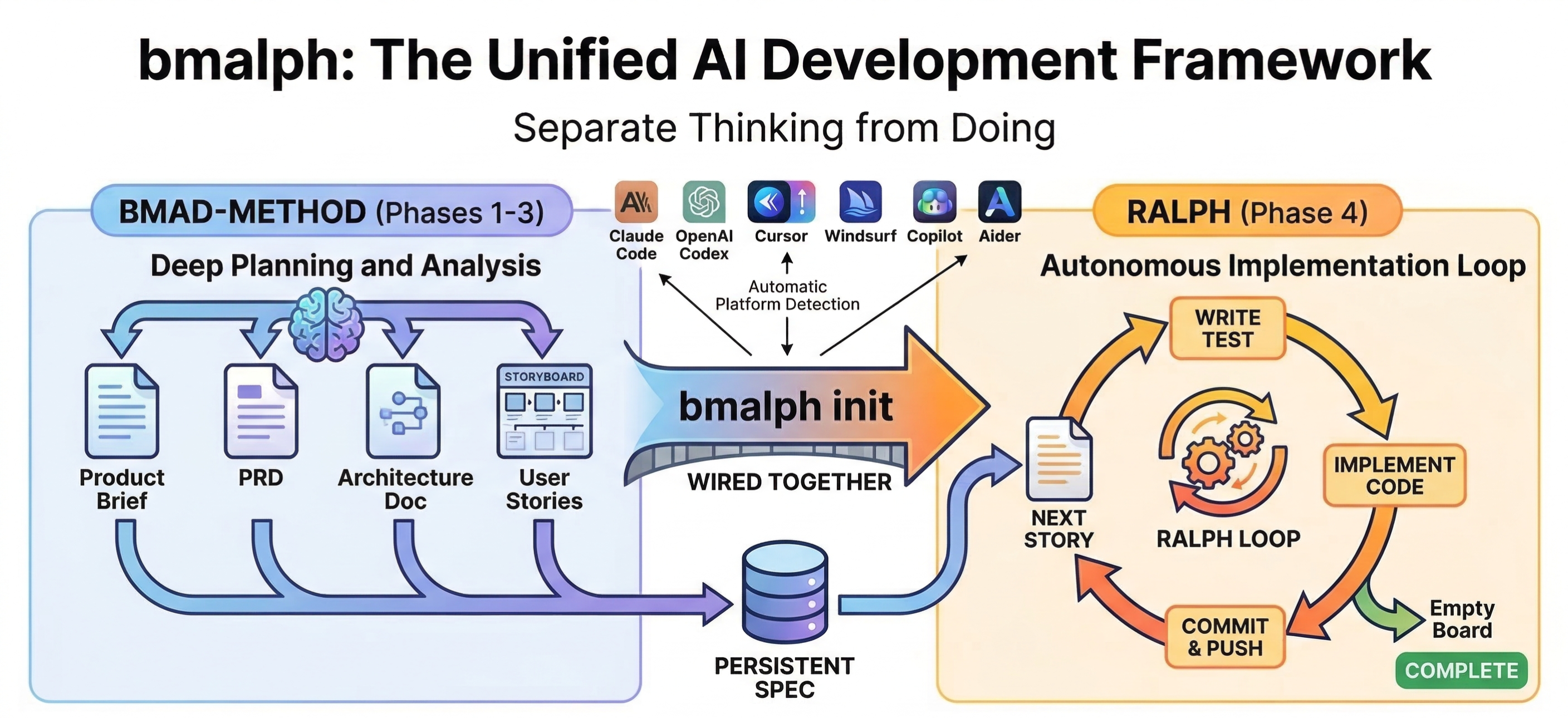
BMAD-METHOD planning + Ralph autonomous implementation, wired through platform-specific instructions, skills, and command indexes.
What is bmalph?
bmalph bundles and installs two AI development systems:
- BMAD-METHOD — Planning agents and workflows (Phases 1-3)
- Ralph — Autonomous implementation loop (Phase 4)
bmalph provides:
bmalph init— Install both systemsbmalph upgrade— Update to latest versionsbmalph doctor— Check installation healthbmalph implement— Transition from BMAD to Ralphbmalph run— Start Ralph loop with live dashboardbmalph check-updates— Check for upstream updatesbmalph status— Show project status and phasebmalph reset— Remove all bmalph filesbmalph watchbmalph runinstead
Supported Platforms
bmalph works with multiple AI coding assistants. Each platform gets BMAD planning (Phases 1-3). The Ralph autonomous loop (Phase 4) requires a CLI-based platform.
| Platform | ID | Tier | Instructions File | Commands |
|---|---|---|---|---|
| Claude Code | claude-code | full | CLAUDE.md | .claude/commands/ directory |
| OpenAI Codex | codex | full | AGENTS.md | Codex Skills (.agents/skills/) |
| OpenCode | opencode | full | AGENTS.md | OpenCode Skills (.opencode/skills/) |
| Cursor | cursor | full (experimental) | .cursor/rules/bmad.mdc | _bmad/COMMANDS.md |
| Windsurf | windsurf | instructions-only | .windsurf/rules/bmad.md | _bmad/COMMANDS.md |
| GitHub Copilot | copilot | full (experimental) | .github/copilot-instructions.md | _bmad/COMMANDS.md |
| Aider | aider | instructions-only | CONVENTIONS.md | _bmad/COMMANDS.md |
Tiers:
- full — Phases 1-4. BMAD planning + Ralph autonomous implementation loop.
- instructions-only — Phases 1-3. BMAD planning only. Ralph is not available.
Prerequisites
- Node.js 20+
- Bash (WSL or Git Bash on Windows)
- A supported AI coding platform (see table above)
- For Ralph loop (Phase 4): Claude Code (
claude), Codex CLI (codex), OpenCode (opencode), Copilot CLI (copilot), or Cursor CLI (cursor-agent; olderagentinstalls are also supported)
Installation
npm install -g bmalph
Quick Start
cd my-project
bmalph init --name my-project

# To target a specific platform, add --platform (e.g. codex, cursor, windsurf)
# Without --platform, bmalph auto-detects strong project markers and
# prompts interactively when detection is ambiguous or missing
Workflow
Step 1: Initialize
cd my-project
bmalph init
Platform resolution: --platform flag > auto-detect from project markers > interactive prompt > default claude-code
Strong markers such as .cursor/, .claude/, .opencode/, .windsurf/, .github/copilot-instructions.md, and .aider.conf.yml are auto-detected directly. Root-only AGENTS.md and CLAUDE.md are treated as weak hints and may still trigger the interactive platform prompt.
This installs:
_bmad/— BMAD agents and workflows.ralph/— Ralph loop, libs, templates (drivers for claude-code, codex, opencode, copilot, and cursor)bmalph/— State management (config.json, stores selected platform)- Updates the platform's instructions file with BMAD workflow instructions (e.g.
CLAUDE.md,AGENTS.md,.cursor/rules/bmad.mdc) - Delivers BMAD commands using the platform's native mechanism (Claude Code:
.claude/commands/; Codex:.agents/skills/; OpenCode:.opencode/skills/; Cursor, Windsurf, Copilot, and Aider:_bmad/COMMANDS.md)
Migrating from standalone BMAD
If you already have BMAD installed (a _bmad/ directory), bmalph init works as a migration path:
_bmad/(framework files) will be replaced with the bmalph-managed version_bmad-output/(your planning artifacts: PRDs, architecture, stories) is not touched- If you've customized framework files inside
_bmad/, commit first so you can review changes withgit diff
Step 2: Plan with BMAD (Phases 1-3)
Work interactively with BMAD agents in your AI coding assistant.
- Claude Code — use
/bmalphto see your current phase and available commands. - OpenAI Codex — use Codex Skills such as
$analystand$create-prd. - Cursor — Read
_bmad/COMMANDS.mdand ask Cursor to run the BMAD master agent. - Windsurf, Copilot, Aider — use
_bmad/COMMANDS.mdas the command reference and ask the assistant to follow the named BMAD workflow.
| Phase | Agent | Commands |
|---|---|---|
| 1 Analysis | Analyst | BP, MR, DR, TR, CB |
| 2 Planning | PM / UX Designer | CP, VP, EP, CU |
| 3 Solutioning | Architect / PM | CA, CE, IR |
Validation commands (validate-brief, validate-prd, validate-ux, validate-architecture, validate-epics-stories) run the same workflow in Validate mode. In Claude Code, invoke them as slash commands; on other platforms use the equivalent entry from _bmad/COMMANDS.md or Codex Skills.
Phase 1 — Analysis
BPBrainstorm Project — guided facilitation through brainstorming techniquesMRMarket Research — market analysis, competitive landscape, customer needsDRDomain Research — industry domain deep diveTRTechnical Research — technical feasibility, architecture optionsCBCreate Brief — guided experience to nail down your product idea
Phase 2 — Planning
CPCreate PRD — expert led facilitation to produce your PRD (required)VPValidate PRD — validate PRD is comprehensive and cohesiveEPEdit PRD — improve and enhance an existing PRDCUCreate UX — guidance through realizing the plan for your UX
Phase 3 — Solutioning
CACreate Architecture — guided workflow to document technical decisions (required)CECreate Epics and Stories — create the epics and stories listing (required)IRImplementation Readiness — ensure PRD, UX, architecture, and stories are aligned (required)
Anytime Commands
Available in any phase for supporting tasks:
QSQuick Spec — lightweight spec for small tasks without full planningQDQuick Dev — quick implementation for small tasksDPDocument Project — analyze existing project to produce documentationGPCGenerate Project Context — scan codebase to generate LLM-optimized contextCCCorrect Course — navigate significant changes mid-projectWDWrite Document — tech writer agent for documentationMGMermaid Generate — create Mermaid diagramsVDValidate Document — review documents against standardsBSPBrainstorming — interactive idea generation techniques (core, distinct from BP)IDIndex Docs — create lightweight doc index for LLM scanningSDShard Document — split large documents into smaller filesESEditorial Review (Structure) — propose document reorganizationARAdversarial Review — critical content review for QAUSUpdate Standards — update tech-writer documentation standardsECExplain Concept — create technical explanations with examples_bmad/COMMANDS.md— generated command reference for platforms without native slash commands
Note:
EPmeans Edit PRD in the bmm workflow (Phase 2) and Editorial Review — Prose in the core module.PMis Party Mode in core. The bmm meanings are the primary workflow codes.
Step 3: Implement with Ralph (Phase 4)
Note: Ralph is only available on full tier platforms (Claude Code, OpenAI Codex, OpenCode, GitHub Copilot, Cursor). Instructions-only platforms (Windsurf, Aider) support Phases 1-3 only. GitHub Copilot and Cursor support is experimental.
Run bmalph implement from the terminal, or use the /bmalph-implement slash command in Claude Code.
This transitions your BMAD artifacts into Ralph's format:
- Reads your stories from BMAD output
- Generates
.ralph/@fix_plan.mdwith ordered tasks - Copies specs to
.ralph/specs/with changelog tracking - Instructs you to start the Ralph autonomous loop
Then start Ralph:
bmalph run
Advanced: Ralph loads the platform drivers internally. Start the loop with
bmalph run, or runbash .ralph/ralph_loop.shdirectly if you need to bypass the CLI.
Ralph picks stories one by one, implements with TDD, and commits. The loop stops when all stories are done or the circuit breaker triggers.
Incremental Development
bmalph supports iterative development cycles:
BMAD (Epic 1) → bmalph implement → Ralph works on Epic 1
     ↓
BMAD (add Epic 2) → bmalph implement → Ralph sees changes + picks up Epic 2
Smart Merge: When you run bmalph implement again after Ralph has made progress:
- Completed stories (
[x]) are preserved in the new fix_plan - New stories from BMAD are added as pending (
[ ])
Specs Changelog: .ralph/SPECS_CHANGELOG.md shows what changed in specs since the last run, so Ralph knows what's new or modified.
CLI Reference
| Command | Description |
|---|---|
bmalph init | Install BMAD + Ralph into project |
bmalph upgrade | Update bundled assets to current version |
bmalph doctor | Check installation health |
bmalph check-updates | Check if bundled BMAD/Ralph versions are up to date |
bmalph status | Show current project status and phase |
bmalph implement | Transition BMAD planning artifacts to Ralph format |
bmalph run | Start Ralph loop with live dashboard |
bmalph reset | Remove all bmalph files from the project |
bmalph watch | (deprecated) Use bmalph run instead |
Global options
| Flag | Description |
|---|---|
--verbose | Enable debug logging |
--no-color | Disable colored output |
--quiet | Suppress non-essential output |
-C, --project-dir <path> | Run in specified directory |
--version | Show version |
--help | Show help |
init options
| Flag | Description | Default |
|---|---|---|
-n, --name <name> | Project name | directory name |
-d, --description <desc> | Project description | (prompted) |
--platform <id> | Target platform (claude-code, codex, opencode, cursor, windsurf, copilot, aider) | auto-detect |
--dry-run | Preview changes without writing files |
implement options
| Flag | Description |
|---|---|
--force | Override pre-flight validation errors |
check-updates options
| Flag | Description |
|---|---|
--json | Output as JSON |
doctor options
| Flag | Description |
|---|---|
--json | Output as JSON |
status options
| Flag | Description |
|---|---|
--json | Output as JSON |
upgrade options
| Flag | Description |
|---|---|
--force | Skip confirmation prompts |
--dry-run | Preview changes |
reset options
| Flag | Description |
|---|---|
--dry-run | Preview changes |
--force | Skip confirmation prompt |
run options
| Flag | Description |
|---|---|
--driver <platform> | Override platform driver (claude-code, codex, opencode, copilot, cursor) |
--review [mode] | Quality review: enhanced (every 5 loops) or ultimate (every story). Claude Code only |
--interval <ms> | Dashboard refresh interval in milliseconds (default: 2000) |
--no-dashboard | Run Ralph without the dashboard overlay |
--swarm [count] | Run N parallel workers in git worktrees (default: 2, max: 6). Requires >= 2 epics |
watch options
Deprecated: Use
bmalph runinstead. Thewatchcommand will be removed in a future release.
| Flag | Description |
|---|---|
--interval <ms> | Refresh interval in milliseconds (default: 2000) |
Command Delivery
bmalph bundles 54 BMAD and bmalph command definitions. Delivery varies by platform:
- Claude Code — installed as files in
.claude/commands/(invoke with/command-name) - OpenAI Codex — delivered as Codex Skills in
.agents/skills/(invoke with$command-name) - OpenCode — delivered as OpenCode Skills in
.opencode/skills/ - Cursor — discoverable via
_bmad/COMMANDS.md; ask Cursor to run the BMAD master agent - Windsurf, Copilot, Aider — discoverable via
_bmad/COMMANDS.mdreference index
Key commands (Claude Code syntax):
| Command | Description |
|---|---|
/bmalph | BMAD master agent — navigate phases |
/analyst | Analyst agent |
/pm | Product Manager agent |
/architect | Architect agent |
/dev | Developer agent |
/sm | Scrum Master agent |
/qa | QA agent |
/ux-designer | UX Designer agent |
/tech-writer | Tech Writer agent |
/quick-flow-solo-dev | Quick Flow solo developer agent |
/create-prd | Create PRD workflow |
/create-architecture | Create architecture workflow |
/create-epics-stories | Create epics and stories |
/bmad-help | List all BMAD commands |
For the full list:
- Claude Code: run
/bmad-help - OpenAI Codex: inspect
.agents/skills/ - OpenCode: inspect
.opencode/skills/ - Cursor, Windsurf, Copilot, Aider: open
_bmad/COMMANDS.md
Transition to Ralph
Use bmalph implement (or /bmalph-implement in Claude Code) to transition from BMAD planning to Ralph implementation.
Project Structure (after init)
project/
├── _bmad/                     # BMAD agents, workflows, core
│   ├── config.yaml            # Generated platform/project config
│   ├── COMMANDS.md            # Generated command reference index
│   ├── _config/               # Generated manifests
│   │   ├── task-manifest.csv  # Combined task manifest
│   │   ├── workflow-manifest.csv # Combined workflow manifest
│   │   └── bmad-help.csv      # Combined help manifest
│   ├── core/
│   │   ├── agents/            # Master agent
│   │   ├── tasks/             # Workflow tasks
│   │   ├── workflows/         # Brainstorming, party-mode, etc.
│   │   ├── module.yaml        # Core module metadata
│   │   └── module-help.csv    # Core module help entries
│   └── bmm/
│       ├── agents/            # Analyst, PM, Architect, Dev, QA, etc.
│       ├── data/              # Templates (project-context-template.md)
│       ├── workflows/         # Phase 1-4 workflows
│       ├── teams/             # Agent team definitions
│       ├── module.yaml        # BMM module metadata
│       └── module-help.csv    # BMM module help entries
├── _bmad-output/              # BMAD planning artifacts (generated)
│   ├── planning-artifacts/    # PRD, architecture, stories
│   ├── implementation-artifacts/ # Sprint plans (optional)
│   └── brainstorming/         # Brainstorm sessions (optional)
├── .ralph/                    # Ralph autonomous loop (drivers for claude-code, codex, opencode, copilot, and cursor)
│   ├── ralph_loop.sh          # Main loop script
│   ├── ralph_import.sh        # Import requirements into Ralph
│   ├── ralph_monitor.sh       # Monitor loop progress
│   ├── .ralphrc               # Ralph configuration
│   ├── RALPH-REFERENCE.md     # Ralph usage reference
│   ├── drivers/               # Platform driver scripts
│   │   ├── claude-code.sh     # Claude Code driver (uses `claude`)
│   │   ├── codex.sh           # OpenAI Codex driver (uses `codex exec`)
│   │   ├── opencode.sh        # OpenCode driver (uses `opencode run`)
│   │   ├── copilot.sh         # GitHub Copilot driver (uses `copilot`, experimental)
│   │   ├── cursor.sh          # Cursor driver (uses `cursor-agent`/`agent`, experimental)
│   │   └── cursor-agent-wrapper.sh # Wrapper for Windows .cmd Cursor installs
│   ├── lib/                   # Shell libraries
│   ├── docs/generated/        # Generated documentation
│   ├── specs/                 # Copied from _bmad-output during transition
│   ├── logs/                  # Loop execution logs
│   ├── PROMPT.md              # Iteration prompt template
│   ├── PROJECT_CONTEXT.md     # Extracted project context (after bmalph implement)
│   ├── SPECS_CHANGELOG.md     # Spec diff since last run (after bmalph implement)
│   ├── SPECS_INDEX.md         # Prioritized spec file index (after bmalph implement)
│   ├── @AGENT.md              # Agent build instructions
│   └── @fix_plan.md           # Generated task list (after bmalph implement)
├── bmalph/                    # State management
│   ├── config.json            # Project config (name, description, platform)
│   └── state/                 # Phase tracking data
├── .claude/                   # Claude Code specific
│   └── commands/              # Slash commands (claude-code only)
└── <instructions file>        # Varies by platform (see Supported Platforms)
The instructions file and command directory depend on the configured platform. See the Supported Platforms table for details.
How Ralph Works
Ralph is a bash loop that spawns fresh AI coding sessions using a platform driver matching the configured platform:
- Claude Code driver — invokes
claudewith--output-format json,--permission-mode bypassPermissions,--allowedTools, and explicit--resume <session_id> - Codex driver — invokes
codex exec --json --sandbox workspace-writewith explicit--resume <session_id> - OpenCode driver — invokes
opencode run --agent build --format jsonwith optional--continue --session <session_id> - Copilot driver (experimental) — invokes
copilot --autopilot --yolowith plain-text output - Cursor driver (experimental) — invokes
cursor-agent -p --force --output-format json, persistssession_idfor--resume, and switches tostream-jsononly for live output
Each iteration:
- Pick the next unchecked story from
@fix_plan.md - Implement with TDD (tests first, then code)
- Commit the changes
- Move to the next story
Safety mechanisms:
- Circuit breaker — prevents infinite loops on failing stories
- Response analyzer — detects stuck or repeating outputs
- Code review — optional quality review (
--review [mode], Claude Code only). Enhanced: periodic review every 5 loops. Ultimate: review after every completed story. A read-only session analyzes git diffs and feeds structured findings into the next implementation loop - Completion — loop exits when all
@fix_plan.mditems are checked off
Cursor-specific runtime checks:
bmalph doctorvalidatescommand -v jqin the bash environment Ralph usesbmalph doctorvalidatescommand -v cursor-agentandcursor-agent statusbmalph run --driver cursorruns the same bash-scoped preflight before the loop starts
Run bmalph run to start the loop with a live dashboard, or bmalph run --no-dashboard for headless mode. Press Ctrl+C to stop the loop at any time.
Swarm Mode (Parallel Workers)
bmalph run --swarm [N] spawns N Ralph loops in isolated git worktrees, each working on different epics simultaneously. Stories are partitioned by epic using greedy bin-packing for balanced distribution.
- Each worker gets its own
@fix_plan.mdwith only its assigned stories - Workers run on separate branches (
swarm/worker-1,swarm/worker-2, etc.) - Rate limits are divided across workers; starts are staggered by 5s
- After all workers complete, branches are merged back sequentially
.ralph/state is excluded from merges; the fix plan is rebuilt from combined completions- On source code conflict, the merge stops and branches are preserved for manual resolution
Requirements: clean working tree, at least 2 incomplete epics, full-tier platform, not on detached HEAD.
Troubleshooting
Windows: Bash Not Found
Ralph requires bash to run. On Windows, install one of:
Git Bash (Recommended)
# Install Git for Windows from https://git-scm.com/downloads
# Git Bash is included and works well with bmalph
# bmalph prefers Git Bash over broken Windows bash.exe shims
WSL (Windows Subsystem for Linux)
# In PowerShell as Administrator
wsl --install
# Then restart and run bmalph from WSL terminal
Permission Denied
If you get permission errors:
# Claude Code only: broaden the tool allowlist in the managed config
# .ralph/.ralphrc
ALLOWED_TOOLS="Write,Read,Edit,MultiEdit,Glob,Grep,Task,TodoWrite,WebFetch,WebSearch,EnterPlanMode,ExitPlanMode,NotebookEdit,Bash"

# Keep interactive approval workflows out of unattended Claude loops
CLAUDE_PERMISSION_MODE="bypassPermissions"

# Keep the loop unattended by continuing after detected denials
PERMISSION_DENIAL_MODE="continue"

# Reset stale session state and restart
bash .ralph/ralph_loop.sh --reset-session
bmalph run
Notes:
ALLOWED_TOOLSonly applies to the Claude Code driver and controls normal tool access.CLAUDE_PERMISSION_MODE="bypassPermissions"keeps unattended Claude loops out of interactive approval flows without relying on the unsupportedafk-modebeta header.- Codex, Cursor, and Copilot use their native sandbox/approval settings instead.
- Fresh installs default to unattended mode and discourage in-loop user questions via
.ralph/PROMPT.md.
Common Issues
| Scenario | Solution |
|---|---|
| Commands fail before init | Run bmalph init first |
| Transition finds no stories | Create stories in Phase 3 with /create-epics-stories, the matching Codex Skill, or the _bmad/COMMANDS.md entry |
| Ralph stops mid-loop | Circuit breaker detected stagnation. Check .ralph/logs/ |
| Doctor reports version drift | Run bmalph upgrade to update bundled assets |
| Wrong platform detected | Re-run bmalph init --platform <id> with the correct platform |
| Ralph unavailable on platform | Ralph requires a full tier platform (claude-code, codex, opencode, copilot, or cursor) |
Windows: Cursor Driver
bmalph run --driver cursor is experimental on Windows and is designed for Git Bash.
bmalphprefers a working Git Bash install instead of Windowsbash.exeshims.- The official binary is
cursor-agent. The driver also acceptscursor-agent.cmd,agent,agent.cmd, and%LOCALAPPDATA%\\cursor-agent\\*.cmdas compatibility fallbacks. - The main Ralph loop uses
cursor-agent -p --force --output-format jsonand stores Cursor'ssession_idfor--resumeon the next loop. - Live display switches to
stream-json; background execution stays on JSON mode for reliable parsing. - Cursor preflight is bash-scoped:
command -v jq,command -v cursor-agent, andcursor-agent statusmust all succeed in the same shell Ralph uses. - On Windows, the driver sends Cursor a short bootstrap prompt that tells it to read the Ralph files from
.ralph/instead of trying to inline the full prompt on the command line.
Reset Installation
The simplest way to remove all bmalph files:
bmalph reset
Use --dry-run to preview what will be removed, or --force to skip confirmation.
Manual removal
If the CLI is unavailable, remove these directories and files manually:
rm -rf _bmad/ .ralph/ bmalph/
Then remove the bmalph-managed sections from your instructions file. The file depends on your platform:
- Claude Code — remove
.claude/commands/and bmalph section fromCLAUDE.md - Codex — remove bmalph sections from
AGENTS.md - OpenCode — remove
.opencode/skills/bmad-*/and bmalph sections fromAGENTS.md - Cursor — remove
.cursor/rules/bmad.mdc - Windsurf — remove
.windsurf/rules/bmad.md - Copilot — remove bmalph sections from
.github/copilot-instructions.md - Aider — remove bmalph sections from
CONVENTIONS.md
See the Supported Platforms table for details. After manual removal, run bmalph init to reinitialize.
Quick Examples
Initialize a new project
# Interactive mode (prompts for name/description, auto-detects platform)
bmalph init

# Non-interactive mode
bmalph init --name my-app --description "My awesome app"

# Specify platform explicitly
bmalph init --name my-app --platform codex
bmalph init --name my-app --platform cursor
bmalph init --name my-app --platform windsurf

# Preview what would be created
bmalph init --dry-run
Check installation health
# Human-readable output
bmalph doctor

# JSON output for scripting
bmalph doctor --json
Update bundled assets
# Update BMAD and Ralph to latest bundled versions
bmalph upgrade

# Preview changes first
bmalph upgrade --dry-run
After init: Next steps
Claude Code:
# 1. Open Claude Code in your project
claude

# 2. Use the /bmalph slash command to start
#    This shows your current phase and available commands

# 3. Follow the BMAD workflow:
#    Phase 1: /analyst → create product brief
#    Phase 2: /pm → create PRD
#    Phase 3: /architect → create architecture and stories

# 4. Transition to Ralph
#    Run: bmalph implement

# 5. Start autonomous implementation
bmalph run
OpenAI Codex:
# 1. Open your project in your AI coding assistant

# 2. Use Codex Skills such as $analyst, $create-prd, and $architect
#    See .agents/skills/ and _bmad/COMMANDS.md for the full catalog

# 3. Follow phases: Analysis -> Planning -> Solutioning

# 4. Transition to Ralph
#    Run: bmalph implement
#    Then: bmalph run
OpenCode:
# 1. Open your project in your AI coding assistant

# 2. Use OpenCode Skills such as $analyst, $create-prd, and $architect
#    See .opencode/skills/ and _bmad/COMMANDS.md for the full catalog

# 3. Follow phases: Analysis -> Planning -> Solutioning

# 4. Transition to Ralph
#    Run: bmalph implement
#    Then: bmalph run
Cursor, Copilot, Windsurf, Aider:
# 1. Open your project in your AI coding assistant

# 2. Read _bmad/COMMANDS.md for the available BMAD agents and workflows
#    On Cursor specifically: ask Cursor to run the BMAD master agent

# 3. Follow phases: Analysis -> Planning -> Solutioning
#    Or check progress from terminal: bmalph status

# 4. For full tier platforms (Cursor and Copilot), transition to Ralph:
#    Run: bmalph implement
#    Then: bmalph run
Contributing
See CONTRIBUTING.md for development setup, test workflow, and commit guidelines.
License
MIT