Any Router 多账号自动签到



多平台多账号自动签到,理论上支持所有 NewAPI、OneAPI 平台,目前内置支持 Any Router 与 Agent Router,其它可根据文档进行摸索配置。
推荐搭配使用Auo,支持任意 Claude Code Token 切换的工具。
维护开源不易,如果本项目帮助到了你,请帮忙点个 Star,谢谢!
用于 Claude Code 中转站 Any Router 网站多账号每日签到,一次 $25,限时注册即送 100 美金,点击这里注册。业界良心,支持 Claude Sonnet 4.5、GPT-5-Codex、Claude Code 百万上下文(使用 /model sonnet[1m] 开启),gemini-2.5-pro 模型。
功能特性
- ✅ 多平台(兼容 NewAPI 与 OneAPI)
- ✅ 单个/多账号自动签到
- ✅ 多种机器人通知(可选)
- ✅ 绕过 WAF 限制
使用方法
1. Fork 本仓库
点击右上角的 "Fork" 按钮,将本仓库 fork 到你的账户。
2. 获取账号信息
对于每个需要签到的账号,你需要获取:(可借助 在线 Secrets 配置生成器)
- Cookies: 用于身份验证
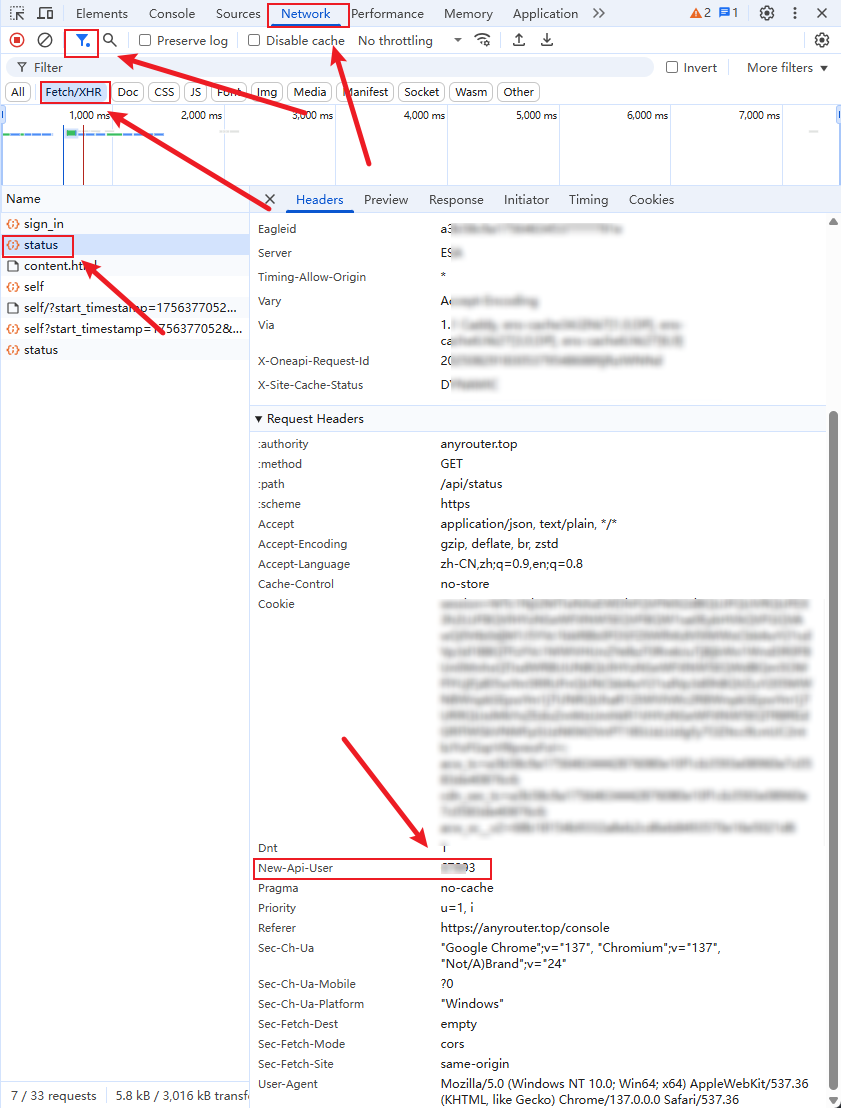
- API User: 用于请求头的 new-api-user 参数(自己配置其它平台时该值需要注意匹配)
获取 Cookies:
- 打开浏览器,访问 https://anyrouter.top/
- 登录你的账户
- 打开开发者工具 (F12)
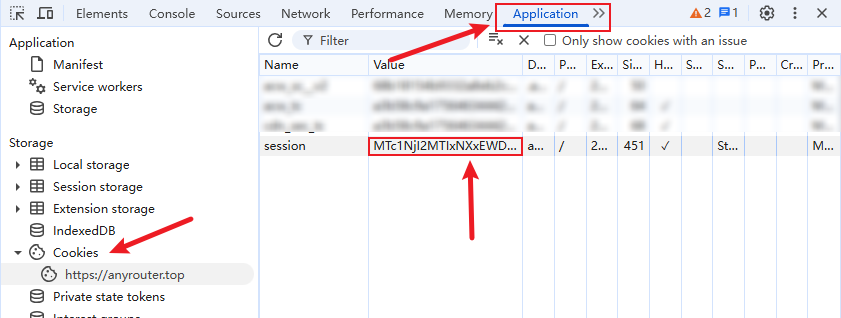
- 切换到 "Application" 或 "存储" 选项卡
- 找到 "Cookies" 选项
- 复制所有 cookies
获取 API User:
按照下方图片教程操作获得。
3. 设置 GitHub Environment Secret
- 在你 fork 的仓库中,点击 "Settings" 选项卡
- 在左侧菜单中找到 "Environments" -> "New environment"
- 新建一个名为
production的环境 - 点击新建的
production环境进入环境配置页 - 点击 "Add environment secret" 创建 secret:
- Name:
ANYROUTER_ACCOUNTS - Value: 你的多账号配置数据
- Name:
4. 多账号配置格式
支持单个与多个账号配置,可选 name 和 provider 字段:
[
  {
    "name": "我的主账号",
    "email": "account1@example.com",
    "password": "account1_password"
  },
  {
    "name": "备用账号",
    "provider": "agentrouter",
    "email": "account2@example.com",
    "password": "account2_password"
  }
]
字段说明:
email+password:推荐的浏览器登录方式,登录成功后会自动获取 cookies 与用户标识cookies:兼容旧版的 session cookies 登录方式api_user:session cookies 登录时用于请求头的 new-api-user 参数;邮箱密码登录可省略provider(可选):指定使用的服务商,默认为anyroutername(可选):自定义账号显示名称,用于通知和日志中标识账号
默认值说明:
- 如果未提供
provider字段,默认使用anyrouter(向后兼容) - 如果未提供
name字段,会使用Account 1、Account 2等默认名称 anyrouter与agentrouter配置已内置,无需填写
如果使用 session cookies 登录,接下来获取 cookies 与 api_user 的值。
通过 F12 工具,切到 Application 面板,拿到 session 的值,最好重新登录下,该值 1 个月有效期,但有可能提前失效,失效后报 401 错误,到时请再重新获取。
通过 F12 工具,切到 Network 面板,可以过滤下,只要 Fetch/XHR,找到带 New-Api-User,这个值正常是 5 位数,如果是负数或者个位数,正常是未登录。
5. 启用 GitHub Actions
- 在你的仓库中,点击 "Actions" 选项卡
- 如果提示启用 Actions,请点击启用
- 找到 "AnyRouter 自动签到" workflow
- 点击 "Enable workflow"
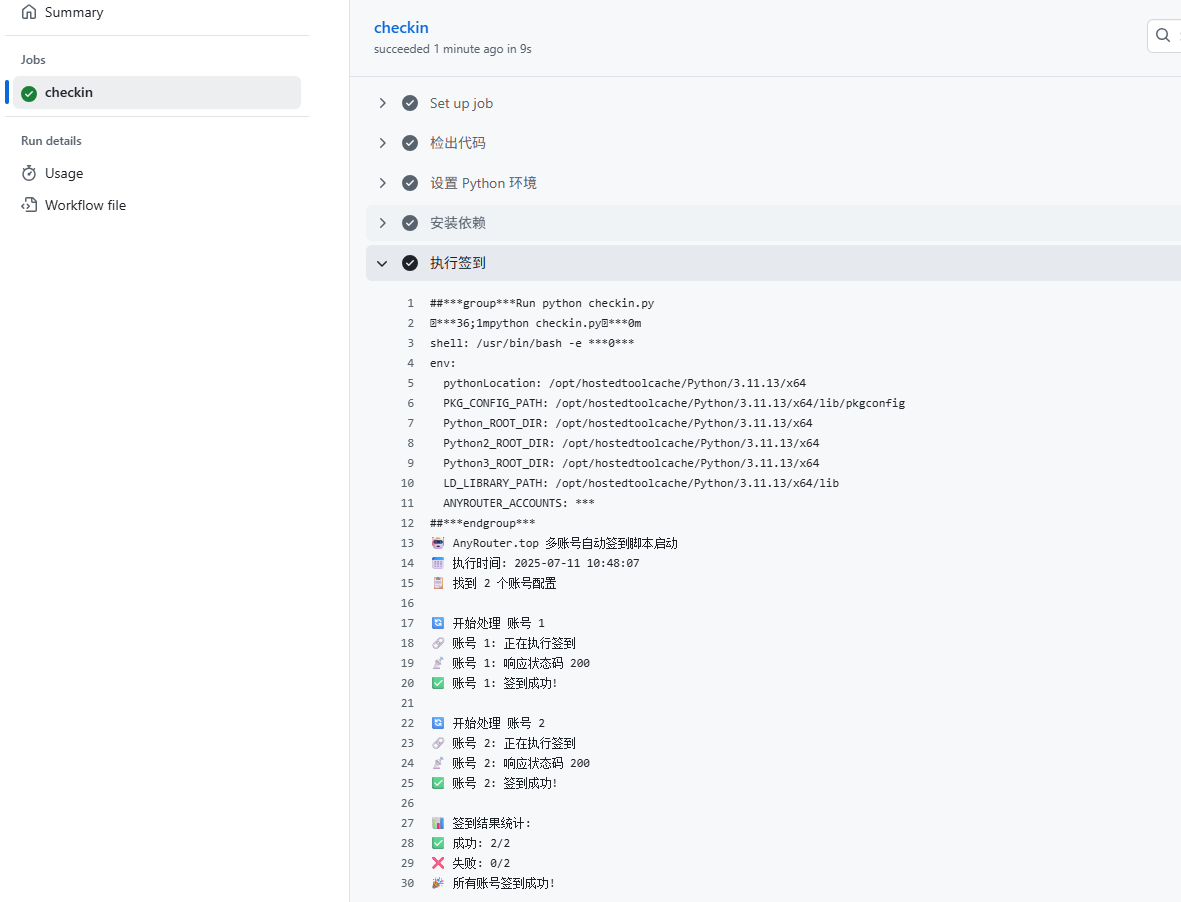
6. 测试运行
你可以手动触发一次签到来测试:
- 在 "Actions" 选项卡中,点击 "AnyRouter 自动签到"
- 点击 "Run workflow" 按钮
- 确认运行
执行时间
- 脚本每 6 小时执行一次(1. action 无法准确触发,基本延时 1~1.5h;2. 目前观测到 anyrouter 的签到是每 24h 而不是零点就可签到)
- 你也可以随时手动触发签到
注意事项
- 请确保每个账号的 cookies 和 API User 都是正确的
- 可以在 Actions 页面查看详细的运行日志
- 支持部分账号失败,只要有账号成功签到,整个任务就不会失败
- 报 401 错误,请重新获取 cookies,理论 1 个月失效,但有 Bug,详见 #6
- 请求 200,但出现 Error 1040(08004):Too many connections,官方数据库问题,目前已修复,但遇到几次了,详见 #7
配置示例
基础配置(向后兼容)
假设你有两个账号需要签到,不指定 provider 时默认使用 anyrouter:
[
  {
    "cookies": {
      "session": "abc123session"
    },
    "api_user": "user123"
  },
  {
    "cookies": {
      "session": "xyz789session"
    },
    "api_user": "user456"
  }
]
多服务商配置
如果你需要同时使用多个服务商(如 anyrouter 和 agentrouter):
[
  {
    "name": "AnyRouter 主账号",
    "provider": "anyrouter",
    "cookies": {
      "session": "abc123session"
    },
    "api_user": "user123"
  },
  {
    "name": "AgentRouter 备用",
    "provider": "agentrouter",
    "cookies": {
      "session": "xyz789session"
    },
    "api_user": "user456"
  }
]
自定义 Provider 配置(可选)
默认情况下,anyrouter、agentrouter 已内置配置,无需额外设置。如果你需要使用其他服务商,可以通过环境变量 PROVIDERS 配置:
基础配置(仅域名)
大多数情况下,只需提供 domain 即可,其他路径会自动使用默认值:
{
  "customrouter": {
    "domain": "https://custom.example.com"
  }
}
完整配置(自定义路径)
如果服务商使用了不同的 API 路径、请求头或需要 WAF 绕过,可以额外指定:
{
  "customrouter": {
    "domain": "https://custom.example.com",
    "login_path": "/auth/login",
    "sign_in_path": "/api/checkin",
    "user_info_path": "/api/profile",
    "api_user_key": "New-Api-User",
    "bypass_method": "waf_cookies",
    "waf_cookie_names": ["acw_tc", "cdn_sec_tc", "acw_sc__v2"]
  }
}
关于 bypass_method:
- 不设置或设置为
null:直接使用用户提供的 cookies 进行请求(适合无 WAF 保护的网站) - 设置为
"waf_cookies":使用 CloakBrowser 打开浏览器获取 WAF cookies 后再进行请求(适合有 WAF 保护的网站)
注:
anyrouter和agentrouter已内置默认配置,无需在PROVIDERS中配置
在 GitHub Actions 中配置
- 进入你的仓库 Settings -> Environments -> production
- 添加新的 secret:
- Name:
PROVIDERS - Value: 你的 provider 配置(JSON 格式)
- Name:
字段说明:
domain(必需):服务商的域名login_path(可选):登录页面路径,默认为/login(仅在bypass_method为"waf_cookies"时使用)sign_in_path(可选):签到 API 路径,默认为/api/user/sign_inuser_info_path(可选):用户信息 API 路径,默认为/api/user/selfapi_user_key(可选):API 用户标识请求头名称,默认为new-api-userbypass_method(可选):WAF 绕过方法"waf_cookies":使用 CloakBrowser 打开浏览器获取 WAF cookies 后再执行签到- 不设置或
null:直接使用用户 cookies 执行签到(适合无 WAF 保护的网站)
waf_cookie_names(可选):绕过 WAF 所需 cookie 的名称列表,bypass_method为waf_cookies时必须设置
配置示例(完整):
{
  "customrouter": {
    "domain": "https://custom.example.com",
    "login_path": "/auth/login",
    "sign_in_path": "/api/checkin",
    "user_info_path": "/api/profile",
    "api_user_key": "x-user-id",
    "bypass_method": "waf_cookies"
  }
}
内置配置说明:
anyrouter:bypass_method: "waf_cookies"(需要先获取 WAF cookies,然后执行签到)sign_in_path: "/api/user/sign_in"
agentrouter:bypass_method: "waf_cookies"(需要获取acw_tc)sign_in_path: null(查询用户信息时自动签到)use_proxy: true
重要提示:
PROVIDERS是可选的,不配置则使用内置的anyrouter和agentrouter- 自定义的 provider 配置会覆盖同名的默认配置
代理配置(可选)
内置的 agentrouter 默认 use_proxy: true。如果你的运行环境访问该平台不稳定,可以在 GitHub Actions 中配置 mihomo 订阅代理。
在仓库 Settings -> Environments -> production -> Environment secrets 中添加:
PROXY_SUBSCRIPTION_URL:Clash/Mihomo 订阅链接。设置后,workflow 会运行scripts/setup_mihomo_proxy.sh,启动本地代理并写入CHECKIN_PROXY_URL。
本地运行时也可以直接使用已有代理:
CHECKIN_PROXY_URL=http://127.0.0.1:7890
PROVIDERS={"agentrouter":{"use_proxy":true}}
如果使用订阅脚本,默认会用 https://www.google.com/generate_204 测试代理连通性;也可以通过 PROXY_TEST_URL 覆盖。
开启通知
脚本支持多种通知方式,可以通过配置以下环境变量开启,如果 webhook 有要求安全设置,例如钉钉,可以在新建机器人时选择自定义关键词,填写 AnyRouter。
邮箱通知(STMP)
EMAIL_USER: 发件人邮箱地址/STMP 登录地址EMAIL_PASS: 发件人邮箱密码/授权码EMAIL_SENDER: 邮件显示的发件人地址(可选,默认: EMAIL_USER)CUSTOM_SMTP_SERVER: 自定义发件人 SMTP 服务器(可选)EMAIL_TO: 收件人邮箱地址
钉钉机器人
DINGDING_WEBHOOK: 钉钉机器人的 Webhook 地址
飞书机器人
FEISHU_WEBHOOK: 飞书机器人的 Webhook 地址
企业微信机器人
WEIXIN_WEBHOOK: 企业微信机器人的 Webhook 地址
PushPlus 推送
PUSHPLUS_TOKEN: PushPlus 的 Token
Server 酱
SERVERPUSHKEY: Server 酱的 SendKey
Telegram Bot
TELEGRAM_BOT_TOKEN: Telegram Bot 的 TokenTELEGRAM_CHAT_ID: Telegram Chat ID
Gotify 推送
GOTIFY_URL: Gotify 服务的 URL 地址(例如: https://your-gotify-server/message)GOTIFY_TOKEN: Gotify 应用的访问令牌GOTIFY_PRIORITY: Gotify 消息优先级 (1-10, 默认为 9)
Bark 推送
BARK_KEY: Bark 应用的 Key(APP 打开时即可看到)BARK_SERVER: 自建 Bark 服务器地址 (可选,默认: https://api.day.app)
配置步骤:
- 在仓库的 Settings -> Environments -> production -> Environment secrets 中添加上述环境变量
- 每个通知方式都是独立的,可以只配置你需要的推送方式
- 如果某个通知方式配置不正确或未配置,脚本会自动跳过该通知方式
故障排除
如果签到失败,请检查:
- 账号配置格式是否正确
- cookies 是否过期
- API User 是否正确
- 网站是否更改了签到接口
- 查看 Actions 运行日志获取详细错误信息
本地开发环境设置
如果你需要在本地测试或开发,请按照以下步骤设置:
# 安装所有依赖
uv sync --dev

# 安装 CloakBrowser 浏览器
uv run python -m cloakbrowser install
# 如需使用本地浏览器,可设置 CLOAKBROWSER_BINARY_PATH=/path/to/browser

# 创建 .env 文件并配置(注意:JSON 必须是单行格式)
# 示例:
# ANYROUTER_ACCOUNTS=[{"name":"账号1","email":"your@email.com","password":"your_password"}]
# PROVIDERS={"agentrouter":{"domain":"https://agentrouter.org"}}
# PROXY_SUBSCRIPTION_URL=https://example.com/sub?token=xxx
# CHECKIN_PROXY_URL=http://127.0.0.1:7890

# 运行签到脚本
uv run checkin.py
测试
uv sync --dev

# 浏览器相关测试或本地登录可安装 CloakBrowser,或设置 CLOAKBROWSER_BINARY_PATH 指向本地浏览器
uv run python -m cloakbrowser install

# 运行测试
uv run pytest tests/

# 查看测试覆盖率
uv run pytest tests/ --cov=. --cov-report=html
贡献指南
欢迎贡献代码!在提交 Pull Request 之前,请阅读贡献指南。
代码质量
本项目使用以下工具确保代码质量:
- Ruff: 代码风格检查和格式化
- MyPy: 静态类型检查
- Bandit: 安全漏洞扫描
- Pytest: 自动化测试
- pre-commit: Git 提交前自动检查
所有 Pull Request 会自动运行以下检查:
- ✅ 代码风格检查(Ruff Lint & Format)
- ✅ 类型检查(MyPy)
- ✅ 安全扫描(Bandit)
- ✅ 测试运行(Pytest)
- ✅ 测试覆盖率报告(Codecov)
本地开发
# 安装开发依赖
uv sync --dev

# 安装 pre-commit 钩子
uv run pre-commit install

# 运行代码检查
uv run ruff check .
uv run ruff format .
uv run mypy .
uv run bandit -r . -c pyproject.toml

# 运行测试
uv run pytest tests/ --cov=.
免责声明
本脚本仅用于学习和研究目的,使用前请确保遵守相关网站的使用条款.