AI Agent HA
A powerful Home Assistant custom integration that connects your Home Assistant instance with multiple AI providers (OpenAI, Google Gemini, Anthropic (Claude), OpenRouter, Alter, z.ai, and Llama) to translate user requests into valid Home Assistant operations, including creating automations automatically!
🚀 Quick Install

Click the button above to install AI Agent HA directly through HACS, or see the detailed installation instructions below.
☕ Support the Project
If you find this integration helpful and would like to support its development, you can buy me a coffee! Your support helps keep this project active and maintained. Currently I am the only Dev on that project and looking to have more paretners here.

Every contribution, no matter how small, is greatly appreciated and helps fund the continued development and improvement of AI Agent HA.
Another way to support me will be to try my new project. Askie - AI for kids. I am looking for feedback on this one: Web: https://kidsai.app • iOS: https://apps.apple.com/app/id6749299565 Android: https://play.google.com/store/apps/details?id=com.askie.app
✨ Features
- 🤖 Multiple AI Provider Support: OpenAI, Google Gemini, Anthropic (Claude), OpenRouter, Alter, z.ai, and Llama
- 🎯 Model Selection: Choose from predefined models or use custom model names
- 🏠 Smart Home Control: Turn lights on/off, control climate, and manage devices
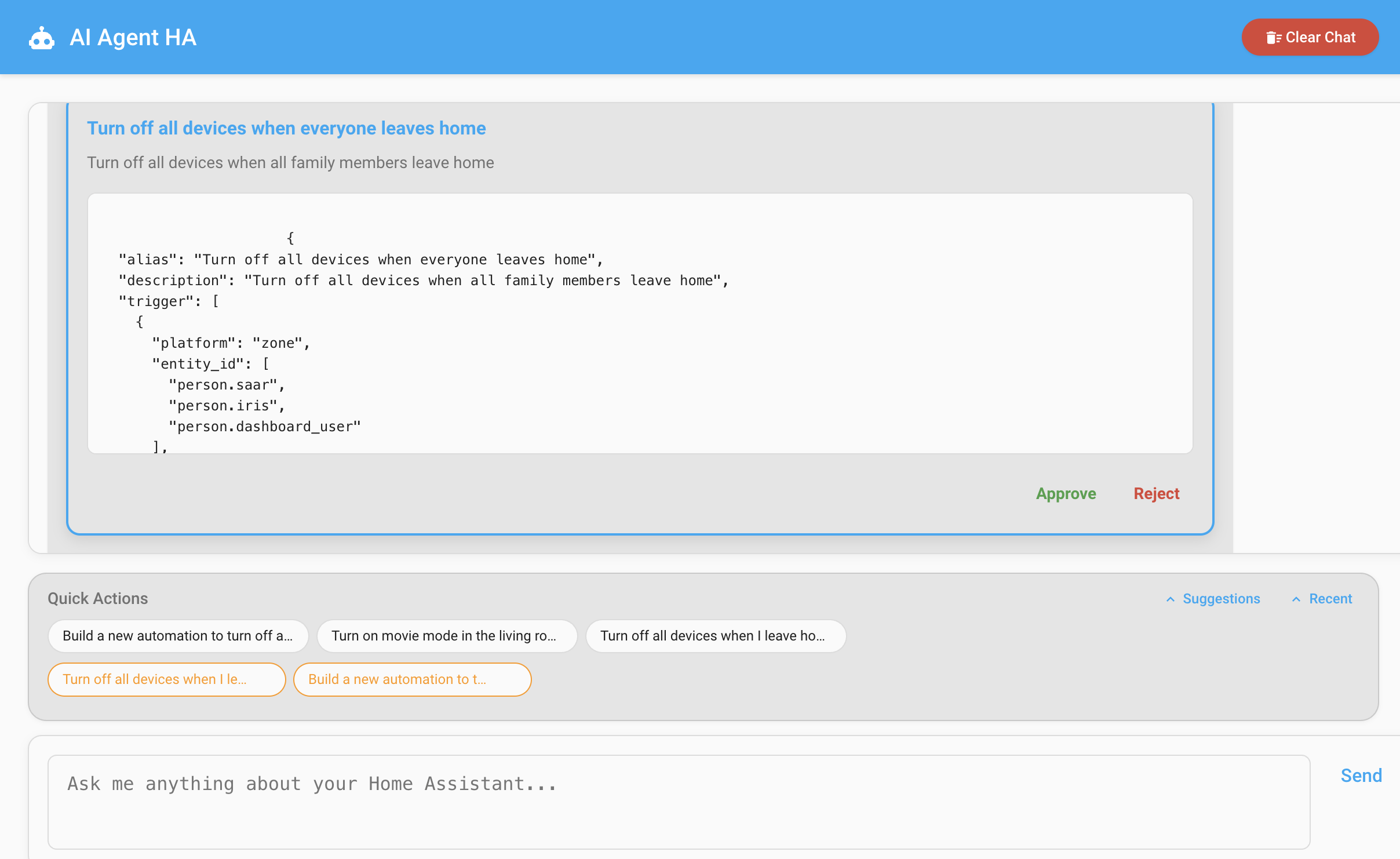
- ⚡ Automation Creation: Automatically create automations based on natural language
- 📋 Dashboard Creation: Create and customize Home Assistant dashboards through natural language
- 📊 Data Access: Get entity states, history, weather, and more
- 🔒 Secure: API keys stored securely in Home Assistant
- 🎨 Beautiful UI: Clean, modern chat interface
- 🔄 Real-time: Instant responses and updates
📸 Screenshots
Automation Creation
📋 Dashboard Creation
AI Agent HA now supports creating and managing Home Assistant dashboards through natural language conversations! Simply describe what you want, and the AI will create a complete dashboard for you.
How Dashboard Creation Works
- Natural Language Request: Ask the AI to create a dashboard for any purpose
- Entity Discovery: The AI automatically finds relevant entities in your Home Assistant
- Smart Organization: Entities are organized by room, functionality, or domain
- Dashboard Generation: Complete dashboard with proper cards and layout is created
- Integration: Dashboard is automatically added to your Home Assistant sidebar
- Restart Required: You'll need to restart Home Assistant to see the new dashboard in your sidebar
Dashboard Creation Examples
Simple Room Dashboard
"Create a dashboard for my living room lights"
The AI will find all living room light entities and create a dashboard with appropriate light control cards.
Security Dashboard
"Create a security dashboard with all door sensors, cameras, and alarm controls"
The AI will create a comprehensive security monitoring dashboard with sensor states, camera feeds, and alarm controls. After creation, restart Home Assistant to see the new dashboard in your sidebar.
Energy Monitoring Dashboard
"I want an energy dashboard showing power consumption and usage graphs"
The AI will create an energy monitoring dashboard with real-time power gauges, usage graphs, and cost tracking.
Climate Control Dashboard
"Create a climate dashboard for temperature control throughout the house"
The AI will organize thermostats, temperature sensors, and HVAC controls in a logical layout.
Supported Dashboard Features
- Smart Card Selection: Appropriate card types for each entity (lights, sensors, media players, etc.)
- Room-Based Organization: Entities automatically grouped by area when possible
- Interactive Clarification: AI asks follow-up questions to refine your requirements
- Template-Based Creation: Built-in templates for common dashboard types (security, energy, climate, etc.)
- Dynamic Layout: Optimized card arrangements and view organization
- Icon Integration: Automatic Material Design icon selection
Dashboard Types the AI Can Create
- Room-Specific: Living room, bedroom, kitchen, etc.
- Functional: Security, energy, climate, media, lighting
- Device-Specific: All lights, all sensors, all switches
- Scenario-Based: Morning routine, evening security, vacation mode
- Custom: Any combination based on your specific needs
For detailed dashboard creation documentation, see: Dashboard Creation Guide
🚀 Supported AI Providers
OpenAI
- Models: All available models are loaded dynamically.
- Setup: Get API key from OpenAI Platform
- During configuration, you can optionally set a custom Base URL (e.g.,
for proxies or regional endpoints). Leave it blank to use the official default. - Note If you need a model not listed, select “Custom...” and type the exact model ID.
Google Gemini
- Models: All available models are loaded dynamically.
- Setup: Get API key from Google AI Studio
- Note: If you need a model not listed, select “Custom...” and type the exact model ID.
Anthropic (Claude)
- Models: Claude Opus 4.7, Claude Sonnet 4.6, Claude Haiku 4.5, Claude 3.5 Sonnet, Claude 3.5 Haiku, Claude 3 Opus, Claude 3 Sonnet, Claude 3 Haiku
- Setup: Get API key from Anthropic Console
- Popular Models:
claude-opus-4-7(Latest flagship model)claude-sonnet-4-6(Latest sonnet model)claude-haiku-4-5(Fast and efficient)claude-3-5-sonnet-20241022(Previous generation)claude-3-opus-20240229(Most powerful for complex tasks)
OpenRouter
- Models: Access to 100+ models including Claude, Llama, Mistral, and more
- Setup: Get API key from OpenRouter
- Popular Models:
anthropic/claude-3.5-sonnetmeta-llama/llama-3.1-70b-instructmistralai/mixtral-8x7b-instruct
Llama
- Models: Llama 4 Maverick, Llama 3.1, Llama 3.2
- Setup: Get API key from your Llama provider
Alter
- Models: Various custom models
- Setup: Get API key from Alter HQ
z.ai
- Models: GLM-4.7, GLM-4.6, GLM-4.5, GLM-4.5-air, GLM-4.5-x, GLM-4.5-airx, GLM-4.5-flash
- Setup: Get API key from Z.ai Platform
- Endpoints:
- General Purpose: Standard AI tasks
- Coding: Optimized for coding scenarios (3× usage, 1/7 cost)
- Popular Models:
glm-4.7(Latest flagship model)glm-4.5-flash(Fast and efficient)
Local Ollama
- Models: Any Ollama model (e.g., llama3.2, mistral, mixtral, etc.)
- Setup: Run Ollama locally and provide its API URL (e.g.,
http://localhost:11434/api/generate)
Local OpenAI-Compatible Endpoints
- Models: All available models are loaded dynamically from your endpoint (if supported). Falls back to “Custom...” if not.
- Setup: Provide your endpoint base URL ending with
/v1/(e.g.,http://localhost:8080/v1/) - Note: If you need a model not listed, select “Custom...” and type the exact model ID.
📦 Installation
HACS Installation (Recommended)
Use the Quick Install button at the top of this README for the easiest installation, or manually add the repository:
- Open HACS in your Home Assistant instance
- Click on "Integrations"
- Click the three dots in the top right corner
- Select "Custom repositories"
- Add this repository:
https://github.com/sbenodiz/ai_agent_ha - Select "Integration" as the category
- Click "Add"
- Find "AI Agent HA" in the integration list
- Click "Download"
- Restart Home Assistant
- Go to Settings → Devices & Services → Add Integration
- Search for "AI Agent HA"
- Follow the setup wizard to configure your preferred AI provider
Manual Installation
- Download the latest release from the releases page
- Extract the files
- Copy the
custom_components/ai_agent_hafolder to your Home Assistantcustom_componentsdirectory - Restart Home Assistant
- Go to Settings → Devices & Services → Add Integration
- Search for "AI Agent HA"
- Follow the setup wizard to configure your preferred AI provider
⚙️ Configuration
The integration uses a two-step configuration process:
Step 1: Choose AI Provider
Select your preferred AI provider from the dropdown:
- OpenAI
- Google Gemini
- Anthropic (Claude)
- OpenRouter
- Alter
- z.ai
- Llama
- Local Ollama
- OpenAI-Compatible Endpoints
Step 2: Configure Provider
Enter your API credentials and optionally select a model:
- API Key/Token: Your provider-specific API key
- Model: Choose from predefined models or enter a custom model name
Configuration Examples
# Example configuration.yaml (optional - integration supports config flow only)
ai_agent_ha:
  ai_provider: anthropic
  anthropic_token: "sk-ant-..."
  models:
    anthropic: "claude-3-5-sonnet-20241022"
# Example with z.ai provider
ai_agent_ha:
  ai_provider: zai
  zai_token: "your-zai-api-key"
  zai_endpoint: "general"  # or "coding" for coding-optimized endpoint
  models:
    zai: "glm-4.7"
# Example with Alter provider
ai_agent_ha:
  ai_provider: alter
  alter_token: "your-alter-api-key"
  models:
    alter: "your-model-name"
# Example with Local Ollama provider
ai_agent_ha:
  ai_provider: local_ollama
  local_ollama_url: "http://localhost:11434/api/generate"
  models:
    local_ollama: "llama3.2"
# Example with OpenAI-Compatible endpoint (e.g., LM Studio, llama-swap)
ai_agent_ha:
  ai_provider: openai_compatible
  openai_compatible_url: "http://localhost:8080/v1/"
  models:
    openai_compatible: "meta-llama/llama-3.1-8b-instruct"
    llama-swap: "qwen3.6-27B-model-name-in-config"
🎮 Usage
Chat Interface
Access the beautiful chat interface at:
- Sidebar: AI Agent HA panel
- URL:
http://your-ha-instance:8123/ai_agent_ha
🔧 Advanced Features
Custom Models
Enter any model name in the "Custom Model" field:
- OpenAI:
gpt-4-0125-preview - Anthropic:
claude-3-opus-20240229 - OpenRouter:
anthropic/claude-3-opus - Gemini:
gemini-pro-vision - Alter:
your-custom-model-name - z.ai:
glm-4.7 - Llama:
Llama-4-Maverick-17B-128E-Instruct-FP8 - Local Ollama:
llama3.2or any model installed in Ollama - OpenAI-Compatible: any model name accepted by your endpoint
Automation Creation
The AI can create automations automatically:
- Ask: "Create an automation to turn on lights at sunset"
- Review the generated automation
- Approve or reject the suggestion
- Automation is added to your Home Assistant
Dashboard Creation
The AI can create custom dashboards through conversation:
- Ask: "Create a security dashboard with cameras and sensors"
- AI discovers relevant entities and asks clarifying questions
- Dashboard is generated with appropriate cards and layout
- Dashboard is automatically added to your Home Assistant sidebar
- Restart Home Assistant to see the new dashboard
Data Access
The AI can access comprehensive Home Assistant data:
- Entity states and history
- Weather information
- Person locations
- Device registry
- Area/room information
- Statistics and analytics
🛠️ Development
Contributing
We welcome contributions from the community! Whether you're fixing bugs, adding features, or improving documentation, your help is appreciated.
Please check out our contribution guidelines for detailed information on how to contribute to this project.
Quick Start
- Fork the repository
- Create a feature branch
- Make your changes
- Test thoroughly
- Submit a pull request
For security issues, please review our security policy.
Local Frontend Testing
You can test the frontend UI locally without deploying to Home Assistant:
-
Start the local test server:
cd tests/frontend python3 serve.py -
Open your browser: Navigate to
http://localhost:8000/test_panel.html -
Test the interface: The test page provides a mock Home Assistant environment where you can test UI changes, styling, and component behavior without needing a full Home Assistant installation.
Test files location:
tests/frontend/test_panel.html- Standalone test pagetests/frontend/serve.py- Simple HTTP server for testing
This is particularly useful for:
- Testing CSS changes and styling
- Verifying UI layout and responsiveness
- Debugging frontend JavaScript issues
- Quick iteration on visual changes
CI/CD Workflows
This project uses GitHub Actions to ensure code quality and reliability:
- Quality Checks: Runs all checks in a single workflow (Python 3.12)
- Python Linting: Checks code style with flake8, black, and isort
- Python Type Checking: Verifies typing with mypy (Python 3.12 compatibility)
- Python Tests: Runs tests with pytest (Python 3.12)
- Security Scan: Checks for security vulnerabilities with Bandit
- Home Assistant Validation: Validates the integration with hassfest
- HACS Validation: Ensures compatibility with HACS
All workflows run automatically on push and pull requests using Python 3.12 to ensure compatibility with the latest Home Assistant versions. You can also run them manually via the "Actions" tab in the GitHub repository.
API Structure
The integration provides these main components:
- AI Clients: Modular providers (OpenAI, Gemini, Anthropic (Claude), OpenRouter, Alter, z.ai, Llama, Local Ollama, OpenAI-Compatible)
- Agent: Core logic for processing requests
- Config Flow: Setup and options management
- Frontend: Chat interface
- Dashboard Templates: Templates for dashboard creation
📋 Requirements
- Home Assistant 2023.3+
- Python 3.12+ (required for compatibility with Home Assistant 2025.1.x+)
- One of the supported AI provider API keys
Python Version Note
Important: Starting with version 0.99.3, this integration requires Python 3.12 or later. This change was made to ensure compatibility with Home Assistant 2025.1.x and later versions, which use syntax features only available in Python 3.12+.
If you're running an older Home Assistant version with Python 3.11, please use version 0.99.2 or earlier of this integration.
🔒 Security
- API keys are stored securely in Home Assistant's encrypted storage
- All communication uses HTTPS
- No data is stored outside your Home Assistant instance
- Provider-specific security practices are followed
📝 License
This project is licensed under the MIT License - see the LICENSE file for details.
🆘 Support
- Troubleshooting: Troubleshooting Guide - Common issues and solutions
- Issues: GitHub Issues
- Discussions: GitHub Discussions
- Documentation: Wiki
🙏 Acknowledgments
- Home Assistant community for the excellent platform
- All AI providers for their powerful APIs
- Special thanks to @RmG152 for their valuable help with development
- Contributors and testers who help improve this integration
- Contributions from @Trixanna for implementing additional Local-host Endpoints
Made with ❤️ for the Home Assistant community