agent-vision-toolkit





What it thinks is what it sees — give any text-only coding agent eyes: image Q&A, long-screenshot OCR, frontend UI restoration, and GUI automation, as a vision toolkit plus a skill, with optional drop-in integration for Codex, Claude Code, Pi, Oh My Pi, and OpenCode.
🎯 An agent's vision capability doesn't have to live in the model — it can live in the harness.
🌐 中文 | English
If your agent already runs on a text-only model such as DeepSeek but is held back by the lack of multimodality — unable to see images, with every attempt to use an image tool blocked by the system — this repository provides tools, skills, and proxy integrations that let text-only models handle visual tasks on equal or even better footing. The goal is to make the experience of using a text-model agent as seamless as using a multimodal one, and ultimately let a tool-equipped text-model agent outperform a native multimodal agent that does not use this toolkit and its methods.
This repository provides two kinds of components:
- Vision tool CLIs — multiple CLIs, plus a skill that teaches the agent when to use each one. Any agent that can invoke a shell can use them.
- Seamless integration (optional upgrade) — a transparent local proxy and single-file native plugins, so images we paste and the agent's built-in image tools both work seamlessly, with no extra tool installation or additional prompting.
All code has been verified in real Codex + DeepSeek sessions, and the same pipeline has been live-verified end-to-end in Claude Code, Pi, Oh My Pi, and OpenCode.
If this project helps you or gives you some inspiration, feel free to star🌟 & fork.
❤️ Sponsor
Want to sponsor this project? See FUNDING.md or email davidyang042@gmail.com.
Click to collapse
 | Thanks to AIHubMix for sponsoring this project! AIHubMix is a stable, high-concurrency AI model API gateway that connects Claude, GPT, Gemini, DeepSeek, and other mainstream models through a single API key, compatible with multiple protocols, with free model options available. Users in China can use it via the China entry, and users abroad via the Global entry. |
Latest Update
2026-08-18 — Skill renamed: the included agent skill is now vision-skills (formerly vision-tools), so the name describes the capability rather than the underlying tools.
2026-08-13 — Native DeepSeek Harness support is now available. The new dsh-vision-toolkit linked package brings this toolkit into DSH Web and Headless profiles as a native Profile Bundle. It provides 10 structured visual tools for intent-aware image Q&A, grounding, detection, tracing, cropping, pixel diff, long-screenshot OCR, foreground extraction, dominant-color analysis, and HTML screenshots, while adding DSH Credentials, a managed isolated runtime, previewable Artifacts, Web Settings, and Agent-scoped progressive tool exposure.
The package is tracked here as a Git submodule and maintained independently at Anionex/dsh-vision-toolkit. Clone this repository with --recurse-submodules, or run git submodule update --init --recursive in an existing checkout.
Contents
Highlights
- More than image descriptions — it captures what the LLM actually cares about: when viewing an image, it passes along the user's or model's latest intent, producing the details needed for the current turn instead of a broad, unfocused description.
- Both pasted images and built-in image tools work: the agent can understand images pasted directly as well as images opened through its built-in tools.
- A battle-tested methodology for visual tasks: the included skill teaches the agent what to inspect, which tool to choose, what sequence to follow, and how to verify the final result.
- One-sentence install: ask your agent to install it — it follows the verified flow end to end, toolkit, skill, and seamless integration included.
Use-case Playbooks
The included vision-skills skill contains complete examples that an agent can follow directly.
When to use them, the order in which to call tools, and how to verify the result are all documented in the corresponding skill guides:
| Use case | What the agent learns to do |
|---|---|
| Extract long screenshots, chat histories, and scrolling pages | Find low-content cut bands, OCR each chunk in order, preserve chat speakers/timestamps/quotes, merge only duplicated overlap, and surface risky boundaries for verification. See the Telegram reference run → |
| Rebuild a UI from a screenshot or design | Reuse project components and assets first, then combine code-native UI, extracted visuals, rendered screenshots, and visual comparison to align a page or component. |
| Restore an icon, logo, illustration, or other graphic | Extract a transparent PNG from the source image, or rebuild an editable/scalable SVG when needed, then verify shape, color, and alpha edges. |
| Turn a sketch, diagram, or whiteboard into structured code | Recover nodes, labels, connections, and directions as editable Mermaid, Graphviz, or another structured representation. |
| Operate a GUI from screenshots | Locate a control, perform one action, capture the screen again, and verify the resulting state before continuing. |
| More use cases | Other step-by-step visual-agent playbooks are being added gradually. |
Real-world Effects
Infographic restoration: screenshot to HTML in one sentence
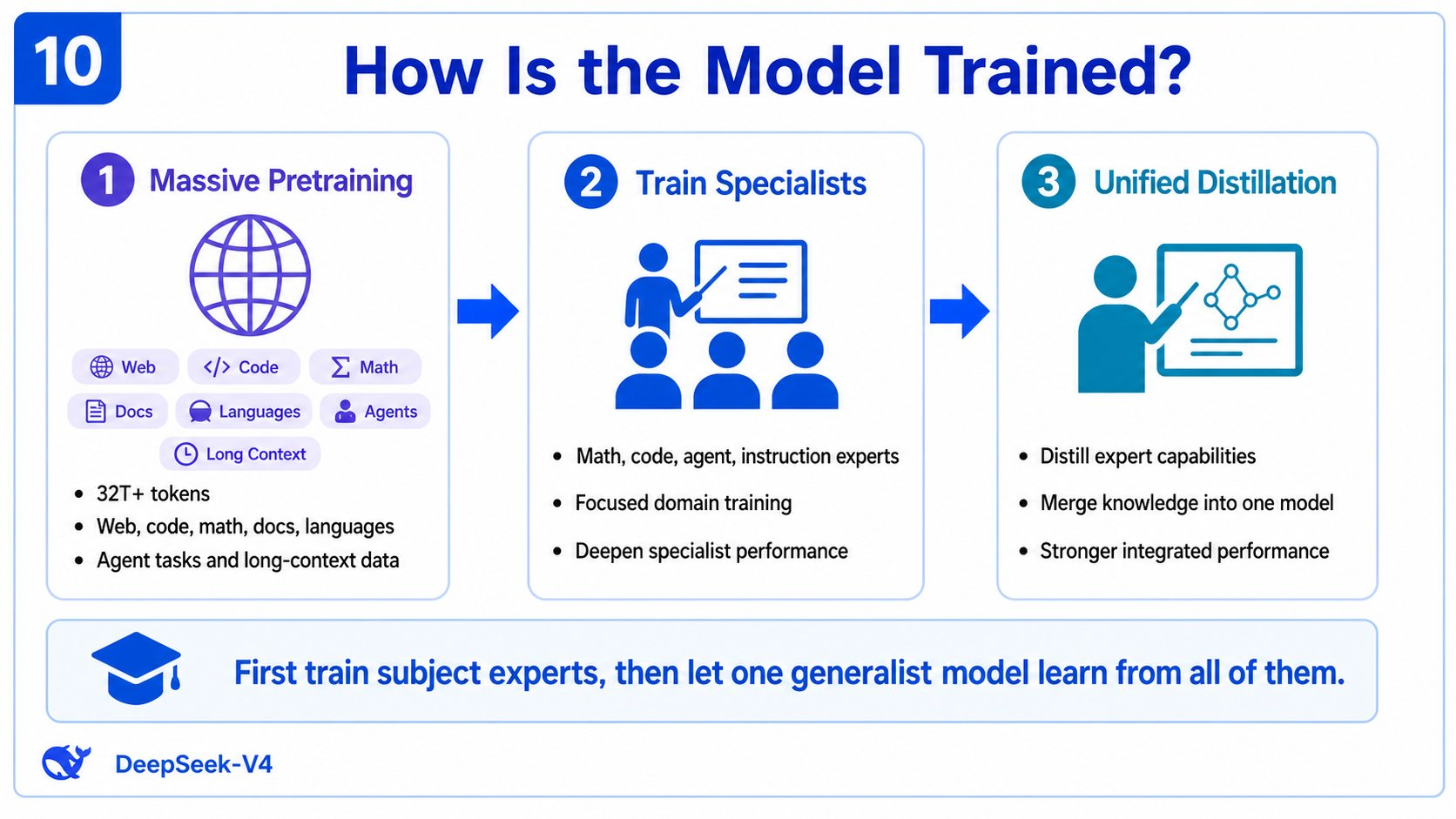
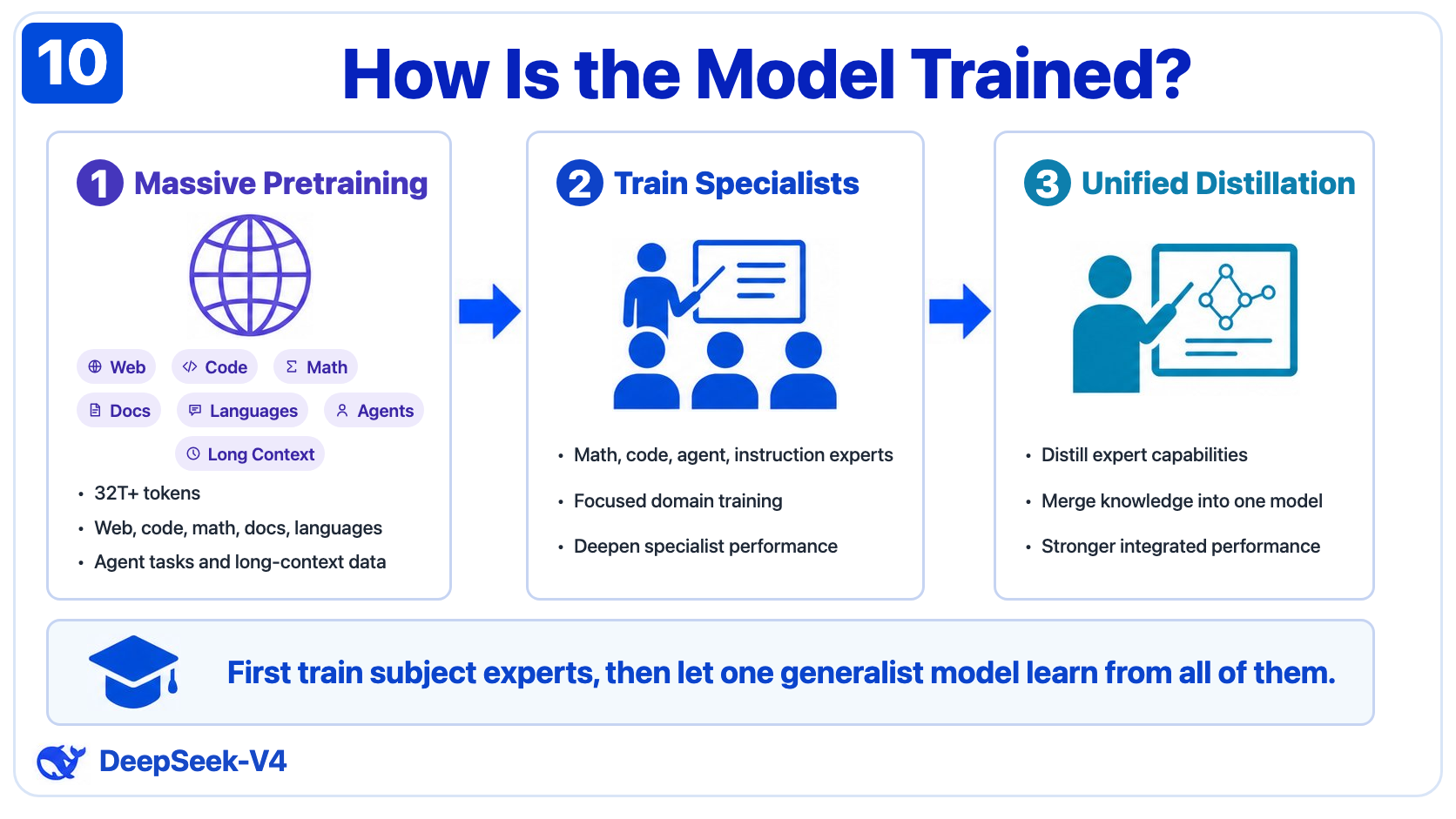
Left: the original infographic screenshot. Right: an editable reconstruction built with HTML/CSS. View the HTML source →
UI restoration: sketch to interface in one sentence
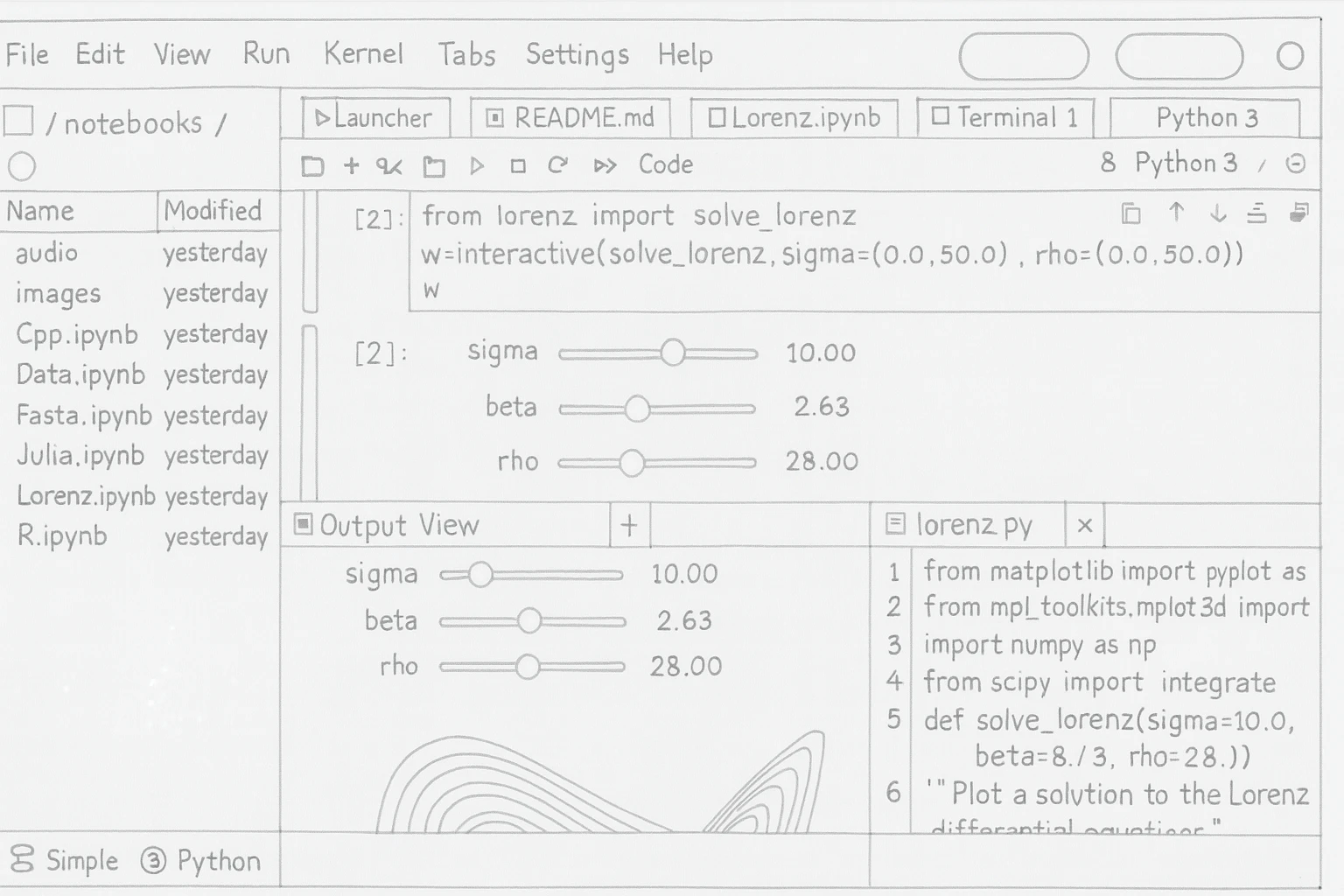
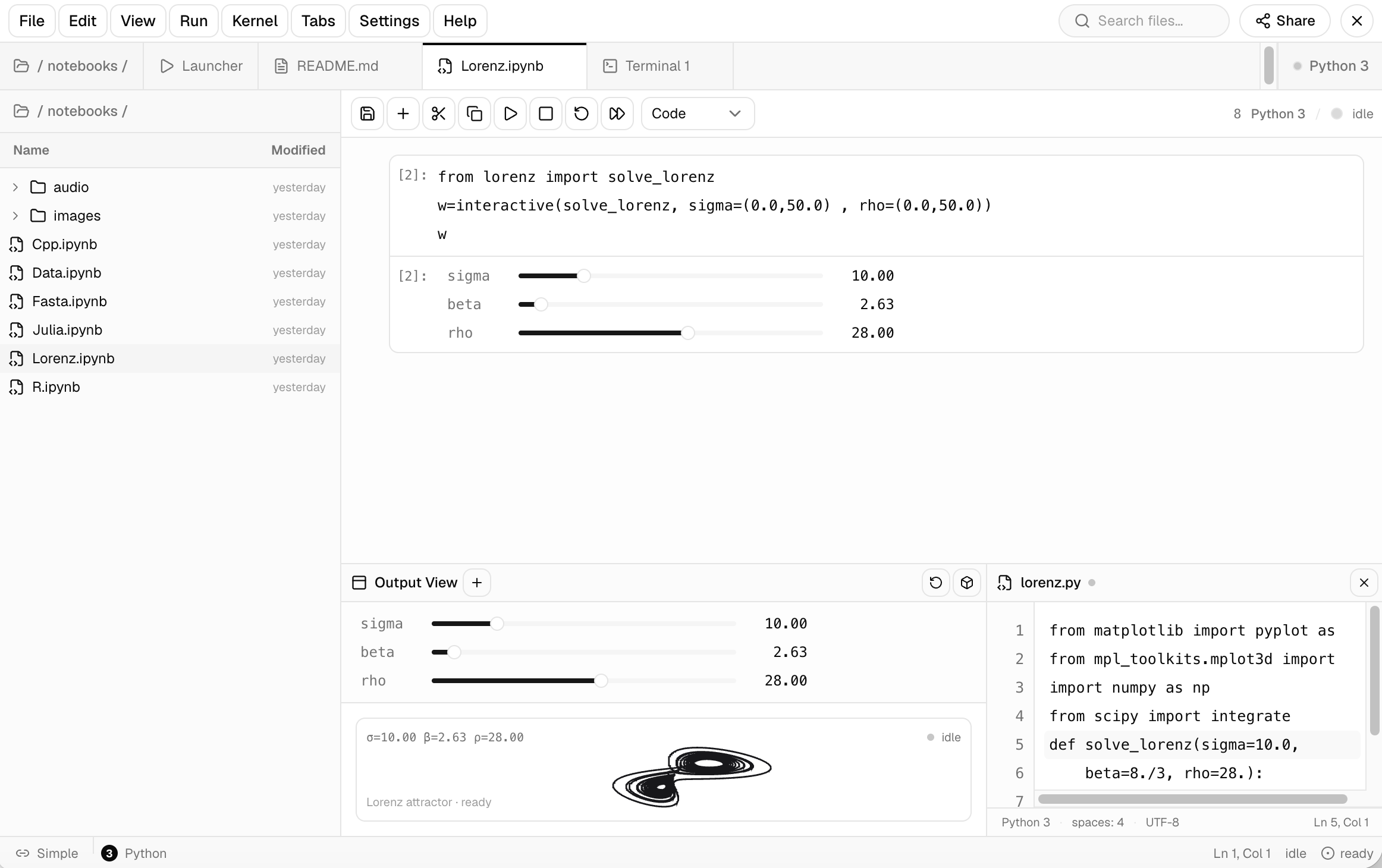
Left: the hand-drawn reference. Right: the restored JupyterLab workspace made from it. See the UI restoration playbook for the workflow. Executed in Codex with deepseek-v4-flash.
Fast UI restoration: an approximate first pass
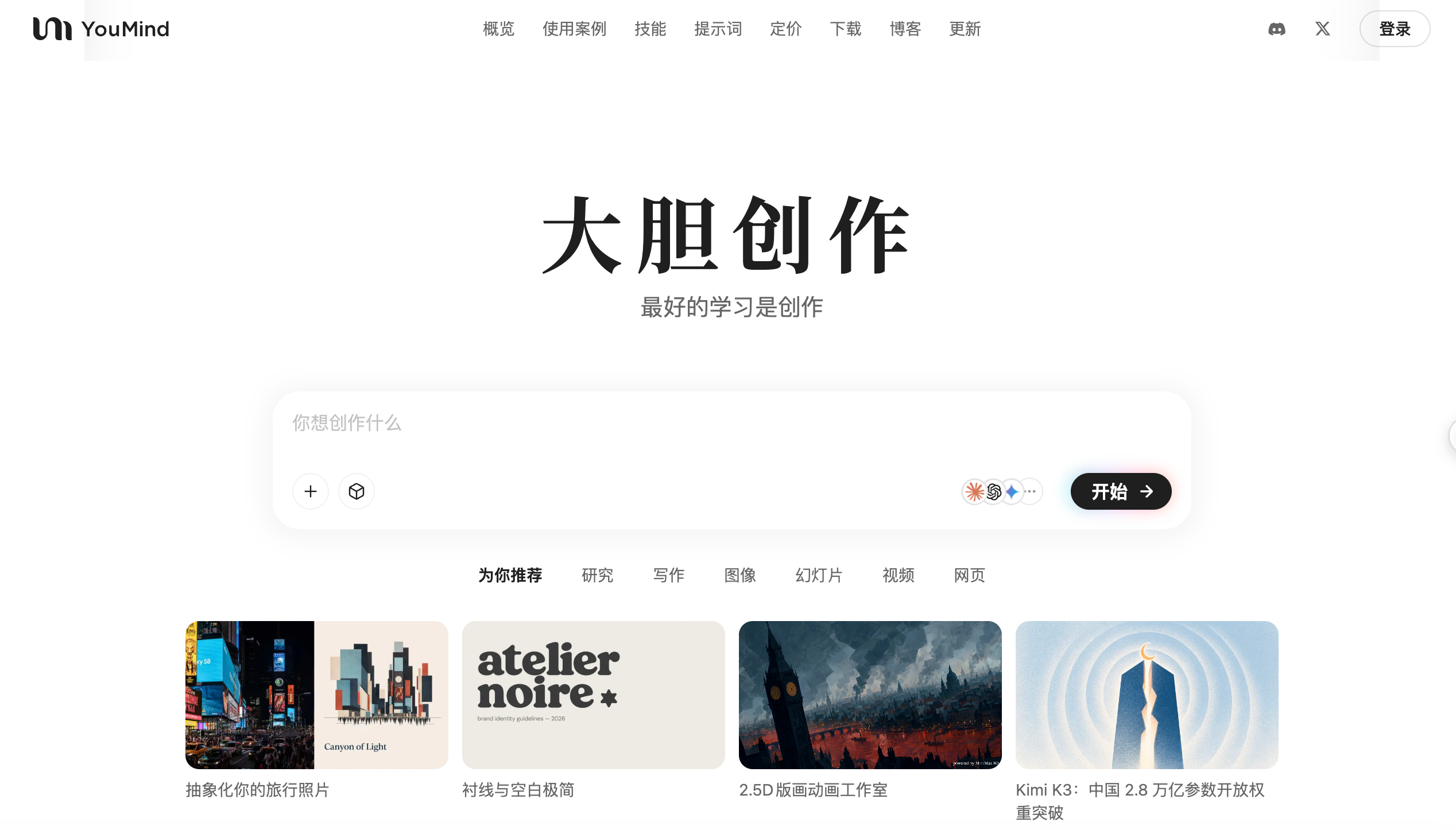
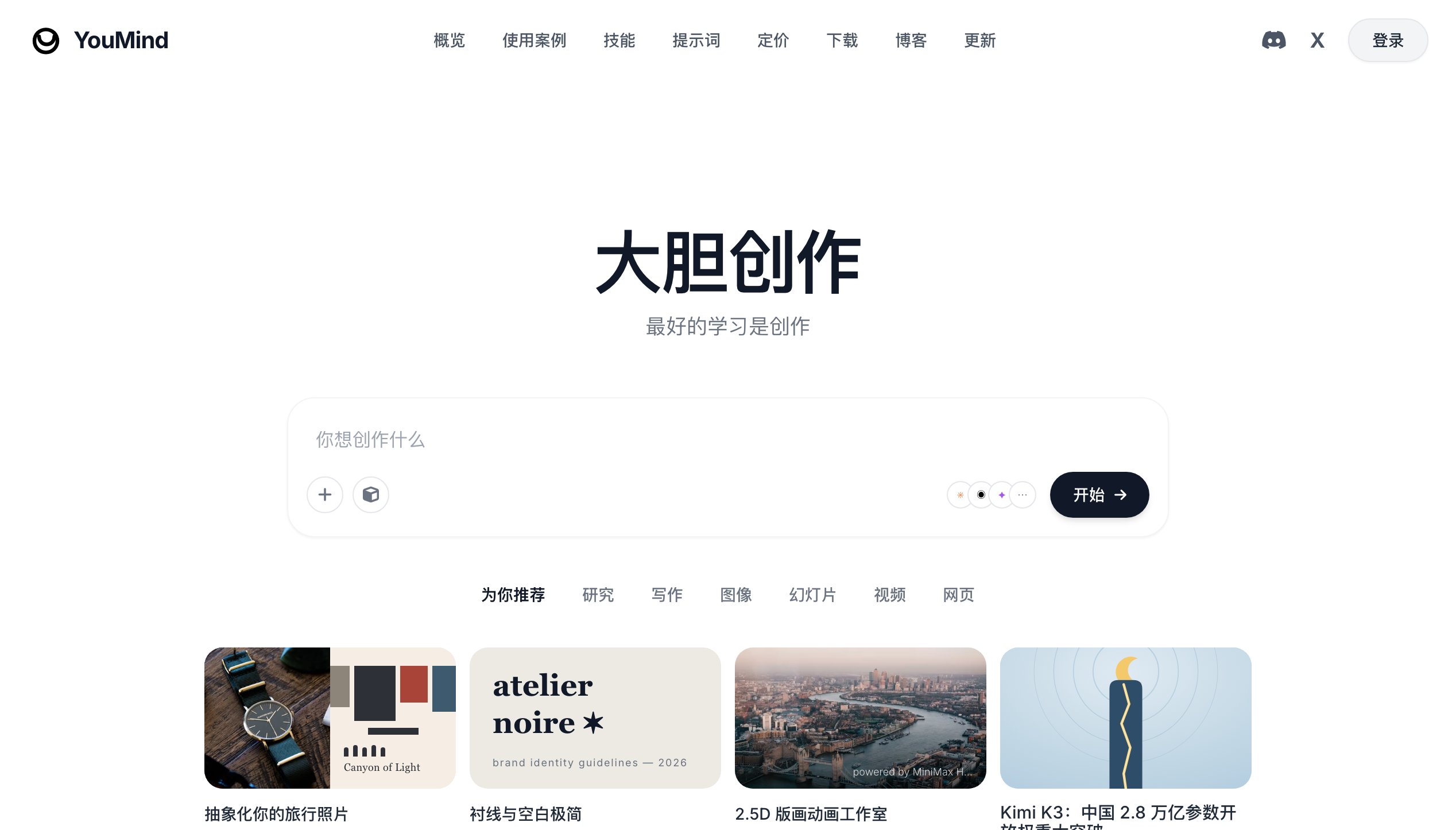
Left: the original page. Right: a fast reconstruction that preserves the main layout, content, and visual hierarchy while allowing approximate colors and library icons. Fast mode targets a first screenshot in about three minutes.
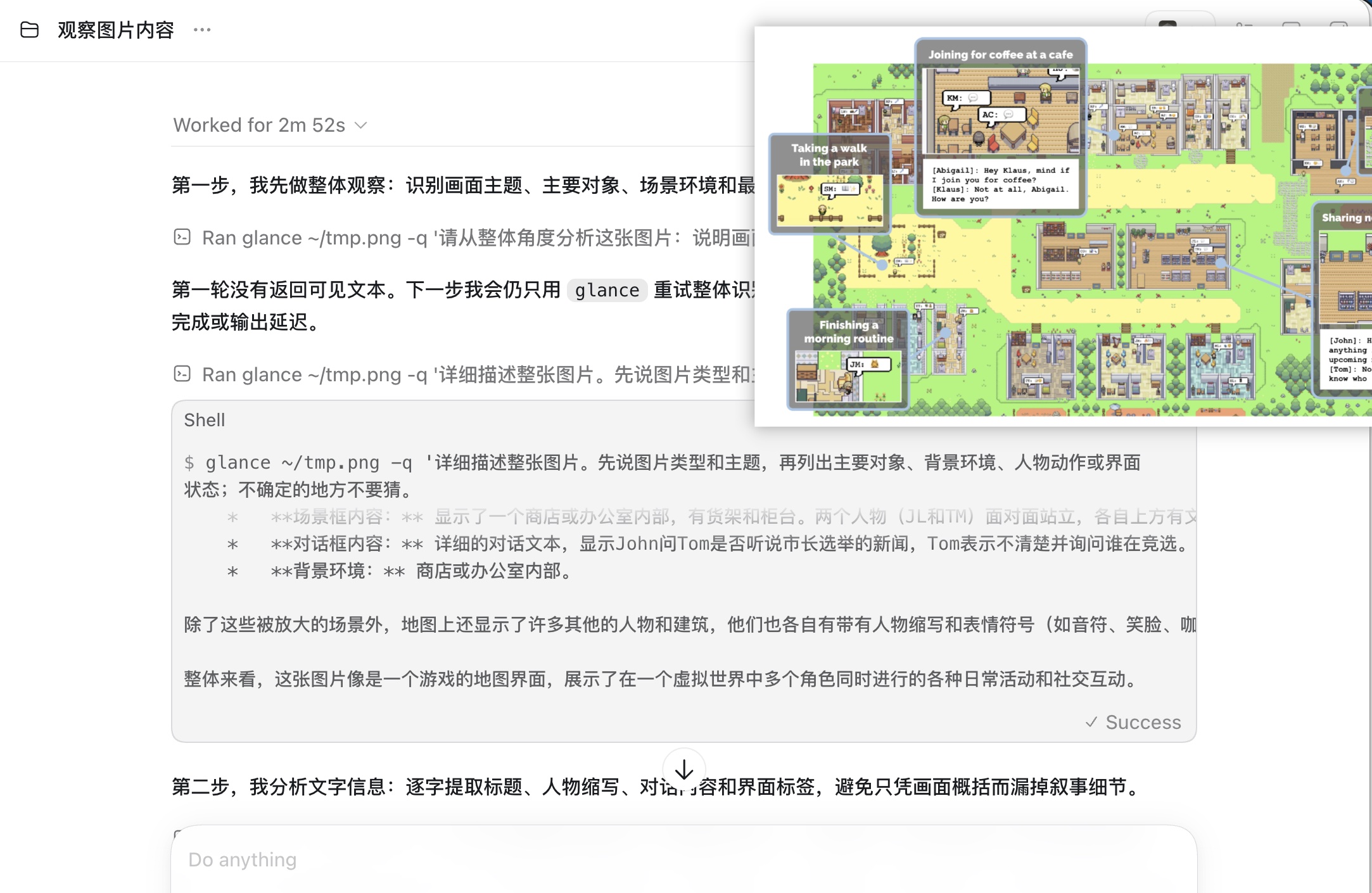
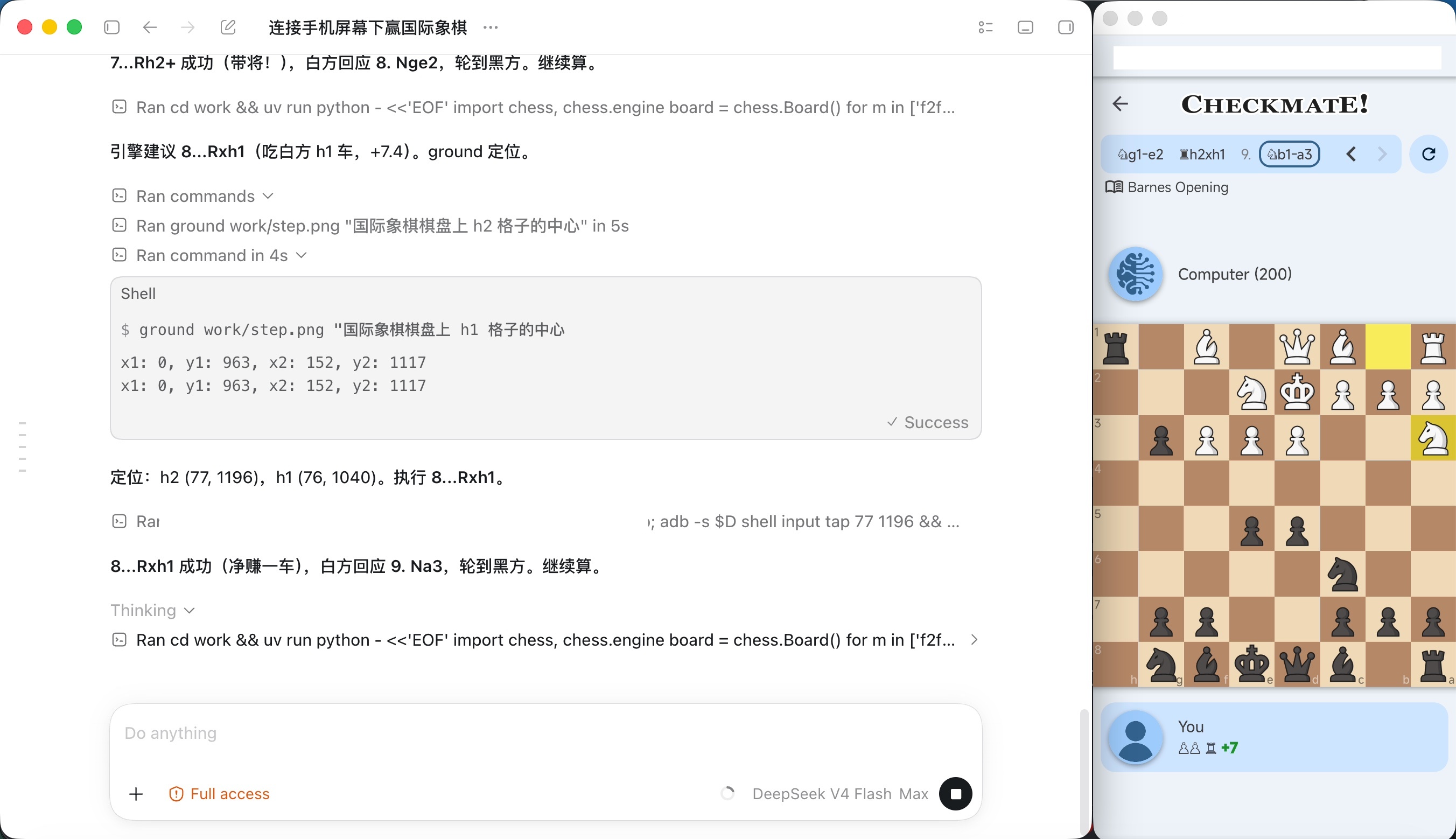
Left: multi-round image Q&A with glance. Right: with ground, DeepSeek V4 locates screen elements to play chess autonomously.
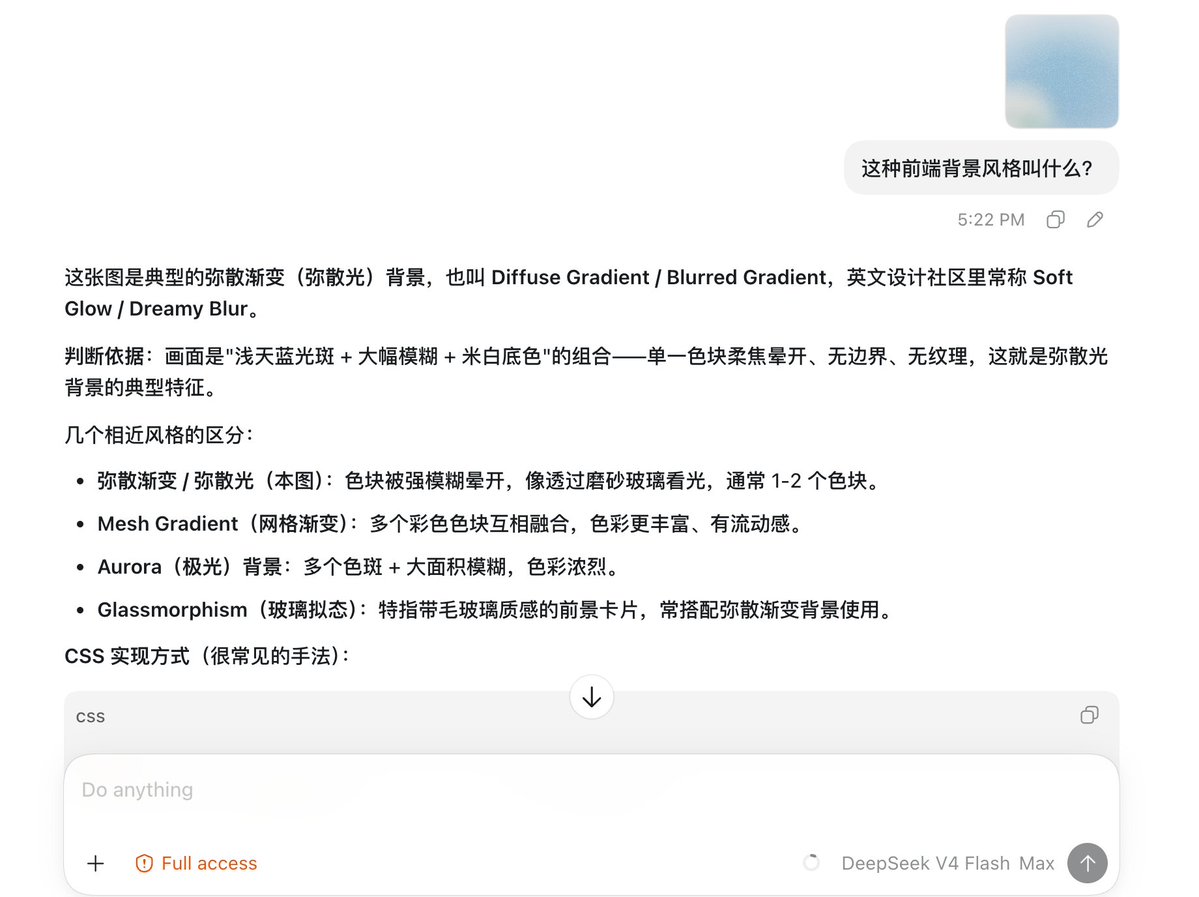
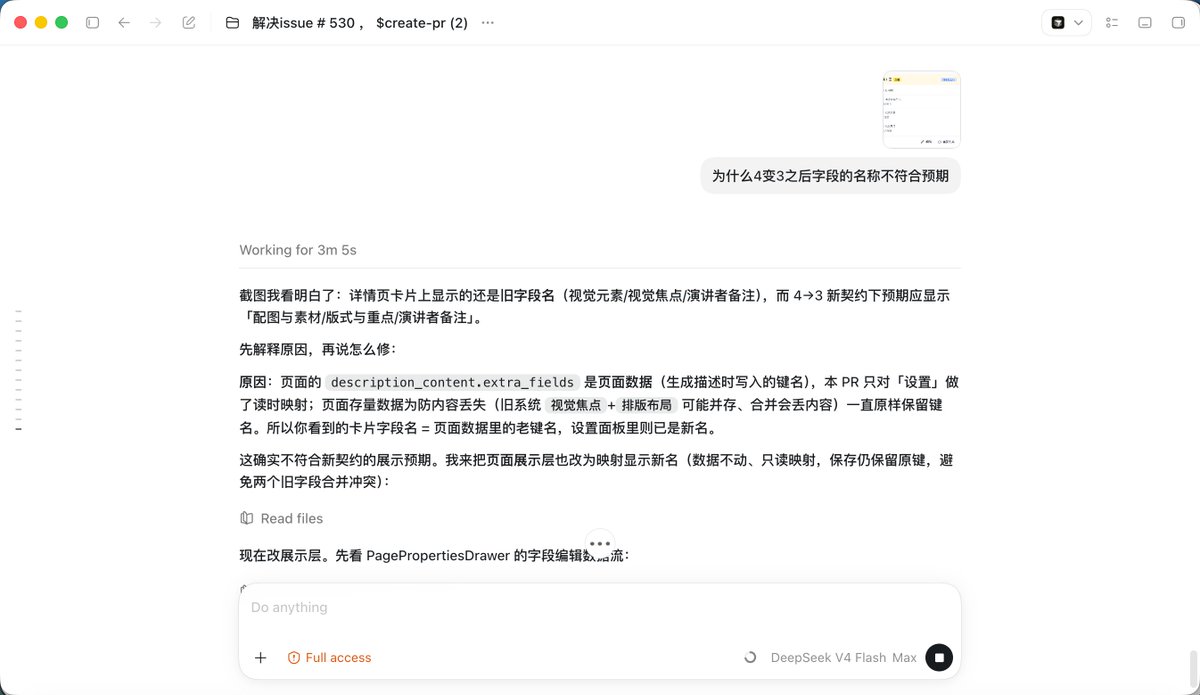
Left: DeepSeek V4 answers a UI style question with similar-style comparisons. Right: DeepSeek V4 debugs a field-name mismatch from a screenshot.
Quick Start
The easiest way to install it is to send this to your agent:
Follow the instructions in https://github.com/Anionex/agent-vision-toolkit to install the vision toolkit and skill locally. If the vision API is not configured, locate the configuration file for the current operating system and guide me through setting
VISION_API_KEY,VISION_BASE_URL, andVISION_MODEL.
If you also want the optional seamless integration layer, send this:
Read https://github.com/Anionex/agent-vision-toolkit/blob/main/AGENT_INSTALL.md in full, then install the appropriate vision proxy or native extension/plugin for the agent application we are currently using. If the vision API is not configured, locate the configuration file for the current operating system and guide me through setting
VISION_API_KEY,VISION_BASE_URL, andVISION_MODEL.
All you need to prepare is a multimodal API supporting OpenAI Chat Completions, OpenAI Responses, or Anthropic Messages, plus its base URL, API key, and model name. The agent will guide you through writing them to the appropriate configuration file.
After installing the optional integration and restarting the agent, paste an image directly or let the model call its built-in image tool. Pi, Oh My Pi, and OpenCode use single-file native extensions rather than the proxy; see each agent's documentation.
Three-step manual installation
1. Point it at a vision API — three env vars in ~/.config/agent-vision-toolkit/env (chmod 600):
VISION_API_KEY=sk-...
VISION_BASE_URL=https://openrouter.ai/api/v1
VISION_MODEL=google/gemini-3.6-flash
Any OpenAI-compatible endpoint that supports /chat/completions with image_url works (e.g. Aliyun DashScope: https://dashscope.aliyuncs.com/compatible-mode/v1 + qwen-vl-max-latest). The Python client/proxy can also use /responses with input_image by setting VISION_API_PROTOCOL=responses, or Anthropic Messages by setting VISION_API_PROTOCOL=anthropic and a base URL ending in /v1 (not /messages). Add LANG=en for English descriptions (default is Chinese).
2. Put the CLIs on your PATH:
git clone https://github.com/Anionex/agent-vision-toolkit.git
export PATH="$PWD/agent-vision-toolkit/bin:$PATH"   # add to your shell profile to persist
glance needs nothing beyond Python 3.11+; ground/detect/crop and the long-screenshot OCR playbook need pillow; trace needs pillow + numpy (and vtracer only for its explicit --outline fallback). Install optional dependencies into an isolated venv only for the tools you use.
3. Install the skill so your agent knows the tools exist and how to combine them:
npx skills add Anionex/agent-vision-toolkit --skill vision-skills -a codex -g --copy -y
Or copy skills/vision-skills/ into your agent's skills directory (e.g. ~/.codex/skills/) and restart the agent.
The Tools
A set of visual tools designed for agents, letting them choose freely based on the situation:
glance — "what does this image look like?"
Ask a question about an image directly, or transcribe its text.
glance screenshot.png -q "What is the dominant color of this image?"
glance screenshot.png --ocr
The dominant colors of this image are **white and light gray, with light blue accents.**
Username
Password
Login
For a scrolling screenshot or chat history, the skill includes a workflow that
finds safe cut bands, OCRs the chunks with glance, merges overlap, and writes
a boundary audit:
python3 skills/vision-skills/scripts/long_screenshot_ocr.py long-chat.png --mode chat -o long-chat.ocr.md
ground — "where is the object I want?"
Locate an object or region and get a bounding box in original pixel coordinates:
ground screenshot.png "Send button"
x1: 1067, y1: 841, x2: 1108, y2: 881
It analyzes one full image per call. With --region X1,Y1,X2,Y2 it searches only that box and still reports original-image coordinates — the zoom-in path for small targets.
detect — "what is in the image, and where?"
Inventory the elements of an image (or a region) — a numbered list with exact visible text and pixel boxes:
detect page.png
detect page.png "buttons"
detect page.png --region 238,600,953,671
1. bottom-left Do anything x1: 253, y1: 601, x2: 328, y2: 609
2. bottom-left + x1: 254, y1: 650, x2: 268, y2: 665
3. bottom-right stop button x1: 924, y1: 645, x2: 952, y2: 670
A full-screen pass is a fast first draft; for completeness on dense screens, inventory region by region.
trace — "what is its clean geometric trajectory?"
trace recovers the centerline of a flat, high-contrast graphic locally and deterministically, then fits editable SVG primitives such as <circle>, <line>, <polyline>, and <polygon>. It also preserves compact solid round marks as filled circles and keeps closed curved loops intact. A magnifier becomes one circle plus one line; a lightning stroke becomes its actual straight segments instead of noisy paths around both sides of the raster ink. Internal upscaling improves small icons while the SVG remains in the source image's coordinate grid. The LLM does not participate in this fitting: an agent such as DeepSeek only orchestrates the surrounding locate, crop, render, and verification steps. Use --outline only when you explicitly need the filled outer silhouette (that fallback requires vtracer).
trace icon.png -o icon.svg
trace screenshot.png --region 1563,514,1668,621 -o icon.svg
trace filled-artwork.png --outline -o silhouette.svg
crop — "crop this image region for reuse"
crop cuts a pixel box out of an image into its own file — the same
X1,Y1,X2,Y2 coordinates ground/detect print, clamped to the image
bounds. Once the same box is about to feed several checks (pixel_diff,
dominant_colors, trace), cut it once and reuse the file instead of
re-cropping in memory on every call. Requires the optional pillow.
crop screenshot.png --region 1563,514,1668,621 -o send-button.png
Upgrade: Seamless Integration
This layer makes screenshots pasted into an agent work directly, while also preventing errors when the agent calls its built-in image tools.
| Agent | How | Status |
|---|---|---|
| Codex | transparent local proxy (Responses API) | ✅ verified |
| Claude Code | the same proxy — point ANTHROPIC_BASE_URL at it | ✅ verified |
| Pi / Oh My Pi | one-file native extension (extensions/pi/) | ✅ verified |
| OpenCode | one-file native plugin (extensions/opencode/) | ✅ verified |
| Any agent with a shell | the toolkit above — no integration needed | ✅ |
All entry points share one configuration. Configure it once and use it everywhere.
How It Works
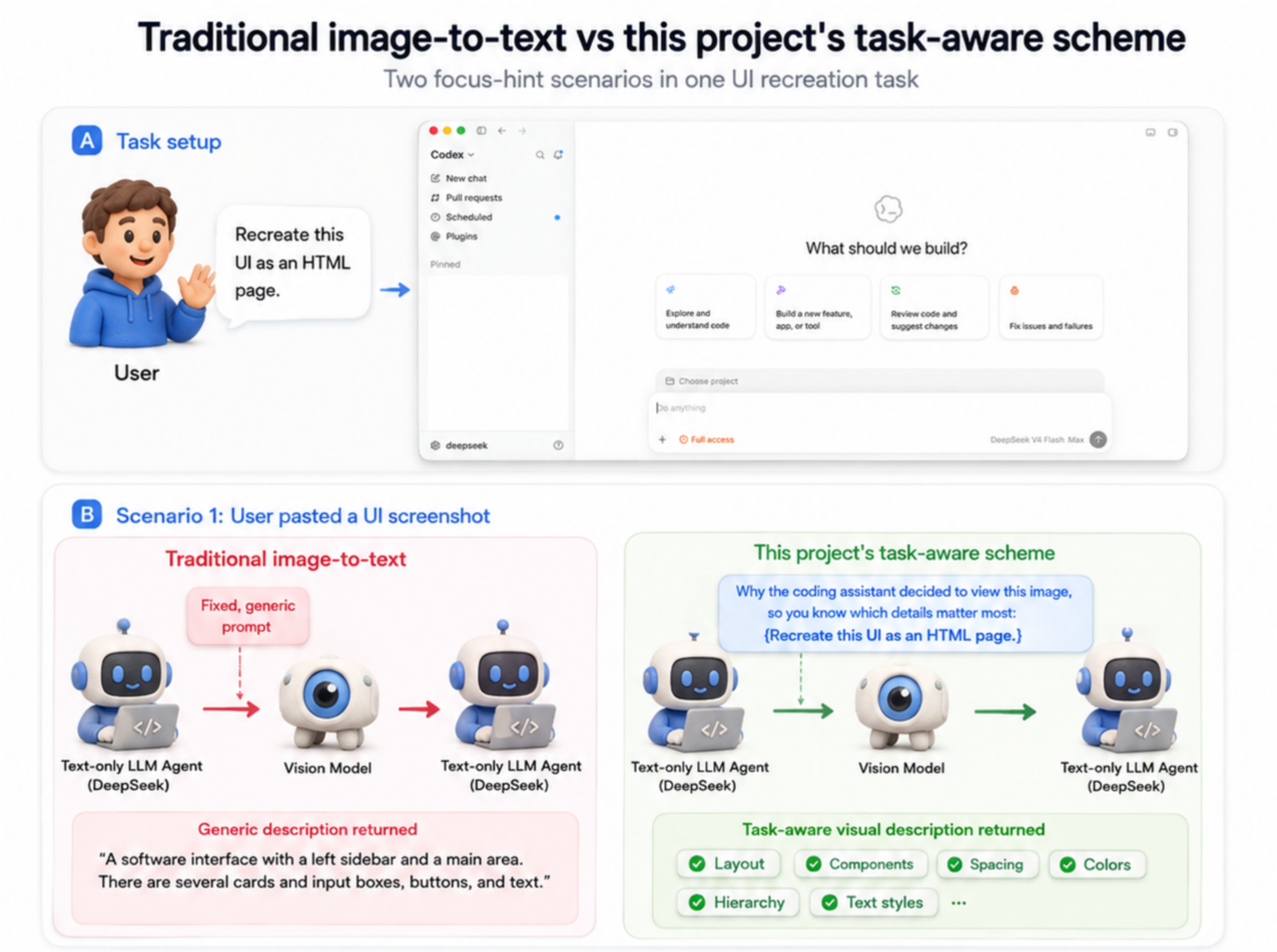
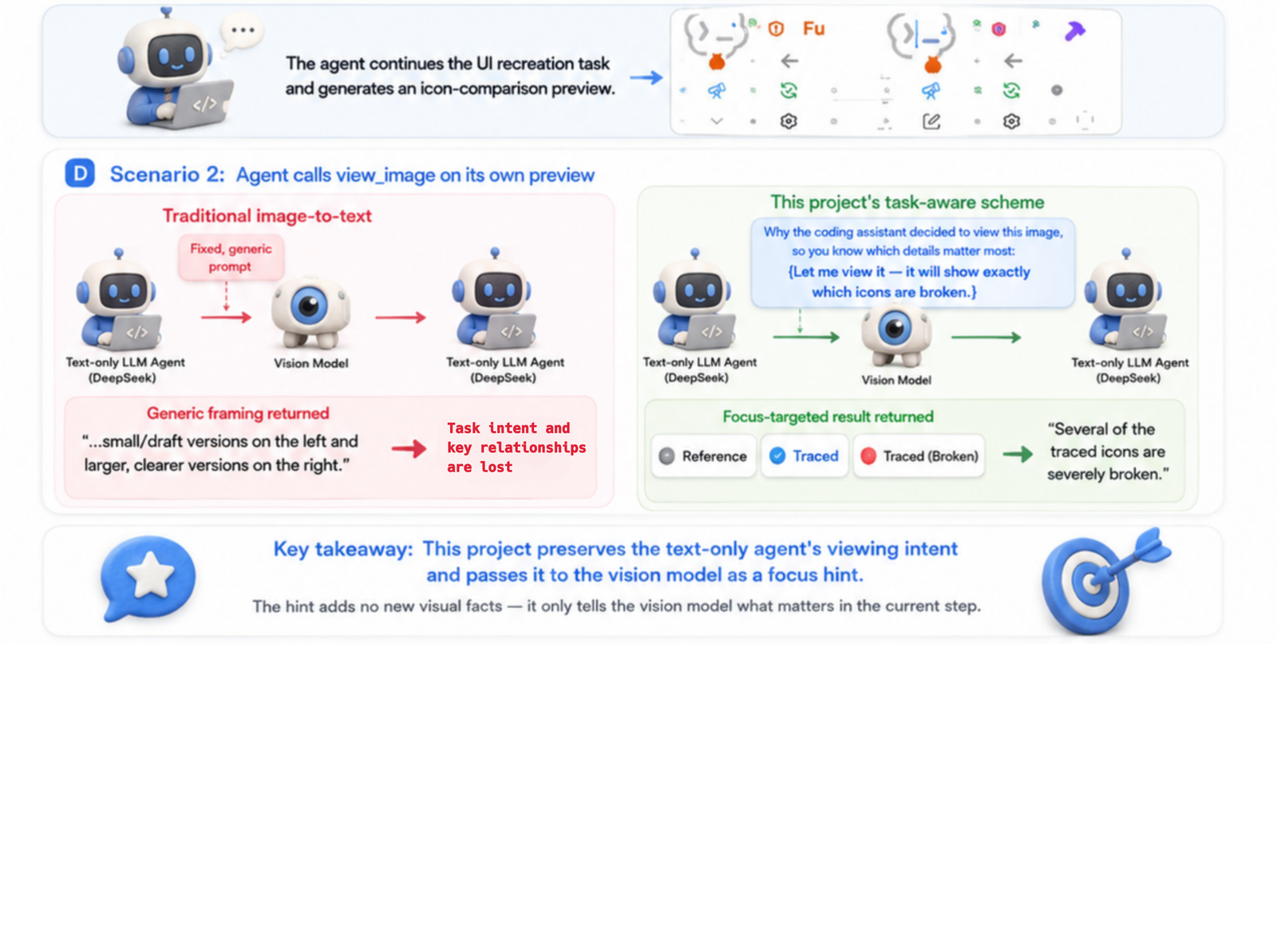
Descriptions that keep the task in view
Most vision bridges for text-only models simply ask a multimodal model to turn an image into a generic description, then hand that description to the text model and expect it to reconstruct the information it needs. That adds another semantic layer where some information is inevitably lost — the source of the common belief that stitched-together vision solutions must suffer a large performance penalty.
To address this, agent-vision-toolkit tries to recover why the agent wants to look at the image. It extracts the viewing intent from the user message or from the model's stated reason for calling a built-in image tool, then passes that intent to the vision model as a focus hint. The result is a task-aware description that emphasizes what matters for the current step instead of producing a generic "detailed description" — at lower cost, with higher accuracy and faster responses.
Request flow and protocol details
Codex -> 127.0.0.1:19100 -> your existing text-only upstream
             |
             +-- when the request contains images:
                 focus hint (the user's request, or the assistant's
                 stated reason for calling view_image)
                   -> vision prompt -> text description -> image replaced
Configuration
Environment variables
The standalone CLIs and Python proxy use these environment variables; just three are required. The native Pi and OpenCode extensions use their own settings and currently call /chat/completions only.
| Variable | Required | Description |
|---|---|---|
VISION_API_KEY | Yes | API key of the multimodal model |
VISION_BASE_URL | Yes | Provider API base URL; include /v1 but not the protocol endpoint such as /messages |
VISION_MODEL | Yes | Multimodal model name |
LANG | No | Vision model output language: zh (Chinese) or en (English); default zh |
VISION_API_PROTOCOL | No | Python client/proxy protocol: chat_completions (default), responses, or anthropic; Anthropic mode uses x-api-key and anthropic-version |
VISION_REASONING_EFFORT | No | Optional provider-supported reasoning effort for the Python client/proxy when using responses |
VISION_ANTHROPIC_THINKING | No | Anthropic thinking mode. omit (default) sends no thinking field and has the broadest compatibility. Use disabled or adaptive only when the selected model documents that mode; restore omit first if the provider returns HTTP 400. Manual enabled plus budget_tokens is not exposed. |
VISION_USER_AGENT | No | Outbound User-Agent for the Python client/proxy; defaults to a browser-compatible value and can be overridden for provider requirements |
Upstream egress
The proxy reaches your model host directly (TCP + TLS) by default and never reads the Windows system proxy, so a local proxy such as Clash going down cannot take the whole chain with it. An explicit proxy is optional:
--upstream-proxy http://127.0.0.1:7890(or envVISION_UPSTREAM_PROXY) routes upstream through that proxy via a CONNECT tunnel.--proxy-first(or envVISION_PROXY_FIRST=1) tries the explicit proxy before direct; the default order is direct first.
The route whose connection (TCP/TLS handshake) succeeds is kept in memory and reused; only connection-establishment failures (refused / DNS / TLS / a 5s socket timeout) switch routes, and HTTP status errors from the model pass through unchanged. If every route fails, the proxy returns 502 listing each route and reason. An HTTP proxy URL without an explicit port uses the standard port 80; proxy authentication is not supported.
Prerequisites
- A coding agent already working with a model, including a text-only model such as DeepSeek V4
- A vision API supporting OpenAI Chat Completions, OpenAI Responses, or Anthropic Messages; select the latter two with
VISION_API_PROTOCOL=responsesorVISION_API_PROTOCOL=anthropic - No other configuration is required
FAQ
After pointing base_url at the local proxy, does the proxy also need the upstream model's API key?
No. Although the network request to the upstream is sent by the proxy process at 127.0.0.1:19100, the upstream API key is still placed in the Authorization header by Codex per your existing configuration, and the proxy forwards that header unchanged:
Codex (carrying the original Authorization)
  -> 127.0.0.1:19100
  -> text-only upstream (receives Authorization unchanged)
So don't modify Codex's existing auth config, and don't store the upstream API key again in the proxy env. The proxy env only needs VISION_API_KEY, VISION_BASE_URL, and VISION_MODEL.
Will adding another multimodal model significantly increase costs?
No. Each time the primary model needs to inspect an image, the vision tool sends only the necessary intent and the image to the multimodal model's context. A truncation mechanism is also in place, so there are no overly long or accumulating contexts, keeping costs low.
To reduce costs further, you can use a locally deployed small multimodal side model to provide vision capabilities. Recommended options include Gemma 4 and the Qwen 3.5/3.6 series.
Limitations
- This is an image-to-text layer; it doesn't hand vision tokens directly to the text model.
- Overall visual-task quality is determined jointly by the primary LLM and the multimodal LLM.
- The proxy's cache lives only inside its process and is cleared on restart.
Donation
If this project is valuable to you, you are welcome to buy the developer a coffee ☕️

Community
- Setup and usage help: Support guide and the repository's issue forms
- Bug reports and feature requests: Issues
- Contributions: Contributing guide
- Security reports: Security policy
- Community standards: Code of Conduct
- User-facing changes: Changelog
About
If agent-vision-toolkit saves you time, you are welcome to star it, share it, contribute, or sponsor the project.
I'm anionex, an AI-native developer who once ranked No. 4 on GitHub's global developer trending list, with more than 16k stars across my projects. If you would like to follow my future work, follow me on X or GitHub.
Join the Community Group
You are welcome to join the agent-vision-toolkit community group to exchange usage tips, share feedback, and suggest improvements. Scan the QR code below to join.