
POIROT
Investigating your Claude Code sessions.
A native macOS companion that lets you browse sessions, explore diffs, and re-run commands — all from a polished SwiftUI interface.
Features • Capabilities • Getting Started • Architecture • Contributing • Roadmap



No login. No tracking. No analytics. No BYOK. No extra cost. Works offline. Less than 6 MB.
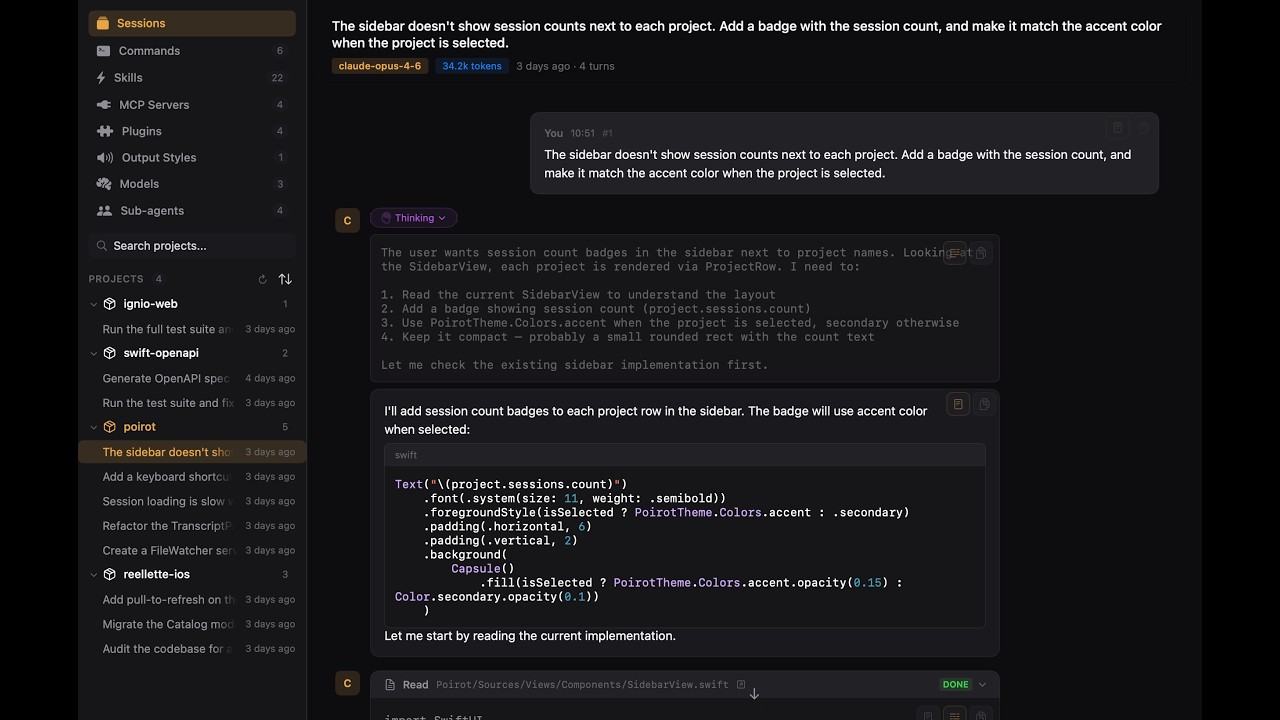
Click to watch the demo on YouTube
The Story
Poirot was vibe-coded in a weekend. The entire app — architecture, parser, UI, tests — was built in a single creative burst with Claude Code as the co-pilot. What started as "I wonder if I can build a companion app for Claude Code... using Claude Code" turned into a real, usable tool.
Named after Hercule Poirot, Agatha Christie's legendary detective. Because every great investigation needs the right tools — and Poirot helps you investigate exactly what your AI assistant has been up to.
Features
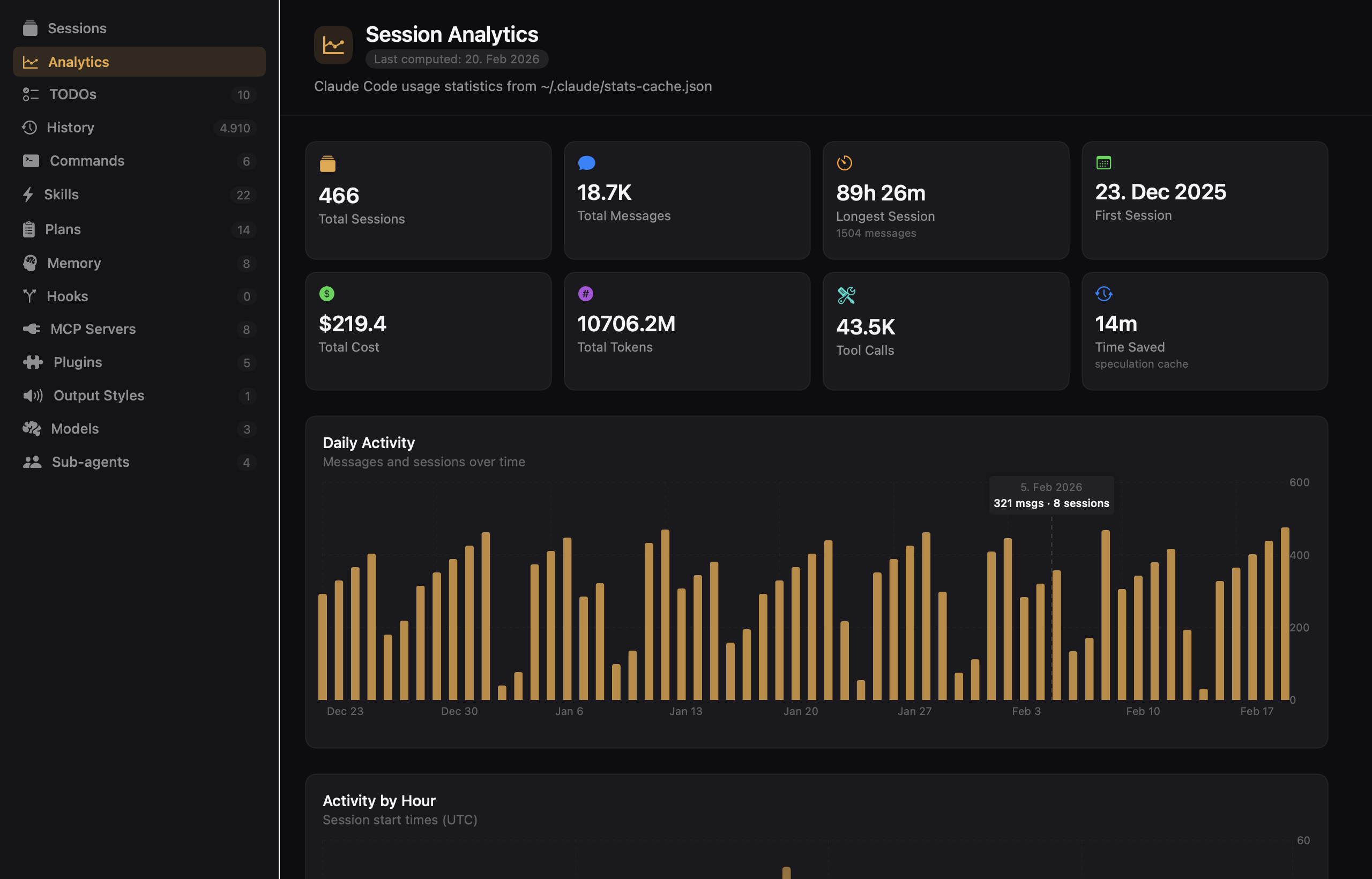
- Session Analytics — Token consumption, cost breakdowns, model distribution, and session trends
- Usage Limits — Live subscription rate-limit gauges (5-hour and 7-day windows) with utilization and reset countdowns, in the dashboard and menu bar — no login, reusing the token Claude Code already stores
- Session History Browser — Sessions grouped by project with timestamps, model info, and token counts
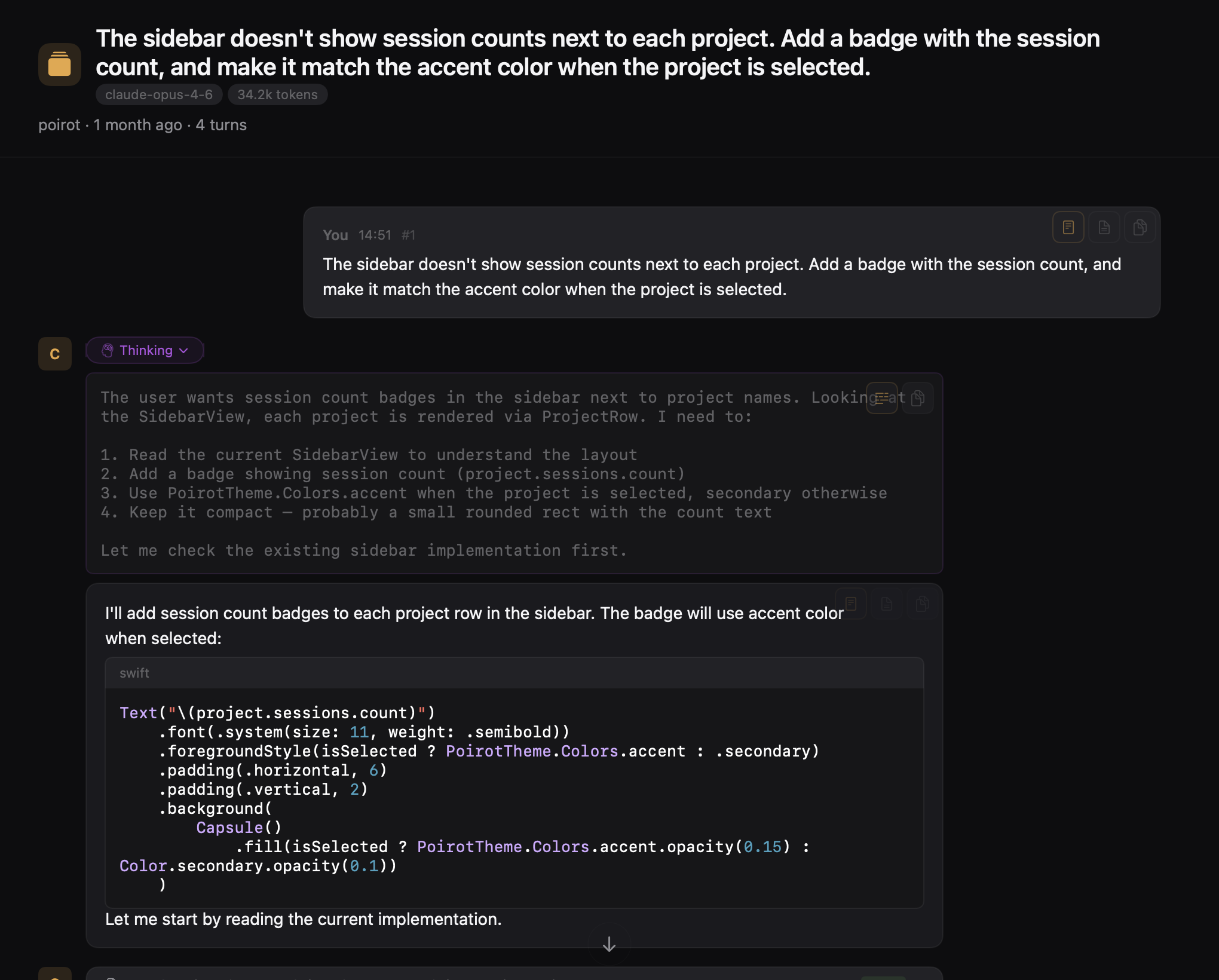
- Rich Conversation View — Full timeline with markdown rendering, syntax highlighting, and collapsible tool blocks
- Tool Block Display — Every tool invocation rendered with name, icon, file path, and result
- Extended Thinking — Collapsible thinking blocks with distinct purple accent
- Fuzzy Search (⌘K) — Spotlight-style search across sessions, commands, file paths, and more
- Slash Commands — Browse global and per-project commands with descriptions and permissions
- Skills — Explore reusable skill modules with parsed frontmatter
- MCP Servers — Live connection status indicators with color-coded SF Symbols
- Models — Browse available models and their capabilities
- Sub-agents — Create, edit, and manage custom sub-agents with tools, model, memory, and system prompt
- Plugins — View installed plugins and their metadata
- Output Styles — Preview output formatting styles
- Hooks — Event hooks grouped by type with matcher patterns and handler details
- Session TODOs — Per-session todo lists with status tracking
- Plans — Browse
~/.claude/plans/with rendered markdown and file watching - Debug Log Viewer — Color-coded log levels, search, filtering, and paginated loading
- Prompt History — Browse input history with date grouping and project filtering
- AI Session Summaries — Goal, outcome, helpfulness, and friction indicators from facets
- Memory — Per-project auto-memory files with rendered markdown and live watching
See all features with screenshots in the Feature Showcase.
Capabilities
| Category | Feature | Description |
|---|---|---|
| Analytics | Session Analytics Dashboard | Token consumption, cost breakdowns, model distribution, and session trends |
| Usage Limits | Subscription 5-hour / 7-day rate-limit gauges with reset countdowns; reads Claude Code's existing OAuth token (no login), shown in the dashboard and menu bar | |
| Sessions | JSONL Transcript Parser | Parses ~/.claude/projects/ transcripts into structured models |
| Session History Browser | Sessions grouped by project with timestamps, model, token counts | |
| Real-time File Watching | Auto-updates via GCD dispatch sources with 1s debounce | |
| Per-Project Configuration | Supports global (~/.claude/) and per-project (.claude/) scopes | |
| Session Detail View | Full conversation timeline with collapsible blocks and scroll-to-bottom | |
| Conversation | Markdown Rendering | Rich text with syntax highlighting via MarkdownUI + HighlightSwift |
| Code Diff Viewer | Syntax-highlighted inline diffs for Edit tool blocks | |
| Bash Output Renderer | Terminal command output with monospace styling and exit status | |
| Extended Thinking | Collapsible thinking blocks with distinct purple accent | |
| Tool Blocks | Every tool invocation rendered with name, icon, file path, and result | |
| In-Session Search | ⌘F to search within the current conversation | |
| Diagnostics | Debug Log Viewer | Parse and browse ~/.claude/debug/ logs with color-coded levels, search, filtering, and paginated lazy loading |
| Auto-scroll to Error | Opens directly at the first error entry for quick triage | |
| Relative Timestamps | Toggle between absolute (HH:mm:ss.SSS) and relative (+offset) time display | |
| History | Prompt History Browser | Browse ~/.claude/history.jsonl with date grouping, project filtering, full-text search, and copy-to-clipboard |
| AI Summaries | Session Facets | AI-generated analysis (goal, outcome, helpfulness) from ~/.claude/usage-data/facets/ |
| Outcome & Helpfulness Badges | Color-coded badges for success/partial/failure and helpfulness rating | |
| Goal Categories | Tag chips showing categorized session goals with counts | |
| Friction Indicators | Subtle indicators for tool failures, misunderstandings, and other friction | |
| Live File Watching | Auto-updates when new facets appear via GCD dispatch sources | |
| Search | Universal Search (⌘K) | Fuzzy search across sessions, AI summaries, history, commands, skills, memory, MCP servers, plugins, output styles, models, sub-agents, plans, TODOs, and debug logs |
| Grouped Results | Results organized by category with counts | |
| Quick Access | Empty state shows shortcuts, counts, and recent sessions | |
| Configuration | Commands | Browse and manage slash commands (global and per-project) |
| Skills | Browse and manage reusable skill modules | |
| MCP Servers | Browse configured Model Context Protocol servers with live connection status | |
| Models | Browse available models and capabilities | |
| Sub-agents | Create, edit, duplicate, and delete custom sub-agents with categorized tool selection and memory configuration | |
| Plugins | Browse installed plugins | |
| Output Styles | Browse and manage output style configurations | |
| Hooks | View and manage event hooks grouped by type with matcher patterns and handler details | |
| TODOs | Browse per-session todo lists with status tracking and session navigation | |
| Plans | Browse ~/.claude/plans/ markdown files with rendered/raw toggle, copy, delete, and file watching | |
| Memory | Browse per-project auto-memory files with rendered markdown, project filtering, and file watching | |
| Grid & List Views | Toggle between card grid and compact list layouts | |
| Scope Badges | Visual distinction between Global and Project-scoped items | |
| Integrations | IDE/Editor | One-click open files in VS Code, Cursor, Xcode, or Zed |
| Terminal Selection | Pick your terminal: Terminal, iTerm2, Warp, Ghostty, Kitty, Alacritty | |
| Quick Command Re-run | Click any Bash command to copy or open in your terminal | |
| Export | Session Export | Export sessions as Markdown or PDF with configurable options |
| Copy Markdown | One-click copy of session content as Markdown to clipboard | |
| Share Sheet | Native macOS share sheet integration for exported files | |
| Sub-agents | Custom Agent Creation | Full form with name, description, system prompt, model, color, categorized tools, and persistent memory |
| Auto File Naming | File path auto-derived from agent name (lowercase, dashes); file renamed on edit | |
| Tool Categories | Select tools by category (Read-only, Edit, Execution, Other) or individually | |
| Agent Memory | Configure persistent memory per agent (global or none) | |
| Import/Export | Share agents as JSON files between users | |
| Duplicate | Clone built-in or custom agents as starting points | |
| Navigation | Font Scaling | ⌘+ / ⌘- / ⌘0 to zoom the entire UI |
| Keyboard Shortcuts | Full keyboard navigation with discoverable shortcut hints | |
| Help Book (⌘?) | Keyboard reference, feature overview, and getting started guide | |
| App | Onboarding Flow | First-run welcome with CLI detection, session discovery, and feature tour |
| Homebrew Distribution | brew install --cask poirot with automated release workflow | |
| Design | Dark Theme | Warm golden accent (#E8A642) on near-black backgrounds |
| SF Symbols | All icons are SF Symbols with bounce, pulse, and replace animations | |
| Design Tokens | Centralized PoirotTheme for colors, spacing, radii, and typography | |
| Architecture | Swift 6 | Strict concurrency with @MainActor default isolation |
| Observation | @Observable with @State — no ObservableObject | |
| Protocol-Driven DI | Services injected via SwiftUI EnvironmentValues | |
| Provider System | Extensible ProviderDescribing protocol for multi-LLM support | |
| Swift Testing | @Test, #expect, #require with hand-written mocks |
Getting Started
Install with Homebrew
brew tap a7t-ai/poirot
brew install --cask poirot
Prerequisites
| Tool | Version | Install |
|---|---|---|
| macOS | 15.0+ | — |
| Xcode | 16.0+ | Mac App Store |
Install SwiftLint and SwiftFormat via Homebrew: brew install swiftlint swiftformat.
Build & Run
git clone https://github.com/a7t-ai/poirot.git
cd Poirot
brew install swiftlint swiftformat
open Poirot.xcodeproj
Hit ⌘R in Xcode and you're up. Or build from the command line:
xcodebuild -scheme Poirot -destination 'platform=macOS' -skipMacroValidation build
Run Tests
xcodebuild test -scheme Poirot -destination 'platform=macOS' -skipMacroValidation
Tests use Swift Testing (@Test, #expect, #require) — not XCTest.
Architecture
Poirot/Sources/
├── App/           # Entry point, ContentView, AppState, Settings
├── Models/        # Value-type structs — Project, Session, Message, ContentBlock
├── Protocols/     # Service protocols (SessionLoading, ProviderDescribing)
├── Services/      # Concrete implementations + SwiftUI Environment DI
│   └── Providers/ # LLM provider configs (ClaudeCodeProvider)
├── Theme/         # Design tokens (PoirotTheme) + Markdown theme
├── Utilities/     # Parsers, terminal launcher
└── Views/         # SwiftUI views organized by feature
    ├── Components/    # Sidebar, StatusBar, Shimmer
    ├── Configuration/ # Config dashboard
    ├── History/       # Prompt history browser
    ├── Home/          # Welcome / empty state
    ├── Memory/        # Memory file browser
    ├── Project/       # Project sessions list
    ├── Plans/         # Plans browser
    ├── Search/        # ⌘K overlay
    ├── Session/       # Conversation detail, tool blocks, thinking
    └── Todos/         # Per-session todo overview
Tech Stack
| Layer | Choice |
|---|---|
| Language | Swift 6 with strict concurrency |
| UI | SwiftUI + Observation (@Observable) |
| Concurrency | MainActor default isolation |
| DI | Protocol-driven services via EnvironmentValues |
| Markdown | MarkdownUI |
| Syntax Highlighting | HighlightSwift |
| Linting | SwiftLint (strict profile) |
| Formatting | SwiftFormat |
| Testing | Swift Testing with hand-written mocks |
Design System
Poirot uses a custom dark theme built around a warm golden accent (#E8A642) on near-black backgrounds (#0D0D0F). All icons are SF Symbols with symbol effects (bounce, pulse, replace transitions). Typography scales dynamically with user preference (⌘+/⌘-).
Design tokens live in PoirotTheme.swift — colors, spacing, radii, and typography all in one place.
How It Works
~/.claude/projects/          Poirot reads JSONL transcripts
        │                    from Claude Code's local storage
        ▼
┌─────────────────┐
│  SessionLoader   │──▶ Discovers projects & session files
└────────┬────────┘
         ▼
┌─────────────────┐
│ TranscriptParser │──▶ Parses JSONL into Session/Message models
└────────┬────────┘
         ▼
┌─────────────────┐
│    AppState      │──▶ Observable state with in-memory caching
└────────┬────────┘
         ▼
┌─────────────────┐
│   SwiftUI Views  │──▶ Sidebar → Session Detail → Tool Blocks
└─────────────────┘
Contributing
We welcome contributions of all sizes — bug fixes, new features, documentation, or just fixing a typo.
Quick Start
- Fork the repo
- Create a feature branch from
main - Make your changes with tests
- Ensure the build passes with zero warnings
- Ensure all tests pass
- Ensure SwiftLint passes
- Open a PR against
main
See CONTRIBUTING.md for the full guide on code style, architecture conventions, and testing expectations.
Code Style at a Glance
- Swift 6 — All types are implicitly
@MainActor(no manual annotations needed) @Observablewith@State— notObservableObject- SF Symbols only — No custom icon assets
- Swift Testing —
@Test,#expect,#requirefor all new tests - Hand-written mocks — In
PoirotTests/Mocks/, no mocking frameworks
Roadmap
Poirot is early. There's a lot to build and we'd love your help. Track what's planned and in progress on the issues page.
Community
- Found a bug? Open an issue
- Have an idea? Start a discussion
- Want to contribute? Read the guide and send a PR
Acknowledgments
- Built with Claude Code — the tool this app is built to complement
- MarkdownUI for rich text rendering
- HighlightSwift for code syntax highlighting
- Every SF Symbol that made the UI feel native
License
MIT — see LICENSE for details.
No tracking. No analytics. Analyze the code yourself, or ask your Claude to do it. :)
Made with coffee and Claude Code in a weekend.
If you find Poirot useful, consider giving it a star. It helps others discover the project.