
ZYRON Desktop Assistant
Your Intelligent Desktop Companion - 100% Local, 100% Private






Powerful • Private • Precise
Control your Windows PC with voice commands or Telegram - all powered by local AI with zero cloud dependencies
What Makes ZYRON Special?
ZYRON isn't just another assistant - it's your personal AI that lives entirely on your machine. No subscriptions, no cloud uploads, no privacy concerns. Just pure, powerful automation at your fingertips.
Core Features
Voice ControlJust say "Hey Pikachu" and command your PC naturally |
Remote AccessControl your computer from anywhere via Telegram |
Smart AIPowered by Qwen 2.5 Coder - understands context and intent |
100% PrivateEverything runs locally - no data leaves your PC |
Zero CostNo API fees, no subscriptions, completely free |
Production ReadyAuto-start, stealth mode, enterprise-grade |
See It In Action
Real Conversations with ZYRON
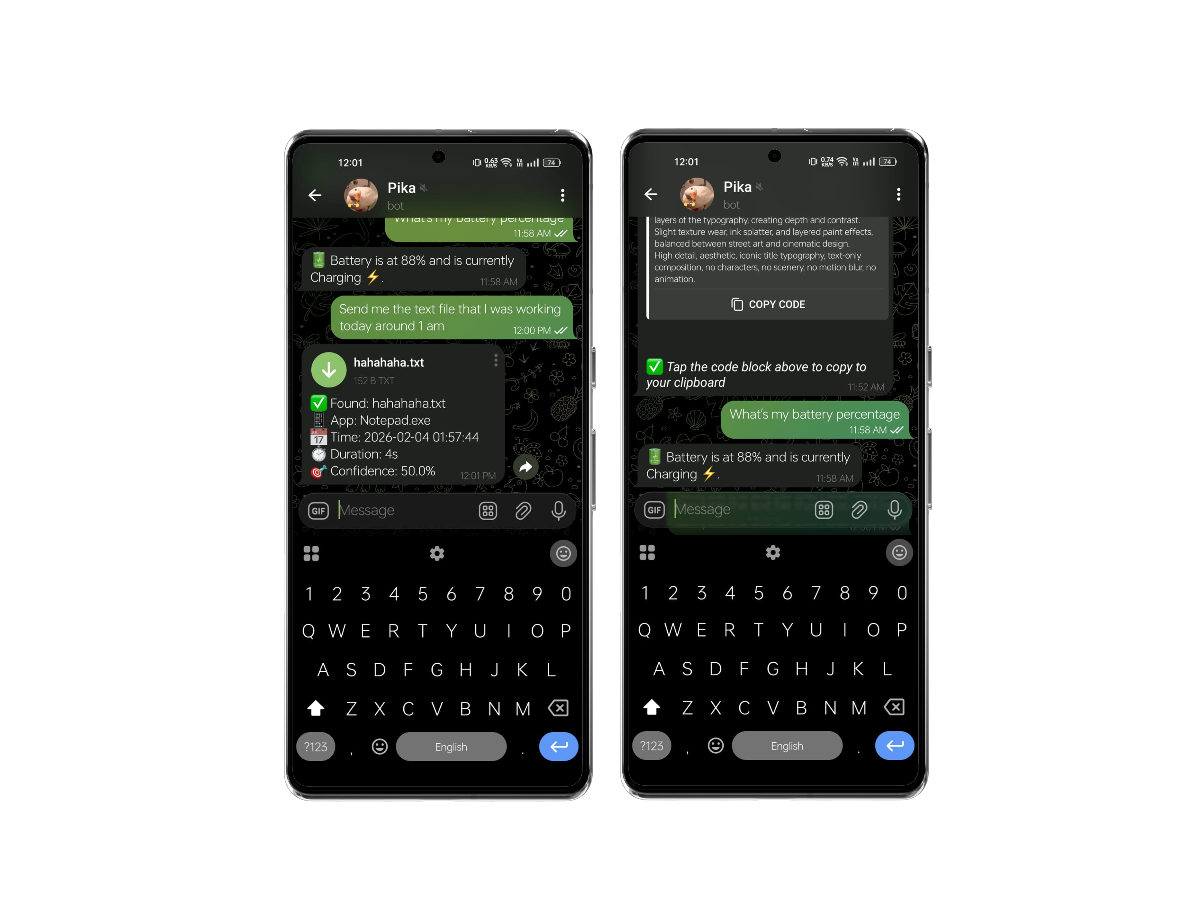
Smart file search and battery monitoring with code copying |
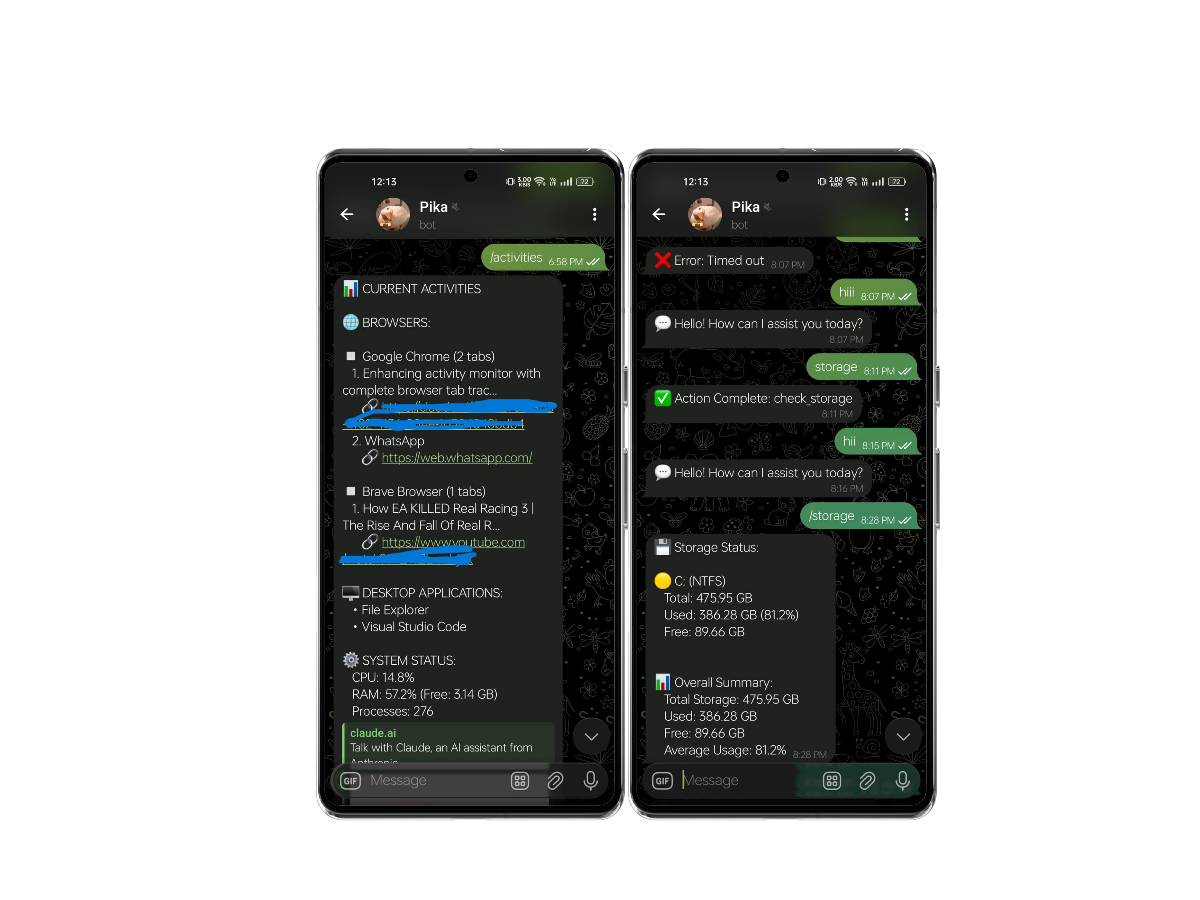
Live browser tracking, app monitoring, and storage analysis |
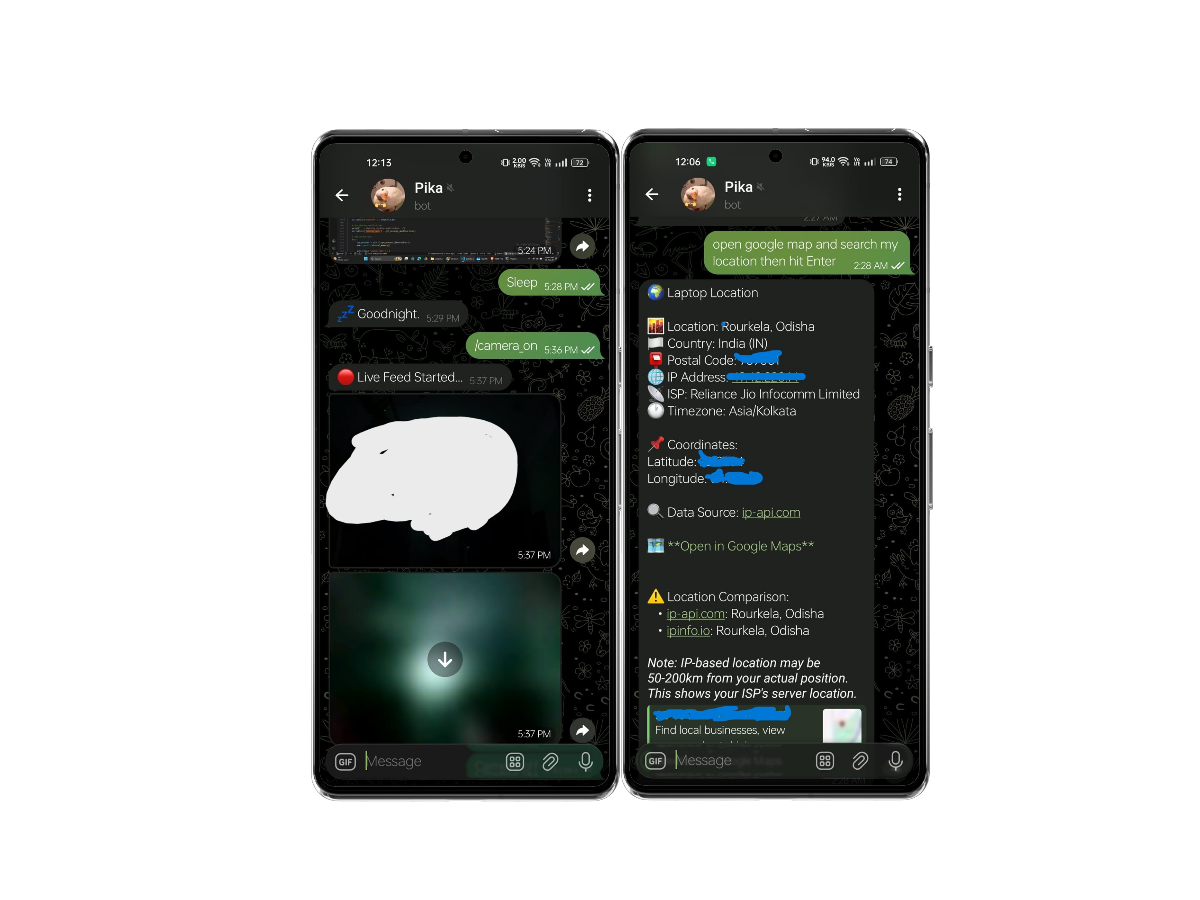
Geolocation tracking and live camera feed access |
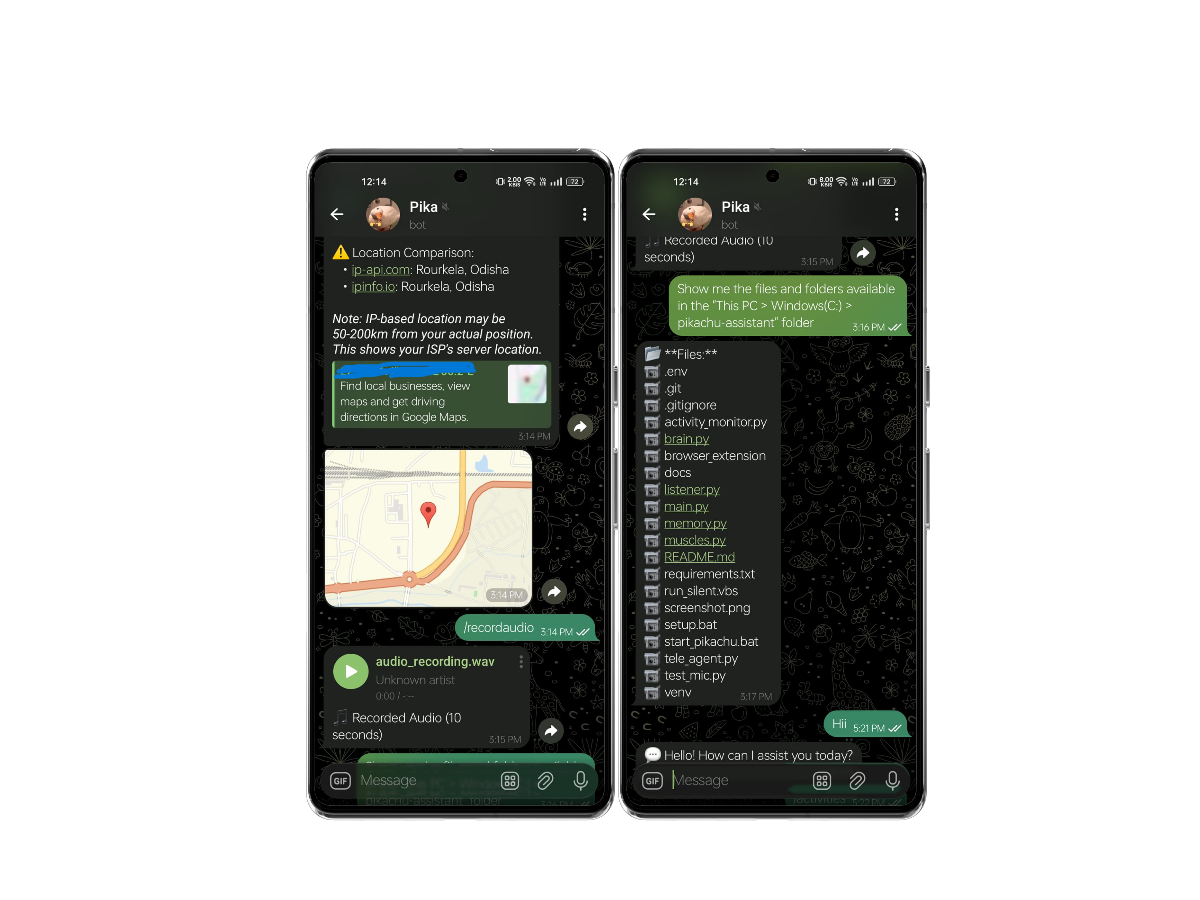
Audio recording and intelligent file system navigation |
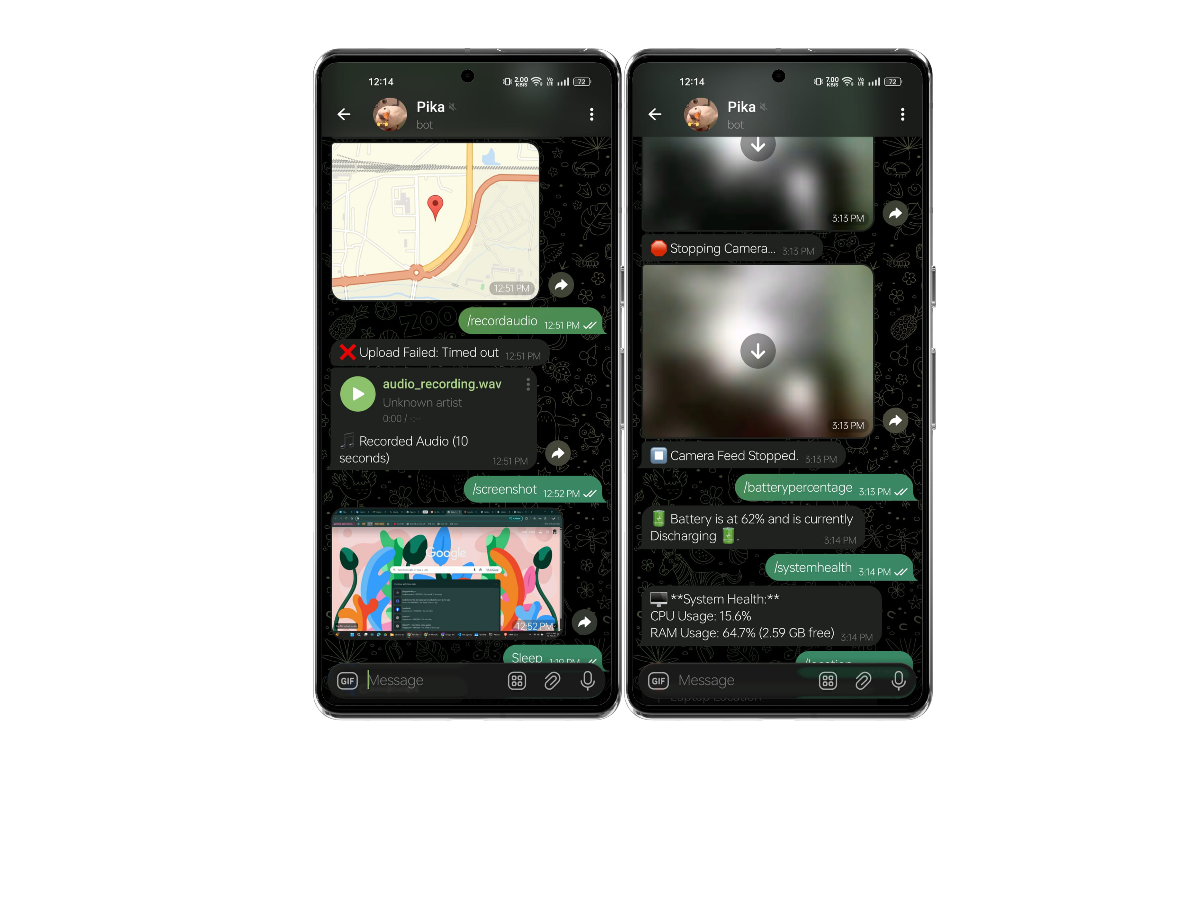
Screenshots and comprehensive system health monitoring |
What Can ZYRON Do?
System Control
- Launch & Manage Apps - Open Chrome, Spotify, VS Code, or any application
- Power Management - Sleep, shutdown, restart, or lock your PC
- File Operations - Browse, search, and manage files naturally
- Window Control - Switch between apps, minimize, maximize
Monitoring & Intelligence
- Live Activity Tracking - See what apps you're running and which browser tabs are open
- System Health - Real-time CPU, RAM, disk, and battery monitoring
- Storage Analysis - Check available space across all drives
- Clipboard History - Access your last 100 copied texts
- Zombie Process Reaper - Auto-detects and alerts you about idle, high-memory apps (kills them on command)
Media Capture
- Screenshots - Capture your screen on command
- Camera Feed - Access your webcam remotely
- Audio Recording - Record 10-second clips from system + microphone
- Instant Sharing - All media delivered via Telegram
Smart Search
- Intelligent File Finder - "Find that PDF I opened yesterday" - ZYRON understands
- Recent Files - Access files by time, type, or keyword
- Activity Log - 30-day history of all file access
- Context-Aware - Learns your preferences over time
Location & Network
- IP Geolocation - Know where your laptop is
- Network Info - Check your connection status
- Location Tracking - Useful for lost/stolen device scenarios
🚀 The Ultimate 0-100 Setup Guide
Follow these stages to get Zyron running perfectly on your machine.
Stage 1: The Engine (AI Infrastructure)
- Download Ollama: Visit ollama.com and install it.
- Pull the Model: Open your terminal and run:
(This model is optimized for tool-calling and system automation)ollama pull qwen2.5-coder:7b
Stage 2: The Core (Installation)
- Clone & Enter:
git clone https://github.com/Surajkumar5050/zyron-assistant.git cd zyron-assistant - Automated Installer: Run the setup script. It creates your environment and installs all 30+ required libraries.
setup.bat
Stage 3: The Bridge (Firefox Integration) 🦊
For live browser monitoring and stealth research:
- Add-on: Download
zyron_activity_monitor.xpifrom the Releases section. - Install: In Firefox, go to
about:addons-> Gear Icon ⚙️ -> Install Add-on From File.... - Secure Bridge: Run the registration script to connect Firefox to your PC:
python src/zyron/scripts/register_native_host.py
Stage 4: Remote Control (Telegram)
- Create Bot: Message @BotFather on Telegram and get your
API TOKEN. - Configure
.env: Open the.envfile created by the installer and fill it in:TELEGRAM_TOKEN=your_bot_token_here ALLOWED_TELEGRAM_USERNAME=your_telegram_username MODEL_NAME=qwen2.5-coder:7b
Stage 5: Launch (The Experience)
- Visible Mode (Testing): Run
start_zyron.batto see the console and voice feedback. - Stealth Mode (Professional): Run
run_silent.vbs. Zyron will move to the background and wait for your voice or Telegram commands without taking up window space.
Command Examples
Voice Commands
"Hey Pikachu, what's my battery level?"
"Hey Pikachu, open Spotify"
"Hey Pikachu, take a screenshot"
"Hey Pikachu, show me what I'm doing"
"Hey Pikachu, find that Excel file from yesterday"
"Hey Pikachu, where am I?"
"Hey Pikachu, check storage"
Telegram Commands
/activities - See running apps and browser tabs
/screenshot - Capture your screen
/batterypercentage - Check current battery percentage + charging / discharging status
/systemhealth - View CPU, RAM, and system performance status
/storage - View disk space across all drives
/location - Get current location
/recordaudio - Record 10 seconds of audio
/camera_on - Start camera feed
/camera_off - Stop camera feed
/sleep - Put PC to sleep
/restart - Restart the system
/shutdown - Shut down the system
/clear_bin - Empty recycle bin
/copied_texts - View top 20 clipboard history
/focus_mode_on - Enable focus mode (do not disturb)
/blacklist - Manage blocked apps, sites for focus mode
Natural Language (Both Voice & Text)
"Open Chrome and go to YouTube"
"What's my battery percentage?"
"Find that PDF I was working on this morning"
"Show me my system resources"
"List files in my downloads folder"
"Clear the recycle bin"
"Send me that document I opened yesterday"
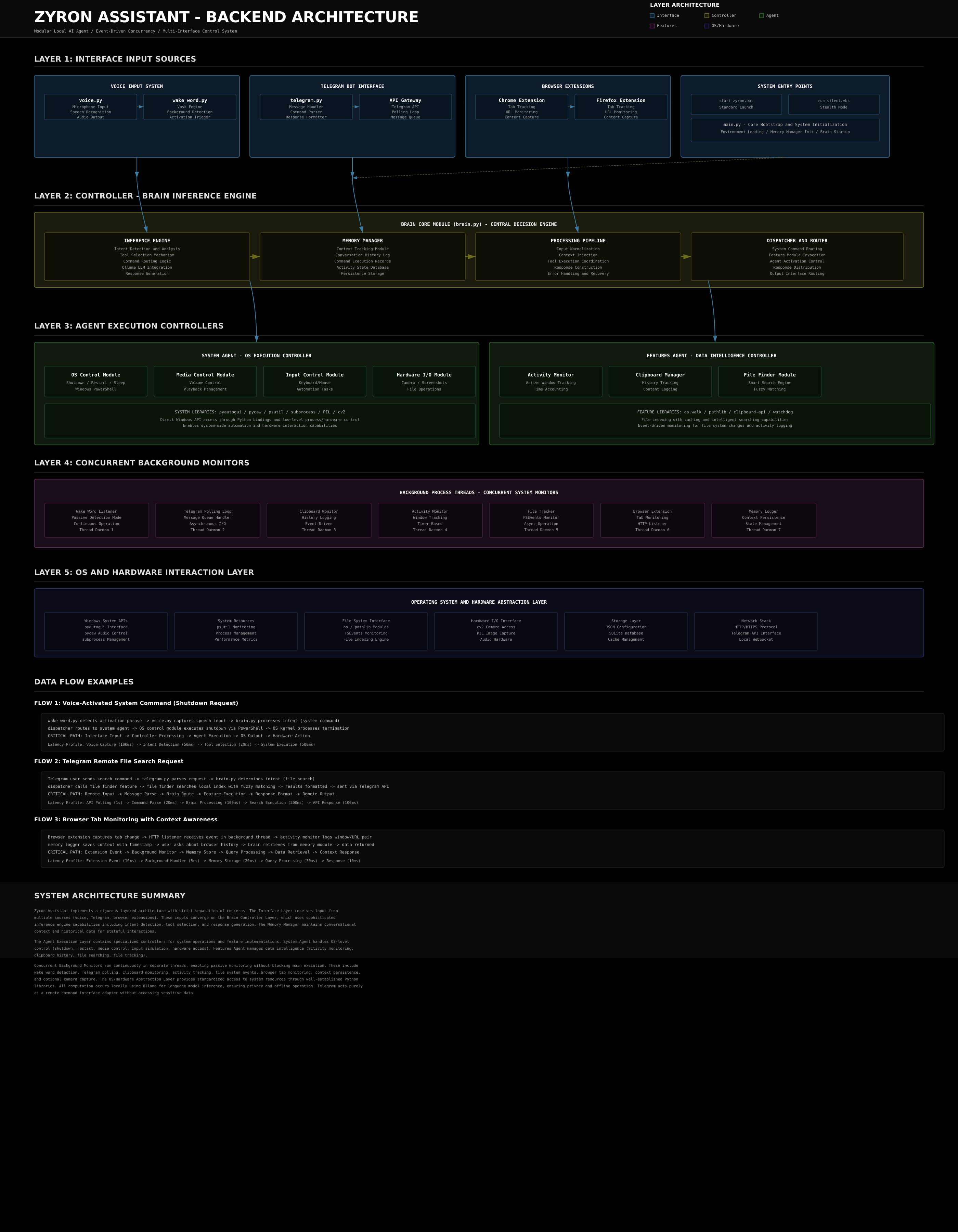
Project Architecture
zyron-assistant/
│
├── src/
│   └── zyron/
│       ├── main.py                    # Application entry point
│       ├── core/                      # Core System Modules
│       │   ├── brain.py               # AI inference engine
│       │   ├── voice.py               # Voice input/output
│       │   ├── wake_word.py           # Offline Wake Word (Vosk)
│       │   └── memory.py              # Context manager
│       ├── agents/                    # Autonomous Agents
│       │   ├── system.py              # System automation (muscles)
│       │   └── telegram.py            # Telegram bot handler
│       └── features/                  # Feature Modules
│           ├── activity.py            # App & Browser monitoring
│           ├── clipboard.py           # Clipboard history
│           └── files/                 # File System Intelligence
│               ├── finder.py          # Smart search engine
│               └── tracker.py         # File activity logger
│
│
├── browser_extension/         # Chrome extension for tab monitoring
│   ├── manifest.json
│   ├── background.js
│   ├── popup.html
│   ├── popup.js
│   └── icons/
│       ├── icon16.png
│       ├── icon48.png
│       └── icon128.png
├── firefox_extension/         # Firefox extension for tab monitoring
│   ├── manifest.json
│   ├── background.js
│   ├── icon16.png
│   ├── icon48.png
│   └── icon128.png
│
├── docs/                      # Documentation
│   ├── ACTIVITIES_FEATURE_GUIDE.md
│   ├── ARCHITECTURE.md
│   ├── CONFIGURATION.md
│   ├── CONTRIBUTING.md
│   ├── EXTENSION_INSTALL_GUIDE.md
│   ├── INSTALLATION.md
│   ├── LOCATION_ACCURACY_GUIDE.md
│   └── USER_MANUAL.md
│
├── markdown_themes/           # README assets
│   ├── header.png
│   ├── collage1.png
│   ├── collage2.png
│   ├── collage3.png
│   ├── collage4.png
│   └── collage5.png
│
├── setup.bat                  # Automated installer
├── run_silent.vbs             # Stealth mode launcher
├── start_zyron.bat            # Standard launcher
├── .env                       # Environment configuration (create this)
├── .gitignore                 # Git ignore rules
├── README.md                  # This file
└── LICENSE                    # MIT License
Latest Features (v1.5.0) 🚀
Intelligent File Tracking
- Automatic Monitoring - Tracks every file you open across all applications
- 30-Day History - Complete log with timestamps, apps, and duration
- 40+ File Types - Documents, images, videos, code, archives, and more
Natural Language File Search
Just describe what you're looking for:
- "Find that PDF I opened yesterday afternoon"
- "Get me that Excel file from this morning"
- "Send that document I was working on last week"
- "That image I saw 2 hours ago"
Clipboard History
- Last 100 Texts - Never lose a copied snippet again
- Timestamped - Know when you copied it
- Quick Access - Retrieve via voice or Telegram
Firefox Integration (v1.5)
- Permanent Browser Bridge - Signed extension ensures it stays active after restart.
- Stealth Research - Zyron finds answers in the background using "Quiet Tabs".
- Headless Fallback - If Firefox is closed, Zyron automatically switches to a low-level headless search engine.
- Privacy Focused - No cloud syncing required; 100% local activity monitoring.
Offline Voice & Hybrid Mode
- Offline Wake Word - Uses Vosk (local) for instant "Hey Pikachu" detection.
- Hybrid Command - Falls back to online speech for accuracy, or set
OFFLINE_MODE=truefor 100% local processing. - Privacy First - You control where your audio goes.
Privacy & Security
Why ZYRON is Different:
Zero Cloud Dependencies - Everything runs on your machine
No External APIs - Your data never leaves your PC
No Telemetry - We don't collect anything
Open Source - Audit the code yourself
Local AI - Ollama processes everything offline
Your data is YOURS.
Advanced Setup
Browser Activity Monitoring (v1.5) 🦊
For the full experience (Invisible Research, Stealth Mode, Media Control):
-
Download the Extension:
- Go to the Releases section.
- Download
zyron_activity_monitor.xpi.
-
Install Permanently:
- Open Firefox and go to
about:addons. - Click the Gear (⚙️) icon -> Install Add-on From File....
- Select the
.xpifile you downloaded.
- Open Firefox and go to
-
Register the Native Host:
python src/zyron/scripts/register_native_host.py(This secures the bridge between your PC and the browser)
Now Zyron can "see" and "research" and "control" your browser even if you're not looking.
Advanced Browser Control (New v1.4) 🦊
- Smart Logic - "Close it" knows you mean the YouTube tab you just watched.
- Ranked Matching - "Mute Spotify" finds the exact tab instantly.
- Media Control - Play/Pause/Next in browser directly from Telegram (no need to open the tab).
- Tab Capture - High-quality screenshots of specific tabs (background capture supported).
Frequently Asked Questions
Q: Is my data safe?
A: Absolutely. Everything runs locally on your PC. No cloud services, no external APIs.
Q: Does it work on Mac/Linux?
A: Currently Windows-only due to system automation. Cross-platform support is planned.
Q: How much RAM does it use?
A: 2-4 GB idle, 6-8 GB during active AI processing.
Q: Can I use different AI models?
A: Yes! Any Ollama-compatible model works. Just update MODEL_NAME in .env
Q: Do I need Telegram?
A: For remote control, yes. Voice-only mode is available but remote features require the bot.
🛠️ Troubleshooting
| Issue | Solution |
|---|---|
| ModuleNotFoundError | Run setup.bat. It will automatically sync your missing libraries. |
| Firefox Bridge Not Connected | Run python src/zyron/scripts/register_native_host.py and restart Firefox. |
| Wake Word Not Detected | Check your default Windows Microphone settings and ensure it's not muted. |
| Telegram Bot Not Responding | Double-check your TELEGRAM_TOKEN in the .env file. |
Contributing
We love contributions! Here's how:
- Fork the repository
- Create a feature branch:
git checkout -b feature/AmazingFeature - Commit your changes:
git commit -m 'Add AmazingFeature' - Push to the branch:
git push origin feature/AmazingFeature - Open a Pull Request
Development Setup
git clone https://github.com/Surajkumar5050/zyron-assistant.git
cd zyron-assistant
git checkout -b dev
pip install -e .
pytest tests/
License
MIT License - Free to use, modify, and distribute.
Copyright © 2025 ZYRON Desktop Assistant
See LICENSE for full terms.
Acknowledgments
Built with amazing open-source tools:
- Ollama - Local AI infrastructure
- Qwen Team - Qwen 2.5 Coder model
- python-telegram-bot - Telegram API wrapper
- All our contributors and testers
Support & Community
- Documentation: Full Wiki
- Bug Reports: Issue Tracker
- Discussions: GitHub Discussions
Star This Project
If ZYRON makes your life easier, give us a star! It helps others discover this project.
Crafted with care for privacy-conscious power users