waku-agent
Your own AI assistant. On your laptop. In code you can read in an afternoon.
Meet Waku — a local-first personal assistant that shows the four pillars behind every serious agent: Harness · Loop · Memory · Eval/LLM-Ops. No frameworks hiding the good parts. Built by seanchen.io.
- Local-first. Your memory is one SQLite file. Open it. Read it. It's yours.
- Memory is the hero. Semantic + episodic + procedural — with a gate that decides whether to remember, and a pass that decides what to keep.
- The loop is ~95 lines of plain Python. Step through it.
- Watch it think. A local dashboard lights up every message as it flows through the harness.
- Eval built in. Deterministic tests and LLM-as-judge, side by side, with a release gate.
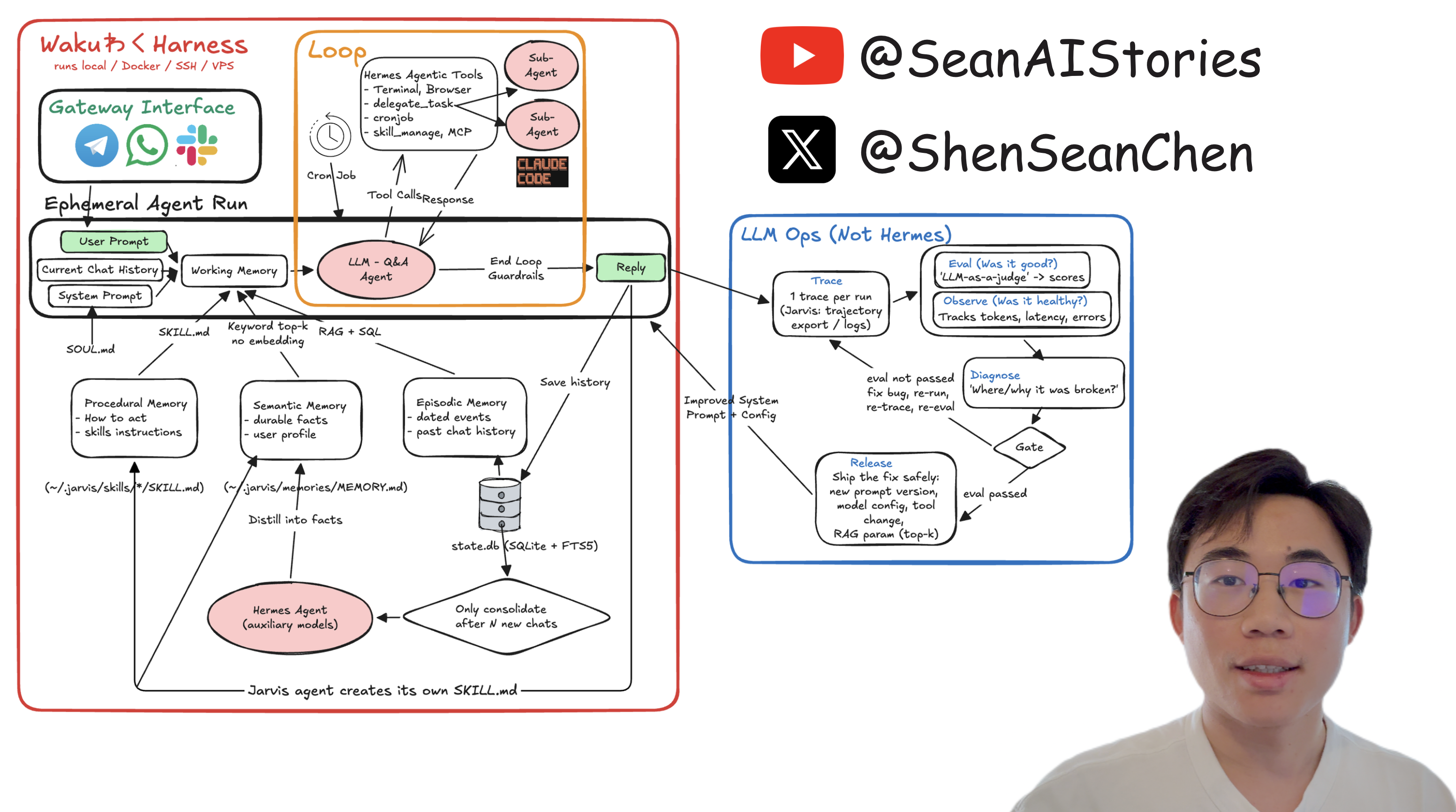
The system-design whiteboard from the series. Every box maps to a file — see the whiteboard maps to the code.
▶ Watch the 20-min code walkthrough — the loop, the memory pillars, the evals, the Telegram gateway and the "Waku Waku" wake word, live.
YouTube · X · LinkedIn · Instagram · TikTok · Discord · 哔哩哔哩 · 小红书 · 抖音
☕️ Buy me a coffee — it keeps this repo (and the videos) coming
Quickstart
Just want to run it:
pip install waku-agent
waku                                    # talk to your Waku in the terminal
waku dashboard                          # …or the browser cockpit → localhost:7777
It will tell you which key to set the first time. Want to read the code (the point of this repo) or contribute — clone it instead:
git clone https://github.com/ShenSeanChen/waku-agent && cd waku-agent
uv venv && uv pip install -e .          # create the env + install the `waku` command
cp .env.example .env                    # pick a provider, paste ONE key
uv run waku                             # talk to your Waku in the terminal
uv run waku dashboard                   # …or the browser cockpit → localhost:7777
uv run waku … needs no venv activation. Three ways to run it:
| Command | When |
|---|---|
uv run waku dashboard | quick start, zero activation (recommended) |
source .venv/bin/activate → waku dashboard | activate once, bare waku all session |
uv tool install . → waku dashboard | install waku globally, forever |
waku and waku dashboard are two doors into the same Waku. The dashboard is a tiny web
server on your machine — chat in the browser, that process runs the turn. Nothing leaves your
laptop. Set TELEGRAM_BOT_TOKEN and it starts your bot too. (make dashboard works as well.)
Now try it. "Remember that Alex prefers morning meetings." Quit. Restart.
"Book a catch-up with Alex on Friday." → it remembers, and books 9am. Your memory is one
file: .waku/state.db.
Use the model you already pay for. Anthropic (default), OpenAI, Gemini, DeepSeek, MiniMax,
Kimi, GLM, OpenRouter (one key, hundreds of hosted models), OpenCode Zen, or OpenCode Go —
set WAKU_PROVIDER=, paste the key, done. One dialect in the loop;
a ~60-line adapter handles the rest.
Watch the harness run — the dashboard
waku dashboard # starts a local server → http://localhost:7777
A small web server you own (127.0.0.1, no cloud). The browser is just the UI — the same
process runs every turn. This is the fastest way to get the system.
A chat dock sits on every tab. Type or speak, and watch it flow through the harness on the Overview diagram: gate lights up → loop calls a tool → reply comes back → memory updates. The frontend is plain static files. No build step.
Each tab is one pillar, linked to the real files:
| Tab | What you see |
|---|---|
| Overview | cost, latency, the gate skip/retrieve split, the clickable architecture map |
| Gateway | one conversation across every channel, each message tagged by source (dashboard / telegram / voice / cli) |
| Loop | every turn with its gate decision, tool calls, tokens, and cost |
| Graph | graph workflows: the live triage topology (drawn from the engine itself) + which door each turn took |
| Memory | sub-tabs per pillar — semantic facts, episodes, editable skills + SOUL, consolidation |
| Tools | the agent's available tools (grouped by origin), its results, and MCP connectors |
| Data | a live SQLite browser: per-table tabs, schema, and a read-only SQL console over state.db |
| Ops | eval verdict + history, the gate decisions, slowest turns, and inline JSONL traces |
The sidebar and chat dock are drag-resizable and hideable, and the chat has New chat + history like any chat app.
Things to try (each shows off a pillar)
Type these in the chat dock (or make run) and watch the dashboard light up:
| Try this | What it shows | Where to watch |
|---|---|---|
| "Schedule a tennis game with Raj this Saturday at 8am" | the Loop calls a tool (create_event) | the LOOP box pulses; Loop tab shows iter 2 |
| "What's on my calendar today?" | reading the calendar (list_events) | it answers from state.db, no made-up events |
| "When am I swimming with Sergey?" then "what's 12 × 8?" | the retrieval gate — retrieve vs skip | Overview gate bar; Ops shows the per-turn decision |
| "Remember that Raj prefers evening games" | memory self-management (save_note) | Memory ▸ Semantic gains a fact; MEMORY.md updates |
| "Search for the World Cup games still left to play and add each one to my calendar" | multi-tool loop engineering | Loop tab shows iter 8: search_web × N → create_event × N |
chat from make run and the browser | one brain, many gateways | the Gateway tab tags each message cli / dashboard |
The money shot is the World Cup one. In one turn, Waku searches the web a few times, reasons
over the results, and books every remaining match — 8 loop iterations, live. Needs a free
TAVILY_API_KEY (paste it in Connections). Watch the LOOP box pulse per cycle. That's loop
engineering, on tape.
How is this different from ChatGPT / Claude Desktop?
Those are products you use. This is a codebase you own — the loop, the memory schema, the gate, the eval harness, all yours to read and change. Understand this repo, and you understand what the products do under the hood.
Versus the big open-source assistants (OpenClaw, Hermes)? Same architecture, 1/100th the code. Products vs. a readable blueprint.
The whiteboard gallery — editable system-design charts
Every whiteboard from the videos lives in docs/whiteboards/ as an
editable .excalidraw source — download one, drop it on excalidraw.com,
and remix it for your own team:
| Chart | What it explains |
|---|---|
k3-architecture.excalidraw | Kimi K3: the 16-of-896 MoE, KDA + AttnRes attention, why agent loops get cheap |
pi-architecture.excalidraw | pi (72K-star coding agent): 4-tool core, extensions, one EventStream |
waku-architecture.excalidraw | Waku itself — harness, loop, memory pillars, LLM Ops (editable rebuild of the whiteboard) |
loop-vs-graph.excalidraw | Loop vs graph engineering — the ladder, and two timelines from a measured run of waku brief against waku gather (the write-up) |
New charts land here with every video. If they help you, a star keeps them coming — and sponsoring gets new whiteboards early.
The whiteboard maps to the code
This diagram renders straight from the README (it's Mermaid text, not an image — edit it in a PR):
flowchart LR
  GW["Gateway<br/>cli · telegram · voice · dashboard"] --> WM["Working memory<br/>SOUL.md + memory + history"]
  WM --> LLM
  subgraph LOOP["The Loop — loop/agent.py"]
    LLM["LLM"] -->|tool call| TOOLS["Tools<br/>create_event · list_events<br/>search_web · save_note · …"]
    TOOLS -->|result| LLM
  end
  LLM -->|reply| REPLY["Reply"] --> GW
  GATE{{"Retrieval gate<br/>does this turn need memory?"}} -. only if needed .-> WM
  MEM[("Memory — state.db<br/>SQLite + FTS5<br/>semantic · episodic · procedural")] --> GATE
  REPLY -. save chat .-> MEM
  MEM -->|every N chats| CONS["Consolidate → facts"] --> MEM
  REPLY --> OPS["LLM Ops<br/>trace → eval → gate → release"]
  OPS -. improved prompt/config .-> WM
  WM -.- WATERMARK["waku-agent · Sean's AI Stories · @ShenSeanChen"]:::wm
  classDef wm fill:none,stroke:none,color:#9aa0aa,font-size:11px;
Architecture of waku-agent — built on the series (@ShenSeanChen). Code is MIT; this diagram is licensed CC BY-NC-SA 4.0 — reuse it with credit to the channel, not for commercial resale.
Every box is one module (full version with every file path: docs/architecture.md):
| Diagram box | Module |
|---|---|
| Gateway Interface (CLI / voice / Telegram / web) | waku/gateway/ |
| Ephemeral Agent Run → Working Memory | waku/runtime/session.py |
| The Loop (LLM ↔ tools, end-loop guardrails) | waku/loop/agent.py |
| Graph workflows (structure around the loop) | waku/graph/ |
| Agentic Tools (schedule / note / message) | waku/tools/ |
| Procedural Memory (SKILL.md, "how to act") | waku/memory/procedural/ + skills/ |
| Semantic Memory (durable facts, profile) | waku/memory/semantic/ |
| Episodic Memory (dated events, past chats) | waku/memory/episodic/ |
| "Should we even retrieve?" gate | waku/memory/retrieval_gate.py |
| Consolidate after N chats → summarizer | waku/memory/consolidation.py |
| Trace (1 trace per run) | waku/ops/tracing.py |
| Eval: deterministic vs LLM-as-judge | evals/deterministic/ vs evals/judge/ |
| Gate → Release | waku/ops/release_gate.py |
A note on MEMORY.md vs state.db. Some assistants (e.g. Hermes) keep long-term memory as a
single MEMORY.md markdown file. Waku keeps the queryable source in state.db (the facts and
episodes tables, keyword-searchable via FTS5) and regenerates a human-readable
.waku/MEMORY.md mirror after every turn — so you get both: a real file you can open, backed by a
sturdy database. The dashboard's Memory tab is the friendly view; the Database tab shows the
raw state.db tables.
The Loop — reason → act → repeat
Yes, there's a real agent loop, and it's ~95 lines of plain Python — no LangGraph, no hidden control flow (and when a task needs structure around the loop, that structure is another ~200 readable lines — see Graph workflows below):
while not done:
    response = llm(messages, tools)      # reason
    if response wants tools:
        results = run(tool_calls)        # act
        messages += results              # observe
    else:
        done                             # reply to the human
Two guardrails end every turn: the model stops asking for tools (natural end), or it hits
max_iterations (hard stop — it never spins forever). That's "loop engineering": the exit
conditions, the tool round-trip, and feeding results back as working memory.
How to show it on camera:
- Type "schedule a swim with Sergey Saturday at 5pm" in the chat dock and watch the LOOP
box on the Overview diagram light up: reason →
create_event→ reason → reply. - Open the Loop tab — every turn is listed with its gate decision, each tool call, the
iteration count, tokens, and dollar cost. A tool-using turn shows
iter 2(reason, act, then reason again to reply); a plain answer showsiter 1. - Open the Ops tab (or
.waku/traces/<today>.jsonl) to read that same turn as raw events in order:turn_start → gate → llm → tool → llm → turn_end. That's the loop, on tape.
The multi-tool loop (the money shot). One tool is a loop; chaining tools is where loop engineering earns its name. Try:
"Search for the World Cup games still left to play and add each one to my calendar."
The agent loops across two tools: search_web reads the web, it
reasons over the results, then calls create_event once per match —
several iterations in a single turn. You'll see iter 4, iter 5… on the Loop tab and the
LOOP box pulse for each cycle. search_web works keyless via DuckDuckGo but that endpoint
rate-limits bots, so for a clean take set a free TAVILY_API_KEY (see .env.example).
Graph workflows — when a turn needs shape
The loop is one agent turn: the model picks tools until it stops, and that covers chat.
But some work has shape — steps that could run at the same time, and explicit
"if this, go here" routing. A graph workflow makes that shape first-class: nodes
(each does one job — a function, one LLM call, or a whole loop turn) connected by edges
(what happens next). It's an extension of the Loop pillar, not a replacement:
loop/agent.py did not change one line — a graph arranges calls
around it, and to it. And it's still no-framework: the entire engine is
one readable file, same trick as the loop.
flowchart LR
  subgraph L["The loop — one path, step after step"]
    T["think"] --> A["act"] --> O["observe"] --> T
  end
  subgraph G["A graph workflow — a map of steps"]
    S(["START"]) --> C["classify<br/>small model"]
    S --> K["check calendar<br/>local read"]
    C --> R{"route"}
    K --> R
    R -. quick .-> Q["quick reply<br/>small model"] --> E(["END"])
    R -. full .-> F["full agent<br/>THE loop, as a node"] --> E
  end
The shipped example: triage. Flip WAKU_GRAPH_WORKFLOWS=1 (in .env, or the
dashboard's Settings) and every message enters the triage graph first — you never
choose a mode, the harness decides. A small model classifies the message while
today's calendar loads in parallel; "thanks!" gets a fast small-model reply and never
wakes the big model; "schedule a swim Saturday" routes into the exact same loop as
before, running as one node. Any failure anywhere — classifier, engine, anything —
fails open to the plain loop, so the flag can only ever save time and tokens. This
is the retrieval-gate idea generalized from one gate to a structure. (A graph is not
a swarm of chatting agents: the edges decide everything, deterministically — which is
why it can be traced and eval'd like everything else here.)
How to show it on camera:
- Switch the flag on, then send "thanks!" — on Overview, the graph panel lights the quick path while the LOOP boxes stay dark: proof the big model never woke.
- Send "schedule a swim Saturday 9am" — watch
route → full_agentlight up, then the familiar loop animation take over. Same loop, one graph node. - Open the Graph tab: the live topology there is drawn from the engine's own
describe()— the picture cannot drift from the code. The trace (.waku/traces/<today>.jsonl) shows the run on tape:graph_start → node_start … route → graph_end.
The two hero moments
1. The retrieval gate. Most agents hit their memory store on every turn. That's slow, and worse — irrelevant memories bias answers. Here a cheap model first answers one question: does this message need memory at all? Watch it in the terminal:
you > what's 2+2?
  gate · skip — pure math
you > when am I meeting Alex?
  gate · retrieve — references user's plans
2. Deterministic eval vs LLM-as-judge. "Did it create the right calendar event?"
is a unit test — 0 or 1, no model judges it (make eval). "Was the reply helpful?"
is a judged score with a threshold (make eval-judge). Conflating the two is the most
common eval mistake; here they're separate suites you can diff. make gate runs both
as a release gate.
Eval, tracing & catching bugs
Three commands, two kinds of eval — the LLM-Ops half of the system:
make eval          # deterministic: "did the right tool fire?" — 0 or 1, no model judges it
make eval-judge    # LLM-as-judge: "was the reply helpful?" — a scored %, needs a key
make gate          # the release gate: deterministic must pass 100%, judge must clear threshold
Deterministic tests are plain pytest in evals/deterministic/; judged
ones use DeepEval in evals/judge/. Keeping them apart is the whole point —
conflating "did it do the thing" (a unit test) with "was it any good" (a scored judgement) is
the most common eval mistake.
Where the results show: the terminal, and the dashboard's Ops tab — the release-gate
verdict, an eval-history table (one row per make gate, so you can see it grow), the actual
per-turn gate decisions, and the raw traces inline.
The bug workflow (this is the discipline you show on camera): when you catch a bug by using
the thing live, you fix it AND add a deterministic case so it can never come back. A real example
from this repo: the agent didn't know the current time and asked for it before scheduling
"in 30 minutes" → fixed in session.py, locked forever by
test_working_memory.py. Run make gate → green →
the eval history records the run.
Spend is permanent: every LLM call's tokens are appended to .waku/usage.jsonl — an
append-only ledger that a demo reset never wipes. The Ops tab shows the all-time cost, tokens,
and a per-day / per-provider breakdown (dollar cost is estimated from tokens, which are the ground
truth). So the number you show on camera is your real running total, not a per-session guess.
Tracing is always on: every turn appends readable lines to .waku/traces/<date>.jsonl
(zero setup) — a trace is just "what happened, in order." For span-waterfall views:
pip install -e '.[tracing]'
make trace                                            # Phoenix at localhost:6006
OTEL_EXPORTER_OTLP_ENDPOINT=http://localhost:4317 make run
Langfuse cloud speaks the same OTel toggle.
Connect it to your life
Voice, Telegram, Apple Calendar and Mail, Google Calendar, MCP servers — each one is opt-in, behind its own extra, and none of them change the loop. Setup for all of them: docs/integrations.md.
It manages its own memory
The agent has tools to keep itself useful — no black box:
- manage_memory — correct or forget a fact when you say it's wrong.
- update_soul — save a standing preference you give it (lives in
SOUL.md). - create_skill — when you teach it a repeatable workflow, it offers to save it
as a skill (written to
.waku/skills/, live the same session).
You can also edit any of this by hand on the dashboard's Memory tab (edit/delete
facts, rewrite SOUL.md) or in Settings (switch provider/model, paste keys — BYOK,
kept in your local .env, never sent to the browser).
Add skills — yours or the community's
Skills are procedural memory: markdown instructions loaded only when relevant.
python -m waku skill install https://github.com/<someone>/<repo>/blob/main/skills/<skill>/SKILL.md
Contribute one — it's just a markdown file. Copy skills/TEMPLATE.md,
PR it into skills/community/. CI validates the frontmatter.
See CONTRIBUTING.md.
Every command
The waku command is installed with the package; the make targets are equivalent aliases.
| Command | Does |
|---|---|
waku | chat in the terminal |
waku dashboard | the live cockpit at localhost:7777 (+ Telegram if TELEGRAM_BOT_TOKEN is set) |
waku voice | talk to it — hands-free "waku waku" (or push-to-talk) |
waku telegram | message it from your phone (standalone) |
waku brief | morning briefing from Calendar + Mail + memory |
make trace | deep trace waterfalls (Phoenix) at localhost:6006 |
make eval | deterministic evals (0/1, no judge) |
make eval-judge | LLM-as-judge evals (scored %) |
make gate | the release gate — both eval suites must pass |
Roadmap — the whiteboard boxes beyond the flagship task
These live in waku/tools/experimental.py, OFF by default —
WAKU_EXPERIMENTAL=1 registers them.
Sub-Agents is now LIVE. delegate_task hands a coding job to
pi — Mario Zechner's minimal open-source coding agent —
through its headless print mode (pi -p "task"). Waku stays the orchestrator (memory, context,
evals); pi is the specialist contractor (read/bash/edit/write). Try it:
npm install -g --ignore-scripts @earendil-works/pi-coding-agent
WAKU_EXPERIMENTAL=1 uv run waku
# "have pi fix the failing test in ~/my-project"
The full pi transcript lands in .waku/outbox/delegate-*.log; tune the budget with
WAKU_DELEGATE_TIMEOUT (default 300s).
The rest are still deliberate skeletons — the intent is drawn so the diagram maps to something, but nothing is over-promised (they report "coming soon", and the dashboard's Tools tab lists them under Coming soon):
| Whiteboard box | Tool | Status |
|---|---|---|
| Sub-Agents | delegate_task | live — delegates coding tasks to pi |
| Graph workflows | waku/graph/ | live behind WAKU_GRAPH_WORKFLOWS=1 — triage-first turns |
| Terminal tool | run_command | skeleton — needs a real sandbox + safety surface first |
| Browser tool | browse_web | skeleton — search_web already covers read-only lookups |
| Cron Job | schedule_task | skeleton — make brief + a system cron line covers it today |
The point of a teaching repo is a readable core; these come alive one at a time, tested.
Upgrade paths (when you outgrow the defaults)
| Default (zero setup) | Upgrade | How |
|---|---|---|
| SQLite FTS5 keyword memory | Supabase pgvector semantic search | WAKU_SEMANTIC_STORE=supabase + sql/init_supabase.sql — the exact schema from launch-rag/launch-agentic-rag |
| Mock calendar (ICS + SQLite) | Apple / Google Calendar | WAKU_APPLE_CALENDAR=1 (macOS) or WAKU_GOOGLE_CALENDAR=1 with pip install -e '.[gcal]' — the tool schema stays |
| Hand-built memory pillars | mem0 / Zep / LangMem | pip install -e '.[arena]' and set WAKU_SEMANTIC_STORE — then race them against each other in the Arena's Memory tab. Where to see your memories in each provider's own console |
Related repos (the building blocks)
launch-rag · launch-agentic-rag · launch-agent-skills · launch-mcp-demo · launch-DeepResearch-Backend
Community
Star the repo, join the Discord, and grab a good first issue — that link is the live list, so it's always current. Gateways, memory backends and community skills are all shaped to be first PRs; the easiest needs no Python at all (see contributing a skill).
Comment on an issue before you start and it gets assigned to you, so two people never build the same thing.
Also from me
- launch-mvp-stripe-nextjs-supabase — NextJS + Supabase + Stripe, everything you need to ship a SaaS.
- AutoManus.io — my AI startup: a sales lead manager for made-to-order products. It embeds where conversations already happen (WhatsApp, email, web chat) to capture inbound, automate follow-ups and kill CRM busywork. Pre-seed backed by Character VC. (AutoManus Discord)
MIT — see LICENSE. Built by @ShenSeanChen (YouTube · X).