Unity Agent Client


English | 日本語
Provides integration of any AI agent (Gemini CLI, Claude Code, Codex CLI, etc.) with the Unity editor using Agent Client Protocol(ACP).
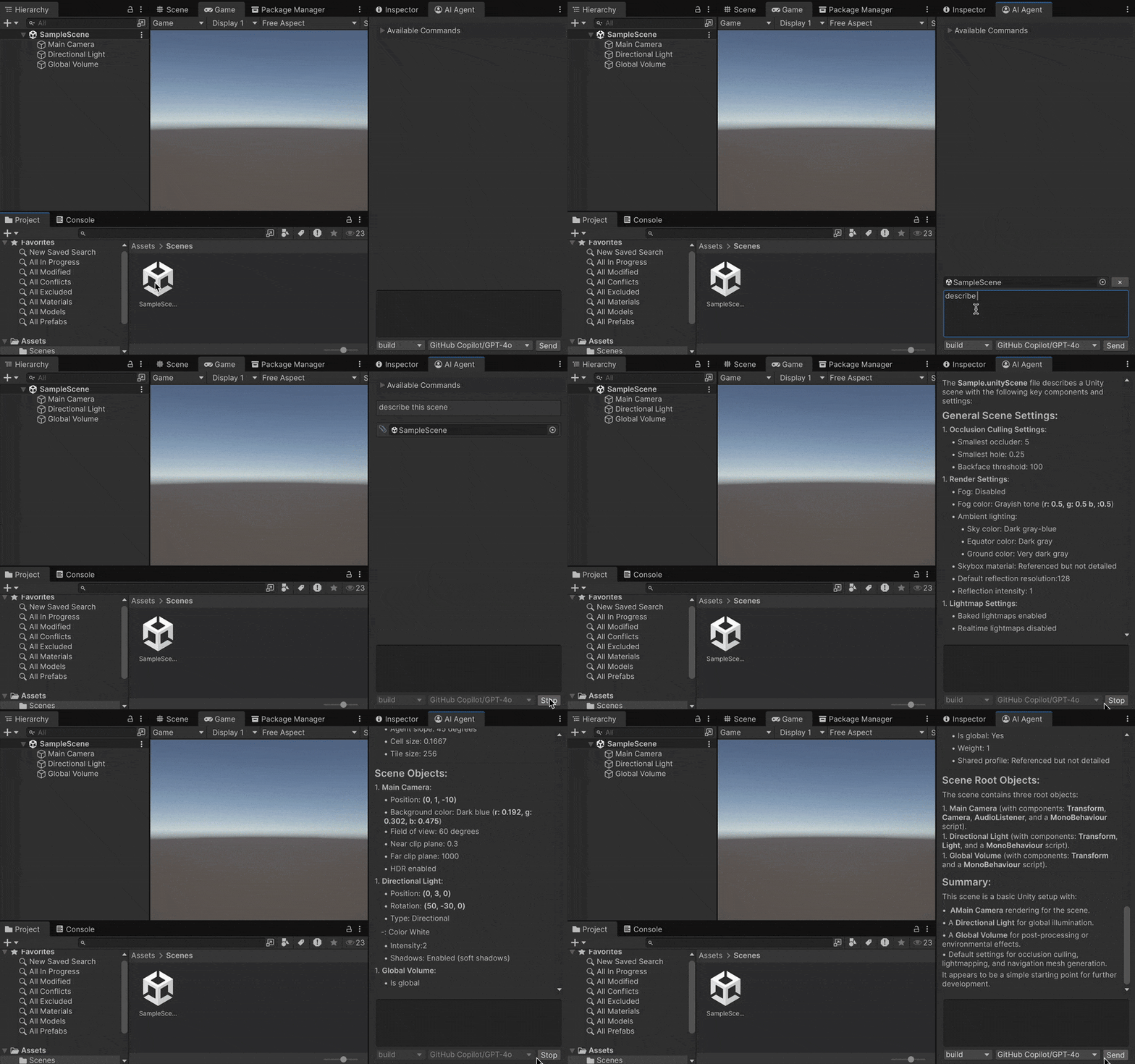
Overview
Unity Agent Client is an editor extension that uses the Agent Client Protocol (ACP) proposed by Zed to enable any AI agent to run on the Unity editor.
Features
- Integrate any AI agent into the Unity editor
- Supports all AI agents compatible with ACP (Gemini CLI, Claude Code, Codex CLI, etc.)
- Utilize assets and editor information as context
- Provides a built-in MCP server
What's Agent Client Protocol?
Agent Client Protocol is a new protocol proposed by Zed to connect AI agents and code editors. It is a protocol based on JSON-RPC and is designed with integration with MCP (Model Context Protocol) in mind.
Zed enables the integration of external AI agents into editors using ACP. Unity Agent Client adopts a similar approach, implementing an ACP Client as an editor extension, allowing any AI agent to run on the Unity editor.
Currently, Gemini CLI provides experimental support (--experimental-acp), and Zed's adapters enable ACP compatibility for Claude Code, Codex CLI, and others. A list of AI agents supporting ACP can be found at the following page:
https://agentclientprotocol.com/overview/agents
Why not Unity AI?
From Unity 6.2 onwards, the official Unity AI can be used. So why use Unity Agent Client?
Unity AI uses models provided by Unity, which means users cannot choose the optimal model for their needs. Additionally, Unity AI requires dedicated tokens (points), making it mandatory to connect Unity projects to Unity Cloud.
Unity Agent Client does not depend on specific LLM providers or agents, allowing users to integrate their preferred AI agents into the editor. Furthermore, ACP supports integration with MCP, enabling users to connect any MCP server of their choice.
Setup
Unity Agent Client requires Unity 2021.3 or later and a Node.js runtime.
1. Install the AgentClientProtocol Package
Unity Agent Client depends on the AgentClientProtocol package, which must be installed from NuGet.
Use NugetForUnity (recommended) or add all dependency packages as DLLs to the project.
2. Install the UnityAgentClient Package
Open the Package Manager and enter the following URL in + > Add package from git URL...:
https://github.com/nuskey8/UnityAgentClient.git?path=Assets/UnityAgentClient
3. Set Up the Agent to Use
Open Project Settings > Unity Agent Client and fill in the settings according to the AI agent you want to use.
[!NOTE] On macOS, PATH resolution may fail in zsh. If an error occurs, use the
whichcommand to check the full path of the binary and enter it in Command.
[!WARNING] The settings are saved in the project's UserSettings folder. While the UserSettings folder is usually excluded by
.gitignore, be careful not to accidentally upload API keys, etc.
Gemini CLI
Gemini CLI currently provides experimental ACP support. This can be executed by specifying the --experimental-acp option.
| Command | Arguments |
|---|---|
gemini | --experimental-acp |
If using an API key for login, add GEMINI_API_KEY to Environment Variables.
Claude Code
Claude Code itself does not support ACP, so use the adapter provided by Zed. Follow the README in the following repository to set up claude-code-acp:
https://github.com/zed-industries/claude-code-acp
| Command | Arguments |
|---|---|
claude-code-acp | - |
Codex CLI
Codex CLI itself does not support ACP, so use the adapter provided by Zed. Follow the README in the following repository to set up codex-acp:
https://github.com/zed-industries/codex-acp
| Command | Arguments |
|---|---|
codex-acp | - |
opencode (Recommended)
opencode is an open-source AI agent that runs on the CLI and supports any LLM provider, as well as MCP and ACP by default.
| Command | Arguments |
|---|---|
opencode | acp |
Goose
Goose is an open-source AI agent that runs on the CLI/desktop and supports any LLM provider, as well as MCP and ACP by default.
https://block.github.io/goose/
| Command | Arguments |
|---|---|
goose | acp |
Usage
Open Window > Unity Agent Client > AI Agent to automatically connect to the session.
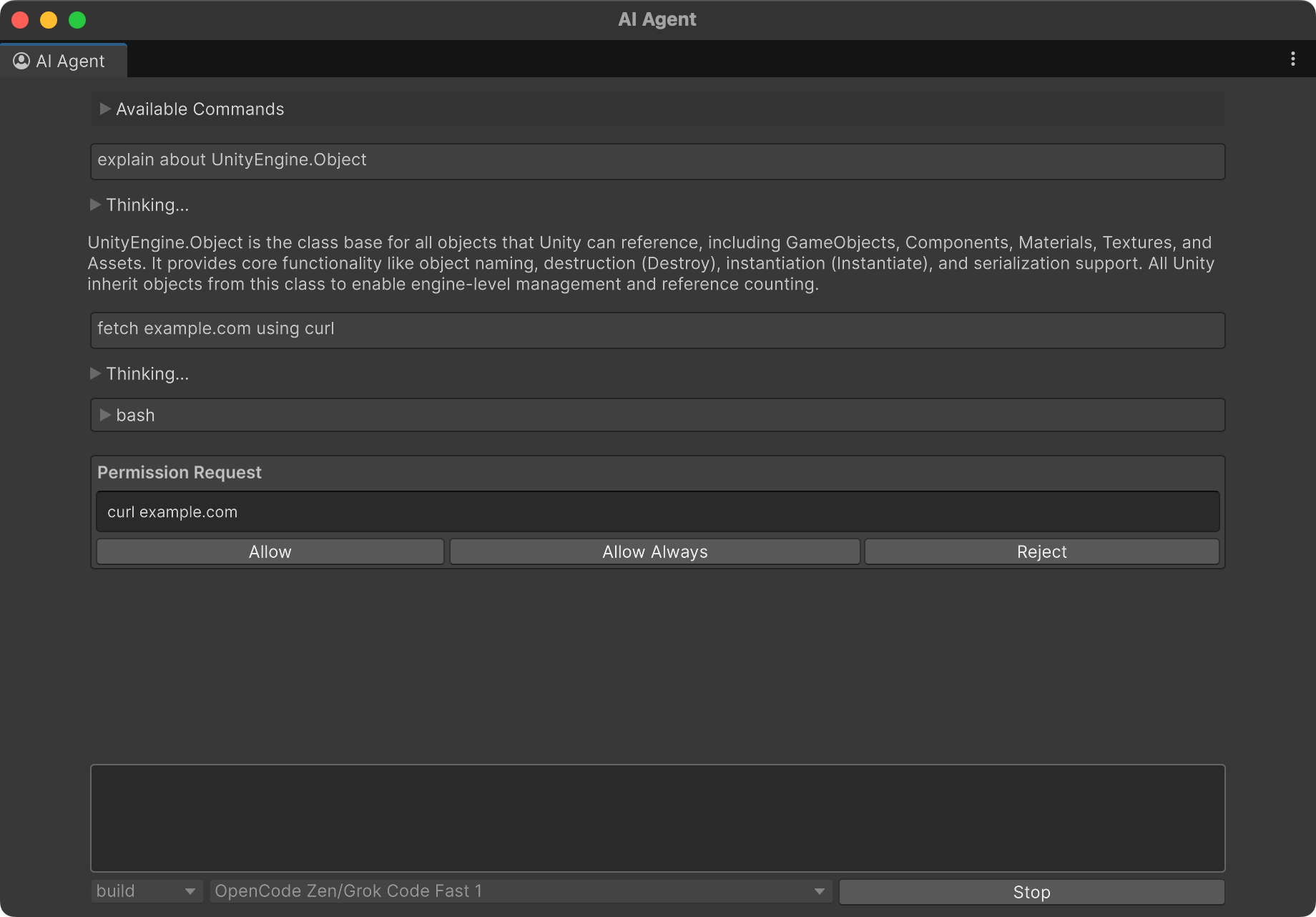
- Enter a prompt in the field and press Send to submit.
- Drag and drop assets into the window to attach them as context.
- When executing tools, the agent may request permission (whether permission is requested depends on the agent's settings).
- If supported by the agent in use, you can switch modes or models when sending.
Best Practices
Unity Agent Client DOES NOT recommend using AI agents for coding within the editor. Due to Unity's constraints, editing C# scripts triggers a Domain Reload, disconnecting the session. Moreover, the Unity editor is not suited for reviewing AI-edited code. Instead, use AI agents integrated into IDEs or code editors.
Unity Agent Client focuses on utilizing AI agents to leverage the entire Unity project as a document. By using AI with the entire editor as context, development team members can deepen their understanding of the project or use it as a tool to identify issues and bottlenecks.
Traditional MCP-based approaches required using tools outside the editor, but Unity Agent Client operates within the editor, eliminating the need to switch windows frequently.
License
This library is provided under the MIT LICENSE.