TradingView MCP Market Data & Technical Analysis for AI Assistants
TradingView MCP server — real-time market data, technical indicators, screeners, and backtesting for Claude, ChatGPT, Cursor, Copilot, and any MCP client. Stocks, crypto, forex & futures across global exchanges. Backtesting + live sentiment + Yahoo Finance + 37 technical-analysis tools — the most complete TradingView MCP toolkit, all in one server.
🆕 The hosted server now draws. Ask for a chart and an interactive candlestick view (1d / 1h / 15m, optional Bollinger overlay) renders live inside the conversation via MCP Apps — and the AI reads the band values back to you:
Paste one URL (or pip install), then just ask. Real output, straight from the live server:
Try these first — they work in Claude, ChatGPT, Cursor, or any MCP client:
Show today's top crypto gainers on Binance
Run a full technical analysis of NVDA
What's the multi-timeframe read on gold?
Backtest an RSI strategy on BTC on the daily timeframe
[!NOTE] Independent open-source project — not affiliated with, endorsed by, or associated with TradingView Inc. "TradingView" is a trademark of its respective owner; this project consumes third-party market data and is not a TradingView product.
[!NOTE] Does it need — or risk — your TradingView account? No. This server does not log into, scrape, or automate a TradingView session, and it requires no TradingView account or API key. Market data is fetched server-side from public endpoints, so there is no account of yours in the loop and no browser/UI automation. (This is different from MCP servers that drive the TradingView Desktop app via Chrome DevTools.) You are responsible for ensuring your own use complies with the terms of any data source you point it at.
"TradingView MCP" now means two very different kinds of project. Both are useful — for different jobs:
This project — data & analysis API Desktop-automation MCPs
What you need Nothing — public market data TradingView Desktop, usually with a paid TradingView plan
Where it works Claude.ai, Claude Code, ChatGPT, Cursor, Copilot — any MCP client Mostly Claude Code, on your own machine
When your machine is off Hosted version keeps answering, 24/7 Stops
Screeners & backtesting Built in (37 tools, multi-exchange) Whatever the TradingView UI offers
Charts Interactive in-conversation charts (MCP Apps, hosted) TradingView's own charts
Your TradingView account Not needed, never touched Drives your logged-in session
If you want an AI clicking around your TradingView Desktop — editing Pine Script, drawing on charts, using replay — check out tradesdontlie/tradingview-mcp. If you want headless market data, screeners and backtesting available to any AI client, with nothing installed and no TradingView account in the loop — that's this project.
[!IMPORTANT] Not financial advice. Nothing produced by this software is investment, financial, legal, tax, or accounting advice. tradingview-mcp is an informational and educational analysis tool. Its outputs, including indicators, scores, signals, "trade setups", entries, stop losses, and targets, are computed from third party market data and are not recommendations to buy, sell, or hold any asset. It does not execute trades, manage money, or guarantee any result. Trading and investing carry a substantial risk of loss, and you can lose some or all of your capital. Always do your own research and consult a licensed professional before making any financial decision. You are solely responsible for your own decisions and for complying with the laws and regulations that apply to you. Market data may be delayed, inaccurate, or incomplete, and is provided without warranty.
[!TIP]
Prefer zero setup? Use the hosted version. pro.cryptosieve.com serves all 37 tools as one connector URL for Claude.ai, ChatGPT, Copilot, and Cursor — no uv, pandas, or Python to wrangle. From $9/mo (Pro) or $29/mo (Pro+ — higher limits), with a 3-day free trial. Self-hosting stays free forever; hosted is just for folks who'd rather skip the ops. (Full self-host vs hosted comparison in Quick Start below.)







⭐ If this tool improves your workflow, please star the repo and consider sponsoring — it keeps the project alive and growing!
🎥 Framework Demo
🆕 What's New
Stability & Strategy Expansion (May 2026)
-
Async hot-path tools — 7 high-traffic tools (
yahoo_price,stock_extended_hours,top_gainers,volume_breakout_scanner,multi_timeframe_analysis,financial_news,combined_analysis) converted toasync def. FastMCP runs sync tools serialized on the event loop — async unlocks real intra-server parallelism so concurrent tool calls actually overlap.combined_analysisadditionally fans its 3 sub-calls out viaasyncio.gatherfor ~3× wall-clock improvement on the power tool.yahoo_price/stock_extended_hoursusehttpx.AsyncClientfor true non-blocking I/O; sync-library tools (tradingview_ta,tradingview-screener,feedparser) are off-loaded viaasyncio.to_thread. (PR — open) -
9 backtest strategies (up from 6) — added
rsi_pullback,keltner_breakout, andtriple_ema, covering trend-pullback, ATR-normalized breakout, and SMA200-filtered EMA cross edges.compare_strategiesnow ranks the full 9. -
Resilience layer — automatic retry + 60-second TTL cache on the TradingView screener provider, eliminating transient
"Expecting value"errors oncombined_analysisandmulti_timeframe_analysis. (PR #32 — merged) -
Financial news service rebuild — replaces deprecated Reuters RSS endpoints with Yahoo Finance, MarketWatch, and CNBC. Fixes the long-standing
count: 0bug onfinancial_news. (PR #33 — merged) -
TA throttle — caps concurrent
tradingview_tacalls (default 4) + min 0.8s spacing between starts. Prevents parallel bursts ofcombined_analysis/multi_timeframe_analysisfrom hitting TradingView's empty-body rate-limit cliff. Tunable via env vars. (PR #34 — merged) -
Walk-forward backtesting (
walk_forward_backtest_strategy) — train/test split with overfitting verdict (ROBUST / MODERATE / WEAK / OVERFITTED). -
Hourly (1h) timeframe support across
backtest_strategy,compare_strategies, andwalk_forward_backtest_strategy. -
Full trade log + equity curve outputs (
include_trade_log=True,include_equity_curve=True).
🏗️ Architecture
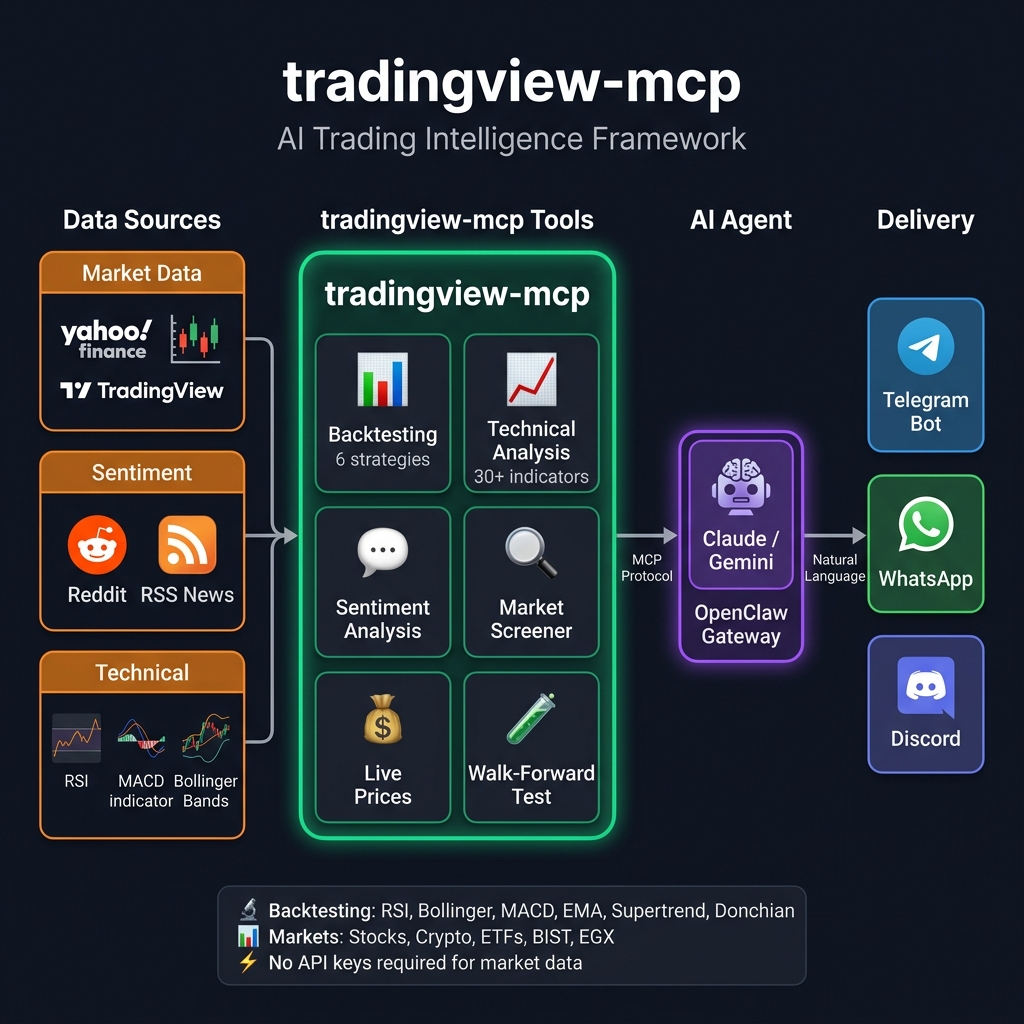
✨ Why tradingview-mcp?
Feature
tradingview-mcp
Traditional Setups
Bloomberg Terminal
Setup Time 5 minutes Hours (Docker, Conda...) Weeks (C