sprite-gen
One drawing in. A game-ready sprite atlas out — breathing.
English · 한국어 · 日本語 · 简体中文 · Español · Français
Breathe
A still idle reads as frozen. Breathe turns a single pose into a living loop — deterministic squash & stretch baked on top of your curated frames. No regeneration, no re-extraction, no extra art. One sidecar field:
"breathe": { "depth": 0.05, "breaths": 3 }
- Anatomy-aware. The engine measures the silhouette: neck bottleneck, symmetric eye pair on neckless blobs, torso-vs-appendage width. Heads stay bit-identical across every frame; wings and arms get pushed, never stretched.
- Pixel-true. Integer row/column mapping only — every output frame is still clean pixel art on the same grid. A 1px outline stays a 1px outline: the warp preserves silhouette edges and normalizes staircase doubling, anchored on the inner line.
- A ruler you can grab. Drag the rigid boundary (red), the body axis (blue), and the torso width (dashed) right on the live playback. The server re-derives the anatomy on release — and the preview keeps breathing while it recalculates.
- Byte-identical preview. The webview mirror and the Python bake produce the same bytes, enforced by golden tests. What you watch looping is exactly what ships in the atlas.
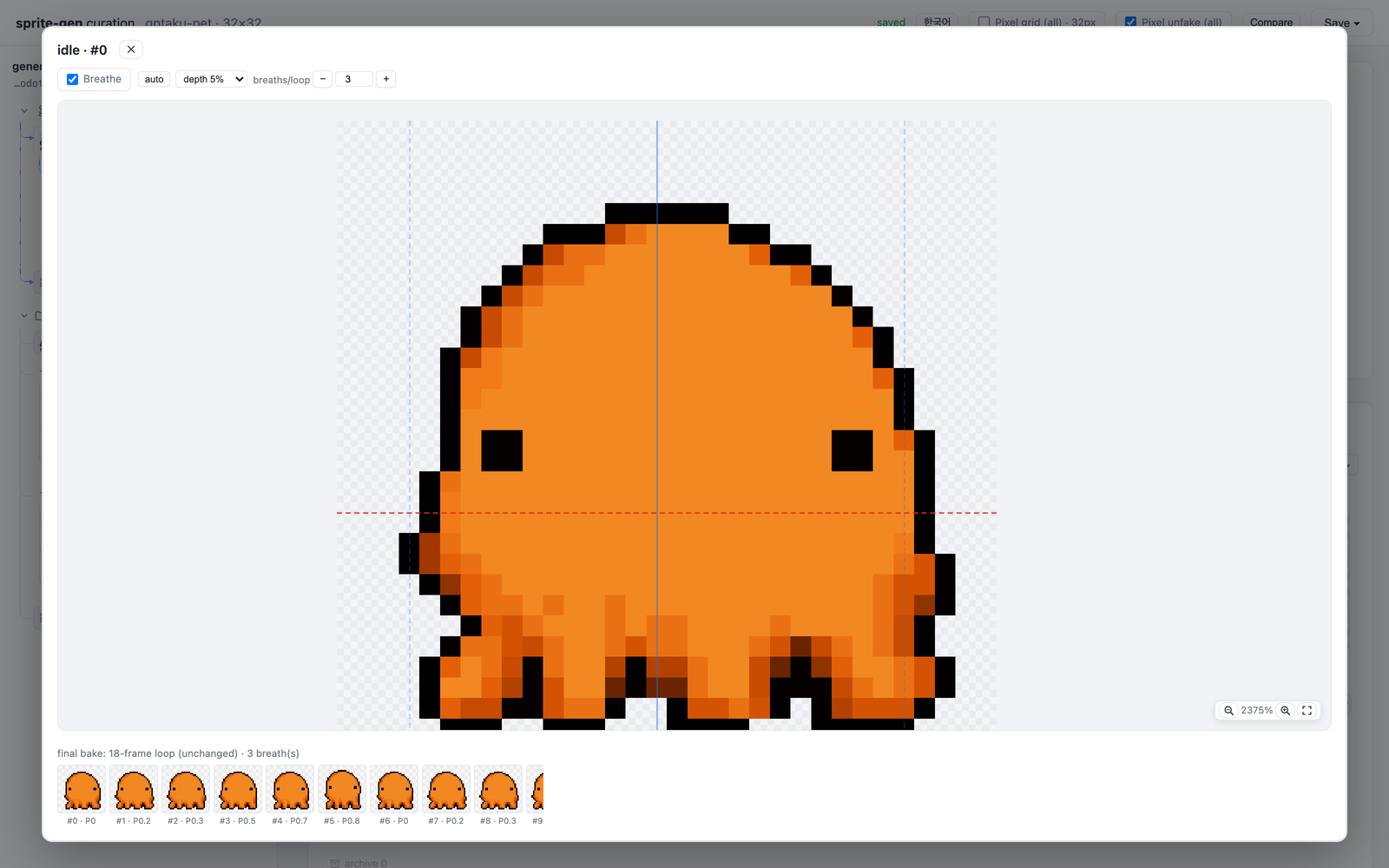
The same deterministic bake applies to front, side, and back views of any silhouette, including humanoids, blobs, and tentacles.
Ask an image model for a "sprite sheet" and you know what you get: a character whose face changes every frame, a background that won't key out, poses that overlap and drift off-grid, and a PNG your game engine can't actually consume. Cute demo, useless asset.
sprite-gen is a Codex/Claude skill that closes that gap. Give it one base image and a list of actions — it drives the generation row by row, locks the character's identity, strips the chroma background to real alpha, extracts each pose as a clean transparent frame, and bakes a runtime atlas with a machine-readable manifest.json.frame_layout.
And for the last 10% that generation never gets right, there's a curation webview: compare frames side by side, reject the broken ones, nudge rotation/scale/position non-destructively, watch the loop live — then bake. The pipeline does the labor; you keep the taste.
sprite-request.json → layout guides + prompts → sprite-gen gen state rows
→ chroma alpha → connected components → transparent frames
→ sprite-sheet-alpha.png + manifest.json.frame_layout
flowchart LR
    REQ["sprite-request.json<br/>(numeric SSoT)"] --> GUIDES["layout guides<br/>+ prompts"]
    GUIDES --> GEN["sprite-gen gen<br/>state row strips"]
    GEN --> EXTRACT["chroma alpha →<br/>connected components"]
    EXTRACT --> FRAMES["transparent frames"]
    FRAMES --> ATLAS["sprite-sheet-alpha.png<br/>+ manifest.json.frame_layout"]
    FRAMES -. "curation webview (optional)" .-> ATLAS
Full architecture:
docs/architecture.md
What you actually get
- A transparent sprite atlas (
sprite-sheet-alpha.png) — real alpha, no leftover chroma fringe, verified against white backgrounds. - A runtime manifest (
manifest.json.frame_layout) — absolute frame rectangles, per-state fps and loop flags. Your engine samples rectangles; it never guesses a grid. - Deterministic colourways —
sprite-gen recolortakes the base sheet plus a palette map and bakes N variant sheets in one command (exact RGB match by default; same input, same output bytes). The curation webview blink-compares them and records the adopted name. Detail:docs/recolor.md. - QA you can watch — per-state GIFs and contact sheets, so motion is judged as motion before anything ships.
- Honest labels — short readable actions (idle, jump, attack, wave) are the stable path; cyclic locomotion (walk/run) is marked experimental unless motion QA actually passes. No silent overpromising.
Chroma alpha quality
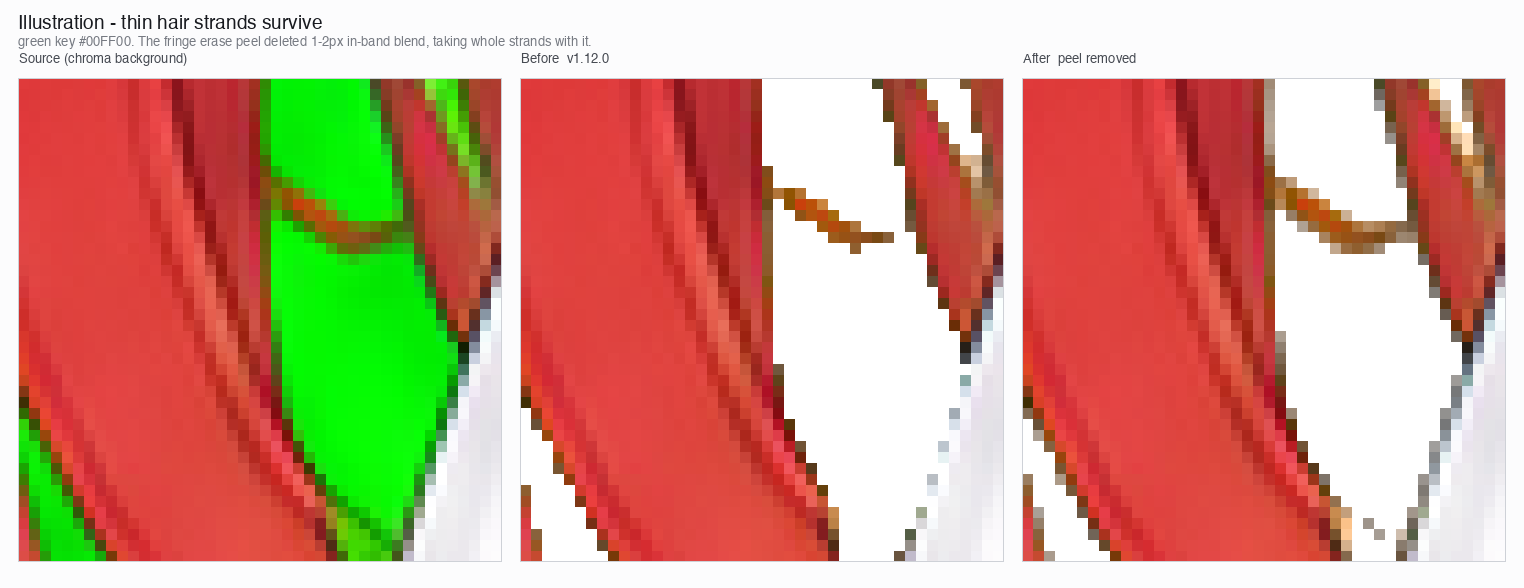
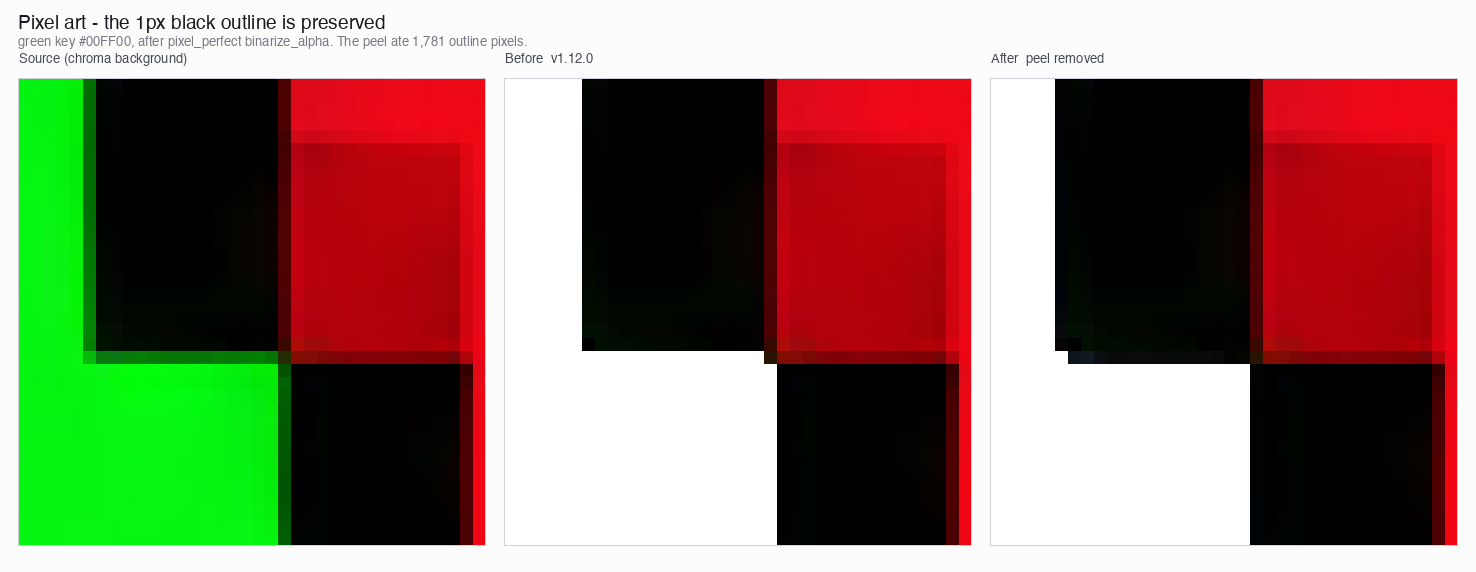
The extractor keeps chroma cleanup deterministic: soft-alpha unmix preserves antialiased hair strands and thin outlines instead of peeling them away before coverage can be solved.
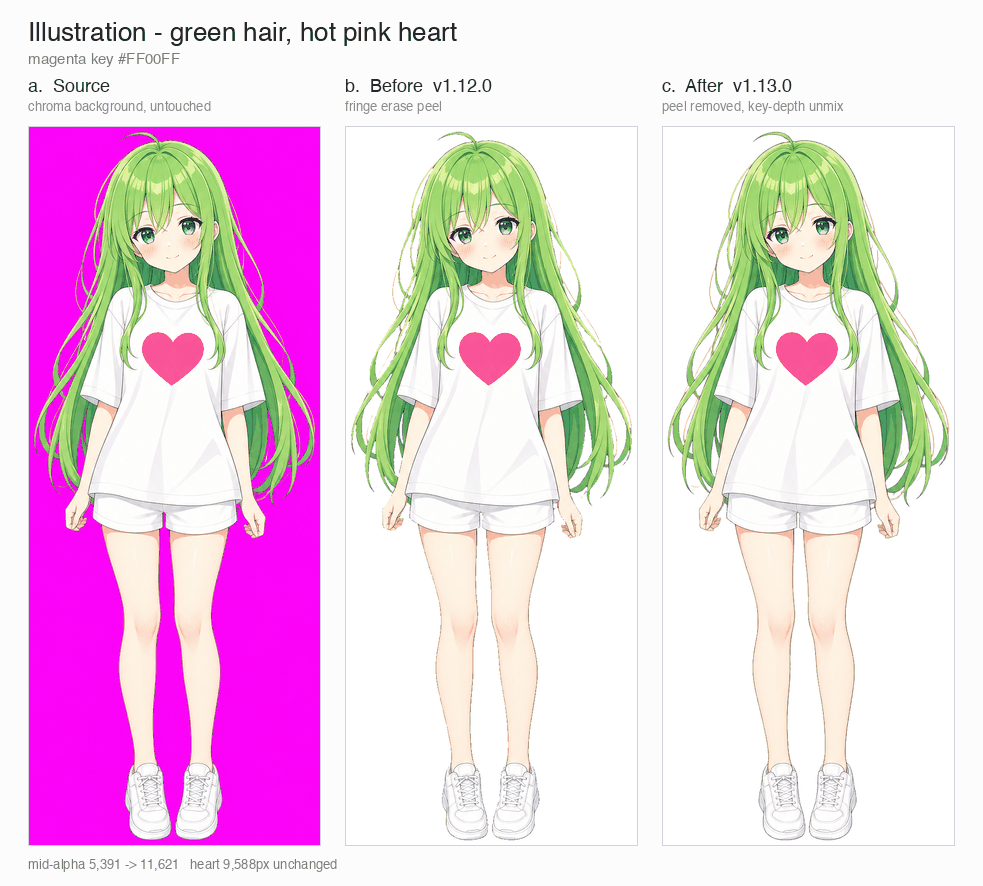
Illustration, magenta key: source, v1.12.0 peel, v1.13.0 soft-alpha unmix.
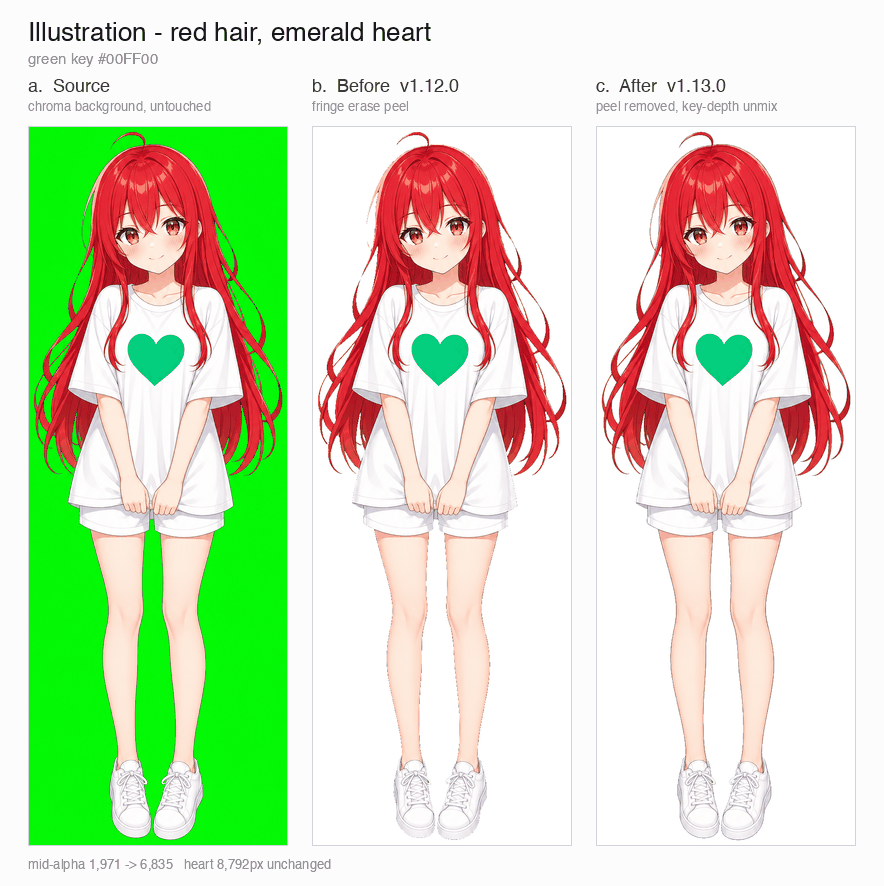
Illustration, green key: source, v1.12.0 peel, v1.13.0 soft-alpha unmix.
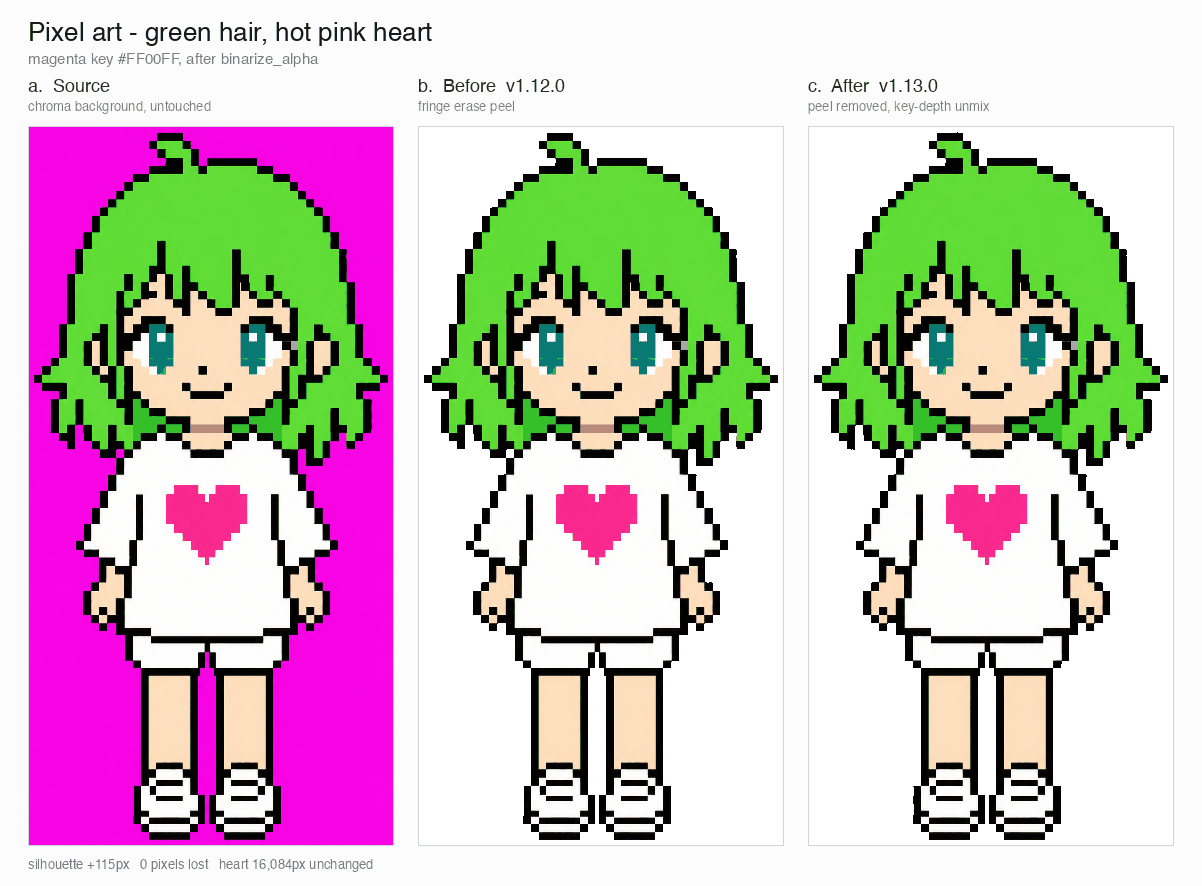
Pixel art, magenta key: source, v1.12.0 peel, v1.13.0 binarized output.
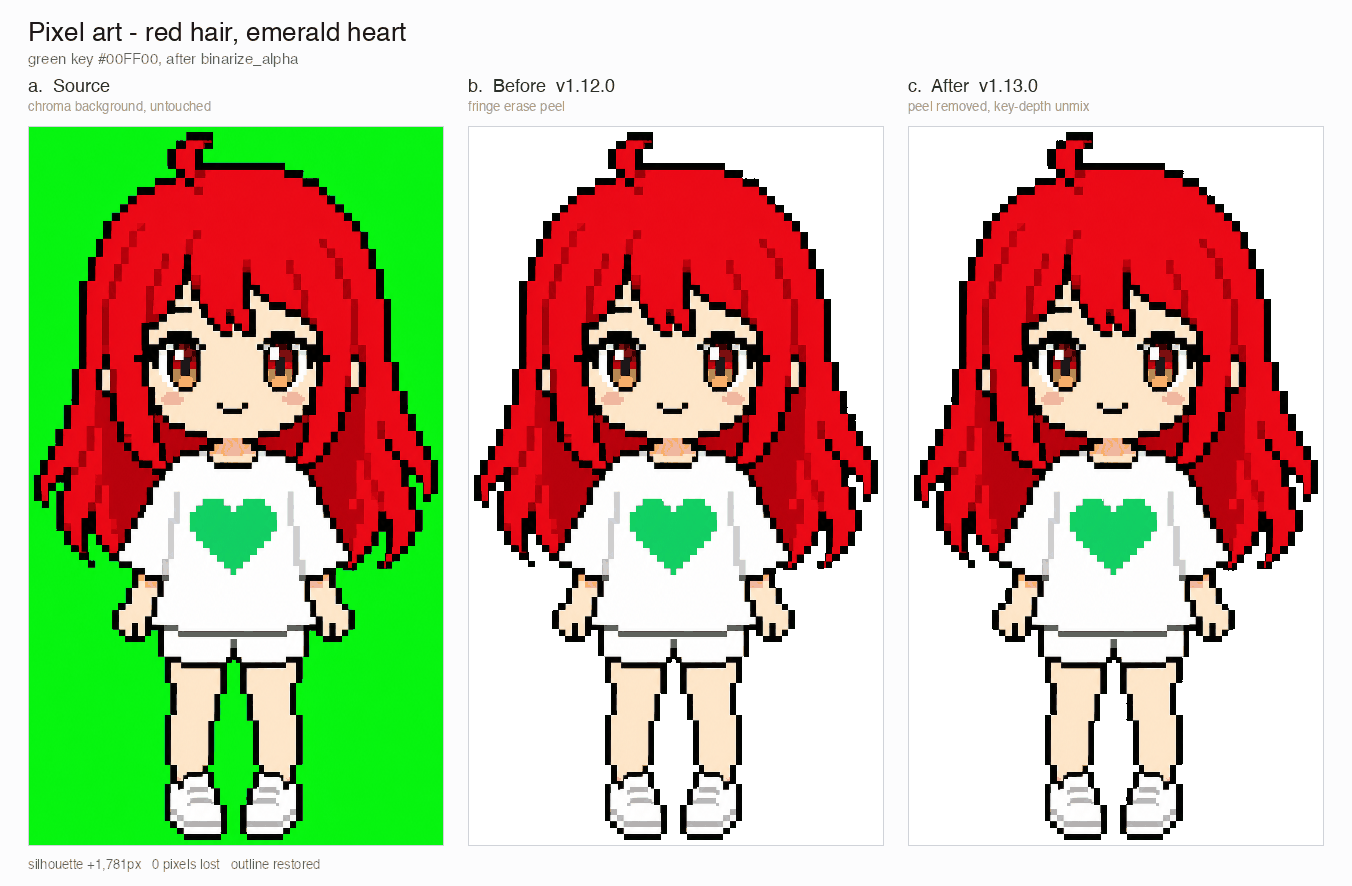
Pixel art, green key: source, v1.12.0 peel, v1.13.0 binarized output.
The close-up crops below show the edge detail behind the full-body comparisons.
Backbone Lattice
AI-generated "pixel art" is not pixel art. The blocks wobble, the edges carry antialiasing, and the lattice drifts within a single row, so cutting on an even grid smears one block into the next. The community fix is to "unfake" the image — guess the block size from run lengths and re-quantize — but that measures each frame on its own, so a walk cycle's cell size breathes frame to frame.
Backbone Lattice measures one grid for the whole subject and holds every cut to it. Per-frame pitch detection feeds a row-wide, cross-frame consensus that outvotes harmonic misdetections; that consensus grid is the backbone every cut snaps to. Cuts land on actual colour boundaries, and a minimum cell width proportional to the measured pitch keeps two neighbouring cuts from ever collapsing onto the same band. One backbone, so the same block stays the same size across a whole animation instead of jumping between frames.
The result is verified against what shipped, not eyeballed on a hand-picked frame: every pixel-unfake run is re-derived from its own source strip and compared pixel by pixel. The shape you approved stays the shape you get; what changes is only where outlines and shading land, which is exactly what the backbone decides.
Curation webview
Generation gets you 90%. The webview is where a human takes it to shipped — standalone, no Studio or framework dependency, runs anywhere the skill is installed (Claude Code Desktop, the Codex app, a plain terminal).
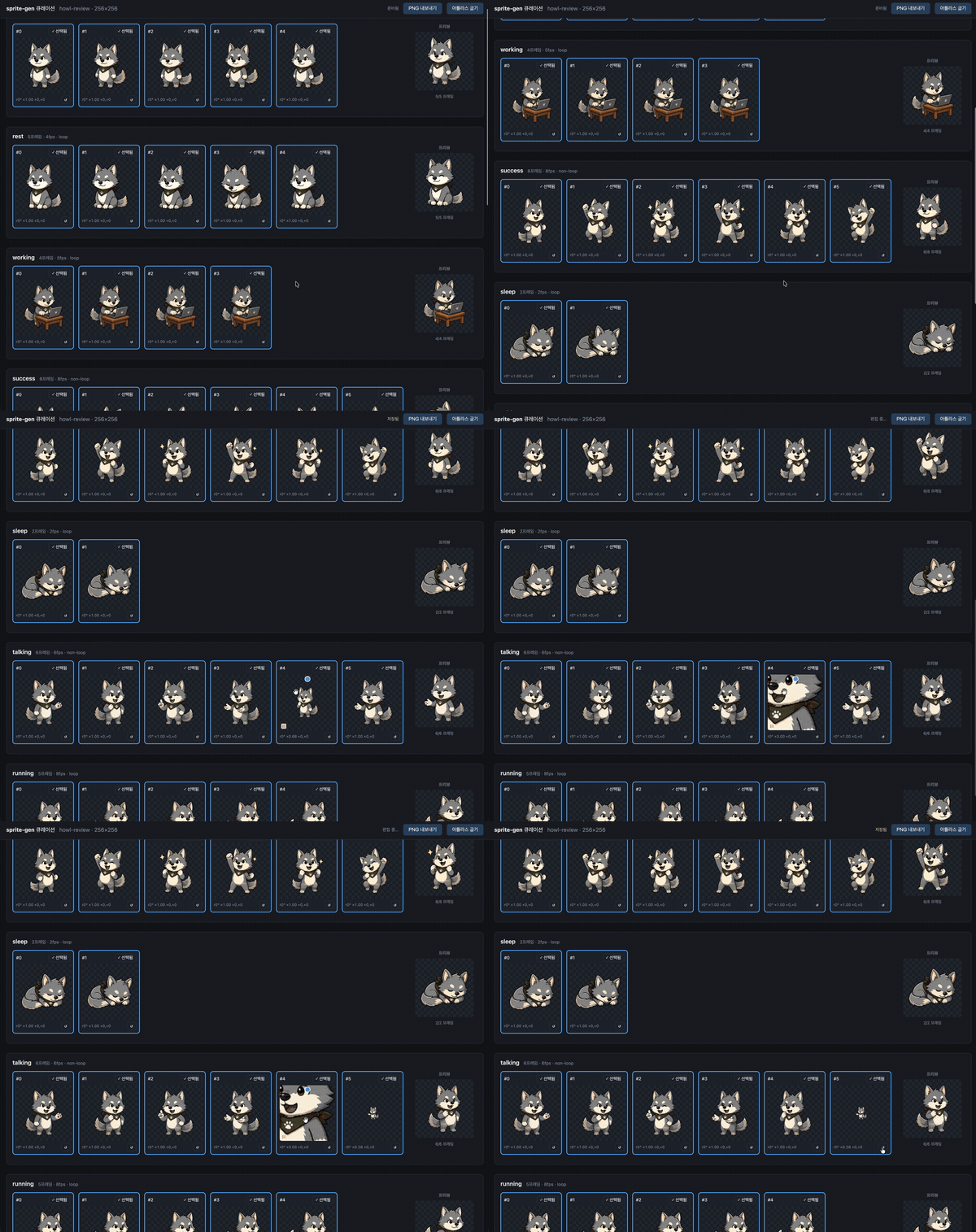
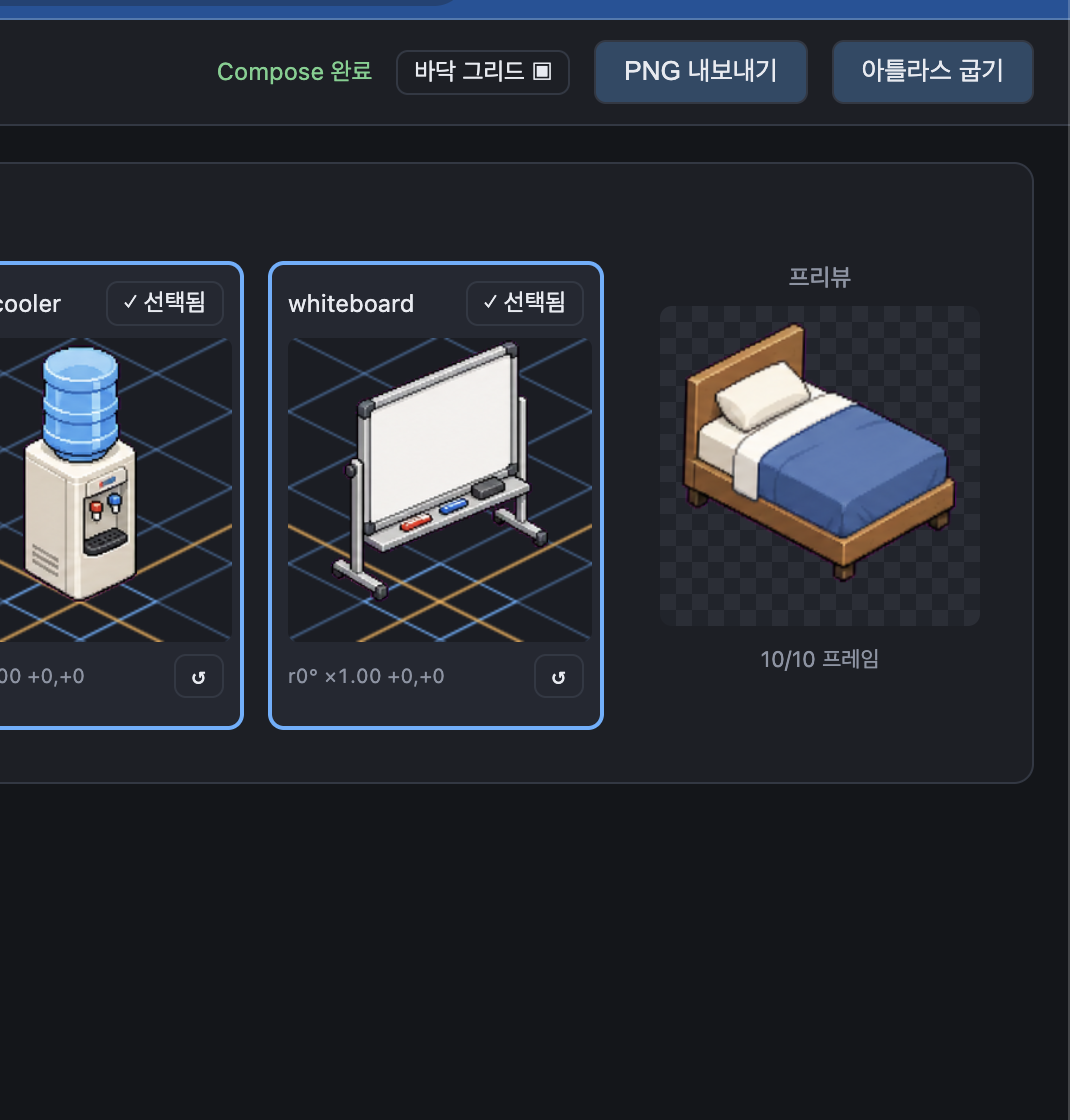
- Two rows per state: the play sequence on top and a candidate pool below (e.g. a second or third generated take). Drag a frame's ⠿ grip to reorder the sequence, or pull a cut up from the pool — rebuild one clean run loop from the best frames across takes. The arrangement is saved, so reopening restores it.
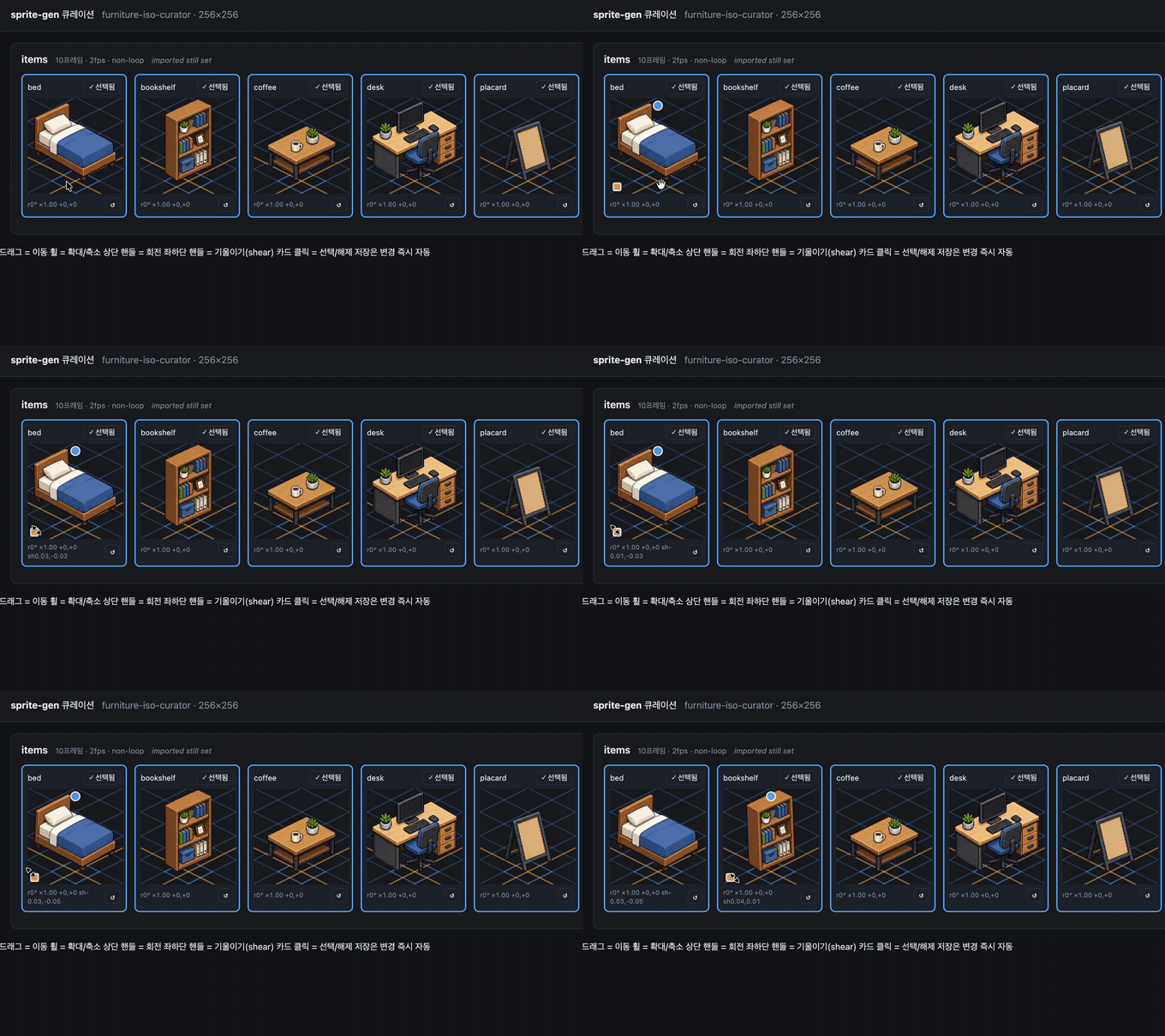
- Non-destructive transform per frame: drag = move, wheel = scale, top handle = rotate, bottom-left = shear, plus a horizontal-flip toggle for left-right-reversed output. Edits live in a
curation.jsonsidecar — source PNGs are never rewritten, and the compose step bakes the result deterministically. Preview and bake share one affine matrix, so what you align is what you get. - Live preview animates the sequence at the state's fps, with play/pause, frame-by-frame stepping, and a 0.25×–4× speed control.
- Not just for sprites: point it at any folder of image candidates (icons, logos, generated drafts) with
unpack_atlas_run.py --pngs-dirand use it as a general pick-the-winner view.
Isometric ground grid
For isometric sets, the webview overlays the floor grid (from meta.json tile/anchor) so you can snap furniture to the diamond axes with the shear handle.
Languages
The webview ships with English and Korean. Pass --lang en|ko when launching, or use the in-app toggle:
python3 scripts/serve_curation.py --run-dir <run-dir> --lang en # or ko
Python support
sprite-gen supports CPython 3.10+. CI runs the minimum supported version (3.10) and the latest covered version (3.14) on GitHub-hosted runners.
The quickstart requires a Python install with working venv/ensurepip. If python3 -m venv fails before package installation in a local distribution, use a standard CPython build for any supported version and rerun the same commands.
Quickstart
# 0. install dependencies (Pillow, NumPy) into a fresh virtualenv
python3 -m venv .venv && source .venv/bin/activate
pip install -e .

# 1. prepare a run from a base image
python3 scripts/prepare_sprite_run.py --out-dir <run-dir> --character-id <id> --base-image base.png

# 2. generate one row image per state with the engine-owned provider CLI
python3 scripts/generate_sprite_image.py --provider codex \
  --prompt-file <run-dir>/prompts/<state>.txt \
  --out <run-dir>/raw/<state>.png \
  --ref <run-dir>/base-source.png \
  --ref <run-dir>/references/layout-guides/<state>.png
# 3. extract frames
python3 scripts/extract_sprite_row_frames.py --run-dir <run-dir>

# 4. (optional) curate frames in the webview
python3 scripts/serve_curation.py --run-dir <run-dir>

# 5. bake the runtime atlas
python3 scripts/compose_sprite_atlas.py --run-dir <run-dir>
Editing a finished sheet
When only the combined sheet survives, rebuild a curator-ready run dir, then curate and export:
# rebuild frames: explicit --grid, --manifest rectangles, or alpha auto-detect (default)
python3 scripts/unpack_atlas_run.py --atlas sheet.png            # auto-detect
python3 scripts/unpack_atlas_run.py --manifest manifest.json     # exact rectangles
python3 scripts/unpack_atlas_run.py --pngs-dir furniture/        # import a loose PNG set

# after curating, bake corrections back to named PNGs
python3 scripts/export_curated_pngs.py --run-dir <run-dir>
Output defaults to a findable <source>-curator folder next to the input.
Baking colourways of a finished sheet
Once the atlas is composed, swap selected colours into N finished sheets without re-running generation. Dot art is exact-match by default; soft-edged art can opt into a tolerance. Geometry and alpha never move — the base manifest describes every variant.
# draft the opaque colours (edit into a recolor spec with kind "sprite-gen-recolor")
python3 -m sprite_gen.cli recolor-palette --base <run-dir>/sprite-sheet-alpha.png --out palette.draft.json

# bake every colourway into <run-dir>/variants/
python3 -m sprite_gen.cli recolor --run-dir <run-dir> --spec recolor.spec.json

# blink-compare and adopt in the curation view
python3 -m sprite_gen.cli curation --run-dir <run-dir>
Full spec/report contract and the adopt sidecar field: docs/recolor.md.
Cutting a background off an imported image
Generated sprites are keyed off their own magenta/green background inside the
pipeline, so they never need this. cutout is the import/post-edit utility: an
image that arrived with an opaque uniform background (a hand-drawn icon, a
downloaded sprite, a screenshot) is turned into a clean transparent PNG.
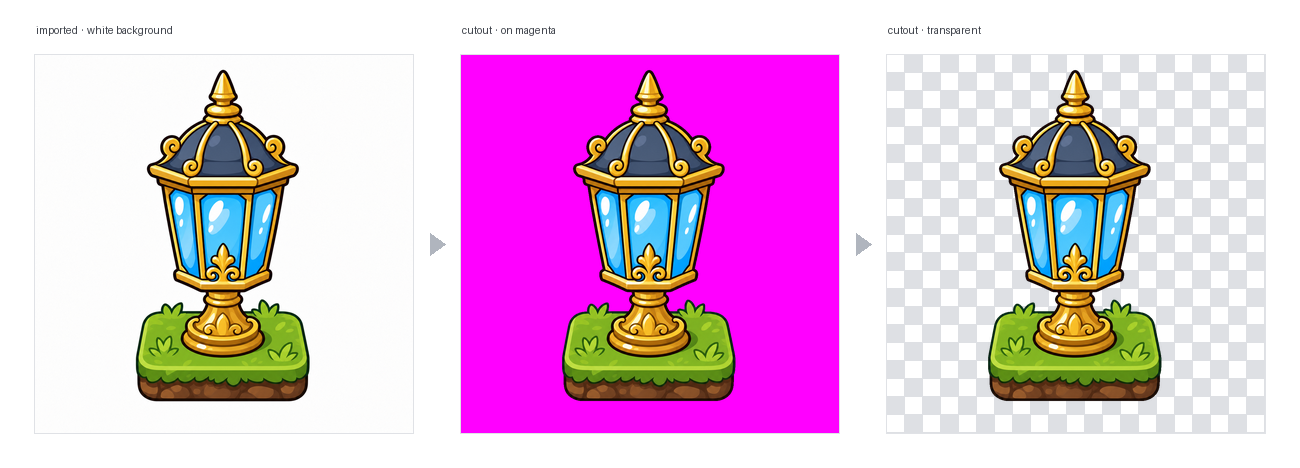
# routes on the corner colour: white/ivory -> matte, magenta/green -> extract engine
python3 -m sprite_gen.cli cutout icon.png --white-check
It reads the corner background colour and routes (--key auto|white|magenta|green):
- white / ivory / solid → position matte. A corner flood-fill keeps the
connected background only (bright highlights inside the object survive, not
holed), then a decontaminated soft alpha feathers the border. Tune with
--strength(bevel removal),--band(edge depth),--erode. - magenta / green key → the project's verified
extractchroma engine is reused as-is. Key colours never appear in objects, so its colour-only cut is safe there — exactly where a white matte's flood-fill guard is not needed.
--white-check writes cyan/magenta/yellow composites so any leftover fringe
shows loudly. For uniform backgrounds; not for complex/non-uniform ones.
The full agent-facing workflow and contracts live in SKILL.md.
Install
From Codex skill installer workflows, install this repository as a root skill:
python3 ~/.codex/skills/.system/skill-installer/scripts/install-skill-from-github.py \
  --repo aldegad/sprite-gen --path .
Image generation ownership
Provider-backed generation is part of this engine (sprite_gen.gen), with
codex and grok as the supported providers. The general image-gen skill is
only a thin shuttle to the same command, so it does not need a second provider
implementation. See docs/gen.md for the CLI and verification
contract.
Attribution
The component-row workflow is inspired by the Apache-2.0 licensed hatch-pet skill, but targets generic game sprite atlases and includes no pet packages or pet visual assets.
Community contributions, experiments, and their originating pull requests are documented in CONTRIBUTORS.md.
License
Apache-2.0