Skills-Manager

by jiweiyeah✓ Verified

Free, open-source desktop manager for AI Agent Skills. Write a skill once, sync it to 32 AI coding tools (Claude Code, Codex, Cursor, Gemini CLI, and more) via symlinks. Local-first, MIT licensed. macOS, Windows, Linux.

948
Stars
60
Forks
TypeScript
Language
8/23/2026
Added
View on GitHubDownload ZIP

⚠️ Third-Party Software Notice

This skill is third-party open-source software developed and hosted independently on GitHub. SkillTip is an informational directory and does not control or maintain the underlying repository. Any security checks displayed are automated and limited in scope. Review the source code before installing.

Read the Terms of Service

Installation

Add to your Claude Code skills directory:

# Add to your Claude Code skills
git clone https://github.com/jiweiyeah/Skills-Manager

Getting Started

Guides for using skills like Skills-Manager.

Security Report

Verified

Last scanned: —

{
  "status": "PASSED",
  "issues": []
}

README.md

Skills Manager

A unified desktop application for managing AI coding assistant skills. Seamlessly organize, sync, and share skills for Claude Code, Codex, Opencode and other AI tools.


Version Downloads Platform Tech

Website · 中文说明

📖 Introduction

Skills Manager is a modern desktop application designed to solve the fragmentation of AI assistant skills configurations. Instead of managing skills and prompts separately for different tools, Skills Manager provides a central hub.

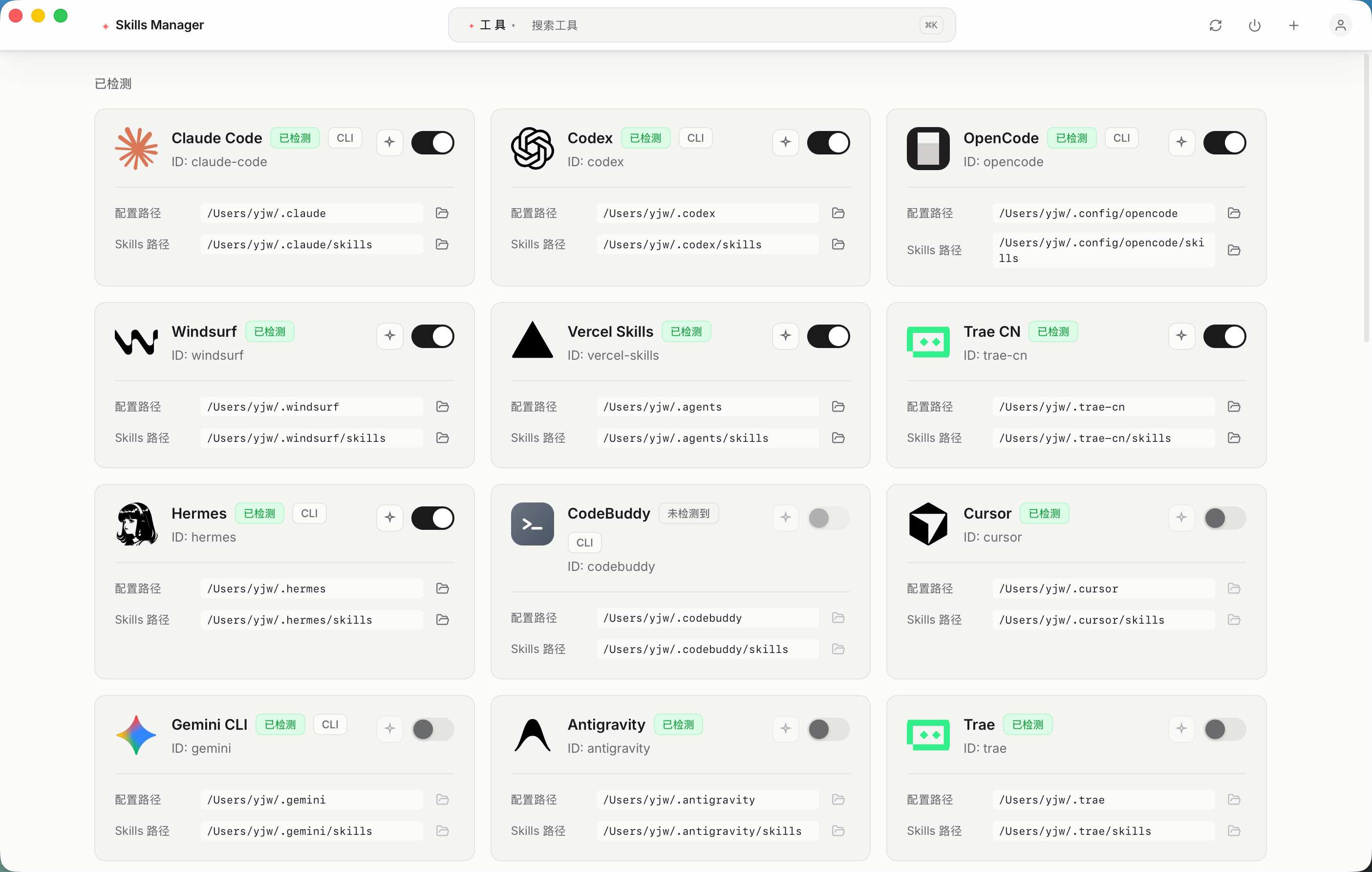
It uses a powerful symlink synchronization mechanism, allowing you to write a skill once and instantly use it across 32 supported AI tools including Claude Code, Codex, Cursor, Gemini CLI, Windsurf, Trae, and more.

✨ Key Features

  • 🎯 Unified Management: Centralize all your AI skills in one secure location.
  • 🔄 Smart Synchronization: Automatic symlink management ensures your tools always have the latest version of your skills without file duplication.
  • 🎛️ Granular Control: Enable or disable specific skills for individual tools without deleting the original files.
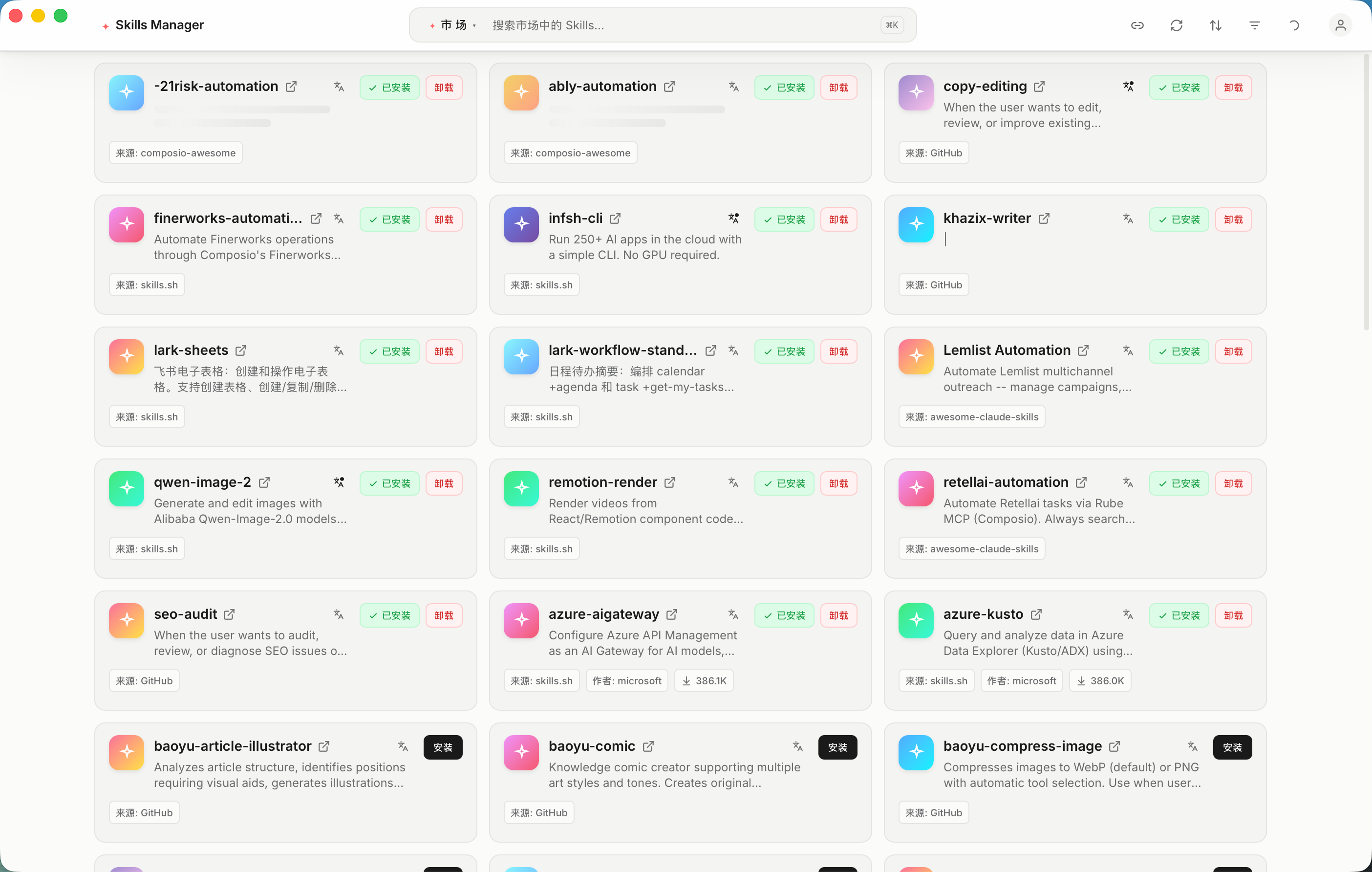
  • 🛒 Marketplace: Browse, install, and share community-contributed skills directly within the app.
  • 🌐 AI Translation: Translate skill names, descriptions, and content into your preferred language using LLM.
  • ⌨️ Command Palette: Quick navigation and actions via ⌘K / Ctrl+K.
  • 🌍 Bilingual UI: Full English and Chinese interface support.
  • ⚡ High Performance: Built with Rust and Tauri 2.0 for a lightweight, blazing-fast experience.
  • 🛡️ Cross-Platform: Native support for macOS, Windows, and Linux.
  • 🔌 Multi-Tool Support: Out-of-the-box support for 32 AI tools (Claude Code, Codex, Cursor, Gemini CLI, Windsurf, Trae, Cline, Augment, Goose, and many more), extensible via custom tools.
  • 🧩 Custom Tools: Add your own tools with custom paths and optional icons.
  • 🎨 Modern UI: Beautiful Raycast-style interface built with React 19, Tailwind CSS v4, and Radix UI.

📸 Screenshots
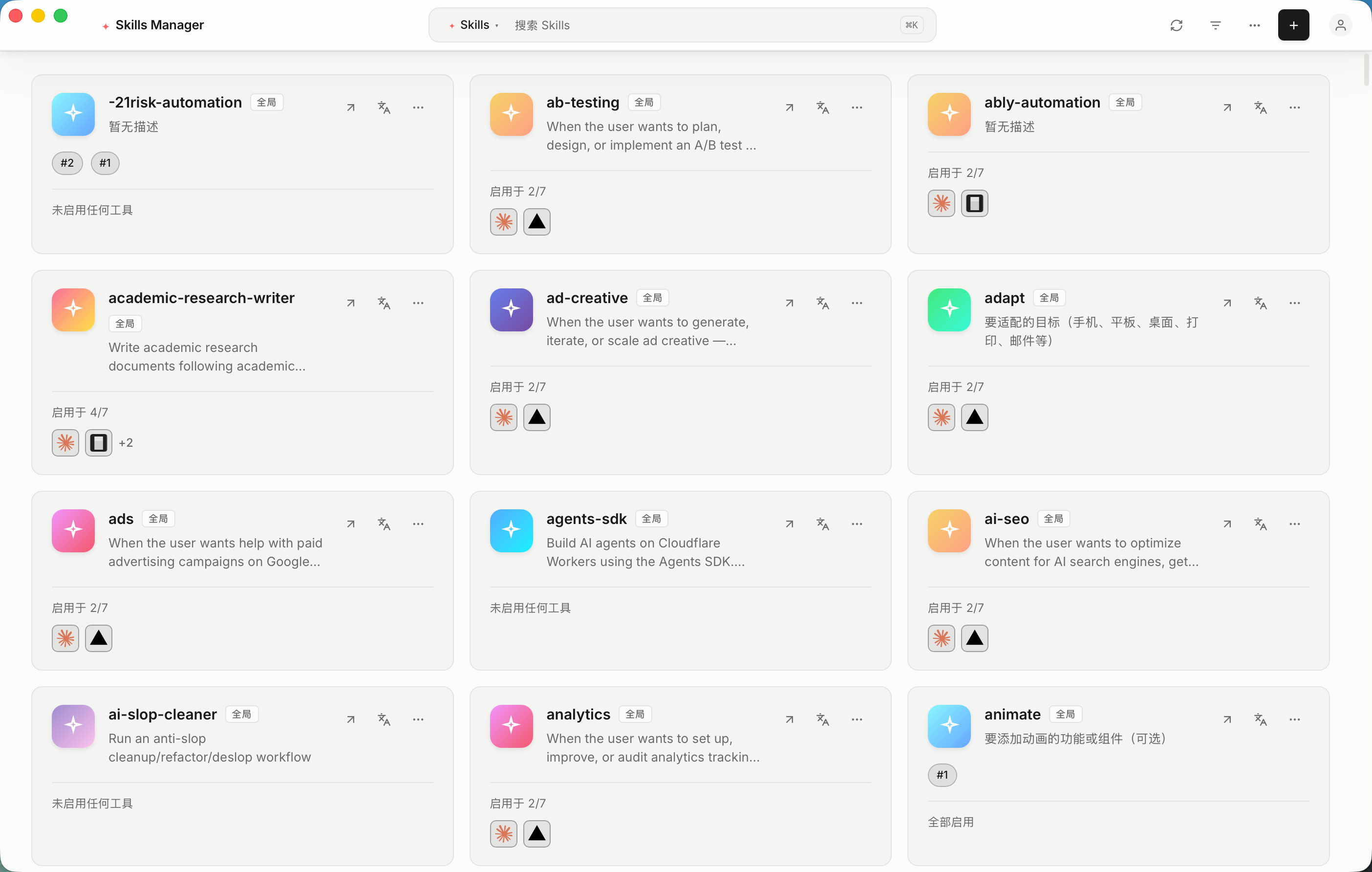
应用截图 1 应用截图 2 应用截图 3

📥 Download

Get the build for your platform from the official website, which detects your OS and architecture automatically, or pick a file yourself on the Releases Page.

OSInstaller Type
macOS.dmg (Universal)
Windows.msi / .exe
Linux.deb / .AppImage / .rpm

🪟 Windows Notes

You do not need Administrator rights. When a skill is enabled for a tool, Skills Manager tries three strategies in order:

  1. Directory symlink — used when Developer Mode is enabled (or when the app happens to run elevated).
  2. Directory junction (mklink /J) — the normal path on a standard account. It needs no special permission.
  3. Tracked copy — if junctions are blocked as well, the folder is copied and its source path is recorded in .skills-manager-source.json, so the copy stays traceable and can still be disabled from the app.

A standard, non-elevated Windows account is enough for all three.

If a tool is not detected, elevation will not help either: the tool's own config directory has to exist on this machine. Check the tool compatibility matrix for the exact path each tool reads, or add it manually as a custom tool.

🚀 Getting Started

  1. Install: Run the installer for your platform.
  2. Setup: On first launch, the app will guide you to select your skills storage directory.
  3. Sync: The app automatically detects installed AI tools (like Claude Code) and links your skills.

❗ Linux Troubleshooting

If you encounter a blank white screen when launching the .AppImage on Linux (especially in virtual machines like VMware/VirtualBox), it is likely a WebKitGTK hardware acceleration issue.

Please run the application from the terminal with the following command:

WEBKIT_DISABLE_COMPOSITING_MODE=1 ./Skills-Manager_<version>_amd64.AppImage

🛠️ Technology Stack

Designed for developers who care about performance and stability:

📅 Roadmap

We are actively working on making Skills Manager better. Here is what we are planning:

  • Core features (e.g., soft link synchronization, multi-tool support).
  • Marketplace – Browse, install, and share community-contributed skills.
  • AI translation for skill content.
  • Plugin system to support more AI tool extensions.
  • Integrated AI chat interface for testing Skills directly within the application.

🤝 Contributing & Feedback

We welcome all forms of contribution!

  • Found a bug? Please submit an issue on our Issues page.
  • Have a feature request? We'd love to hear your ideas! Feel free to open an issue to discuss new features.

💝 Support

If this project helps you, feel free to support via QR code.

WeChat Support QRAlipay Support QR

Or support via Ko-fi: ko-fi.com/yeheboo

📈 Star History

Star History Chart

Made with ❤️ for the AI developer community.

Frequently Asked Questions

What is Skills-Manager?⌄

Skills-Manager is an open-source ai agents skill for AI coding assistants such as Claude Code, Codex CLI, and ChatGPT, built by jiweiyeah. Free, open-source desktop manager for AI Agent Skills. Write a skill once, sync it to 32 AI coding tools (Claude Code, Codex, Cursor, Gemini CLI, and more) via symlinks. Local-first, MIT licensed. macOS, Windows, Linux. It has 948 GitHub stars.

Is Skills-Manager safe to use?⌄

Yes. Skills-Manager passed SkillsLLM's automated security scan — a dependency vulnerability audit plus prompt-injection heuristics — with no high-severity issues. You can read the full report in the Security Report section on this page.

How do I install Skills-Manager?⌄

Clone the repository with "git clone https://github.com/jiweiyeah/Skills-Manager" and add it to your Claude Code skills directory (see the Installation section above).

What programming language is Skills-Manager written in?⌄

Skills-Manager is primarily written in TypeScript. It is open-source under jiweiyeah on GitHub, so you can review or fork the full source.

Are there alternatives to Skills-Manager?⌄

Yes. SkillsLLM lists many other AI Agents skills you can browse and compare side by side. Open the AI Agents category from the badge at the top of this page, or use the Related Skills and comparison links further down to weigh Skills-Manager against similar tools.

Comments (0)

No comments yet. Be the first to share your thoughts!

ECC

by affaan-m

10

The agent harness performance optimization system. Skills, instincts, memory, security, and research-first development for Claude Code, Codex, Opencode, Cursor and beyond.

⭐ 242,219⑂ 36,702JavaScript
AI Agentsai-agentsanthropicclaude-code
View details →
15

An agentic skills framework & software development methodology that works.

⭐ 234,966⑂ 20,863Shell
AI Agentsai-agentsbrainstorming
View details →

The agent harness performance optimization system. Skills, instincts, memory, security, and research-first development for Claude Code, Codex, Opencode, Cursor and beyond.

⭐ 185,940⑂ 28,768JavaScript
AI Agentsai-agentsanthropicclaude-code
View details →

cc-switch

by farion1231

3

A cross-platform desktop All-in-One assistant for Claude Code, Codex, OpenCode, OpenClaw, Grok Build & Hermes Agent. Only official website: ccswitch.io

⭐ 128,868⑂ 8,826Rust
AI Agentsclaude-codeai-tools
View details →

claude-code

by anthropics

Claude Code is an agentic coding tool that lives in your terminal, understands your codebase, and helps you code faster by executing routine tasks, explaining complex code, and handling git workflows - all through natural language commands.

⭐ 120,031⑂ 19,897Shell
AI Agents
View details →

Developers Also Liked

Based on votes and bookmarks from developers who liked this skill

ECC

by affaan-m

10

The agent harness performance optimization system. Skills, instincts, memory, security, and research-first development for Claude Code, Codex, Opencode, Cursor and beyond.

⭐ 242,219⑂ 36,702JavaScript
AI Agentsai-agentsanthropicclaude-code
View details →
15

An agentic skills framework & software development methodology that works.

⭐ 234,966⑂ 20,863Shell
AI Agentsai-agentsbrainstorming
View details →

n8n

by n8n-io

12

Fair-code workflow automation platform with native AI capabilities. Combine visual building with custom code, self-host or cloud, 400+ integrations.

⭐ 201,881⑂ 60,308TypeScript
MCP Serversapisai-tools
View details →

The agent harness performance optimization system. Skills, instincts, memory, security, and research-first development for Claude Code, Codex, Opencode, Cursor and beyond.

⭐ 185,940⑂ 28,768JavaScript
AI Agentsai-agentsanthropicclaude-code
View details →

cc-switch

by farion1231

3

A cross-platform desktop All-in-One assistant for Claude Code, Codex, OpenCode, OpenClaw, Grok Build & Hermes Agent. Only official website: ccswitch.io

⭐ 128,868⑂ 8,826Rust
AI Agentsclaude-codeai-tools
View details →