
Your self-hosted AI research assistant
Manage papers · search literature · track deadlines · collaborate across channels


-blue)

Quick Start · Features · How It Works · Docs
English | 中文
https://github.com/user-attachments/assets/4bb9cdb6-6e4f-4325-9307-a8518d225761
Real user demo · Mobile · Powered by GLM-5
Papers produced: LLM-Based Autonomous Multi-Agent Systems Survey · Hierarchical Memory Sharing in MAS
Table of Contents
- What is Research Claw?
- Key Features
- Getting Started
- How It Works
- Configuration Reference
- Documentation
- Contributing
- License
What is Research Claw?
Research Claw is a personal AI research assistant you run on your own machine. It manages your LaTeX projects, syncs with Overleaf, searches literature, tracks deadlines — and answers you on the channels you already use (CLI, Web UI, Telegram, Feishu, QQ, DingTalk).
Instead of switching between your editor, Overleaf, terminal, and search engine, you talk to one assistant that handles it all:
You: Create a paper project "MoE-Survey" and link it to Overleaf.
Bot: ✅ Project created. Overleaf linked. Switched to MoE-Survey.

You: Research the latest MoE papers and draft an introduction.
Bot: 🔎 Searching arXiv... 📝 Writing introduction... ✅ Compiled successfully.

You: /sync push
Bot: ✅ Pushed 3 files to Overleaf.
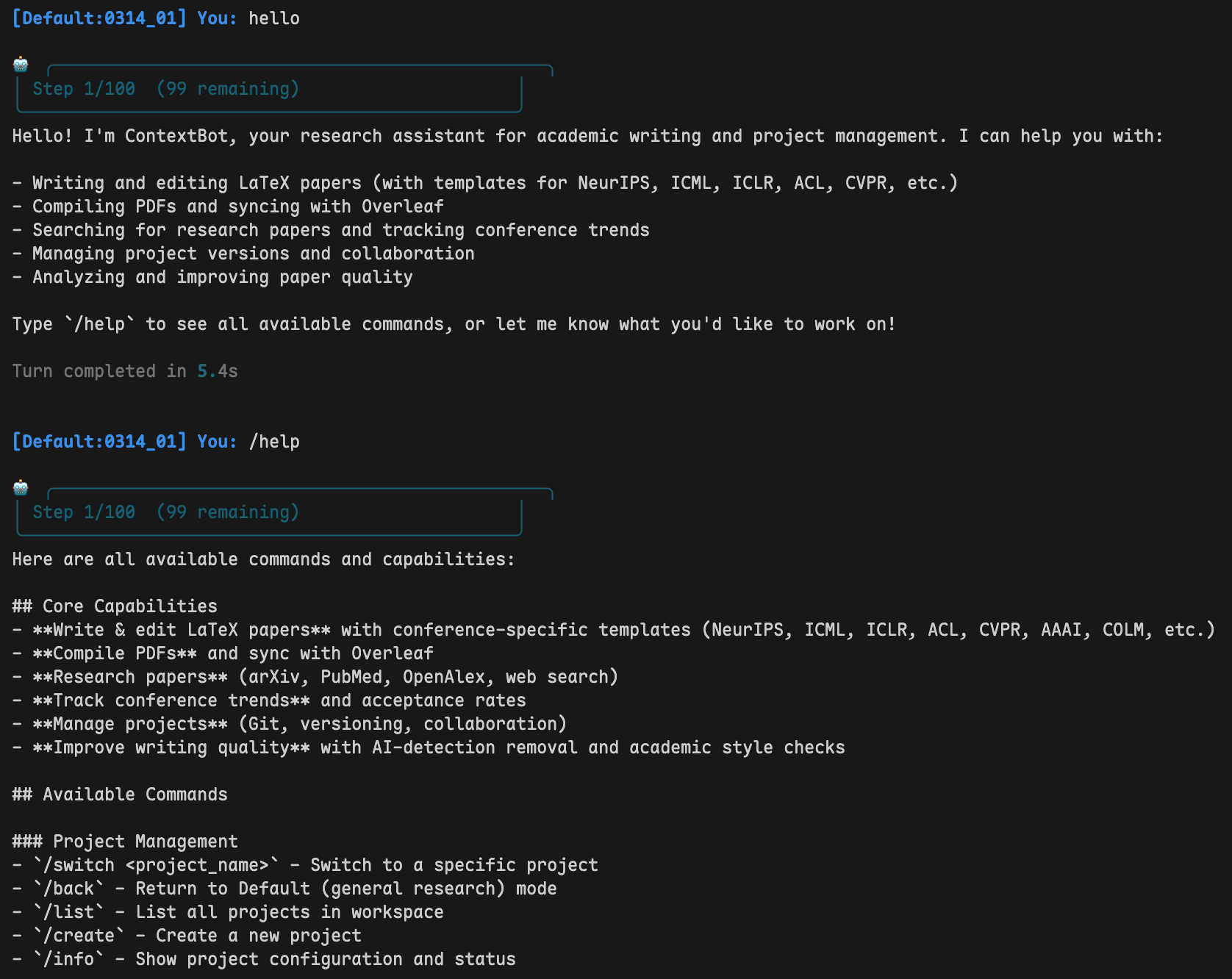
Interactive CLI session
Key Features
:writing_hand: Writing & Compilation
|
:arrows_counterclockwise: Overleaf & Git
|
:busts_in_silhouette: Multi-Agent Collaboration
|
:mag: Literature Search
|
:satellite: Research Radar & Automation
|
:brain: Memory & Context
|
:globe_with_meridians: Access AnywhereWeb UI • CLI • Feishu (Lark) • Telegram • QQ • DingTalk — no public IP required |
Feature Tour (video)
https://github.com/user-attachments/assets/fccb837c-cfc5-4063-b803-2ae900fb4a20
Getting Started
1. Install
Linux / macOS:
git clone https://github.com/nanoAgentTeam/research-claw.git
cd research-claw

python3 -m venv .venv
source .venv/bin/activate
pip install -r requirements.txt
Windows Users (via WSL)
Research Claw relies on POSIX features (signal handling, process management, etc.) and does not run natively on Windows. The recommended approach is WSL2 (Windows Subsystem for Linux) — it runs a real Linux kernel, so networking, filesystem, and process management all behave natively. No code changes needed.
Step 1: Install WSL2
Run in PowerShell (Administrator):
get download list: wsl --list --online
NAME            FRIENDLY NAME
Ubuntu          Ubuntu
Ubuntu-18.04    Ubuntu 18.04 LTS
Ubuntu-20.04    Ubuntu 20.04 LTS
Choose a version to install.
wsl --install -d Ubuntu-20.04
Reboot after installation. On first launch you'll be asked to create a username and password.
Step 2: Install Python 3.11
sudo apt update && sudo apt install -y python3.11 python3.11-venv python3-pip git
Step 3: Clone and install
# Recommended: keep code on the Linux filesystem for better performance
git clone https://github.com/nanoAgentTeam/research-claw.git ~/research-claw
cd ~/research-claw

python3.11 -m venv .venv
source .venv/bin/activate
pip install -r requirements.txt
Performance tip: Do not run the project under
/mnt/c/. Cross-filesystem IO between WSL and Windows is ~3-5x slower. Keep code under~/for near-native Linux performance.
Networking & ports: WSL2 networking (API calls, web search, academic search) works out of the box. When running in Gateway mode, Windows browsers can access the Web UI at http://localhost:18790 — ports are forwarded automatically.
Browser automation (optional): If you need the browser_use tool, install Chromium:
# Option A: install directly
sudo apt install -y chromium-browser

# Option B: via playwright
pip install playwright && playwright install --with-deps chromium
Windows 11 includes WSLg for GUI support; on Windows 10 headless mode works fine.
2. Configure
# Start the gateway — this launches the Web UI
python cli/main.py gateway --port 18790
Open http://localhost:18790/ui in your browser:
- Provider Management — Add your LLM provider (API Key, model name, base URL). Any OpenAI-compatible API works (GPT, DeepSeek, Qwen, Claude, etc.)
- Channel Accounts — (optional) Add IM bot credentials (Feishu / Telegram / QQ / DingTalk)
- Push Subscriptions — (optional) Configure where automation results get delivered
All settings are stored in
settings.json. Advanced users can edit this file directly — see Configuration Reference.
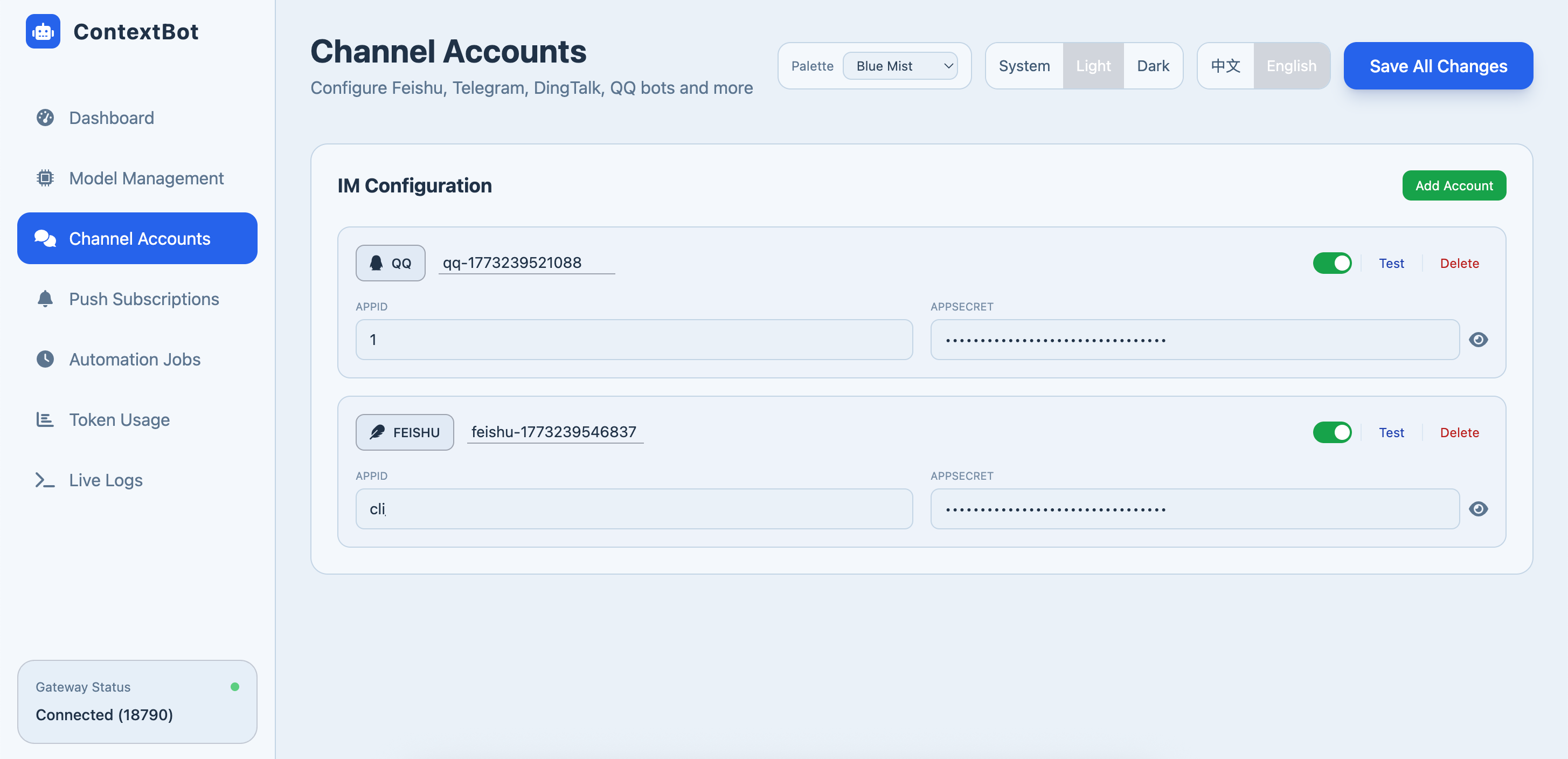
Web UI — Provider & Channel configuration
3. Overleaf Authorization (optional)
Overleaf sync enables bidirectional sync between your local LaTeX project and Overleaf — every AI edit can be pushed, and every collaborator's edit can be pulled.
python cli/main.py login
This will prompt you to choose an Overleaf instance:
| Option | Instance | Required package |
|---|---|---|
| 1 | Overleaf (default) | pip install overleaf-sync |
| 2 | CSTCloud (China Science & Technology Cloud) | pip install PySide6 (built-in, browser login only) |
The login command will call the corresponding login tool, generate .olauth, and save the instance config to settings.json.
Once .olauth is created, the system auto-detects it. Use /sync pull and /sync push inside any project.
4. Run
Option A — CLI — interact directly in your terminal:
python cli/main.py agent
Option B — Gateway — Web UI + IM channels, chat from anywhere:
python cli/main.py gateway --port 18790
How It Works
Architecture
graph TB
    subgraph Channels["Access Channels"]
        direction LR
        CLI["CLI"]
        WebUI["Web UI"]
        Feishu["Feishu"]
        TG["Telegram"]
        QQ["QQ"]
        DT["DingTalk"]
    end

    Channels --> MB["MessageBus"]
    MB --> AL["AgentLoop — Main Agent"]
    AL --> CR["CommandRouter"]
    AL --> CM["ContextManager"]
    AL --> TR["ToolRegistry (40+ tools)"]
    AL --> SA["Sub-Agents (Workers)"]

    TR --> Proj["Project\nGit · LaTeX · Overleaf"]
    TR --> LLM["LLM Provider\nOpenAI-compatible · Hot-swap"]
    TR --> Auto["Automation\nScheduled cron jobs"]
Workspaces
The system has two spaces:
| Default (Lobby) | Project (Workspace) | |
|---|---|---|
| Purpose | Create, list, switch projects | Work on a specific paper |
| Available tools | Project management (create, import from Overleaf), Overleaf list | File editing, LaTeX compile, Git, Overleaf sync, sub-agents, literature search |
workspace/
├── Default/                    # Lobby — project management & chat
└── MyPaper/
    ├── project.yaml            # Project config
    ├── MyPaper/                # Core directory (LaTeX files + Git repo)
    │   ├── main.tex
    │   └── references.bib
    └── 0314_01/                # Session (conversation history, sub-agent workspace)
Commands
| Command | What it does |
|---|---|
/help | Show all available commands |
/list | List local projects in workspace |
/olist | List remote Overleaf projects |
/switch <name> | Switch to a project |
/task <goal> | Decompose a complex goal into sub-tasks, execute in parallel |
/start | Approve the task plan and begin execution |
/done | End current TASK session and return to normal mode |
/resume | Show failed or interrupted tasks |
/resume <task-name> | Resume a failed or interrupted task |
/compile | Compile LaTeX to PDF |
/sync pull | Pull latest files from Overleaf |
/sync push | Push local changes to Overleaf |
/session | List sessions in the current project |
| `/session <session-name | number>` |
/git | Enter interactive Git mode (history, diff, rollback) |
/stop | Force-cancel the current operation |
/reset | Clear current session history |
/back | Return to Default lobby |
Task Mode
For multi-step goals, /task decomposes work into a 5-phase multi-agent pipeline:
1. You type:  /task Write a survey on Mixture-of-Experts

2. [UNDERSTAND]  Bot reads your project files automatically.

3. [PROPOSE]     Bot shows you a proposal (scope, deliverables, approach).
   → Review it. Reply with feedback to revise, or say "ok" to proceed.

4. [PLAN]        Bot shows you a task DAG (sub-tasks, dependencies, assigned agents).
   → Review it. Reply with changes, or type /start to begin execution.

5. [EXECUTE]     Sub-agents run tasks in parallel batches. Real-time progress:
                 📦 Batch 1 | 2 tasks in parallel: [t1, t2]
                 ✅ Batch 1 complete (45s) — Progress: 2/8
                 ...

6. [FINALIZE]    Bot merges all worker outputs and commits.
   → Type /done to exit task mode.
Phase details
| Phase | What the bot does | What you do |
|---|---|---|
| UNDERSTAND | Reads project files to understand context | Nothing — automatic |
| PROPOSE | Generates a proposal via task_propose | Review and reply with feedback, or confirm |
| PLAN | Builds a task DAG via task_build | Review, optionally adjust, then type /start |
| EXECUTE | Runs sub-agents in parallel batches via task_execute | Wait — progress is streamed to you |
| FINALIZE | Merges outputs and commits via task_commit | Type /done to exit task mode |
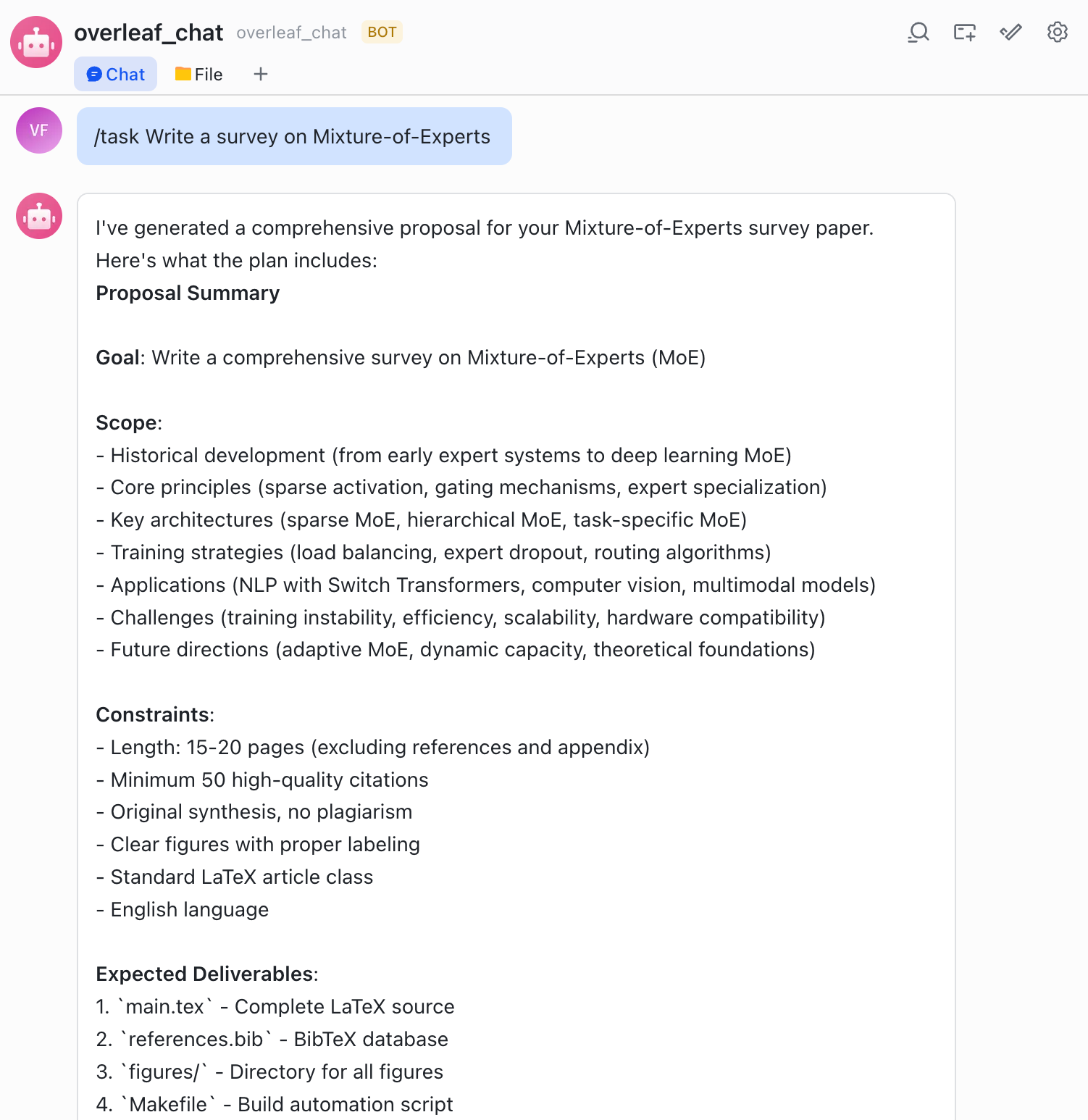
Task mode — parallel sub-agent execution
Multi-Agent Collaboration
You: "Write a paper about MoE"

Main Agent:
  1. Creates "researcher" sub-agent → searches literature in sandbox
  2. Creates "writer" sub-agent → drafts sections in sandbox
  3. Reviews and merges outputs into project
  4. Compiles and syncs to Overleaf
Sub-agents work in isolated overlay directories. Their outputs go through a merge process before touching the project core — no accidental overwrites.
Automation & Research Radar
Each project can have scheduled tasks that run automatically via cron expressions. Configure them through the Web UI's Automation tab or via project.yaml.
Built-in radar jobs (auto-created when a project has no active radar)
| Job | What it does | Default Schedule |
|---|---|---|
| Daily Scan | Search for new papers in the project's research area, summarize findings | Every morning |
| Direction Drift | Detect if the research field is shifting, alert on emerging trends | Daily |
| Deadline Watch | Track upcoming conference deadlines relevant to the project | Daily |
| Conference Track | Monitor new calls-for-papers from target venues | Weekly |
| Weekly Digest | Compile a weekly summary of all radar findings | Monday morning |
| Profile Refresh | Update the project's research profile based on latest edits | Daily |
| Autoplan | Reconcile and adjust radar job schedules based on project state | Twice daily |
How it works: Gateway starts APScheduler → each job fires at its cron schedule, spawns an agent session → agent reads project memory, runs searches, writes findings → results pushed to configured channels (Telegram, Feishu, Email, etc.).
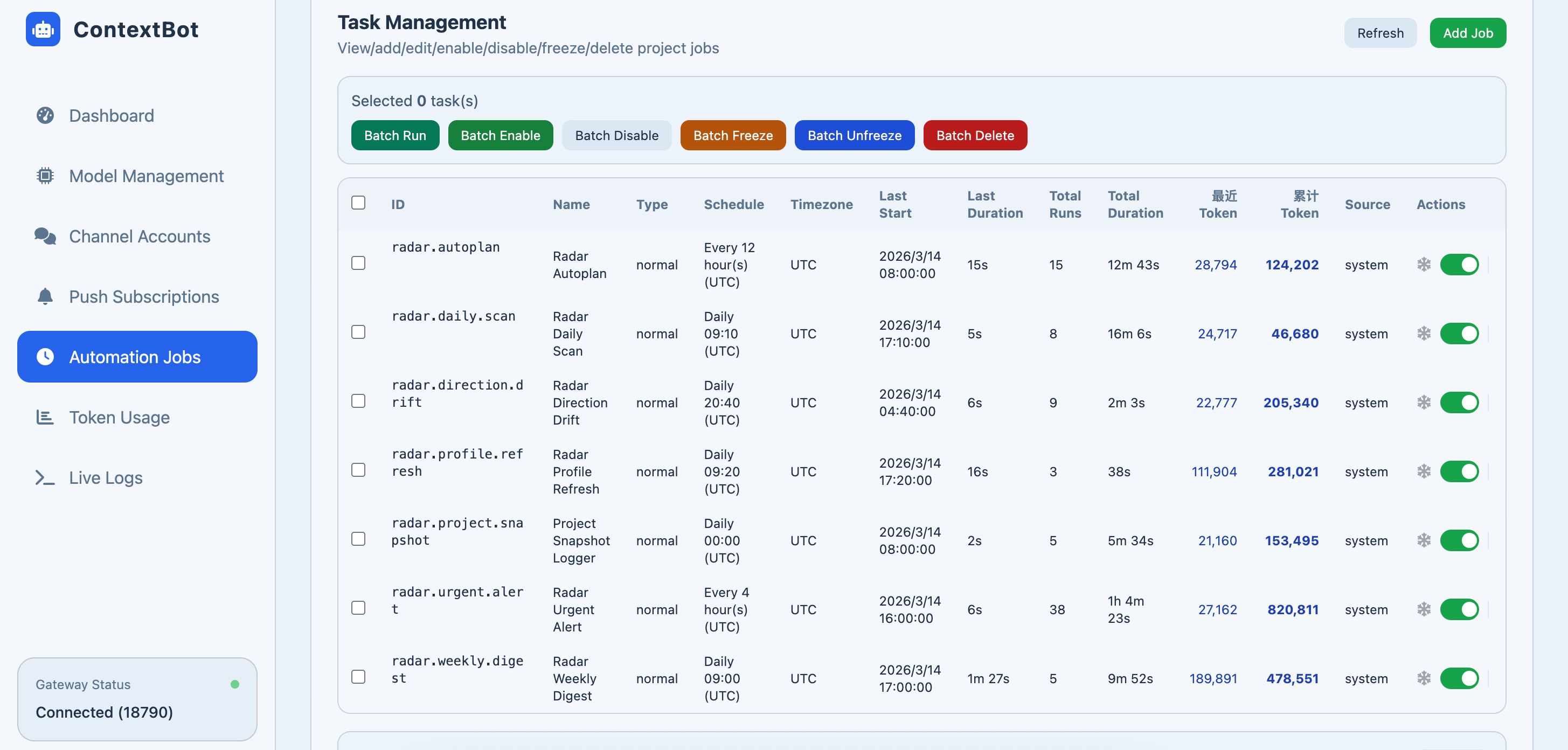
Automation dashboard — radar jobs & push notifications
Configuration Reference
All runtime config lives in settings.json (managed via Web UI, or edit directly):
| Section | Purpose |
|---|---|
provider.instances | LLM providers — API key, base URL, model name |
channel.accounts | IM bot credentials |
gateway | Web UI host & port |
features | Toggle history, memory, auto-summarize, etc. |
tools | Web search & academic tool API keys |
pushSubscriptions | Automation notification routing |
Other config files
| File | Purpose |
|---|---|
config/tools.json | Tool registry (class paths, parameters, permissions) |
config/commands.json | Slash command definitions |
config/agent_profiles/ | Agent role profiles (tools available per role) |
workspace/{project}/project.yaml | Per-project settings (Overleaf ID, LaTeX engine, Git) |
Skills
Skills are domain-specific SOPs the agent activates on demand. Add a custom skill by creating a folder under config/.skills/:
config/.skills/
└── my-skill/
    ├── SKILL.md          # Required — skill definition (YAML frontmatter)
    └── templates/        # Optional — resource files
The system auto-discovers all skill folders at startup — no registration needed.
Documentation
IM Setup: Feishu · Telegram · QQ · DingTalk
Push Subscriptions: Configuration Guide
Contributing
Contributions are welcome! Feel free to:
- Open an Issue for bugs or feature requests
- Submit a Pull Request with improvements
- Improve documentation or add new venue skill templates
License
MIT License — free for academic and commercial use.