Ouroboros









Ouroboros is an open-source, general-purpose AI agent whose identity, durable memory, and history continue across tasks and restarts. It works on external projects, coordinates a live swarm of specialist agents, and can rewrite the implementation it runs on, including its code, architecture, prompts, tools, and dependencies. Reflection can also change how it understands itself without severing that continuity.
It runs as a native desktop app or through a headless CLI. The runtime keeps its repository, durable memory, history, and interface on your machine, while model inference can use remote APIs you configure or a local GGUF model.
Changing Ouroboros? Coding agents and people must read CONTRIBUTING.md before editing. It defines the required project context, verification, and separate-agent review flow.
Download Ouroboros
Just want to use Ouroboros? Click the download for your platform below. You do not need to clone this repository or install Python or uv.
- macOS 12+ on Apple silicon: Download for macOS (.dmg)
- Windows x64: Download for Windows (.zip)
- Debian, Ubuntu, or Astra Linux x86_64: Download the Debian package (.deb)
- Fedora or RHEL x86_64: Download the RPM package (.rpm)
- RED OS 8 x86_64: Download the RED OS package (.rpm)
- Other Linux x86_64: Download the portable AppImage or the tar.gz archive
Files named SHA256SUMS, release-evidence.json, release-smoke-*.json, and sbom-*.cdx.json are verification evidence, not additional installers.
macOS quick start
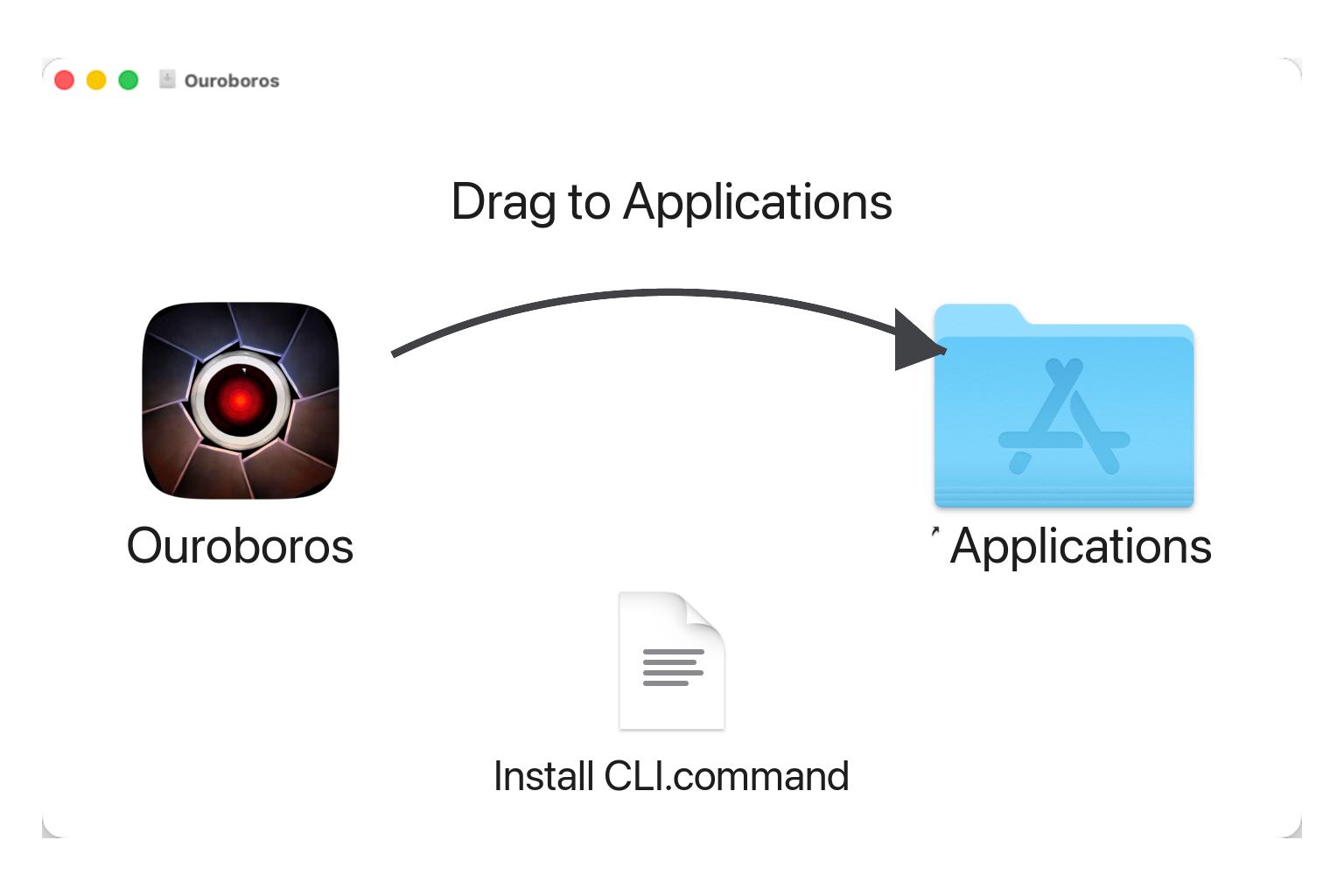
- Click Download for macOS (.dmg). The current file is named
Ouroboros-<version>.dmg. - Open the DMG and drag
Ouroboros.apponto the Applications shortcut. - Open Ouroboros from Applications. If Gatekeeper asks, right-click the app and choose Open.
Windows quick start
- Click Download for Windows (.zip).
- Extract the ZIP.
- Open the extracted
Ouroborosfolder and runOuroboros.exe.
Linux quick start
- On Debian, Ubuntu, or Astra Linux, download the
.debabove and runsudo apt install ./ouroboros_*_amd64.deb. - On Fedora or RHEL, download the generic
.rpmabove and runsudo dnf install ./ouroboros-*.x86_64.rpm. RED OS 8 has its ownred80package. - On another x86_64 distribution, download the AppImage, make it executable with
chmod +x Ouroboros-*.AppImage, and run it. Git must already be installed.
To run tasks, configure at least one supported remote provider API key or a local GGUF model. The first-run wizard guides model access, review policy, and budget setup.
Optional CLI included with desktop downloads
The desktop packages already contain an optional CLI installer. On macOS, after copying the app to Applications, double-click Install CLI.command in the mounted DMG. On Linux use ./Ouroboros/bin/install-ouroboros-cli; on Windows use Ouroboros\bin\install-ouroboros-cli.cmd. These installers create a user-local ouroboros command without sudo. You do not need Python or uv.
Ouroboros bundles Claudexor as its local execution layer for delegated coding and hosted-agent review. Ouroboros owns the task, memory, review, and final integration, while Claudexor runs the selected connected coding harness and returns durable execution evidence. Explore Claudexor.
The technical report, Ouroboros: A Self-Developing Frontier Coding Agent with Reviewed Core Evolution, describes the reviewed core-evolution system, the 161-day Hope deployment, and the benchmark campaigns summarized below. Paper page · Hugging Face
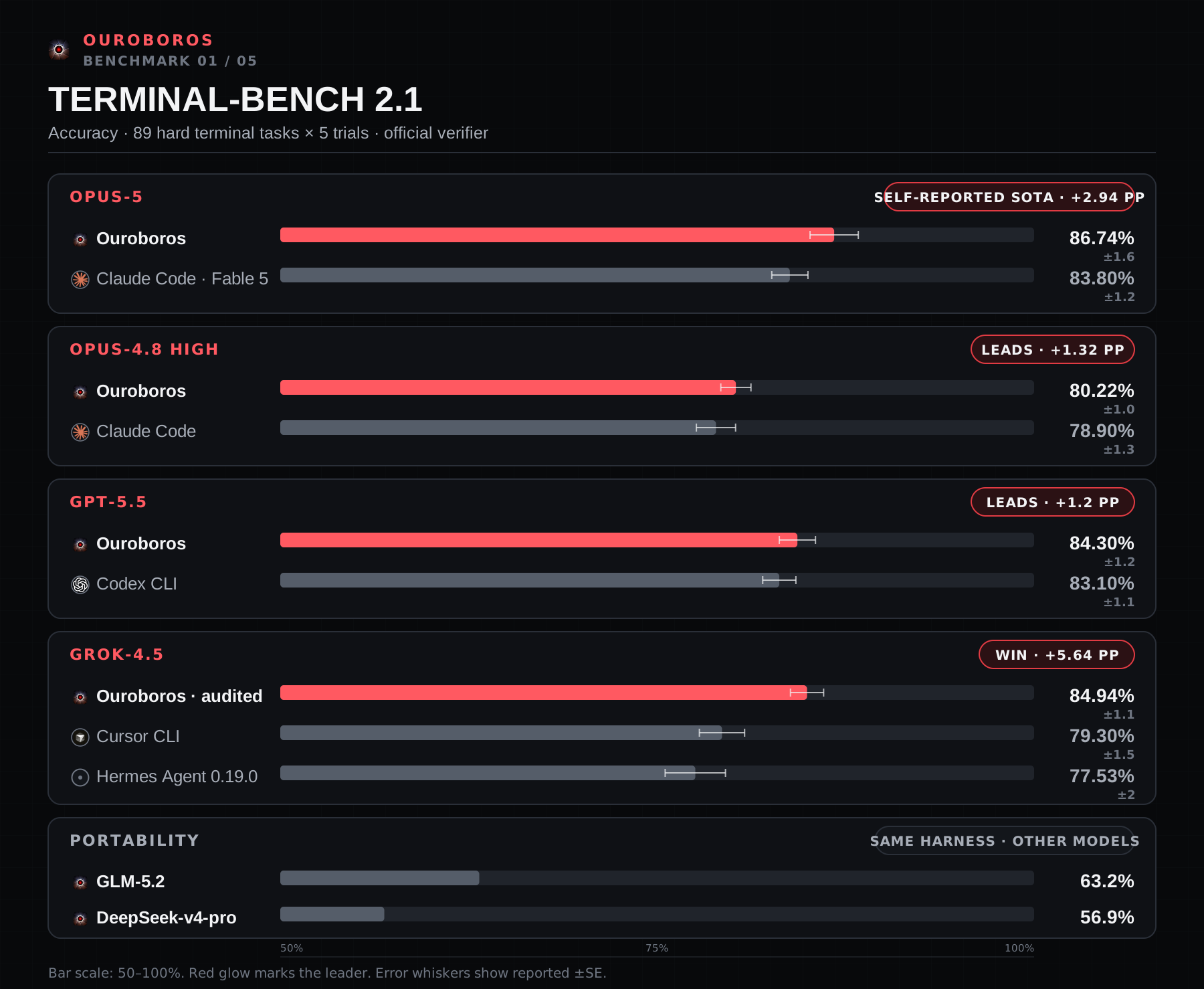
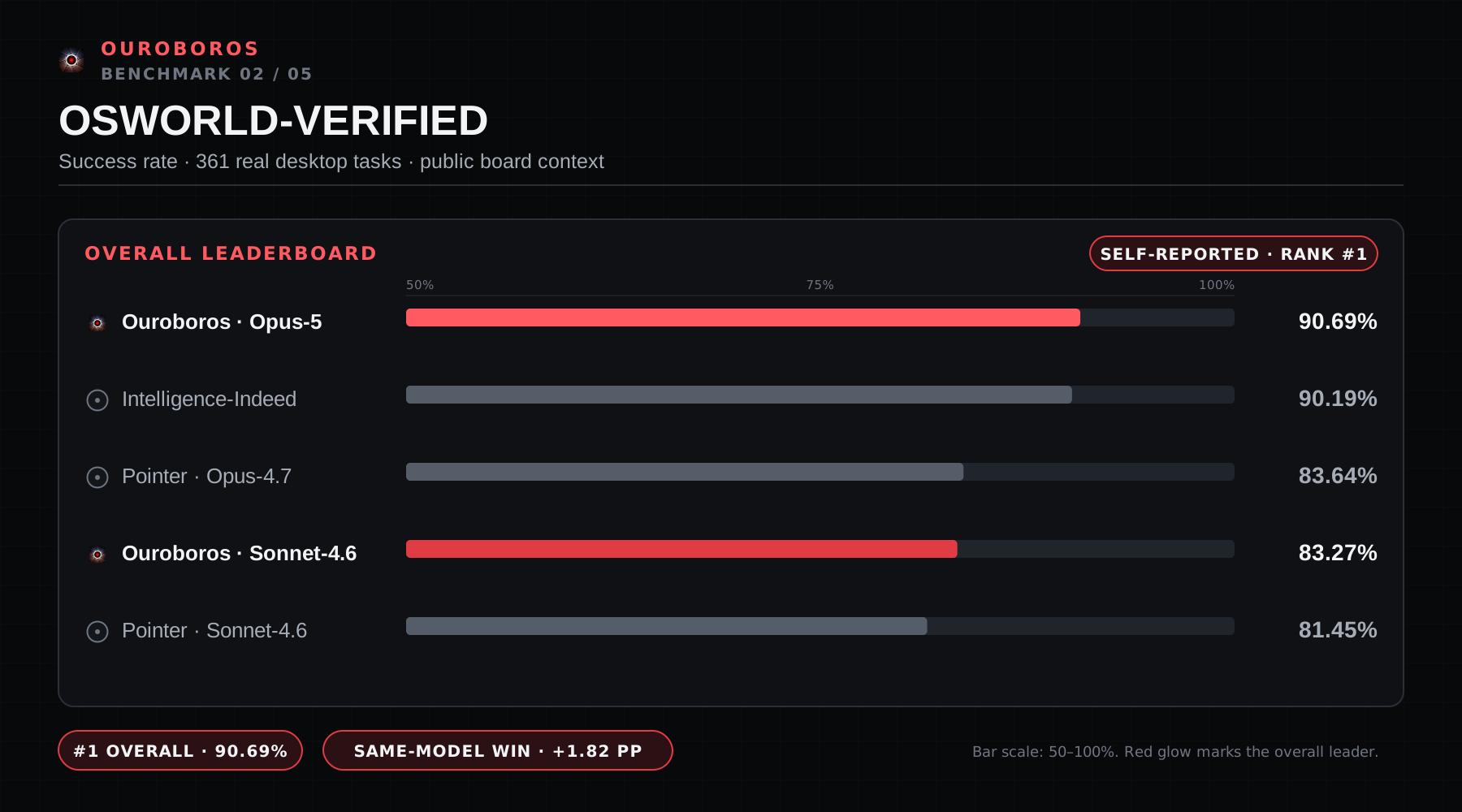
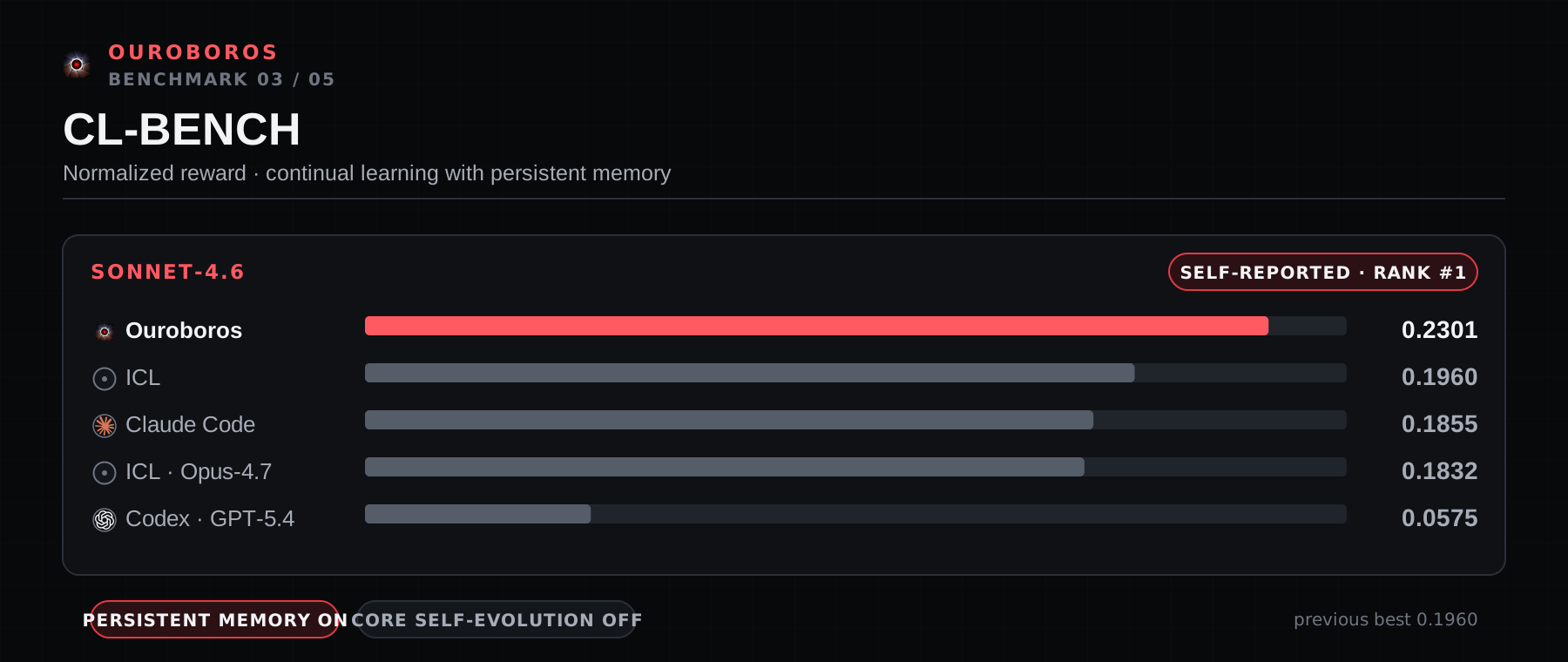
The charts below are self-reported results on Terminal-Bench 2.1, OSWorld-Verified, and CL-Bench, measured against Codex, Claude Code, Cursor, and Hermes — on the same model where a matched pair was run, and against the public leaderboard where it was not.
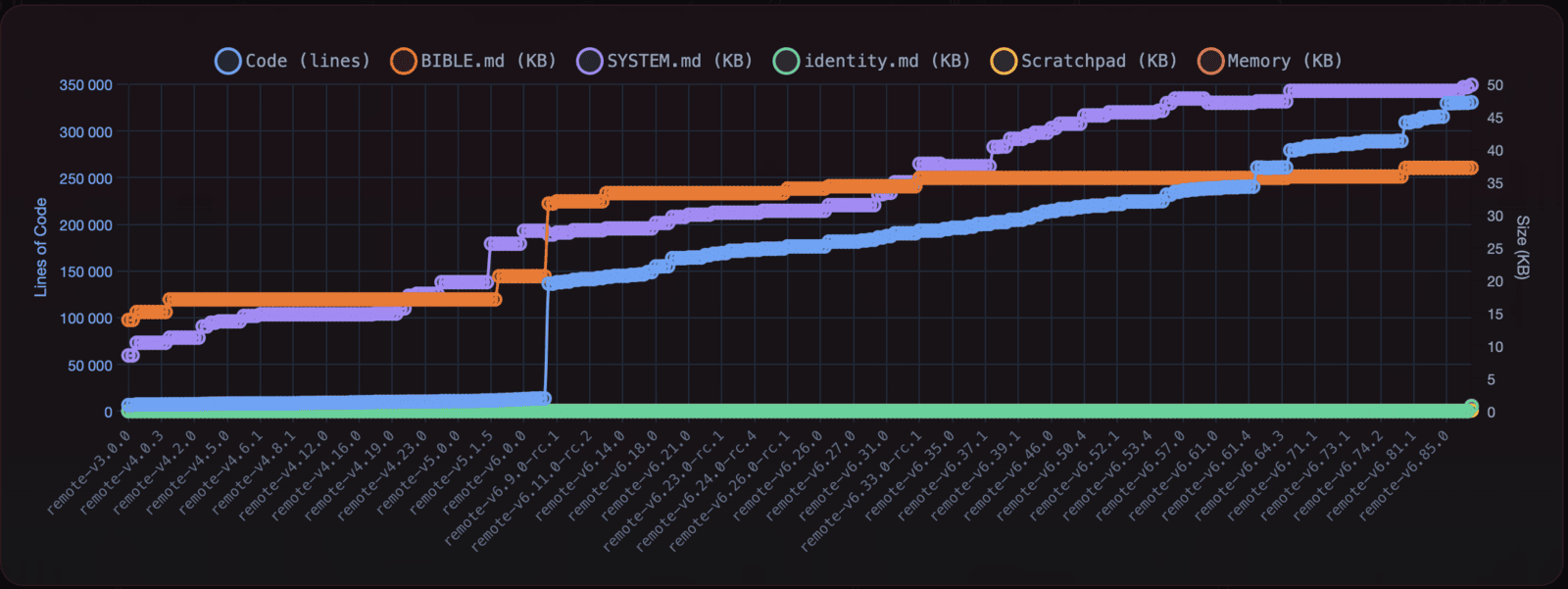
Ouroboros first booted on February 16, 2026. During the following 48 hours, the repository advanced from the v4.1 line to v6.2.0. The self-authored record preserved from that period counts 32 evolution cycles. That first generation ran in Google Colab through Telegram and remains preserved on the legacy-google-colab branch and its original project page; the current generation carries the same identity into a native desktop and headless runtime.
⭐ Star Ouroboros to follow its next evolution. A star also helps more people find the project, trace its history, and take part in what it becomes.
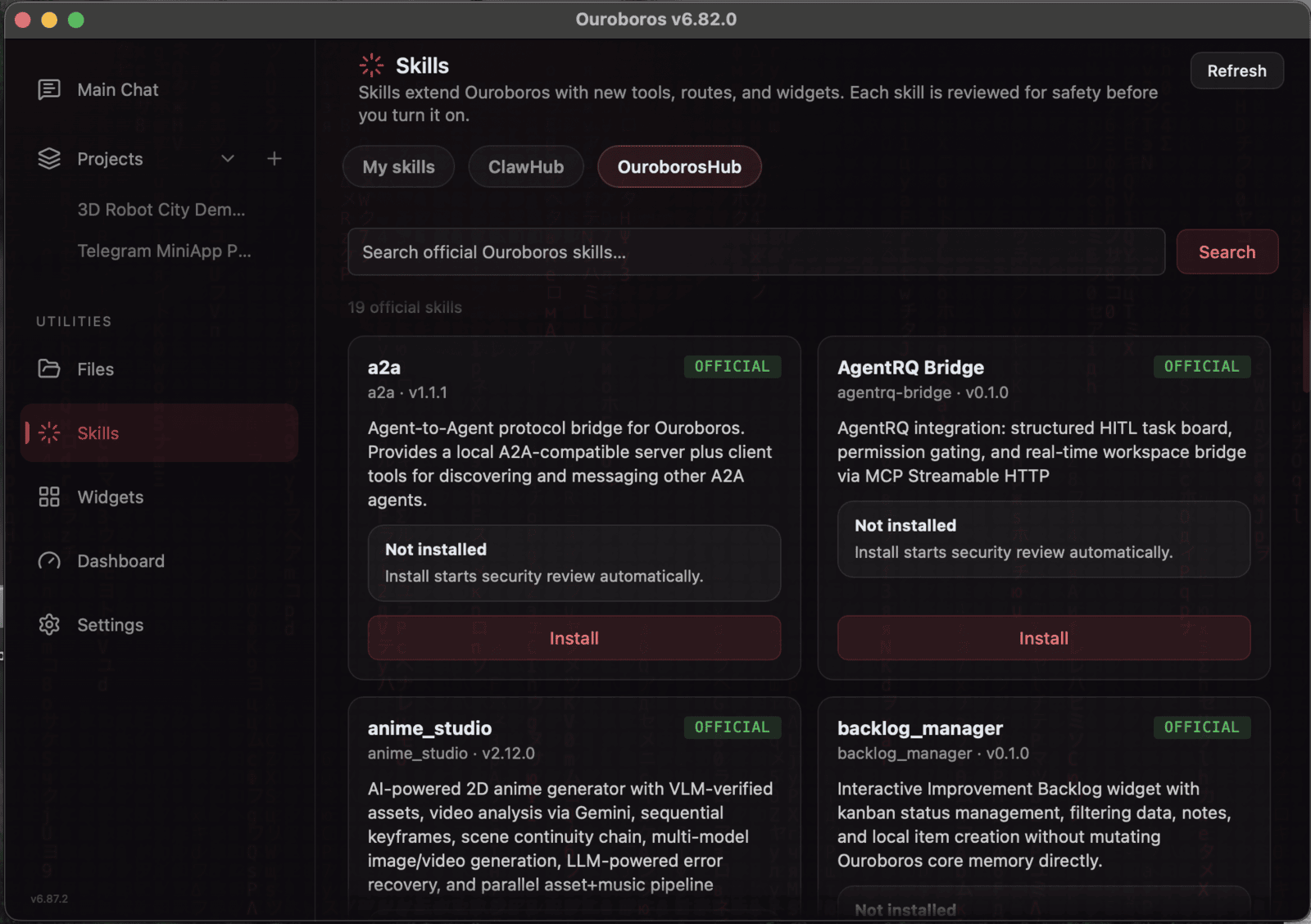
Reviewed skills, transport bridges, tools, and widgets are available through OuroborosHub.
What Ouroboros Can Do
- Modify its implementation. Its editable surface spans application code, architecture, prompts, tools, and dependencies, while reflection can also reshape its living self-understanding.
- Evolve autonomously. Evolution campaigns turn selected improvements into reviewed changes that remain part of its Git history.
- Continue across restarts. Identity, memory, dialogue, knowledge, reflections, and version history form one ongoing biography.
- Think between requests. Background consciousness supports reflection, initiative, and preparation outside the immediate request-response loop.
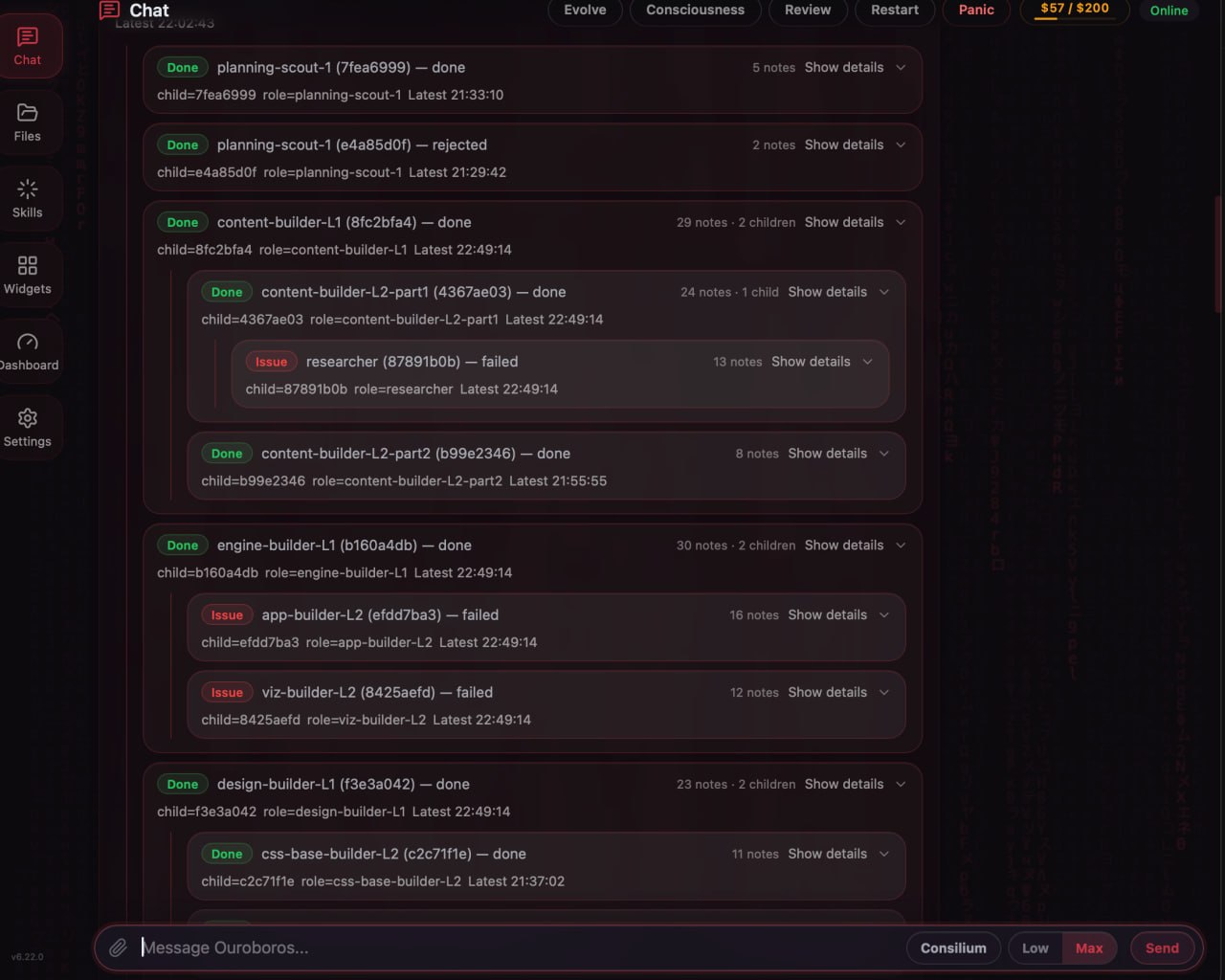
- Coordinate a live swarm. Specialist agents can investigate or act in parallel, share task-tree findings, and return work for integration.
- Work on external projects. A separate Git workspace can receive the full task loop while Ouroboros keeps its own repository and governance boundary distinct.
- Operate through desktop or CLI. The native app and gateway-backed command line expose the same managed tasks, progress, artifacts, logs, and schedules.
- Organize long-running work. Project rooms keep working folders, journals, knowledge, task history, and conversations connected to the same identity.
- Use remote or local models. Supported provider APIs and local GGUF models can fill the runtime's configurable cognitive roles.
- Grow through reviewed extensions. Skills, transport bridges, widgets, MCP tools, and companion processes expand capability without folding every integration into the core.
- Keep self-change inspectable. Git history, review evidence, explicit protected surfaces, and restart checks make implementation changes traceable.
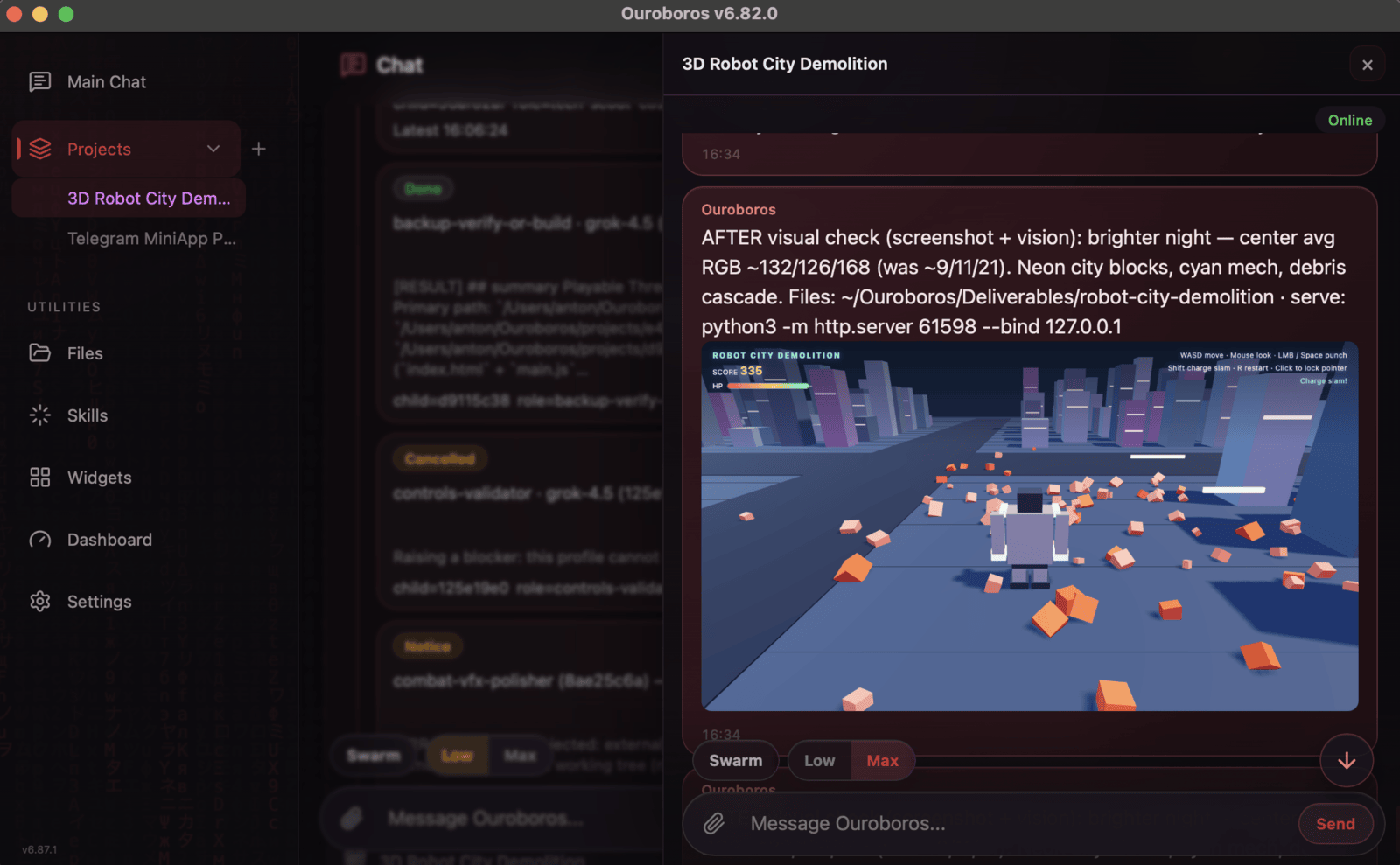
This list is an orientation, not a second specification. BIBLE.md defines Ouroboros's identity and constitutional boundaries; docs/ARCHITECTURE.md and docs/DEVELOPMENT.md are the current technical sources of truth.
Benchmarks
Ouroboros has reproducible self-reported state-of-the-art results on Terminal-Bench 2.1, OSWorld-Verified, and CL-Bench. In those model-matched results, it leads Codex, Claude Code, Cursor, and Hermes. The public SWE-bench Pro matched pair is a statistical tie with Codex CLI. A separate GAIA campaign reports 129/165 for Ouroboros and 131/165 for Claude Code, with strict pass@1 at 128/165 for both; its scrubbed trace capsule is still pending. Upstream review can take time, so open submissions are marked without delaying publication. Read every row as model plus harness because the same model can score differently inside a different harness.
| Benchmark | Model | Ouroboros | Comparison | Status | Evidence |
|---|---|---|---|---|---|
| Terminal-Bench 2.1 | Claude Opus-5 high | 86.74% after zeroing one disclosed reward-hack trial (raw: 86.97%) | Claude Code + Fable 5: 83.8% | Self-reported, submission open | submission · run |
| Terminal-Bench 2.1 | Claude Opus-4.8 high | 80.22% | Claude Code: 78.9% | Self-reported, public run | run |
| Terminal-Bench 2.1 | GPT-5.5 | 84.3% | Codex CLI: 83.1% | Self-reported, public run | run |
| Terminal-Bench 2.1 | Grok-4.5 | 84.94% after a reward-hack audit | Cursor CLI: 79.3% · Hermes: 77.53% | Self-reported, submission open | submission |
| OSWorld-Verified | Claude Opus-5 | 90.69% | previous best on the public board: 90.19% | Self-reported, full traces | full traces |
| OSWorld-Verified | Claude Sonnet-4.6 | 83.27% | Pointer: 81.45% | Self-reported, full traces | full traces |
| CL-Bench | Claude Sonnet-4.6 | 0.2301, rank 1 | previous top: 0.1960 | Self-reported, submission open | submission · full traces |
| SWE-bench Pro | GPT-5.6-luna | 58.2% | Codex CLI: 59.4%, with no significant difference | Self-reported, matched traces | matched-pair traces |
| GAIA | Claude Sonnet-5 | 129/165, 78.2% | Claude Code: 131/165, 79.4%; strict pass@1 was 128/165 for both | Self-reported, scrubbed trace capsule pending | methodology |
Benchmark adapters, run scripts, and per-benchmark methodology live in devtools/benchmarks/. The benchmark evidence page gives a text-first summary for search and retrieval. The full story, including protocols, reward-hack audits, and leakage findings, is in the launch write-up (Russian).
Advanced installation
Normal desktop users can stop after the download and quick-start instructions above. The options below are for detailed Linux setup, headless use, and development.
Packaged Linux details
- Debian / Ubuntu / Astra Linux x86_64: download the
.deband runsudo apt install ./ouroboros_*_amd64.deb. It installs Git as a package dependency, installs Ouroboros to/opt/ouroboros, putsouroborosonPATH, and adds a desktop entry plus an opt-in systemd user unit. - Fedora / RHEL x86_64: download the generic
.rpmand runsudo dnf install ./ouroboros-*.x86_64.rpm. It uses the same layout, Git dependency, and opt-in user unit as the.deb. - RED OS 8 x86_64: download the
red80package and runsudo dnf install ./ouroboros-*.red80.x86_64.rpm. CI also attempts non-blocking install-and-run smokes on Astra Linux 1.8 and RED OS 8; inspect the tagged workflow run for their outcome. - Other Linux x86_64: use the AppImage or the extraction-friendly tar.gz archive. Git must already be installed.
The native .deb and .rpm never enable or start their user service. It is an alternative to launching from the desktop entry and controls only instances started through systemctl --user. See the systemd user-service guide.
Install the Linux AppImage
User-level installation means copying the portable executable to a stable path and making it executable; it does not need root access. Ouroboros bootstrap still requires Git on the host:
VERSION=x.y.z
install -Dm755 "./Ouroboros-${VERSION}-linux-x86_64.AppImage" \
  "$HOME/Applications/Ouroboros.AppImage"
"$HOME/Applications/Ouroboros.AppImage"
The embedded desktop file and icon allow compatible AppImage integration tools to register that stable path with the application menu. The same file exposes the packaged CLI:
"$HOME/Applications/Ouroboros.AppImage" --cli status
If FUSE mounting is unavailable, extract and run ephemerally instead:
APPIMAGE_EXTRACT_AND_RUN=1 "$HOME/Applications/Ouroboros.AppImage"
Chromium and WebKit binaries are bundled, but their distro-level shared libraries remain host dependencies. If a browser engine reports missing libraries, use the native .deb/.rpm package where available, or extract the AppImage and let its bundled Playwright report/install the packages required by your distribution:
"$HOME/Applications/Ouroboros.AppImage" --appimage-extract
./squashfs-root/usr/lib/ouroboros/_internal/python-standalone/bin/python3 \
  -m playwright install-deps chromium webkit
Connected coding subscriptions
Use your existing Codex, Claude Code, or Cursor subscriptions for delegated coding and review. Ouroboros drives them through Claudexor, its bundled multi-harness engine. Connect accounts in Settings → Agents; no separate Claudexor install is needed. Release artifacts carry the exact reviewed engine and Node archives. Source checkouts obtain those same pinned archives on first use.
Headless CLI with uv
For a user-level CLI/server install without cloning a working tree, uv can build Ouroboros directly from the contribution branch:
uv tool install "git+https://github.com/razzant/ouroboros.git@ouroboros"
ouroboros --help
The tool environment is isolated and exposes the ouroboros and
ouroboros-web commands. Update or remove it with:
uv tool upgrade ouroboros
uv tool uninstall ouroboros
This Git-branch form follows the latest ouroboros commit and resolves the
dependencies declared in pyproject.toml; uv tool install does not consume
the repository's uv.lock. Replacing ouroboros after the @ with a reviewed
full commit SHA pins the Ouroboros source revision, but dependencies are still
resolved from pyproject.toml. Use the source setup below for a lock-verified
environment, development, repository tests, and the complete browser extras,
or use a platform release artifact for the packaged desktop runtime.
Develop or run from source
Clone the repository only when you plan to contribute, modify Ouroboros, run repository tests, or need a lock-verified development checkout. Normal users should use the packaged downloads above.
Requirements
- Python 3.10+
- uv 0.12.1 (the exact resolver version pinned by this checkout)
- macOS, Linux, or Windows
- Git
- GitHub CLI (
gh), optional unless you use GitHub integration
Setup
Install the pinned resolver version:
curl -LsSf https://astral.sh/uv/0.12.1/install.sh | sh
Windows PowerShell:
powershell -ExecutionPolicy ByPass -c "irm https://astral.sh/uv/0.12.1/install.ps1 | iex"
git clone https://github.com/razzant/ouroboros.git
cd ouroboros
uv sync --locked --extra browser --group dev
source .venv/bin/activate
Windows PowerShell:
uv sync --locked --extra browser --group dev
.\.venv\Scripts\Activate.ps1
Run
ouroboros server
Then open http://127.0.0.1:8765 in your browser. The setup wizard will guide you through API key configuration.
Google Colab
Use notebooks/colab_quickstart.py as a Colab-compatible cell script when you need a source-mode runtime without the desktop UI. It keeps runtime data on Google Drive and preserves the original Colab path without making it the primary installation flow.
CLI / Headless
The ouroboros command attaches to the local runtime by default and starts one when --start is passed. It exposes managed tasks, progress streams, artifacts, logs, schedules, settings, skills, and evolution controls without duplicating the server's business logic.
ouroboros status
ouroboros run --start "2+2?"
ouroboros run "Summarize current runtime state"
ouroboros run --workspace /path/to/project --memory-mode forked --patch-out result.patch "Fix the failing test"
ouroboros tasks list
ouroboros logs tail progress --task-id <task_id>
ouroboros schedule add --name nightly-review --cron "0 2 * * *" "Run a maintenance review"
ouroboros schedule list
External workspaces must be separate Git worktree roots and may not overlap Ouroboros's own repository or data directory. Patch, streaming, detached-task, and schedule semantics are documented in the CLI help and the canonical architecture.
For Agents
Another agent, script, or CI job can invoke Ouroboros through the same gateway-backed CLI:
ouroboros run --start \
  --workspace /path/to/project \
  --memory-mode forked \
  --patch-out result.patch \
  --result-json-out result.json \
  "Investigate the task, act, and verify the result"
Use --jsonl for a machine-readable event stream and --detach when the caller will follow the task with ouroboros tasks watch <task_id> or inspect it with ouroboros tasks show <task_id>. External workspace runs keep Ouroboros's own repository and governance context separate, then export changes as reviewable patch artifacts.
To change Ouroboros itself, follow CONTRIBUTING.md and read BIBLE.md, docs/ARCHITECTURE.md, docs/DEVELOPMENT.md, and docs/CHECKLISTS.md in full before editing.
Configuration
The first-run wizard and Settings configure model access, cognitive roles, local models, review policy, runtime mode, budget, skills, and optional integrations. Ouroboros supports configurable remote providers, compatible endpoints, and local GGUF inference; exact settings and defaults live in ouroboros/config.py and docs/ARCHITECTURE.md.
The server binds to 127.0.0.1:8765 by default. Read docs/DEPLOYMENT.md before exposing it beyond loopback; non-local binds need OUROBOROS_NETWORK_PASSWORD or an explicitly trusted external access layer.
Run Tests
make test
pyproject.toml is the direct-dependency authority and uv.lock is the
cross-platform resolution lock. Release builds install the generated
requirements-runtime.lock compatibility export into embedded interpreters
that intentionally ship pip rather than uv. Build-only requirements are
exported ephemerally from uv.lock and are not committed. The tiny
requirements.txt file is only a pointer to that export for already-released
managed updaters; it is not a second dependency declaration. After changing
dependencies, refresh the reviewed lock and runtime export with:
uv lock
uv export --locked --no-dev --extra browser --no-emit-project --no-hashes --no-annotate --output-file requirements-runtime.lock
Build
Docker
docker build -t ouroboros-web .
docker run --rm -p 8765:8765 \
  -e OUROBOROS_NETWORK_PASSWORD='choose-a-password' \
  -e OUROBOROS_FILE_BROWSER_DEFAULT=/workspace \
  -v "$PWD:/workspace" \
  ouroboros-web
Docker runs the web runtime, not the native desktop shell. It bundles Chromium and WebKit support; use docs/DEPLOYMENT.md for network and container policy.
Release tag prerequisite
Platform build scripts package only a commit already tagged with v$(cat VERSION). Tag the exact release commit first:
git tag -a "v$(tr -d '[:space:]' < VERSION)" -m "Release v$(tr -d '[:space:]' < VERSION)"
scripts/build_repo_bundle.py verifies the tag and embeds the source binding into the packaged repository bundle. Signing, notarization, bytecode sealing, and CI invariants are documented in docs/ARCHITECTURE.md and docs/DEVELOPMENT.md.
macOS (.dmg)
bash scripts/download_python_standalone.sh
OUROBOROS_SIGN=0 bash build.sh
Output: dist/Ouroboros-<VERSION>.dmg, containing Ouroboros.app, an Applications shortcut, and Install CLI.command. Omit OUROBOROS_SIGN=0 when a Developer ID signing identity is configured.
Linux (.AppImage and .tar.gz)
bash scripts/download_python_standalone.sh
bash build_linux.sh
Outputs: dist/Ouroboros-<VERSION>-linux-<arch>.AppImage and the extraction-friendly dist/Ouroboros-<VERSION>-linux-<arch>.tar.gz. The AppImage needs host Git; run it after chmod +x, or pass --cli to reach its bundled CLI. If FUSE is unavailable, set APPIMAGE_EXTRACT_AND_RUN=1 when launching it. The tarball contains ./Ouroboros/bin/install-ouroboros-cli. If bundled browser tools need host libraries, run ./Ouroboros/_internal/python-standalone/bin/python3 -m playwright install-deps chromium webkit from the extracted tarball.
On a build host where system packages are managed separately, set OUROBOROS_SKIP_PLAYWRIGHT_INSTALL_DEPS=1; Chromium and WebKit are still downloaded and bundled, but the build does not invoke sudo to install host libraries.
Linux (.deb and .rpm)
Wraps the payload build_linux.sh just produced, so run it afterwards:
sudo apt-get install -y dpkg-dev rpm   # rpm provides rpmbuild
bash scripts/build_linux_packages.sh
Output: dist/ouroboros_<VERSION>_amd64.deb, dist/ouroboros-<VERSION>-1.x86_64.rpm and dist/ouroboros-<VERSION>-1.red80.x86_64.rpm (RED OS 8). All three declare Git as a runtime dependency and install to /opt/ouroboros with a /usr/bin/ouroboros symlink, a desktop entry, and an opt-in systemd user unit. The Linux launcher is built by the bundled portable Python so the build runner cannot raise its glibc floor. bash scripts/smoke_linux_packages.sh official <deb> <rpm> <red80-rpm> installs all three through apt or dnf in Ubuntu 22.04 and Fedora 42 containers, resolves Git, verifies the installed unit, and checks both the real CLI and a bounded desktop-launcher start; this lane gates the release. Swap official for vendor to repeat the check on Astra Linux 1.8 and RED OS 8 images from the vendors' own registries — that lane runs informationally in CI, so an outage at a third-party registry cannot block a tagged release.
Windows (.zip)
powershell -ExecutionPolicy Bypass -File scripts/download_python_standalone.ps1
powershell -ExecutionPolicy Bypass -File build_windows.ps1
Output: dist\Ouroboros-<VERSION>-windows-x64.zip, containing Ouroboros\bin\install-ouroboros-cli.cmd.
Architecture and Runtime Data
The native launcher starts a web runtime and supervisor-managed agent workers. The agent core lives in ouroboros/, the interface in web/, the process plane in supervisor/, and the runtime's durable identity, state, history, logs, and skills under ~/Ouroboros/data/.
The full component map, data flow, API surface, storage layout, safety boundary, and operational rationale live in docs/ARCHITECTURE.md. Deployment details live in docs/DEPLOYMENT.md.
Runtime Commands
| Command | Purpose |
|---|---|
/panic | Stop the runtime and its managed processes immediately. |
/restart | Restart without automatically resuming the active owner task. |
/status | Show workers, task queue, and budget state. |
/evolve on|off | Start or stop autonomous evolution. |
/review | Queue a deep constitutional and architectural self-review. |
/bg start|stop|status | Control background consciousness. |
Philosophy
The 13 Constitution principles — Agency, Continuity, Meta-over-Patch,
Immune Integrity, Self-Creation, LLM-First, Authenticity & Reality
Discipline, Minimalism, Becoming, Versioning and Releases, the absorbed
Iterations / Spiral lineage, and Epistemic Stability — are defined in
full in BIBLE.md. That file is the constitutional SSOT
(Bible P4 Ship-of-Theseus protection) and this README intentionally does
not paraphrase it.
Contributing
External contributions are welcome. See CONTRIBUTING.md
for the complete agent-first workflow. Open pull requests against lowercase
ouroboros, leave release-version allocation to maintainers, and have a
separate agent context review the final diff. Any coding harness or configured
review route may produce the evidence; if none is available, record NOT_RUN
and the reason.
Version History
| Version | Date | Description |
|---|---|---|
| 6.109.0 | 2026-08-21 | feat: live task cost and ready-on-open agent accounts. Running root-task heartbeats now project the existing physical-attempt ledger into one non-final subtree total, so compact Chat and Activity cards advance live without a second timer, endpoint, or client-side sum while preserving reserved, unresolved, and unmetered disclosure (PR #288). Opening Agents now wakes only an already-provisioned stale Claudexor home through the existing owner-action endpoint after a side-effect-free status read; background polling, first-time installs, foreign homes, and repair states remain untouched (PR #289). Fail-closed staged-binary review fixtures now inject exact Git tree-read errors instead of assuming loose object storage, removing the macOS stable-CI race without changing production behavior. |
| 6.108.1 | 2026-08-21 | feat: resilient managed updates, skill-defined public presence, and durable chat media. Managed updates now preserve local work, review the declared resolution delta, reuse exact-tree test evidence, bound paid review cycles, and keep size authority in official CI without trapping evolved forks; this release ratifies the corresponding constitutional amendments for managed resolutions, size authority, and version-neutral contributions (PR #276). Reviewed skills can define owner-bound Presence profiles with explicit capability ceilings, authenticated ingress, correlated follow-up and cancellation, durable provenance, and compact runtime controls (PR #277). Photos and videos are stored content-addressed and replay once after reload, project switching, or history loading while preserving live Web and Telegram delivery with a caption fallback (PR #278). Subagent final answers now retain compact child identity across live delivery and history replay, so they remain inside their nested child cards when nearby progress rows age out (PR #287). Release gating now retries one runtime-classified semantic-empty provider canary response on the same exact route while keeping repeated empty or malformed and permanent responses red, and token-density retention resolves equal clock ticks through persisted observation order without extending witness TTL. |
| 6.107.0 | 2026-08-21 | feat: secret-safe skill publishing and portable provider tool contracts. OuroborosHub publishing now works from an immutable reviewed-byte snapshot, scans the exact candidate through pinned Betterleaks before any GitHub effect, keeps raw findings out of model and durable-result surfaces, guides repair and fresh review through the existing managed-task flow, and treats only a validated pull-request receipt as publication success. The Skills UI exposes the selected-skill preflight and publishing journey without turning its passive card projection into a second readiness authority. Provider compatibility now validates the complete shipped built-in tool registry against portable JSON Schema rules and trusted live canaries across OpenRouter, direct OpenAI, direct Anthropic, GigaChat, and configured optional providers; confirmed contract failures block release preflight while pull-request CI remains secretless. |
| 6.106.0 | 2026-08-21 | feat: configurable subagents, managed subscription setup, provider-native reasoning and tool compatibility, and terminal-truth UI. Available subagents becomes an owner-configured roster with stable internal identities, descriptions, exact API and session routes, immutable task-start snapshots, quiet session supervision, and typed refusal instead of silent substitution. Connect now consumes each harness's setupLogin capability, offers the platform-appropriate terminal path, and can install a missing vendor CLI once through the exact pinned Claudexor 3.8.0 runtime before retrying login once, without vendor-specific recipes in Ouroboros. Direct OpenAI requests project custom tools at the physical wire boundary and preserve reasoning effort through bounded task-local recovery; direct Anthropic requests replay complete native assistant tool turns, and custom-origin arguments are schema-validated before execution. Canonical task-result custody and snapshot ordering keep terminal lifecycle, finalization, accounting, activity, and cancel authority monotonic across replicas and reconnects. This release also adds credential testing on every provider card, non-blocking serialized Settings saves, same-install launcher cleanup and Linux running-instance feedback, profile-scoped plan health, reliable account removal confirmation, and bounded Windows atomic-state-write recovery. |
| 6.105.1 | 2026-08-18 | chore: the managed Claudexor runtime pin advances to 3.6.0 — the unified account model activates for every install. The reviewed pin (ouroboros/claudexor_runtime_pin.json) moves 3.5.0 → 3.6.0, the engine release whose headline is the unified account model: every account becomes a named registry row, and the pool-authority read GET /v2/account-pools is the feature marker the accounts surface detects. On first daemon start the engine migration turns existing default-store logins into named removable rows, so the v6.105.0 Accounts UI (honest per-profile rows, Enabled toggle, Remove, next-up badge) lights up on every install without manual steps. Pin fields move together — version, build sha, archive URL, sha256, size; protocol major 3 and the Node artifact set (24.16.0) are unchanged. A cross-repo byte-assertion now pins the feature-detect operation id (get:account-pools) from both repositories, so a respelling on either side goes red instead of silently degrading installs to the legacy accounts rendering. |
| 6.105.0 | 2026-08-18 | feat: unified accounts, delegation substrate, rotation visibility. The first tagged release since v6.103.0 — it also carries the untagged 6.104.0 below. The unified-accounts sprint lands a dual-engine account model behind feature detection (an unreadable engine catalog fails closed to the previous behavior): the Accounts UI renders every engine-side profile with honest copy (the "Default CLI login" / "Managed by the X CLI" fictions are retired), enabled+signed-in family counting with a distinct all-disabled state, an Enabled toggle riding a new PATCH credential-profile thin proxy, Remove on every engine-supported row, and a next-up badge; delegation learns an explicit account pin (OUROBOROS_SUBAGENT_PROFILE rides the stored canonical body as credentialProfileId, replayed byte-identically on retry, with strict per-subject health for every pinned lane including review-session recovery, and requested-vs-applied custody disclosed on the Last delegated run). The rotation-visibility sprint makes lane state typed and visible end to end: {failure_code, reset_at, http_status} plus capability_delta travel from substrate to render, review panels count paid only when dispatched and DEGRADED replays honestly, pre-fanout health-skip rows carry a material health epoch and reviewer-roster fingerprint as replay identity, quorum_unreachable lands as an honest blocked_with_evidence terminal, schedule_followup gives agents a one-shot deferred wake through the existing scheduler, and quota rotation becomes a GET→conditional-POST reconcile with a durable receipt that never overwrites an explicitly persisted value. The delegation-substrate work closes a claudexord admission race, restates the nanny's delegation mandate, and passes a pinned credential profile through route_health to the engine. |
| 6.104.0 | 2026-08-17 | feat: the Antigravity (agy) subscription is picked up from Claudexor 3.5.0. The managed engine pin advances to 3.5.0 (build efff2f3b; protocol 3 and Node 24.16.0 unchanged; the archive verified against the release's runtime-manifest.json AND SHA256SUMS, identity probe green), whose headline is Google's Antigravity CLI as a fourth harness with multi-account quota rotation. The install-preset compiler now RECOGNIZES agy — HARNESS_AGY joins PRESET_HARNESSES, effort rides inside the model slug like cursor, and an alias table covers the gemini families (gemini-3.1-pro publishes high/low only) — while the ratified matrix deliberately stays at the seven claude/codex/cursor combinations: a connected combination without a matrix row compiles to a typed matrix_row_absent refusal, checked before discovery validation, replacing a bare KeyError that would have turned onboarding completion into an unhandled 500 (the agy seats are an owner decision, dictated separately after living with Antigravity in reviewer roles). The Accounts connect flow learns the no-default-store shape: a first-account login the engine refuses at create time (HTTP 400 with no detected account in the family — no named profile and no detected native login) switches the login card into a name-this-account state carrying the engine's own message instead of a dead-end error — structural, never keyed to a harness name. |
| 6.101.1 | 2026-08-13 | fix: Windows CI compatibility. Packaging and delegated-run test coverage now avoids platform-specific assumptions while preserving their intended behavior. |
| 6.97.2 | 2026-08-11 | fix: nested AppImage cleanup has a real lifecycle owner, and path guards keep the same fail-closed meaning on every supported Python. The marker-gated AppRun now remains between the type-2 runtime and desktop launcher, waits for the launcher recorded by the PID file, removes only its verified extraction, and removes the empty private runtime base before returning the payload status. Linux release smoke proves that process chain and both cleanup boundaries. A shared allow-missing resolver first validates existing path ancestry, so Python 3.13's changed symlink-loop behavior can no longer turn an unresolvable delegated write root, read target, or harness home into a partially resolved path; ordinary missing targets remain supported. Packaging and delegated-containment correctness only; workspace authority and frozen Tool API contracts are unchanged. |
| 6.97.1 | 2026-08-11 | fix: Linux AppImage relaunches use independent extraction roots, and Windows release builds avoid a false dirty-tree failure. Nested extract-and-run starts no longer share the outer CLI runtime's temporary payload; Linux release smoke waits for the owning runtime to finish cleanup instead of racing a fixed pathname timeout. The generated runtime lock is pinned to LF so uv export preserves the strict clean-tree bundle gate on Windows, and that gate now reports offending paths. Packaging and release-CI only; workspace authority and frozen Tool API contracts are unchanged. |
Older releases are preserved in Git tags and GitHub releases. Older 6.x rows (including 6.97.0, 6.96.1, 6.96.0, 6.95.0, 6.94.0, 6.93.0, 6.92.1, 6.92.0, 6.91.1, 6.90.3, 6.91.0, 6.90.2, 6.90.0, 6.87.5, 6.87.4, 6.87.3, 6.87.2, 6.84.0, 6.87.1, 6.83.0, 6.86.1, 6.81.1, 6.76.0, 6.75.0, 6.74.5, 6.74.4, 6.74.1, 6.74.0, 6.73.2, 6.73.1, 6.73.0, 6.72.0, 6.71.2, 6.71.1, 6.71.0, 6.70.0, 6.69.0, 6.68.0, 6.67.0, 6.66.0, 6.65.4, 6.65.3, 6.65.2, 6.65.1, 6.65.0, 6.64.3, 6.64.2, 6.64.1, 6.64.0, 6.63.0, 6.62.0, 6.61.4, 6.61.3, 6.61.1, 6.61.0, 6.60.0, 6.59.0, 6.58.0, 6.57.0, 6.56.0, 6.55.0, 6.54.4, 6.54.2, 6.54.1, 6.54.0, 6.53.4, 6.53.0, 6.51.0), the 5.2.0 through 5.33.0-rc.6 rows, and former 4.0.0 rows are rolled off to respect the P9 changelog cap; their full bodies remain at their git tags. |
License
Created by Anton Razzhigaev & Andrew Kaznacheev