   ██████╗ ██╗██╗      ██████╗ ████████╗
   ██╔══██╗██║██║     ██╔═══██╗╚══██╔══╝
   ██████╔╝██║██║     ██║   ██║   ██║
   ██╔═══╝ ██║██║     ██║   ██║   ██║
   ██║     ██║███████╗╚██████╔╝   ██║
   ╚═╝     ╚═╝╚══════╝ ╚═════╝    ╚═╝
AI that ships your tickets while you sleep




Docs • Install • Desktop • Quick Start • How It Works • Features • CLI • Discord • Deploy
The Problem
You have 47 tickets in your backlog. You agonize over which to prioritize. Half are "quick fixes" that somehow take 2 hours each. Your PM asks for status updates. Sound familiar?
The Solution
Pilot picks up tickets from GitHub, Linear, Jira, or Asana—plans the implementation, writes the code, runs tests, and opens a PR. You review and merge. That's it.
┌─────────────┐      ┌─────────────┐      ┌─────────────┐      ┌─────────────┐
│   Ticket    │ ───▶ │   Pilot     │ ───▶ │   Review    │ ───▶ │   Ship      │
│  (GitHub)   │      │  (AI dev)   │      │   (You)     │      │  (Merge)    │
└─────────────┘      └─────────────┘      └─────────────┘      └─────────────┘
Install
Homebrew (recommended)
brew tap qf-studio/pilot
brew install pilot
Go Install
go install github.com/qf-studio/pilot/cmd/pilot@latest
From Source
git clone https://github.com/qf-studio/pilot
cd pilot
make build
sudo make install-global
Desktop App
Download the desktop app from the latest release:
| Platform | Download |
|---|---|
| macOS (Universal) | Pilot-Desktop-macOS-universal.dmg |
| Windows (x64) | Pilot-Desktop-Windows-amd64-setup.exe |
| Linux (x64) | Pilot-Desktop-Linux-amd64.tar.gz |
Requirements
- Go 1.22+ (build only)
- Claude Code CLI 2.1.17+
- OpenAI API key (optional, for voice transcription)
Quick Start
# 1. Initialize config
pilot init

# 2. Start Pilot
pilot start --github              # GitHub issue polling
pilot start --telegram            # Telegram bot
pilot start --telegram --github   # Both

# 3. Create a GitHub issue with 'pilot' label, or message your Telegram bot
That's it. Go grab coffee. ☕
How It Works
You label issue "pilot"
        │
        ▼
┌───────────────────┐
│  Pilot claims it  │  ← Adds "pilot/in-progress" label
└───────┬───────────┘
        │
        ▼
┌───────────────────┐
│  Creates branch   │  ← pilot/GH-{number}
└───────┬───────────┘
        │
        ▼
┌───────────────────┐
│  Plans approach   │  ← Analyzes codebase, designs solution
└───────┬───────────┘
        │
        ▼
┌───────────────────┐
│  Implements       │  ← Writes code with Claude Code
└───────┬───────────┘
        │
        ▼
┌───────────────────┐
│  Quality gates    │  ← Test, lint, build validation
└───────┬───────────┘
        │
        ▼
┌───────────────────┐
│  Opens PR         │  ← Links to issue, adds "pilot/done"
└───────┬───────────┘
        │
        ▼
    You review
        │
        ▼
      Merge 🚀
Features
133 features implemented across execution, intelligence, integrations, and infrastructure.
Core Execution
| Feature | Description |
|---|---|
| Autopilot | CI monitoring, auto-merge, feedback loop (dev/stage/prod modes) |
| Epic Decomposition | Complex tasks auto-split into sequential subtasks via Haiku API |
| Self-Review | Auto code review before PR push catches issues early |
| Sequential Execution | Wait for PR merge before next issue (prevents conflicts) |
| Quality Gates | Test/lint/build validation with auto-retry |
| Execution Replay | Record, playback, analyze, export (HTML/JSON/MD) |
Intelligence
| Feature | Description |
|---|---|
| Model Routing | Haiku (trivial) → Opus 4.6 (standard/complex), auto-detected |
| Effort Routing | Maps task complexity to Claude thinking depth |
| Research Subagents | Haiku-powered parallel codebase exploration |
| Navigator Integration | Auto-detected .agent/, skipped for trivial tasks |
| Cross-Project Memory | Shared patterns and context across repositories |
Integrations
| Feature | Description |
|---|---|
| Telegram Bot | Chat, research, planning, tasks + voice & images |
| GitHub Polling | Auto-pick issues with pilot label |
| GitLab / Azure DevOps | Full polling + webhook adapters |
| Linear/Jira/Asana | Webhooks and task sync |
| Daily Briefs | Scheduled reports via Slack/Email/Telegram |
| Alerting | Task failures, cost thresholds, stuck detection |
Infrastructure
| Feature | Description |
|---|---|
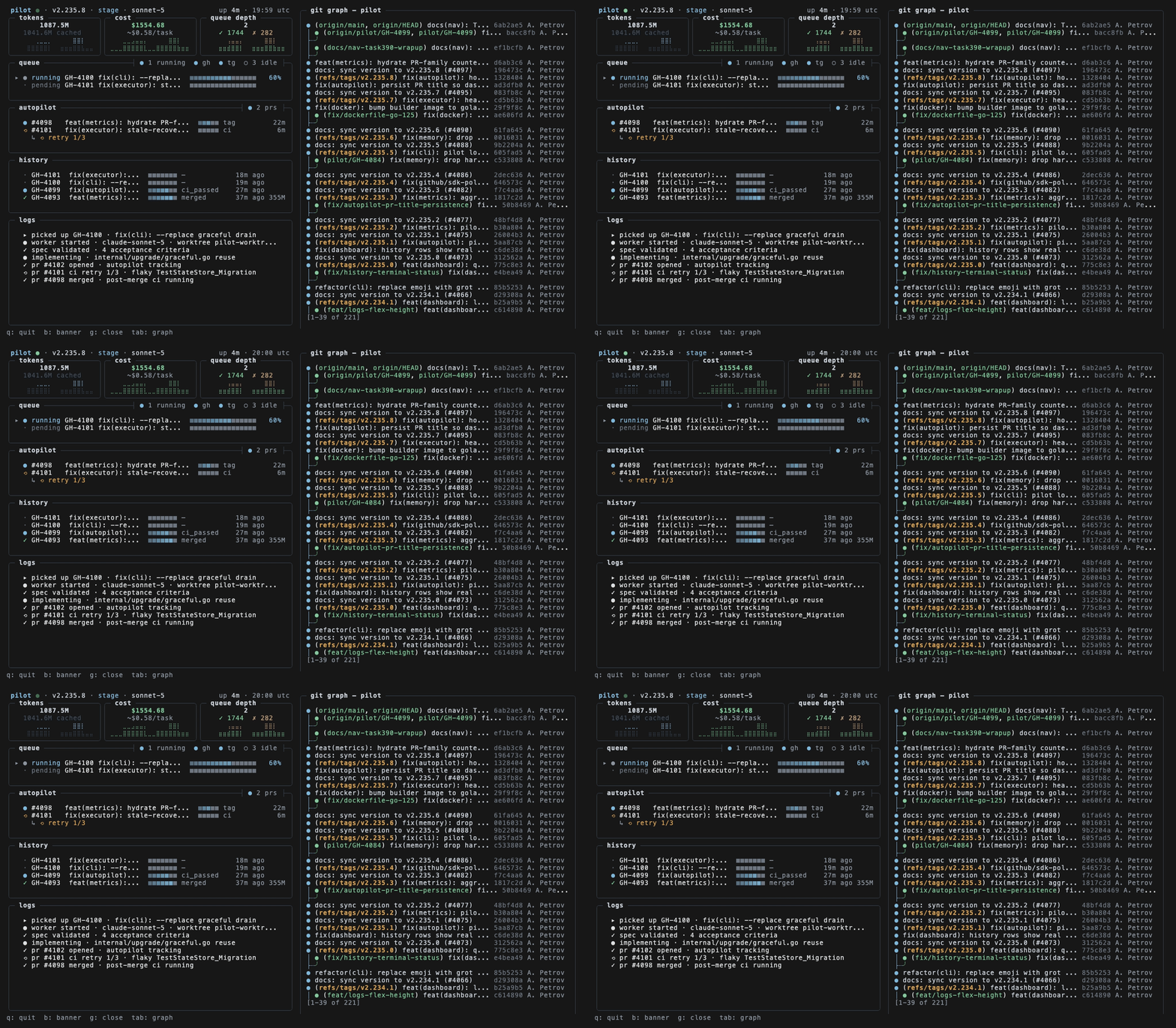
| Dashboard TUI | Sparkline metrics cards, queue depth, autopilot status |
| Persistent Metrics | Token/cost/task counts survive restarts via SQLite |
| Hot Upgrade | Self-update with pilot upgrade or u key in dashboard |
| Cost Controls | Budget limits with hard enforcement |
| Multiple Backends | Claude Code + OpenCode support |
| BYOK | Bring your own Anthropic key, Bedrock, or Vertex |
Autopilot Modes
Control how much autonomy Pilot has:
# Fast iteration - skip CI, auto-merge
pilot start --env=dev --github

# Balanced - wait for CI, then auto-merge
pilot start --env=stage --github

# Safe - wait for CI + human approval
pilot start --env=prod --github
Telegram Integration
Talk to Pilot naturally - it understands different interaction modes:
| Mode | Example | What Happens |
|---|---|---|
| 💬 Chat | "What do you think about using Redis?" | Conversational response, no code changes |
| 🔍 Question | "What files handle authentication?" | Quick read-only answer |
| 🔬 Research | "Research how the caching layer works" | Deep analysis sent to chat |
| 📐 Planning | "Plan how to add rate limiting" | Shows plan with Execute/Cancel buttons |
| 🚀 Task | "Add rate limiting to /api/users" | Confirms, then creates PR |
You: "Plan how to add user authentication"
Pilot: 📐 Drafting plan...
Pilot: 📋 Implementation Plan
       1. Create auth middleware...
       2. Add JWT token validation...
       [Execute] [Cancel]

You: [clicks Execute]
Pilot: 🚀 Executing...
Pilot: ✅ PR #142 ready: https://github.com/...
Send voice messages, images, or text. Pilot understands context.
Dashboard
Real-time visibility into what Pilot is doing:
┌─ Pilot Dashboard ─────────────────────────────────────────┐
│                                                           │
│  Status: ● Running    Autopilot: stage    Queue: 3        │
│                                                           │
│  Current Task                                             │
│  ├─ GH-156: Add user authentication                       │
│  ├─ Phase: Implementing (65%)                             │
│  └─ Duration: 2m 34s                                      │
│                                                           │
│  Token Usage          Cost                                │
│  ├─ Input:  124k      Today:    $4.82                     │
│  ├─ Output:  31k      This Week: $28.40                   │
│  └─ Total:  155k      Budget:    $100.00                  │
│                                                           │
│  Recent Tasks                                             │
│  ├─ ✅ GH-155  Fix login redirect      1m 12s   $0.45     │
│  ├─ ✅ GH-154  Add dark mode toggle    3m 45s   $1.20     │
│  └─ ✅ GH-153  Update dependencies     0m 34s   $0.15     │
│                                                           │
└───────────────────────────────────────────────────────────┘
pilot start --dashboard --github
Environment Variables
Pilot uses Claude Code for AI execution:
| Variable | Description |
|---|---|
ANTHROPIC_API_KEY | Custom Anthropic API key (uses your own account) |
ANTHROPIC_BASE_URL | Custom API endpoint (proxies, enterprise) |
CLAUDE_CODE_USE_BEDROCK | Set to 1 for AWS Bedrock |
CLAUDE_CODE_USE_VERTEX | Set to 1 for Google Vertex AI |
Example: Using AWS Bedrock
export CLAUDE_CODE_USE_BEDROCK=1
export AWS_REGION=us-east-1
pilot start --github
Configuration
Config location: ~/.pilot/config.yaml
version: "1.0"

gateway:
  host: "127.0.0.1"
  port: 9090

adapters:
  telegram:
    enabled: true
    bot_token: "${TELEGRAM_BOT_TOKEN}"
    chat_id: "${TELEGRAM_CHAT_ID}"

  github:
    enabled: true
    token: "${GITHUB_TOKEN}"
    repo: "owner/repo"
    pilot_label: "pilot"
    polling:
      enabled: true
      interval: 30s

orchestrator:
  execution:
    mode: sequential           # "sequential" or "parallel"
    wait_for_merge: true       # Wait for PR merge before next task
    poll_interval: 30s
    pr_timeout: 1h

projects:
  - name: "my-project"
    path: "~/Projects/my-project"
    navigator: true
    default_branch: main

daily_brief:
  enabled: true
  schedule: "0 8 * * *"
  timezone: "Europe/Berlin"

alerts:
  enabled: true
  channels:
    - name: telegram-alerts
      type: telegram
      severities: [critical, error, warning]

executor:
  backend: claude-code          # "claude-code" or "opencode"
CLI Reference
Core Commands
pilot start          # Start with configured inputs
pilot stop           # Stop daemon
pilot status         # Show running tasks
pilot init           # Initialize configuration
pilot version        # Show version info
pilot start
pilot start                          # Config-driven
pilot start --telegram               # Enable Telegram polling
pilot start --github                 # Enable GitHub issue polling
pilot start --linear                 # Enable Linear webhooks
pilot start --telegram --github      # Enable both
pilot start --dashboard              # With TUI dashboard
pilot start --no-gateway             # Polling only (no HTTP server)
pilot start --sequential             # Sequential execution mode
pilot start --env=stage              # Autopilot mode (dev/stage/prod)
pilot start -p ~/Projects/myapp      # Specify project
pilot start --replace                # Kill existing instance first
pilot task
pilot task "Add user authentication"                    # Run in cwd
pilot task "Fix login bug" -p ~/Projects/myapp          # Specify project
pilot task "Refactor API" --verbose                     # Stream output
pilot task "Update docs" --dry-run                      # Preview only
pilot task "Implement feature" --backend opencode       # Use OpenCode
pilot upgrade
pilot upgrade                    # Check and upgrade
pilot upgrade check              # Only check for updates
pilot upgrade rollback           # Restore previous version
pilot upgrade --force            # Skip task completion wait
pilot upgrade --no-restart       # Don't restart after upgrade
pilot upgrade --yes              # Skip confirmation
Analytics Commands
pilot brief                       # Show scheduler status
pilot brief --now                 # Generate and send immediately
pilot brief --weekly              # Generate weekly summary

pilot metrics summary             # Last 7 days overview
pilot metrics summary --days 30   # Last 30 days
pilot metrics daily               # Daily breakdown
pilot metrics projects            # Per-project stats

pilot usage summary               # Billable usage summary
pilot usage daily                 # Daily breakdown
pilot usage export --format json  # Export for billing

pilot patterns list               # List learned patterns
pilot patterns search "auth"      # Search by keyword
Architecture
┌─────────────────────────────────────────────────────────────┐
│                          PILOT                              │
├──────────────┬──────────────────────────────────────────────┤
│ Gateway      │ HTTP/WebSocket server, routing               │
│ Adapters     │ Telegram, Slack, GitHub, Jira, Linear, Asana │
│ Executor     │ Claude Code process management               │
│ Orchestrator │ Task planning, phase management              │
│ Memory       │ SQLite + cross-project knowledge graph       │
│ Briefs       │ Scheduled reports, multi-channel delivery    │
│ Alerts       │ Failure detection, cost monitoring           │
│ Metrics      │ Token usage, execution analytics             │
└──────────────┴──────────────────────────────────────────────┘
Development
make deps        # Install dependencies
make build       # Build binary
make test        # Run tests
make lint        # Run linter
make dev         # Development mode with hot reload
FAQ
Is this safe?
Pilot runs in your environment with your permissions. It can only access repos you configure. All changes go through PR review (unless you enable auto-merge). You stay in control.
How much does it cost?
Pilot is free. You pay for Claude API usage (~$0.50-2.00 per typical task). Set budget limits to control costs.
What tasks can it handle?
Best for: bug fixes, small features, refactoring, tests, docs, dependency updates.
Not ideal for: large architectural changes, security-critical code, tasks requiring human judgment.
Does it learn my codebase?
Yes. Pilot uses Navigator to understand your patterns, conventions, and architecture. Cross-project memory shares learnings across repositories.
License
Business Source License 1.1 © Aleksei Petrov
| Use Case | Allowed |
|---|---|
| Internal use | ✅ |
| Self-hosting | ✅ |
| Modification & forking | ✅ |
| Non-competing products | ✅ |
| Competing SaaS | ❌ (requires license) |
Converts to Apache 2.0 after 4 years.
Contributing
Contributions welcome. Please open an issue first for major changes.
git checkout -b feature/my-feature
make test
# Submit PR
Stop agonizing over tickets. Let Pilot ship them.
Built with Claude Code + Navigator