ProxmoxMCP-Plus

Operate Proxmox VE from MCP clients, AI agents, and OpenAPI tooling through one security-conscious control plane for VMs, LXCs, snapshots, backups, ISOs, container commands, and persistent long-running jobs.




Quick Start | Client Install | Demo | Tools | Safety | Scenarios | Docs | Wiki
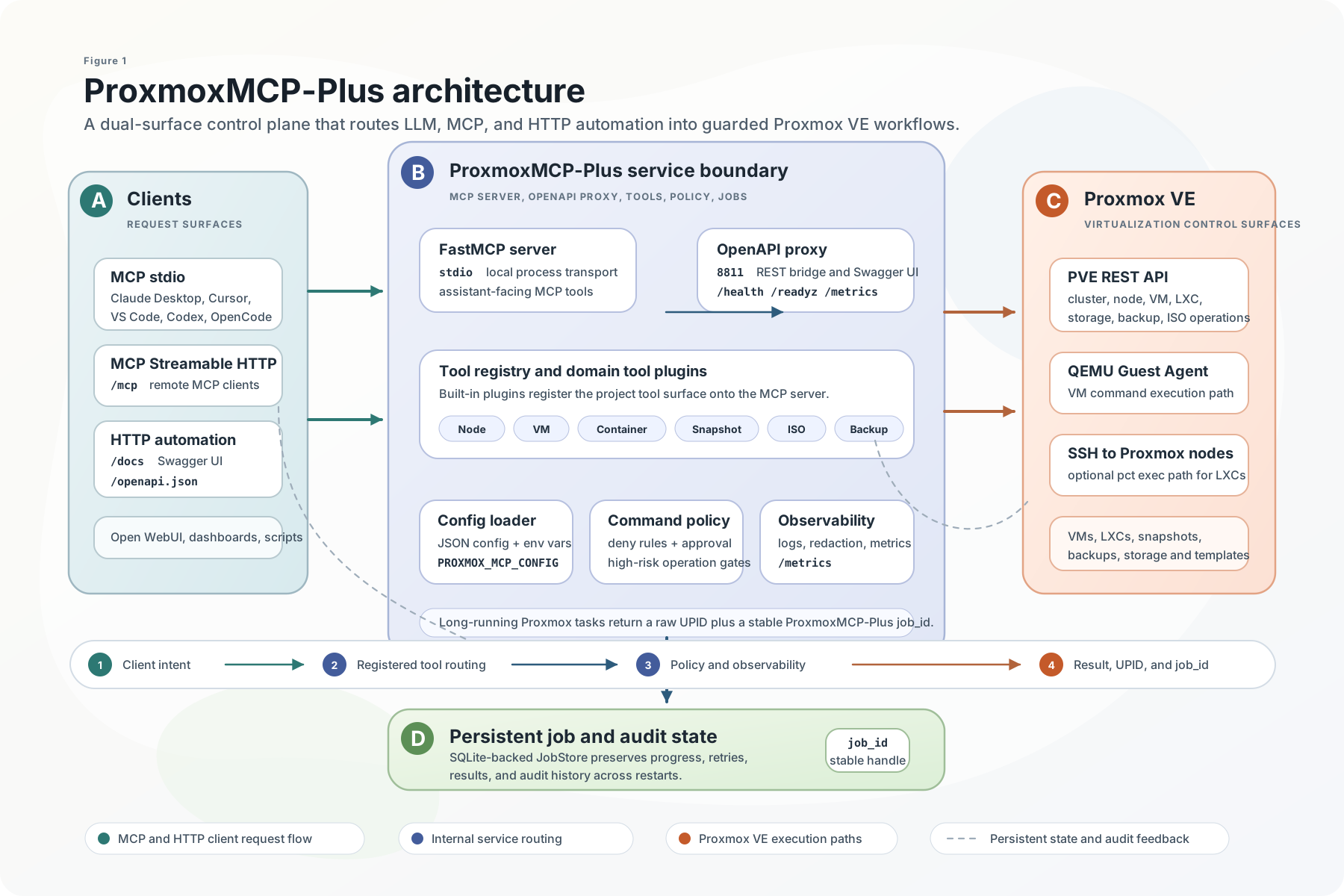
Why ProxmoxMCP-Plus
ProxmoxMCP-Plus sits between AI clients and Proxmox VE so operators do not have to stitch together raw API calls, one-off shell scripts, and custom job polling for every workflow.
It exposes the same operational surface in two ways:
MCPfor Claude Desktop, Cursor, VS Code, Open WebUI, Codex, and other MCP-capable agentsOpenAPIfor HTTP automation, dashboards, internal tools, and no-code workflows
What you get:
- VM and LXC lifecycle actions
- snapshot create, rollback, and delete
- backup and restore workflows
- ISO download and cleanup
- node, storage, and cluster inspection
- SSH-backed container command execution with guardrails
- persistent job tracking for async Proxmox tasks
What Makes It Different
| Priority | How the project handles it |
|---|---|
| Dual access paths | Native MCP for agent workflows and OpenAPI for standard HTTP automation |
| Proxmox-oriented workflows | Day-2 VM, LXC, snapshot, backup, ISO, storage, and cluster operations |
| Long-running operations | Stable job_ids, Proxmox UPID tracking, polling, retry, cancel, and audit history |
| Safer execution | Proxmox API tokens, OpenAPI bearer auth, command policy, approval tokens, TLS validation, and MCP HTTP Host/Origin controls |
| Real validation | Unit, integration, Docker/OpenAPI, and live Proxmox e2e entry points are documented in the repo |
Quick Start
1. Prepare Proxmox Credentials
Create a Proxmox API token with only the permissions your workflows need. Then create the local config file:
cp proxmox-config/config.example.json proxmox-config/config.json
Then edit proxmox-config/config.json with your environment. At minimum, it needs:
proxmox.hostproxmox.portauth.userauth.token_nameauth.token_value
Add an ssh section as well if you want container command execution.
Add a jobs section if you want job state persisted somewhere other than the default local SQLite file.
For real live verification, use a separate proxmox-config/config.live.json created from proxmox-config/config.live.example.json.
Do not point live e2e at a placeholder or local-only config.json unless you intentionally run a local API tunnel there.
Optional job persistence config:
{
  "jobs": {
    "sqlite_path": "proxmox-jobs.sqlite3"
  }
}
2. Choose One Runtime Path
| Path | Best for | Start command | Verify |
|---|---|---|---|
| MCP stdio from PyPI | Claude Desktop, Cursor, VS Code, Codex, local agents | uvx proxmox-mcp-plus | client lists get_nodes, get_vms, and job tools |
| Native MCP HTTP from Docker | remote MCP clients that support Streamable HTTP | docker compose --profile mcp-http up -d proxmox-mcp-http | connect to http://localhost:8000/mcp |
| OpenAPI bridge from Docker | HTTP clients, dashboards, scripts, no-code tools | docker compose up -d | curl -f http://localhost:8811/livez |
MCP stdio with PyPI
uvx proxmox-mcp-plus
Or install it first:
pip install proxmox-mcp-plus
proxmox-mcp-plus
Use this path when the MCP client launches a local stdio server.
Native MCP HTTP with Docker
Use this path when a remote MCP client supports Streamable HTTP:
export MCP_API_KEY="$(openssl rand -hex 32)"
docker run --rm -p 8000:8000 \
  -e PROXMOX_MCP_MODE=mcp-http \
  -e MCP_HOST=0.0.0.0 \
  -e MCP_PORT=8000 \
  -e MCP_TRANSPORT=STREAMABLE_HTTP \
  -e MCP_API_KEY="$MCP_API_KEY" \
  -v "$(pwd)/proxmox-config/config.json:/app/proxmox-config/config.json:ro" \
  ghcr.io/rekklesna/proxmoxmcp-plus:latest
Point MCP clients at:
http://<docker-host>:8000/mcp
Send Authorization: Bearer <MCP_API_KEY> with every MCP HTTP request. MCP_API_KEY
is deliberately separate from the OpenAPI-only PROXMOX_API_KEY, so the two surfaces
can be rotated independently. If MCP_API_KEY is unset, Streamable HTTP remains
unauthenticated for backward compatibility and logs a security warning at startup.
When serving MCP HTTP behind a reverse proxy, keep DNS rebinding protection enabled and allow only the hostnames you expect:
docker run --rm -p 8000:8000 \
  -e PROXMOX_MCP_MODE=mcp-http \
  -e MCP_HOST=0.0.0.0 \
  -e MCP_PORT=8000 \
  -e MCP_TRANSPORT=STREAMABLE_HTTP \
  -e MCP_API_KEY="$MCP_API_KEY" \
  -e MCP_DNS_REBINDING_PROTECTION=true \
  -e MCP_ALLOWED_HOSTS=mcp.example.com:*,localhost:* \
  -e MCP_ALLOWED_ORIGINS=https://mcp.example.com \
  -v "$(pwd)/proxmox-config/config.json:/app/proxmox-config/config.json:ro" \
  ghcr.io/rekklesna/proxmoxmcp-plus:latest
OpenAPI bridge with Docker
OpenAPI mode is the default Docker runtime and requires an API key:
export PROXMOX_API_KEY="$(openssl rand -hex 32)"
docker run --rm -p 8811:8811 \
  -e PROXMOX_API_KEY="$PROXMOX_API_KEY" \
  -v "$(pwd)/proxmox-config/config.json:/app/proxmox-config/config.json:ro" \
  ghcr.io/rekklesna/proxmoxmcp-plus:latest
Verify the OpenAPI surface:
curl -f http://localhost:8811/livez
curl -f -H "Authorization: Bearer $PROXMOX_API_KEY" http://localhost:8811/health
curl -H "Authorization: Bearer $PROXMOX_API_KEY" http://localhost:8811/openapi.json
For local unauthenticated development only, set PROXMOX_ALLOW_NO_AUTH=true.
Source checkout
git clone https://github.com/RekklesNA/ProxmoxMCP-Plus.git
cd ProxmoxMCP-Plus
uv venv
uv pip install -e ".[dev]"
python main.py
The 8811 service is the OpenAPI/REST bridge. The 8000 service is the native MCP HTTP endpoint.
Client Install
Use the one-click buttons when your client supports MCP install deeplinks, or copy the JSON config below.


Recommended stdio config:
{
  "mcpServers": {
    "proxmox-mcp-plus": {
      "command": "uvx",
      "args": ["proxmox-mcp-plus"],
      "env": {
        "PROXMOX_HOST": "your-proxmox-host",
        "PROXMOX_USER": "root@pam",
        "PROXMOX_TOKEN_NAME": "mcp-token",
        "PROXMOX_TOKEN_VALUE": "your-token-secret",
        "PROXMOX_PORT": "8006",
        "PROXMOX_VERIFY_SSL": "true"
      }
    }
  }
}
Use a local config file if you prefer not to keep credentials in the client config:
{
  "mcpServers": {
    "proxmox-mcp-plus": {
      "command": "uvx",
      "args": ["proxmox-mcp-plus"],
      "env": {
        "PROXMOX_MCP_CONFIG": "/path/to/ProxmoxMCP-Plus/proxmox-config/config.json"
      }
    }
  }
}
Client-specific examples for Claude Desktop, Cursor, VS Code, Codex, OpenCode, Open WebUI, Streamable HTTP, and OpenAPI are in the Client Setup Guide and Integrations Guide.
Demo
This demo is a direct terminal recording of qwen/qwen3.6-plus driving a live MCP session in English against a local Proxmox lab. It shows natural-language control flowing through MCP tools to create and start an LXC, execute a container command, and confirm the authenticated HTTP /health surface.

Choose The Right Tool
Start with read-only discovery, then move to mutating tools only after the target node, storage, VMID, and permissions are clear.
| Operator goal | Start with | Then use | Notes |
|---|---|---|---|
| Inspect the cluster | get_nodes, get_cluster_status | get_storage, get_vms, get_containers | Best first health check after client install |
| Create or manage a VM | get_nodes, get_storage | create_vm, start_vm, stop_vm, delete_vm | Long-running mutations return job_id and Proxmox task_id |
| Manage LXCs | get_containers, get_storage | create_container, start_container, stop_container, delete_container | SSH-backed command tools require the optional ssh config |
| Roll back risky changes | list_snapshots with vm_type=qemu or vm_type=lxc | create_snapshot, rollback_snapshot, delete_snapshot | Create a snapshot before destructive workflow tests |
| Run commands inside guests | VM or container status tools | execute_vm_command, execute_container_command | VM path needs QEMU Guest Agent; LXC path needs SSH to the Proxmox node |
| Track async work | mutation response with job_id | poll_job, get_job, list_jobs, retry_job, cancel_job | Use job_id for agent/user conversations and task_id for raw Proxmox traceability |
| Inspect logs | get_node_syslog, get_cluster_log | get_task_log, get_node_firewall_log, get_guest_firewall_log | All log tools are read-only; get_task_log accepts any Proxmox UPID |
| Automate from HTTP tools | /openapi.json | /jobs, /health, generated tool routes | Use bearer auth and keep CORS restricted outside local development |
For the full tool map, see the Tool Selection Guide and API & Tool Reference.
Safety Model
ProxmoxMCP-Plus is an access layer, not a replacement for Proxmox RBAC, network controls, or client-side MCP approval prompts.
The project gives operators several control points:
- Proxmox API tokens decide what the backend can do.
PROXMOX_API_KEYprotects the OpenAPI bridge by default.MCP_API_KEYoptionally protects the native Streamable HTTP/mcpendpoint with Bearer authentication.- TLS verification is enforced unless development mode is explicitly enabled.
command_policycontrols command execution and high-risk operations.approval_tokencan gate command execution and high-risk mutating actions.- MCP Streamable HTTP deployments can use DNS rebinding protection plus Host and Origin allowlists.
- Logs are designed to avoid exposing command and credential material.
Read the Security Guide before exposing the server outside a trusted local environment.
Core Platform Capabilities
ProxmoxMCP-Plus provides a unified control surface for the operational tasks most teams actually need in Proxmox VE. The same server can expose these workflows to MCP clients for LLM and AI-agent use cases, and to HTTP consumers through the OpenAPI bridge.
Supported workflow areas:
| Capability Area | Availability |
|---|---|
| VM create / start / stop / delete | Available |
| VM snapshot create / rollback / delete | Available |
| Backup create / restore | Available |
| ISO download / delete | Available |
| LXC create / start / stop / delete | Available |
| Container SSH-backed command execution | Available |
| Container authorized_keys update | Available |
| Persistent job store for long tasks | Available |
MCP job control tools (list_jobs, get_job, poll_job, cancel_job, retry_job) | Available |
OpenAPI /jobs endpoints with explicit status codes | Available |
Local OpenAPI /livez, /readyz, /health, and schema | Available |
Docker native MCP Streamable HTTP at /mcp | Available |
Docker image build and /livez | Available |
Validation and contract entry points in this repository:
pytest -q --cov=proxmox_mcp --cov-report=term-missing --cov-fail-under=75ruff check .mypy src --ignore-missing-importspip-audit -r requirements.txttests/integration/test_real_contract.pytests/scripts/run_real_e2e.py
tests/scripts/run_real_e2e.py now prefers proxmox-config/config.live.json or PROXMOX_MCP_E2E_CONFIG.
This avoids accidentally running live checks against a machine-specific default config.json.
Long-Running Jobs
Many Proxmox mutations are asynchronous. ProxmoxMCP-Plus now wraps those tasks in a persistent job layer so MCP and OpenAPI clients can track them through a stable Job ID.
Long-running tools such as VM create/start/stop, container create/start/stop, snapshot changes, backup/restore, and ISO download/delete now return both:
task_id: the raw ProxmoxUPIDjob_id: the stable server-side job record
The job record stores:
- current status and progress
- retry count and prior
UPIDs - latest result payload or failure reason
- audit history for create, poll, retry, and cancel actions
By default the job store persists to proxmox-jobs.sqlite3, so restart does not lose in-flight or completed job metadata.
MCP Job Tools
list_jobsget_jobpoll_jobcancel_jobretry_job
OpenAPI Job Routes
When the OpenAPI proxy is enabled and a local JobStore is available, these routes are exposed directly:
| Path | Method | Purpose | Success Codes |
|---|---|---|---|
/jobs | GET | list persisted jobs | 200 |
/jobs/{job_id} | GET | fetch one job, optional refresh=true | 200 |
/jobs/{job_id}/poll | POST | refresh status from Proxmox | 200 |
/jobs/{job_id}/cancel | POST | request cancellation | 202 |
/jobs/{job_id}/retry | POST | replay a stored retry recipe | 202 |
Common error codes:
404: unknownjob_id409: the job exists but that operation is not valid now503: the OpenAPI proxy was started without a localJobStore
tests/scripts/run_real_e2e.py now prefers proxmox-config/config.live.json or PROXMOX_MCP_E2E_CONFIG.
This avoids accidentally running live checks against a machine-specific default config.json.
Positioning Against Common Approaches
| Capability | Official Proxmox API | One-off scripts | ProxmoxMCP-Plus |
|---|---|---|---|
| MCP for LLM and AI agent workflows | No | No | Yes |
| OpenAPI surface for standard HTTP tooling | No | Usually no | Yes |
| VM and LXC operations in one interface | Low-level only | Depends | Yes |
| Snapshot, backup, and restore workflows | Low-level only | Depends | Yes |
| Persistent async job tracking and retry | No | Rare | Yes |
| Container command execution with policy controls | No | Custom only | Yes |
| Docker distribution path | No | Rare | Yes |
| Repository-level live-environment verification | N/A | Rare | Yes |
Scenario Templates
Ready-to-copy examples live in docs/examples/:
These are written for both human operators and LLM-driven usage.
Documentation
The README is intentionally optimized for fast GitHub comprehension. Longer operational docs live in docs/wiki/ and can also be published to the GitHub Wiki.
| If you need to... | Start here |
|---|---|
| Understand the project and deployment flow | Wiki Home |
| Configure and run against a Proxmox environment | Operator Guide |
| Connect Claude Desktop, Cursor, VS Code, Codex, Open WebUI, or HTTP clients | Client Setup Guide |
| Choose the right tool for a workflow | Tool Selection Guide |
| Review docs quality goals, media plan, and publishing checklist | Documentation Quality Plan |
| Review integration patterns and transport details | Integrations Guide |
| Install from MCP-aware IDEs and agents | Agent Installation |
| Enable LXC command execution over SSH | Container Command Execution |
| Review security and command policy | Security Guide |
| Inspect tool parameters, prerequisites, and behavior | API & Tool Reference |
| Debug startup, auth, or health issues | Troubleshooting |
| Work on the codebase or release it | Developer Guide |
| Review release and upgrade notes | Release & Upgrade Notes |
Published wiki:
Repo Layout
src/proxmox_mcp/: MCP server, config loading, security, OpenAPI bridgemain.py: MCP entrypoint for local and client-driven usagedocker-compose.yml: HTTP/OpenAPI runtimerequirements/: auxiliary dependency sources and runtime install listsscripts/: helper startup scripts for local workflowstests/scripts/run_real_e2e.py: live Proxmox and Docker/OpenAPI pathtests/: unit and integration coveragedocs/examples/: scenario-driven prompts and HTTP examplesdocs/wiki/: longer-form operator, integration, and reference docs
Development Checks
pytest -q --cov=proxmox_mcp --cov-report=term-missing --cov-fail-under=75
ruff check .
mypy src --ignore-missing-imports
pip-audit -r requirements.txt
python -m build
Paramiko 5.0.0 or newer is required so pip-audit can run without a CVE-2026-44405 exception.