portal

作者 hosenur已验证

Mobile first batteries included web ui for sst/opencode. Git integration, in browser terminal, isolated workspaces.

791
Stars
64
Forks
TypeScript
语言
2026/8/23
添加时间

⚠️ 第三方软件声明

本 Skill 为第三方开源软件,独立托管于 GitHub。SkillTip 仅为信息目录,不控制或维护底层仓库。所显示的安全检查为自动化且范围有限,安装前请自行审查源码。

阅读服务条款

安装

添加到你的 Claude Code skills 目录:

# Add to your Claude Code skills
git clone https://github.com/hosenur/portal

快速入门

使用 portal 等 Skills 的指南。

安全报告

已验证

上次扫描:—

{
  "status": "PASSED",
  "issues": []
}

README.md

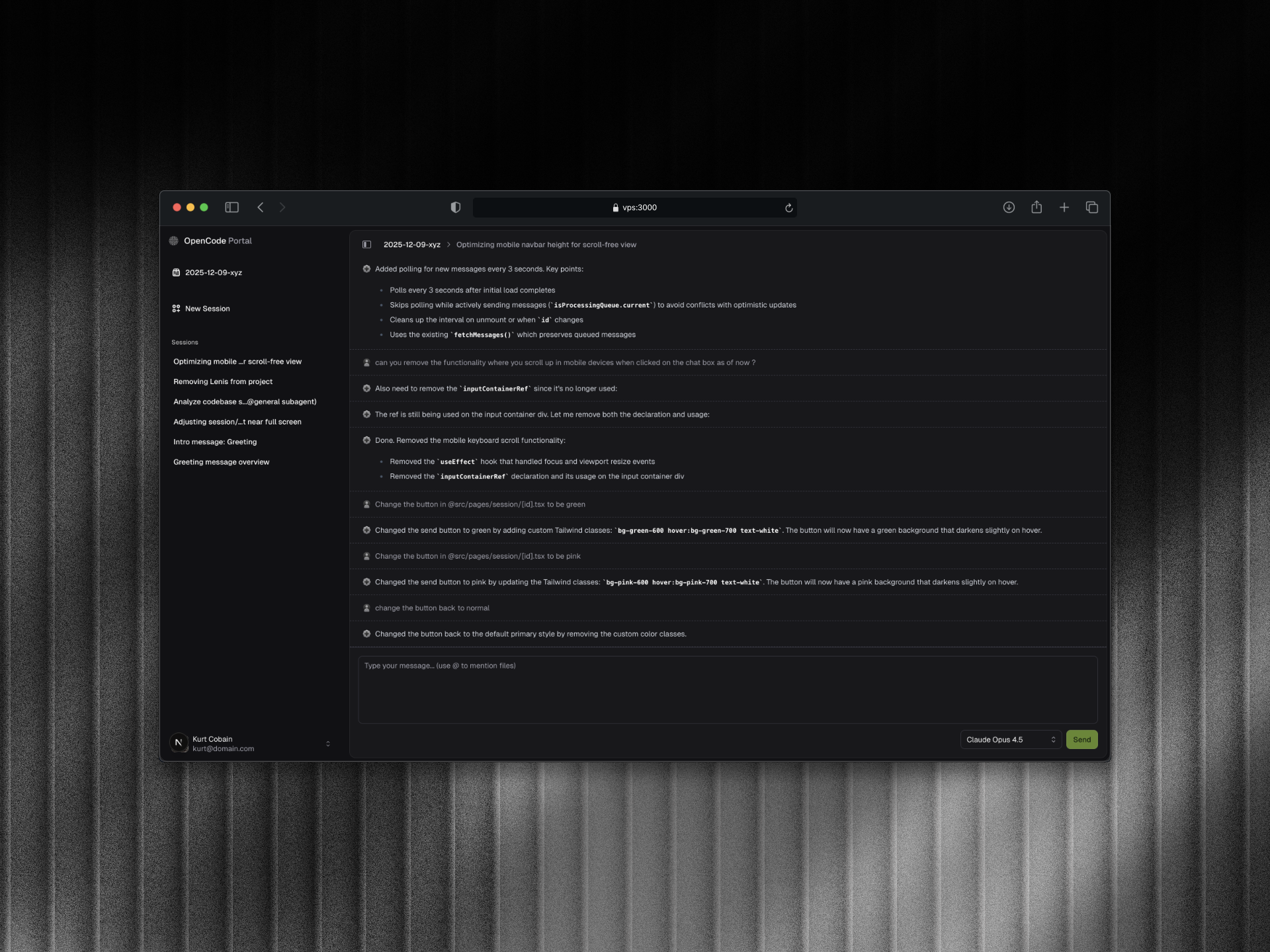
OpenCode Portal

banner

Disclaimer: This is a personal project and is not related to https://github.com/sst/opencode or the SST team. This portal is a personal-built interface for interacting with OpenCode instances.

A web-based UI for OpenCode, the AI coding agent. This portal provides a browser interface to interact with OpenCode sessions, view messages, and chat with the AI assistant.

Quick Start

Using bunx (Recommended)

The easiest way to run OpenCode Portal is using bunx:

# Navigate to your project directory
cd /path/to/your/project

# Run OpenCode Portal
bunx openportal

Note: OpenPortal works best when paired with Bun. Node.js may have some rough edges.

This will:

  • Start the OpenCode server (default port: 4000)
  • Start the web UI (default port: 3000)
  • Automatically find available ports if defaults are busy

Installation

You can also install globally:

bun install -g openportal

# Then run in any project directory
openportal

CLI Commands

openportal                    # Start OpenCode + Web UI
openportal run                # Start only OpenCode server (no Web UI)
openportal stop               # Stop running instances
openportal list               # List running instances
openportal clean              # Clean up stale entries

CLI Options

openportal [command] [options]

Options:
  -h, --help              Show help message
  -d, --directory <path>  Working directory (default: current directory)
  -p, --port <port>       Web UI port (default: 3000, auto-finds if busy)
  --opencode-port <port>  OpenCode server port (default: 4000, auto-finds if busy)
  --hostname <host>       Hostname to bind (default: 0.0.0.0)
  --name <name>           Instance name (default: directory name)

Prerequisites

OpenCode must be installed on your system. Install it using one of these methods:

# Using bun
bun install -g opencode

# Using Homebrew (macOS)
brew install sst/tap/opencode

Overview

OpenCode Portal connects to a running OpenCode server and provides:

  • Session management (create, view, delete sessions)
  • Real-time chat interface with the AI assistant
  • File mention support (@filename to reference files)
  • Model selection
  • Dark/light theme support

Why This Project?

OpenCode comes with its own official web UI that you can access by running:

opencode --port 4096

However, the official UI is currently under development and has some limitations:

  • Not mobile responsive
  • Limited mobile experience

This project was inspired by my personal need to access OpenCode from my mobile device when I don't have my laptop around. The goal is to provide a mobile-first, responsive interface for interacting with OpenCode instances remotely.

Use Case

This portal is designed for remote access to your OpenCode instance. Deploy the portal on a VPS alongside OpenCode, then use Tailscale (or similar VPN) to securely connect from your mobile device or any other machine.

Example setup:

[Your Phone] ---(Tailscale)---> [VPS running Portal + OpenCode]

Tech Stack

Contributing

Contributions are welcome! Here's how you can help:

Feedback & Feature Requests

Visit oc-portal.userjot.com to submit feedback and feature requests.

Reporting Issues

  • Bugs: Report bugs by opening an issue with a clear description and steps to reproduce

Development Setup

  1. Fork the repository
  2. Clone your fork:
    git clone https://github.com/YOUR_USERNAME/portal.git
    cd portal
    
  3. Install dependencies:
    bun install
    
  4. Run the development server:
    bun dev
    

Pull Request Process

  1. Create a feature branch from main
  2. Make your changes following the existing code style
  3. Test your changes thoroughly
  4. Update documentation if needed
  5. Submit a pull request with a clear description

Code Style

  • Use TypeScript for all new code
  • Follow the existing component patterns in apps/web/src/components/
  • Use Tailwind CSS for styling
  • Maintain consistent naming conventions
  • Add proper TypeScript types

Getting Help

  • Join our Discord community
  • Check existing issues before creating new ones
  • Join the discussion in existing issues
  • Be respectful and constructive in all interactions

License

MIT

常见问题

What is portal?

portal is an open-source ai agents skill for AI coding assistants such as Claude Code, Codex CLI, and ChatGPT, built by hosenur. Mobile first batteries included web ui for sst/opencode. Git integration, in browser terminal, isolated workspaces. It has 791 GitHub stars.

Is portal safe to use?

Yes. portal passed SkillsLLM's automated security scan — a dependency vulnerability audit plus prompt-injection heuristics — with no high-severity issues. You can read the full report in the Security Report section on this page.

How do I install portal?

Clone the repository with "git clone https://github.com/hosenur/portal" and add it to your Claude Code skills directory (see the Installation section above).

What programming language is portal written in?

portal is primarily written in TypeScript. It is open-source under hosenur on GitHub, so you can review or fork the full source.

Are there alternatives to portal?

Yes. SkillsLLM lists many other AI Agents skills you can browse and compare side by side. Open the AI Agents category from the badge at the top of this page, or use the Related Skills and comparison links further down to weigh portal against similar tools.

评论 (0)

暂无评论,成为第一个分享想法的人!

ECC

by affaan-m

10

The agent harness performance optimization system. Skills, instincts, memory, security, and research-first development for Claude Code, Codex, Opencode, Cursor and beyond.

242,21936,702JavaScript
AI 智能体ai-agentsanthropicclaude-code
查看详情
15

An agentic skills framework & software development methodology that works.

234,96620,863Shell
AI 智能体ai-agentsbrainstorming
查看详情

hermes-agent

by NousResearch

10

The agent that grows with you

234,43747,175Python
AI 智能体ai-agentsagent-orchestration
查看详情

The agent harness performance optimization system. Skills, instincts, memory, security, and research-first development for Claude Code, Codex, Opencode, Cursor and beyond.

185,94028,768JavaScript
AI 智能体ai-agentsanthropicclaude-code
查看详情

cc-switch

by farion1231

3

A cross-platform desktop All-in-One assistant for Claude Code, Codex, OpenCode, OpenClaw, Grok Build & Hermes Agent. Only official website: ccswitch.io

128,8688,826Rust
AI 智能体claude-codeai-tools
查看详情

claude-code

by anthropics

Claude Code is an agentic coding tool that lives in your terminal, understands your codebase, and helps you code faster by executing routine tasks, explaining complex code, and handling git workflows - all through natural language commands.

120,03119,897Shell
AI 智能体
查看详情

开发者还喜欢

基于喜欢此 Skill 的开发者投票和收藏

ECC

by affaan-m

10

The agent harness performance optimization system. Skills, instincts, memory, security, and research-first development for Claude Code, Codex, Opencode, Cursor and beyond.

242,21936,702JavaScript
AI 智能体ai-agentsanthropicclaude-code
查看详情
15

An agentic skills framework & software development methodology that works.

234,96620,863Shell
AI 智能体ai-agentsbrainstorming
查看详情

hermes-agent

by NousResearch

10

The agent that grows with you

234,43747,175Python
AI 智能体ai-agentsagent-orchestration
查看详情

n8n

by n8n-io

12

Fair-code workflow automation platform with native AI capabilities. Combine visual building with custom code, self-host or cloud, 400+ integrations.

201,88160,308TypeScript
MCP 服务器apisai-tools
查看详情

The agent harness performance optimization system. Skills, instincts, memory, security, and research-first development for Claude Code, Codex, Opencode, Cursor and beyond.

185,94028,768JavaScript
AI 智能体ai-agentsanthropicclaude-code
查看详情

cc-switch

by farion1231

3

A cross-platform desktop All-in-One assistant for Claude Code, Codex, OpenCode, OpenClaw, Grok Build & Hermes Agent. Only official website: ccswitch.io

128,8688,826Rust
AI 智能体claude-codeai-tools
查看详情