



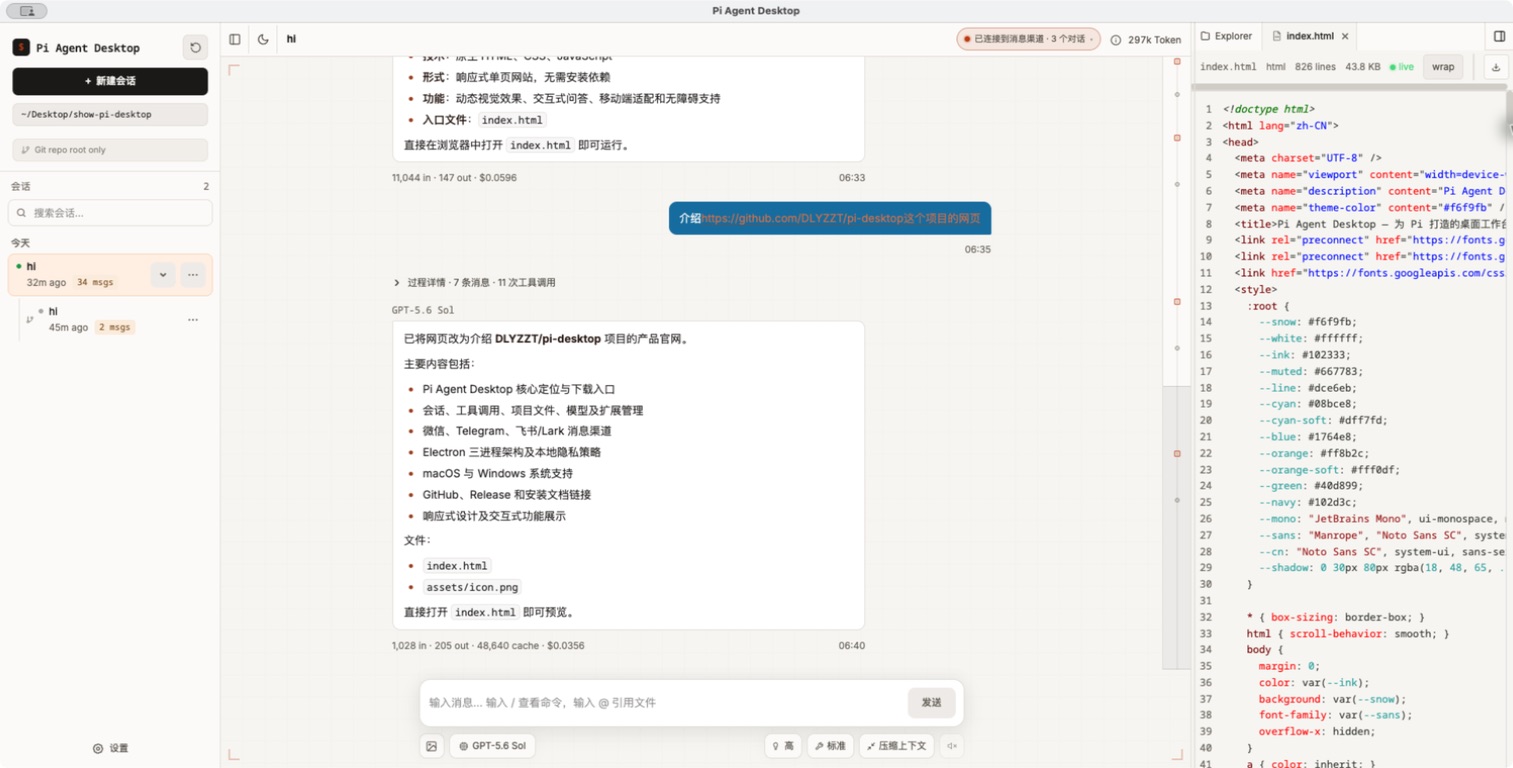
应用截图
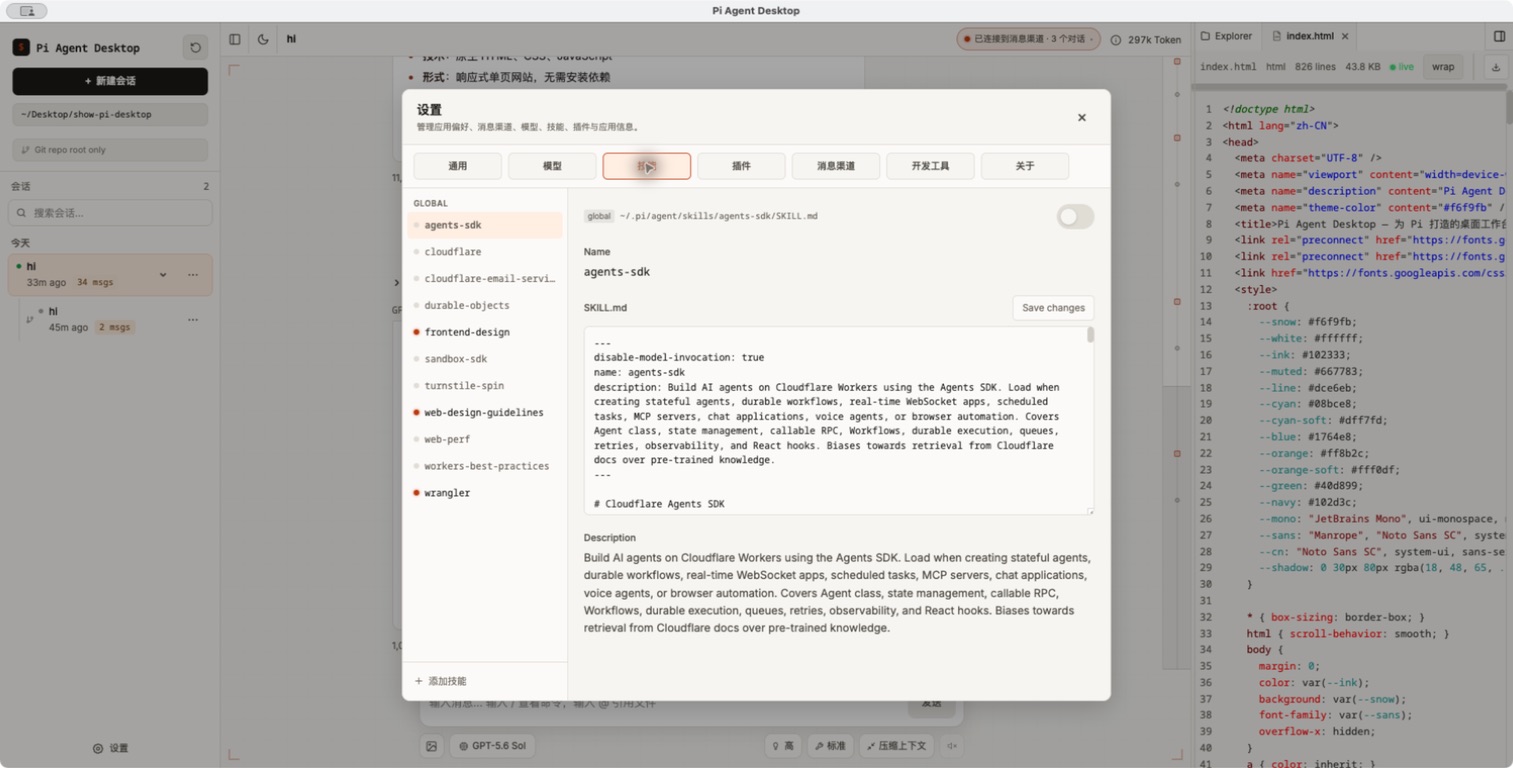
技能浏览、启用与内容编辑 |
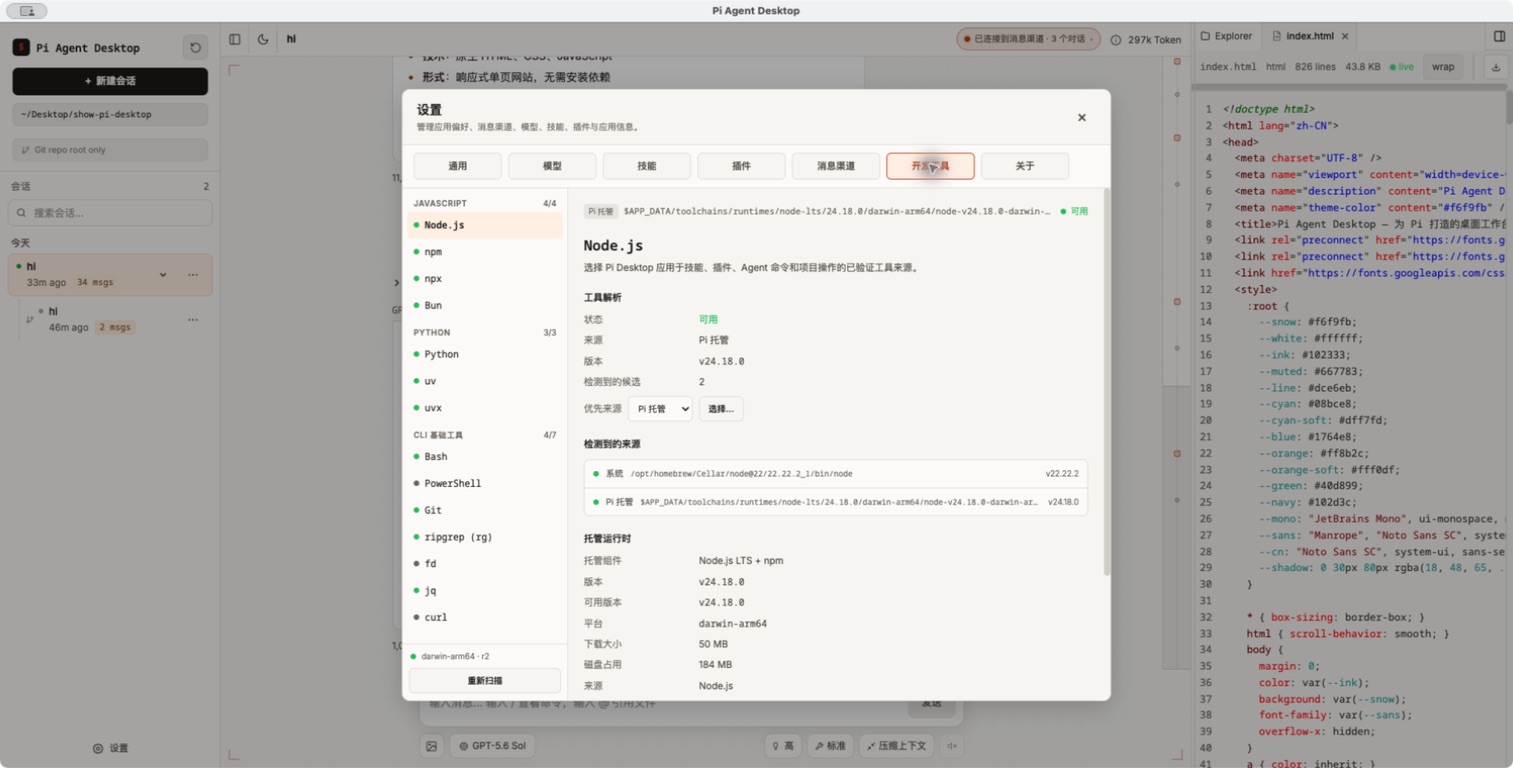
系统工具发现与托管运行时管理 |
核心能力
一个完整的 Agent 工作台
- 创建、切换、重命名和删除会话,并持续展示流式回复
- 新会话可根据首条有效消息在后台自动生成简短标题;可在设置中关闭,手动名称始终优先
- 搜索会话、按日期分组浏览,并在列表和主对话顶部使用稳定的会话标题
- 查看工具调用、执行过程和上下文压缩状态
- 支持排队消息、Steer / Follow-up 等交互方式
- 快速切换模型、推理等级、工具预设和提示音
- 支持图片附件、斜杠命令与
@文件引用 - 对话与输入框使用一致的阅读宽度,右侧文件面板可通过鼠标或键盘调整并记住宽度
用户与 Agent 共享的内置浏览器
- 在主界面右侧使用 Electron
WebContentsView承载真实 Chromium 页面,支持多 Tab、临时/持久 Profile、登录态、下载、上传和代理 - Agent 可在独立的 Browser read/interact 授权下执行导航、结构化页面快照、截图、点击、输入、键盘与等待;首次需要时由主窗口弹窗询问,Coding 权限不会隐式开启浏览权限
- 用户与 Agent 操作同一个页面,并可随时接管;提交、下载、上传、权限和外部协议继续经过本地策略或确认
- 设置页管理全局默认与具体会话的永久权限,授权弹窗只产生当前会话的临时权限;高级浏览器模式由一个仅本次启动有效的本机开关统一控制
- 高级浏览器模式整合三层 UA/Client Hints 身份、可信输入、CDP 网络抓包与确认后的写请求重放、JavaScript 经验库和专用高级 Profile;Agent 工具不接收或返回 Cookie value
- 私网保护当前为明确标记的 best-effort;未部署受控网络沙箱时,Strict 模式会直接拒绝请求
可观察、可控制的受管开发进程
- 在受支持平台上让 Agent 用显式
process_*tools 持续运行 Vite、React、Three.js、Storybook、Flask、Spring Boot、mock API 和 watch build;普通短命令继续走 Bash - 右侧 Processes 面板展示 owner、状态、readiness、脱敏日志、loopback endpoint 和退出原因;用户可随时发送行式 stdin、停止、强制停止、重启、复制或导出日志
- 框架页面使用受管 localhost 服务与内置 Browser 联调,进程权限与 Browser 授权保持分离;慢启动可复用日志 cursor 继续等待,不需要 shell
&、nohup 或外部终端 - macOS/Linux 使用 POSIX process group;Windows x64 使用经过完整性校验的 Rust helper 和 Job Object,helper、reaper 或 owner identity 未就绪时会 fail-closed
- 功能默认关闭且不是安全沙箱:子进程拥有与 Agent Bash 相同的本机文件、网络和环境权限;常见 LAN bind 需要确认,Host/App 故障或退出时会有界清理进程树
v0.1.14 的受管后台进程支持 macOS、Linux 和 Windows 11 x64;Windows ARM64、Windows Server 和 32 位 Windows 暂不支持。
围绕项目工作的文件体验
- 原生选择项目目录,管理 Git 分支与 Worktree
- 浏览项目文件、打开多标签页、下载或引用文件
- Agent 回复和 Markdown 文件支持代码高亮、Mermaid、KaTeX,并可预览 Word(
.docx)文档 - 文件变更监听与 Git 状态感知,让会话始终贴近当前项目
模型与扩展统一管理
- 内置 Pi Coding Agent 0.84.0,管理模型提供商和模型配置
- 会话启动优先使用本地模型目录;需要时可显式刷新远程目录,离线、超时或部分 provider 失败时继续保留缓存模型
- 支持浏览器 OAuth 登录流程
- 搜索、安装和配置 Skills;正常安装沿用 npm 默认并发,遇到网络、超时或 cache lock 故障时使用隔离缓存重试一次
- 管理 Plugins,并沿用 Pi Agent 的扩展体系
跨平台开发工具管理
- 优先发现并验证用户已有的 Node.js/npm、Python、uv、Git/Bash、Bun 和 jq,覆盖 GUI 启动时 PATH 不完整的常见场景
- 为 Skills、Plugins、Agent Bash、Git/worktree 和搜索工具提供一致的绝对路径与局部执行环境
- 用户确认后可把 Node.js LTS、CPython、uv、PortableGit、Bun 和 jq 安装到应用私有目录,不修改系统 PATH、Shell 配置或注册表
- 安装包内置经过清单校验的目标平台 ripgrep 与 fd,保证基础搜索离线可用
微信、Telegram 与飞书/Lark 消息渠道
- 个人微信二维码登录、Telegram BotFather token,以及飞书/Lark 官方扫码创建新机器人或已有应用 App ID/App Secret 接入
- 私聊配对,以及 Telegram、飞书/Lark 群聊白名单与 @触发控制;微信群尚未开放,默认不授予远程工具权限
- 外部对话默认使用独立 Pi Session,也可从当前会话顶部快速绑定并与 UI 共用上下文;绑定列表会在窗口内自动定位,长列表支持内部滚动
- 账号的默认工具权限用于新建独立渠道会话,保存变更时也会同步到该账号已经绑定的会话;工具权限按 Pi Session 生效,共用同一 Session 的多个渠道入口共享同一权限
- 模型用户正文只包含 IM 实际文本;桌面端用本地黑、微信绿、Telegram 蓝、飞书/Lark 橙的用户气泡区分来源
- 微信、Telegram 与飞书/Lark 支持入站图片、文件和语音;飞书/Lark 还支持视频资源,图片直接作为多模态输入,其他附件进入隔离暂存区,微信 SILK 语音优先转为 WAV
- Telegram 私聊支持流式预览,并折叠思考与工具详情
- 飞书/Lark 通过官方 SDK 长连接收取私聊、受控群聊和 thread,并使用 Card 渲染 Markdown、流式显示思考/工具调用、最终折叠过程
- Telegram 与飞书/Lark 在原消息上显示回合 Reaction 状态;飞书单聊可用原生菜单触发
/help、/status、/new、/compact和/reload
为长期运行而设计
- 单实例、系统托盘、桌面通知与 Dock / 任务栏角标
- 窗口状态记忆、系统主题跟随和自定义协议
- Agent Host 异常恢复、崩溃报告与诊断信息导出
- 已启用平台的正式安装版可定时或手工检查稳定版更新,由用户确认下载,并在任务结束后重启安装
sandbox: true、严格 CSP 与类型化 IPC 契约
快速开始
使用桌面安装包
最新稳定版为 v0.1.14,提供 macOS Apple Silicon / Intel、Windows x64 和 Linux x64 安装包。
Pi Agent Desktop v0.1.14 已内置 Pi Coding Agent 0.84.0 运行时。普通用户使用 Agent 本身无需单独安装 Pi CLI、Pi Coding Agent、Node.js 或 npm;安装桌面应用并配置模型提供商后即可使用。Skills、Plugins 或 Agent 脚本需要额外开发工具时,应用会优先复用健康的系统安装,也可以在用户确认后安装应用私有运行时。
应用会读取 ~/.pi/agent/ 中的会话与配置。如果你已经使用 Pi CLI,可以直接复用现有数据,无需迁移;此前没有使用过 Pi CLI 也不影响使用。
Pi Desktop 会先发现并验证用户已经安装的 Node.js/npm、Python、Git、Bash、uv、jq 和 Bun;内置的 rg/fd 保证离线搜索可用。
桌面安装包系统要求
- macOS 12 Monterey 或更高版本,支持 Apple Silicon(arm64)和 Intel(x64)
- Windows 10 或 Windows 11 64 位(x64)
- Linux 64 位(x64)AppImage,需要现代 glibc 发行版和可用的桌面图形会话;当前采用手工下载安装更新
- 暂不提供 Windows 32 位(x86)或 Windows ARM64 安装包
源码开发环境要求
- Node.js 22.19 或更高版本
- npm(随 Node.js 安装即可)
- macOS、Windows 或 Linux
本地运行
git clone https://github.com/DLYZZT/pi-desktop.git
cd pi-desktop
npm ci
npm run dev
构建
- macOS Apple Silicon(arm64):DMG + ZIP
- macOS Intel(x64):DMG + ZIP
- Windows(x64):NSIS 安装程序
- Linux(x64):AppImage
架构设计
Pi Agent Desktop 使用 Electron 三进程模型,将高权限桌面能力、Agent 运行时和 UI 隔离开来。
flowchart LR
    Main["Electron Main<br/>窗口 · 托盘 · 协议 · Host 监督"]
    Host["Agent Host / utilityProcess<br/>Pi Agent · 会话 · 文件 · 配置"]
    UI["Renderer<br/>React 19 · Vite"]
    Browser["Main-owned WebContentsView<br/>远程网页 · Profile · 网络策略"]
    Processes["受管项目进程<br/>dev server · watcher · mock API"]
    Data["~/.pi/agent/<br/>会话 · 模型 · 配置"]

    Main --> Host
    Main --> UI
    Main --> Browser
    Host -->|"revisioned Browser RPC"| Main
    Host -->|"POSIX worker / Windows Job helper"| Processes
    Main -.->|"crash reaper"| Processes
    Browser -->|"独立授权的 localhost 访问"| Processes
    UI <-->|"Typed MessagePort IPC"| Host
    Host <--> Data
- Main:负责窗口生命周期、菜单、托盘、通知、软件更新、自定义协议和 Agent Host 监督
- Agent Host:在独立
utilityProcess中运行 Pi Coding Agent,处理会话、文件、配置与扩展 - Renderer:运行 React UI,只通过受控的 preload bridge 与 Host 交互
- Browser View:远程站点与 localhost 项目页只进入 Main 创建的沙箱化
WebContentsView,不获得应用 preload、Node 或主 Renderer bridge - 无内部本地服务:应用不使用 TCP 端口承载 UI 或控制面;用户显式启动的受管项目服务可以监听 loopback
数据、安全与隐私
- 会话与 Pi 配置默认留在本机
~/.pi/agent/ - 应用不会为了 UI 通信额外开放本地网络端口
- Renderer 开启 Electron sandbox,并使用严格的 Content Security Policy
- preload 只暴露受控桥接接口,Host RPC 由 TypeScript 契约约束
- Agent Browser tools 与高级浏览器模式默认关闭;Main 在任何目标工具副作用前按 session、持久策略、临时 grant、lease 和 policy revision 逐次校验
- 受管后台进程默认关闭,并要求受支持的平台与架构、项目 trust、Session cwd containment、健康的 crash reaper 和有界资源策略;Windows x64 还会校验 Rust helper 的固定路径、版本与完整性。它是生命周期控制,不是容器或沙箱
- 更新客户端只使用正式包内固定的公开 GitHub Release 配置,不接收 Renderer 提供的更新地址或发布凭证
- 微信和 Telegram 只发起出站 long polling,飞书/Lark 使用出站 WebSocket;均不开放 webhook 或本地监听端口
- 模型请求的数据处理方式取决于你配置的模型提供商,请同时查看对应服务的隐私政策
参与开发
常用命令
| 命令 | 说明 |
|---|---|
npm run dev | 启动 Vite、主进程构建监听与 Electron |
npm run typecheck | 执行 TypeScript 类型检查 |
npm run test | 运行自动化测试套件 |
npm run check:contract | 检查 API 方法与 Host handler 覆盖关系 |
npm run smoke | 运行 Electron 冒烟测试 |
npm run test:browser-electron | 运行本地 Browser Electron 集成测试 |
npm run test:managed-process-workflows | 运行受管进程生命周期与清理测试 |
npm run test:windows-managed-helper | 在 Windows x64 验收 Rust helper 与 Job Object |
npm run verify | 执行提交前的完整质量检查 |
npm run build | 构建 main、preload 与 renderer |
npm run pack | 生成未封装的应用目录 |
npm run dist | 生成当前平台配置的全部架构安装包 |
npm run dist:mac:signed | 生成当前 Mac 架构的 Developer ID 签名包 |
npm run dist:mac:notarized | 生成签名并经 Apple 公证的 macOS 包 |
项目结构
src/
├── contract/      # IPC 类型契约与 RPC 层
├── main/          # Electron 主进程与 crash reaper
├── preload/       # 安全桥接接口
├── agent-host/    # Agent、会话、文件、配置与受管进程
├── renderer/      # React 桌面界面
└── shared/        # 可测试的纯函数与共享模块
native/
└── windows-managed-process-helper/  # Windows x64 Rust / Job Object helper
欢迎通过 Issues 提交问题或建议,也欢迎直接发起 Pull Request。提交代码前请至少运行:
npm run verify
路线图
- Electron 三进程架构与类型化 IPC
- 会话、项目文件、模型、Skills、Plugins 与 OAuth
- 个人微信、Telegram 与飞书/Lark 文本、图片、文件和语音消息渠道,以及飞书/Lark 视频资源
- 托盘、通知、系统主题、崩溃恢复与诊断导出
- Linux、macOS、Windows CI 测试与正式发布构建矩阵
- macOS 本地签名/公证工具与
v*tag release workflow - 首次
v*tag 双架构签名、公证与正式 Release 端到端验收 - Windows x64 正式 Release 资产管线(当前不配置代码签名)
- 首个同时包含 macOS 与 Windows 正式资产的 Release 验收(v0.1.1)
- 实现主进程稳定版检查、用户确认下载、重启安装和设置界面
- 实现 Main-owned WebContentsView 内置浏览器、按需 Agent 会话授权和统一高级浏览器模式
- 实现 macOS/Linux 受管后台进程、Agent tools、Processes UI、日志游标与 crash reaper
- 实现 Windows x64 Rust helper、Job Object containment、打包门禁与 Windows 11 验收
- 完成 updater-enabled 基线到更高版本的 macOS 与 Windows 端到端升级验证
- macOS arm64/x64、Windows x64、Linux x64 安装包生产启动 E2E 与发布前检查
与 Pi 生态的关系
Pi Agent Desktop 是 Pi Coding Agent 的桌面工作台,继续使用 ~/.pi/agent/ 中的会话和配置,因此可以与 CLI 配合使用。
Plugins 继续通过 Pi 的包管理器与运行时加载。仅适用于终端 TUI 的扩展接口(例如自定义终端组件或原始按键监听)无法在桌面 Renderer 中等价呈现;应用会显示明确的兼容性提示,不会静默忽略。