Pagecast
Preview local HTML reports, Markdown docs, and static mini apps, then publish them to shareable Cloudflare Pages URLs — from the terminal or your coding agent.
Site: https://pagecasthq.pages.dev/ ·
Agent skill: publish-report on Skills.sh ·
Architecture: ARCHITECTURE.md
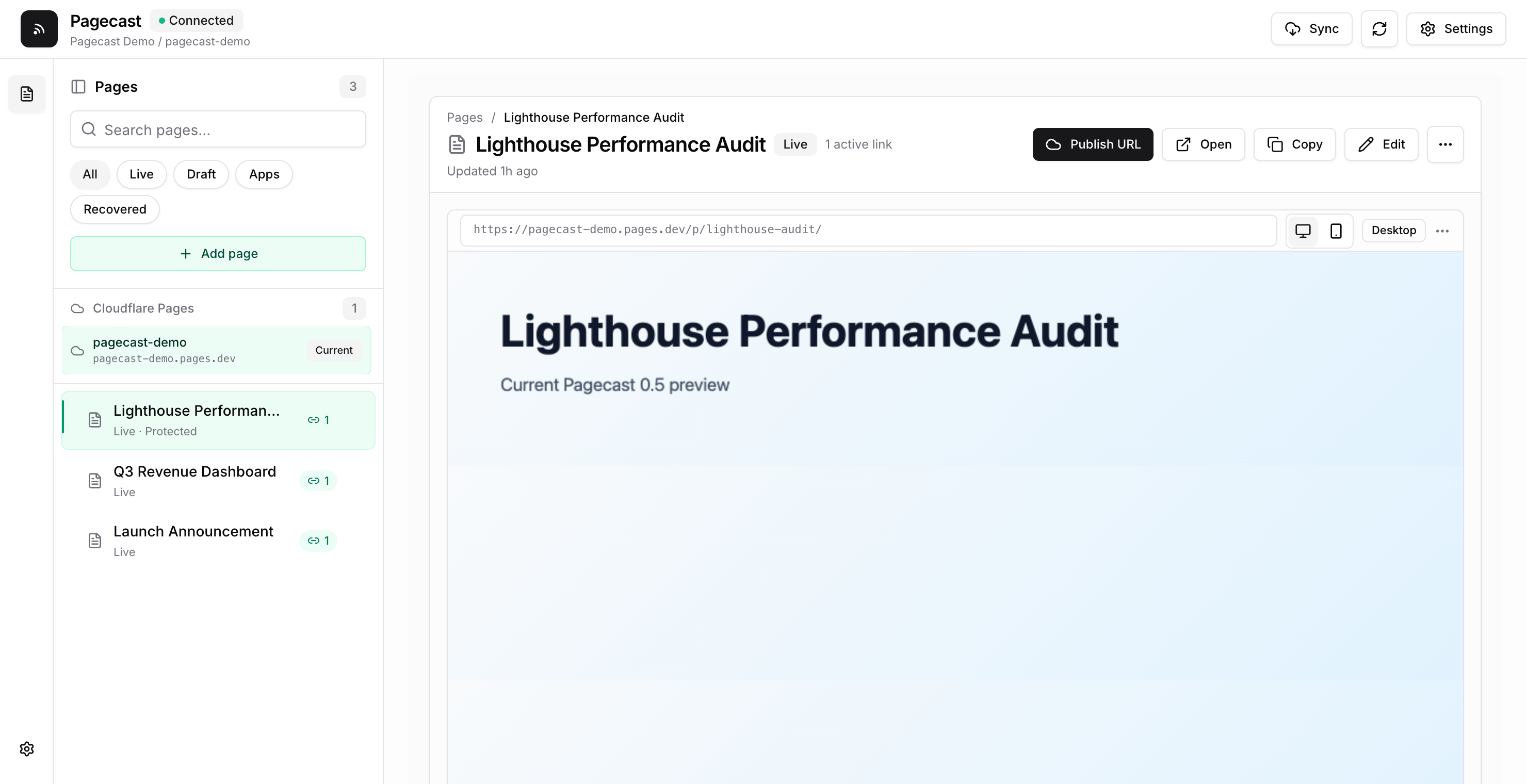
Pagecast is a local-first publishing tool for agent-generated reports and small
static web projects: preview files, publish, re-sync, rename links,
password-protect pages, and revoke URLs — from a local admin UI or headless
pagecast commands. Good fits: HTML reports and dashboards, Markdown docs and
plans, static mini apps from dist/build/out. Not a fit: server-rendered
apps that need a running backend (export static assets first).
Quick Start
Requires Node.js 20.19+ and a Cloudflare account (for publishing). No global install:
npx pagecast
This starts the local app and opens the admin UI:
- Admin UI —
http://pagecast.localhost:4173 - Local preview/public origin —
http://pagecast.localhost:4174 - Pagecast Home —
~/.pagecast/home/(Cloudflare target, publication registry, settings) - Workspace metadata —
.pagecast/in the current directory
One OS user profile owns one Pagecast Home and Cloudflare subdomain. Run the CLI
from the relevant project; use --data-dir only for an intentionally isolated
CI/container profile. If the default ports are busy, Pagecast falls forward to
the next free pair and remembers it.
In the admin UI, confirm the suggested Home subdomain and click Connect
Cloudflare — Pagecast runs Wrangler's scoped browser OAuth flow (Cloudflare
labels the app Wrangler) and resumes setup after consent. From a source
checkout, run npm start instead. Prefer containers? See
Run with Docker.
Run in the background, or (macOS) install a login service plus a local-only
http://pagecast.localhost redirect:
npx pagecast background start && npx pagecast open
npx pagecast setup-local-url
# manage: pagecast local-url status|remove, pagecast background service status|uninstall
Headless/advanced setup:
npx pagecast pages setup --project your-pagecast-home
# multiple accounts? add  --account <account-id>
# automation? export CLOUDFLARE_API_TOKEN (scoped Pages:Edit) + CLOUDFLARE_ACCOUNT_ID
Upgrading from 0.5: stop the old process (npx pagecast@0.5.0 background stop),
reinstall the macOS login service if you use it (npx pagecast@0.7.0 background service install), and reload the unpacked Chrome extension from the matching
release. The first 0.6 launch creates ~/.pagecast/home/ and imports compatible
workspace publications without changing URLs; publications on other Cloudflare
projects remain legacy targets until you explicitly attach or move them.
Publish From The Terminal
# An HTML or Markdown file → a memorable /p/<slug>/ link (source folder included)
npx pagecast publish "/absolute/path/report.html" --json

# Set an expiry — 7d, 12h, or never (default 30d)
npx pagecast publish "/absolute/path/report.html" --expires 7d --json

# Force a new URL, or explicitly update a known one
npx pagecast publish "/absolute/path/report.html" --new-link --json
npx pagecast publish "/absolute/path/report.html" --update <url-or-token> --json

# A built static project → publish its entry file
npm run build && npx pagecast publish ./dist/index.html --json

# A whole folder → replace a named Pages project directly (--branch defaults to main)
npx pagecast pages deploy ./dist --project my-static-site --json
Things to know:
publishcopies every non-hidden, non-symlink file under the source folder, referenced or not — publish from a clean folder and keep secrets elsewhere.- New links are unlisted: a memorable label plus a 128-bit suffix. Anyone with the URL can view it — unlisted is not private. The admin UI's Short public link toggle (or renaming to a vanity slug) makes a guessable public drop instead. Password protection is the access-control option.
- Publishing is context-aware: repeating a publish for the same item in the same
agent context updates the existing URL. Context comes from
--context-id,PAGECAST_CONTEXT_ID,CODEX_THREAD_ID,CLAUDE_SESSION_ID, then a workspace/source fallback; override matching with--new-linkor--update. pages deployis a separate, stateless whole-site operation on the named project. It never changes the project used for managed/p/...links — use a separate project unless replacing the managed site is intentional.statusCode 401→ authentication required (interactive runs start Wrangler auth automatically);statusCode 409→ conflict, follow the returned message.
Activity Analytics
Optional, enabled in Settings: Pagecast deploys a Worker + D1 database to your Cloudflare account and shows views, anonymous uniques, and recent events beside each link, plus a global Activity view. Events carry coarse geo, device class, and referrer hostname; raw IPs are HMACed with a per-Home secret and discarded, and detailed events expire after 30 days. Analytics is audit visibility, not access control — use password protection to restrict access.
Password Protection
Gate any published page from the admin UI (Password protection toggle) or headlessly:
npx pagecast publish "/absolute/path/report.html" --password "your-password" --json
npx pagecast publish "/absolute/path/report.html" --no-password --json   # remove it
Enforced at the edge by a generated Cloudflare Pages Function covering every file of a multi-file report. Older immutable deployments keep the gate state they shipped with — prune deploy history if an unprotected snapshot must stop being reachable. Crypto and security model: PASSWORD-PROTECTION.md.
Deploy History
Every publish or re-sync creates an immutable whole-site Cloudflare deployment
with its own <hash>.pages.dev URL. Manage them from the admin UI
(Settings → Deploy history) or the terminal:
npx pagecast pages deployments list --json
npx pagecast pages deployments delete <id> --json     # the live deployment is protected
npx pagecast pages deployments prune --keep 5 --yes --json
Removing a snapshot never affects your live site or pages. But expiry, password changes, and revoke apply only to the replacement deployment — prune history when old snapshot URLs must stop working.
Use From Coding Agents
Pagecast ships a Codex-native skill and a portable Agent-Skills file. An explicit "Publish this as a Pagecast" instruction publishes immediately; a proactive agent suggestion still asks once.
# Skills.sh (Codex, Claude Code, Cursor, Gemini CLI, and other supported agents)
npx skills add https://github.com/amal-david/pagecast --skill publish-report

# Claude Code plugin (includes the report-detection hook)
/plugin marketplace add Amal-David/pagecast
/plugin install pagecast@pagecast

# Manual install from a clone
cp -R .codex/skills/publish-report ~/.codex/skills/                              # Codex
cp plugin/skills/publish-report/SKILL.md /path/to/your-agent/skills/publish-report/SKILL.md  # any agent
More detail in plugin/README.md.
Use Through MCP
Pagecast can run as a Model Context Protocol server, so MCP-capable agents can publish, inspect, and revoke through a bounded tool surface. Configure the stdio server:
{
  "mcpServers": {
    "pagecast": {
      "command": "npx",
      "args": ["pagecast", "mcp"]
    }
  }
}
It shares the same user-level Home, Cloudflare credentials, expiry, and
password behavior as npx pagecast publish; add "--data-dir" only for an
intentionally isolated MCP profile.
| Tool | Purpose | Safety notes |
|---|---|---|
status | Show Cloudflare/Pagecast connection state. | Redacted by default; verbose: true only for trusted local clients. |
list_pages | List known reports and published links. | Redacted by default; verbose: true reveals local paths/build settings. |
publish_content | Publish supplied HTML or Markdown content. | Supports mode: upsert|new|update, contextId, publication; deterministic upserts need itemKey. |
publish_file | Publish a local .html/.htm/.md/.markdown file. | Isolates the entry file; sibling assets require includeAssets: true and confirmAssets: true. |
revoke_publication | Take a published token offline and redeploy. | Requires confirm: true because it changes a live URL. |
The MCP server is separate from the admin API, which stays loopback-only — do not expose the admin port to a VPN or shared network. This release supports local stdio MCP only; an org-hosted HTTP endpoint would need its own auth, audit, and threat model, and a VPN would gate who can invoke Pagecast, not who can reach the published URL. Use password protection or your organization's access layer for restricted recipients.
Run with Docker
A single image bundles the whole pagecast CLI — it serves the admin dashboard
and runs every publish/deploy command.
# Serve the dashboard (then open http://localhost:4173)
docker compose up --build

# Or run the released image from GHCR
docker pull ghcr.io/amal-david/pagecast:latest
docker run --rm \
  -p 127.0.0.1:4173:4173 -p 127.0.0.1:4174:4174 \
  -v "$PWD/.pagecast:/app/.pagecast" \
  ghcr.io/amal-david/pagecast:latest serve
Publishing from a container uses an API token, not the dashboard's OAuth
button. Copy .env.example to .env with CLOUDFLARE_API_TOKEN
(+ CLOUDFLARE_ACCOUNT_ID), or run headlessly:
docker run --rm -v "$PWD:/work" -w /work \
  -e CLOUDFLARE_API_TOKEN -e CLOUDFLARE_ACCOUNT_ID \
  ghcr.io/amal-david/pagecast:latest publish ./report.html --json
Notes:
- The admin server can run build and publish commands, and its browser-mutation
checks are not remote-user authentication. Always map both ports to the
host's loopback only (
-p 127.0.0.1:4173:4173, never bare-pmappings). - On Linux the container runs as uid 1000 (
node);mkdir -p .pagecastbeforecompose up(orchown 1000:1000 .pagecast) avoids bind-mount permission errors. - Wrangler is pinned (see
src/platform.js) and baked into the image, so deploys don't contact npm at runtime.
Chrome Extension (Experimental)
⚠️ Experimental — load-unpacked only, not yet on the Chrome Web Store.
When an agent opens an HTML file as file:///…/report.html, the bundled
extension adds a one-click Publish to Pagecast button (the server must be
running). Load extension/ from a source checkout — or the
pagecast-extension-v<version>.zip from the matching release —
via chrome://extensions → Developer mode → Load unpacked, then enable
"Allow access to file URLs". See extension/README.md.
Admin UI Features
- Add
.html/.mdfiles by path orfile:///…URL, deployable static folders, or source folders with a build command and output directory. - Drag to reorder; publish, re-sync in place, rename links (old links redirect; vanity slugs are public drops), or revoke one/all versions.
- Auto-sync path-backed reports; password-protect pages; edit HTML in-app without touching the original source file.
- Review interrupted managed operations and retry safe recovery steps.
- View deploy history and remove old snapshots, with one-click "keep newest N" cleanup.
Security Model
- Admin UI binds to loopback by default, rejects non-loopback Host headers, and requires same-origin browser mutations plus a per-process CSRF token; no-Origin mutations require the private workspace capability.
- Draft/report HTML is served only by the separate preview origin (port 4174), embedded by the admin origin in a sandbox without top-navigation permission.
- The Chrome extension is limited to its session/status/local-publish routes.
- Production access is through active
/p/<slug>/links; revoked links 404 after the replacement deploy. Older immutable deployment URLs retain their snapshot until pruned. - Public routes reject directory traversal and hidden files. CLI path publishing exposes every regular file under the report's source folder — keep secrets out.
- The Pages root publishes no report listing.
Telemetry
Pagecast can collect anonymous usage stats — command name, Pagecast/Node version, OS/arch — never file contents, paths, URLs, or Cloudflare tokens/account IDs. Fresh interactive installs are opt-out with a one-time disclosure; telemetry is automatically off in CI. Exact fields: PRIVACY.md.
npx pagecast telemetry status|disable|enable
# env overrides: PAGECAST_TELEMETRY=0|1, DO_NOT_TRACK=1 (always wins)
Development
npm start                  # run the packaged app from source
npm run check && npm test  # verification suite
npm run build              # rebuild the React admin UI (web/) into public/
UI work requires pnpm 10: pnpm -C web install --frozen-lockfile --ignore-scripts,
then pnpm -C web run dev (proxied to the server on 4173). The root CLI/server
has no runtime npm dependencies. Layout: src/ (CLI, server, publisher),
public/ (built UI), web/ (React source), plugin/ + .codex/skills/
(agent skills), test/ (Node tests). Source-folder build commands run through
the platform's native shell (sh -lc / %ComSpec%) — author portable commands.
Contributing
Issues and pull requests are welcome. Fork and branch from main, keep the root
CLI/server free of runtime npm dependencies, run npm run check && npm test
before opening a PR, and rebuild the admin UI (npm run build) if you touched
web/. Please don't file public issues for security problems — report them
privately via SECURITY.md.
License
MIT — see LICENSE.