OpenClaw MCP Server





🦞 Model Context Protocol (MCP) server for OpenClaw AI assistant integration.
Demo
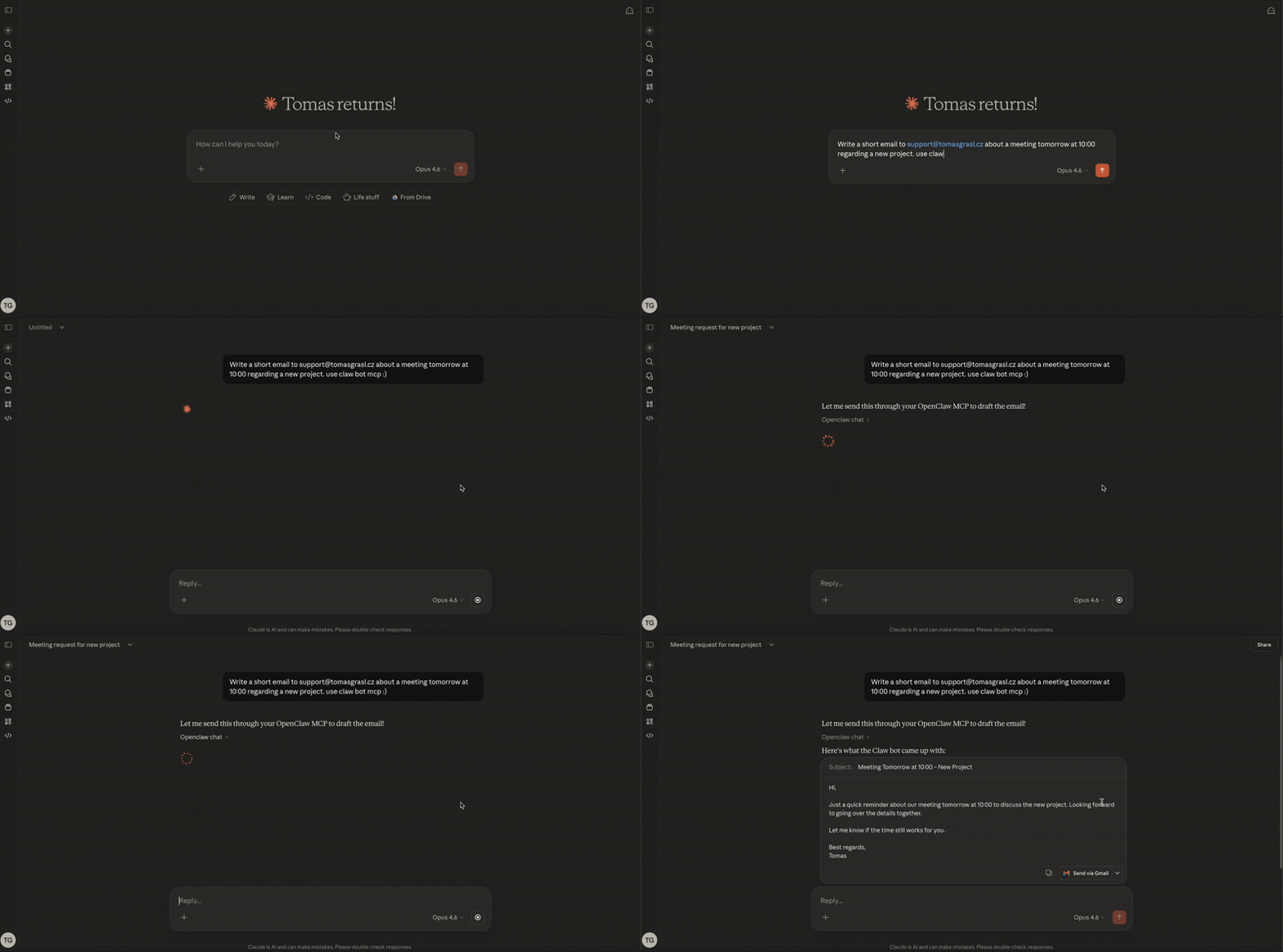
Why I Built This
Hey! I created this MCP server because I didn't want to rely solely on messaging channels to communicate with OpenClaw. What really excites me is the ability to connect OpenClaw to the Claude web UI. Essentially, my chat can delegate tasks to my Claw bot, which then handles everything else — like spinning up Claude Code to fix issues for me.
Think of it as an AI assistant orchestrating another AI assistant. Pretty cool, right?
Quick Start
Docker (Recommended)
Pre-built images are published to GitHub Container Registry on every release.
docker pull ghcr.io/freema/openclaw-mcp:latest
Create a docker-compose.yml:
services:
  mcp-bridge:
    image: ghcr.io/freema/openclaw-mcp:latest
    container_name: openclaw-mcp
    restart: unless-stopped
    ports:
      - "3000:3000"
    environment:
      - OPENCLAW_URL=http://host.docker.internal:18789
      - OPENCLAW_GATEWAY_TOKEN=${OPENCLAW_GATEWAY_TOKEN}
      - OPENCLAW_AGENT_ID=${OPENCLAW_AGENT_ID:-}
      - OPENCLAW_MODEL=openclaw
      - AUTH_ENABLED=true
      - MCP_CLIENT_ID=openclaw
      - MCP_CLIENT_SECRET=${MCP_CLIENT_SECRET}
      - MCP_ISSUER_URL=${MCP_ISSUER_URL:-}
      - MCP_REDIRECT_URIS=https://claude.ai/api/mcp/auth_callback,https://claude.com/api/mcp/auth_callback
      - TRUST_PROXY=1
      - CORS_ORIGINS=https://claude.ai
    extra_hosts:
      - "host.docker.internal:host-gateway"
    read_only: true
    security_opt:
      - no-new-privileges
Generate secrets and start:
export MCP_CLIENT_SECRET=$(openssl rand -hex 32)
export OPENCLAW_GATEWAY_TOKEN=your-gateway-token
docker compose up -d
Then in Claude.ai add a custom MCP connector pointing to https://your-domain.com/mcp with MCP_CLIENT_ID=openclaw and your MCP_CLIENT_SECRET.
Important: The connector URL must end with
/mcp— that's the Streamable HTTP endpoint. A bare domain (https://your-domain.com) hits the server root and returns 404 after OAuth completes.
Tip: Pin a specific version instead of
latestfor production:ghcr.io/freema/openclaw-mcp:1.1.0
Local (Claude Desktop)
npx openclaw-mcp
Add to your Claude Desktop config:
{
  "mcpServers": {
    "openclaw": {
      "command": "npx",
      "args": ["openclaw-mcp"],
      "env": {
        "OPENCLAW_URL": "http://127.0.0.1:18789",
        "OPENCLAW_GATEWAY_TOKEN": "your-gateway-token",
        "OPENCLAW_AGENT_ID": "main",
        "OPENCLAW_MODEL": "openclaw",
        "OPENCLAW_TIMEOUT_MS": "300000"
      }
    }
  }
}
Remote (Claude.ai) without Docker
AUTH_ENABLED=true MCP_CLIENT_ID=openclaw MCP_CLIENT_SECRET=your-secret \
  MCP_ISSUER_URL=https://mcp.your-domain.com \
  CORS_ORIGINS=https://claude.ai OPENCLAW_GATEWAY_TOKEN=your-gateway-token \
  npx openclaw-mcp --transport http --port 3000
Important: When running behind a reverse proxy (Caddy, nginx, Traefik, Cloudflare Tunnel, etc.) you must set:
MCP_ISSUER_URL(or--issuer-url) to your public HTTPS URL — otherwise OAuth metadata advertiseshttp://localhost:3000and clients fail to authenticate.TRUST_PROXY=1(or--trust-proxy 1) — otherwiseexpress-rate-limitrejects the proxy'sX-Forwarded-Forheader and/tokencrashes withERR_ERL_UNEXPECTED_X_FORWARDED_FOR.
Recommended: Set
MCP_REDIRECT_URIS=https://claude.ai/api/mcp/auth_callback,https://claude.com/api/mcp/auth_callbackso authorization codes can only be delivered to Claude's callbacks. Note the exact/api/mcp/auth_callbackpath — matching is exact, and getting it wrong fails OAuth withUnregistered redirect_uri(see Troubleshooting).
See Installation Guide for details.
Architecture
┌─────────────────────────────────────────────────────────────────┐
│                         Your Server                             │
│                                                                 │
│  ┌─────────────────┐      ┌─────────────────────────┐          │
│  │   OpenClaw      │      │    OpenClaw MCP         │          │
│  │   Gateway       │◄────►│    Bridge Server        │          │
│  │   :18789        │      │    :3000                │          │
│  │                 │      │                         │          │
│  │  OpenAI-compat  │      │  - OAuth 2.1 auth       │          │
│  │  /v1/chat/...   │      │  - CORS protection      │          │
│  └─────────────────┘      │  - Input validation     │          │
│                           └──────────┬──────────────┘          │
│                                      │                          │
└──────────────────────────────────────┼──────────────────────────┘
                                       │ HTTPS + OAuth 2.1
                                       ▼
                              ┌─────────────────┐
                              │   Claude.ai     │
                              │   (MCP Client)  │
                              └─────────────────┘
Available Tools
Sync Tools
| Tool | Description |
|---|---|
openclaw_chat | Send messages to OpenClaw and get responses |
openclaw_status | Check OpenClaw gateway health |
openclaw_instances | List all configured OpenClaw instances |
Async Tools (for long-running operations)
| Tool | Description |
|---|---|
openclaw_chat_async | Queue a message, get task_id immediately |
openclaw_task_status | Check task progress and get results |
openclaw_task_list | List your tasks with filtering |
openclaw_task_cancel | Cancel a pending task |
Tasks are scoped to the MCP connection that created them. In HTTP mode, where
one process serves many clients, a client can only see and cancel its own
tasks — another client's task_id reads as "not found" even if it is known.
Reconnecting starts a fresh scope, so poll a task on the connection that
queued it.
Multi-Instance Mode
Orchestrate multiple OpenClaw gateways from a single MCP server. One bridge, many claws — route requests to prod, staging, dev, or whatever you name them (lobster-supreme and the-claw-abides are perfectly valid names).
┌──────────────────────────────────────────────────────────────────────┐
│                        Claude.ai / Claude Desktop                    │
│                              (MCP Client)                            │
└──────────────────────┬───────────────────────────────────────────────┘
                       │
                       ▼
┌──────────────────────────────────────────────────────────────────────┐
│                     OpenClaw MCP Bridge Server                        │
│                                                                      │
│  ┌──────────────┐  ┌──────────────┐  ┌──────────────┐               │
│  │  Instance     │  │  Instance     │  │  Instance     │              │
│  │  Registry     │  │  Resolver     │  │  Validator    │              │
│  └──────┬───────┘  └──────┬───────┘  └──────┬───────┘               │
│         │                 │                  │                        │
│  ┌──────┴─────────────────┴──────────────────┴───────┐               │
│  │              Per-Instance OpenClaw Clients          │              │
│  │     (separate auth, timeout, URL per instance)     │              │
│  └────────┬──────────────┬──────────────┬────────────┘               │
└───────────┼──────────────┼──────────────┼────────────────────────────┘
            │              │              │
            ▼              ▼              ▼
   ┌──────────────┐ ┌──────────────┐ ┌──────────────┐
   │  🦞 prod     │ │  🦞 staging  │ │  🦞 dev      │
   │  (default)   │ │              │ │              │
   │  :18789      │ │  :18789      │ │  :18789      │
   │  OpenClaw GW │ │  OpenClaw GW │ │  OpenClaw GW │
   └──────────────┘ └──────────────┘ └──────────────┘
Setup
OPENCLAW_INSTANCES='[
  {"name": "prod", "url": "http://prod:18789", "token": "tok1", "default": true},
  {"name": "staging", "url": "http://staging:18789", "token": "tok2"},
  {"name": "dev", "url": "http://dev:18789", "token": "tok3"}
]'
Usage
All tools accept an optional instance parameter to target a specific gateway:
# Chat with staging instance
openclaw_chat message="Deploy status?" instance="staging"

# Check health of prod
openclaw_status instance="prod"

# List all configured instances
openclaw_instances

# Async task targeting dev
openclaw_chat_async message="Run tests" instance="dev"
When instance is omitted, the default instance is used. Each instance has its own auth token, timeout, and URL — fully isolated.
Key Features
- Zero-migration upgrade — existing single-instance deployments work without any config change
- Per-instance isolation — separate auth tokens, timeouts, and URLs
- Dynamic routing — Claude picks the right instance per request
- Task tracking — async tasks remember which instance they target
- Security — tokens are never exposed via
openclaw_instances
See Configuration — Multi-Instance Mode for the full reference.
Documentation
- Installation — Setup for Claude Desktop & Claude.ai
- Configuration — Environment variables & options
- Deployment — Docker & production setup
- Threat Model — What Claude can/can't trigger, trust boundaries & attack surfaces
- Logging — What gets logged, where, and what is never logged
- Development — Contributing & adding tools
- Security — Security policy & best practices
Security
⚠️ Always enable authentication in production!
# Generate secure client secret
export MCP_CLIENT_SECRET=$(openssl rand -hex 32)

# Run with auth enabled
AUTH_ENABLED=true MCP_CLIENT_ID=openclaw MCP_CLIENT_SECRET=$MCP_CLIENT_SECRET \
  openclaw-mcp --transport http
CORS is disabled unless you opt in. Set CORS_ORIGINS only when a browser
client needs to reach the server directly:
CORS_ORIGINS=https://claude.ai,https://your-app.com
See Configuration for all security options.
Upgrading to 1.7.0
Two defaults changed for security. Both only affect HTTP mode; stdio is unchanged.
- CORS is now off by default. Previously an unset
CORS_ORIGINSsentAccess-Control-Allow-Origin: *. If a browser client depends on that, set the origins explicitly (CORS_ORIGINS=https://your-app.com), orCORS_ORIGINS=*to restore the old behaviour. - Async tasks are scoped to the connection that created them. A client
that used to poll a
task_idqueued by a different connection will now get "not found".
Migrating from SSE to HTTP transport
Starting with v1.5.0, the primary transport is Streamable HTTP (--transport http). The legacy SSE transport (--transport sse) is deprecated but still works for backward compatibility.
What changed
| Before | After |
|---|---|
--transport sse | --transport http (recommended) |
Primary endpoint: GET /sse | Primary endpoint: POST/GET/DELETE /mcp |
Health: "transport": "sse" | Health: "transport": "streamable-http" |
Migration steps
-
CLI / Docker: Replace
--transport ssewith--transport http# Before openclaw-mcp --transport sse --port 3000 # After openclaw-mcp --transport http --port 3000 -
Claude.ai connector URL: No change needed — Claude.ai already uses
/mcp(Streamable HTTP) -
Legacy clients: The
/sseand/messagesendpoints still work. A deprecation warning is logged on each SSE connection. -
Dockerfile ENTRYPOINT: Updated automatically if using the official Docker image
Note:
--transport ssewill continue to work as a deprecated alias. Both transports are served simultaneously regardless of which flag you use.
Requirements
- Node.js ≥ 20
- OpenClaw gateway running with HTTP API enabled:
// openclaw.json
{ "gateway": { "http": { "endpoints": { "chatCompletions": { "enabled": true } } } } }
License
MIT
Author
Created by Tomáš Grasl
Related Projects
- OpenClaw — The AI assistant this MCP connects to
- MCP Specification — Model Context Protocol docs