
The Ontology Lookup Service (OLS) is a repository for biomedical ontologies that aims to provide a single point of access to the latest ontology versions. It provides a website, REST API, and MCP server.
See also:
- The public OLS instance at EMBL-EBI: https://www.ebi.ac.uk/ols4/
- OLS4: a new Ontology Lookup Service for a growing interdisciplinary knowledge ecosystem
- REST API docs
- MCP endpoint (Streamable HTTP):
https://www.ebi.ac.uk/ols4/api/mcp
If you use OLS in your work, please cite our recent publication in Bioinformatics.
This repository contains three projects:
- The dataloader (
dataloaddirectory) - The API server (
backenddirectory) - The React frontend (
frontenddirectory)
Deploying OLS4
First run the OLS dataload (requires Docker):
OLS4_CONFIG=./dataload/configs/efo.json ./dataload.sh
This will create a PostgreSQL database in the out directory. Now start the OLS stack:
HOST_UID=$(id -u) HOST_GID=$(id -g) docker compose up
You should now be able to access the OLS4 frontend at http://localhost:8081.
If you want to test it with your own ontology, copy the OWL or RDFS ontology file into this repository folder. Then make a new config file for your ontology; you can use efo.json from dataload/configs as a
template. For the ontology_purl property in the config, use the relative path in this repository to your ontology e.g. ./myontology.owl. Then follow the above steps for efo with the config filename you created.
Deployment: Using Kubernetes with GitHub Packages
To deploy OLS4 using Kubernetes, Docker images built and uploaded to this repository (using GitHub Packages) are utilized. Software requirements are as follows:
- Kubernetes command-line tool, kubectl
- Kubernetes package manager, helm
Create data archives for PostgreSQL
First run the OLS dataload (requires Docker):
OLS4_CONFIG=./dataload/configs/efo.json ./dataload.sh
This will create a PostgreSQL database in the out directory.
Startup OLS4 deployment
Uninstall existing ols4 deployments, if any, before installing a new one. Do not forget to set KUBECONFIG
environment variable.
IMPORTANT: The use of imageTag is to specify the Docker image (uploaded to this repository) that will be used in the deployment. If not familiar, simply
use either the dev or stable image.
export KUBECONFIG=<K8S_CONFIG>
helm install ols4 <OLS4_DIR>/k8chart/ols4 --set imageTag=dev
Developing OLS4
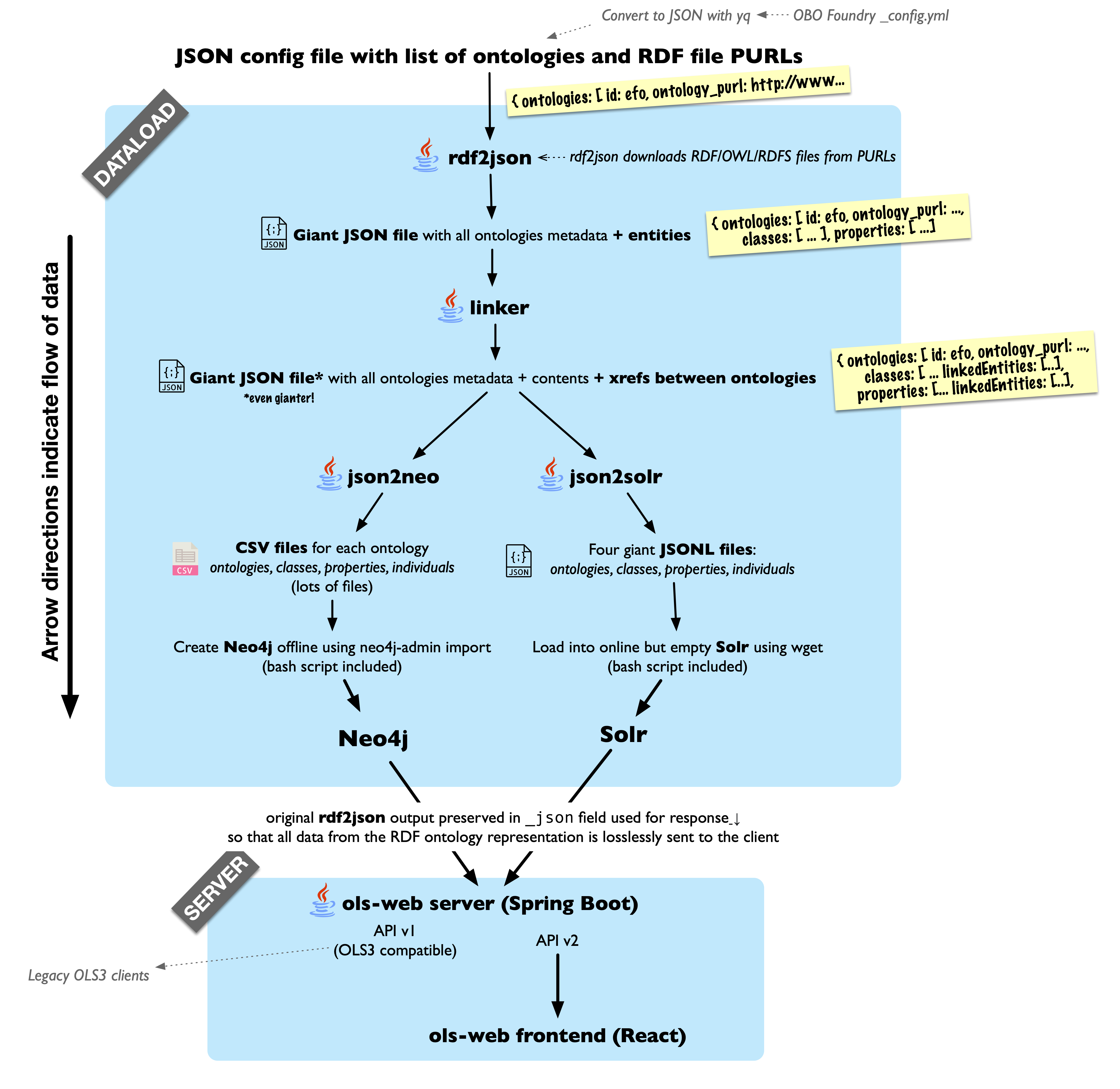
OLS is different to most webapps in that its API provides both full text search and recursive graph queries. It uses PostgreSQL with pgvector, for storing entities, hierarchies, embedding vectors, and full-text search.
- The
dataloaddirectory contains the code which turns ontologies from RDF (specified using OWL and/or RDFS) into JSON and TSV datasets which can be loaded into PostgreSQL; and some minimal bash scripts which help with loading them. - The
backenddirectory contains a Spring Boot application which hosts the OLS API over the above PostgreSQL instance - The
frontenddirectory contains the React frontend built upon thebackendabove.
Running OLS4 components using Docker
You can run OLS4, or any combination of its consistuent parts (dataload, backend, frontend) in Docker. When developing, it is often useful to run, for example, just PostgreSQL in Docker, while running the API server locally; or to run PostgreSQL and the backend API server in Docker while running the frontend locally.
First install the latest version of Docker Desktop (or compatible, such as Rancher Desktop) if you are on Mac or Windows. This now includes the docker compose
command. If you are on Linux, make sure you have the docker compose plugin
installed (apt install docker.io docker-compose-plugin on Ubuntu).
Then, start up the components you would like to run. For example, PostgreSQL only (to develop the backend API server and/or frontend):
docker compose up --force-recreate --build --always-recreate-deps --attach-dependencies ols4-postgres
This will start up PostgreSQL with your new dataset on port 5432. To start PostgreSQL AND the backend API server (to develop the frontend):
docker compose up --force-recreate --build --always-recreate-deps --attach-dependencies ols4-postgres ols4-backend
To start everything, including the frontend:
docker compose up --force-recreate --build --always-recreate-deps --attach-dependencies ols4-postgres ols4-backend ols4-frontend
Making the tests pass
OLS has a comprehensive suite of automated CI tests for the dataload and API. If code changes change the output such that it no longer matches testcases_expected_output (mock dataload) and/or testcases_expected_output_api (full Nextflow dataload and API) the CI will fail, and you will need to update the expected output.
Before running your testcases, ensure that your work is already committed. Create a new branch based on the branch you worked on
but with a -testcases suffix. I.e., if your branch is called "fix-xyz", the new branch for the testcases will be
fix-xyz-testcases. We commit testcases to a separate branch due to the large number of files updated when testcases are run.
Testing the mock dataload
First, build an up to date Docker image for the dataload:
docker build -t ols4-dataload:local -f ./dataload/Dockerfile . --no-cache
Remove the old testcases_expected_output contents from your local working tree:
rm -rf testcases_expected_output/*
Re-populate testcases_expected_output directory with updated test output:
docker run \
    -v $(pwd)/testcases_expected_output:/opt/ols/testcases_output \
    ols4-dataload:local \
    bash -c "cd /opt/ols && ./test_dataload.sh"
Now you can inspect any changes to the files in testcases_expected_output and make sure they are intentional, e.g. using git diff or from VS Code. When you are happy, stage and commit the updated testcases_expected_output.
git add -A testcases_expected_output
git commit -m "Update testcase output"
Testing the full Nextflow dataload and API
First follow the instructions above for testing the mock dataload. Then build up to date Docker images for remainder of the OLS stack:
For backend use following docker command:
docker build -t ols4-backend:local -f ./backend/Dockerfile . --no-cache
For frontend use following docker command:
docker build -t ols4-frontend:local -f ./frontend/Dockerfile ./frontend --no-cache
For apitester use following docker command:
docker build -t ols4-apitester4:local -f ./apitester4/Dockerfile ./apitester4 --no-cache
and then run the API tests with the new images:
export OLS4_BACKEND_IMAGE=ols4-backend:local
export OLS4_FRONTEND_IMAGE=ols4-frontend:local
export OLS4_APITESTER_IMAGE=ols4-apitester4:local
HOST_UID=$(id -u) HOST_GID=$(id -g) docker compose --profile run-api-tests build --no-cache
Run the test script to produce a testcases_output_api directory:
OLS4_DATALOAD_IMAGE=ols4-dataload:local ./test_api.sh
The log file testcases_output_api/apitester4.log contains diff information. You can also manually compare the files in testcases_output_api with the files in testcases_expected_output_api. Once you are happy the changes are intentional, replace the old test outputs with the new ones:
rm -rf testcases_expected_output_api
mv testcases_output_api testcases_expected_output_api
Stage and commit the updated testcases_expected_output_api:
git add -A testcases_expected_output_api
git commit -m "Update API testcase output"
Running OLS locally
OLS is intended to be run as a containerised application. However, for some debugging scenarios it may be useful to run OLS non-containerised (i.e. outside of Docker). Best effort instructions are provided in RUNNING_LOCALLY.md, though these may not be suitable for all platforms.
Reasoning
OLS does not do any OWL reasoning on ontologies at all. The assumption is that ontologies loaded into OLS are pre-reasoned.