



English | 中文
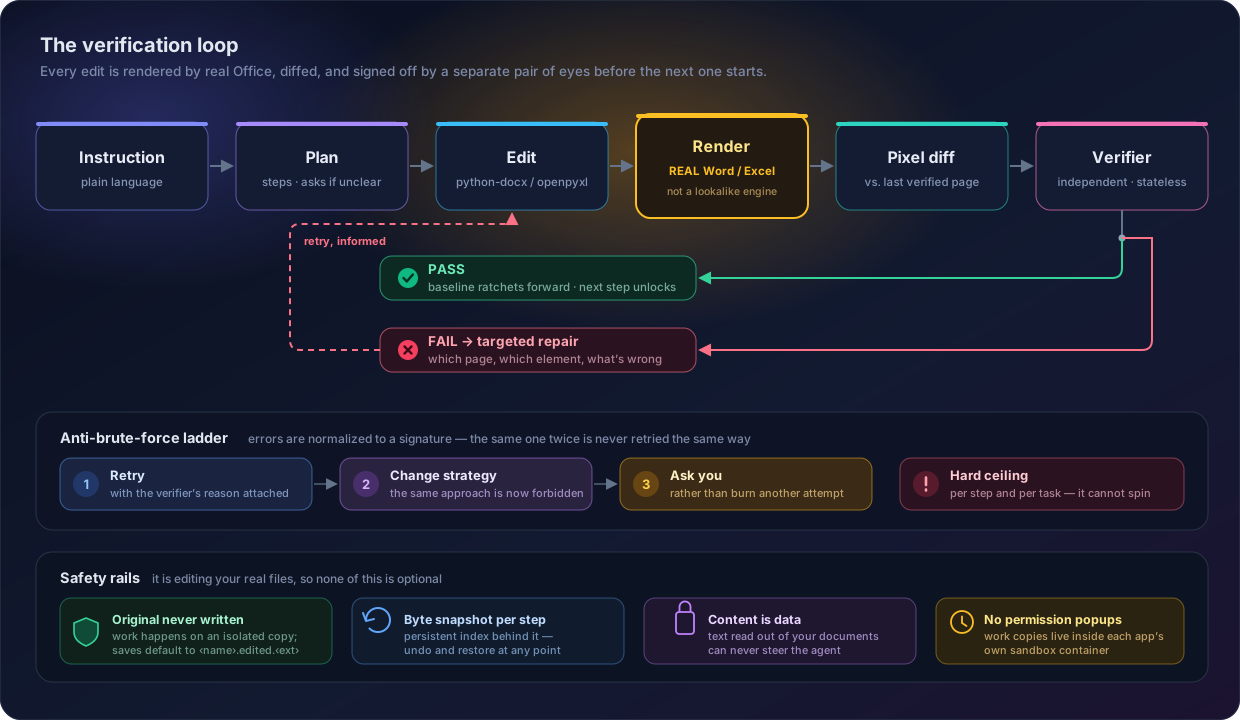
Most document agents write bytes into a file and hope. OfficeBuddy renders the document through Microsoft Word and Excel themselves after every single edit, diffs the pages, and hands the screenshot to a separate multimodal verifier that has to sign off before the next step begins. When the verifier objects, it says which page, which element, what is wrong — so the repair is targeted, not a blind retry.
The renderer is not a lookalike engine. It is Word.
Proof, not promises
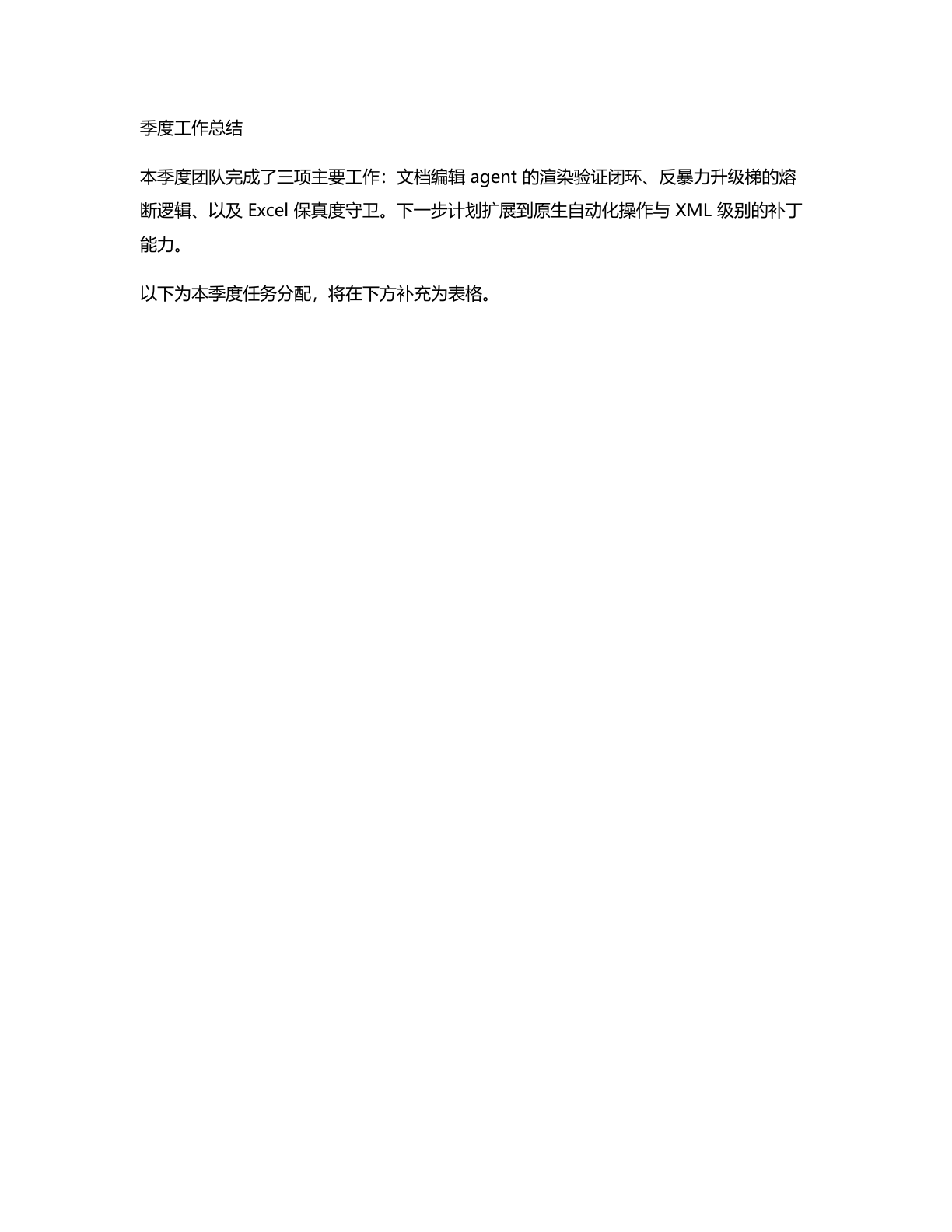
Nothing below is a mockup. This is a real run on a real .docx, on a real Mac, rendered by
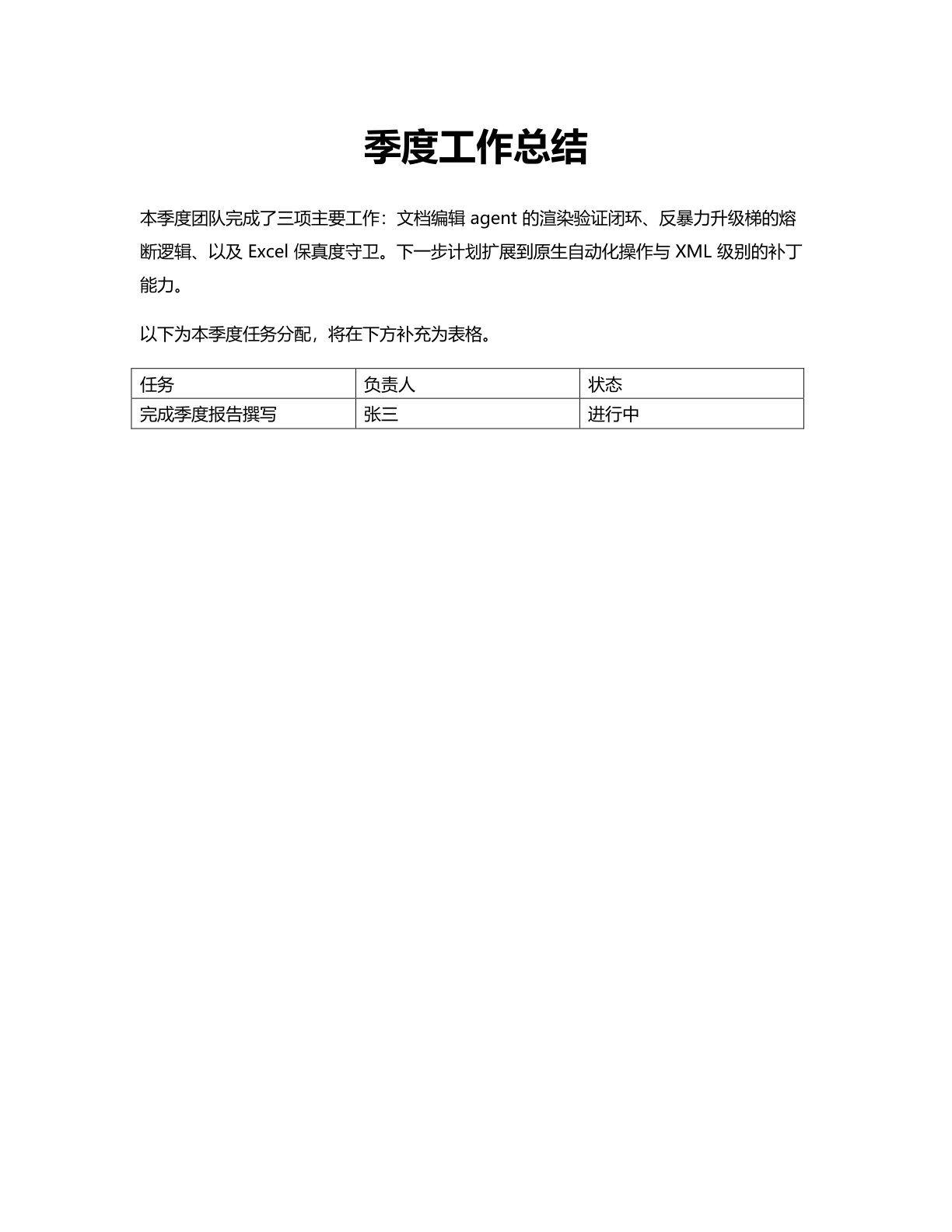
real Word — instruction: "Make the title bold, 24pt and centered; then add a 2×3 table at
the end with headers 任务/负责人/状态 and one data row, with black solid borders."
| 1 · before | 2 · after the edit | 3 · what the verifier sees |
 |  | 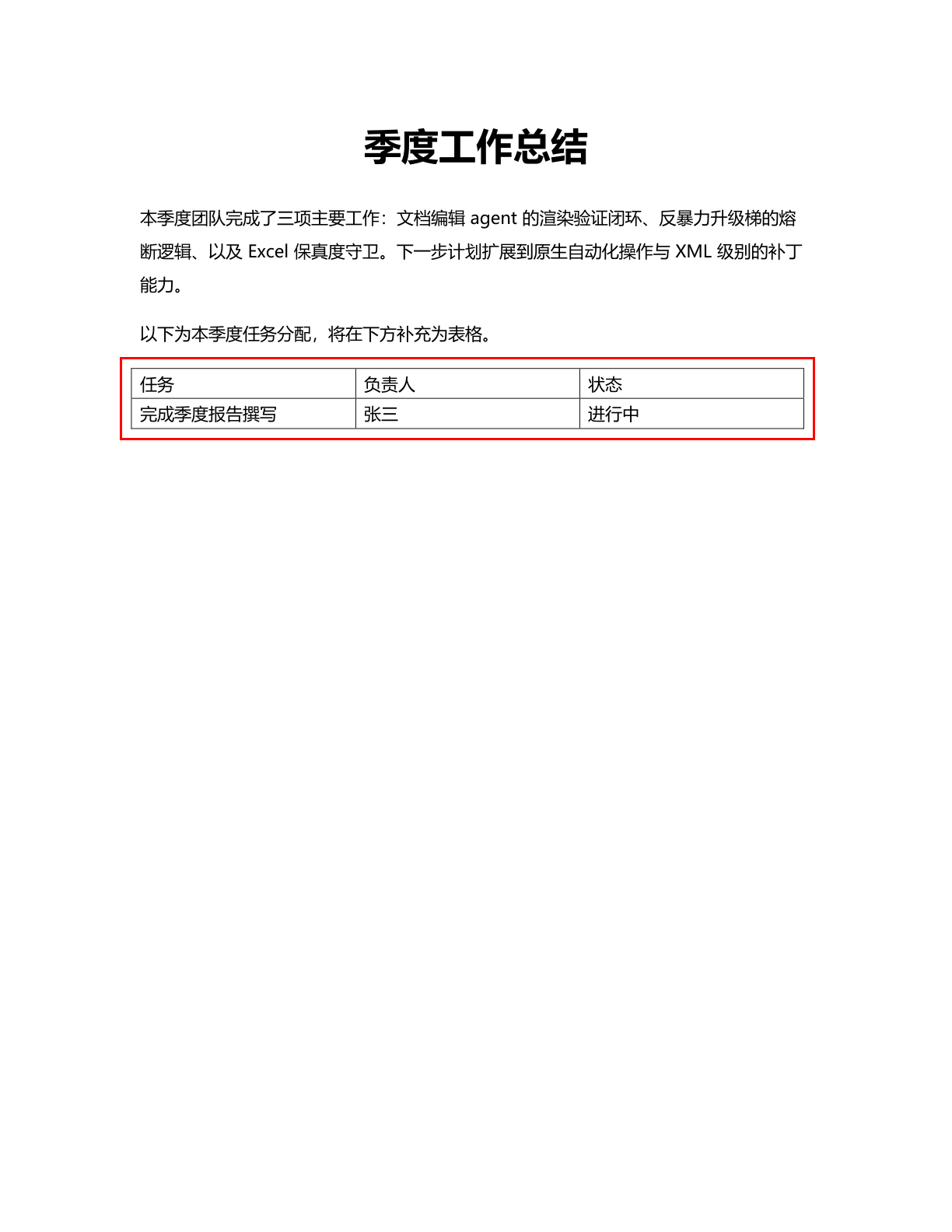 |
That red box is not decoration. It is drawn by a pixel diff against the last verified render, so the verifier is told exactly where to look instead of re-reading the whole page.
The complete evidence trail — the model's plan, every tool call, the rendered PDFs, and the
verifier's structured verdicts — is checked into
examples/harness-walkthrough/. Read it and grade the claim
yourself.
Measured against another agent
Byte-level assertions and schema validation share a blind spot: a file can be structurally valid, pass every assertion, and still be visibly broken once a real layout engine renders it. Render-Truth Bench is 9 tasks built on exactly that gap — each pairs an ordinary edit instruction with a literal-execution trap, where doing what was asked, verbatim, yields a file that validates cleanly and renders wrong.
A 2×2 factorial over two systems × visual-feedback availability, 3 repeats per cell, 108 runs, every artefact rendered through real Microsoft Word and Excel:
| Configuration | DDR ↓ | SFR ↓ | DAR ↑ | DAR* ↑ |
|---|---|---|---|---|
| OfficeBuddy · visual feedback on | 26% | 15% | 85% | 81% |
| OfficeBuddy · visual feedback off | 33% | 22% | 78% | 71% |
| OfficeCLI · screenshots available | 63% | 63% | 37% | 19% |
| OfficeCLI · screenshots ablated | 63% | 59% | 41% | 24% |
DDR — defect delivery rate; share of runs whose delivered file carries the defect, decided by deterministic detectors with no model in the loop. SFR — silent failure rate; the file is broken and the user was never told. DAR — defect awareness rate. DAR* — DAR excluding the two tasks this project has already hardened against, so the number cannot be explained by a baked-in default.
Read the caveats before quoting any of this. The task set is deliberately aimed at the one
dimension this architecture targets — it does not measure capability breadth, speed, or
token cost, and on those the comparison runs the other way (see bench/REPORT.md).
At n=3 per cell, differences of a few points are not distinguishable. The harness, the
three-state calibration gate that every task had to pass, and the full report with rendered
evidence are all in bench/ — including
RESULTS.md and visual_report.html.
Why this is more than a retry wrapper
- The verifier is a separate, stateless call. It never sees the edit history or the model's own reasoning — only the screenshot and the step description. It cannot talk itself into believing an edit worked.
- The baseline ratchets. Each new render is diffed against the last render that passed, not merely the last render produced. A failed step cannot quietly become the new normal.
- Failure escalates instead of repeating. Errors are normalized into signatures; the same signature twice forces a different strategy, a third time asks you. Every step and every task has a hard budget ceiling.
Quick start
git clone https://github.com/richardChenzhihui/OfficeBuddy.git
cd OfficeBuddy
pip install -e .
export MINIMAX_API_KEY=...      # Anthropic-compatible endpoint, model MiniMax-M3
officebuddy doctor              # one-time automation-permission setup + self-check
Then just talk to it:
# one-shot, then drop into a REPL to keep going
officebuddy "把第一段改成 Times New Roman 12 号,并加粗标题" report.docx

# pure one-shot
officebuddy "add a totals row and bold it" sales.xlsx --one-shot

# interactive session
officebuddy
Useful flags:
| Flag | What it does |
|---|---|
--yes | allow overwriting the original file (non-interactive use) |
--no-visual-verify | skip the render loop — faster for pure data edits |
--verbose / -v | show every tool call and its result |
--one-shot | run the task and exit instead of entering the REPL |
--non-interactive | never ask questions; take the safe default |
Requirements: macOS, Microsoft Word / Excel (they are the renderer), Python 3.10+, and a
MiniMax API key.
office-agent still works as an alias of the officebuddy command.
What it can edit
| Read | Edit | Rendered verification | |
|---|---|---|---|
Word (.docx) | ✅ | ✅ | ✅ |
Excel (.xlsx) | ✅ | ✅ | ✅ |
Word — text editing and find/replace (paragraph- and run-level), character styling (font,
size, bold/italic/underline, color, per-script CJK font slots), paragraph styling
(alignment, indent, spacing), inserting and deleting elements (paragraphs, tables, page
breaks), table and cell borders (tblBorders / tcBorders), and structure inspection.
Excel — cell read/write with type preservation, formulas, cell and range styling (font,
fill, alignment, number format, borders), conditional selection (row[Salary>5000]-style
predicates), row/column insertion and deletion, sheet management, freeze panes, charts, and a
fidelity guard that inventories the workbook's parts before and after a save and reports
exactly what the underlying reader would have dropped.
Safety, because it edits your actual files
- Your original is never written until you say so. All work happens on an isolated copy;
the default output is
<name>.edited.<ext>. Overwriting the original requires an interactive confirmation or--yes. - Every change is snapshotted byte-for-byte with a persistent index —
undoandrestorework at any point. - Document content is data, not instructions. Text read out of your files is never allowed to steer the agent (prompt-injection defense).
- No permission dialogs during normal use. Working copies live inside each Office app's
own sandbox container, exports pre-delete their target, alerts are suppressed, and focus is
never stolen. macOS asks for automation permission exactly once, and
doctorwalks you through it. - The Excel fidelity guard warns you up front when a workbook contains parts the reader cannot round-trip (see Limitations).
Architecture
cli.py                  REPL / one-shot / doctor
agent/
  loop.py               main harness: plan → clarify → execute → render → verify → repair
  verifier.py           independent stateless visual verification (forced structured verdict)
  budget.py             error signatures + escalation ladder (retry → new strategy → ask)
  history.py            message history (images are kept out of the main loop's context)
tools/
  registry.py           pydantic models → tool schemas; uniform error envelope; auto-snapshot
  word_tools.py         word_edit_text / edit_style / insert_element / delete_element /
                        find_replace / read_content
  excel_tools.py        excel_write_cells / edit_formula / edit_style / conditional_select /
                        create_chart / manage_sheet / freeze_panes / fidelity_report / …
  interaction_tools.py  propose_plan / update_plan / ask_user / render_preview
render/
  applescript.py        Word/Excel → PDF (in-container, dialog-free, timeout + error classes)
  pdf_to_images.py      PDF → PNG (PyMuPDF, 144 dpi)
  page_diff.py          changed-page detection + red bounding-box annotation
  renderer.py           content-addressed render cache + verified-baseline ratchet
core/
  session.py            working-copy isolation (the original is touched only on explicit save)
  snapshot_manager.py   per-step byte snapshots + persistent index (undo / restore)
adapters/               stateless python-docx / openpyxl operation layer
A bug the screenshots caught by themselves
After the first demo run, plain body text showed words that looked randomly bolder than
their neighbours — in a paragraph the agent had never touched. Chasing it down: the source
document.xml had no per-character formatting at all, but pdffonts showed the exported PDF
embedding both MS-Mincho and MicrosoftYaHei, and a per-span extraction confirmed Word was
guessing a fallback font per CJK character, because the document's Normal style declared
no east-asian font.
That is exactly the class of defect a byte-level assertion can never see and a rendered
screenshot cannot miss. The fix — proper w:eastAsia font slots in the Word adapter — and the
full investigation are written up in
examples/harness-walkthrough/README.md.
Design notes
Longer write-ups on the edit layer live in docs/edit-layer-designs/:
the native-ops router, the
Excel fidelity guard, and the
Word raw-XML patch modality.
There is also a self-contained visual walkthrough of the harness design at
examples/harness-walkthrough/visualization/harness-design-manual.html
— download it and open it in a browser.
Limitations
- Opening an
.xlsxthat already contains charts or images and saving it loses them. openpyxl's reader does not parse them. You are warned explicitly on open and told not to overwrite the original; pure data and styling edits are unaffected. - Excel charts are generated by openpyxl: the first column of the data range becomes the category axis by default, and the styling is plain.
- Word tracked changes, comments, footnotes and TOC field updates are not supported yet (planned via a Word-internal automation escape hatch). Table and cell borders are supported.
- The first Word render of a session can take 1–2 minutes while Word itself cold-starts;
warm renders within a session take about 0.6s. Word and Excel are deliberately left running
afterwards to preserve that warm start —
doctoronly quits instances it started. - Paragraph-level find/replace flattens run formatting within that paragraph when a match straddles a formatting boundary. The result carries a warning when this happens.
- macOS only, by construction. The whole premise is driving real Office as the renderer.
Development
pytest -q                    # offline suite (unit + tools + FakeLLM loop tests)
pytest -m mac_office -q      # integration tests that drive real Word/Excel
OFFICE_AGENT_LIVE_TEST=1 pytest -m live -q   # live MiniMax smoke test (costs money, skipped by default)
mac_office tests drive the real Office apps and may surface macOS permission dialogs — run
them with a human present, never unattended.
License
MIT — see LICENSE.