Obsidian-Export-Skill.md

by DGApexVerified

Obsidian Export turns your local Obsidian vault into a self-contained, interactive HTML knowledge map — driven by an AI agent that understands your intent, selects the right notes, and runs the export for you.

2
Stars
0
Forks
Python
Language
8/24/2026
Added
View on GitHubDownload ZIP

⚠️ Third-Party Software Notice

This skill is third-party open-source software developed and hosted independently on GitHub. SkillTip is an informational directory and does not control or maintain the underlying repository. Any security checks displayed are automated and limited in scope. Review the source code before installing.

Read the Terms of Service

Installation

Add to your Claude Code skills directory:

# Add to your Claude Code skills
git clone https://github.com/DGApex/Obsidian-Export-Skill.md

Getting Started

Guides for using skills like Obsidian-Export-Skill.md.

Security Report

Verified

Last scanned: —

{
  "status": "PASSED",
  "issues": []
}

README.md

Obsidian Export 🚀

Tell your AI agent which notes to export. It handles the rest.

License: MIT Python: 3.8+ Obsidian: Compatible

Obsidian Export turns your local Obsidian vault into a self-contained, interactive HTML knowledge map — driven by an AI agent that understands your intent, selects the right notes, and runs the export for you.

You don't touch the command line. You just say what you want.
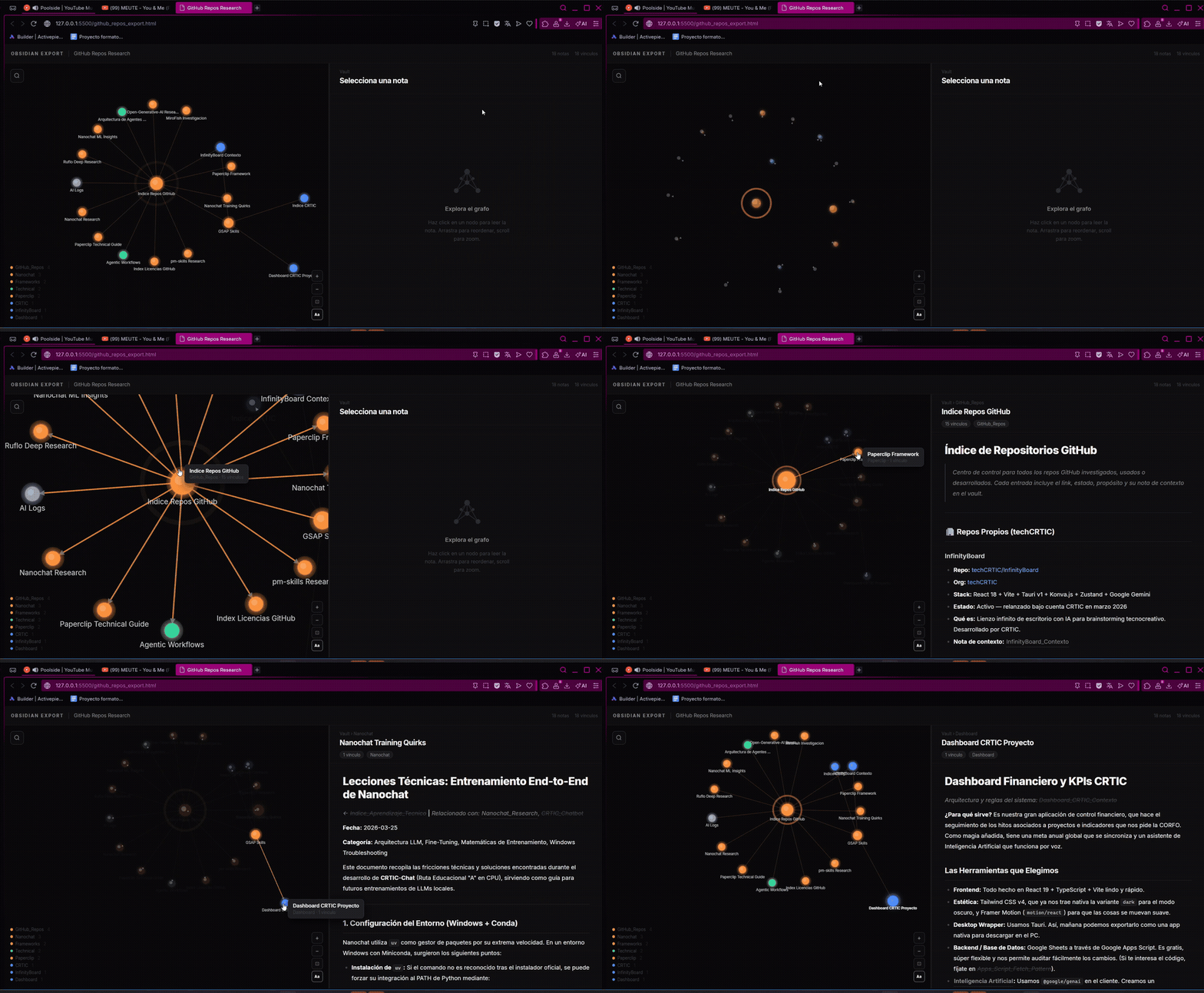
Obsidian Export Demo


🤖 How It Works

This repo is built around two components:

ComponentRole
SKILL.mdTells the AI agent what this tool does, how to use it, and what questions to ask
src/obsidian_to_html.pyDeterministic Python script that does the actual export

The AI is the interface. You describe what you want in natural language — a project, a topic, a set of notes — and the agent:

  1. Reads SKILL.md to understand the tool
  2. Asks you the right clarifying questions (scope, depth, exclusions)
  3. Constructs and runs the export command
  4. Reports back with the result: how many notes, how many connections, where the file is

The script is the engine. The agent is the driver.


🌟 Why This Approach?

Obsidian vaults are personal and messy. No two are structured the same way. A static CLI tool would require you to know the exact path, the right depth, which files to exclude — every time.

An AI agent handles that translation layer:

  • "Export everything about the GUS project" → agent finds Projects/GUS/, sets --isolate, runs it
  • "Share my research on AI frameworks" → agent locates the right folder, adjusts depth, excludes index notes
  • "Make a portable version of these notes for a client" → agent adds --offline, sets a clean title

✨ Output Features

The generated HTML is self-contained and needs no server or hosting:

  • 🕸️ D3.js Force Graph — interactive physics-based visualization of note connections
  • 🌓 Obsidian Dark Aesthetic — polished UI matching the Obsidian dark theme
  • 🔍 Global Search — find notes and highlight matches across the graph and reader panel
  • 🔗 Wikilink Navigation[[wikilinks]] are clickable and navigate within the file
  • 🎨 Folder Color-Coding — nodes colored automatically by top-level folder
  • 📦 Fully Offline — with --offline, no external dependencies at render time

🚀 Quick Start

1. Install the script dependencies

pip install -r requirements.txt

Both libraries (mistune, PyYAML) are optional — the script falls back to standard Python libraries if they're not available. Installing them gives better Markdown rendering.

2. Load the skill into your AI agent

Copy SKILL.md into your agent's context, or reference it directly if your agent supports file reading.

3. Ask for an export

"Export everything related to my X project."
"Share my Research/AI folder as a portable HTML."
"Generate a knowledge map of my Proyects/App notes, depth 3."

The agent will ask any clarifying questions it needs, then run the export and tell you where the file is.


🧪 Running Tests

pip install -r requirements-dev.txt
pytest tests/ -v

🛡️ Safety

[!CAUTION] This tool is read-only — it never modifies your .md files. Even so, always keep a backup of your vault before running external scripts.


🔧 CLI Reference

For debugging or direct use without an agent:

python src/obsidian_to_html.py \
  --root "/path/to/vault/ProjectA" \
  --vault "/path/to/vault" \
  --title "Project A" \
  --offline
ArgumentDescriptionDefault
--rootStarting note or folder(Required)
--vaultRoot of your vault to resolve linksParent of --root
--depthTraversal depth (0=unlimited)2
--outputDestination HTML fileobsidian_export.html
--titleCustom title shown in the HTML headerFilename/folder name
--excludeComma-separated substrings to skip (e.g. Index,Home)""
--offlineEmbed D3.js for full offline supportFalse
--isolateOnly export notes within the root pathFalse

Tip: Use --isolate when exporting a single project to prevent shared notes from pulling in unrelated content. Use --exclude to drop index or hub notes that would otherwise dominate the graph.


🎨 Customization

Node colors are assigned by the top-level folder of each note relative to the vault root. Edit FOLDER_COLORS in src/obsidian_to_html.py to match your structure:

FOLDER_COLORS = {
    'work':      '#4f8ef7',
    'knowledge': '#34d399',
    'research':  '#fb923c',
    # Add your own top-level folder names here (lowercase)
}

A note at Research/AI/note.md gets the color for 'research'. Notes in unmapped folders fall back to the default purple (#a78bfa). Subfolders do not affect the color.


🌐 Community & Support

Share your exported graphs:


📄 License

Distributed under the MIT License. See LICENSE for more information.

Frequently Asked Questions

What is Obsidian-Export-Skill.md?

Obsidian-Export-Skill.md is an open-source ai agents skill for AI coding assistants such as Claude Code, Codex CLI, and ChatGPT, built by DGApex. Obsidian Export turns your local Obsidian vault into a self-contained, interactive HTML knowledge map — driven by an AI agent that understands your intent, selects the right notes, and runs the export for you. It has 2 GitHub stars.

Is Obsidian-Export-Skill.md safe to use?

Yes. Obsidian-Export-Skill.md passed SkillsLLM's automated security scan — a dependency vulnerability audit plus prompt-injection heuristics — with no high-severity issues. You can read the full report in the Security Report section on this page.

How do I install Obsidian-Export-Skill.md?

Clone the repository with "git clone https://github.com/DGApex/Obsidian-Export-Skill.md" and add it to your Claude Code skills directory (see the Installation section above). Obsidian-Export-Skill.md ships a SKILL.md manifest, so compatible agents can discover and load it automatically.

What programming language is Obsidian-Export-Skill.md written in?

Obsidian-Export-Skill.md is primarily written in Python. It is open-source under DGApex on GitHub, so you can review or fork the full source.

Are there alternatives to Obsidian-Export-Skill.md?

Yes. SkillsLLM lists many other AI Agents skills you can browse and compare side by side. Open the AI Agents category from the badge at the top of this page, or use the Related Skills and comparison links further down to weigh Obsidian-Export-Skill.md against similar tools.

Comments (0)

No comments yet. Be the first to share your thoughts!

ECC

by affaan-m

10

The agent harness performance optimization system. Skills, instincts, memory, security, and research-first development for Claude Code, Codex, Opencode, Cursor and beyond.

242,21936,702JavaScript
AI Agentsai-agentsanthropicclaude-code
View details
15

An agentic skills framework & software development methodology that works.

234,96620,863Shell
AI Agentsai-agentsbrainstorming
View details

The agent harness performance optimization system. Skills, instincts, memory, security, and research-first development for Claude Code, Codex, Opencode, Cursor and beyond.

185,94028,768JavaScript
AI Agentsai-agentsanthropicclaude-code
View details

cc-switch

by farion1231

3

A cross-platform desktop All-in-One assistant for Claude Code, Codex, OpenCode, OpenClaw, Grok Build & Hermes Agent. Only official website: ccswitch.io

128,8688,826Rust
AI Agentsclaude-codeai-tools
View details

claude-code

by anthropics

Claude Code is an agentic coding tool that lives in your terminal, understands your codebase, and helps you code faster by executing routine tasks, explaining complex code, and handling git workflows - all through natural language commands.

120,03119,897Shell
AI Agents
View details

Developers Also Liked

Based on votes and bookmarks from developers who liked this skill

ECC

by affaan-m

10

The agent harness performance optimization system. Skills, instincts, memory, security, and research-first development for Claude Code, Codex, Opencode, Cursor and beyond.

242,21936,702JavaScript
AI Agentsai-agentsanthropicclaude-code
View details
15

An agentic skills framework & software development methodology that works.

234,96620,863Shell
AI Agentsai-agentsbrainstorming
View details

n8n

by n8n-io

12

Fair-code workflow automation platform with native AI capabilities. Combine visual building with custom code, self-host or cloud, 400+ integrations.

201,88160,308TypeScript
MCP Serversapisai-tools
View details

The agent harness performance optimization system. Skills, instincts, memory, security, and research-first development for Claude Code, Codex, Opencode, Cursor and beyond.

185,94028,768JavaScript
AI Agentsai-agentsanthropicclaude-code
View details

cc-switch

by farion1231

3

A cross-platform desktop All-in-One assistant for Claude Code, Codex, OpenCode, OpenClaw, Grok Build & Hermes Agent. Only official website: ccswitch.io

128,8688,826Rust
AI Agentsclaude-codeai-tools
View details
