




这是什么
这是一个可直接安装到兼容 Agent 中的开放 Skill:它从本地视频或用户有权处理的在线视频开始,经过来源获取、文字稿定位、选题选句、精确取帧、紧凑拼图和逐张质检,生成适合社交平台发布的 3:4 字幕长图。
它支持两种不混用的字幕模式:原生模式完全保留视频像素;脚本模式把已审核的时间点与台词绘制到真实视频帧上,并明确标识为后期字幕。
仓库内包含:
- 可复制到兼容 Agent 的独立 Skill;
- 符合 Codex 插件结构的安装包;
yt-dlp、Deno/Node 和辅助文字时间轴的 URL 工作流;- 用文字稿选题、再回到真实视频帧校准画面和时间点的完整方法;
- 自动生成带时间点的候选帧总览;
- 生成字幕区域预览、聚焦候选帧、原生字幕或脚本字幕 3:4 JPG、时间点清单和总览图的本地脚本;
- 从高质量成品归纳出的紧凑版式规范,解决台词条过高、间隔过宽和主图不突出的问题;
- 核心模式与 URL 模式的只读环境诊断。
两种字幕模式
| 模式 | 什么时候用 | 成品文字来源 | CLI |
|---|---|---|---|
| 原生字幕 | 关闭播放器 CC 后,字幕仍然直接存在于画面里;你要求保留原字幕 | 视频画面像素;不 OCR 重绘,不翻译改写 | render |
| 脚本字幕 | 你要把已核对的台词、翻译或观点按案例版式绘制到真实视频帧上 | 已审核的 lines[].text;明确属于后期字幕 | render-script |
如果用户要求原生字幕,但视频只有可开关的字幕轨,Agent 必须先说明限制;只有用户同意后,才能转脚本字幕模式。
完整工作流
本地视频 / YouTube 链接
        ↓
yt-dlp 获取视频、元数据和辅助字幕轨(URL 模式)
        ↓
检查真实帧,区分烧录字幕与独立字幕轨
        ↓
字幕轨或 Whisper 建立带时间戳的内容索引(可选)
        ↓
视频理解 / 选题 / 写作 Skill 提名主题(可选)
        ↓
锁定原生或脚本字幕模式
        ↓
回到真实帧校准时间点和主画面
        ↓
manifest / lines JSON → 紧凑 3:4 渲染 → 逐张 QA
这里最重要的边界是:原生模式的字只能来自视频像素;脚本模式的字只能来自已审核 JSON,不得冒充原字幕。
Skill 支持三种工作模式:
- 本地成片模式:直接从本地视频选句、取帧、出图;不需要
yt-dlp。 - URL 完整模式:使用
yt-dlp获取用户有权处理的视频、元数据和辅助时间轴,再选择字幕模式。 - 内容生产模式:完成“读视频 → 选题 → 写文章/帖子 → 字幕截图”;其他内容 Skill 作为上游,本 Skill 负责最终时间点、真实画面、字幕来源标识和质检。
URL 模式先尝试公开访问。若 YouTube 返回“登录以确认不是机器人”、年龄验证或用户自己的非公开视频限制,Agent 不应误判为“Skill 只能处理本地视频”,而应说明原因并询问是否允许 yt-dlp 临时读取 Chrome 的已登录 Cookie。用户授权后,元数据、字幕与视频下载命令统一添加 --cookies-from-browser chrome;Cookie 不导出、不保存、不上传,也不写入仓库。
组件分层
| 组件 | 本地模式 | URL 模式 | 用途 |
|---|---|---|---|
native-subtitle-quote-image | 必需 | 必需 | 选帧、裁切、拼图和最终 QA |
| Python 3.10+ | 必需 | 必需 | 运行 Skill 脚本 |
| Pillow | 必需 | 必需 | 裁图、拼图、导出 JPG |
imageio-ffmpeg 或 FFmpeg | 必需 | 必需 | 读取视频与精确取帧 |
yt-dlp | 不需要 | 必需 | 获取在线视频、元数据和字幕轨 |
| Deno;或显式启用 Node.js | 不需要 | YouTube 必需 | 完整解析 YouTube 格式 |
| Whisper / 语音识别 Skill | 可选 | 可选 | 没有可用字幕轨时生成时间索引 |
| CJK 字体 | 中日韩脚本模式必需 | 中日韩脚本模式必需 | 绘制中日韩台词;原生模式不需要 |
| 选题、写作或视频理解 Skill | 可选 | 可选 | 从文字稿提名主题并生产配套内容 |
详细说明:
Demo
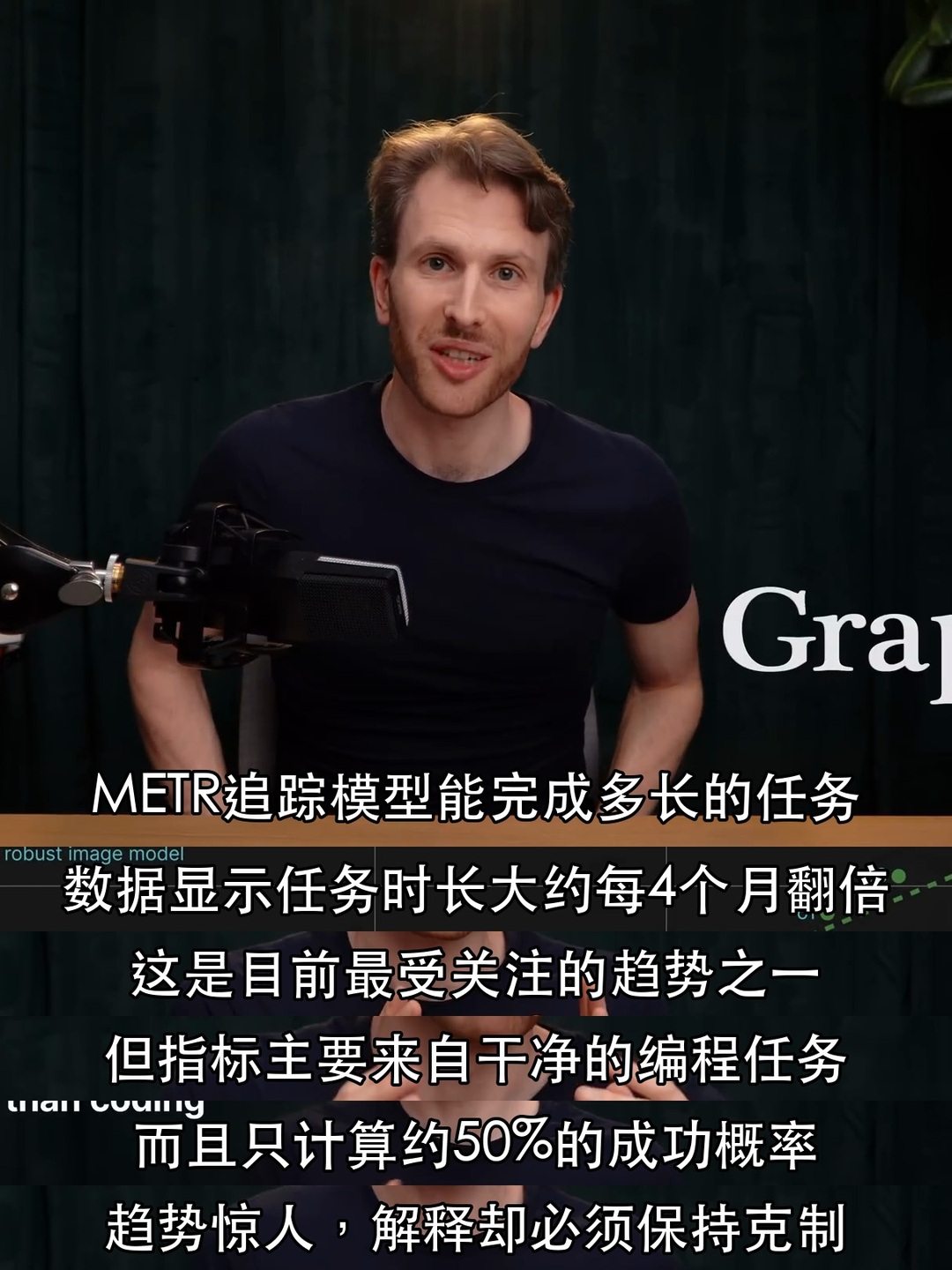
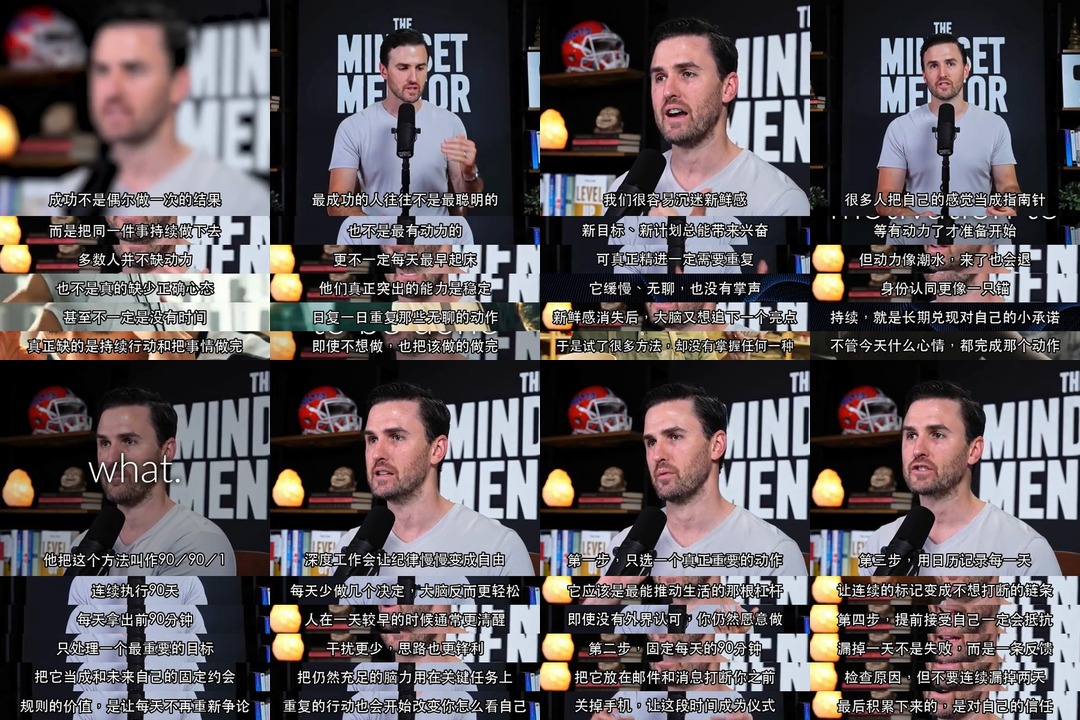
下面都是真实视频帧 + 已审核中文台词的脚本字幕模式案例。它们展示的是选帧、主图比例、台词条密度与视觉质检,不表示画面原本就带有这些中文字幕。
单张脚本字幕拼图
成套输出总览
更多完整案例
下面两张保留原始 1080×1440 分辨率;README 只控制页面显示宽度,不缩小图片文件本身。
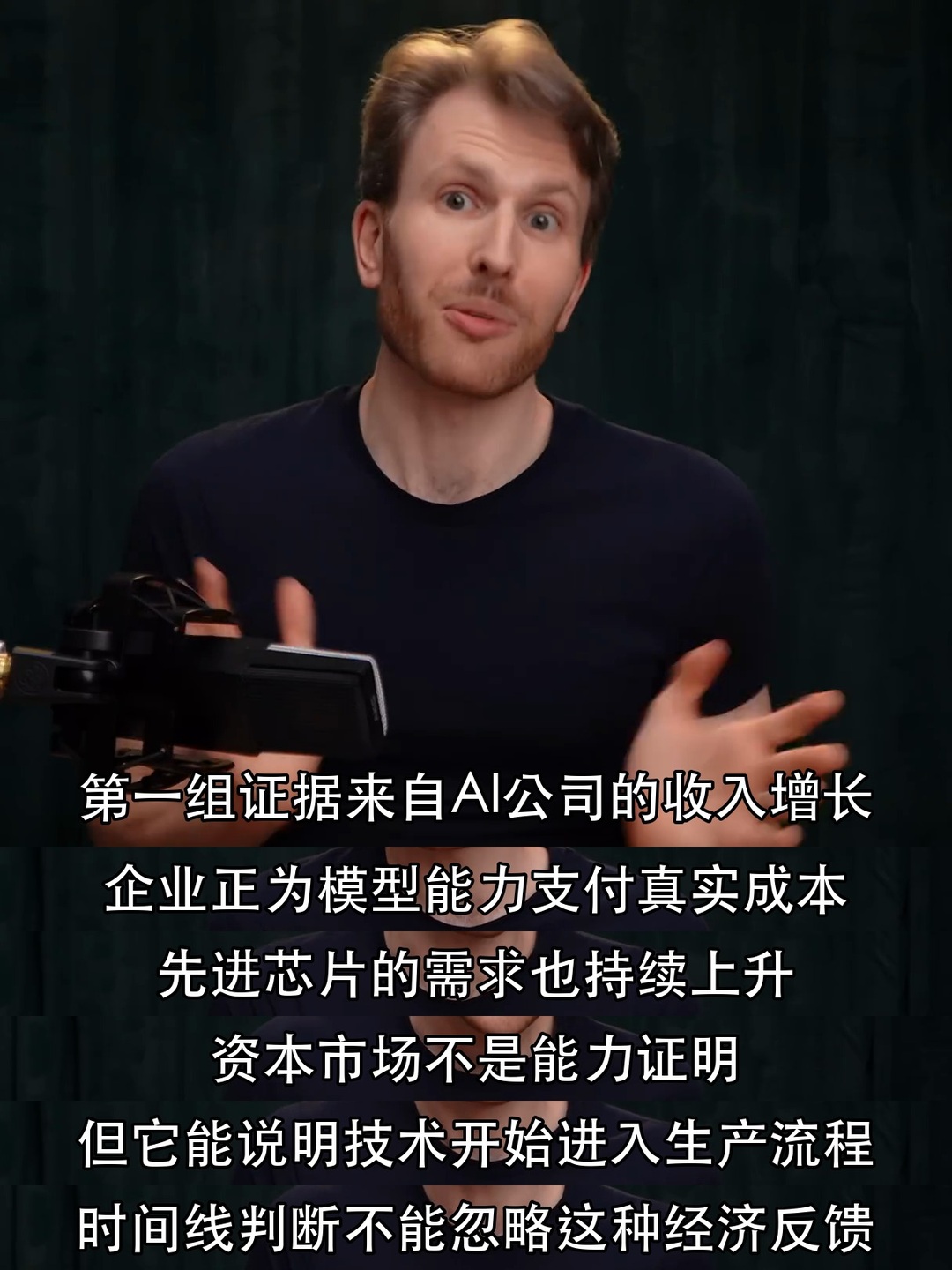
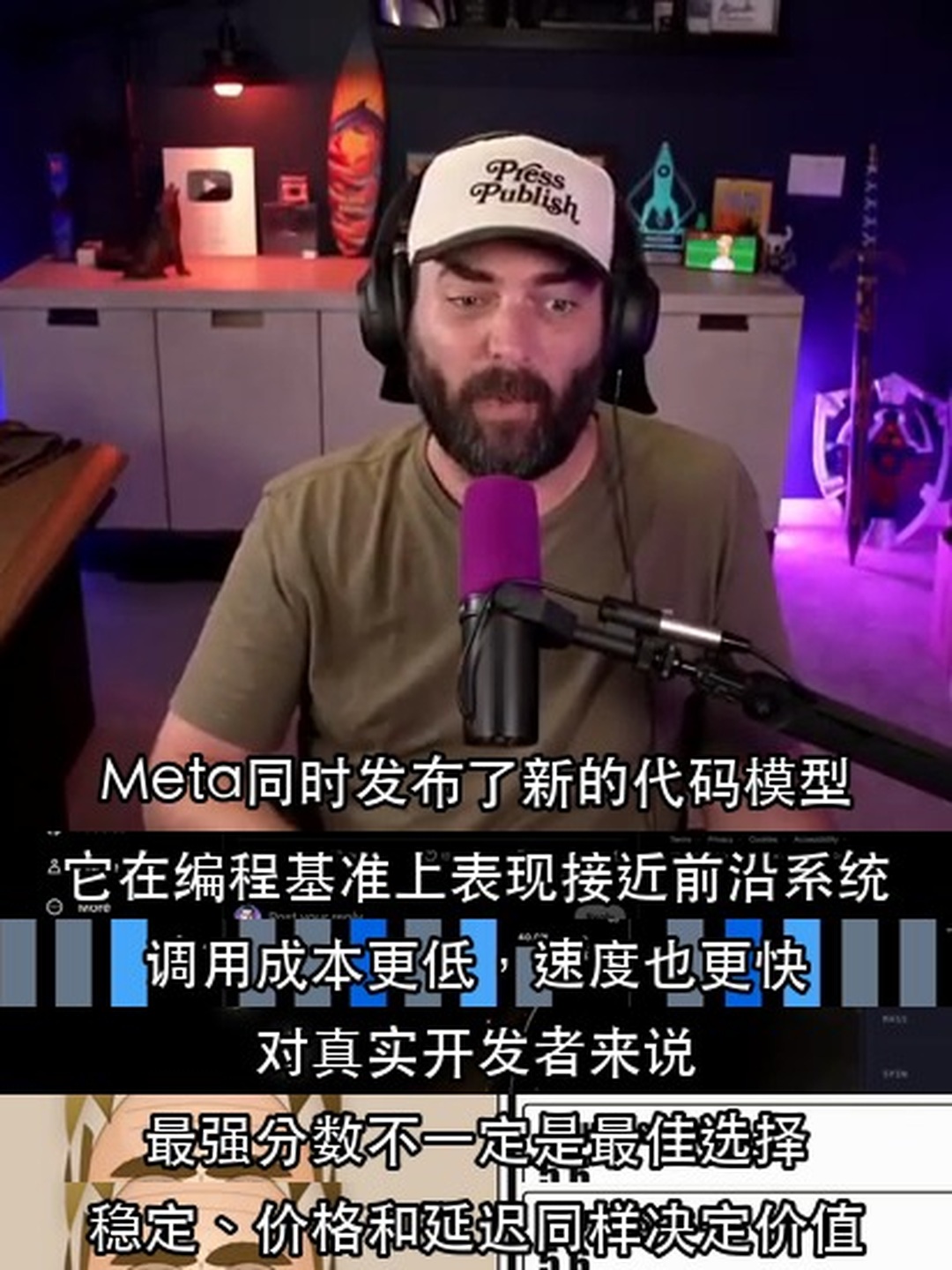
这些案例展示了不同场景下的同一原则:主画面保持主导,字幕条紧凑连续,台词之间不留大块无意义空间。默认 1 张主图 + 4 个台词条时,主图约占高度 70%,每条约占 7.5%,条间距为 0。
示例图片只用于展示 Skill 的输出效果;图片及其中出现的第三方内容不属于本仓库 MIT License 的授权范围。
安装
Codex Skill Installer
在 Codex 中调用 $skill-installer,并让它安装下面的 Skill 目录:
https://github.com/chengyi-ai/native-subtitle-quote-image/tree/main/skills/native-subtitle-quote-image
手动安装到 Codex
git clone https://github.com/chengyi-ai/native-subtitle-quote-image.git
mkdir -p ~/.codex/skills
cp -R native-subtitle-quote-image/skills/native-subtitle-quote-image ~/.codex/skills/
重新打开 Codex 任务后即可使用 $native-subtitle-quote-image。
安装核心依赖
python3 -m pip install -r skills/native-subtitle-quote-image/requirements.txt
python3 skills/native-subtitle-quote-image/scripts/check_environment.py
如果要绘制中日韩台词,还应检查 CJK 字体:
python3 skills/native-subtitle-quote-image/scripts/check_environment.py --script-mode
URL 模式
URL 模式额外需要 yt-dlp 和 JavaScript runtime。yt-dlp 官方当前推荐 Deno;已有 Node.js 时也可以使用,但命令要添加 --js-runtimes node。
python3 -m pip install -U "yt-dlp[default]"
python3 skills/native-subtitle-quote-image/scripts/check_environment.py --url-mode
环境诊断不会自动安装或修改软件。缺少组件时,Agent 应先说明用途并取得授权。
若公开请求被 YouTube 登录验证拦截,在用户明确授权后使用:
yt-dlp --cookies-from-browser chrome --js-runtimes node \
  --no-playlist --skip-download \
  --print "%(id)s | %(title)s | %(duration_string)s" \
  "URL"
同一 URL 后续的 --list-subs、字幕下载和视频下载命令也要保留 --cookies-from-browser chrome。完整授权边界与故障处理见 URL 获取参考。
更新提醒
Skill 每个新任务开始时会运行一次非阻塞版本检查。检查器从 Skill 自带的 VERSION 读取本地版本,并与本项目的 GitHub Latest Release 比较:
python3 skills/native-subtitle-quote-image/scripts/check_update.py --json
- 默认 24 小时内复用缓存,不会每次使用都联网。
- 发现新版时只提醒版本号和 Release 链接,不会自动覆盖用户的本地 Skill。
- 断网、GitHub 不可用或用户拒绝联网时,继续原任务。
- 缓存只保存检查时间、最新版本号和 Release 链接,不包含账号、素材或使用记录。
用户需要立即重新检查时,可以运行:
python3 skills/native-subtitle-quote-image/scripts/check_update.py --force --verbose
其他 Agent
该 Skill 使用开放的 Agent Skills 目录格式。把 skills/native-subtitle-quote-image/ 复制到目标 Agent 支持的 Skills 目录;具体目录和启用方式以目标 Agent 的说明为准。
使用
在 Agent 中直接输入:
使用 $native-subtitle-quote-image,把这个带内嵌中文字幕的视频做成原生字幕拼图。
输入是链接时:
使用 $native-subtitle-quote-image,读取这个 YouTube 链接,先检查下载权限和烧录字幕,再选 3 个适合传播的主题,制作成原生字幕拼图并逐张质检。
需要配合内容生产时:
先根据视频文字稿提炼选题并写文章,再用 $native-subtitle-quote-image 为每个核心观点选真实视频帧并出图;先判断原生或脚本字幕模式,不要混用。
需要根据已核对台词生成和 Demo 相同的版式时:
使用 $native-subtitle-quote-image 的脚本字幕模式,把这份带时间点的中文台词画到真实视频帧上,做成紧凑 3:4 长图并逐张质检。
Agent 会先检查来源、字幕类型和候选帧,明确模式后再生成:
- 逐张 3:4 JPG;
- 原生模式的
原生字幕时间点.json,或脚本模式的linesJSON; - 多图任务的
final_contact_sheet.jpg总览图。
本地脚本
先生成带时间点的候选帧总览,减少反复试时间点:
python3 skills/native-subtitle-quote-image/scripts/native_subtitle_stitch.py sample VIDEO \
  --start 30 --end 120 --interval 5 --out candidate-contact-sheet.jpg
不传 --start、--end 和 --interval 时,脚本会在整段视频中自动均匀抽取最多 24 帧。完整参数可通过 --help 查看。
文字稿已经给出候选时间点时,围绕每个时间点生成前、中、后三帧,避免截到字幕切换瞬间:
python3 skills/native-subtitle-quote-image/scripts/native_subtitle_stitch.py sample VIDEO \
  -t 61.2 -t 68.9 -t 74.5 -t 82.0 -t 88.4 \
  --around 0.8 --out focused-candidates.jpg
原生字幕渲染
先用 band 确认字幕裁切区域,再用 manifest 渲染一组成品:
python3 skills/native-subtitle-quote-image/scripts/native_subtitle_stitch.py band VIDEO \
  -t 61.2 --band-top 0.78 --band-bottom 0.96 --out band-preview.jpg

python3 skills/native-subtitle-quote-image/scripts/native_subtitle_stitch.py render VIDEO \
  --manifest manifest.json --out-dir output-v1 \
  --aspect 3:4 --width 1440 \
  --band-top 0.78 --band-bottom 0.96
脚本字幕渲染
script.json 的每个 text 都必须是已复核的单行台词,t 是严格递增的真实时间点:
{
  "lines": [
    {"t": 61.6, "text": "第一句已核对台词"},
    {"t": 69.3, "text": "第二句已核对台词"},
    {"t": 75.0, "text": "第三句已核对台词"},
    {"t": 82.4, "text": "第四句已核对台词"},
    {"t": 88.8, "text": "第五句已核对台词"}
  ]
}
python3 skills/native-subtitle-quote-image/scripts/native_subtitle_stitch.py render-script VIDEO \
  --script script.json --out output.jpg --aspect 3:4 --width 1440
脚本会尝试常见系统 CJK 字体;找不到时使用 --font /path/to/font.ttc。台词过长时拆句,不依靠过小字号硬塞。
两种渲染器都会根据字幕条数量自动调整主图比例。常见的 1 张主图 + 4 个字幕条使用约 70% 的主图高度,并把条间距保持为 0;原生单行字幕默认从视频高度的 0.78–0.96 区域开始预览。详细规则见紧凑型视觉规范。
脚本默认拒绝覆盖已有图片。确认需要替换当前输出时,显式添加 --overwrite。
判断边界
这个 Skill 适合什么视频?
- 原生模式:关闭播放器的 CC/字幕开关后,字幕仍然留在画面像素中;
- 脚本模式:已有可复核的时间点和已审核台词,并需要在真实视频帧上后期绘制;
- 使用者有权处理和发布输入视频及生成画面。
什么情况不适合?
- 用户要求原生字幕,但视频只有可单独关闭、切换或下载的字幕轨;
- 脚本台词或翻译尚未复核,或希望 Agent 编造不在来源中的引语;
- 需要把低清视频“增强”为真实高清画质。
原生字幕与脚本字幕在本 Skill 中是两条明确分开的工作流。前者不改字,后者不冒充原字幕;两者都必须使用真实时间点并完成逐张视觉质检。
素材从哪里来?
优先使用自己拍摄并添加字幕的视频、已经获得授权的素材,或明确允许再利用的公开视频。公开生成图片前,仍需确认素材使用权。
项目验证
python3 scripts/validate_repo.py
python3 -m unittest discover -s tests -v
python3 skills/native-subtitle-quote-image/scripts/check_environment.py
python3 skills/native-subtitle-quote-image/scripts/native_subtitle_stitch.py --help
python3 skills/native-subtitle-quote-image/scripts/native_subtitle_stitch.py render-script --help
每次推送和 Pull Request 都会在 Python 3.10 与 3.13 环境中通过 GitHub Actions 自动运行检查。
开源许可
代码与 Skill 指令采用 MIT License。输入视频、生成图片及其中出现的第三方内容不因本许可证获得额外授权。