napi - Better Software Architecture for the AI Age
napi is a fully offline CLI that analyzes your codebase's architecture --
dependencies, complexity, and structure -- then lets you visualize and refactor
it, all without sending your code anywhere.
It generates dependency manifests from your source code, stores them locally, and serves an interactive graph visualizer directly from the CLI.
Features
- 🔍 Dependency Analysis: Map every file, symbol, and dependency in your codebase automatically.
- 🚨 Audit: Detect files and symbols that exceed complexity, size, or coupling thresholds.
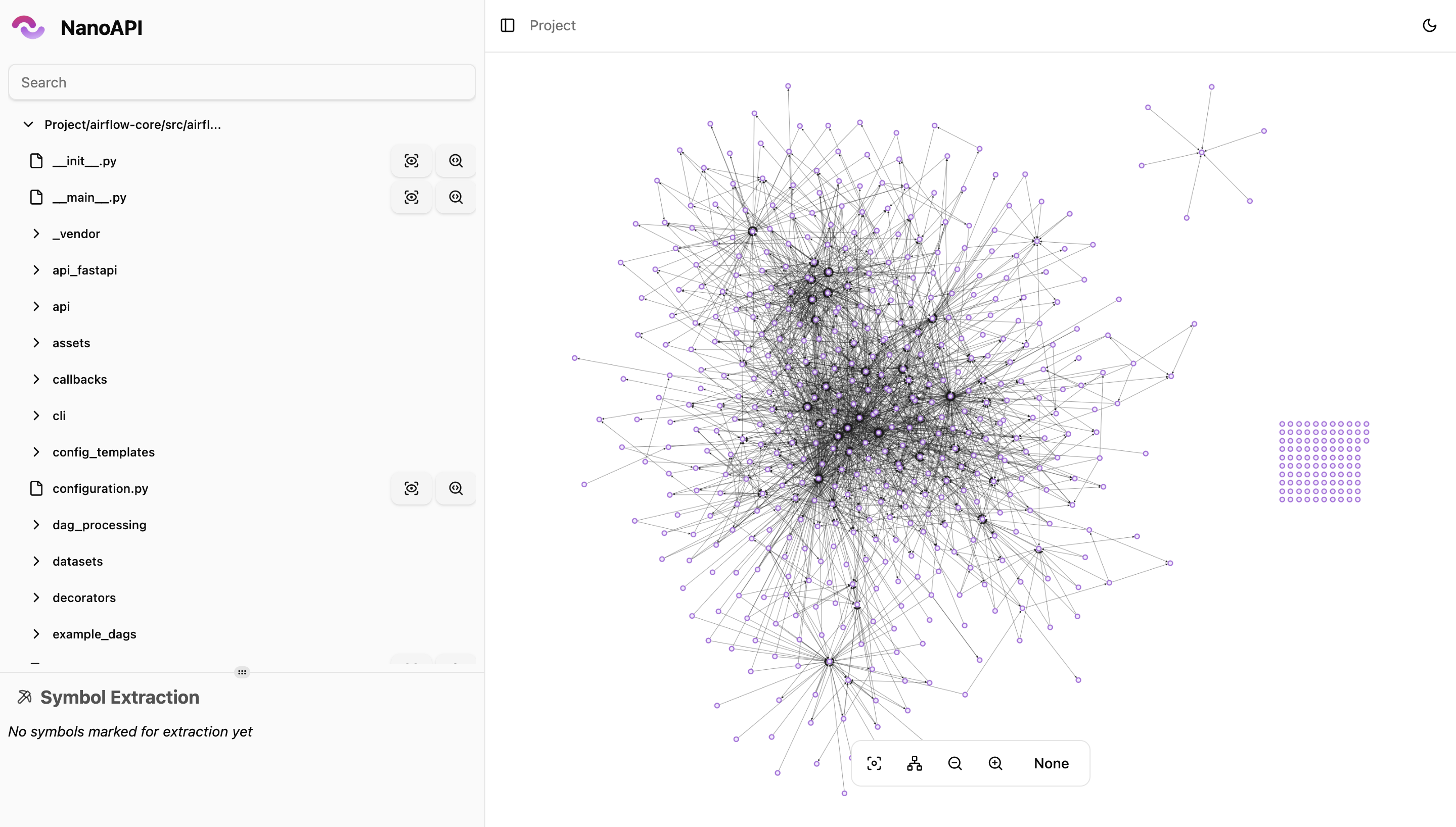
- 📊 Interactive Visualizer: Explore your architecture through Cytoscape.js graphs served locally in your browser.
- 📝 Symbol Extraction: Extract specific functions, classes, or symbols into standalone files for refactoring.
- 🏷️ AI Labeling (optional): Use OpenAI, Google, or Anthropic models to auto-label dependencies.
- ⚙️ CI/CD Ready: Integrates into any pipeline -- generate manifests on every push and track architecture over time.
- 🔒 Fully Offline: No accounts, no servers, no data leaves your machine.
Supported Languages
| Language | Status |
|---|---|
| Python | ✅ Supported |
| C# | ✅ Supported |
| C | ✅ Supported |
| Java | ✅ Supported |
| C++ | 🚧 In Progress |
| PHP | 🚧 In Progress |
| JS/TS | 🚧 In Progress |
Installation
Unix (macOS, Linux)
curl -fsSL https://raw.githubusercontent.com/nanoapi-io/napi/refs/heads/main/install_scripts/install.sh | bash
Or download a binary directly from GitHub Releases.
Windows
Use WSL to run napi. Native Windows support is in progress.
Quick Start
# 1. Initialize your project (creates .napirc)
napi init

# 2. Generate a dependency manifest
napi generate

# 3. Open the visualizer in your browser
napi view
That's it. Your manifest is saved locally in .napi/manifests/ and the
visualizer opens at http://localhost:3000.
CLI Commands
napi init
Interactive setup that creates a .napirc configuration file in your project
root.
Prompts you for:
- Language -- Python, C#, C, or Java
- Include/exclude patterns -- which files to analyze
- Output directory -- where extracted symbols are written
- AI labeling (optional) -- provider and concurrency settings
napi init
napi generate
Analyzes your codebase and generates a dependency manifest. The manifest captures every file, symbol, dependency, and metric (lines, complexity, coupling).
Manifests are saved as JSON files in .napi/manifests/ with the naming pattern
{timestamp}-{commitSha}.json.
# Interactive (prompts for branch/commit if not in git)
napi generate

# Non-interactive (for CI)
napi generate --branch main --commit-sha abc1234 --commit-sha-date 2026-01-01T00:00:00Z
Options:
--branch-- Git branch name (auto-detected if omitted)--commit-sha-- Git commit hash (auto-detected if omitted)--commit-sha-date-- Commit date in ISO 8601 format (auto-detected if omitted)--labelingApiKey-- API key for AI labeling (overrides global config)
napi view
Starts a local web server and opens an interactive dependency visualizer in your browser.
napi view
napi view --port 8080
The viewer provides:
- Manifest list -- browse all locally stored manifests by branch, commit, and date
- Project graph -- file-level dependency map with Cytoscape.js
- File graph -- symbol-level view within a file (functions, classes, variables)
- Symbol graph -- transitive dependency chain for a specific symbol
- File explorer sidebar -- navigate your codebase structure
- Audit alerts -- visual indicators for files/symbols exceeding thresholds
napi extract
Extracts specific symbols from your codebase into separate files using a local manifest.
# Extract a function from a specific file
napi extract --symbol "src/auth/login.py|authenticate"

# Extract multiple symbols
napi extract --symbol "src/models.py|User" --symbol "src/models.py|Session"

# Use a specific manifest (defaults to latest)
napi extract --symbol "src/main.py|run" --manifestId 1712500000000-a1b2c3d
Output is written to {outDir}/extracted-{timestamp}/.
napi set apiKey
Configure API keys for AI-powered dependency labeling. Keys are stored in the global config (not in your project).
napi set apiKey
Prompts for:
- Provider -- Google, OpenAI, or Anthropic
- API key -- your provider API key
Local Manifest Storage
All manifests are stored in .napi/manifests/ relative to your project root.
Each manifest is a self-contained JSON file:
{
  "id": "1712500000000-a1b2c3d",
  "branch": "main",
  "commitSha": "a1b2c3d4e5f6...",
  "commitShaDate": "2026-04-07T10:00:00Z",
  "createdAt": "2026-04-07T10:01:00Z",
  "manifest": {}
}
Add .napi/ to your .gitignore or commit it to track architecture history in
version control -- your choice.
CI/CD Integration
Generate manifests automatically on every push:
# .github/workflows/napi.yml
name: Generate Manifest
on: [push]
jobs:
  manifest:
    runs-on: ubuntu-latest
    steps:
      - uses: actions/checkout@v4

      - name: Install napi
        run: curl -fsSL https://raw.githubusercontent.com/nanoapi-io/napi/refs/heads/main/install_scripts/install.sh | bash

      - name: Generate manifest
        run: napi generate --branch ${{ github.ref_name }} --commit-sha ${{ github.sha }} --commit-sha-date "$(git log -1 --format=%cI)"
Configuration Reference
.napirc
Project-level configuration created by napi init:
{
  "language": "python",
  "python": { "version": "3.10" },
  "project": {
    "include": ["src/**/*.py"],
    "exclude": [".git/**", "**/__pycache__/**", "napi_out/**"]
  },
  "outDir": "napi_out",
  "labeling": {
    "modelProvider": "openai",
    "maxConcurrency": 5
  }
}
Global Config
Stored in your OS config directory (~/.config/napi/config.json on Linux,
~/Library/Application Support/napi/config.json on macOS). Managed via
napi set apiKey.
{
  "labeling": {
    "apiKeys": {
      "openai": "sk-...",
      "google": "AIza...",
      "anthropic": "sk-ant-..."
    }
  }
}
Development
Requires Deno v2.4+.
# Install dependencies
deno install --allow-scripts

# Run CLI in dev mode
deno task dev

# Run viewer dev server (hot-reload)
deno task dev:viewer

# Build viewer for production
deno task build:viewer

# Compile binary (includes viewer)
deno task compile

# Run tests
deno task test

# Lint
deno lint

# Format
deno fmt
Contributing
We welcome contributions from the community. Please read our contributing guide for details on how to get involved.
License
napi is licensed under the
Sustainable Use License.
Further Reading
- Automating the Strangler Pattern with Microlithic Development
- Rise of the "Microlith": Rethinking Microservices for Modern Developers
Donations
NanoAPI is a fair-source project. Because of this, we feel it would be unethical to keep any donations to ourselves. Instead, here is how we will handle donations:
- Donations go into a pool
- Money from the pool will be distributed to contributors
- At the end of the year, any remaining money will be donated to a charity of the community's choice
We will post regular updates on how much money is in the pool and how it is being distributed.