Mixamo LLM Mocap
Turn any locked-camera video — filmed or AI-generated — into a clean FK animation on any Mixamo character. One performer, or two fighting each other. No mocap suit, no manual keyframing, and every stage scriptable enough that an AI agent can run the whole loop.




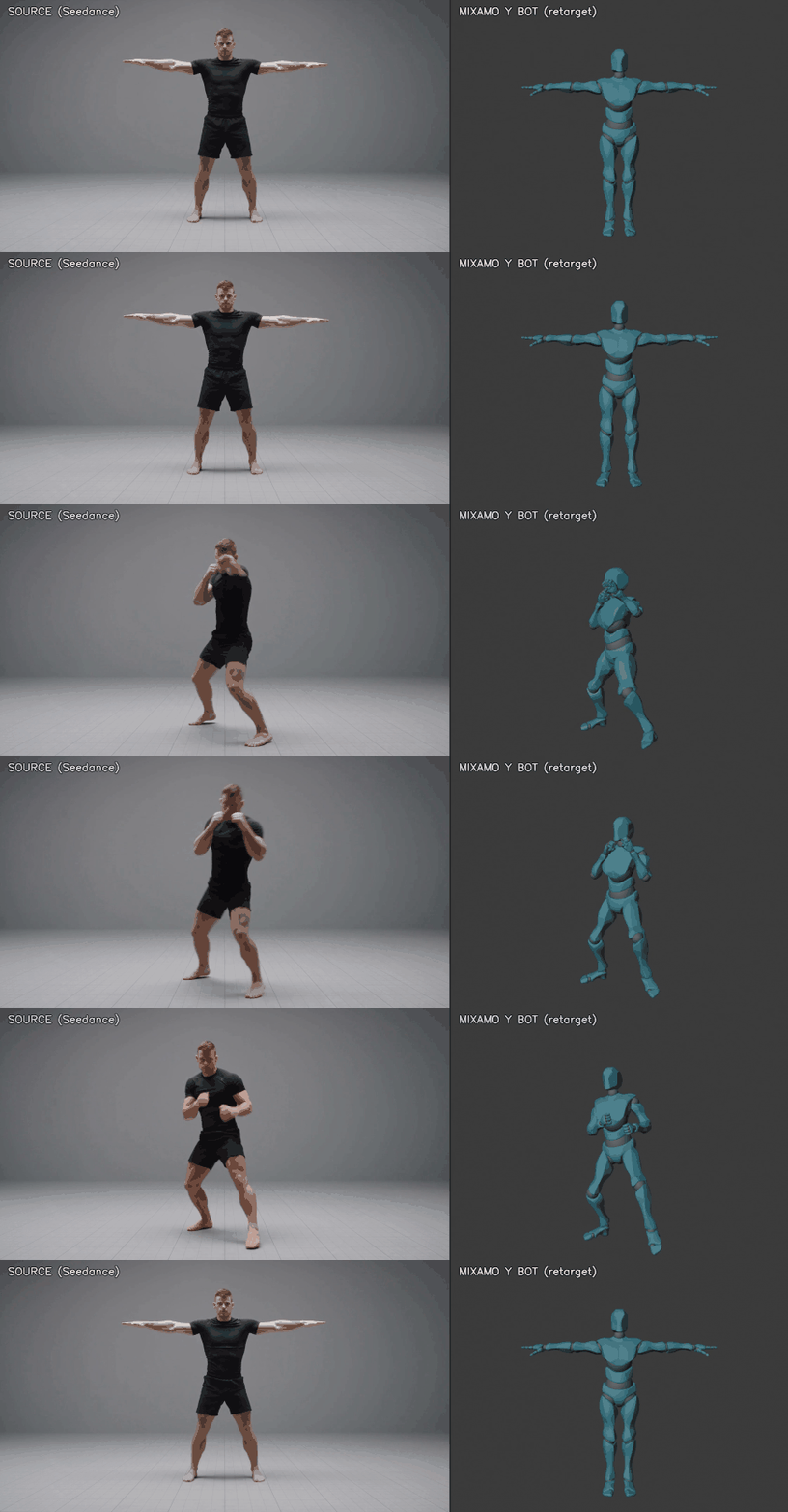
Left: AI-generated source video. Right: the automatic retarget on a Mixamo character in Blender — 10 seconds, nine punches, a slip under and a high side kick, straight through the pipeline.
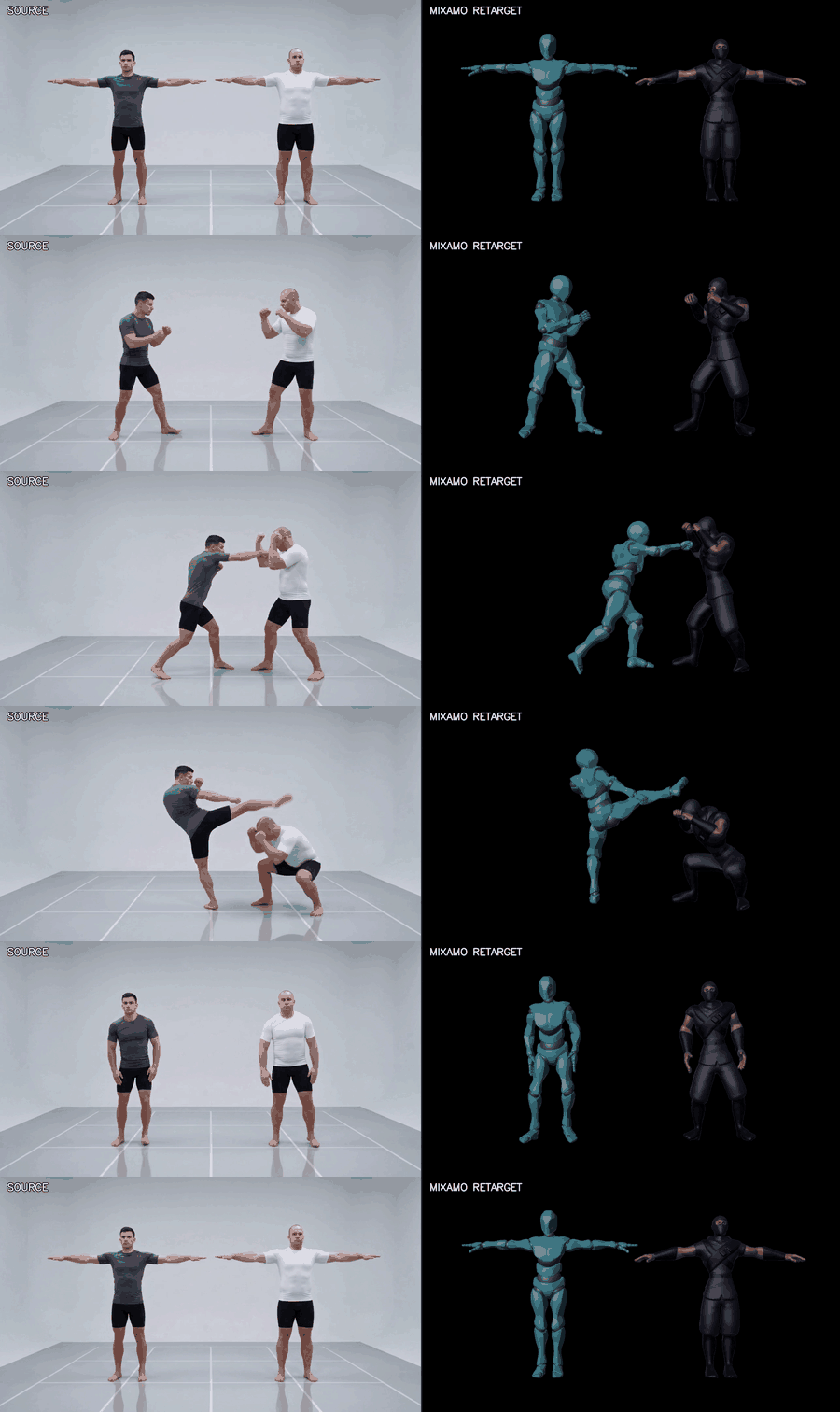
Two performers, one plate, one pass. The left fighter throws four punches and a roundhouse; the right one blocks, folds over the body shot and ducks under the kick. Both tracks are split out of the same video by screen side, retargeted onto two Mixamo characters with different proportions — Y Bot and Ninja — and placed at the distance the performers actually stood, measured from the footage.
How it works
video plate (locked camera, T-pose bookends)
   │
   ├─ 1. estimate_pose_gvhmr.py    GVHMR (SMPL-X mesh recovery) → 33 landmarks + pelvis height
   ├─ 2. analyze_landmarks.py     numeric beat detection → you write a beat sheet from NUMBERS
   ├─ 3. action_specs/<name>.json  the motion as data: support schedule, rest blends, fists
   ├─ 4. lift_to_mixamo.py         direction-preserving retarget onto YOUR rig's proportions
   ├─ 5. apply_mixamo_fk.py        FK aim + foot planting, inside live Blender (via Blender MCP)
   ├─ 6. qa_clip.py                automated gate: no explosions, no pops, no foot skate
   ├─ 7. compare_reference.py      frame-by-frame vs the video → which windows still differ
   ├─ 8. compare_pair.py           two-character plates: separation, reach, intrusion
   ├─ 9. run_in_blender.py contact real mesh-vs-mesh collision between two characters
   └─ 10. render_preview.py        preview + side-by-side showcase video
With two performers in the plate, stages 1–7 run once per fighter
(--person left|right splits the tracks), setup_duo.py builds one
scene holding both characters, and compare_pair.py checks what only
exists when there are two of them: whether they stand, reach and miss
each other the way the performers did.
The estimator provides mesh-quality joints; the lift keeps its segment
directions but rebuilds every position from your character's measured
bone lengths; the apply plants feet by solving hip height (never IK —
Mixamo rigs are FK-only); the spec contributes only what a video cannot
know: which foot is the support in each phase (including "none" for
airborne beats), when fists close, where the clip locks back to rest.
Why it's different
- Any Mixamo character.
setup_rig.pybuilds a clean scene from your own Mixamo download and measures it intorig_profile.json(rest pose, bone lengths, hip and ground heights). Every stage reads that profile. - Motions are data, not code. A new motion is a small JSON spec —
the
action_specs/here (a kung-fu form, a combo with a jump, a fight combination, a 360° jumping spin kick and a two-fighter duel) are worked examples of the whole schema. - Honest Mixamo FK. Hips are the only translating bone, everything else is quaternions at 30 fps — clips drop into any Mixamo-style workflow without cleanup.
- Real ground contact. Planted feet solve to ground height with zero skate (the support ankle is pinned through each stance); jumps integrate the estimator's real pelvis arc.
- A QA gate, not vibes. Exploded bones, hip pops, foot skate, drifting roots and broken rest poses are caught numerically before a human ever looks.
- A closed refinement loop.
compare_reference.pymeasures the retarget against the source video frame by frame on what an eye actually reads — hand height relative to the face, distance between the hands, limbs inside the torso, gaze direction — and reports the exact frame windows that diverge. Notes like "his hands are too high and his arm clips his back" become numbers, and an over-correction gets caught before it ships instead of after. - Two characters, one scene. A two-performer plate is split into
tracks by which side of frame each occupies — robust where tracker
ids swap on contact — retargeted onto two different Mixamo characters
with their own measured proportions, and placed at the distance the
performers actually stood, recovered from the footage rather than
eyeballed.
compare_pair.pythen verifies separation, strike reach and limb intrusion against the video, frame by frame, and a Blender BVH pass checks the actual skinned meshes for collision — because two Mixamo characters are thicker than two humans, and a choreography built out of 2 cm near-misses collides when you retarget it faithfully. Clearance is bought from the stage with a declared, measured offset, which the comparator keeps reporting so the cost stays visible. - A review pass that is part of the loop. Render the showcase, put source and retarget side by side at the same beat, name what looks wrong in one sentence, then measure it. When eye and numbers disagree it is usually the numbers — every false reading in this project came from a mismatched proxy (a nose against a skull-base joint, a capsule against a mesh). docs/PIPELINE.md section 10.
- Written for agents. Beat decisions come from
analyze_landmarks.pynumbers (never from eyeballing frames), every stage is a CLI or a socket call, anddocs/PITFALLS.mdencodes every mistake so the next operator — human or AI — doesn't repeat them.
Quickstart
-
Install — docs/INSTALL.md walks through every dependency (list below).
-
Build your rig scene:
blender --background --python pipeline\setup_rig.py -- --fbx ybot.fbx --out ybot_rest.blend -
Run a plate (Blender open on the scene; plate rules in docs/PROMPTING.md):
tools\GVHMR\.venv\Scripts\python.exe pipeline\estimate_pose_gvhmr.py --video plates\<name>\<name>.mp4 --out plates\<name>\landmarks.json tools\GVHMR\.venv\Scripts\python.exe pipeline\analyze_landmarks.py --landmarks plates\<name>\landmarks.json # beat sheet → action_specs\<name>.json (schema: docs/PIPELINE.md) tools\GVHMR\.venv\Scripts\python.exe pipeline\lift_to_mixamo.py --spec action_specs\<name>.json python pipeline\run_in_blender.py all action_specs\<name>.json tools\GVHMR\.venv\Scripts\python.exe pipeline\qa_clip.py --spec action_specs\<name>.json tools\GVHMR\.venv\Scripts\python.exe pipeline\compare_reference.py --spec action_specs\<name>.json tools\GVHMR\.venv\Scripts\python.exe pipeline\render_preview.py action_specs\<name>.json --showcasecompare_reference.pytells you which frame windows still differ from the video; the last command producespreview.mp4and the side-by-sideshowcase.mp4— the same format as the demo GIF above.Two-performer plates add
--person left|rightto the estimate, one spec per fighter, and acompare_pair.pyrun — see docs/PIPELINE.md section 9. -
Iterate with docs/PIPELINE.md and docs/PITFALLS.md.
What you need to bring (and where to get it)
| What | Where | Notes |
|---|---|---|
| A Mixamo character — any model | mixamo.com → Characters → download FBX Binary, T-pose | Adobe's terms don't allow redistributing them; setup_rig.py builds and validates the scene from your download |
| Blender 5.1+ | blender.org | |
| Blender MCP add-on (official, Blender Lab) | blender.org/lab/mcp-server | enable Allow Online Access; the apply talks to its socket |
| GVHMR (the pose estimator — not in this repo) | github.com/zju3dv/GVHMR | clone into tools/GVHMR; install per docs/INSTALL.md — including a working Windows recipe (docs/requirements_gvhmr_windows.txt + prebuilt pytorch3d wheel) |
| GVHMR checkpoints (~5 GB) | HuggingFace mirror | exact curl commands in docs/INSTALL.md |
| SMPL-X body model | smpl-x.is.tue.mpg.de | free research registration → download SMPL-X v1.1, place SMPLX_NEUTRAL.npz as shown in docs/INSTALL.md |
| GPU | ~8 GB VRAM | developed on an RTX 4080 |
Docs
| Doc | What it covers |
|---|---|
| docs/INSTALL.md | Every dependency, step by step, Windows-proven |
| docs/PIPELINE.md | The operational loop + the action_spec schema, field by field |
| docs/RIG.md | Mixamo rig conventions: spaces, units, the rules that must never break |
| docs/PITFALLS.md | Every mistake this pipeline's development paid for, so you don't pay twice |
| docs/PROMPTING.md | Writing gen-video plate prompts that survive retargeting |
License
MIT — see LICENSE, including third-party notes (Mixamo, GVHMR, SMPL-X, Blender MCP).