mac-thermalright-ai-monitor

by m1ng-liVerified

AI agent (Claude Code + Codex) & system monitor for the Thermalright 9.16 LCD — native macOS

56
Stars
14
Forks
Swift
Language
8/24/2026
Added
View on GitHubDownload ZIP

⚠️ Third-Party Software Notice

This skill is third-party open-source software developed and hosted independently on GitHub. SkillTip is an informational directory and does not control or maintain the underlying repository. Any security checks displayed are automated and limited in scope. Review the source code before installing.

Read the Terms of Service

Installation

Add to your Claude Code skills directory:

# Add to your Claude Code skills
git clone https://github.com/m1ng-li/mac-thermalright-ai-monitor

Getting Started

Guides for using skills like mac-thermalright-ai-monitor.

Security Report

Verified

Last scanned: —

{
  "status": "PASSED",
  "issues": []
}

README.md

MacTR —— 利民 LCD 上的 AI Agent & 系统监控

中文 · English

把利民 CPU 散热器上的 1920×480 LCD 变成一块实时仪表盘,既显示 Mac 的系统状态,又能看到你的 AI 编程助手此刻在干什么 —— 全部原生运行于 macOS,无需 Windows。
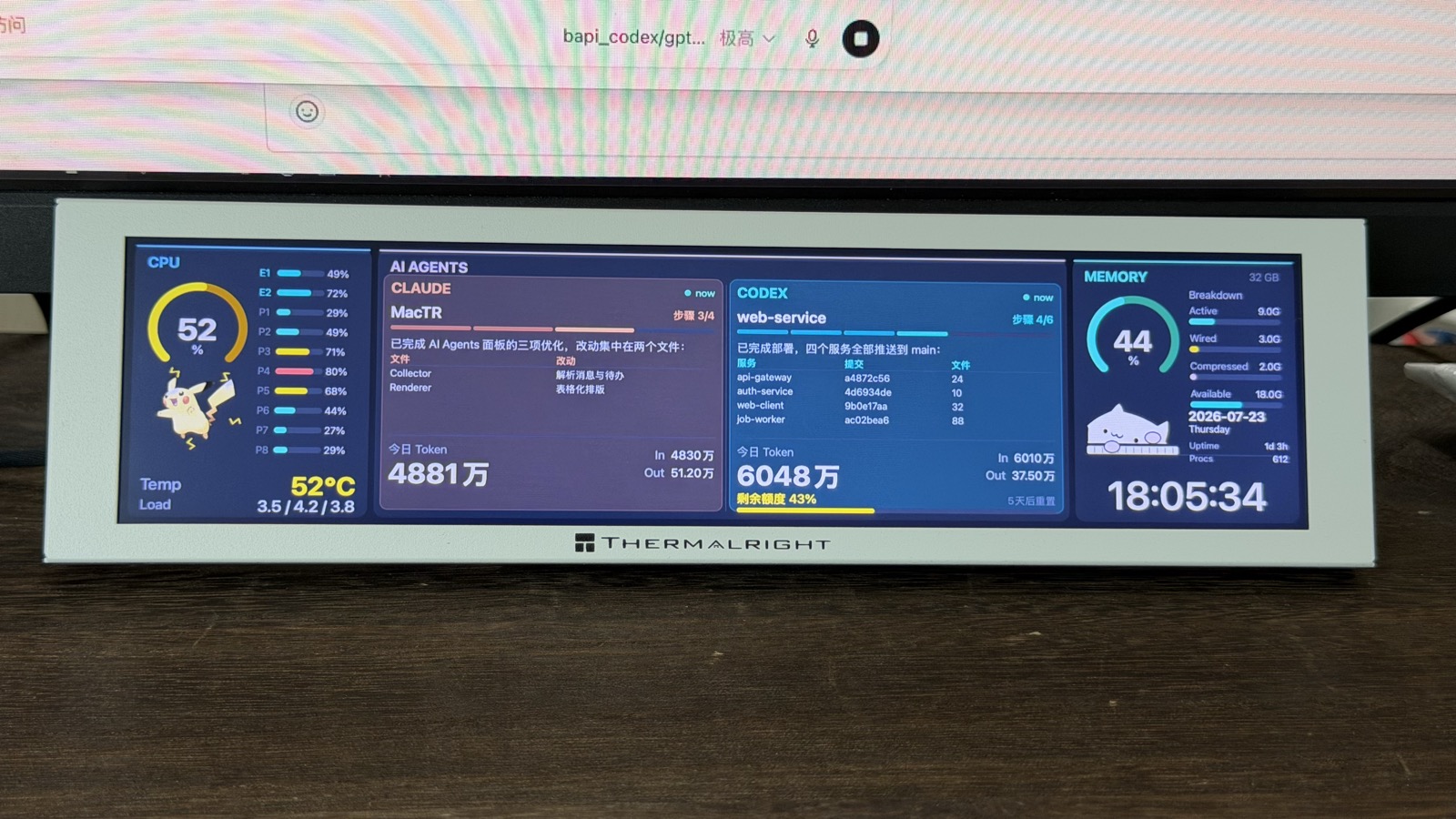
真机实拍

装在利民 Trofeo Vision 9.16 散热器上的实拍效果。

仪表盘

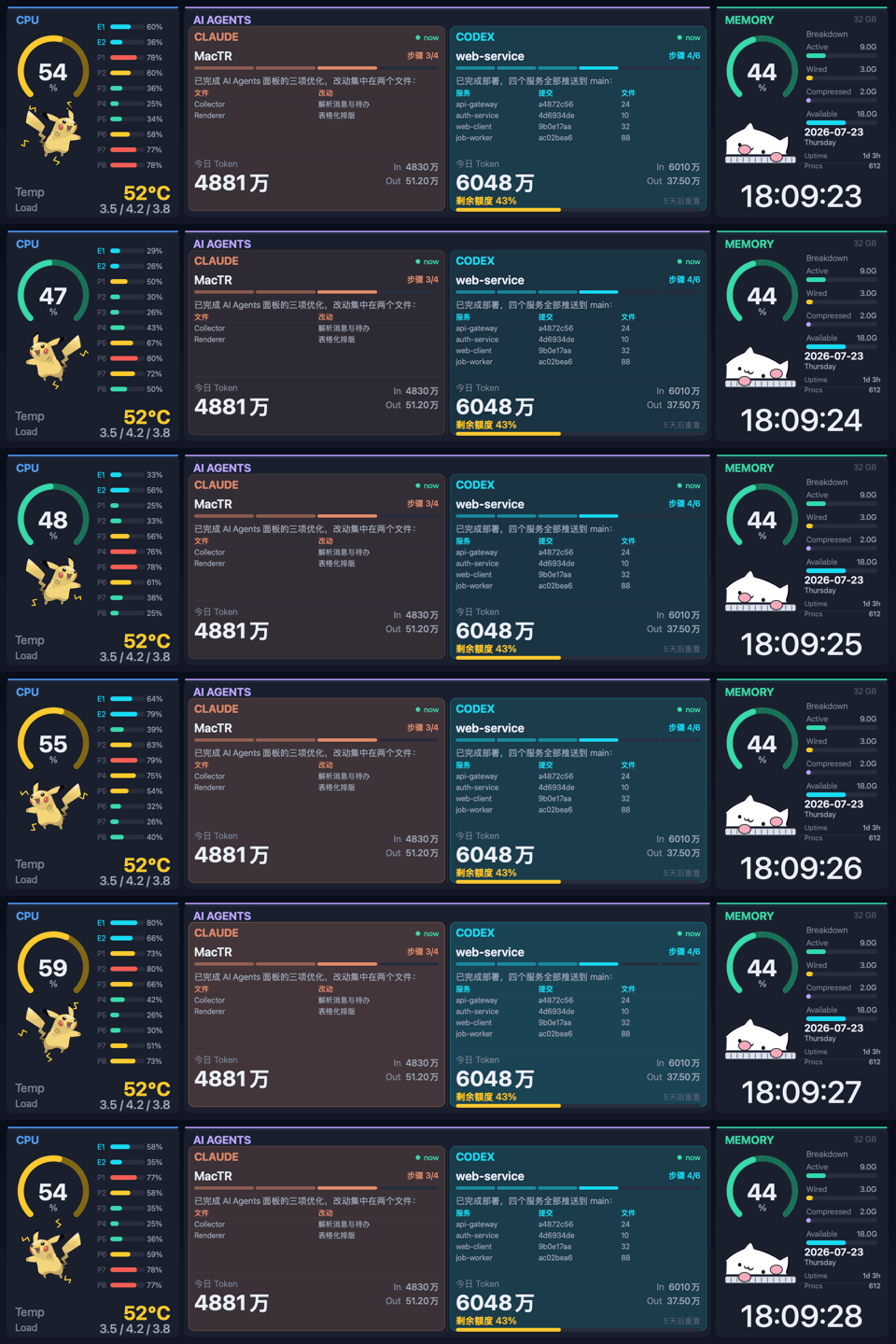
实时演示(假数据)。两个 agent 都在"工作"→ 面板呼吸、Bongo Cat 敲键盘、皮卡丘随 CPU 负载蹦跳放电、时钟走字。

基于 beret21/MacTR 改造,核心是一块实时追踪 Claude CodeCodexCursor 会话的 AI Agents 面板。左右两列可在设置里自由切换。

亮点

🤖 AI Agents 面板

读取本地的 Claude Code / Codex / Cursor 会话日志(只读、不联网)。默认左侧 Cursor、右侧 Codex,可在菜单栏或 Settings → Agents 里把任意一列改成 Claude / Codex / Cursor:

  • 当前项目它最后说的话 —— 消息里的 Markdown 表格会被渲染成对齐的表格,而不是原始的 | … | 文本。
  • 计划 / 步骤进度 —— 步骤 4/6 徽章 + 分段进度条,从 Codex 的 update_plan、Claude / Cursor 的 TodoWrite 解析而来。上一轮已完成的旧计划会自动消失。
  • 今日 Token 用量 —— 总量 + In/Out,用简洁的 万 / 亿 格式(Cursor 本地日志不含用量,显示「—」)。
  • Codex 剩余额度 —— 剩余百分比 + 重置倒计时,跨所有近期会话取最新读数。
  • 实时状态 —— agent 工作时该栏缓慢呼吸,完成一轮或需要你输入时闪烁约 10 秒提醒。

🖥️ 系统面板

  • CPU —— 占用率环形表、每核 P/E 柱状条、温度(经 IOHIDEventSystemClient,无需 sudo)、负载平均值。
  • 内存 —— 按内存压力着色的占用环、Active/Wired/Compressed/Available 明细、整宽时钟、日期、开机时长、进程数。

🐱⚡ 会互动的桌宠

  • Bongo Cat:agent 工作时在键盘上啪嗒啪嗒敲字,空闲时打盹。
  • 皮卡丘:CPU 负载越高电弧越猛;agent 运行时它还会蹦跳、左右转身。

⚙️ 底层

  • 自适应帧率 —— 只有在有动画时(agent 工作、CPU 高负载)LCD 才跑约 15fps,其余时间降到 2fps 省电。
  • USB 热插拔 —— 插拔、睡眠/唤醒后自动重连。
  • 本机预览 —— 没接 LCD 时改为渲染到窗口,方便无硬件开发调试。
  • 菜单栏应用 —— 后台运行,无 Dock 图标。

硬件

产品利民 Trofeo Vision 9.16 LCD
屏幕9.16" IPS,1920 × 480
接口USB Type-C(USB 2.0)
设备0416:5408(LY Bulk 协议)

环境要求

  • Apple Silicon Mac(M1–M5)
  • macOS 15(Sequoia)或更新

下载安装包的话到此为止 —— libusb 已经打进 App 里,不需要装 Homebrew。 只有想从源码构建时才另外需要 libusb 和 Swift 6.1+ 工具链。

安装

Releases 下载 .dmg,打开后把 MacTR AI 拖进「应用程序」。

首次打开会被 Gatekeeper 拦下。 这个 App 没买 Apple 开发者证书(99 美元/年), 只做了 ad-hoc 签名,所以 macOS 会说「无法验证开发者」。 在「应用程序」里 右键点图标 → 打开,弹窗里再点一次「打开」就行,只需一次。

命令行等价写法:

xattr -dr com.apple.quarantine "/Applications/MacTR AI.app"

装好后从菜单栏图标进入设置,可以打开「开机自启」。

从源码构建

brew install libusb pkg-config

git clone https://github.com/m1ng-li/mac-thermalright-ai-monitor.git
cd mac-thermalright-ai-monitor
swift build -c release

.build/release/MacTR          # 菜单栏应用;驱动 LCD,或没接 LCD 时弹预览窗口

如果系统的 Command Line Tools 损坏、swift build 在解析包清单时报错, 装 Homebrew 的 Swift 工具链(brew install swift),改用 /opt/homebrew/opt/swift/bin/swift build -c release, 或给下面的打包脚本传 SWIFT=/opt/homebrew/opt/swift/bin/swift

自己打包成 .app / .dmg

./packaging/build-app.sh      # → dist/MacTR AI.app(自带 libusb,已 ad-hoc 签名)
./packaging/make-dmg.sh       # → dist/MacTR-AI-<版本>-arm64.dmg

build-app.sh 会自动把二进制引用的所有非系统 dylib 复制进 Contents/Frameworks 并改写 install name,最后校验产物里没有残留构建机的本地路径。

版本号以 git tag 为准:推一个 v* tag 就会触发 Release 流水线,由 CI 构建并把 DMG 传到 GitHub Release。

开机(登录)自启

推荐用 App 内设置里的开关(基于 SMAppService)。

如果你还想要「崩溃后自动拉起」,改用 LaunchAgent:

cp packaging/com.m1ngli.MacTRAI.plist ~/Library/LaunchAgents/
launchctl load -w ~/Library/LaunchAgents/com.m1ngli.MacTRAI.plist

两者只能选一个,同时开会启动两份实例互抢 USB 设备。

运行模式

.build/release/MacTR                 # 菜单栏应用(有 LCD 走 LCD,没有则预览窗口)
.build/release/MacTR --preview       # 强制打开本机预览窗口
.build/release/MacTR --demo          # 用精美假数据驱动 LCD(方便拍照 / 展示)
.build/release/MacTR --snapshot x.png --cores 10        # 渲染一帧假数据到 PNG
.build/release/MacTR --gif x.gif --frames 48 --fps 12 --scale 2   # 生成演示 GIF
.build/release/MacTR --benchmark 120 # 测量 LCD 可达帧率

装好的 App 里同样的入口是 /Applications/MacTR AI.app/Contents/MacOS/MacTR

同一时刻只能有一个进程占用 USB 设备 —— 用 --demo / --benchmark 前先停掉正在运行的实例。

Agent 数据怎么读取

MacTR 从不访问任何网络或 API,只读取这些 CLI 本来就写到本地磁盘的会话记录:

Agent来源解析内容
Claude Code~/.claude/projects/*/*.jsonl助手消息、usage token、TodoWrite
Codex~/.codex/sessions/YYYY/MM/DD/*.jsonlagent 消息、token_countrate_limitsupdate_plan
Cursor~/.cursor/projects/*/agent-transcripts/*/*.jsonl助手消息、turn_endedTodoWrite(无 token 用量)

Token 总量按本地自然日统计;某个 agent 今天还没跑过时,面板会优雅地显示它上一次会话的上下文。

隐私

一切都在本地、只读。无遥测、无网络请求,没有任何数据离开你的 Mac。

致谢

Bongo Cat 与皮卡丘纯属装饰。若你要分发构建产物,请注意它们的美术版权归各自所有者; 需要的话可替换或删除内嵌的 BongoCatAsset.swift / PikachuAsset.swift

许可证

MIT(继承自上游项目)。第三方素材各自遵循其自身条款。


用 Swift + libusb 构建。与 Claude Code 协作开发。

Frequently Asked Questions

What is mac-thermalright-ai-monitor?

mac-thermalright-ai-monitor is an open-source ai agents skill for AI coding assistants such as Claude Code, Codex CLI, and ChatGPT, built by m1ng-li. AI agent (Claude Code + Codex) & system monitor for the Thermalright 9.16 LCD — native macOS. It has 56 GitHub stars.

Is mac-thermalright-ai-monitor safe to use?

Yes. mac-thermalright-ai-monitor passed SkillsLLM's automated security scan — a dependency vulnerability audit plus prompt-injection heuristics — with no high-severity issues. You can read the full report in the Security Report section on this page.

How do I install mac-thermalright-ai-monitor?

Clone the repository with "git clone https://github.com/m1ng-li/mac-thermalright-ai-monitor" and add it to your Claude Code skills directory (see the Installation section above).

What programming language is mac-thermalright-ai-monitor written in?

mac-thermalright-ai-monitor is primarily written in Swift. It is open-source under m1ng-li on GitHub, so you can review or fork the full source.

Are there alternatives to mac-thermalright-ai-monitor?

Yes. SkillsLLM lists many other AI Agents skills you can browse and compare side by side. Open the AI Agents category from the badge at the top of this page, or use the Related Skills and comparison links further down to weigh mac-thermalright-ai-monitor against similar tools.

Comments (0)

No comments yet. Be the first to share your thoughts!

ECC

by affaan-m

10

The agent harness performance optimization system. Skills, instincts, memory, security, and research-first development for Claude Code, Codex, Opencode, Cursor and beyond.

242,21936,702JavaScript
AI Agentsai-agentsanthropicclaude-code
View details
15

An agentic skills framework & software development methodology that works.

234,96620,863Shell
AI Agentsai-agentsbrainstorming
View details

The agent harness performance optimization system. Skills, instincts, memory, security, and research-first development for Claude Code, Codex, Opencode, Cursor and beyond.

185,94028,768JavaScript
AI Agentsai-agentsanthropicclaude-code
View details

cc-switch

by farion1231

3

A cross-platform desktop All-in-One assistant for Claude Code, Codex, OpenCode, OpenClaw, Grok Build & Hermes Agent. Only official website: ccswitch.io

128,8688,826Rust
AI Agentsclaude-codeai-tools
View details

claude-code

by anthropics

Claude Code is an agentic coding tool that lives in your terminal, understands your codebase, and helps you code faster by executing routine tasks, explaining complex code, and handling git workflows - all through natural language commands.

120,03119,897Shell
AI Agents
View details

Developers Also Liked

Based on votes and bookmarks from developers who liked this skill

ECC

by affaan-m

10

The agent harness performance optimization system. Skills, instincts, memory, security, and research-first development for Claude Code, Codex, Opencode, Cursor and beyond.

242,21936,702JavaScript
AI Agentsai-agentsanthropicclaude-code
View details
15

An agentic skills framework & software development methodology that works.

234,96620,863Shell
AI Agentsai-agentsbrainstorming
View details

n8n

by n8n-io

12

Fair-code workflow automation platform with native AI capabilities. Combine visual building with custom code, self-host or cloud, 400+ integrations.

201,88160,308TypeScript
MCP Serversapisai-tools
View details

The agent harness performance optimization system. Skills, instincts, memory, security, and research-first development for Claude Code, Codex, Opencode, Cursor and beyond.

185,94028,768JavaScript
AI Agentsai-agentsanthropicclaude-code
View details

cc-switch

by farion1231

3

A cross-platform desktop All-in-One assistant for Claude Code, Codex, OpenCode, OpenClaw, Grok Build & Hermes Agent. Only official website: ccswitch.io

128,8688,826Rust
AI Agentsclaude-codeai-tools
View details