🦞 Lobster0
一个装在自己电脑上的个人 Agent:能聊天,也能在你允许后真正把事情做完。





安装
v0.7.0 预发布已可直接安装(需要 uv):
curl -fL --proto '=https' --tlsv1.2 \
  -o /tmp/lobster0_agent-0.7.0-py3-none-any.whl \
  https://github.com/NEDONION/lobster0/releases/download/v0.7.0/lobster0_agent-0.7.0-py3-none-any.whl \
  && uv tool install --python 3.12 "/tmp/lobster0_agent-0.7.0-py3-none-any.whl[feishu]"
中国大陆机器请用这条(加 GitHub 镜像与国内 PyPI 源)
curl -fL --proto '=https' --tlsv1.2 \
  -o /tmp/lobster0_agent-0.7.0-py3-none-any.whl \
  https://gh-proxy.com/https://github.com/NEDONION/lobster0/releases/download/v0.7.0/lobster0_agent-0.7.0-py3-none-any.whl \
  && UV_DEFAULT_INDEX=https://pypi.tuna.tsinghua.edu.cn/simple \
     uv tool install --python 3.12 "/tmp/lobster0_agent-0.7.0-py3-none-any.whl[feishu]"
不换源的话 git clone 与依赖下载会极慢甚至中断,详见实机部署踩坑实录。
装完即可使用:
lobster0 --version     # lobster0 0.7.0
lobster0 setup         # 交互式配置:模型 API Key、飞书 App ID/Secret、Owner
lobster0 gateway       # 启动飞书网关(WebSocket 长连接,无需公网端口)
密钥填错或需要轮换?用
lobster0 secret set LOBSTER0_MODEL_API_KEY就地改掉一个值, 不要rm -rf ~/.lobster0——那会连记忆、会话历史、定时任务和审计记录一起删掉。lobster0 secret list可以查看哪些变量已配置(只显示名称)。
文件名必须保持原样——
uv要从中读取版本号,改名会报Must have a version。
v0.7.0是预发布,整体状态为 RELEASE CANDIDATE / PUBLIC GATES PENDING: 可以用来自己部署(已在纯净 Ubuntu 24.04 实机验证到doctor全绿), 但 Tier 1 真机矩阵、PyPI 发布与镜像 attestation 均未执行,不应视为完整验证过的稳定版。 一行install.sh安装尚不可用,原因见下文。
服务器完整部署流程见 Linux 服务器部署指南。
你可以把会议记录、代码仓库、文件整理、网页查询或定时任务交给 Lobster0。它会先理解目标, 再调用受控工具完成工作;遇到本地写入、命令执行等关键动作,会把准备做什么说清楚,等你批准。
Lobster0 的 Core 跑在你自己的机器上。Desktop、TUI、飞书、Telegram、Discord 和 Web 控制台 只是不同入口,它们共享同一套会话、Memory、权限和审计记录。
[!IMPORTANT] 当前状态是 IMPLEMENTATION PASS:本地测试、离线评测和多轮稳定性门禁已通过;飞书等真实平台的 完整 Live Gate、Phase 6 production soak 与公开 Release 仍在收口。README 不会把这些 pending 工作 写成已经上线。
它能帮你做什么
| 你交给它的事 | Lobster0 怎么完成 |
|---|---|
| “读完这些会议记录,整理一份周报” | 在 Workspace 内读取文件,给出进展、风险和下一步。 |
| “检查仓库有没有未提交改动” | 展示精确命令,经过审批后执行并解释结果。 |
| “每天 9:30 汇总昨天的工作” | 创建可暂停、可追踪、可恢复的定时任务。 |
| “帮我查网页并保存结果” | 使用独立 Chromium Profile;点击、输入和下载仍受 Policy 控制。 |
| “我在飞书里问一句,回电脑继续做” | Owner 私聊共享同一个 Agent Runtime 和 Memory。 |
它不是“把聊天框直接接到 Shell”。模型只能提出 Tool Call;真正的参数校验、权限判断、审批、执行、 落库和恢复,都由本地 Core 负责。
四个真实界面
下面 4 张图来自当前仓库构建。Desktop 与 TUI 使用隔离的 LOBSTER0_HOME、虚构 Workspace 和本地固定
Provider;UI、Bridge、TurnService、Policy、ToolExecutor、SQLite 与 Tool 执行都走真实代码路径。
飞书图来自真实 Lucas’s 智能体会话。截图不代表真实模型 Live Gate 或生产 soak 已通过。
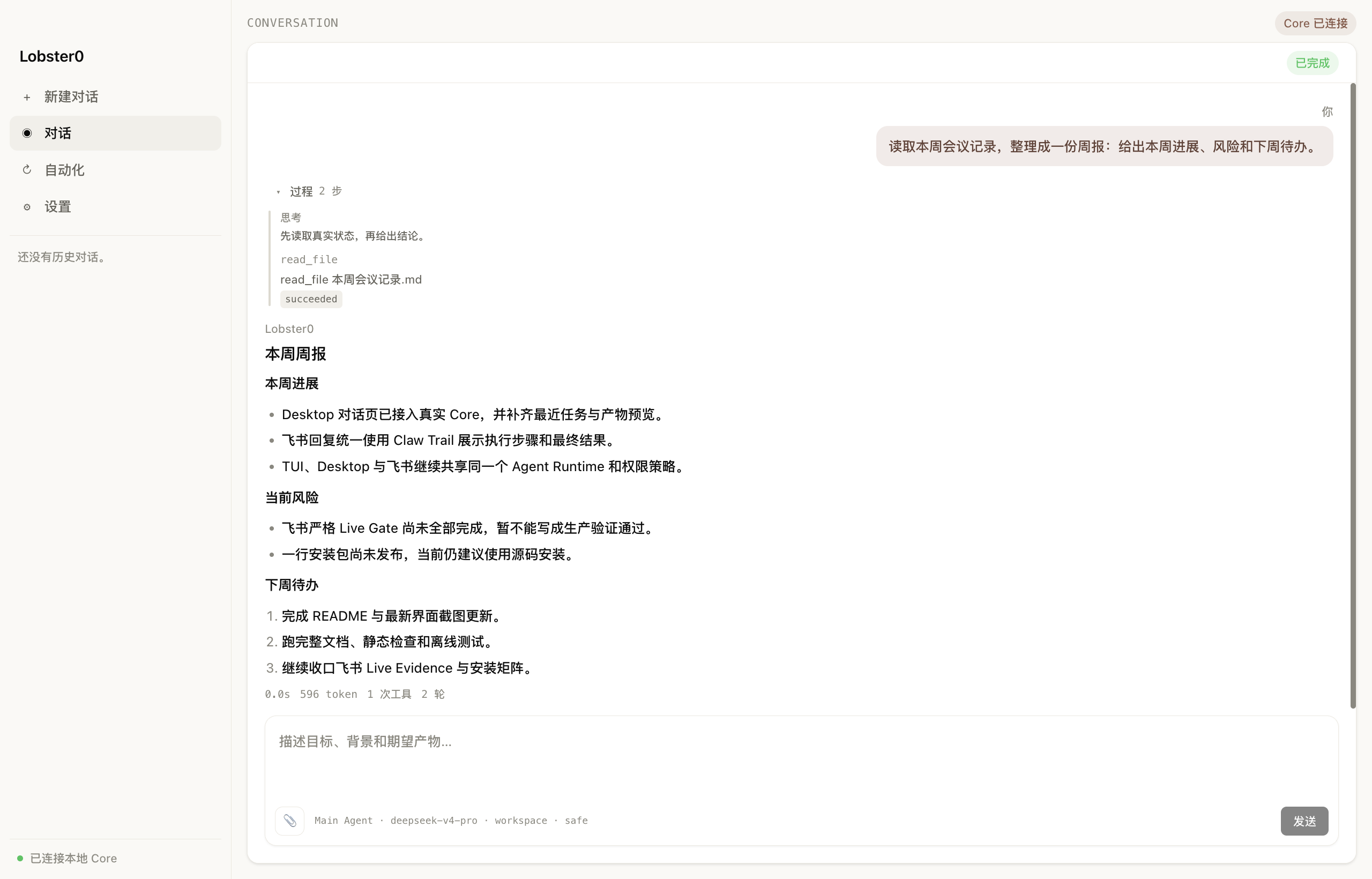
1. Desktop:从材料到结果
主界面直接输入目标。Lobster0 读取会议记录,展开真实 read_file 过程,再交付结构化周报。
2. Warp TUI:开发任务也能说人话
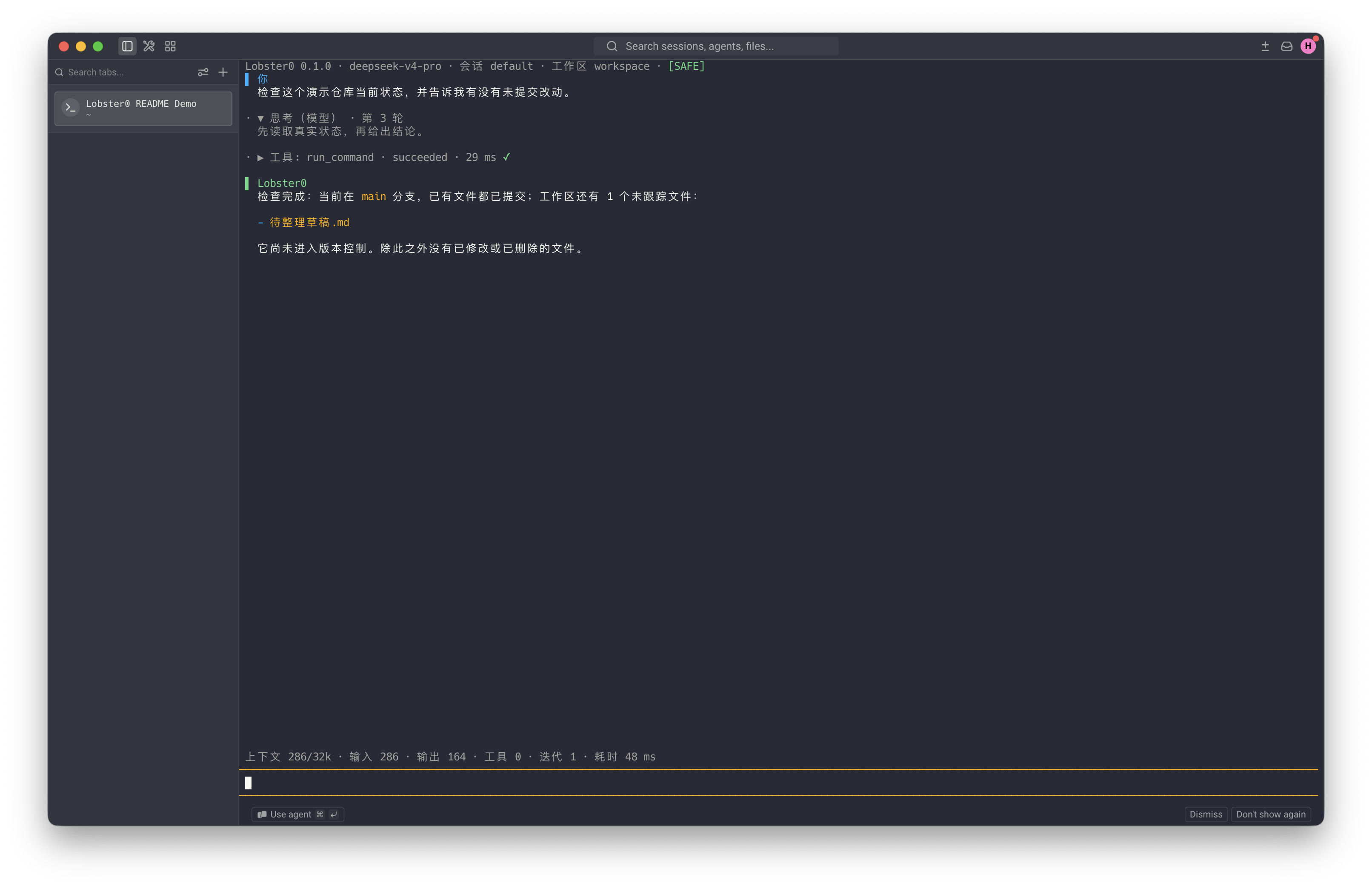
它运行 git status --short --branch 后,不只回显命令输出,而是告诉你:当前分支是什么、哪些文件尚未跟踪。
3. SAFE 审批:先看清楚,再决定
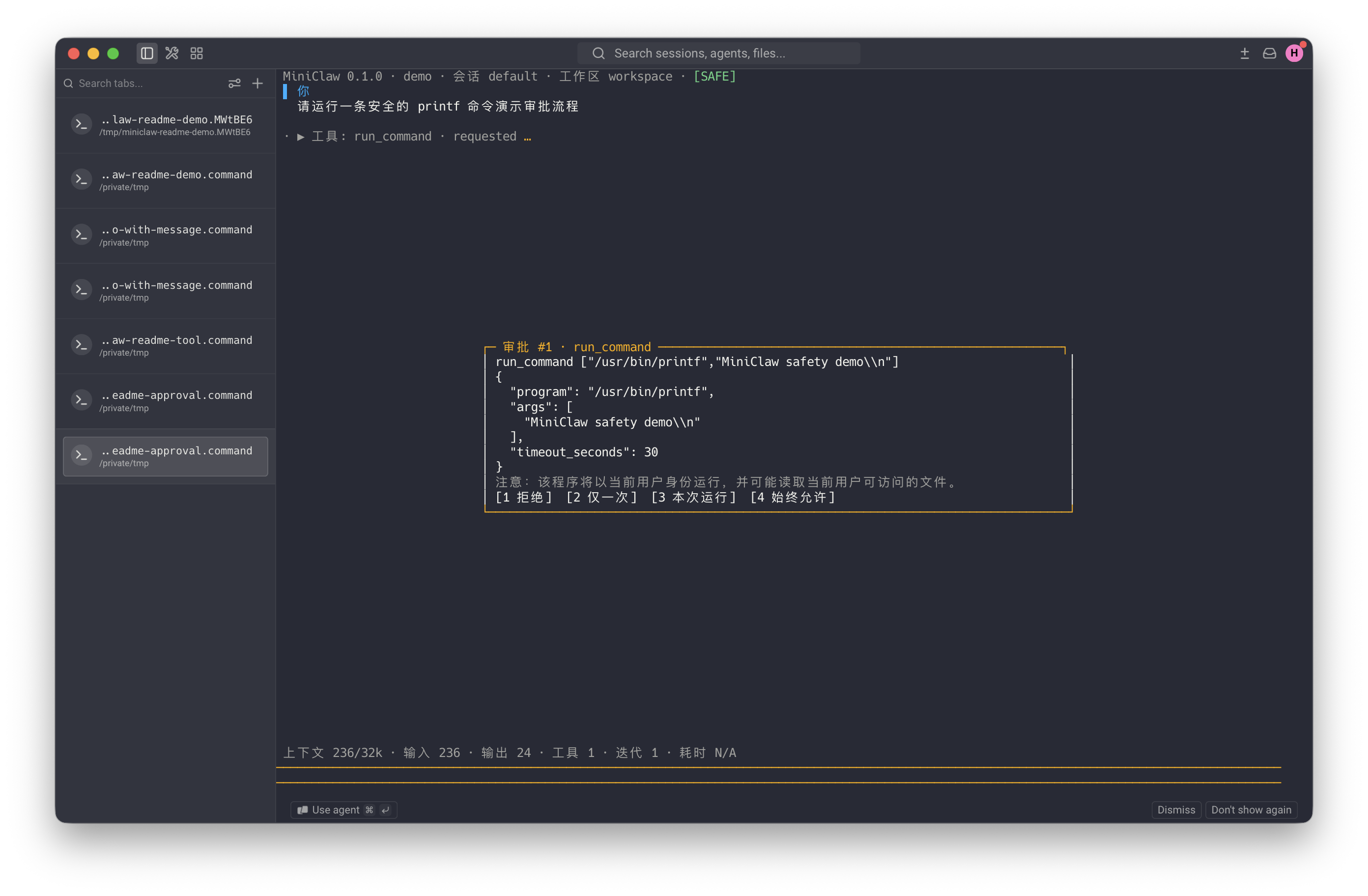
执行前会显示绝对程序、完整参数、超时和四种授权范围。截图里的命令仍处于 requested,尚未执行。
4. 飞书:在常用聊天里拿结果
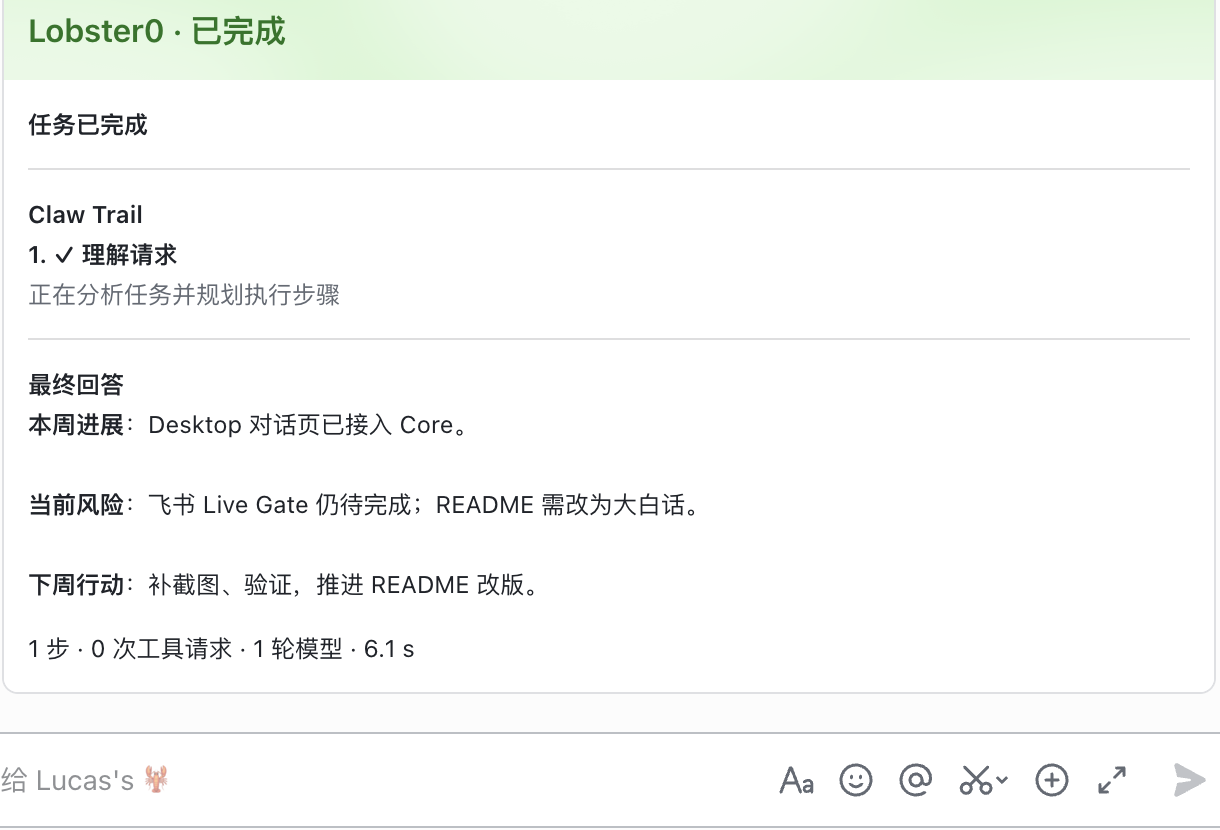
同一个 Agent 在飞书里用单张 Claw Trail 卡片交付步骤和最终回答;不用在一串零散消息里找结论。
当前能力
| 部分 | 已经能用的能力 |
|---|---|
| 对话 | OpenAI-compatible 流式回答、Tool Loop、上下文压缩、token/耗时统计。 |
| Desktop | 对话、最近任务、附件、产物预览、审批、自动化控制、模型与 Workspace 设置。 |
| TUI | 中文/英文、流式时间线、Tool 过程、紧凑审批、四档 Permission Mode。 |
| Channel | 飞书、Telegram、Discord 独立收发和恢复,共享一个 Agent Runtime。 |
| Tool | 18 个本机与 Memory Tool;启用 Browser 后增加 8 个隔离网页 Tool。 |
| Memory Autopilot | Markdown 真相源、SQLite 检索、纠错、忘记、Review、TTL 和跨入口 Owner 私聊共享。 |
| Automation | one-shot、interval、cron、预算、E-stop、审批续跑和幂等主动投递。 |
| 安全 | Workspace Guard、exact argv、HTTPS/SSRF 校验、参数绑定审批、SQLite 审计。 |
| 运维 | init、doctor、Gateway、macOS/Linux 用户服务、Web 控制台和版本化 Eval。 |
init 会幂等安装 feishu-lark-cli 与 github-cli Skill。飞书云端请求走官方 lark-cli,
GitHub 远端请求走本机 gh,本地仓库请求走 git;凭据不会被塞进 Tool 参数或模型上下文。
快速开始
安装
安装命令见文首的安装一节(含中国大陆镜像源版本),这里不重复。
安装后 lobster0 是全局命令,接着执行 lobster0 setup 配置、lobster0 gateway 启动。
完整的服务器部署流程见 Linux 服务器部署指南,
国内网络的坑见实机部署踩坑实录。
从源码运行(开发与贡献)
只想把它跑起来用的话,直接看上面的安装——一条命令即可,不需要 Node.js 和 pnpm。 这一节是给要改代码、跑测试的人用的。
需要 Python 3.12+、uv、Node.js
22.22.3 <= version < 23 或 24.15.0 <= version < 25,以及 pnpm(因为要自己构建 TUI)。
git clone https://github.com/NEDONION/lobster0.git
cd lobster0

uv sync --extra dev --extra channels
pnpm --dir tui install
pnpm --dir tui build

cp .env.example .env
# 只在本机填写 LOBSTER0_MODEL_API_KEY;不要提交 .env

uv run lobster0 init
uv run lobster0 doctor
uv run lobster0
默认状态目录是 ~/.lobster0,Workspace 是 ~/.lobster0/workspace。想跑一份完全隔离的实例:
uv run lobster0 --home /absolute/path/to/demo-home init
uv run lobster0 --home /absolute/path/to/demo-home
没有合规 Node.js 时,可以临时使用 Textual fallback:
LOBSTER0_TUI=textual uv run lobster0
Desktop
Desktop 当前是开发构建,还不是已签名安装包。macOS 上可直接双击根目录的
start-desktop.command,或在终端执行:
./start-desktop.command
脚本会安装锁定依赖、构建共享 TUI Bridge client、补齐 Electron,并在首次启动时安全收集模型 Key。
Secret 由 Core 写入 owner-only secrets.env,脚本不会读取或打印它。
Web 控制台
先构建 Desktop 的共享 Renderer,再启动回环控制台:
pnpm --dir desktop build:web
uv run lobster0 web
默认只绑定 loopback;非回环监听必须显式配置 token。
飞书、Telegram、Discord
完成对应 Channel 配置后启动 Gateway:
uv run lobster0 gateway
Owner、allowlist、平台凭据和真实验收步骤见本地运行指南。
一行安装(尚不可用)
curl -fsSL --proto '=https' --tlsv1.2 \
  https://github.com/NEDONION/lobster0/releases/latest/download/install.sh | bash
[!WARNING] 这个 URL 目前仍返回 404,而且有两个独立的原因。 其一,
install.sh由发布流水线的assemble阶段生成,该阶段尚未跑通,Release 里还没有这个文件。其二,releases/latest/只解析到正式版,而v0.7.0被标记为预发布,所以本仓库当前根本没有 latest release—— 即使install.sh生成出来,在发出第一个正式版之前这条 URL 依然会 404。 请先用上面的 wheel 安装方式。
v0.7.0是预发布:真机安装矩阵(Tier 1)、包发布到 PyPI、镜像摘要 smoke 与 attestation 均未执行,状态为 PUBLIC GATES PENDING。它可以用来自己部署, 但不应被当作经过完整验证的稳定版。
发布后的安装器会自带 pinned uv、受管 Python 3.12 和受管 Node.js,默认安装到 ~/.lobster0,
不要求 sudo。完整参数、升级、回滚和卸载方法见安装与发布运维手册。
候选包名是 lobster0-agent。Tier 1 设计范围包括 Ubuntu 22.04/24.04、Debian、Rocky/Alma 与 macOS,
覆盖 x86_64、arm64,并使用 systemd user 或 LaunchAgent;Windows、WSL、Alpine 会在写入前返回
unsupported_platform。Node 支持 22.22.3 起的 22.x 或 24.15.0 起的 24.x,发布矩阵锁定 24.18.0。
服务与卸载命令是 lobster0 service install、lobster0 service logs、lobster0 service uninstall 和
lobster0 uninstall;删除状态还要同时给出 --purge-data --yes-i-understand-data-loss。自动化安装可用
--no-onboard、--no-install-service、--dry-run 和 --json。当前 lobster0 update 会返回
update_requires_bootstrap,升级请重新运行一行安装命令。
常用命令
| 命令 | 用途 |
|---|---|
uv run lobster0 | 启动主 TUI。 |
uv run lobster0 init | 初始化配置、Memory、Skills 和 SQLite。 |
uv run lobster0 doctor | 检查配置、目录、Provider、TUI 和数据库。 |
uv run lobster0 secret list | 查看哪些密钥变量已配置(只显示名称,不显示值)。 |
uv run lobster0 secret set NAME | 改掉一个填错或轮换的密钥;值从终端隐藏读取,其余状态不动。 |
uv run lobster0 gateway | 启动已配置的消息 Channel。 |
uv run lobster0 web | 启动本地 Web 控制台。 |
uv run lobster0 task list | 查看定时任务;另有 show/runs/pause/resume/run/cancel。 |
lobster0 service install/status/logs/restart | 管理 Linux systemd user 或 macOS LaunchAgent。 |
在飞书里直接用的指令
私聊机器人发送这些指令(都只有 Owner 私聊有效,群里或他人发送一律拒绝):
| 指令 | 作用 |
|---|---|
/stop | 中止当前正在执行的这一轮。能真正打断执行中的命令与网络请求,不是等它跑完。 |
/restart | 重启 Gateway 进程。仅在进程由 systemd/launchd 托管时生效;前台裸跑时会明确拒绝而不是把自己关掉。 |
/reset | 清空当前会话上下文,重新开始。 |
/good、/bad <原因> | 回复某条回答记录反馈。失败的回答同样可以反馈。 |
/approve、/deny | 审批或拒绝一个待确认的危险动作。 |
/permissions | 查看当前权限模式与生效规则。 |
关于长任务:默认不限制单轮时长与工具调用次数——真正的长程任务不该被时钟砍断。 约束交回给你:想停就发
/stop。若确实需要一个硬性时限,可设agent.max_turn_seconds(或LOBSTER0_MAX_TURN_SECONDS)为正整数启用;注意它只在工具边界检查, 单次很长的工具调用可能显著超出该预算。
它为什么可控
Permission Mode
| 模式 | 大白话说明 |
|---|---|
SAFE | 低风险只读动作可以直接做,其余先问你。 |
SMART | 命中明确安全规则时少打扰,没命中仍会问。 |
AUTOPILOT | 已验证 Owner 的非关键动作自动放行,硬边界仍然生效。 |
YOLO | 最少监督,但不会关闭敏感路径、SSRF、Workspace 和关键动作硬拒绝。 |
新安装默认 autopilot。这个默认值只信任本地入口和经过验证的 Owner 私聊;群聊、其他用户与硬拒绝规则
不会因此扩权。显式配置过 safe 或 smart 的旧实例保持不变。
永远不会因为“少打扰”而关闭的边界
- Secret 不进入仓库、普通日志或 Memory;密码、Token、OTP、Authorization 和私钥在边界拒绝。
- 文件 Tool 只能访问配置的 Workspace/允许根;symlink、路径逃逸、二进制和超限内容 fail closed。
run_command只接受程序名和参数数组,shell=False,没有管道、重定向或命令字符串拼接。http_get只允许通过 URL、DNS、端口、redirect 和重绑定检查的 HTTPS 目标。- Approval 绑定 Tool、规范化参数 hash、Owner、TTL 和允许的决策;篡改、重放、跨 Owner 都会失败。
- 各 Channel 的 Transport、Delivery、queue 与恢复状态彼此隔离,不会因为一个平台故障拖垮全部入口。
- Memory、Skill、网页和外部消息只是上下文,不能扩大 Policy 权限。
技术细节
flowchart LR
    U["Owner"] --> UI["Desktop / TUI / Web"]
    U --> IM["Feishu / Telegram / Discord"]
    UI --> CORE["Lobster0 Core"]
    IM --> PIPE["isolated Channel pipelines"]
    PIPE --> CORE
    CORE --> PROVIDER["OpenAI-compatible Provider"]
    CORE --> POLICY["Policy + Approval"]
    POLICY --> TOOLS["Files / HTTPS / CLI / Memory / Browser"]
    CORE --> AUTO["Scheduler + TaskRunner"]
    CORE --> DB["SQLite ledgers"]
    CORE --> MD["Markdown Memory + Skills"]
一次本机任务大致是这样完成的:
- Desktop、TUI 或 Channel 把你的原话交给同一个
TurnService; - Core 组合 SOUL、USER、Memory、Skills 和有界历史;
- Provider 返回文本或 Tool Call;
- Tool 先过 Schema,再由 Policy 决定允许、拒绝或请求审批;
- 执行结果写入 ToolRun/Audit,Agent 根据真实结果继续回答;
- Turn、消息、审批、Artifact 和 Delivery 都能在重启后恢复或解释。
Memory、Automation 与 Browser
- Memory:Owner 接受的内容写入 Markdown 真相源;SQLite 只是可重建的检索投影。普通对话异步捕获, 明确“记住”会原子落盘后再报告成功。
- Automation:每个 Run 都冻结任务快照、预算和 Tool profile;
complete_task是唯一成功出口, 危险动作仍走参数绑定审批。 - Sandbox/Checkpoint:Docker/Seatbelt 缺失时 fail closed;文件副作用前创建有界 Checkpoint, Rollback 需要 preview hash,冲突时保留现场。
- Browser:使用 Lobster0 专用 Chromium Profile;模型只能调用 8 个封闭 Tool,不能执行任意 JavaScript, 也不能读取个人 Chrome Profile、密码或 OTP。
更完整的数据流和边界见系统架构。
项目状态
| 项目 | 当前证据 |
|---|---|
| Python | 全量标准库 unittest 通过;Phase 6.5 历史计数基线为 1005,当前计数见 v0.7.0 记录。 |
| TUI | 42/42 TypeScript tests + build PASS;41/41 是上一个发布记录基线。 |
| Desktop | 159/159 Vitest + Electron build PASS。 |
| Browser Worker | 14/14 TypeScript + 真实 headless Chrome tests PASS。 |
| Agent | 39/39 active offline cases PASS。 |
| Channel | 33/33 versioned cases;20 轮 local soak 660/660 PASS。 |
| Automation | 15/15 versioned cases;20 轮 300/300 PASS。 |
| Browser | 18/18 versioned cases;20 轮 360/360 PASS;CONTROLLED LIVE SMOKE PENDING。 |
| Feishu | TARGETED CALLBACK LIVE VERIFIED / 15-CASE LIVE PENDING。 |
| Telegram / Discord | Implementation PASS;完整真实平台 Live Gate pending。 |
| Phase 6 | IMPLEMENTATION PASS / PRODUCTION SOAK PENDING。 |
| wheel 安装 | v0.7.0 预发布可用;已在纯净 Ubuntu 24.04 实机部署至 doctor 全绿。 |
一行安装 install.sh | 尚未产出;发布流水线 assemble 阶段未跑通。 |
| Tier 1 真机矩阵 / PyPI / 镜像摘要 | PUBLIC GATES PENDING,均未执行。 |
本地 fake SDK、固定 Provider、离线场景和 soak 只能证明 IMPLEMENTATION PASS,不会冒充真实平台 Live PASS。
逐项证据见 docs/evals/releases/。
验证命令
uv run python -m unittest discover -s tests -v
pnpm --dir tui test
pnpm --dir desktop test
pnpm --dir browser-worker test
uv run ruff check .
uv run lobster0 eval run --suite channel --repeat 20 --json --root evals/scenarios
uv run lobster0 eval run --suite automation --repeat 20 --json --root evals/scenarios
uv run lobster0 eval run --suite browser --repeat 20 --json --root evals/scenarios
uv run python scripts/validate_docs.py
git diff --check
下一步
- 完成飞书、Telegram、Discord 的严格 Live Evidence;
- 完成 Browser controlled live smoke 与 Phase 6 production soak;
- 跑完一行安装的真实平台矩阵并发布首个公开 Release;
- 继续 Controlled Evolution、更多 Skills/MCP、Sub-agent 与 Multimodal。
规划项只有通过对应 Gate 后,才会从“下一步”移到“当前能力”。
仓库结构
src/lobster0/
├── agent/       # Context、Runner、Turn、Compaction
├── automation/  # Task、Scheduler、Runner、Heartbeat、Delivery
├── artifacts/   # Screenshot/Download 私有 CAS 与 TTL
├── browser/     # Worker Client、协议与动作 Policy
├── channels/    # Feishu / Telegram / Discord
├── memory/      # Markdown Truth、FTS5、Review、迁移
├── policy/      # Workspace、Command、Network、Approval
├── sandbox/     # immutable Plan 与隔离 backend
├── storage/     # SQLite schema、repository、migration
└── tools/       # Core Tool 与可选 Browser Tool

tui/             # Node.js pi-tui + Python Bridge client
desktop/         # Electron + React Desktop / Web Renderer
browser-worker/  # Playwright/Chromium 隔离 Worker
evals/           # versioned Agent / Channel / Automation / Browser scenarios
docs/            # 产品、架构、工程、计划与发布证据
tests/           # Python unittest
文档
| 想了解什么 | 从这里开始 |
|---|---|
| 安装、配置、TUI、Gateway | 本地运行指南 |
| 产品范围和非目标 | 产品需求文档 |
| 模块边界和数据流 | 系统架构 |
| 全部文档索引 | 文档中心 |
| 安装、升级、回滚和卸载 | 安装与发布运维手册 |
| 当前 Release 候选证据 | v0.7.0 记录 |
| macOS + 飞书生产验收 | Phase 6 验收 Runbook |
| Browser 隔离与 Artifact | Browser Agent 工程文档 |
| 能力差距与后续路线 | OpenClaw/Hermes Gap |
| 路线的工程拆解 | Alignment Roadmap |
| Memory Autopilot 实施记录 | 实施计划 |
参与开发
欢迎 Issue 和 Pull Request。开始前请阅读 AGENTS.md,只提交当前任务需要的改动, 保持测试离线可重复,也不要把规划写成已经实现。
uv sync --extra dev
uv run python -m unittest discover -s tests -v
uv run ruff check .